
MOVONE Wireless Controller
4.2Editor score
Dual vibration motors included
Compatible with PC and PS4
3.5mm audio jack support
This guide compares the top aftermarket PS4 controllers for performance, comfort, and value, helping gamers find the perfect pad for their setup.
Finding the right controller can transform your gaming experience entirely. Whether you need extra buttons for competitive play or a budget-friendly backup, the market offers diverse options tailored to every style and preference.
We evaluated each model based on build quality, responsiveness, battery life, and unique features like paddles or wireless connectivity. Our list covers a wide range of budgets and use cases to ensure you find the ideal match.
Each pick highlights specific strengths and trade-offs so you can decide what matters most. Prices fluctuate frequently, so checking current listings is wise before making your final purchase decision today.
4.2Editor score

4.2Editor score

3.8Editor score
This side-by-side comparison highlights key specifications across all ten models so you can quickly identify which controller meets your specific needs and budget requirements effectively.




The AceGamer 2 Pack stands out as an exceptional value proposition for gamers who need multiple controllers without breaking the bank. With a solid 4.2 rating, it offers wireless functionality and a distinct design that appeals to families or friends playing together locally.
We may earn a commission when you buy through this link, at no additional cost to you.
This controller shines with its non-slip grip on both sides, ensuring comfort during extended sessions. The turbo setting allows you to customize keys for rapid fire, which is particularly useful in shooter games where timing is critical. Additionally, the inclusion of two controllers in one box makes gifting or upgrading your setup significantly more affordable.
While the wireless connection is stable after the initial pairing, users should note that connecting to a PC requires a specific receiver or adapter since Bluetooth might not be universally supported without extra hardware. The initial connection process requires using the USB cable, which adds a minor step before full wireless freedom.
This option is ideal for casual gamers or households needing spare controllers. If you prioritize cost-efficiency and versatility across platforms, the AceGamer 2 Pack delivers a reliable experience that balances performance and price effectively for various gaming scenarios.
The non-slip grip ensures your hands stay secure even during intense gameplay, reducing hand fatigue significantly over time.
Adjustable turbo frequency gears let you fine-tune rapid-fire speeds to match your personal playstyle preferences exactly.
We may earn a commission when you buy through this link, at no additional cost to you.
The MOVONE Wireless Controller provides a straightforward and reliable experience for gamers seeking a budget-friendly alternative to official hardware. It maintains core functionalities like dual vibration and headphone connectivity, making it a practical choice for everyday use without unnecessary fluff.
We may earn a commission when you buy through this link, at no additional cost to you.
Its support for both PS4 and PC via USB ensures you can play on multiple devices with a single purchase. The optimized button layout offers high sensitivity, which helps in precise movements during fast-paced games. The 3.5mm audio jack allows you to control volume directly from the controller, a convenient feature for privacy.
One minor limitation is the lack of advanced customization options like paddles or turbo keys found in more premium models. Additionally, like many third-party controllers, the initial setup requires a USB cable to activate the device before switching to wireless mode, which can be slightly cumbersome.
If you need a simple, dependable backup controller or are new to console gaming, this model fits the bill perfectly. It balances essential features with an attractive price point, ensuring you don't have to compromise too much on quality for basic gameplay needs.
Volume controls located directly on the controller streamline audio adjustments so you never have to pause your game.
Seamless switching between PS4 and PC with USB wired support maximizes the value of your investment significantly.
We may earn a commission when you buy through this link, at no additional cost to you.
This wireless controller offers a significant step up for players looking to add competitive features without the full price of a pro-level setup. The inclusion of anti-drift ALPS sticks addresses a common pain point, ensuring that your movements remain precise and consistent over time.
We may earn a commission when you buy through this link, at no additional cost to you.
The back paddles allow you to map essential actions like jumping or reloading to your fingers, keeping your thumbs on the sticks for better aim. With a robust 1200mAh battery, you can enjoy longer play sessions before needing to recharge, which is essential for marathon gaming nights.
While the Type-C charging modernizes the connection, the initial pairing process requires careful attention to Bluetooth settings on your console. Some users might find the setup instructions slightly complex compared to official hardware, but the performance benefits typically outweigh this initial learning curve.
It is an excellent middle-ground option for gamers who want customization without sacrificing reliability. If you value steady aim and extra control inputs, this model delivers a satisfying experience that enhances both casual and competitive play effectively.
Anti-drift sticks ensure your character responds accurately to your input, reducing frustrating unwanted movements during play.
A high-capacity battery reduces interruptions, allowing you to focus on the game for hours without frequent charging breaks.
We may earn a commission when you buy through this link, at no additional cost to you.
The DualShock 4 remains the definitive controller for PS4 users, offering flawless compatibility and refined ergonomics. With a high rating of 4.6, it sets the benchmark against which all aftermarket options are measured, ensuring every feature works exactly as intended by developers.
We may earn a commission when you buy through this link, at no additional cost to you.
Its touchpad and motion sensors unlock unique gameplay mechanics that third-party controllers sometimes struggle to replicate perfectly. The improved analog sticks and triggers provide a greater sense of control, making it ideal for titles requiring precise inputs. The built-in speaker adds another layer of immersion to your audio experience.
While it lacks the extra paddles found in premium aftermarket models, its reliability is unmatched. The ability to charge via the console or any standard charger adds convenience. However, the price is significantly higher than budget alternatives, which might be a barrier for some buyers.
If you want the most reliable experience without troubleshooting compatibility issues, this is the ultimate choice. It guarantees that every button press and motion is translated accurately, providing a seamless gaming experience that few others can match consistently.
Every feature works flawlessly with system updates and games, ensuring you never face driver or compatibility issues.
Improved sensitivity in sticks and triggers allows for nuanced movement and control in fast-paced action titles easily.
We may earn a commission when you buy through this link, at no additional cost to you.
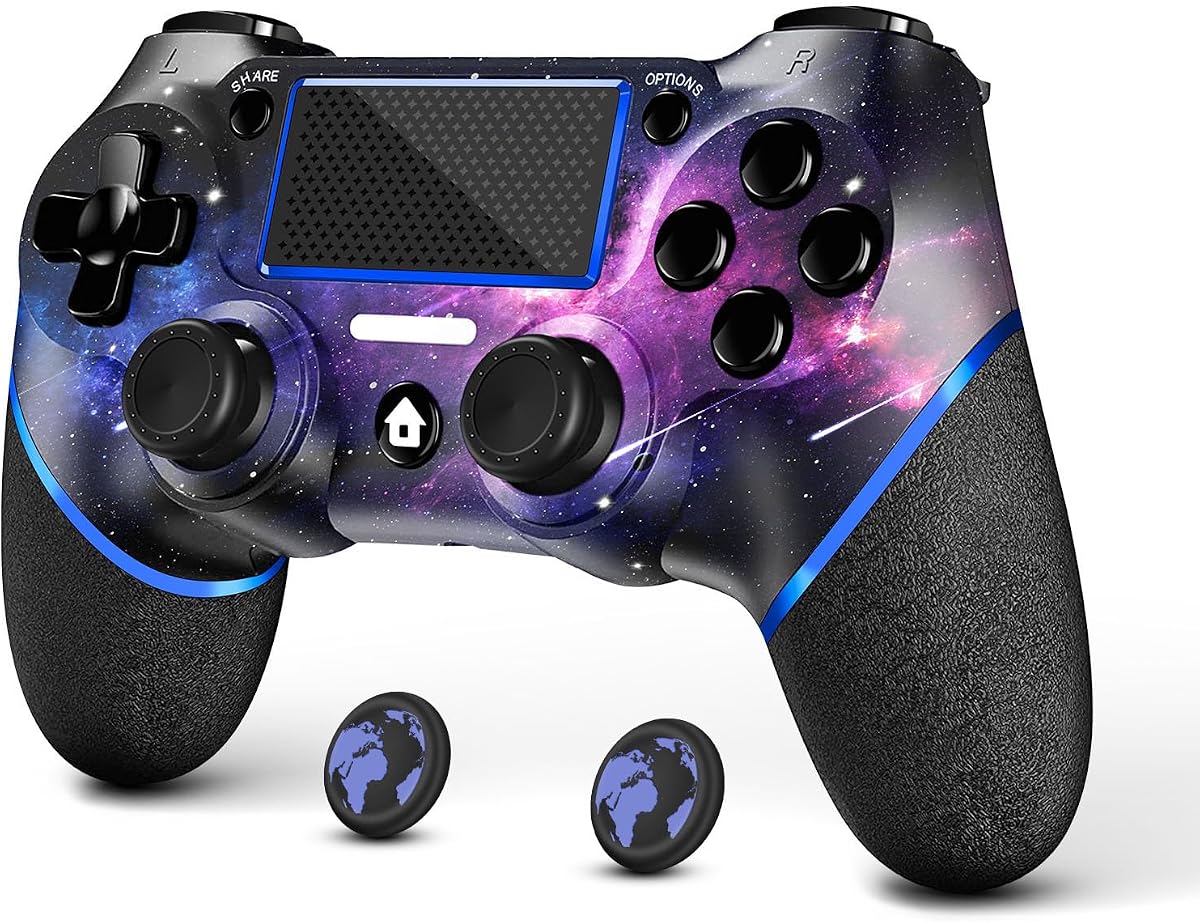
This AceGamer controller combines utility with a striking visual design that stands out on any shelf. The galaxy theme is printed using a water transfer process rather than cheap stickers, ensuring durability and a premium feel. This attention to detail makes it a great choice for gamers who value aesthetics.
We may earn a commission when you buy through this link, at no additional cost to you.
Functionally, it includes the turbo feature and non-slip grips found in its sibling models, making it suitable for both casual and competitive sessions. The inclusion of thumb caps adds extra protection and comfort for your thumbs during extended play. The smooth oil finish ensures sweat does not degrade the design over time.
While the setup process is similar to other third-party options, requiring a cable for initial pairing, the unique look provides a personal touch that standard controllers lack. However, cleaning should be done gently to maintain the print quality, which adds a slight maintenance consideration compared to plain surfaces.
For those who want a controller that reflects their personality without sacrificing core performance, this is an excellent pick. It offers the standard features you need while providing a distinct visual flair that makes gaming feel more personalized and engaging overall.
The water transfer process ensures your unique design remains intact even after daily use, avoiding common sticker peeling issues.
Included thumb caps protect your controller and improve your grip accuracy by reducing slipping during intense gameplay sessions.
We may earn a commission when you buy through this link, at no additional cost to you.
This renewed DualShock 4 offers a chance to own genuine Sony hardware at a more accessible price point. By choosing a renewed option, you get the authentic layout and build quality without the full retail cost, making it a practical choice for budget-conscious gamers.
We may earn a commission when you buy through this link, at no additional cost to you.
It retains all the original features like the touchpad and motion sensors, ensuring full compatibility with your game library. The Magma Red color is a stylish alternative to standard black, adding some flair to your setup. However, since it is renewed, individual battery life and cosmetic condition may vary slightly.
While it lacks the custom buttons of aftermarket models, its reliability as a first-party device remains superior. You avoid the need for extra adapters or drivers, ensuring everything works out of the box. Just be mindful of the specific unit's condition upon arrival to ensure it meets your expectations.
If you prefer the guaranteed feel of an official controller but need to save money, this renewed model is a smart compromise. It delivers the core PS4 experience reliably, ensuring you can enjoy your games without worrying about third-party compatibility issues or lag.
Buying renewed lets you access top-tier hardware at a fraction of the cost while reducing environmental impact significantly.
Every button and sensor functions exactly as intended, eliminating compatibility guesswork common with generic third-party controllers.
We may earn a commission when you buy through this link, at no additional cost to you.
The Nacon Wired Controller stands out for those who prioritize zero latency and durability over wireless convenience. As an officially licensed product, it guarantees compatibility and build quality that rivals official Sony hardware, making it a robust option for long gaming sessions.
We may earn a commission when you buy through this link, at no additional cost to you.
Its larger face buttons and rubber coating provide enhanced comfort, reducing fatigue during extended play. The integrated USB connection ensures stable performance without battery concerns, which is a huge plus for competitive players. The headset compatibility further extends its utility for chat and audio management.
The primary trade-off is the lack of wireless capability, which can limit mobility around your setup. You are tethered to the console by the cable, which might be an inconvenience for some users. However, for desk gaming, this wired connection ensures a lag-free experience that wireless models sometimes struggle to match.
If you value stability and official certification, this controller delivers exceptional value. It is an ideal choice for serious gamers who need precise inputs without the risk of signal interference or battery drain interrupting a crucial match.
Licensed by Sony, you can trust that the layout and features work seamlessly with every game released for PS4.
The direct wired connection eliminates latency concerns, ensuring your commands are registered instantly every single time.
We may earn a commission when you buy through this link, at no additional cost to you.
This renewed Jet Black controller offers a classic choice for gamers who want the original experience at a lower price. It retains all the signature features like the clickable touchpad and share button, allowing you to capture moments without switching to another app or device.
We may earn a commission when you buy through this link, at no additional cost to you.
The renewed status means you get tested hardware that meets quality standards but at a reduced cost compared to new units. While individual battery life might vary, the overall build quality ensures reliable performance for everyday gaming. It is an excellent choice for backup or secondary controller needs.
As with any renewed product, there is a degree of variability in cosmetic condition. You might find minor wear that does not affect functionality. If your priority is the authentic feel and functionality of a Sony controller without the premium price, this model is a strong contender.
It is particularly well-suited for players who do not need extra buttons but want guaranteed compatibility. By choosing a renewed official controller, you ensure a consistent experience across all games without worrying about third-party drivers or connection issues.
Built-in share button allows instant screenshots and recordings, enhancing your social gaming experience without extra apps.
Renewed options make premium hardware affordable, ensuring budget players can still enjoy genuine quality and comfort.
We may earn a commission when you buy through this link, at no additional cost to you.
The HEXGAMING NEW EDGE is designed specifically for competitive players who demand every possible advantage. With four back buttons and six remappable profiles, you can tailor the controller to your exact playstyle, ensuring you never lose control over complex game mechanics during intense moments.
We may earn a commission when you buy through this link, at no additional cost to you.
The hair trigger mechanism reduces activation distance, allowing for faster shooting and quicker response times in shooters. Interchangeable thumbsticks let you choose the height and shape that fits your hand best, improving accuracy and comfort significantly. This level of customization is rare in this price range.
While the feature set is impressive, the complexity might be overwhelming for casual gamers who do not need rapid-fire or remapping. Additionally, the high price reflects the premium components, making it a significant investment. However, for eSports enthusiasts, these features provide a tangible performance edge.
If you are looking for a controller that can adapt to any game type and gives you a competitive edge, this is the ultimate choice. It transforms standard gameplay into a precision tool, allowing you to execute moves faster and with greater control than standard hardware ever could.
Hair triggers activate with minimal pressure, giving you the split-second speed advantage needed to win competitive matches.
Choosing the right stick height and shape improves accuracy by reducing fatigue and ensuring consistent movement inputs.
We may earn a commission when you buy through this link, at no additional cost to you.
This Strike Pack is a modular solution that allows you to upgrade your existing DualShock 4 rather than buying a whole new controller. It includes two remappable paddles and built-in mods like anti-recoil and rapid fire, giving you significant performance benefits without changing your primary hardware.
We may earn a commission when you buy through this link, at no additional cost to you.
The plug-and-play design means you do not need software or complex setup to start using the paddles. You can map inputs on the fly without pausing your game, keeping you in the action while improving your accuracy and reaction speed. The detachable paddles allow for customization based on hand size.
While the pack is effective for shooters, it adds bulk to the original controller, which might feel different in your hands. It is also strictly compatible with older DualShock 4 models, so verify your controller version before purchasing. For FPS fans, the built-in mods offer a clear tactical advantage.
If you already own a controller but want the benefits of back buttons and mods, this kit is a smart investment. It extends the life of your existing hardware while adding professional-grade features that can elevate your gameplay experience significantly in competitive environments.
Turn your standard controller into a pro-level pad by adding custom features without the cost of a full replacement.
Anti-recoil and rapid-fire functions are ready to use instantly, giving you an edge in competitive matches immediately.
We may earn a commission when you buy through this link, at no additional cost to you.
Selecting the right controller requires balancing performance, features, and budget to ensure a comfortable experience that suits your specific gaming needs.
Wireless controllers offer the freedom to play from your couch but rely on battery life and Bluetooth pairing which can occasionally lag if not properly set up. Wired models ensure zero latency and no charging anxiety but limit your range to the length of the cable attached to your console.
Choose wireless for convenience and comfort if you play from a distance or wired if you prioritize consistent performance during competitive sessions.
Back paddles are essential for competitive gamers who want to keep their thumbs on the analog sticks while performing actions like jumping or reloading. These buttons allow for faster reactions and better positioning in shooters and sports titles without moving your hands away from the center.
If you play frequently and want a competitive edge, look for controllers with at least two paddles that can be remapped easily to your favorite actions.
Hair triggers reduce the distance required to press the L2 or R2 buttons, allowing for quicker shots and faster acceleration in racing games. Standard triggers are safer for precision but can sometimes delay your input in fast-paced scenarios where timing is critical for success.
For shooters and racing games, consider models with adjustable or hair triggers to maximize your responsiveness during intense gameplay moments.
A controller that fits your hand comfortably will reduce fatigue during long sessions, so look for models with textured grips and well-placed buttons that do not require excessive force. Check reviews regarding plastic durability and stick drift issues to ensure the device lasts through years of gaming.
Prioritize models with non-slip surfaces and ergonomic curves to ensure your hands stay comfortable regardless of how many hours you play daily.
Wireless controllers typically last between 10 to 20 hours on a single charge, but this varies widely between third-party and official brands. A Type-C charging port is a modern standard that makes it easier to find cables and top up quickly compared to older micro-USB ports.
Look for high-capacity batteries and modern charging ports to avoid interruptions, especially if you play in long marathons without stopping frequently.
Many aftermarket controllers work out of the box with PC but might require specific drivers or adapters to function correctly with Steam or other platforms. Some models support Xbox-style XInput while others rely on DS4Windows or similar software to map keys correctly for your game library.
If you plan to use the controller on a PC, verify the compatibility list and check if any additional software is needed for seamless integration with your system.
Controllers range from affordable basic models to expensive premium units with advanced features like remapping and interchangeable sticks. Determine which features are actually useful to you so you do not pay extra for capabilities you will not use in your day-to-day gaming routine.
Balance your budget against the features that matter most, such as paddles or wireless capability, to get the best value without overspending on unnecessary extras.
Stick drift occurs when the analog sticks register movement without you touching them, which can ruin gameplay in games that require precise aiming. Look for controllers that use higher-quality components or anti-drift technology to ensure the sensors remain accurate over time and prevent frustration.
Invest in a controller with proven durability or a warranty to protect against drift and ensure your investment lasts as long as your console.
Start by pairing your controller via USB to ensure a stable connection before switching to wireless. This initial step is crucial for most third-party models to activate the device properly and avoid connection errors later on.
Clean your controller regularly with a microfiber cloth to remove dust and oils that can accumulate on buttons and analog sticks. Avoid using harsh chemicals or excessive moisture which can damage the internal electronics or degrade the plastic finish over time.
Store your controller in a dry, cool place away from direct sunlight to prevent discoloration and material warping. If using a rechargeable model, try not to let the battery drain completely before charging to maintain optimal battery health for longevity.
Most aftermarket PS4 controllers are compatible with the PS5 but only when playing PS4 titles. They do not support native PS5 games which usually require the DualSense controller for full feature support like adaptive triggers.
Third-party controllers often require a USB connection during the first pairing to sync the internal hardware with the console. This ensures a stable wireless link before you switch to Bluetooth for future wireless use sessions.
Using turbo keys or auto-fire mods can violate terms of service for some online competitive games. While often used in single-player modes, they may lead to penalties if detected during ranked matchmaking or official tournaments.
Stick drift can often be resolved by recalibrating the controller settings in your system menu. If recalibration fails, checking for firmware updates or adjusting the sensitivity in-game may help mitigate the issue.
Yes, most models support PC via USB or Bluetooth though you might need drivers like DS4Windows for full compatibility. Wired connections are generally more reliable for PC gaming due to latency and driver support differences.
Wireless models generally offer between 10 to 20 hours of play on a full charge depending on usage and features like vibration. Higher-end models often include larger batteries to reduce charging frequency during long gaming sessions.
Official controllers guarantee full compatibility and build quality but often cost more than third-party alternatives. Aftermarket models can offer features like paddles that official hardware lacks, providing a choice between reliability and customization.
Most third-party controllers do not support firmware updates, but official models can be updated via the PS4 system settings. Check the manufacturer website for specific instructions if you encounter compatibility or feature issues.
Whether you need budget-friendly backups or premium competitive features, the market offers excellent options for every player. The AceGamer 2 Pack and MOVONE provide great value for casual use while the HEXGAMING NEW EDGE stands out for serious gamers.
Prioritize features that enhance your specific playstyle such as paddles for shooters or comfort for long sessions. Evaluating your own needs will help you avoid overspending on unnecessary extras and ensure the controller you choose fits your setup perfectly.
Prices and availability change frequently so always check current listings before finalizing your purchase. Taking the time to review the specs and compatibility ensures you get the most reliable experience possible for your gaming setup today.