
VIVO Pneumatic Arm Quad Ultrawide Monitor
4.5Editor score
Pneumatic height adjustment
Holds ultra-wide screens
Cast aluminum construction
Finding the right 4 monitor mount with adjustable arms transforms your workspace into a streamlined productivity hub. These systems elevate screens to eye level, reducing strain while maximizing valuable desk real estate for keyboards and tools.
We evaluated ten top-rated quad monitor mounts based on build quality, adjustment range, and ease of installation. Our analysis focuses on how each model supports various screen sizes and weights while maintaining stability during daily use.
Each pick highlights key strengths and ideal use cases for different workflows. Note that availability and pricing may change, so verify current details before purchasing to ensure you get the best value for your needs.
4.5Editor score

4.5Editor score

4.5Editor score
As an Amazon Associate we earn from qualifying purchases.
This side-by-side comparison highlights the key specifications of all ten models to help you quickly identify which mount best fits your desk setup and monitor requirements.



The WALI Stacked 4 Monitor Mount stands out as a reliable choice for users seeking a balanced combination of stability and affordability. With a solid 4.5 rating from thousands of buyers, it delivers consistent performance for standard setups.
We may earn a commission when you buy through this link, at no additional cost to you.
Its sturdy steel frame provides excellent stability even during adjustments, ensuring your screens stay level. The integrated cable management system keeps wires tucked neatly within the arms, reducing visual clutter on your workspace.
While it is limited to screens up to 27 inches, the range of motion is extensive. You can tilt, swivel, and rotate each arm to find the perfect angle, which helps minimize neck strain during long work sessions.
This model is ideal for professionals who need a clean and organized desk without spending a fortune. It transforms your workstation into a professional environment while offering the ergonomic benefits of elevating your monitors.
Raising monitors to eye level reduces neck and back strain, making long coding or gaming sessions more comfortable for your body.
Frees up valuable desk real estate by lifting screens off the surface, allowing more room for keyboards and peripherals.
We may earn a commission when you buy through this link, at no additional cost to you.
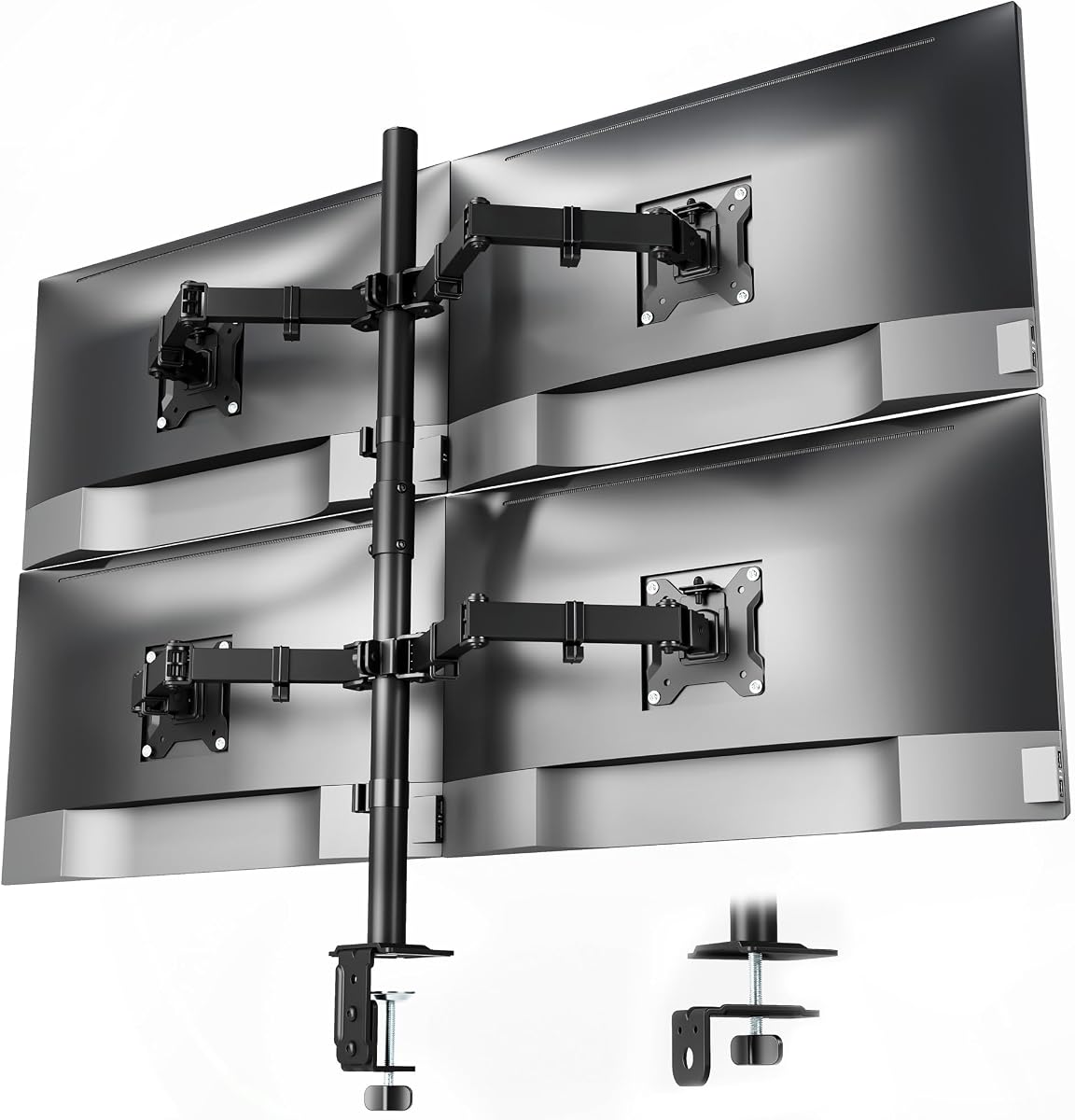
The VIVO Pneumatic Arm Quad Ultrawide Monitor is engineered for advanced users who need to support massive displays. Its pneumatic system allows you to adjust height with a light touch, offering unparalleled ease of use.
We may earn a commission when you buy through this link, at no additional cost to you.
Constructed from premium cast aluminum, this mount is built to handle heavy screens without sagging. The high-capacity tilt joints ensure that even the heaviest monitors remain steady, providing a secure foundation for critical tasks.
While the price is higher, the capability to hold up to 49-inch screens sets it apart. This level of versatility makes it suitable for trading desks or creative studios where screen real estate is paramount.
If you require a robust solution for ultra-wide monitors, this mount offers the strength and flexibility needed. It transforms your setup into a commanding workstation that supports intense multitasking with ease.
Accommodates massive screens up to 49 inches, providing an expansive canvas for complex data visualization or immersive media.
Powerful arms counterbalance monitor weight, allowing effortless height changes without needing manual tension adjustments.
We may earn a commission when you buy through this link, at no additional cost to you.
The MOUNT PRO 4 Monitor Mount is an excellent entry-level option for those looking to upgrade their desk ergonomics without breaking the bank. It delivers essential features like full adjustability and strong clamping mechanisms.
We may earn a commission when you buy through this link, at no additional cost to you.
With a height of 31.7 inches, it provides enough vertical range for most standard desks. The easy assembly process ensures you can get your setup running quickly, minimizing downtime for your workflow.
While it supports slightly less weight than premium models, it is sufficient for most standard monitors. The design prioritizes function and cost-effectiveness, making it a smart choice for home offices or student setups.
This model proves you do not need to spend a lot to get a clean, organized workspace. It effectively manages cables and elevates screens to improve posture while keeping costs minimal.
Offers significant value by delivering core ergonomic benefits at a price point accessible to almost every budget.
Extra tall pole provides practical height for both sitting and standing positions, ensuring eye-level viewing.
We may earn a commission when you buy through this link, at no additional cost to you.
The PUTORSEN Quad Monitor Mount offers a unique configuration designed for users who need an ultra-wide primary screen above standard monitors. Its 3-section arm design allows for customized spacing to fit specific room constraints.
We may earn a commission when you buy through this link, at no additional cost to you.
Built with heavy-duty steel, it handles the weight of a 49-inch display securely. The gas spring extension provides smooth movement, ensuring that the large screen remains stable and easy to reposition.
The ability to remove segments is a distinct advantage for those who need a tighter fit near a wall. However, the assembly can be more complex than simpler mounts, requiring patience during setup.
This model is perfect for advanced trading or editing setups where a mix of large and small screens is required. It maximizes your visual real estate without sacrificing structural integrity.
Removable arm segments let you adjust the reach to suit narrow desks or specific wall placements.
Top bracket designed to handle large 49-inch displays, serving as a central hub for your workflow.
We may earn a commission when you buy through this link, at no additional cost to you.
The monTEK Quad Monitor Stand is built with high-grade materials to ensure that your screens stay level and secure. Its advanced joint design is a key strength, eliminating the risk of sagging over time.
We may earn a commission when you buy through this link, at no additional cost to you.
Each arm supports up to 22 lbs, making it a solid choice for heavier professional monitors. The inclusion of quick-release VESA plates simplifies the attachment process, saving you effort during installation.
While it is a reliable mount, the installation time can vary depending on desk thickness. However, the included hardware is comprehensive, ensuring you have everything needed for a successful setup.
This stand is an excellent choice for users who prioritize durability and long-term performance. It offers a professional finish and robust support for daily office tasks without compromising on quality.
Engineered joints prevent screen drooping, maintaining a perfect viewing angle regardless of adjustment frequency.
Supports a wide range of monitor weights up to 22 lbs, ensuring compatibility with heavy displays.
We may earn a commission when you buy through this link, at no additional cost to you.
The MOUNTUP Quad Monitor Stand focuses on delivering a user-friendly experience with a quick and straightforward assembly process. It is designed to get you working faster with clear instructions and labeled parts.
We may earn a commission when you buy through this link, at no additional cost to you.
With a 3-year support promise, the brand stands behind its build quality. The stand allows for 360-degree rotation and flexible height adjustments, making it easy to switch between landscape and portrait modes.
The weight limit per arm is moderate, but suitable for most standard office monitors. Cable clips are included to help keep your desk tidy, which is a crucial factor for maintaining a productive workspace.
This model is ideal for users who want a hassle-free installation and reliable performance. It provides all the essential ergonomic benefits without overwhelming the user with complex features.
Comes with clear instructions and labeled parts to ensure a smooth setup within minutes.
Full 360-degree rotation allows seamless switching between landscape and portrait viewing modes.
We may earn a commission when you buy through this link, at no additional cost to you.
The VIVO Quad Pneumatic Monitor Mount uses dual pneumatic arms to counterbalance your screens, allowing for smooth and effortless adjustments. This feature is particularly useful for users who frequently change their viewing height.
We may earn a commission when you buy through this link, at no additional cost to you.
Its heavy-duty steel and aluminum support ensures that the mount remains secure even with heavier monitors. The tension can be adjusted to suit different weights, providing flexibility in your setup.
The C-clamp mounting system is robust and does not require drilling into your desk, preserving its surface. While the price is higher, the ease of movement and build quality justify the investment for daily users.
This mount is well-suited for professionals who need dynamic screen positioning throughout the day. It enhances ergonomics by reducing the effort needed to move your screens to the perfect spot.
Dual pneumatic arms provide smooth transitions, making it easy to reposition screens for different tasks.
Drill-free C-clamp ensures a solid hold without damaging your desk surface or requiring permanent modifications.
We may earn a commission when you buy through this link, at no additional cost to you.
The Pholiten Quad Monitor Arm Desk Mount emphasizes ergonomic comfort with its advanced gas spring technology. This allows you to position your screens smoothly, reducing strain during extended periods of use.
We may earn a commission when you buy through this link, at no additional cost to you.
Its design focuses on saving desktop space by lifting monitors off the surface. The arms adjust forward and backward, giving you precise control over how close your screens sit to your body.
The gas spring provides superior weight support, ensuring that the screens do not drop unexpectedly. This feature enhances safety and comfort, making it a reliable choice for home offices.
This model is perfect for users who want a neat and organized desk without sacrificing adjustability. It balances functionality with a sleek look that fits well in modern work environments.
Forward and backward arm adjustments allow you to tailor the viewing distance to your specific needs.
Advanced gas spring technology ensures reliable weight support, keeping your screens securely in place.
We may earn a commission when you buy through this link, at no additional cost to you.
The WALI Quad Monitor Desk Mount has earned a high rating due to its consistent performance and sturdy build. It supports screens up to 22 lbs per arm, offering robust support for professional setups.
We may earn a commission when you buy through this link, at no additional cost to you.
Its 31.5-inch height pole allows for flexible positioning to suit different desk heights. The two-stage locking system provides secure attachment, ensuring that your mounts stay in place during adjustments.
Integrated cable management keeps your workspace tidy by guiding wires along the arms. This attention to detail helps maintain a professional appearance and reduces the risk of tangled cords.
This model is a reliable choice for those who want proven performance at a competitive price. It effectively transforms your desk into a clean, organized workstation that supports productivity.
Two-stage locking system ensures that the clamp stays firmly in place even during frequent adjustments.
Built-in cable guides keep wires out of sight, creating a clean and professional look.
We may earn a commission when you buy through this link, at no additional cost to you.
The VIVO Quad Monitor 13 to 32 inch features a 3 plus 1 layout, allowing for a unique arrangement of screens. This design is particularly useful for tasks that require one primary screen and three secondary ones.
We may earn a commission when you buy through this link, at no additional cost to you.
Its solid build ensures durability and stability for screens up to 22 lbs. The clamp-on design allows for drill-free mounting, making it easy to install without damaging your desk surface.
While the tilt range is somewhat limited compared to others, the overall flexibility is high. You can easily adjust the height and swivel to find a comfortable viewing angle for your specific workflow.
This model is a great choice for users who need a specific screen arrangement for multitasking. It provides the structural support needed for complex setups while keeping installation straightforward.
The 3 plus 1 layout allows for specialized setups that prioritize one main screen over others.
Step-by-step instructions and drill-free mounting make setup straightforward for most standard desks.
We may earn a commission when you buy through this link, at no additional cost to you.
Selecting the right quad monitor mount involves considering your screen sizes, weight requirements, and desk compatibility.
Ensure the mount supports the diagonal size of your monitors. Most models support between 13 and 32 inches, while some premium options handle ultra-wide screens up to 49 inches.
Check the VESA pattern compatibility to ensure the mounting holes match your screens.
Calculate the total weight of your monitors to confirm the mount can handle the load. Look for arms rated for at least 20 lbs per screen to ensure stability.
Higher capacity ensures the mount does not sag over time with heavier displays.
Measure the thickness of your desk to ensure the C-clamp or grommet fits securely. Most mounts accommodate desks from 1 to 4 inches thick.
Verify the mounting options before purchase to avoid issues during installation.
Steel and aluminum frames offer the best durability and stability. Cast aluminum is preferred for premium models due to its strength and resistance to bending.
Robust materials prevent wobbling when adjusting screens or typing.
Look for mounts that offer full tilt, swivel, and rotation capabilities. Some models include pneumatic or gas springs for smoother movement.
A wide range of motion helps you find the perfect ergonomic angle for your posture.
Integrated cable clips or channels keep wires organized and out of sight. This feature maintains a clean workspace and reduces clutter.
Look for clips that securely hold cables to prevent them from swinging.
Clear instructions and labeled parts simplify the setup process. Some models feature quick-release VESA plates to speed up monitor attachment.
Consider if you need a tool-free installation or if basic tools are provided.
Check the warranty length and customer service availability. Brands offering multi-year support provide extra peace of mind for your investment.
Reliable support ensures you can get help if issues arise during use.
Begin by attaching the VESA plates to your monitors using the provided screws. Ensure these are tightened securely before lifting the monitors onto the arms.
Install the base plate on your desk using the C-clamp or grommet. Make sure the clamp is tightened firmly to prevent the mount from sliding or tipping.
Adjust the tension on the arms to match the weight of your screens. Regularly check cables to ensure they remain organized and do not strain the connections.
Yes, most quad mounts allow for mixed screen sizes as long as they fit within the weight and size limits. Ensure that the VESA patterns match for each monitor.
Most models come with all necessary tools and hardware. Assembly typically requires basic tools like a screwdriver, which are often included in the package.
Measure your desk edge thickness and compare it to the mount specifications. Most C-clamps fit desks between 1 and 4 inches thick.
As long as the weight capacity matches your screen weight and the desk is stable, it is safe. Follow the manufacturer's instructions for tension and mounting.
Yes, most mounts offer easy height adjustment via a central pole or gas springs. This allows you to change your viewing angle without removing the monitor.
You will need to purchase an adapter kit designed for your specific monitor model. These adapters provide the standard 75x75mm or 100x100mm mounting holes.
Most reputable brands offer warranties ranging from one to three years. Check the product listing or manufacturer website for specific terms and coverage details.
Wipe the metal frame with a dry cloth to remove dust. Avoid harsh chemicals that could damage the finish or mechanical joints.
Whether you choose the WALI Stacked 4 Monitor Mount for its value or the VIVO Pneumatic Arm for premium features, investing in a quad mount transforms your workspace.
Prioritize stability and adjustability to ensure your screens remain level and easy to move. Consider your specific screen sizes and desk thickness when making a final decision.
Always verify the current availability and specifications before purchasing. Prices and stock levels may fluctuate, so checking the latest details ensures a smooth buying experience.