
Redragon K617 HE
4.3Editor score
Hall Effect switches
Rapid trigger mode
Compact 60 layout
This guide compares the top 10 keyboards for CS2 featuring rapid trigger hall effect switches and adjustable actuation to help you find the perfect match for
Finding the right keyboard for CS2 can dramatically improve your aiming precision and reaction times during intense competitive matches. Players need devices that offer rapid trigger capabilities and adjustable actuation points to execute complex movements smoothly.
We evaluated ten top-rated models based on their switch technology build quality and software customization options. Each product was analyzed for its ability to handle fast-paced FPS gameplay and provide reliable performance under pressure.
Each pick highlights unique features and performance strengths tailored to different playstyles and budget needs. Please note that product availability and pricing may change so verify current details before making your final purchase decision.
4.3Editor score
4.4Editor score
4.5Editor score
The following table provides a side-by-side comparison of all ten featured keyboards highlighting their key specifications and unique selling points to help you decide which model fits your setup best.



The Redragon K617 HE stands out as an affordable entry point for players seeking high performance features typically found in expensive keyboards. It features Hall Effect magnetic switches that enable rapid trigger functionality essential for quick movement in CS2.
We may earn a commission when you buy through this link, at no additional cost to you.
Its standout quality is the ability to adjust actuation points between 0.1mm and 3.4mm allowing users to customize sensitivity per key. The 8000Hz polling rate ensures inputs are registered nearly instantaneously reducing latency during critical moments.
While the software is functional it lacks the polish of premium brands. The 60 layout saves desk space but requires an adjustment period for those used to full-size keys. These trade-offs are acceptable given the competitive price.
Budget-conscious gamers who want rapid trigger technology without breaking the bank should buy this model. It delivers reliable performance for competitive play and is a strong starting point for building a dedicated CS2 setup.
Rapid trigger allows keys to reset immediately upon release enabling faster counter-strafing and directional changes essential in FPS games.
Adjustable actuation lets players set lighter triggers for movement keys and deeper presses for shooting keys improving precision and comfort.
We may earn a commission when you buy through this link, at no additional cost to you.
The Redragon K686 HE builds on the success of the K617 with added quality-of-life features like a dedicated media knob and improved sound dampening. It maintains the core benefits of Hall Effect switches at a reasonable price point.
We may earn a commission when you buy through this link, at no additional cost to you.
Its key strengths include the one-knob simplicity for adjusting backlight brightness and media playback without memorizing key combos. The dual-module floating structure reduces noise providing a softer bounce that is pleasing during long typing or gaming sessions.
The driver software requires installation which may be inconvenient for some users. The price is higher than the K617 but the added features justify the cost for those who value comfort and convenience.
Players looking for a balance between performance and daily usability should consider this keyboard. It offers a refined experience that suits both gaming and work environments making it a versatile choice for many setups.
The dedicated media knob allows instant volume and playback adjustments streamlining your workflow during intense gameplay without needing to use your mouse.
Multiple dampening layers reduce harsh clacks creating a softer tactile feel that enhances comfort during extended gaming sessions.
We may earn a commission when you buy through this link, at no additional cost to you.
The Redragon K673 HE offers a similar feature set to the K686 with a focus on performance and durability. It incorporates advanced magnetic switches that provide the precision needed for competitive FPS gaming.
We may earn a commission when you buy through this link, at no additional cost to you.
Its strengths lie in the UltraMag switches that sense keypresses without physical contact ensuring long lifespan and consistent performance. The anti-wobble independent switch plate design paired with dampening layers gives a soft Hi-Fi bounce.
Some users report mixed experiences with the software driver which can be inconsistent. The overall build quality is solid but minor inconsistencies may affect the user experience. These issues are generally manageable for most players.
Gamers seeking reliable performance with good build quality at a mid-range price should look at this model. It delivers the core features needed for CS2 while offering a comfortable typing experience for daily use.
Magnetic switches detect presses without physical contact reducing wear and tear significantly extending the keyboard's usable life compared to traditional mechanical switches.
Save multiple actuation profiles to tailor sensitivity for different games or tasks ensuring your setup stays consistent across various applications.
We may earn a commission when you buy through this link, at no additional cost to you.
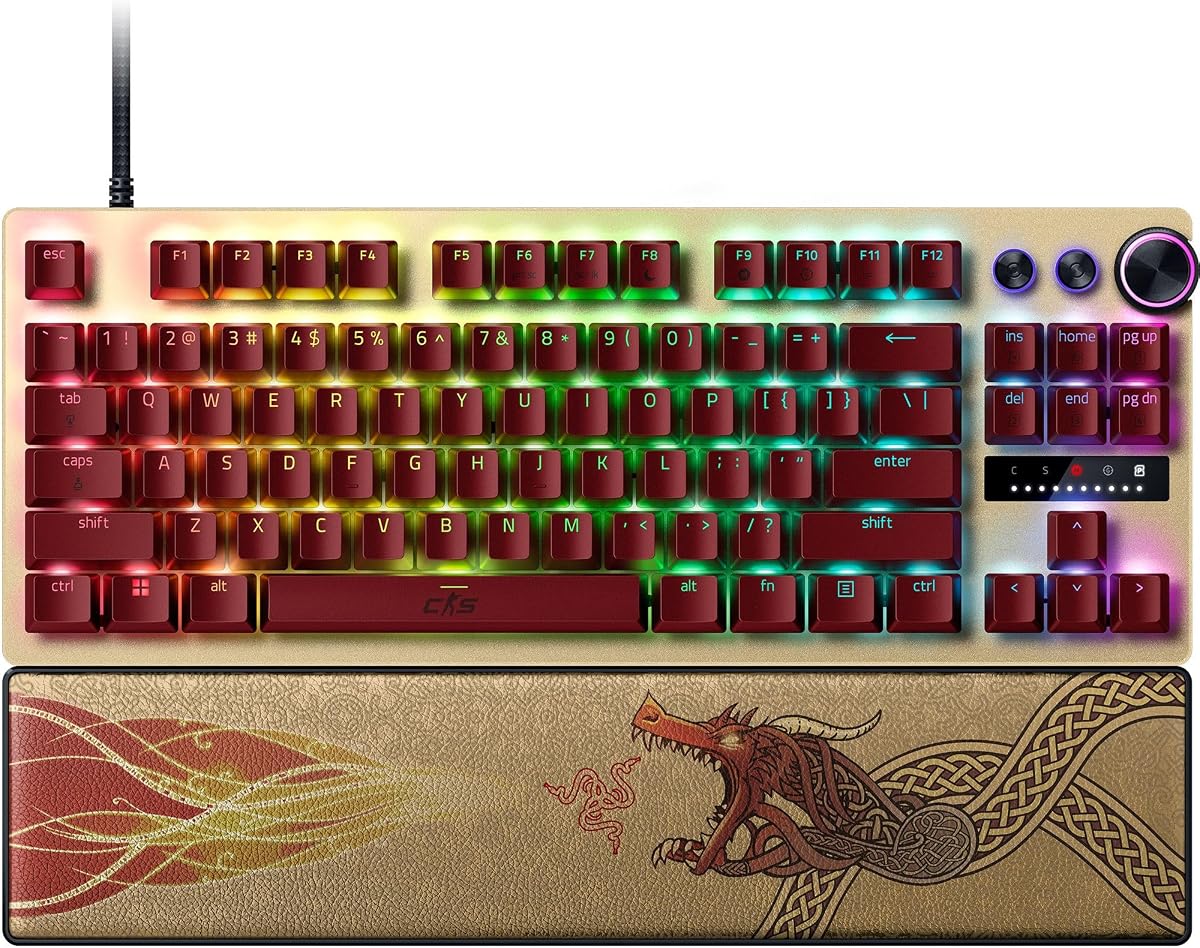
The Razer Huntsman V3 Pro TKL Counter Strike 2 Edition is engineered for elite competitive play offering advanced features like Snap Tap and Rapid Trigger for precise movements. It is designed to give FPS gamers an unbeatable edge.
We may earn a commission when you buy through this link, at no additional cost to you.
Its standout quality is the Snap Tap mode that prioritizes the latest input between two keys allowing near-instant directional changes. The onboard LED array aids quick adjustments to actuation height without needing software.
The price is significantly higher than other options which may not fit all budgets. The reliance on firmware updates for features like Snap Tap can be a drawback if updates are delayed. These trade-offs are acceptable for pros.
Elite players and enthusiasts who demand top-tier performance and customization will appreciate this keyboard. It combines premium materials with cutting-edge technology making it a worthy investment for serious CS2 competitors.
Snap Tap mode lets you quickly switch between keys without releasing the previous one providing smoother movement and faster reactions in FPS games.
Visual aids like onboard LED arrays help you make precise adjustments to settings quickly without opening software applications.
We may earn a commission when you buy through this link, at no additional cost to you.
The Corsair Clipper PRO MINI combines advanced Hall Effect technology with a compact 60 layout ideal for maximizing mouse space. It supports FlashTap SOCD for cleaner directional inputs essential for CS2 movement.
We may earn a commission when you buy through this link, at no additional cost to you.
Its key strengths include IP57-rated durability protecting against water and dust spills during long sessions. The MGX Hyperdrive core switches offer zero drift and high durability ensuring consistent performance under pressure.
The compact layout reduces the available keys which may take time to adjust for some users. The smaller footprint can make typing slower for those needing frequent access to function keys. This is a trade-off for mobility.
Travel gamers and low-sensitivity mouse users will find this keyboard particularly useful. It offers robust protection and competitive features in a small package making it perfect for tight desk setups or LAN events.
IP57 water and dust resistance allows the keyboard to withstand accidental spills ensuring uninterrupted gameplay even in messy environments.
FlashTap SOCD technology enables cleaner directional inputs and sharper counter-strafing improving precision during fast-paced competitive matches.
We may earn a commission when you buy through this link, at no additional cost to you.
The Redragon K745 HE features vibrant RGB lighting and rapid trigger capabilities making it an appealing choice for players prioritizing aesthetics and speed. It utilizes UltraMag switches for physical contactless sensing.
We may earn a commission when you buy through this link, at no additional cost to you.
Its strengths include the floating design that enhances lighting visibility and provides a distinct look. The multi-layer noise dampening offers a soft tactile feel which improves comfort during long typing or gaming sessions.
Some users report build quality inconsistencies affecting the overall feel. The driver software can be complex and may require technical knowledge to configure effectively. These issues limit its appeal compared to refined models.
Players who prioritize RGB aesthetics and performance features over build quality might enjoy this model. It offers solid capabilities for CS2 but may require patience to set up correctly for optimal performance.
Adjustable brightness and lighting modes bring your desk to life allowing personalization to match your gaming setup.
Independent switch plate design reduces wobble and provides a stable typing experience even during intense gameplay.
We may earn a commission when you buy through this link, at no additional cost to you.
The Keychron C0 HE is a one-handed keypad designed for high-level FPS gameplay and content creation. It features Rapid Trigger Hall Effect switches for ultra-low latency and instant key reset essential for competitive play.
We may earn a commission when you buy through this link, at no additional cost to you.
Its standout feature is the web-based configurator eliminating the need for software installation. The 8K polling rate ensures inputs are detected with precision allowing for smoother movement control in titles like CS2.
As a dedicated keypad it has limited utility outside specific workflows or games. The layout requires time to learn for users accustomed to full keyboards. This restricts its use as a primary input device.
Streamers and MMO players who need efficient command access will find this tool useful. It pairs well with a main keyboard providing extra programmability for shortcuts macros and complex commands.
Customize key mapping and RGB lighting directly in the browser allowing easy setup across multiple devices without installing software.
Thirty-five programmable keys provide essential commands within reach improving efficiency for gaming and productivity workflows.
We may earn a commission when you buy through this link, at no additional cost to you.
This renewed version of the Razer Huntsman V3 Pro offers high-end features like optical switches and Snap Tap at a lower price point. It delivers the same competitive edge for FPS games in a cost-effective package.
We may earn a commission when you buy through this link, at no additional cost to you.
Its strengths include analog optical switches with adjustable actuation and rapid trigger for precise inputs. The brushed aluminum top plate and magnetic wrist rest ensure durability and ergonomic support for long sessions.
As a renewed product it may lack the full warranty of a brand-new unit. The condition can vary meaning there is some risk compared to buying new. This is acceptable for budget-conscious buyers seeking premium gear.
Gamers wanting top-tier performance without the highest cost should consider this option. It combines the reliability of Razer hardware with the affordability of certified renewed goods making it a smart choice.
Advanced optical switches provide faster response and adjustable actuation ensuring precise inputs even during rapid repeated keypresses.
A solid warped-resistant casing with a brushed aluminum top plate enhances stability and durability for intense competitive play.
We may earn a commission when you buy through this link, at no additional cost to you.
The Corsair K55 RGB PRO is an affordable membrane keyboard offering essential gaming features like RGB backlighting and dedicated macro keys. It is a practical choice for casual gamers on a tight budget.
We may earn a commission when you buy through this link, at no additional cost to you.
Its key strengths include six dedicated macro keys programmable through iCUE software for streamlined execution. The IP42-rated protection guards against spills ensuring longevity even in casual environments.
Membrane switches lack the precision and speed of Hall Effect switches making it less ideal for competitive CS2 play. The absence of rapid trigger limits movement precision. These trade-offs are acceptable for casual use.
Casual players and those starting out may find this keyboard sufficient for basic needs. It offers good durability and customization features at an entry-level price making it a solid starter option.
Six dedicated macro keys allow instant activation of complex commands or shortcuts improving efficiency during gameplay.
IP42 protection ensures accidental spills and dust do not stop your gameplay allowing you to continue playing through minor accidents.
We may earn a commission when you buy through this link, at no additional cost to you.
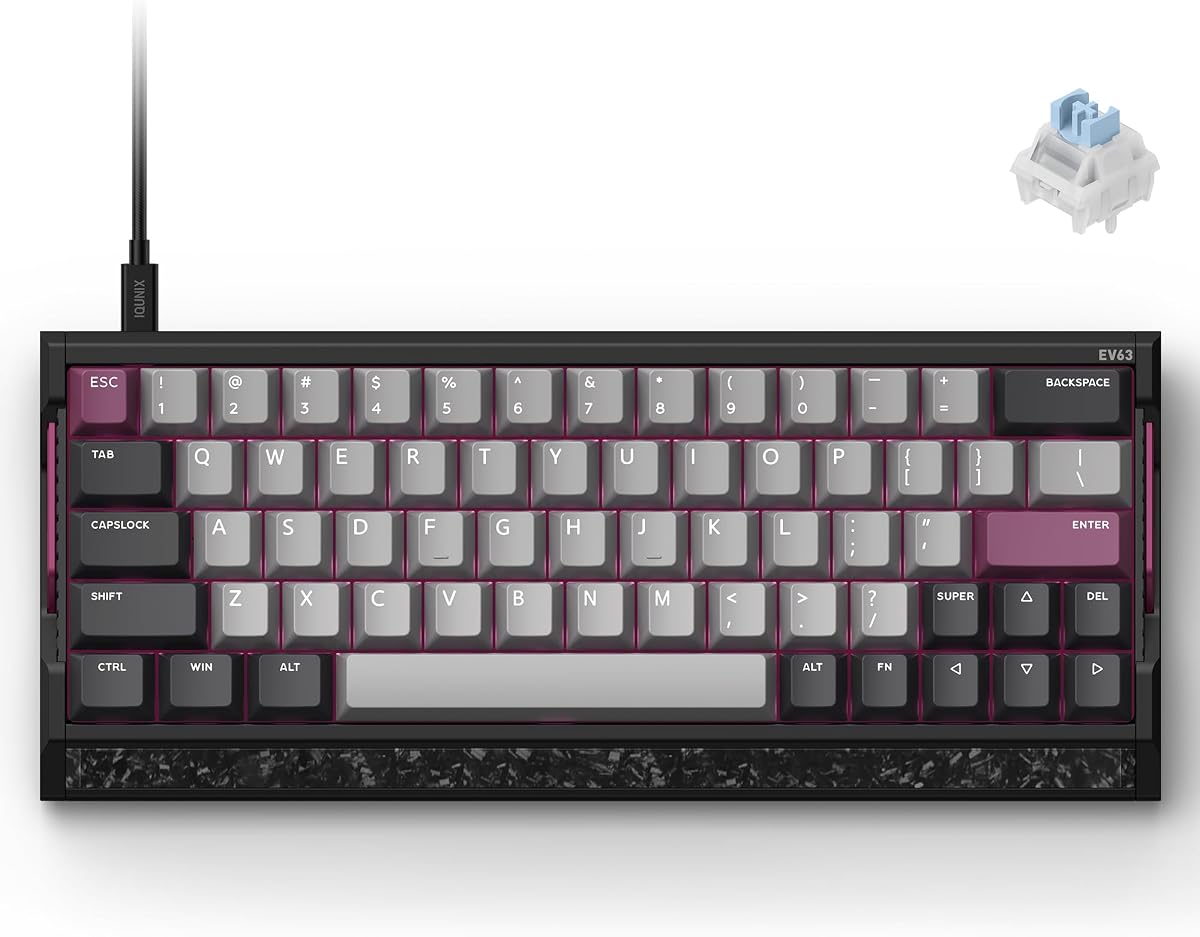
The IQUNIX EV63 combines premium materials with cutting-edge magnetic switch technology for exceptional stability and speed. Its custom 64-key layout is designed specifically for FPS players needing maximum mouse space.
We may earn a commission when you buy through this link, at no additional cost to you.
Its standout feature is the M.A.T. algorithm reducing missed inputs and sticky key behavior during high-speed movement. The aircraft-grade aluminum case with real forged carbon front plate adds substantial weight and stability.
The price is high and the compact layout may require significant adjustment for users used to standard sizes. These trade-offs are acceptable for those prioritizing build quality and stability above all else.
Gamers seeking a custom-like feel and maximum stability will appreciate this keyboard. It delivers professional-grade performance and durability making it a top choice for serious competitive players.
The M.A.T. 2.0 algorithm checks each key in real time ensuring consistent magnetic sensing and reducing unintended triggers or sticky inputs.
A planted metal chassis with real forged carbon reduces unwanted desk movement and vibration providing a premium custom-like feel.
We may earn a commission when you buy through this link, at no additional cost to you.
Choosing the right keyboard involves understanding switch types actuation mechanisms and layout options. This guide breaks down essential factors to help you select a model that matches your playstyle and budget.
For competitive CS2 gaming hall effect magnetic switches are often preferred because they offer rapid trigger capabilities. These switches detect keypresses without physical contact enabling faster reset times and adjustable actuation points for tailored sensitivity.
Look for keyboards with hall effect or optical switches if you prioritize speed and responsiveness over traditional mechanical feel.
Rapid trigger is a critical feature for CS2 as it resets keys immediately upon release enabling faster counter-strafing and directional changes. This capability is essential for maintaining speed and precision during fast-paced matches.
Ensure the keyboard explicitly supports rapid trigger functionality to gain this competitive edge in movement-heavy scenarios.
Adjustable actuation allows you to set different keypress depths for different keys optimizing sensitivity for aiming versus movement. This customization improves comfort and precision by letting you tailor the keyboard to your specific needs.
Choose models with software-driven customization options to save and switch between multiple profiles easily.
Polling rate determines how often the keyboard communicates with the PC typically ranging from 1000Hz to 8000Hz. Higher polling rates reduce latency ensuring inputs are registered nearly instantaneously during critical moments.
Opt for keyboards with at least 4000Hz polling rates to minimize input lag in competitive environments.
Compact layouts like 60 or tenkeyless (TKL) save desk space allowing more room for mouse movement which is crucial for low-sensitivity aiming. Full-size keyboards offer more keys but may limit your mouse space significantly.
Select a layout that balances your need for keys with the desk real estate available in your setup.
Build quality affects stability and longevity. Aluminum frames and PBT keycaps resist wear and vibration better than plastic components. IP ratings can protect against spills and dust ensuring the keyboard survives daily use.
Prioritize keyboards with solid materials and protective features if you expect intense or frequent usage.
Robust software allows for detailed customization of lighting macros and switch settings. Some keyboards offer web-based configurators which are convenient for cross-platform support without installing extra software.
Check if the keyboard provides intuitive drivers or web tools for easy management of settings and profiles.
Gaming keyboards vary widely in price from affordable options around thirty dollars to premium models exceeding two hundred dollars. Determine your budget early to narrow down choices that offer the best value for your needs.
Focus on core performance features rather than extras if you need to maximize value within a limited budget.
Set up your keyboard by connecting it to your PC and installing any necessary drivers or software. Use the provided tools to customize actuation points and rapid trigger settings according to your playstyle preferences.
Keep your keyboard clean by regularly wiping down keycaps with a soft cloth to prevent dust buildup. Avoid spills and store the device in a dry place to maintain durability and longevity over time.
Periodically update firmware to ensure access to the latest features and performance improvements. Regularly review your settings to optimize performance based on your evolving gaming needs.
A suitable keyboard for CS2 features rapid trigger capabilities and adjustable actuation points. These technologies enable faster counter-strafing and precise movement essential for competitive play.
Yes Hall Effect switches are often better for FPS games because they offer contactless sensing and rapid trigger support. This reduces latency and wear improving responsiveness during intense gameplay.
While not strictly necessary rapid trigger provides a significant advantage for fast movement and quick directional changes. It helps players execute complex maneuvers more smoothly during competitive matches.
No compact layouts like 60 or TKL are often preferred for CS2 to maximize mouse space. Full-size keyboards may limit your ability to perform wide mouse swipes needed for precise aiming.
Adjustable actuation allows you to set key sensitivity for different tasks improving precision and comfort. Lighter settings help with movement keys while deeper settings prevent accidental presses on others.
Many gaming keyboards require drivers or software for advanced features like macros and actuation adjustment. Some models offer web-based tools that eliminate the need for traditional software installation.
Choosing the right keyboard for CS2 involves balancing performance features build quality and budget. The top picks offer a range of options from budget-friendly models to premium builds tailored for competitive play.
Prioritize keyboards with rapid trigger and adjustable actuation if you want to maximize movement precision. Ensure your choice aligns with your playstyle and desk setup for optimal long-term satisfaction.
Product prices and availability change frequently so check current listings before purchasing. Verify all features and warranty details to make an informed decision that fits your gaming needs.