
Large Aluminum Heat Sink
4.7Editor score
Passive aluminum cooling design
Pre-applied thermal tape
294 fins for heat transfer
This guide compares the top GPU backplates for cooling and protection, featuring aluminum designs, fan kits, and anti-sag brackets for every build.
GPU backplates are essential components for modern graphics cards, offering both aesthetic appeal and functional benefits. They protect the rear of the PCB from dust and damage while helping to dissipate heat generated during intense gaming sessions or creative workloads.
We evaluated ten distinct GPU backplate solutions based on material quality, thermal performance, compatibility, and ease of installation. Our analysis considers passive aluminum spreaders, active fan-equipped radiators, and structural support brackets to help you find the right fit for your specific graphics card.
Each product review highlights key specifications, pros, cons, and real-world application scenarios. Prices and availability can change frequently on online marketplaces, so please verify current details before purchasing to ensure you get the best value for your system configuration.
4.7Editor score

4.0Editor score

4.2Editor score
The following table provides a side-by-side comparison of all ten GPU backplate options reviewed in this guide. Use this overview to quickly assess compatibility, material type, and key features before diving into the detailed reviews.

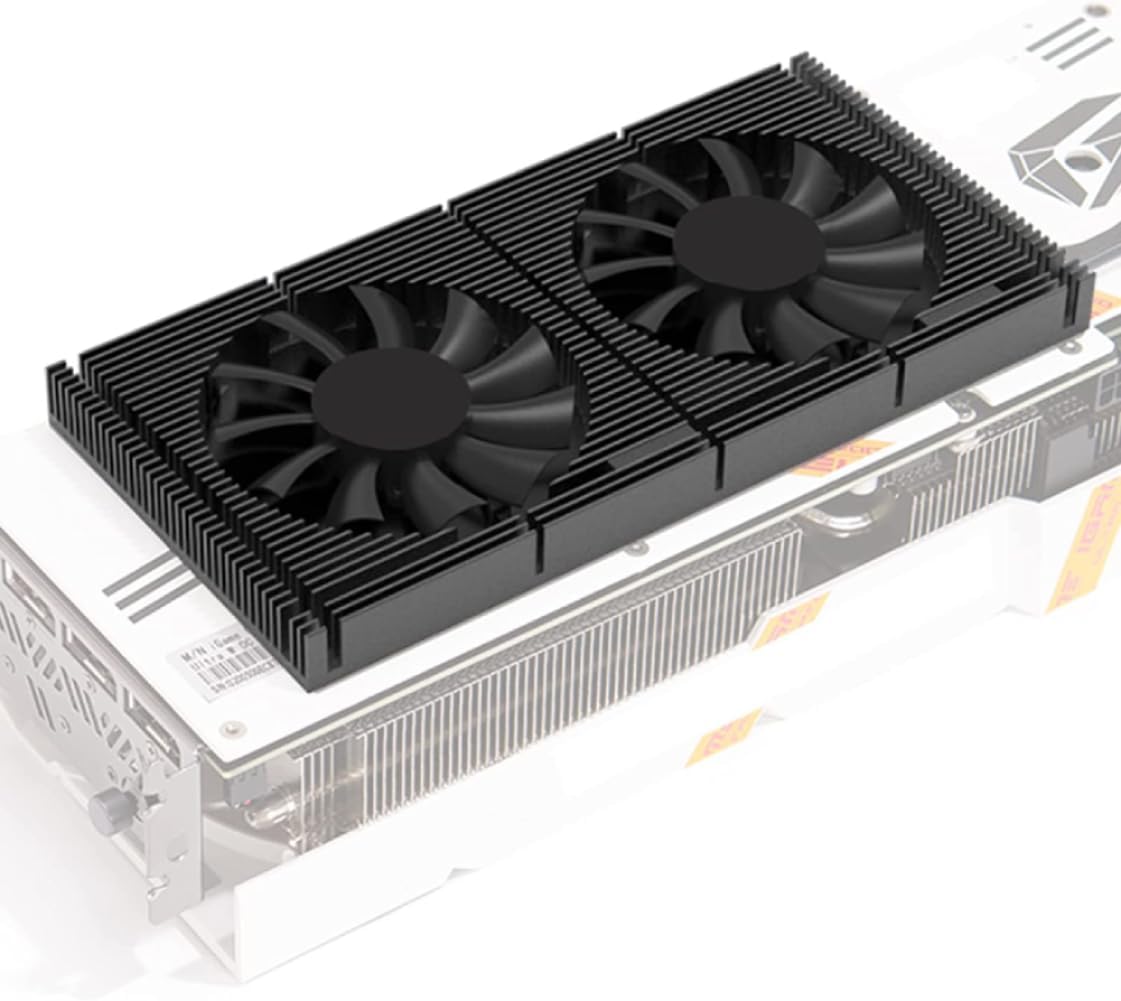


This Large Aluminum Heat Sink is a versatile passive cooling component that doubles as a GPU backplate for custom builds. With a high rating of 4.7, it is valued for its extensive fin structure and pre-applied thermal tape. It offers a cost-effective way to add thermal mass to your graphics card without requiring complex installation.
We may earn a commission when you buy through this link, at no additional cost to you.
The unit features 294 fins designed to increase the surface area for heat dissipation significantly. Made from aluminum, it weighs 310 grams and measures 150x93x15mm, providing substantial coverage for many standard GPU PCBs. The black anodized finish helps blend in with modern PC internals while the passive design ensures silent operation.
While effective for heat transfer, the lack of specific mounting holes for GPU PCBs means it relies entirely on thermal adhesive. This can be a limitation for heavy graphics cards that might sag or shift over time. Additionally, the adhesive may leave residue if you ever decide to remove it later.
This heatsink is ideal for builders on a budget who need extra cooling for high-power GPUs like the RTX 3090. It is best used in conjunction with a secure frame or bracket. If you need a pure thermal solution that requires no electricity, this is a solid choice.
The passive design relies on natural convection to move heat away from the GPU without adding fan noise to your system.
The pre-applied thermal conductive tape simplifies installation but requires careful alignment to ensure full contact with the PCB.
We may earn a commission when you buy through this link, at no additional cost to you.
The GOWENIC GPU Backplate combines structural protection with active cooling through an integrated fan. Rated at 4.0, this model is designed for RTX 3090, 3080, and 3070 cards. It uses an aluminum alloy construction that is sturdy and resistant to damage over long periods of use.
We may earn a commission when you buy through this link, at no additional cost to you.
The cooling fan connects via a standard 4-pin interface, allowing it to sync with your motherboard for low noise operation. The 15mm thickness accommodates the thermal pad included in the package. CNC machining ensures the finish is smooth and the design looks professional on the back of your graphics card.
Active cooling means you need an available fan header on your motherboard, which can be a constraint on boards with limited headers. The fan adds a layer of mechanical complexity compared to passive options. However, the heat dissipation speed is significantly faster than passive spreaders alone.
This backplate is excellent for users who want to reduce VRM temperatures on their graphics card actively. It is well-suited for builders who have spare fan headers and want to maximize airflow to the rear of the GPU. It stands out as a versatile choice for common card models.
The included 4-pin fan allows for dynamic speed control, balancing cooling performance with noise levels based on your system needs.
The design supports vertical mounting configurations which are becoming more popular in modern PC cases for aesthetic appeal.
We may earn a commission when you buy through this link, at no additional cost to you.
This aluminum backplate is tailored specifically for GIGABYTE RTX 5060 and 5050 Low Profile 8GB graphics cards. With a rating of 3.6, it aims to solve structural weaknesses in specific models. The CNC-cut design ensures ports and brackets remain accessible without interference.
We may earn a commission when you buy through this link, at no additional cost to you.
The primary benefit is the reinforcement of the PCB, reducing flex which can lead to long-term damage. Pre-drilled holes align perfectly with original mounting points for a secure fit. This rigidity is particularly important for low-profile cards in small form factor builds where vertical mounting might stress the component.
Compatibility is very limited to the specific RTX 5060 and 5050 Low Profile models mentioned. If your card is from a different manufacturer or a standard size, this product will not fit. Some users reported fitment challenges which may explain the moderate rating score.
If you own one of the targeted cards and need to strengthen the PCB or improve heat spread, this is a useful upgrade. It is best suited for builders who want a factory-like feel without modifying the card. Ensure your exact model matches the description before purchasing.
The thick aluminum construction physically protects sensitive rear components from cable pressure and accidental bumps during transport.
While not active cooling, the metal plate helps distribute heat from the VRM and GPU core more evenly across the surface.
We may earn a commission when you buy through this link, at no additional cost to you.
The Hilitand GPU Backplate is another active cooling option for RTX 30 series cards. It features a 4-pin fan interface similar to the GOWENIC model. Constructed from aluminum alloy, it provides a robust shield for the rear of your graphics card while facilitating heat dissipation.
We may earn a commission when you buy through this link, at no additional cost to you.
The 15mm thickness allows for sufficient thermal pad clearance. The fan connects to your motherboard fan socket which enables automatic speed control based on system temperature. This design supports both standard and vertical mounting setups giving you flexibility in your case configuration.
As with other fan-based backplates, you need a spare fan header to make this work effectively. If your motherboard is full, you may not be able to plug it in. The build quality is consistent with similar products in this price range offering good value.
This product is well-suited for owners of RTX 3090, 3080, or 3070 cards looking for a budget-friendly cooling upgrade. It is a practical choice if you have the necessary headers available. Verify your card width before buying to ensure full coverage.
The design accommodates vertical mounting which allows for better aesthetics in cases with GPU mounting brackets.
The 15mm profile ensures there is room for the thermal pad to bridge the gap between the VRM and the metal plate.
We may earn a commission when you buy through this link, at no additional cost to you.
This GPU backplate radiator holds a rating of 4.5 making it one of the better-reviewed options in its class. It utilizes a standard 4-pin fan and CNC machining for a sleek look. It is intended for RTX 30 series cards but check exact dimensions before installing.
We may earn a commission when you buy through this link, at no additional cost to you.
The aluminum alloy construction ensures durability and strength. The fan interface allows for low noise operation when connected to the motherboard. It offers fast heat dissipation which can help lower VRM temperatures during intensive rendering or gaming sessions.
The need for a fan connection limits its use to systems with available headers. If your system is already running hot and all fan headers are in use you might not find space for this unit. The fit is generally good for common card sizes.
It is a recommended choice for those seeking a balance of price and active cooling performance. It works best in cases where airflow to the rear is a priority. Ensure your graphics card model is explicitly supported before making the purchase.
The combination of aluminum fins and active air movement significantly speeds up cooling compared to passive aluminum plates.
Standard mounting points and included hardware simplify the process of adding a backplate to an existing graphics card.
We may earn a commission when you buy through this link, at no additional cost to you.
This GPU support bracket is designed to prevent graphics card sag rather than cooling. Rated at 4.7 it is a strong mechanical solution for heavy cards. It is built from aluminum alloy to ensure durability and stability in your PC case.
We may earn a commission when you buy through this link, at no additional cost to you.
The height adjustable feature makes it compatible with most ATX M-ATX and ITX cases. It provides a solid base for your graphics card reducing stress on the PCIe slot and motherboard over time. The tool-free setup allows for quick installation without disassembling your entire PC.
While it does not act as a cooling backplate it complements a cooling solution by keeping the card level. Some users may prefer a combined bracket and backplate but this focuses purely on structural integrity. It is a vital component for modern long GPUs.
Use this if your card sags visibly or you want to protect your motherboard from stress. It is best paired with a standard stock backplate if you want both cooling and support. Check case clearance before purchase to ensure it fits comfortably.
By supporting the weight of the card this bracket prevents long-term PCB bending and reduces risk of GPU failure.
The adjustable height allows it to work with a wide range of case designs and graphics card weights.
We may earn a commission when you buy through this link, at no additional cost to you.
This High Power Heat Sink is similar to the first product but carries a slightly different listing. With a rating of 4.6 it is highly regarded for its raw cooling mass. It is designed for various PCBs including GPUs routers and regulators.
We may earn a commission when you buy through this link, at no additional cost to you.
The 150x93x15mm size covers a large area of the graphics card rear. The 294 fins increase surface area significantly allowing passive airflow to move heat efficiently. It is anodized black which helps with aesthetics and corrosion resistance.
Like other passive options it does not come with mounting screws for specific GPUs. You will need to rely on adhesive or zip ties to keep it in place. This can be a hassle for heavy cards but the cooling performance is generally good.
It is an excellent budget choice for adding thermal mass to your GPU. If you are comfortable mounting it with adhesive this product offers great value. Verify the dimensions match your card to avoid blocking ports.
Passive cooling eliminates the risk of fan failure and noise making it a reliable long-term solution for heat management.
Beyond GPUs this heatsink can be used for other high-power electronics like WiFi routers or voltage regulators.
We may earn a commission when you buy through this link, at no additional cost to you.
This I/O shield backplate is designed specifically for EVGA RTX 3060ti 3070 3080 and 3090 FTW3 XC3 models. It is made from zinc alloy for durability. It serves primarily as an external bracket to cover the back of the PCIe slot area.
We may earn a commission when you buy through this link, at no additional cost to you.
The 12×3.8cm size fits the graphics card slot precisely. Installation requires screws but is quick and straightforward. It is an essential component to complete the look of an EVGA build and protect internal cables from the rear of the case.
Note that this does not cover the entire GPU PCB and therefore does not assist with cooling. It is purely a structural and aesthetic piece for the rear interface. If you own a different brand card this product will not be useful.
It is best used by EVGA owners who want to complete their system aesthetics. Ensure your exact card model matches the FTW3 XC3 series before buying. It provides a solid physical barrier against dust and damage in that specific area.
Designed specifically for EVGA models to ensure perfect alignment with the ports and bracket structure.
Zinc alloy is sturdy and resists bending better than standard plastic IO shields found in some cases.
We may earn a commission when you buy through this link, at no additional cost to you.
This aluminum backplate is engineered for ZOTAC RTX 5060 and 5050 Solo 8GB cards. It has a perfect 5.0 rating indicating high customer satisfaction. The CNC-machined design ensures zero interference with ports or mounting holes on these specific models.
We may earn a commission when you buy through this link, at no additional cost to you.
It includes ventilation cutouts to improve airflow to the components on the rear. This helps maintain stable performance during rendering or gaming. The anti-sag feature provides rear support to keep the card stable over time.
Since it is specific to ZOTAC cards it is a limited choice but a great one for owners of those models. The DIY installation kit makes the process simple. You will need basic tools but no permanent modifications are needed.
This is a must-have for ZOTAC owners looking to upgrade their card protection. It improves heat dissipation and structural integrity simultaneously. Verify your exact card model is the Solo 8GB version before purchasing.
Strategic cutouts allow air to pass through preventing heat buildup in the rear section of the graphics card.
The rigid aluminum plate adds strength to the PCB reducing the risk of bending under the weight of the components.
We may earn a commission when you buy through this link, at no additional cost to you.
This GPU backplate memory heatsink is a premium solution for high-performance graphics cards. It features dual 70mm PWM fans for enhanced cooling capacity. The material is aviation aluminum 6061 which is lightweight yet sturdy and resistant to oxidation.
We may earn a commission when you buy through this link, at no additional cost to you.
The fan speed ranges from 1500 to 2800 RPM allowing automatic adjustment based on temperature. The 1.2mm thermal pad ensures good contact between the heatsink and your card. It is compatible with RTX 3090 3080 and 3070 models provided they have a flat surface.
The elastic latch makes installation simpler compared to screw-only systems. However using two fans requires two available motherboard headers. This can be a limiting factor for some users. It is designed for enthusiasts who prioritize thermal performance.
If you run a high-end GPU and want maximum cooling potential this is a strong option. It is best for those who have the headers to spare and want a high-quality build. Check your GPU surface flatness before purchasing to ensure compatibility.
Two 70mm fans provide more airflow than single fan units leading to better heat removal from VRM and memory.
Aluminum 6061 is a high-grade alloy often used in aerospace applications for its strength and light weight.
We may earn a commission when you buy through this link, at no additional cost to you.
Selecting the right GPU backplate depends on your specific graphics card model and cooling needs. Understanding key factors like material and compatibility helps you make a confident decision.
Check that the backplate matches your exact GPU model or dimensions. Some backplates are brand-specific like GIGABYTE or ZOTAC while others are generic for common RTX 30 series cards.
Ensure it does not block ports or interfere with case mounting points for a clean install.
Aluminum is the standard material for backplates due to its excellent thermal conductivity and lightweight nature. Aluminum alloy offers extra durability and resistance to physical damage.
Zinc is sometimes used for IO shields but is less effective for heat dissipation compared to aluminum.
Active backplates include fans that require power from your motherboard headers. They cool better but add noise and complexity to your build.
Passive backplates rely on natural convection and are silent. They are better for noise-sensitive builds but offer less cooling performance.
Look for pre-drilled holes that align with your PCB mounting points for a secure fit. Some models use adhesive tape which is simpler but less stable for heavy cards.
Tools-free options and elastic latches make the process easier for beginners.
If your GPU is heavy a backplate that offers structural rigidity can prevent sagging. This protects your PCIe slot from long-term stress.
Separate brackets are also available if the backplate does not provide enough support.
Ensure the backplate thickness accommodates your thermal pad and any existing components on the rear. 15mm is common for active coolers.
Too thick a plate may not fit in smaller cases with tight clearance.
Anodized black finishes look professional and resist corrosion. Consider the vent patterns if you want airflow to pass through.
Design should match the aesthetic of your case and other components.
Passive backplates are generally cheaper while active fan models cost more. Determine your priority between cooling performance and cost.
Invest in a higher quality product if you plan to keep the GPU for several years.
Install the backplate by aligning it with the PCB mounting holes and securing it with screws. If using adhesive tape peel the backing and press firmly to ensure full contact.
For active cooling models connect the fan cable to a available motherboard fan header. This ensures the fan runs only when your system is hot.
Clean the backplate occasionally with compressed air to remove dust that can block fins. Inspect thermal pads every few years to ensure they are not drying out.
Yes active cooling backplates with fans can significantly lower VRM and memory temperatures. Passive backplates help by spreading heat but do not cool as effectively as active units.
Installing a third-party backplate may void your warranty if you damage components during installation. Check your manufacturer policy before adding non-stock parts.
You can use any aluminum plate if you can mount it securely and ensure it does not touch short circuits. However pre-drilled options are safer and easier to install.
Use high-quality thermal adhesive tape to secure a generic plate. Ensure the card is light enough that adhesive alone can hold it safely.
Common sizes are 50mm and 70mm. Check your backplate thickness to ensure the fan fits inside the case clearance.
Not all GPUs need a backplate but they provide protection and better aesthetics. High-end cards benefit most from cooling and anti-sag support.
We found that active cooling options like the GOWENIC and GPU Backplate Memory Heatsink offer the best thermal performance for high-end cards.
Prioritize compatibility and structural support to ensure your graphics card stays stable and protected over the long term.
Prices and stock change regularly so check current listings before making your purchase to secure the best deal.