
VSD Mini Macro Pad Shortcut Keypad
4.1Editor score
6 custom LCD programmable keys
Compact portable design
Dual side RGB light bars
This expert guide compares the top ten macro pads for streaming to help you find the best controller for OBS, Twitch, and YouTube workflows.
Streaming requires quick access to tools and macros to keep your broadcast smooth. A dedicated macro pad lets you trigger scenes and control audio with a single tap. Choosing the right device ensures your setup remains efficient and organized during live events.
We evaluated ten leading macro pads based on key customization, software support, and build quality. Our analysis covers LCD screens, physical buttons, and RGB features to find the most versatile options. Each product offers unique strengths for gamers, creators, and office professionals.
Every pick includes detailed specs and real-world usage insights to guide your decision. We highlight standout features and potential limitations for each model. Please note that pricing and availability can change frequently, so check current listings before purchasing your new controller.
4.1Editor score

4.4Editor score

4.8Editor score
This side-by-side comparison highlights the key specifications and capabilities of each macro pad. Use this table to quickly identify the model that matches your streaming needs and desk space requirements.



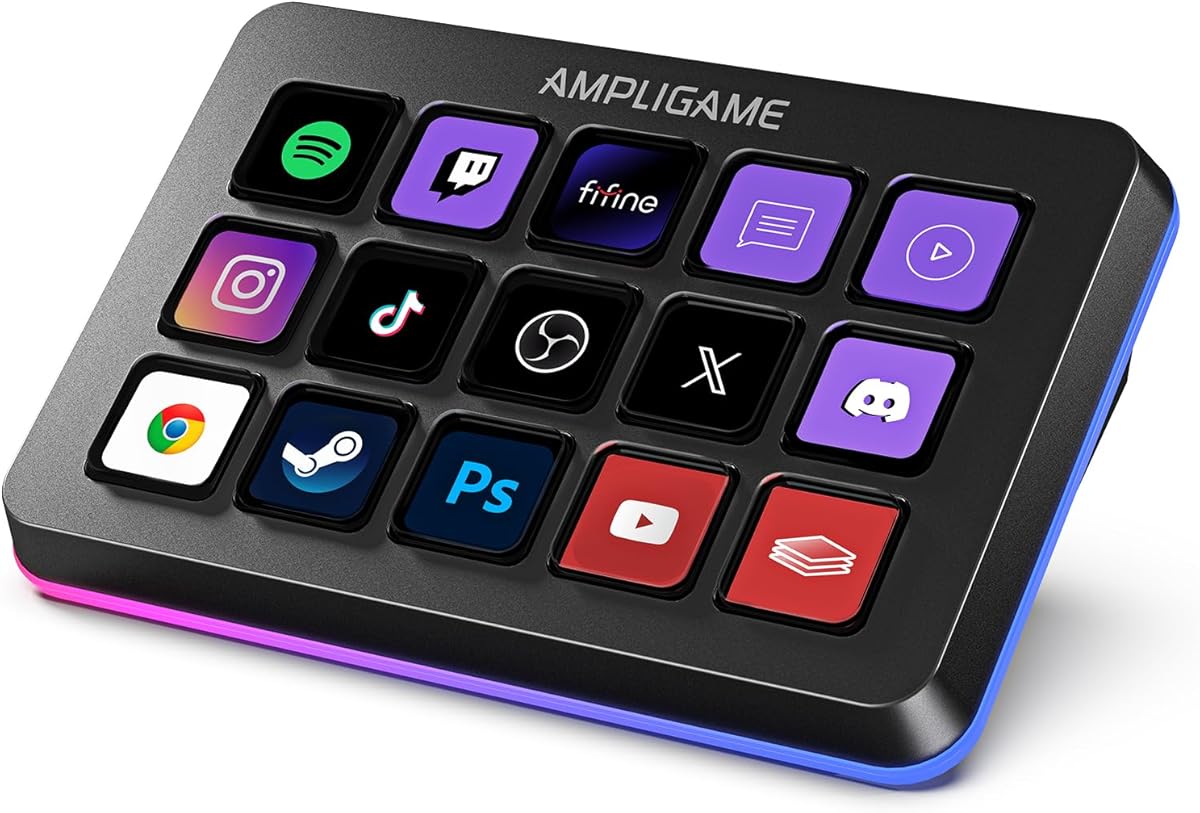


The VSD M18 is a robust macro pad designed for streamers needing quick access to OBS and other tools. With 18 programmable keys including 15 LCD visual keys it offers extensive customization. Its rating reflects strong user satisfaction with setup and daily performance.
We may earn a commission when you buy through this link, at no additional cost to you.
Its standout features include single tap multi shortcut controls and the ability to assign images or GIFs to each key. The RGB surround light ring adds ambiance while built-in plugins like weather and calendar assist daily tasks. USB-C connection ensures stable power and data transfer.
While it offers great value the device requires installing VSD software for full function setup. Linux users cannot utilize plug-and-play features without secondary development SDKs. These limitations are minor given the broad range of supported applications like Discord Excel and Photoshop.
We recommend this device for streamers and gamers who need a reliable deck with visual feedback. It simplifies complex workflows by allowing multi-step macro execution. Check current availability to see if it fits your current setup needs.
The LCD keys support JPG PNG and GIF images allowing you to see exactly what each button does without guessing.
Operation Follow functionality lets you run multiple macro steps in sequence or simultaneously for streamlined task control.
We may earn a commission when you buy through this link, at no additional cost to you.
This stream controller stands out for its vertical space-saving design which is rare among macro pads. It offers three modes including calculator and numeric keypad making it versatile beyond just streaming. Users rate it highly for its ergonomic shape and functionality.
We may earn a commission when you buy through this link, at no additional cost to you.
The ability to drag files browsers and apps directly to LCD keys simplifies workflow significantly. Customizable icons and GIFs allow unique visual styles while hundreds of plugins extend its utility. It works well with Windows and macOS supporting major creative apps.
Customer support relies on tutorial videos and online questions rather than direct phone lines. Setup may feel complex without a printed manual but the online resources are thorough. The warranty period of 24 months adds significant peace of mind.
Ideal for users needing a compact yet versatile control deck this model saves desk space effectively. Its calculator mode makes it unique for data entry tasks. Verify plugin availability for your specific apps before purchasing.
The vertical layout saves valuable desktop space while expanding shortcut keys for better accessibility.
Access hundreds of plugins including schedule reminders and weather to transform this into a desktop companion.
We may earn a commission when you buy through this link, at no additional cost to you.
This VSD variant shares core features with the M18 model but emphasizes one-touch efficiency. It is built for streamers who prioritize speed and visual recognition during live events. The rating shows consistent performance across gaming and production tasks.
We may earn a commission when you buy through this link, at no additional cost to you.
You can assign single or series of actions to each of the 18 keys for seamless workflow. The RGB light ring creates an immersive atmosphere while software updates keep functionality fresh. It integrates well with OBS and Photoshop for quick scene changes.
Linux support remains limited and the device relies on specific VSD software for configuration. This may require an initial learning curve for users accustomed to plug-and-play devices. However the built-in plugins and stability make up for this minor inconvenience.
This model is perfect for creators needing a high-tech productivity tool with stylish visuals. It balances aesthetic appeal with practical utility. Check system requirements to ensure full feature support on your machine.
One-touch operation allows instant launch of macros files or apps to reduce repetitive keystrokes.
Personalize each LCD key with images or animations for enhanced recognition and memorization.
We may earn a commission when you buy through this link, at no additional cost to you.
The VSD Mini is a compact solution for users with limited desk space. It features six fully customizable LCD keys that support images and GIFs for easy recognition. This makes it an ideal entry-level macro pad for casual streaming or office work.
We may earn a commission when you buy through this link, at no additional cost to you.
Its dual side RGB light bars add aesthetic value without taking up much room. One-touch shortcut execution helps finish multi-step tasks quickly. It connects via USB and works with Windows and macOS offering broad compatibility for mainstream apps.
The device lacks a built-in battery relying on direct USB power for operation. Fewer keys mean less capacity for complex macro chains compared to larger models. These trade-offs are acceptable for those prioritizing portability and budget.
We recommend this mini deck for beginners or secondary setups needing basic shortcut functions. It delivers value through its small footprint and visual customization. Ensure your USB port is accessible for continuous operation.
Designed in mini portable size it saves desk space while retaining full macro customization functions.
Freely set custom images and animations on each key for easy recognition in any scenario.
We may earn a commission when you buy through this link, at no additional cost to you.
This controller targets creators needing both visual macros and audio control. With 10 LCD keys and 4 RGB knobs it offers precise adjustments for volume and sound. It rates well for its ability to simplify complex editing and streaming workflows.
We may earn a commission when you buy through this link, at no additional cost to you.
The USB sound deck allows you to trigger audio commands directly to your computer. Dynamic RGB visuals and a built-in dock enhance connectivity. The foldable ergonomic stand ensures comfortable viewing during long sessions.
It does not include speakers so audio output still relies on your computer system. The higher price reflects the added audio features and build quality. It is a solid choice for serious content creators.
Buy this model if you need an all-in-one control deck for audio and scene management. Its plugin ecosystem offers extensive customization options. Verify audio compatibility with your specific software before purchasing.
Trigger sound effects and adjust audio atmosphere with one tap using the dedicated USB sound board.
The foldable stand provides comfortable viewing angles for long streaming and editing sessions.
We may earn a commission when you buy through this link, at no additional cost to you.
The fifine D6 features 15 customizable keys that provide clear visual feedback for every action. It supports major streaming apps and offers a visual operation keypad for direct control. Users appreciate its vivid RGB lighting and multi-tasking capabilities.
We may earn a commission when you buy through this link, at no additional cost to you.
You can drag-and-drop plugins and icons to customize your layout easily. The RGB ring offers nine different modes to match your gaming or work style. It is designed to streamline workflows across editing office and streaming.
Initial use requires ensuring both firmware and software are updated to the latest versions. This setup step ensures stability but adds time before first use. The extensive plugin options provide long-term value for diverse users.
This deck is recommended for users who value visual clarity and multi-purpose functionality. It handles diverse scenarios from photo editing to live streaming efficiently. Check system updates before setup for optimal performance.
Press directly on the touchscreen of the stream controller for visual feedback and immediate execution.
Brighten your setup with 9 different controllable RGB modes for a vivid game impression.
We may earn a commission when you buy through this link, at no additional cost to you.
This controller stands out for its extensive plugin marketplace offering over 200 plugins and icon profiles. It supports dynamic animated icons which adds personality to your desktop. The rating reflects high user satisfaction with its integration capabilities.
We may earn a commission when you buy through this link, at no additional cost to you.
Users can switch between shortcut calculator and numeric keypad modes for versatile use. The software is easy to install and offers thousands of free options for apps like Discord and Twitch. Dynamic icons bring life to static interfaces.
Spotify integration requires an active premium account which may limit some free users. The dependency on VSD software means updates are necessary for full functionality. These constraints are minor compared to the flexibility offered.
Ideal for streamers who need deep customization this model offers a rich ecosystem. Its dynamic icons and plugin support provide unique workflow solutions. Verify your account status for specific app integrations.
Use your favorite animations to create custom animated icon scenes for your device.
Download thousands of free options to control apps and optimize your workflow.
We may earn a commission when you buy through this link, at no additional cost to you.
The S15 offers 15 customizable keys alongside three status display panels for real-time info. This allows you to monitor CPU usage or weather while streaming. It rates well for its practical features and ease of preset control pages.
We may earn a commission when you buy through this link, at no additional cost to you.
Action flows let you trigger multiple commands with a single key press. The software supports over 100 plugins and icons for deep customization. It works seamlessly with Windows and macOS for broad application support.
Linux is not supported which limits its utility for open-source users. You must uninstall similar controller software before setup to avoid conflicts. These steps ensure stability but require extra effort during installation.
This deck is perfect for users needing visual system stats alongside macro controls. Its preset pages help manage different tasks like editing or office work. Ensure your system meets compatibility requirements before buying.
Display supported data such as CPU temperature and GPU status for at-a-glance info.
Build action flows to trigger multiple commands with one key for streamlined tasks.
We may earn a commission when you buy through this link, at no additional cost to you.
The S10 combines LCD keys with an integrated touchscreen and four knobs for precise control. It serves as a central controller for streaming editing and gaming workflows. The highest rating reflects its premium build and versatile capabilities.
We may earn a commission when you buy through this link, at no additional cost to you.
You can access supported controls via the touchscreen and assign knobs to volume or timeline adjustments. Build multi-action workflows to reduce repetitive steps across complex projects. It includes 100+ plugins for extensive customization.
Linux support is limited similar to other modern controllers in this class. Third-party services may require active accounts for full integration. These requirements are standard for professional-grade controllers in the market.
Highly recommended for demanding workflows needing both macro and precise audio control. Its touchscreen interface adds a new layer of interaction. Verify subscription requirements for your chosen apps.
Assign knobs to volume microphone levels and timeline adjustments for finer control.
Assign several actions to one key to reduce repetitive steps across complex projects.
We may earn a commission when you buy through this link, at no additional cost to you.
The Elgato Stream Deck MK.2 remains a gold standard for streaming controllers. Its 15 customizable LCD keys and powerful plugin ecosystem make it highly versatile. Users praise its one-touch operation and reliable visual feedback during live events.
We may earn a commission when you buy through this link, at no additional cost to you.
You can trigger single or multiple actions instantly and control media or mute mic. The plugin support extends to major platforms like Spotify Twitch and Discord. It helps streamline editing workflows with precise hotkey actions.
Its premium price may be higher than other options on this list. The lack of physical knobs means audio control relies entirely on software keys. These factors are acceptable given the reliability and software support.
We recommend this deck for those seeking a proven professional tool for daily use. Its ecosystem ensures long-term value and frequent updates. Check current pricing to decide on this premium option.
Know that your command has been executed instantly with visual feedback on the screen.
Access powerful plugins for Twitch YouTube Spotify and many more services easily.
We may earn a commission when you buy through this link, at no additional cost to you.
Selecting the right macro pad requires analyzing key factors like key count, software support, and layout. This guide helps you evaluate the most important specs for your streaming needs.
The number of programmable keys determines how many actions you can assign at once. Models range from six to eighteen keys allowing for basic shortcuts or complex workflows. Vertical layouts save desk space but horizontal ones offer more immediate access to buttons.
Choose a layout that matches your hand position and available desk space.
Software is the bridge between your hardware and streaming tools like OBS or Twitch. Ensure the controller supports your operating system and specific apps you use daily. Some brands require unique software while others integrate directly with mainstream platforms.
Check if Linux or Mac is supported before purchase to avoid setup issues.
LCD keys with customizable images help you identify functions instantly during a broadcast. Static icons are common but GIFs add a layer of engagement and clarity. Visual feedback ensures you know exactly what command you are triggering without looking at the main screen.
Prioritize models with visual keys if you switch between many apps frequently.
A good macro pad supports single and multi-step actions to automate complex tasks. Look for features that allow you to trigger multiple commands with one key press. This capability is essential for managing scenes and sound effects simultaneously.
Ensure the software allows for multi-step chaining without requiring coding skills.
RGB lighting adds style to your desk setup and can signal status changes during live streams. Adjustable rings or bars provide visual ambiance that matches your brand colors. Some models sync lights with audio or system activity for dynamic effects.
Select a model with customizable RGB options to enhance your visual presentation.
Sturdy construction ensures the device survives long sessions and daily wear and tear. Materials like durable plastic or metal affect both longevity and the feel of the keys. Consider weight and stand stability to ensure the unit stays in place.
Look for solid construction and quality inspection standards in the product details.
A rich ecosystem of plugins extends the controller beyond basic shortcuts into productivity tools. Access to weather calendars and app-specific widgets adds daily utility to your desk. Check if there is a marketplace for third-party tools to grow your setup over time.
Verify the number of available plugins before committing to a specific brand.
Most macro pads rely on USB for power and data transfer. Ensure your computer has accessible ports for continuous operation during long streams. Some devices include USB docks to save ports on your main machine.
Confirm the power source is reliable for uninterrupted streaming sessions.
Begin by downloading the official software from the manufacturer's website to unlock full features. Connect the device via USB and allow the system to recognize the new hardware. Follow the setup wizard to register your user account and update firmware.
Customize each key by assigning actions using the drag-and-drop interface provided in the software. Save different profiles for streaming editing or gaming to switch between layouts quickly. Test each macro to ensure it triggers the intended apps without delay.
Keep your device clean by wiping the surface with a soft cloth to avoid dust buildup. Check for software updates regularly to access new plugins and security patches. Store the controller in a dry place when not in use to extend its lifespan.
Yes, most require dedicated software to map keys and assign actions. Some basic functions may work without it but full customization needs the provided application. Always install the latest version for best compatibility.
Yes, most macro pads support OBS integration through plugins or direct hotkeys. You can assign keys to switch scenes or control audio within the software. Check the specific plugin requirements for your model.
Many modern macro pads support macOS but you should verify compatibility before purchasing. Some software may have limited features on Mac compared to Windows. Ensure the product description lists macOS support explicitly.
Update firmware through the official software or the manufacturer's website. Connect the device via USB and follow the on-screen prompts to install new versions. Always backup your profiles before starting any update process.
Yes, they are excellent for office work and productivity tasks like Excel or Word. You can assign keys to common shortcuts or app launches to speed up work. Some models even include calculator or calendar plugins.
Warranty periods vary by manufacturer but typically range from one to two years. Check the product listing for specific terms as some brands offer longer coverage. Keep your purchase receipt for valid claims.
No, most controllers use a no-code interface with drag-and-drop features. You can assign actions visually without writing scripts or commands. This makes them accessible to users without technical backgrounds.
Yes, you can save multiple user profiles within the software to share one device. Switching between users is done by selecting the profile menu in the app. Each user gets their own set of customized keys.
Our top picks like the VSD M18 and Elgato Stream Deck MK.2 offer reliable performance for various needs. Each device brings unique strengths from visual feedback to audio control features that cater to specific workflows. Use these guides to find the match for your setup.
Prioritize features that improve your daily workflow such as macro flexibility and plugin support. Consider the build quality and warranty to ensure your investment lasts through heavy usage. Matching the device to your specific apps is crucial for efficiency.
Prices and stock change frequently so check current listings before finalizing your purchase. Verify that the model meets your system requirements to avoid compatibility issues. A well-chosen macro pad will elevate your streaming experience significantly.