
Thrustmaster T-Flight Hotas X
4.5Editor score
Fully programmable buttons
Adjustable resistance
Plug and play setup
Discover the top Mac game flight controllers for immersive simulation. This guide compares the best yokes, HOTAS systems, and throttles for Mac gamers today.
Finding the right flight controller for your Mac setup can transform how you experience aviation simulation. A good controller offers precise inputs, durable construction, and software compatibility that matches your favorite titles without frustrating delays.
We evaluated each model based on build quality, ease of setup, and real-world performance in popular simulators. Our list includes options for beginners and enthusiasts, covering everything from compact sticks to full cockpit yoke systems.
Each pick highlights key strengths and potential drawbacks to help you decide quickly. Prices and availability change often, so check the latest details before ordering to ensure you get the best deal for your specific needs.
4.5Editor score

4.4Editor score

4.0Editor score
This side-by-side comparison highlights the essential features of each controller to help you weigh build quality against functionality. We focus on connectivity, programmability, and compatibility with Mac and Windows environments where noted.






The Honeycomb Alpha Yoke stands out as a top choice for Mac users seeking realistic controls. It earns a solid rating for its build quality and smooth operation during extended simulation sessions.
We may earn a commission when you buy through this link, at no additional cost to you.
Developed by pilots, this system features a solid steel shaft with dual linear ball bearings for precise pitch and roll. The integrated switch panel adds authenticity with master and avionics controls within easy reach.
While expensive, the trade-off is a durable experience that mimics real cockpits. Some Mac users report needing extra software steps, but the hardware itself is robust and reliable.
Ideal for serious simmers, this controller delivers an immersive experience. If realism matters most, the Alpha Yoke is a strong recommendation for your Mac setup.
The full 180 degree rotation and self-centering mechanism create a natural feel that enhances immersion during long flights.
Use the heavy-duty clamps or the 3M suction pad for a secure setup that fits various desk thicknesses.
We may earn a commission when you buy through this link, at no additional cost to you.
The Thrustmaster T-Flight Hotas X offers excellent value for those new to flight simulation. Its high rating reflects a strong balance of performance and affordability for casual Mac users.
We may earn a commission when you buy through this link, at no additional cost to you.
Designed with ergonomic comfort, it features a detachable throttle and adjustable resistance dial for fine-tuned control. The plug-and-play setup means you can start flying quickly without complex configuration.
Build quality is mostly plastic, which keeps costs down but may lack the heft of premium models. Mac compatibility is decent but relies on driver workarounds for full functionality.
For budget-conscious gamers, this controller provides all the basics. It is a practical entry point that delivers immersive fun without breaking the bank.
The wide hand rest and natural throttle shape reduce fatigue during long simulation sessions.
Program all 12 buttons and 5 axes to match your preferred flight sim setup for instant command.
We may earn a commission when you buy through this link, at no additional cost to you.
The Logitech G X56 is a premium HOTAS system designed for high performance and customization. It earns recognition for its extensive controls and immersive features that appeal to dedicated Mac users.
We may earn a commission when you buy through this link, at no additional cost to you.
Featuring hall-effect sensors and an advanced spring system, it offers precise input and adjustable resistance. The RGB lighting and twin throttles enhance the visual and functional appeal of any cockpit setup.
At a higher price, it demands a serious commitment. Setup on Mac may require additional software steps, but the hardware performance justifies the investment for enthusiasts.
If you want top-tier functionality, this controller delivers. It is perfect for those who demand precision and style in their flight simulation experience.
The hall-effect sensors and 16-bit aileron axis provide accurate and reliable control during complex maneuvers.
Use the software to set RGB colors to match your gaming rig for a cohesive visual setup.
We may earn a commission when you buy through this link, at no additional cost to you.
The Logitech G PRO Flight Yoke System provides a realistic yoke experience suitable for new and experienced pilots. Its rating highlights strong build quality and intuitive control for Mac users.
We may earn a commission when you buy through this link, at no additional cost to you.
With a stainless steel shaft and 54 programmable controls, it offers durable and flexible input. The desk clamp ensures stability during intense maneuvers, enhancing the simulation experience.
While it lacks an integrated throttle, the setup is modular and allows for future upgrades. Mac compatibility works well but may need optional software for full feature access.
This yoke is a solid choice for training and realism. It delivers reliable performance that helps build essential flight skills in a virtual environment.
The stainless steel shaft ensures smooth and accurate control of your virtual aircraft in flight simulators.
Access POV hat and 14 button controls to manage most aircraft functions under your fingertips.
We may earn a commission when you buy through this link, at no additional cost to you.
The Logitech G Saitek X52 Pro is a classic HOTAS system offering solid functionality for Mac users. It maintains a steady rating for its practical features and customizable interface.
We may earn a commission when you buy through this link, at no additional cost to you.
An LCD display and illuminated buttons enhance visibility and ease of use. The progressive throttle with resistance adjustment allows for detailed control over aircraft systems.
Setup requires software, which can be a hurdle for some Mac users. However, the ergonomic handle adjustments make it comfortable for various hand sizes during extended use.
A reliable mid-range option, this controller balances features and price. It suits those who want customizable controls without the cost of top-tier models.
The LCD multi-function display provides quick access to essential flight data during missions.
A 5-position handle adjustment system suits all hand sizes for maximum gaming comfort.
We may earn a commission when you buy through this link, at no additional cost to you.
The Turtle Beach VelocityOne H.O.T.A.S. introduces a unique OLED display for real-time flight data. While it faces some reliability concerns, it appeals to users who value visual feedback.
We may earn a commission when you buy through this link, at no additional cost to you.
High-resolution sensors and 73 programmable inputs offer deep customization. The full-color display allows quick performance tuning, adding a layer of immersion to simulations.
Mac compatibility can be tricky, and the rating suggests quality issues. Users may need to invest time in troubleshooting settings for a smooth experience.
If visual data is a priority, this model stands out. It offers advanced features for those willing to navigate setup complexities for a richer cockpit experience.
The full-color display provides real-time flight data and quick performance tuning without looking away.
Adjustable throttle resistance and stick tension settings let you customize the feel of controls.
We may earn a commission when you buy through this link, at no additional cost to you.
This bundle combines the Logitech G PRO Flight Yoke with Pro Flight Rudder Pedals for a complete setup. It achieves a high rating for the added realism and convenience of an all-in-one package.
We may earn a commission when you buy through this link, at no additional cost to you.
The pedals feature differential toe brakes and adjustable foot rests to accommodate different sizes. This combination enhances control during takeoff and landing sequences significantly.
While effective, the bundle requires more physical space. Mac users should ensure their setup can accommodate both yoke and pedals comfortably.
Ideal for immersive simulators, this kit simplifies buying multiple parts. It delivers a cohesive experience that bridges the gap between casual and serious simulation.
Add another layer of realistic control with smooth and accurate self-centering rudder pedals.
Non-slip materials and adjustable rests ensure your feet stay secure during intense flight sequences.
We may earn a commission when you buy through this link, at no additional cost to you.
The Turtle Beach VelocityOne Flightstick offers universal compatibility with Xbox and PC, making it versatile for Mac users. Its rating reflects strong precision and unique features like an integrated OLED display.
We may earn a commission when you buy through this link, at no additional cost to you.
Non-contact main axes ensure smooth control without wear. The OLED display and touchpad navigation add modern functionality that stands out among traditional sticks.
The throttle lever is integrated, which limits flexibility compared to detachable models. Mac users may need to check driver support for full functionality.
A modern choice, this controller balances size and features. It suits gamers who want advanced tech in a compact form factor.
An integrated OLED flight management display and touchpad navigation enhance immersion and control.
High-precision non-contact main axes deliver consistent accuracy during flight simulations.
We may earn a commission when you buy through this link, at no additional cost to you.
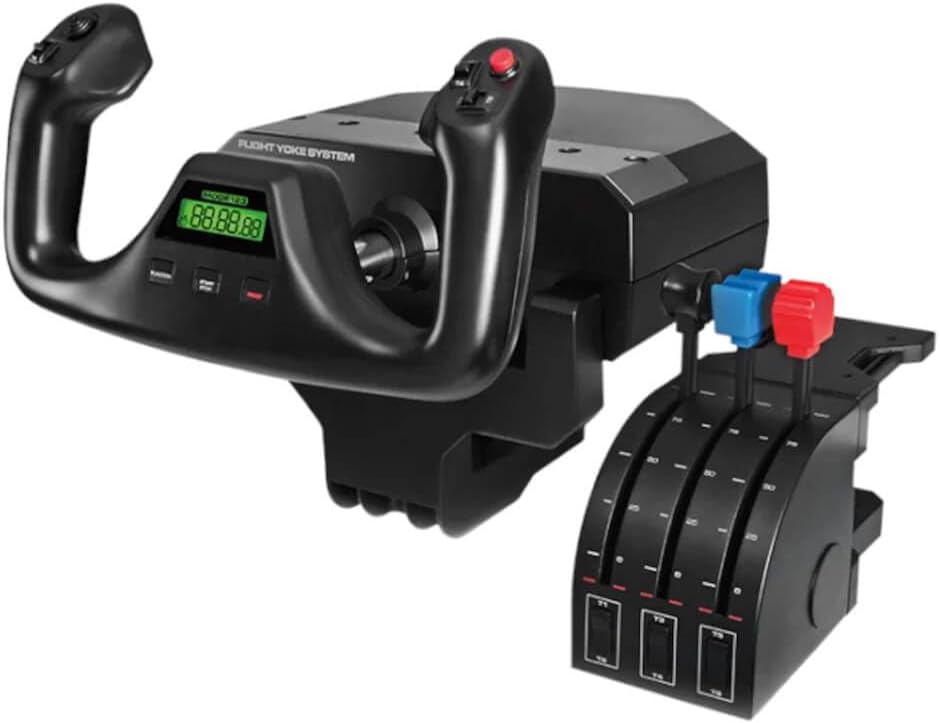
This Logitech G PRO Flight Yoke System includes a separate throttle quadrant, enhancing control for Mac users. Its strong rating highlights excellent build quality and a high number of programmable inputs.
We may earn a commission when you buy through this link, at no additional cost to you.
A stainless steel shaft ensures precise movements while configurable knobs allow customization of throttle settings. An integrated USB hub helps manage cable clutter on your desk.
The setup can be large, requiring sufficient desk space. Mac users should verify software compatibility for the most efficient experience.
An excellent yoke and throttle combo, this product offers professional features. It suits those who demand robust controls for accurate simulation.
The built-in USB 2.0 port helps reduce cable clutter for a cleaner desk setup.
Stainless steel yoke shaft delivers robust and accurate control of your aircraft in flight simulators.
We may earn a commission when you buy through this link, at no additional cost to you.
This renewed Logitech G Saitek PRO USB Flight Yoke offers a budget-friendly path to realistic controls. Its good rating reflects solid performance and Mac compatibility for virtual flights.
We may earn a commission when you buy through this link, at no additional cost to you.
Ultra-precise bearings ensure smooth inputs, and a digital chronograph helps with timing during simulations. The renewed status makes it accessible without the full price tag.
As a renewed product, condition may vary. Check the seller details and warranty information before purchasing to manage expectations.
A smart choice for budget buyers, this yoke delivers value. It is a practical option for those seeking quality without the premium price.
The integrated digital chronograph is perfect for brushing up on IFR and cross-country procedures.
Compatible with Mac OSX operating systems for a seamless experience in flight simulators.
We may earn a commission when you buy through this link, at no additional cost to you.
Selecting a flight controller requires weighing build quality, compatibility, and features against your budget and simulation goals. This guide outlines the key factors to consider.
Many controllers are designed for Windows, but Mac compatibility is essential for seamless setup. Check manufacturer documentation or forums to confirm driver support and software requirements before buying.
Look for controllers with plug-and-play functionality or open-source driver support to avoid configuration headaches on macOS.
Flight controllers undergo frequent use and require robust construction. Metal shafts, high-quality plastics, and reinforced joints help ensure long-term reliability during intense sessions.
Prioritize products with stainless steel components and reinforced joints for durability over time.
More programmable buttons and axes allow greater customization. Advanced users often need 50+ controls to manage complex aircraft systems without switching keyboard inputs.
Choose a controller with enough programmable inputs to match your simulation complexity.
Yoke systems offer realistic control for airliners while HOTAS setups suit military aviation. Decide based on the types of aircraft you simulate most often.
Yokes mimic civil aviation; HOTAS suits fighter jets.
Some bundles include rudder pedals, enhancing realism for landing and takeoff. If not bundled, ensure the controller is compatible with separate pedals you plan to buy later.
Consider bundles that include rudder pedals for a complete setup.
Secure mounting prevents wobble during flight. Look for systems with adjustable clamps or suction pads that fit your desk thickness and material.
Flexible mounting ensures stability regardless of desk type.
Advanced software allows detailed mapping and profile management. Ensure the software is available or supported for macOS to unlock full controller features.
Software support on Mac is critical for full customization.
Prices range from affordable sticks to expensive full yoke systems. Align your purchase with your budget while considering long-term value through durability and features.
Balance cost with features to ensure long-term satisfaction.
Start by connecting your controller via USB and installing any required drivers or software. Ensure your Mac recognizes the device in system settings before launching your simulation application.
Calibrate the controls through the software to minimize drift and improve accuracy. Adjust resistance and axis settings to match your preferred flying style for optimal performance.
Regularly clean the controller surface with a soft cloth to prevent dust buildup. Store it in a dry place to protect the mechanical components from wear over time.
Some controllers offer native Mac support while others require Windows or third-party drivers. Always check product descriptions for macOS compatibility before purchasing to ensure smooth setup and function.
Many controllers support separate rudder pedals via USB or additional ports. Bundles often include them for convenience, but standalone pedals work with most modern systems.
Most controllers require manufacturer software for full customization. Check if it supports macOS or if alternatives exist for mapping buttons and axes effectively.
Yes, most controllers work with X-Plane and other major simulators. Ensure the device is recognized by the game to utilize all programmed inputs.
Recalibrate the device using the provided software or game settings. Check for hardware defects if recalibration does not resolve persistent drift during flight.
Steel shafts offer more durability and smoother movement than plastic. They are preferred for long-term reliability and realistic resistance in flight simulations.
The Honeycomb Alpha Yoke and Logitech G X56 lead the pack for realism and customization. These models deliver premium performance that elevates simulation quality for dedicated Mac users.
Budget options like the Thrustmaster T-Flight Hotas X provide accessible entry points without sacrificing essential controls. Consider your simulation goals to prioritize features that matter most.
Prices and availability fluctuate frequently, so review current listings before deciding. Ensuring the latest model and driver compatibility will help you maximize your flight simulation investment.