
ASRock B550M-HDV Socket AM4
4.5Editor score
Affordable Micro ATX Design
PCIe 4.0 Ready
Six Power Phase Delivery
This guide compares the top low power motherboard options for efficient NAS and home server builds based on performance and power consumption features.
Finding the right low power motherboard is essential for building efficient NAS systems or home servers that run continuously without high energy costs. These boards balance performance with minimal wattage draw to keep your setup cool and quiet while handling data tasks smoothly.
We evaluated ten real products focusing on their processor efficiency thermal management and connectivity options for storage and networking. Our selection includes industrial NAS boards and consumer chipsets that support energy efficient CPUs for 24/7 operation in compact cases.
Each pick highlights specific strengths like dual 2.5G LAN ports or multiple M.2 slots for fast storage. Prices and availability change frequently so check the linked product page for the most current deals before making your final purchase decision.
4.5Editor score

4.5Editor score

5.0Editor score
The table below provides a quick side by side view of key specifications for all ten boards including form factor CPU support and networking options.





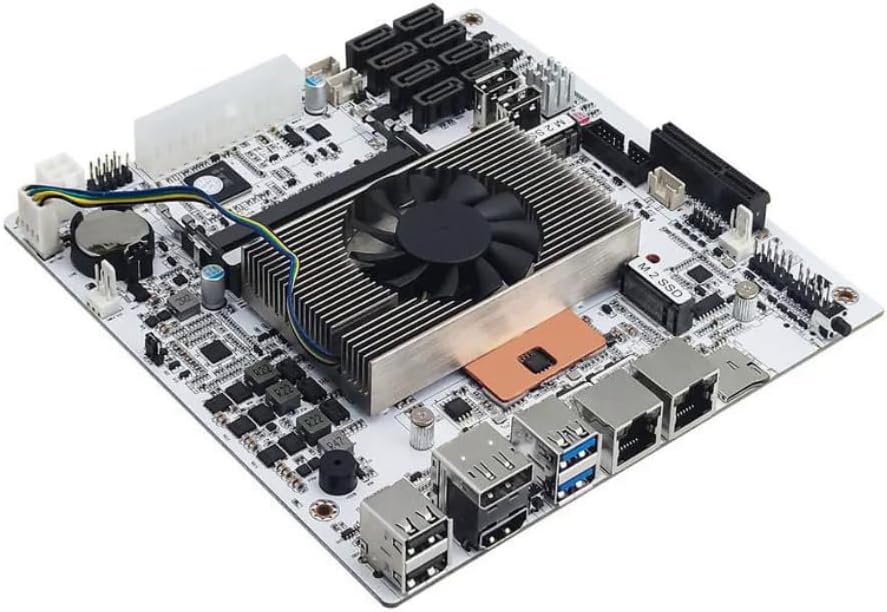
This Industrial NAS motherboard stands out as our top pick due to its balanced mix of networking and processing power for server tasks. It features an Intel Celeron N5105 processor that delivers solid multi-threaded performance while keeping power usage low for continuous operation.
We may earn a commission when you buy through this link, at no additional cost to you.
The standout strength lies in its networking capabilities with four i226 2.5GbE ports that provide high speed secure connectivity for professional firewall or storage appliances. Storage is equally impressive with six SATA ports and two M.2 NVMe slots allowing for a large and fast drive array.
A minor trade-off is the need for both 24 pin and 4 pin power connections which requires a compatible power supply unit. Also the first boot may take several minutes to read memory information so patience is needed during initial setup.
If you are building a high performance NAS or home server that needs fast network access and lots of storage ports this board is an excellent choice. Its industrial grade build and rich connectivity make it worth the premium over basic consumer boards.
The four 2.5GbE LAN ports enable link aggregation and high bandwidth throughput for multi user file transfers without saturating the network.
The ultra-high density moisture proof fiber circuit board protects against corrosion and electrical shorts ensuring long term reliability in server racks.
We may earn a commission when you buy through this link, at no additional cost to you.
This budget friendly Micro ATX board offers an entry level solution for simple home tasks or media centers where high end performance is not needed. The included Intel J1800 dual core processor provides sufficient power for light computing while maintaining a low thermal profile.
We may earn a commission when you buy through this link, at no additional cost to you.
Key strengths include its comprehensive I/O panel with one USB 3.0 port and multiple USB 2.0 headers for front panel connections. It also supports both VGA and HDMI outputs making it versatile for older monitors or modern displays without needing an adapter.
The main limitations are the use of DDR3 memory which is less efficient than DDR4 and only two SATA 2.0 ports for storage. These factors restrict its use in modern large scale storage builds or applications requiring fast data access speeds.
For users seeking the lowest possible cost for a functional low power system this board delivers good value. It suits basic office tasks or retro gaming builds where legacy port support and minimal power draw are priorities over raw speed.
The inclusion of PS/2 keyboard and mouse ports ensures compatibility with older industrial or enterprise peripherals that require these connections.
By including the CPU on the board users save on separate processor costs making this an economical choice for fixed task appliances.
We may earn a commission when you buy through this link, at no additional cost to you.
This micro ATX motherboard is ideal for users planning to upgrade to energy efficient AMD Ryzen processors that offer strong performance per watt. The AM4 socket compatibility extends the life of this board for future low power CPU options without replacing the entire platform.
We may earn a commission when you buy through this link, at no additional cost to you.
It features a digital 3+3 VRM design that ensures steady power delivery to the CPU which is crucial for stable operation during extended server or media tasks. The inclusion of PCIe 4.0 slots allows for fast NVMe storage and modern graphics cards if needed.
While it lacks high end audio features and has fewer rear USB ports compared to premium boards it provides all the essentials for a functional build. The onboard Q-Flash utility simplifies BIOS updates without requiring a compatible CPU for flashing.
Buyers looking for a reliable platform that balances cost and upgradeability will find this board a solid choice. It supports future low power Ryzen CPUs and includes modern storage interfaces making it a versatile base for efficient home servers.
Supporting a wide range of Ryzen processors means users can swap to a more efficient CPU later without changing the motherboard or case.
The digital power phases reduce voltage ripple and improve energy conversion efficiency which helps keep power draw lower under load.
We may earn a commission when you buy through this link, at no additional cost to you.
This board integrates smart cooling features that adjust system fan settings based on real time temperatures to maintain low power and quiet operation. It supports AMD Ryzen processors with a focus on stability and efficiency for 24/7 workloads in compact micro ATX cases.
We may earn a commission when you buy through this link, at no additional cost to you.
The Frozr AI cooling system and passive chipset heatsinks help dissipate heat effectively without needing noisy fans. Memory boost capabilities allow for high speed DDR4 operation which improves overall system responsiveness for virtualization or database tasks.
While it lacks built-in WiFi the wired connectivity is robust with a dedicated Gigabit LAN controller. The Steel Armor on the PCIe slot protects expensive GPUs or network cards from physical damage during installation.
This product suits users who value thermal management and stable power delivery for continuous operation. Its AI cooling and memory support make it a strong candidate for efficient builds that need to run cool and fast over long periods.
AI cooling algorithms automatically optimize fan curves to balance noise and cooling reducing power consumption when full speed is not required.
Core Boost technology ensures the CPU receives clean power which minimizes electrical waste and improves energy efficiency during processing tasks.
We may earn a commission when you buy through this link, at no additional cost to you.
This Micro ATX motherboard bundles a low power Quad-Core processor that is well suited for media transcoding or basic server duties. The J4125 chip offers a balance of performance and energy savings making it a popular choice for home labs and NAS enclosures.
We may earn a commission when you buy through this link, at no additional cost to you.
It includes a dedicated M.2 Key E slot specifically for WiFi modules which adds wireless connectivity without taking up PCIe slots. The Super Alloy components aim to improve durability and electrical efficiency over time in continuous use scenarios.
The main drawback is the older PCIe 2.0 specification which limits bandwidth for modern expansion cards or high speed storage adapters. User feedback indicates mixed reliability so checking recent reviews before purchasing is advisable.
If you need a simple plug and play board with an included low power CPU this option is worth considering. It provides a straightforward path to building a compact efficient system without the hassle of separate CPU installation.
Having the CPU soldered reduces installation steps and potential compatibility issues which is helpful for first time builders or quick setups.
The M.2 Key E slot allows users to add WiFi if needed without occupying the main PCIe x16 slot for other expansion cards.
We may earn a commission when you buy through this link, at no additional cost to you.
This affordable micro ATX board supports a wide range of Ryzen processors allowing users to pick low power APUs or efficient desktop CPUs for their needs. It offers robust protection features and stable power phases to ensure long term reliability for home server projects.
We may earn a commission when you buy through this link, at no additional cost to you.
One unique benefit is the legacy display support with HDMI DVI-D and D-Sub outputs which makes it compatible with older monitors or industrial displays. The 6 power phase design with premium chokes provides consistent voltage for steady performance under light loads.
While it is a budget product it does not skimp on essentials like USB 3.2 ports and Gigabit LAN. The spike protection guards ports against electrical surges which is vital for always-on devices in home environments with unstable power.
Buyers on a tight budget who still need modern Ryzen support will appreciate this board. It balances cost and features effectively making it a strong value pick for efficient builds that do not require extreme performance.
Three video outputs ensure you can connect any monitor type without needing additional hardware which simplifies setup for HTPC or NAS setups.
Full Spike Protection on USB and LAN ports prevents damage from power surges extending the lifespan of the board and connected peripherals.
We may earn a commission when you buy through this link, at no additional cost to you.
This Mini ITX board is perfect for tight spaces where space efficiency is key without sacrificing connectivity. The integrated Intel WiFi and Bluetooth module eliminates the need for separate cards which saves a PCIe slot and reduces internal cable clutter.
We may earn a commission when you buy through this link, at no additional cost to you.
The direct 6 phase digital PWM with high quality DrMOS ensures efficient power conversion that reduces heat and power loss. This is critical for small cases where airflow is restricted and thermal management is challenging.
It supports three display outputs which is rare for ITX boards and allows for multi monitor setups in compact media centers. The NVMe PCIe 3.0 slot provides fast boot and application launch speeds essential for responsive low power systems.
For enthusiasts building a compact home server or gaming rig this board offers a complete package. Its thermal design and wireless features make it a top choice for users who want performance in a tiny footprint.
Having WiFi and Bluetooth built in frees up expansion slots for other cards and reduces the need for additional antennas inside the case.
The digital PWM design improves voltage regulation and reduces wasted energy which helps keep the system cool in limited airflow environments.
We may earn a commission when you buy through this link, at no additional cost to you.
This premium board delivers top tier connectivity and power features for users who want the best wireless and audio experience. The Wi-Fi 6E support provides low latency connections ideal for real time streaming or gaming on a home server.
We may earn a commission when you buy through this link, at no additional cost to you.
An 8 phase power design ensures robust support for high end Ryzen CPUs which is rare in micro ATX boards. The high capacity RAM support allows for extensive virtualization or media database tasks that demand large memory pools.
While it costs more than basic boards the included WiFi 6E and premium audio codec add significant value. The Nahimic audio software enhances sound quality for media playback which is a bonus for home theater PCs.
Buyers seeking a complete feature rich platform will find this board worth the investment. It combines high speed networking with reliable power delivery to support demanding low power workloads with ease.
Wi-Fi 6E uses the 6GHz band to offer faster speeds and less interference which is crucial for high bandwidth wireless transfers.
Support for up to 128GB RAM ensures future readiness for virtual machines or large local databases without hardware upgrades.
We may earn a commission when you buy through this link, at no additional cost to you.
This industrial Mini ITX board offers a powerful quad core eight thread CPU that outperforms mainstream low power chips for complex tasks. It is designed for virtualization and firewall workloads that need more cores without sacrificing energy efficiency.
We may earn a commission when you buy through this link, at no additional cost to you.
The eight SATA ports provide exceptional storage expansion for a compact board which is useful for large NAS arrays. Dual 2.5GbE network ports enable high throughput connections suitable for multi gigabit network setups.
A known sleep mode bug may require users to disable certain power states in BIOS for stability. The first boot process is slow as it reads memory information so setup requires patience to complete correctly.
For users needing significant core counts and storage channels in a small form factor this board is unmatched. It balances industrial durability with high end features making it ideal for serious home lab projects.
Support for VT-x and VT-d allows smooth pass-through of storage and network devices to virtual machines for better performance.
Dual copper heat pipes and dual ball bearing fans ensure the CPU stays cool even under sustained multi-threaded workloads.
We may earn a commission when you buy through this link, at no additional cost to you.
This NAS specific board features an 8th gen Core i5 processor that delivers strong single thread performance for media transcoding tasks. It includes enterprise level features like virtualization passthrough that allow VMs direct access to hardware resources.
We may earn a commission when you buy through this link, at no additional cost to you.
The eight SATA ports and two NVMe slots provide a versatile storage array capable of hosting a large library or database. Dual 2.5GbE LAN ports support link aggregation for redundant and high speed network connections.
Users should note the absence of sleep mode which is common for servers but may impact power savings in idle scenarios. The ES version processor indicates engineering samples might be used which can affect long term stability.
This board is best for advanced users needing high storage density and networking features in a compact ITX form factor. It offers a robust foundation for complex server environments that require hardware passthrough and high bandwidth.
Eight SATA ports allow a single small box to hold enough drives for a full NAS array without needing extra controllers.
VT-x and VT-d support enables VMs to access USB and network hardware directly improving performance for containerized apps.
We may earn a commission when you buy through this link, at no additional cost to you.
Selecting the right motherboard requires balancing energy efficiency with performance needs and feature sets.
Low power motherboards often come with integrated CPUs or support energy efficient series like Intel T-series or AMD Ryzen U-series. Check the TDP rating to ensure it fits your cooling and power budget. Integrated solutions simplify builds by eliminating CPU selection errors.
Look for processors with lower TDP ratings to reduce heat and electricity costs over time.
Mini ITX boards fit small cases while Micro ATX offer more expansion slots. Verify your case dimensions before purchasing to avoid installation issues. Small cases limit airflow so efficient boards reduce thermal stress.
Choose a form factor that matches your case size and planned number of drives or cards.
NAS and server builds benefit from multiple Ethernet ports for link aggregation or network segmentation. Boards with 2.5G LAN provide faster transfers than standard Gigabit options. Integrated WiFi can reduce the need for extra PCIe cards.
Ensure you have enough LAN ports to meet your network speed requirements.
Check the number of SATA and M.2 slots available to support your storage growth plans. Some industrial boards offer eight or more SATA ports for massive capacity. NVMe slots add speed for cache drives or OS installation.
Count your current and future drives to confirm enough ports are present.
Quality VRMs and chipset heatsinks keep temperatures stable during 24/7 operation. Passive cooling designs reduce noise but may limit performance under heavy loads. Look for boards with multiple power headers if high stability is needed.
Prioritize passive or AI cooling features for silent home server builds.
DDR4 or DDR5 support ensures compatibility with modern memory modules. Higher capacity support allows for virtual machines and caching. Dual channel configurations improve memory bandwidth for smoother operations.
Verify the maximum RAM size per slot to meet your virtualization needs.
If your build needs a display for setup or media playback ensure HDMI or DP ports are present. Some industrial boards offer multiple outputs for multi-monitor setups. Legacy VGA options may be needed for older equipment.
Check the number and type of video outputs before purchasing.
Easy update tools like Q-Flash allow BIOS changes without a CPU. Look for options to tweak fan curves or power settings. Remote management support helps monitor health without physical access.
Choose a board with user-friendly BIOS tools for easy maintenance.
Ensure your power supply provides enough wattage and connectors to meet the board's requirements. Low power boards often need both 24 pin and 4 pin connections so check your PSU before assembly.
Keep dust out of the case with filters to prevent clogging fans and heatsinks. Periodically check fan speeds in BIOS to maintain cooling efficiency in your specific environment.
Update the BIOS to the latest version to improve stability and CPU support. Regular updates fix bugs and optimize power management features for better efficiency.
Low power boards reduce electricity costs and heat output which is essential for devices running 24/7. They often include features like multiple LAN ports or SATA channels optimized for storage tasks.
Many support current generations of Ryzen or Intel processors. Always check the specific CPU support list on the manufacturer's website before buying to ensure compatibility.
Multiple ports allow link aggregation for higher bandwidth or separate networks for security. This improves file transfer speeds and network isolation in advanced home setups.
Mini ITX boards are compact and save space but may have fewer ports. Micro ATX offers more flexibility and ports for the same efficiency with low power CPUs.
If the CPU is soldered like on some industrial boards you cannot upgrade. Consumer chipsets usually allow CPU swaps within the same socket type so check this before buying.
Enable power saving modes in BIOS and disconnect unused peripherals. Using efficient power supplies also helps to minimize overall energy consumption in your build.
We highlighted ten options ranging from industrial NAS boards to consumer chipsets that meet energy efficiency goals. The Celeron N5105 board leads in networking features while budget AMD boards offer great value for upgradable systems.
Prioritize your specific needs like drive count or network speed when comparing models. The right choice depends on whether you value port density or upgrade flexibility over long term use.
Always verify current availability and prices as these details can change. Use the links provided to check real time stock and pricing before finalizing your order.