
Cudy R700
4.4Editor score
Connects Up to 5 ISPs
Full OpenWRT Support
Built-In WireGuard VPN
This guide compares the top load balancing routers for small businesses and advanced home networks, evaluating performance, security, and multi-WAN capabilities
Finding the right load balancing router is crucial for maintaining stable internet connectivity in busy environments. These devices distribute traffic across multiple connections to prevent bottlenecks and ensure seamless operations for your team.
We evaluated ten leading models based on port configurations, security features, and ease of management. Each product offers unique strengths tailored to different network sizes and technical requirements.
Our selections highlight key benefits and potential drawbacks to help you make an informed decision. Keep in mind that product availability and pricing may fluctuate over time.
4.4Editor score

4.4Editor score

4.7Editor score
The following table provides a side-by-side comparison of all ten routers to help you quickly identify which model aligns with your specific bandwidth and security needs.


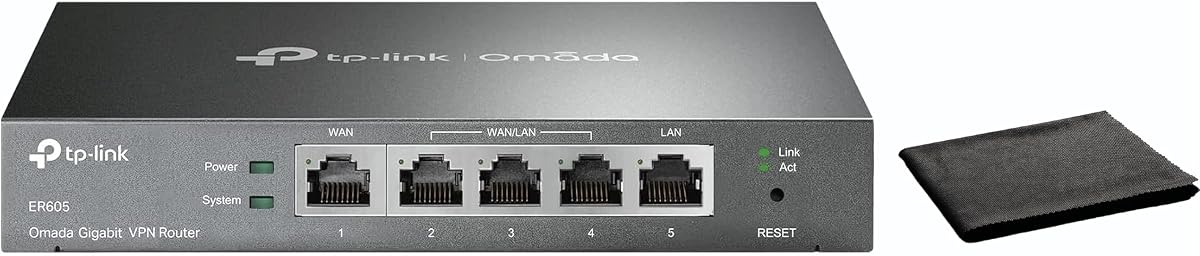

The TP-Link ER605 stands out as a top contender for small to medium businesses needing reliable load balancing. With a high rating from users, it delivers consistent performance without breaking the bank.
We may earn a commission when you buy through this link, at no additional cost to you.
Its five Gigabit ports allow for flexible connectivity, including multiple WAN inputs to distribute internet traffic efficiently. The support for mobile broadband via USB ensures your business stays online even if your primary connection fails.
While it lacks some advanced enterprise features, the robust security suite including DoS defense and IP filtering provides solid protection for most environments. The trade-off is worth the cost savings for smaller setups.
If you need a dependable router that balances performance and price, the ER605 is an excellent choice. It simplifies network management while ensuring your team has uninterrupted access to critical resources.
The USB WAN port enables seamless failover to mobile networks when wired connections fail.
Built-in SPI firewall and DoS defense protect your internal network from external threats.
We may earn a commission when you buy through this link, at no additional cost to you.
The ER7206 is designed for growing businesses that need to manage many devices simultaneously. Its ability to handle up to 700 clients makes it ideal for larger offices or schools.
We may earn a commission when you buy through this link, at no additional cost to you.
Integration with the Omada SDN platform offers centralized control over access points and switches, streamlining network administration. The flexible port configuration includes an SFP WAN port for fiber optic connectivity.
While the setup can be more involved than basic routers, the long-term benefits of scalability and centralized management are significant. Users appreciate the reliability and the extensive security options available.
For organizations planning to expand their network infrastructure, this router provides a solid foundation. It balances high capacity with advanced management tools to support complex networking needs.
Omada SDN integration allows you to add access points and switches seamlessly.
Remote management via Omada Cloud ensures you can monitor your network from anywhere.
We may earn a commission when you buy through this link, at no additional cost to you.
The Cudy R700 offers exceptional value for users seeking load balancing without a high price tag. Its support for up to five ISPs provides robust redundancy at a fraction of the cost of premium models.
We may earn a commission when you buy through this link, at no additional cost to you.
OpenWRT support unlocks a wide range of customizations for advanced users who want to tailor their network settings. The built-in WireGuard VPN ensures secure remote access is available right out of the box.
While it may not handle heavy enterprise traffic as well as higher-end units, it is perfect for small offices or remote workers. The intuitive web interface and app management make setup straightforward for non-experts.
If you need a cost-effective way to maintain internet uptime through multiple connections, this router is a great option. It combines essential features with flexibility for those who enjoy tweaking their network.
Full OpenWRT support allows for custom firmware and advanced network packages.
Built-in WireGuard support enables fast and secure connections for remote staff.
We may earn a commission when you buy through this link, at no additional cost to you.
The Route10 is built for users who need maximum speed and performance without compromise. Its 10Gbps wired routing capabilities ensure that large file transfers and high-bandwidth applications run smoothly.
We may earn a commission when you buy through this link, at no additional cost to you.
Powered by a quad-core Qualcomm processor, the router handles heavy traffic loads without lag. The inclusion of PoE+ means you can power your access points directly from the router, simplifying your setup.
While it does not broadcast Wi-Fi, its role as a dedicated router allows it to focus on performance. Real-time monitoring tools give administrators deep insights into traffic patterns and potential bottlenecks.
This router is ideal for tech enthusiasts or businesses with demanding network needs. It offers a professional grade solution that prioritizes speed and control over convenience features like built-in Wi-Fi.
2 Gbps SFP+ ports provide future-proof connectivity for high-speed fiber networks.
Integrated PoE+ reduces the need for extra power adapters by powering devices directly.
We may earn a commission when you buy through this link, at no additional cost to you.
The ER7412-M2 brings multi-gigabit speeds to businesses ready to upgrade their infrastructure. Its two 2.5G ports allow you to take full advantage of faster internet plans without needing a complete overhaul.
We may earn a commission when you buy through this link, at no additional cost to you.
With ten total ports, this router offers extensive connectivity options for various devices and network segments. Security is a priority with features like IPS/IDS protection and support for modern VPN protocols.
While it performs best within the Omada ecosystem, it stands on its own as a powerful tool. The load balancing capabilities ensure that your network resources are utilized efficiently across all connections.
If you are looking to future-proof your network with 2.5G connectivity, this model is a strong candidate. It balances speed with security to support modern business environments effectively.
2.5G ports ensure your network can handle faster broadband speeds without bottlenecks.
IPS/IDS features provide an extra layer of protection against internal and external threats.
We may earn a commission when you buy through this link, at no additional cost to you.
The TL-R470T+ is designed for small offices that need multiple internet connections without complex features. Its four WAN ports allow for redundancy and bandwidth aggregation to keep operations running smoothly.
We may earn a commission when you buy through this link, at no additional cost to you.
Although it uses Fast Ethernet rather than Gigabit, it is sufficient for many basic business needs. The PPPoE server support adds flexibility for managing network accounts and internet access for clients.
Users appreciate the compact design and built-in lightning protection which safeguards the device from power surges. While the interface is straightforward, it provides the essential tools needed for load balancing.
For small retail locations or cafes where budget is a priority, this router offers reliable performance. It ensures you can maintain internet access even if one provider experiences an outage.
Four WAN ports allow you to connect to multiple ISPs for backup capabilities.
Port-based management helps you direct traffic to specific clients effectively.
We may earn a commission when you buy through this link, at no additional cost to you.
The TL-R480T+ serves as an entry point for users needing basic load balancing capabilities. Its three configurable ports offer flexibility for small setups that require multiple internet connections.
We may earn a commission when you buy through this link, at no additional cost to you.
While it is limited to 100Mbps speeds, it is suitable for environments where high throughput is not the primary concern. The straightforward setup process makes it easy to get online quickly.
Cost-effective design means you can get essential redundancy without investing in expensive hardware. It is a practical choice for small offices or homes where multiple providers are used for backup.
If your primary goal is simple internet backup without needing advanced management tools, this model fits well. It provides a reliable solution for maintaining connectivity through multiple lines.
This model offers a cost-effective way to connect multiple ISPs for backup purposes.
Three ports can be configured to meet the specific WAN and LAN needs of your network.
We may earn a commission when you buy through this link, at no additional cost to you.
The ER-605 focuses on ease of use without sacrificing essential business features. Its cloud monitoring capabilities allow you to keep an eye on network status from anywhere using the Omada app.
We may earn a commission when you buy through this link, at no additional cost to you.
With dual WAN ports, you can set up a primary and backup connection to maintain uptime. The QoS settings ensure that critical applications like VoIP or video conferencing get priority bandwidth.
While it has fewer WAN ports than other models, it is sufficient for many small businesses. The inclusion of VPN support ensures that remote workers can connect securely to your internal network.
For those who prioritize simplicity and remote management, this router is a great option. It combines reliable performance with intuitive tools to make network administration stress-free.
Cloud monitoring ensures you can check network health and alerts from a remote device.
QoS settings help manage bandwidth so that critical business apps do not lag.
We may earn a commission when you buy through this link, at no additional cost to you.
The EdgeRouter 4 is a favorite among IT professionals who need granular control over their network. Its robust hardware and fanless design ensure it can handle demanding environments without overheating.
We may earn a commission when you buy through this link, at no additional cost to you.
With support for advanced routing protocols, it offers flexibility for complex network architectures. The SFP port allows for fiber connectivity which is essential for high-performance links.
While the interface may be challenging for beginners, the power it offers is unmatched in this category. Users appreciate the stability and reliability that comes with Ubiquiti's enterprise-grade engineering.
If you are comfortable with technical network configurations, this router provides outstanding performance. It is a solid investment for those who need a professional-grade solution for load balancing.
Fanless internal PSU design ensures quiet operation and consistent performance.
Wall or rack mount options allow you to install the router in various environments.
We may earn a commission when you buy through this link, at no additional cost to you.
The Omada Fusion 2.5G represents the cutting edge of router technology with its touchscreen interface. This unique feature allows you to troubleshoot and monitor traffic directly on the device without needing a laptop.
We may earn a commission when you buy through this link, at no additional cost to you.
With five 2.5G ports, it provides ample bandwidth for modern networks that demand high speeds. The quad-core CPU ensures that even heavy loads are processed efficiently without delays.
While it is on the higher end of the price spectrum, the convenience of on-site diagnostics and robust performance justify the cost. It is built for businesses that value efficiency and speed above all else.
If you need a premium solution that simplifies network management and boosts performance, this router is an excellent choice. It stands out for its innovative design and powerful hardware capabilities.
The touchscreen provides instant health scores and traffic stats right on the router.
Bluetooth setup allows for quick adoption and configuration via the Omada App.
We may earn a commission when you buy through this link, at no additional cost to you.
Selecting the right load balancing router requires understanding your network needs and the technical features available. Consider these factors to find a model that supports your goals.
The number of WAN ports determines how many internet connections you can utilize simultaneously. More ports provide greater redundancy and bandwidth aggregation options.
Choose a model with enough ports to meet your current needs while allowing room for future expansion.
Port speeds range from Fast Ethernet to 2.5G and 10Gbps. Ensure your router supports the speed of your internet plan to avoid bottlenecks.
Higher port speeds are essential for businesses with large file transfers or heavy data usage.
Secure remote access is vital for distributed teams. Look for routers that support modern protocols like WireGuard and IPsec for encrypted connections.
Verify the maximum number of concurrent VPN connections your chosen router can handle effectively.
Ease of management affects how quickly you can configure and troubleshoot your network. Web interfaces and cloud apps are common options for remote control.
Some models offer advanced tools like touchscreens for on-site monitoring to simplify maintenance.
Built-in security features protect your network from external threats. Look for firewalls, DoS protection, and filtering capabilities to secure your data.
Enterprise-grade security helps prevent unauthorized access and keeps your business operations safe.
Routers that integrate with a broader ecosystem allow for unified management of switches and access points. This centralization simplifies network administration.
If you plan to expand your network, choosing a router that works with existing devices is beneficial.
Automatic failover ensures that your internet remains active if the primary connection fails. This is critical for businesses that cannot afford downtime.
Check how quickly the router switches to the backup connection to minimize disruptions.
Prices vary widely based on performance and features. Balance your financial budget with the technical requirements of your organization.
Investing in a higher-end model may save money in the long run by reducing maintenance and downtime.
Connect your primary and secondary internet cables to the WAN ports on the router to ensure load balancing is active.
Access the web interface or app to configure which WAN connections are primary or backup based on your needs.
Regularly update the firmware to maintain security and ensure the router runs efficiently over time.
A load balancing router distributes network traffic across multiple internet connections to optimize bandwidth usage and ensure reliability. If one connection fails, it automatically routes traffic through another to maintain uptime.
If you rely on a single internet connection for daily tasks, a standard router is usually sufficient. However, if you work from home and require constant uptime, a load balancing router can provide a backup to prevent downtime.
They use policies to distribute traffic based on weight or connection quality. This ensures that data is sent through the most efficient path available at any given time.
While they do not increase the speed of a single connection, combining multiple connections can result in higher total throughput. This is beneficial for networks with many users or high-bandwidth applications.
The router detects the outage and switches traffic to the remaining active connection. This failover process happens automatically to minimize disruption for users.
Most modern models offer intuitive web interfaces or mobile apps to simplify setup. However, advanced configurations may require technical knowledge to optimize performance effectively.
Yes, most support VPNs to secure remote access. They can handle multiple secure connections for remote employees to connect to the local network safely.
Higher-priced models often include faster ports, better hardware, and advanced management features. These improvements support larger networks and more complex traffic management needs.
The top picks in this guide offer a range of options suitable for various needs and budgets. The TP-Link ER605 provides a reliable balance of performance and affordability for small businesses.
If you need higher speeds and more control, consider the Omada Fusion 2.5G for its premium features. Evaluate your specific bandwidth requirements to determine the best fit.
Remember that product availability and pricing can change. Check current listings to ensure you get the best deal for your networking needs.