
Logitech G305 Lightspeed Wireless Gaming Mouse – Black
4.6Editor score
HERO sensor delivers 12000 DPI
LIGHTSPEED wireless 1ms report rate
Up to 250 hours battery life
This guide compares the top 10 lightweight mouse options for gaming and productivity, analyzing performance, weight, and battery life to help you choose.
Finding the right lightweight mouse can transform your computing experience by reducing hand fatigue and improving precision during long sessions. Whether you are a competitive gamer or a professional needing mobility, choosing a design that balances portability with performance is essential for daily use.
We evaluated ten top-rated models based on sensor accuracy, build quality, wireless latency, and ergonomic design. Our comparison focuses on real-world usability, ensuring each pick meets rigorous standards for speed, comfort, and reliability across various operating systems and usage scenarios.
Each review highlights specific strengths and trade-offs to help you find the ideal match for your workflow. Please note that product availability and pricing fluctuate frequently, so verify current details before purchasing to ensure you get the best value for your needs today.
4.6Editor score

4.5Editor score

4.6Editor score
This side-by-side comparison outlines the key specifications and features of all ten selected lightweight mice to help you quickly identify the model that best suits your specific performance and comfort requirements.





The Logitech G305 stands out as a top choice for gamers seeking a lightweight wireless experience without breaking the bank. With a 4.6 rating, it delivers high performance thanks to its HERO sensor and LIGHTSPEED technology, ensuring precision and speed for competitive play.
We may earn a commission when you buy through this link, at no additional cost to you.
Its HERO sensor offers up to 12,000 DPI sensitivity and 400 IPS precision, making it highly responsive during fast movements. The LIGHTSPEED wireless connection ensures a lag-free experience with a 1 ms report rate, matching wired performance reliability. Users can enjoy up to 250 hours of continuous gameplay on one AA battery, or extend this to nine months with Endurance mode.
While it relies on a standard AA battery rather than internal charging, the efficient design minimizes power consumption significantly. The absence of RGB lighting keeps costs down but may not appeal to those prioritizing aesthetics. However, for pure functionality and portability, these trade-offs are acceptable for most users.
This mouse is ideal for budget-conscious gamers who need reliable wireless performance and long battery life. Its compact design also makes it a great travel companion for those who frequently move between workstations or travel with laptops.
The next-generation optical HERO sensor provides incredible performance while consuming significantly less power than previous models.
Experience lag-free gaming with 1 ms report rate ensuring responsiveness and reliability during competitive matches.
We may earn a commission when you buy through this link, at no additional cost to you.
The white variant of the Logitech G305 offers identical performance to its black counterpart but with a fresh visual style. Rated at 4.6, it is perfect for users who want a clean setup while maintaining top-tier gaming capabilities and reliability.
We may earn a commission when you buy through this link, at no additional cost to you.
Key features include the next-generation 12,000 DPI HERO optical sensor for accuracy and power efficiency. It utilizes advanced LIGHTSPEED wireless technology for a super-fast 1 ms response time. The battery life is impressive, providing up to 250 hours of continuous gaming on a single AA battery. Its classic shape ensures maximum maneuverability and comfort.
Potential downsides include a marginally higher price compared to the black version. Additionally, lighter surfaces can show smudges or dirt more readily than darker ones. Despite this, the aesthetic appeal often outweighs the minor maintenance required for dedicated users.
Buy this if you prefer a lighter color scheme for your gaming rig. It remains a top choice for portability and performance, fitting well in travel bags or minimalist desk setups.
The classic shape ensures maximum maneuverability, durability, and comfort during extended use sessions.
Convenient built-in storage for the included USB wireless receiver keeps everything compact for travel.
We may earn a commission when you buy through this link, at no additional cost to you.
The Logitech G PRO X Superlight 2 is a premium choice for serious esports athletes and enthusiasts. With a 4.5 rating, it combines speed, precision, and durability in a form factor that is lighter than its predecessor, making it the top overall lightweight option available today.
We may earn a commission when you buy through this link, at no additional cost to you.
Its HERO 2 sensor is the most advanced in gaming, tracking over 888 IPS and up to 44,000 DPI without smoothing or filtering. The mouse weighs only 60 grams, allowing for effortless movement. It features LIGHTFORCE hybrid switches for precise clicks and Zero-Additive PTFE mouse feet for seamless gliding. Battery life reaches 95 hours with 8 kHz polling.
While it delivers championship-level performance, the price is significantly higher than standard wireless mice. It also lacks onboard memory, relying on software for settings. For professionals, however, the accuracy and weight reduction justify the investment for winning matches.
Select this mouse if you demand the highest precision and lightest weight. It is designed in collaboration with leading esports pros, ensuring it meets the rigorous demands of competitive play.
Tracks over 888 IPS and up to 44000 DPI with zero smoothing for true precision.
Delivers pro-level precision and reliability with a tactile click feel for rapid fire.
We may earn a commission when you buy through this link, at no additional cost to you.
The Logitech G PRO X2 SUPERSTRIKE is engineered to win with breakthrough haptic technology and rapid trigger reset. Rated at 4.6, it offers unmatched immersive feedback and speed, making it a standout premium choice for professionals wanting customization.
We may earn a commission when you buy through this link, at no additional cost to you.
Designed with top esports athletes, it delivers 30 ms faster clicks for peak performance. The Haptic Inductive Trigger System provides real-time feedback during play. The HERO 2 sensor ensures tracking over 888 IPS and up to 44,000 DPI. It supports 10-level actuation points and features a thin-wall case for lightweight durability. Battery life ranges from 60 to 90 hours.
Advanced features require Logitech G HUB Software, which adds setup complexity. The high cost may not fit all budgets, but the innovation justifies it for competitive players. Its POWERPLAY 2 compatibility ensures endless wireless play without charging interruptions.
Buy this if you need the fastest clicks and deepest customization. It is compatible with PC and Mac, offering an immersive experience unmatched by standard gaming peripherals.
Gives real-time feedback for an unmatched immersive experience in any game scenario.
Delivers endless wireless play with no interruptions or charging worries during sessions.
We may earn a commission when you buy through this link, at no additional cost to you.
The Redragon M612 is an affordable option for gamers seeking high DPI performance without wireless complexity. With a 4.6 rating, it offers extensive customization through programmable buttons and dynamic RGB lighting, making it a great value for entry-level builds.
We may earn a commission when you buy through this link, at no additional cost to you.
It features 5 redefinable DPI levels ranging from 500 to 8000 for switching between game needs. The 11 programmable buttons allow for tactical keybinds and macro setups. The skin-friendly frosted coating provides a comfortable, fingerprint-free grip. The ergonomic claw-grip design reduces fatigue even after hours of use.
As a wired mouse, it lacks wireless mobility. The RGB lighting might be too flashy for some office environments. However, for gaming setups, the vibrant aesthetics and solid connectivity make it a preferred choice for many.
Choose this for budget-friendly gaming with high customization. It is perfect for users who prioritize wired reliability and vibrant lighting over wireless convenience.
Gear with 5 redefinable DPI levels for easy switching between different game needs.
Offers a satisfying and comfortable gaming experience with less fatigue during long use.
We may earn a commission when you buy through this link, at no additional cost to you.
The Logitech G502 Hero is renowned for its ergonomic shape and precise tracking capabilities. Rated at 4.6, it features a next-gen HERO sensor and adjustable weights, making it a versatile choice for users who prefer wired reliability and custom balance.
We may earn a commission when you buy through this link, at no additional cost to you.
Its HERO sensor delivers precision tracking up to 25,600 DPI with zero smoothing. The mouse includes 11 programmable buttons and a dual-mode hyper-fast scroll wheel. Adjustable weights allow you to match your playing style with up to five 3.6 g weights. Mechanical switch button tensioning ensures crisp clicks.
While known for being heavier than ultra-light models, this weight provides stability for some users. The wired connection restricts movement compared to wireless options. However, for precision and tactile feedback, many find these trade-offs beneficial.
Select this for precise tracking and custom weight balance. It is ideal for gamers who value mechanical switches and scroll wheel versatility in a wired form.
Arrange up to five 3.6 g weights for a personalized weight and balance configuration.
Metal spring tensioning and pivot hinges provide crisp, clean click feel.
We may earn a commission when you buy through this link, at no additional cost to you.
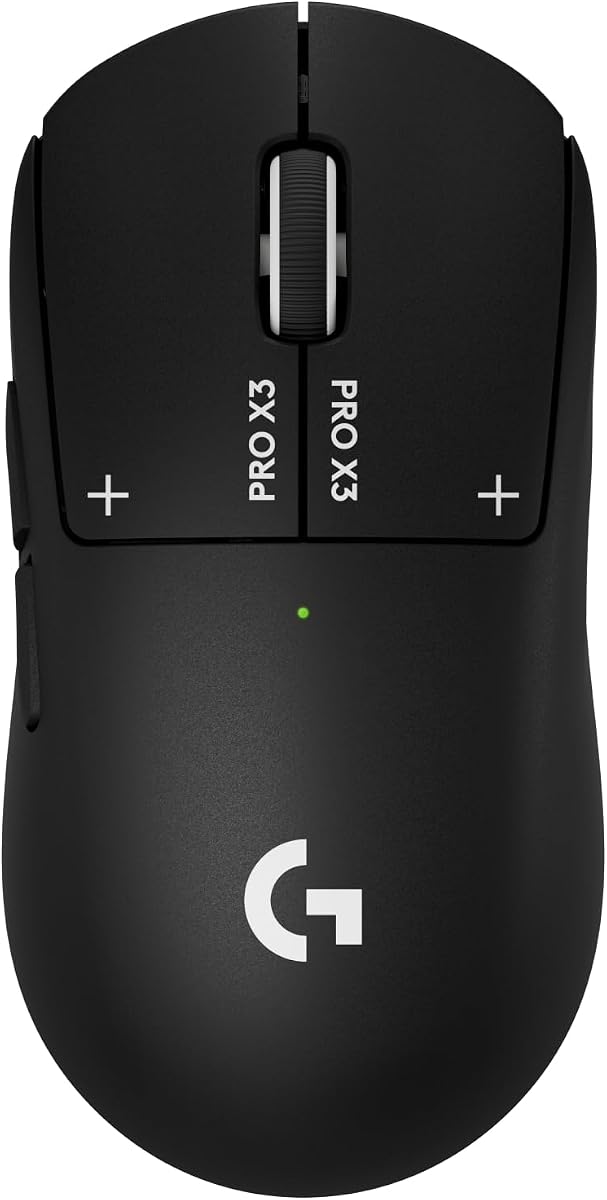
The Logitech G PRO X3 SUPERSTRIKE is built for endurance and precision with advanced haptic technology. With a 4.3 rating, it offers the longest battery life in its class and a unique electromagnetic switch system designed for competitive accuracy.
We may earn a commission when you buy through this link, at no additional cost to you.
It features the HERO 2 sensor tracking over 930 IPS and up to 48,000 DPI. The Haptic Inductive Trigger system replaces standard switches with an electromagnetic field for 10 actuation and 5 reset points. LIGHTSPEED wireless operates at up to 8 kHz polling for zero lag. Enjoy up to 135 hours of battery life on a single charge. It glides effortlessly with extra-large UHMWPE feet.
The advanced features require Logitech G HUB Software for full functionality. Its high cost may limit accessibility for casual gamers. Yet, for professionals seeking deep customization and endurance, it is a powerful tool.
Choose this for marathon sessions and high-stakes matches. It is designed with world-class athletes and delivers true click innovation for tournament-grade setups.
Haptic Inductive Trigger system replaces standard switches with electromagnetic field.
LIGHTSPEED wireless technology operates at up to 8 kHz polling for responsiveness.
We may earn a commission when you buy through this link, at no additional cost to you.
The Logitech M185 is a simple, reliable wireless mouse for everyday computing and travel. Rated at 4.4, it offers plug-and-play convenience and ambidextrous comfort, making it an accessible option for general productivity and office use.
We may earn a commission when you buy through this link, at no additional cost to you.
Its compact size makes it suitable for small hands and tight workspaces. The contoured shape feels great in either hand. It features a reliable 2.4 GHz connection and comes with a nano receiver. Enjoy up to 1 year of battery life with smart sleep mode. It includes certified post-consumer recycled plastic parts.
It lacks advanced features like programmable buttons or RGB lighting. The basic scroll wheel may not suit power users. However, its simplicity and reliability make it a trusted companion for work laptops and portable setups.
Buy this for effortless daily productivity. It is a better alternative to touchpads, increasing productivity by 50% according to studies.
The compact size and smooth cursor control make it suitable for tight workspaces.
Go for a full year without a battery change with smart sleep mode.
We may earn a commission when you buy through this link, at no additional cost to you.
The Logitech M330 Silent Plus is designed for quiet environments where noise reduction is critical. With a 4.5 rating, it delivers top performance while reducing clicking sounds by over 90%, making it perfect for shared workspaces and offices.
We may earn a commission when you buy through this link, at no additional cost to you.
Its SilentTouch Technology ensures a quieter working environment without sacrificing performance. The contoured plastic grips provide long-lasting comfort for right-handed users. With an 18-month battery life and auto-sleep mode, battery hassles are minimized. Advanced optical tracking provides high-performance precision on most surfaces.
It is right-handed only, limiting use for left-handed individuals. It lacks gaming-specific features like high DPI or RGB. However, for office workers focused on professionalism and silence, these limitations are acceptable.
Select this for a quieter workspace. It is a great upgrade from noisy mice, ensuring you remain focused without disturbing colleagues.
Reduces over 90 percent of clicking sounds ensuring top performance quietly.
Power saving auto-sleep mode allows focus without battery changing for a year.
We may earn a commission when you buy through this link, at no additional cost to you.
The Logitech MX Master 4 elevates productivity with haptic feedback and advanced scroll technology. Rated at 4.2, it is a powerhouse for professionals who need precise navigation and ergonomic comfort during long workflows.
We may earn a commission when you buy through this link, at no additional cost to you.
It features a Haptic Sense Panel for customizable feedback on specific actions. The Actions Ring adapts to each app, placing filters and shortcuts at your cursor. Scroll 1,000 lines per second with the MagSpeed scroll wheel. Enjoy 2X more powerful connectivity via USB-C dongle or Bluetooth. Quiet clicks reduce noise and distractions.
While it weighs more than gaming mice, the ergonomic tilt reduces hand stress. The high cost may limit its adoption for casual users. However, for creatives and professionals seeking flow and control, it remains a top-tier device.
Buy this for professional productivity and flow. It is designed for a positive future with recycled plastic and a complimentary 1-month Adobe Creative Cloud subscription.
Haptic Sense Panel offers customizable feedback on specific actions and notifications.
Scroll 1000 lines per second with the fastest quietest precise scrolling experience.
We may earn a commission when you buy through this link, at no additional cost to you.
Selecting the right lightweight mouse requires understanding key factors that impact performance, comfort, and longevity in your daily workflow.
Lightweight mice typically weigh under 70 grams, reducing hand strain and enabling faster movements. Look for models with thin-wall cases or removed buttons to minimize mass without compromising durability.
Prioritize lightweight designs if you play fast-paced games or travel frequently. A lighter mouse enhances agility and reduces fatigue over long periods.
High-quality sensors ensure precise tracking and accurate cursor movement. Aim for a mouse with adjustable DPI settings ranging from 500 to 25,600 or higher to suit different screen resolutions.
Choose a mouse with a proven sensor technology like HERO or similar for smooth tracking without smoothing or acceleration. This ensures consistent performance across various surfaces.
Wireless mice offer mobility and a clutter-free desk but require battery management. Ensure the model uses low-latency wireless technology like LIGHTSPEED to match wired responsiveness for gaming.
Wired options provide unlimited power and consistent connectivity. Consider your preference for freedom of movement versus reliability when making your final choice.
Long battery life ensures uninterrupted use. Look for mice offering over 250 hours of continuous play or rechargeable options with USB-C charging for extended sessions.
Rechargeable models are more sustainable and convenient. Check for power-saving features like auto-sleep modes to maximize battery efficiency.
An ergonomic shape supports your hand naturally and prevents discomfort. Look for contoured grips, thumb rests, and balanced designs that reduce wrist strain.
Try different shapes to find what fits your hand best. Comfort should be the top priority for long-term productivity and health.
Programmable buttons allow for customizable keybinds and macros. This feature boosts efficiency in games or specialized workflows.
Ensure the mouse includes intuitive software to configure buttons easily. More buttons offer flexibility but may add weight if not managed well.
Durable materials like polycarbonate shells and reinforced switches ensure longevity. Check for features like PTFE feet for smooth gliding and metal tensioning for crisp clicks.
A solid build protects against daily wear and tear. Quality construction ensures the mouse remains reliable for years of use.
Verify the mouse works with your operating system. Most modern mice support Windows, macOS, and ChromeOS for seamless plug-and-play functionality.
Choose a model compatible with your current devices. Universal support ensures you can switch between computers without setup issues.
Begin by connecting the mouse via USB dongle or Bluetooth and installing necessary software for button customization. Adjust DPI settings and polling rates to match your screen resolution and usage style.
Clean the mouse regularly by wiping the surface with a dry cloth. Remove the USB receiver when not in use to prevent damage and keep it safe during travel.
Store the mouse in a protective case to avoid scratches on the surface or PTFE feet. Update firmware periodically through official software to maintain performance and fix issues.
A lightweight mouse typically weighs under 70 grams due to material choices like thin plastics and removed internal components. This design reduces fatigue and improves speed for gaming and productivity.
Lightweight mice allow for quicker movements and lower resistance, which helps in fast-paced games. Many professional players prefer them for reduced hand strain and better control.
Use a soft, dry cloth to wipe the exterior and a soft brush to clear dust from crevices. Avoid using harsh chemicals that might damage the coating.
Many modern lightweight mice feature efficient sensors and sleep modes for long battery life. Some offer over 250 hours or rechargeable batteries for continuous use.
HERO sensors are designed for high precision with minimal power consumption. They track movement accurately without smoothing or filtering, ensuring consistent performance.
Yes, lightweight mice are suitable for office work as they reduce hand fatigue during long hours. Look for ergonomic designs if you prioritize comfort over speed.
The top picks range from budget-friendly options like the Logitech G305 to premium models like the G PRO X2 SUPERSTRIKE. Each offers unique benefits depending on your specific needs.
Prioritize factors like sensor accuracy, battery life, and ergonomics to find the perfect fit. Whether you need speed for gaming or silence for work, there is an option for everyone.
Check current prices and availability before purchasing to ensure you get the best deal. Technology evolves quickly, so staying updated ensures you make an informed decision.