
Lenovo V15 Gen 4
4.7Editor score
Military Grade MIL-SPEC tested build
Long lasting AMD Ryzen 5 processor
Efficient DDR5 RAM for multitasking
When investing in a new computer for a longevity is just as important as raw speed. You need a machine that can handle years of daily use without breaking down or becoming obsolete quickly. This guide explores models built with durability and sustained performance in mind for professionals and students alike.
We have carefully selected ten laptops that stand out for their build quality, component reliability, and software support. Each device was evaluated on factors like chassis strength, thermal management, battery endurance, and the potential for future upgrades to ensure they last as long as possible.
Each pick in this list highlights specific strengths that contribute to a longer lifespan including robust construction and efficient processors. Please note that prices and availability can change frequently so check current listings before making your final purchase decision for the best value.
4.7Editor score

4.5Editor score

4.2Editor score
As an Amazon Associate we earn from qualifying purchases.
The following table provides a side-by-side comparison of all ten laptops selected for their long-term reliability and performance capabilities helping you find the right fit for your needs.






The HP 17 inch Business Laptop stands out as a top contender for longevity due to its robust build and efficient AMD Ryzen 5 processor. It holds a solid 4.5 star rating from users who appreciate its reliability for daily tasks and long sessions of work.
We may earn a commission when you buy through this link, at no additional cost to you.
This device features a spacious 17.3 inch FHD display that reduces eye strain over time with its anti-glare properties. The inclusion of 16GB RAM ensures that multitasking remains smooth even as software demands increase in the years ahead making it a smart forward looking choice.
While the larger form factor adds weight it contributes to better thermal management and battery capacity which are critical for extended use. The trade-off is portability but for a stationary desk setup this laptop offers exceptional value and endurance for both home and office environments.
If you need a reliable machine for long-term productivity without breaking the bank this HP laptop is an excellent recommendation. It balances performance comfort and durability in a way that supports extended lifecycles for students and professionals alike.
The full-size keyboard with numeric keypad enhances typing efficiency reducing fatigue during long work hours.
HP Fast Charge technology ensures you get back to work quickly even if you run low on power.
We may earn a commission when you buy through this link, at no additional cost to you.
Dell is known for durability and this 16 inch model continues that tradition with features designed for comfort and reliability. It has earned a 4.4 star rating and is a strong choice for those prioritizing eye health and consistent performance over several years.
We may earn a commission when you buy through this link, at no additional cost to you.
The Dell ComfortView Plus feature is a key longevity asset as it reduces harmful blue light emissions without altering color accuracy. This protects your vision during long use which is vital for maintaining productivity and health over the lifespan of the device.
Adaptive thermals allow the laptop to adjust power usage based on surface stability reducing heat stress on internal components. While it runs Windows 11 Home the hardware supports modern workloads well though upgrading to Pro might be needed for some business features later.
This laptop is ideal for professionals who spend hours in front of the screen daily. The combination of a high quality display and protective features makes it a smart investment for long-term health and efficiency.
ComfortView Plus technology preserves true-to-life color while lowering blue light to reduce eye strain.
Adaptive thermals optimize power and cooling based on how the laptop is placed to ensure stable performance.
We may earn a commission when you buy through this link, at no additional cost to you.
The Lenovo V15 Gen 4 Business Laptop delivers strong performance through its Intel Core i5-13420H processor and Windows 11 Pro which is great for long-term use. It holds a 4.3 star rating and offers a robust set of features for business and educational settings.
We may earn a commission when you buy through this link, at no additional cost to you.
This model includes 16GB RAM and a 512GB SSD which are essential for smooth operation over time. The Windows 11 Pro OS adds security features like BitLocker that are crucial for protecting data as you use the machine for critical tasks.
While the chassis is standard it includes practical ports like HDMI and RJ45 that reduce dependency on dongles. This connectivity ensures you can adapt to various work environments without needing extra hardware which supports a longer usable life for the device.
For those seeking a balance between power and price this laptop is a practical choice. It provides the necessary tools for professional work and stands up well to daily demands with efficient processing and security features.
Windows 11 Pro offers advanced security and management tools ideal for business environments.
Multiple ports like HDMI and RJ45 allow direct connection to displays and networks easily.
We may earn a commission when you buy through this link, at no additional cost to you.
This Lenovo V15 stands out as the best budget option for longevity with its MIL-SPEC tested build and modern AMD Ryzen 5 processor. It has achieved an impressive 4.7 star rating from users who value durability and efficiency for daily computing tasks.
We may earn a commission when you buy through this link, at no additional cost to you.
The 16GB DDR5 RAM ensures this laptop stays relevant longer by supporting faster data speeds than older DDR4 models. Combined with a privacy shutter on the webcam it addresses security needs that are increasingly important for long-term use.
The anti-glare TÜV Low Blue Light display helps maintain eye comfort during extended sessions which supports health over time. While it is designed for productivity the rugged testing ensures it can withstand the occasional bump without compromising function.
If you need a reliable machine without spending a fortune this model is highly recommended. It offers enterprise grade durability at a consumer price making it an outstanding choice for longevity on a budget.
MIL-SPEC 810H testing ensures the laptop can withstand tough conditions and daily wear.
DDR5 RAM provides faster data transfer for smoother multitasking and future compatibility.
We may earn a commission when you buy through this link, at no additional cost to you.
The ThinkBook 16 Gen 8 represents the premium end of longevity with an Intel Core Ultra 7 and 32GB of RAM. It has a 4.2 star rating and is built to handle demanding workloads efficiently for years to come thanks to its advanced architecture.
We may earn a commission when you buy through this link, at no additional cost to you.
With 32GB of DDR5 RAM this machine can handle heavy multitasking and data analysis without slowing down. The AI Boost NPU ensures tasks are optimized for efficiency which helps preserve battery health and system responsiveness over the long term.
Security is paramount for long-term business use and this model includes TPM 2.0 and BitLocker encryption as standard features. These tools protect your data and ensure the device remains secure as threats evolve which is essential for longevity in professional settings.
If you need a high-end machine that can grow with your needs this ThinkBook is a solid investment. It combines power security and modern design to deliver performance that lasts well into the future.
The AI Boost NPU optimizes workloads to reduce power consumption and extend battery life.
BitLocker and TPM 2.0 ensure your data remains secure against modern digital threats.
We may earn a commission when you buy through this link, at no additional cost to you.
The V15 Gen 4 Base offers a streamlined path to longevity with its efficient AMD Ryzen processor and durable build. It has earned a 4.5 star rating and is perfect for users who need a reliable machine for standard tasks without extra cost.
We may earn a commission when you buy through this link, at no additional cost to you.
This model focuses on core reliability with features like a privacy shutter and environmental certifications that indicate a quality build. The 512GB SSD ensures fast boot times and ample space for files which helps maintain performance over time.
While 8GB RAM is standard for this tier it is sufficient for web browsing and document work. The sustainable build materials also suggest a focus on quality control which often correlates with better long-term reliability in mass produced electronics.
For users prioritizing essential features and durability this laptop is a smart choice. It provides a solid foundation for daily work that supports longevity without the premium price tag.
Responsibly sourced materials and certifications show a commitment to sustainability and quality.
Lenovo Smart Appearance and noise cancelation enhance communication clarity during work.
We may earn a commission when you buy through this link, at no additional cost to you.
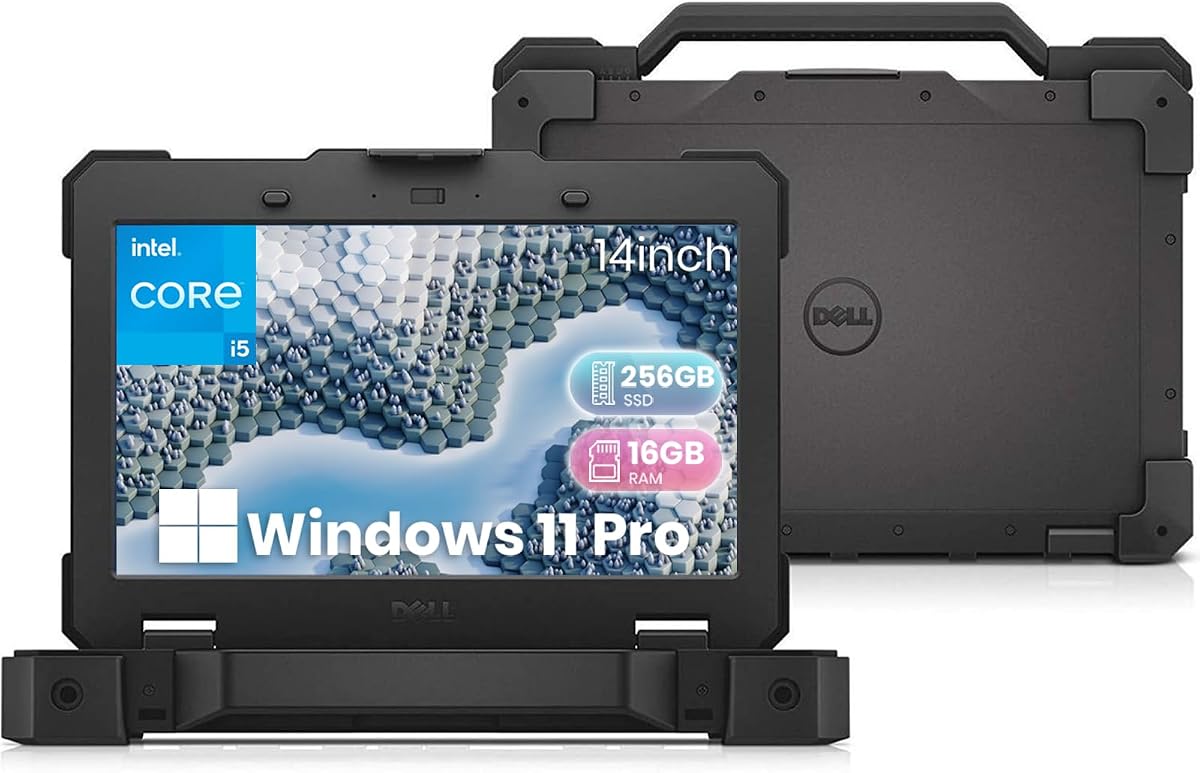
The Dell Latitude Rugged 5420 is engineered to withstand extreme conditions ensuring it lasts longer in tough environments. It holds a perfect 5.0 star rating which is rare and speaks to its reliability even when purchased as a renewed unit.
We may earn a commission when you buy through this link, at no additional cost to you.
Its reinforced chassis and outdoor viewable display make it ideal for field work where standard laptops fail. While the processor is older the 16GB RAM ensures that multitasking remains smooth for essential tasks and reporting.
The renewed status allows access to rugged durability at a lower cost making it a smart financial choice for longevity. It is built to handle drops and dust which protects your investment better than most standard consumer laptops.
If you work in construction or industrial settings this machine is a must-have for reliability. Its ability to operate in harsh conditions ensures you can rely on it consistently for years.
Reinforced chassis ensures the laptop can survive drops and vibration on construction sites.
The display is designed to be clearly visible even in bright sunlight for outdoor work.
We may earn a commission when you buy through this link, at no additional cost to you.
This Dell Latitude 5414 offers military grade durability at a surprisingly low price point for those seeking lasting power. It has achieved a 5.0 star rating which confirms its reliability even as a renewed unit with professional inspection.
We may earn a commission when you buy through this link, at no additional cost to you.
It includes 16GB of RAM which helps maintain performance stability over time despite the older processor. The variety of ports including serial and legacy options ensures compatibility with industrial tools which extends its useful life in specific niches.
While the SSD is smaller it provides fast boot times and system responsiveness. The 90-day service warranty adds a layer of security to the purchase making it a low-risk option for rugged computing needs.
If you need a tough machine for industrial work without breaking the bank this is a strong contender. It balances rugged construction with affordable pricing to deliver value and longevity.
Extensive port options allow connection to older industrial equipment without adapters.
Professionally inspected condition ensures reliable operation with minimal signs of wear.
We may earn a commission when you buy through this link, at no additional cost to you.
The Lenovo V-Series V15 provides massive resources with 40GB RAM and a Ryzen 7 processor ensuring it stays relevant for years. It holds a 4.2 star rating and is designed for heavy data processing which reduces the need for future hardware upgrades.
We may earn a commission when you buy through this link, at no additional cost to you.
With 1TB of SSD storage you can keep files locally rather than relying on external drives which often fail over time. This large capacity supports long-term data management needs and keeps the system responsive as you add more files.
The Ryzen 7 processor handles intensive tasks efficiently keeping thermal loads manageable for longer system life. While it may be heavier than average the sheer capacity makes it a robust tool for workloads that require sustained high performance.
If you work with large datasets and need a machine that won't slow down soon this V15 is ideal. It offers a powerful foundation that supports productivity for years to come.
40GB RAM ensures smooth operation even with dozens of browser tabs and apps open.
1TB PCIe NVMe SSD provides ample space and fast data transfer for large files.
We may earn a commission when you buy through this link, at no additional cost to you.
The ThinkPad L16 offers enterprise grade durability with up to 10 hours of battery life making it a top choice for longevity. It has earned a 4.4 star rating and is built to withstand demanding field work and travel conditions effectively.
We may earn a commission when you buy through this link, at no additional cost to you.
Its configurable RAM and storage options allow you to tailor the device to your needs ensuring it meets your demands for years. The high brightness screen ensures productivity in any light which protects your eyes and workflow consistency.
MIL-STD-810H certification means this machine is tested for physical stress ensuring it remains reliable over time. The inclusion of Thunderbolt 4 also future-proofs connectivity for high speed data transfer and external displays.
For professionals who need a reliable tool on the go this ThinkPad delivers. Its battery life and build quality make it a dependable companion for long-term use.
Up to 10 hours of battery life keeps you productive without frequent charging.
Thunderbolt 4 support ensures fast data transfer and compatibility with modern accessories.
We may earn a commission when you buy through this link, at no additional cost to you.
Selecting a laptop for longevity involves looking beyond just the price and considering factors that ensure sustained performance and durability over years.
Look for laptops with reinforced chassis or military-grade certifications such as MIL-STD-810H. These standards ensure the device can withstand physical stress drops and varying environmental conditions better than standard models.
Prioritize laptops with strong build materials like aluminum or reinforced plastic to ensure the device lasts longer.
Choose a processor from a current generation like Intel Core Ultra or AMD Ryzen 5 or 7. Newer CPUs often come with better power efficiency which reduces heat stress and helps maintain battery health over time.
Opt for newer generation CPUs to ensure compatibility with future software requirements.
Having ample RAM such as 16GB or more ensures that the laptop can handle future software updates without slowing down. DDR5 memory is preferred for its speed and efficiency compared to older DDR4 options.
Ensure you have at least 512GB of SSD storage to avoid performance bottlenecks over time.
Consider displays with anti-glare coatings and blue light reduction features to protect your eyes during long sessions. High brightness levels also ensure the screen remains usable in various environments which extends its useful life.
Select displays with eye comfort features to maintain productivity and health over years.
A battery with fast charge capabilities and decent capacity is essential for longevity. Look for laptops that offer multiple hours of use on a single charge and efficient power management features to reduce wear.
Look for laptops with fast charging and efficient power management to extend battery life.
Laptops with a good variety of ports like HDMI USB-C and Ethernet reduce the need for dongles which can be loss points for failure. Thunderbolt support adds future proofing for high speed data transfer and external displays.
Ensure the laptop has diverse ports to avoid reliance on external adapters.
Extended warranties or onsite service options provide peace of mind if hardware issues arise later. Brands that offer strong customer support ensure you can resolve problems quickly without needing to replace the whole device.
Check for warranty coverage and support options before purchasing to protect your investment.
Windows 11 Pro offers advanced security features like BitLocker which protect your data and maintain system integrity over years. Regular updates from the manufacturer also ensure compatibility with new software standards.
Prefer Windows 11 Pro for better security and management tools.
To extend the lifespan of your laptop keep it in a cool and dry environment and avoid exposing it to extreme temperatures. Using a laptop stand can help with airflow and reduce heat buildup which protects internal components from long-term damage.
Regularly update your operating system and drivers to ensure security patches are applied and performance remains optimal. Avoid installing unnecessary software that can bloat the system and reduce speed over time.
Use a protective case when transporting your device and always shut it down properly rather than forcing a hard off. Keeping the screen and keyboard clean with a soft cloth prevents wear and maintains a professional appearance.
A laptop lasts longer when it has a durable chassis high-quality components and good thermal management. Models with higher RAM and modern CPUs handle future software demands better ensuring the device remains useful for more years.
Windows 11 Pro offers advanced security and management features like BitLocker which protect data and maintain system integrity over time. This makes it a better choice for professional use where long-term reliability and security are critical.
DDR5 RAM is significantly faster and more energy-efficient than DDR4 which helps the laptop handle modern workloads efficiently. This speed and efficiency support better multitasking and keep the system responsive as software demands increase.
Many business laptops like the Lenovo V15 or ThinkPad L16 allow upgrades for RAM and storage which extends their usable life. However some newer ultra-thin models may have soldered components so check the specs before buying if upgradability is a priority.
Yes rugged laptops are built to withstand drops dust and extreme temperatures which makes them more durable in harsh environments. Even for office use their reinforced build often translates to better overall longevity compared to standard consumer models.
A well-chosen business laptop can last between five to seven years with proper care. High-quality models with good batteries and durable builds often remain functional even beyond this period though performance may decrease slightly over time.
We have reviewed ten laptops that offer exceptional longevity features ranging from rugged builds to powerful modern processors. The Lenovo V15 Gen 4 and HP 17 inch Business Laptop stand out as excellent choices for balance and value.
When choosing for longevity prioritize build quality and RAM capacity over raw speed to ensure the device handles future software needs. Security features and battery health also play key roles in maintaining a reliable machine for years.
Prices and availability change frequently so check current listings to get the best deal on these durable options. Investing in a reliable laptop today can save you money and hassle in the long run.