
NIMO 15.6'' AI Ready Laptop
4.8Editor score
Affordable price point
Full-stack I/O suite
Backlit keyboard included
Choosing the right laptop for karaoke gear can transform your home entertainment setup into a professional stage. You need a machine that handles multimedia smoothly, supports various audio interfaces, and displays lyrics clearly without lag or stutter during performances.
We evaluated ten top-rated products including powerful laptops and specialized audio mixers. Our comparison focuses on processor speed, screen real estate, port availability for microphones, and overall reliability to ensure your party runs without technical glitches or interruptions.
Each pick highlights specific strengths like high refresh rates for smooth visuals or robust mixing controls for sound tuning. Prices and availability change frequently so check current listings before purchasing to secure the best deal for your specific karaoke needs.
4.8Editor score

4.5Editor score

4.5Editor score
As an Amazon Associate we earn from qualifying purchases.
This side-by-side comparison breaks down the key specifications of each laptop and audio device to help you find the perfect match for your vocal needs and budget constraints.






This HP laptop stands out as a powerful option for hosting karaoke sessions at home. With a spacious 17.3 inch display you can show lyrics and video feeds simultaneously without cluttering the screen. The AMD Ryzen 5 processor ensures that streaming services and karaoke apps run smoothly without freezing during performances.
We may earn a commission when you buy through this link, at no additional cost to you.
The 16GB of RAM allows for seamless multitasking between your music library and video apps. You can have multiple browser tabs open for finding songs while playing music without any lag. The 512GB SSD provides ample space to store downloaded tracks and backups of your favorite playlists.
While the display is not touch-enabled it offers clear sharp visuals that are easy to read from a distance. The numeric keypad is useful if you need to input codes or navigate spreadsheets for event planning. Battery life is impressive ensuring the laptop stays on throughout long gatherings.
Anyone hosting frequent parties will find this machine reliable and easy to manage. It connects effortlessly to external speakers via audio jacks and offers multiple USB ports for wireless dongles. The balance of performance and screen size makes it a top choice for vocal enthusiasts.
The 17.3 inch screen provides ample real estate for displaying lyrics side by side with video clips.
With 16GB RAM you can run karaoke software alongside other apps without performance drops.
We may earn a commission when you buy through this link, at no additional cost to you.
The Dell Pro 15.6 Laptop combines speed and portability making it suitable for mobile karaoke setups. The 16GB DDR5 memory ensures that applications launch quickly and switch effortlessly. This is essential if you need to change playlists or adjust settings during a live session.
We may earn a commission when you buy through this link, at no additional cost to you.
The 120Hz refresh rate on the display makes video playback look exceptionally smooth. This is beneficial if you are using video karaoke tracks that require high frame rates. The 15.6 inch screen is compact enough to carry in a backpack yet large enough for personal viewing.
Connectivity is well covered with HDMI and USB ports allowing you to hook up external monitors or audio interfaces. The integrated microphone helps for quick conference calls between songs. The carbon black design is durable and resists scratches during travel.
This laptop is ideal for users who need a reliable machine that can go anywhere. It handles basic audio mixing software well and provides enough power for streaming services. While storage is limited you can use cloud services to access your music library on the fly.
The 120Hz refresh rate ensures video karaoke tracks play without stuttering or tearing.
At 4.19 lbs this laptop is easy to transport between different venues or homes.
We may earn a commission when you buy through this link, at no additional cost to you.
The HP OmniBook 3 17.3 inch Laptop is engineered for endurance with up to 14 hours of battery life. This is crucial for long events where power outlets might be scarce or difficult to reach. The Fast Charge feature restores half the battery in just 45 minutes.
We may earn a commission when you buy through this link, at no additional cost to you.
The AMD Ryzen 3 30 processor provides reliable everyday performance for streaming music and videos. While it may not be the fastest chip it handles standard karaoke applications with ease. The 8GB of LPDDR5 RAM is optimized for efficiency to help extend the battery duration.
The display offers wide viewing angles which are helpful when guests are sitting around the screen. The HDR auto-switch on the camera ensures clear video feedback even in varying light conditions. The AI noise reduction helps filter out background sounds during important communication calls.
This laptop is a solid choice for events where staying unplugged is a priority. Its design is sleek and modern making it a nice addition to any entertainment center. Users who value battery reliability over raw processing power will appreciate this device.
The 14 hour battery life allows for all-day use without needing a power source.
Fast Charge restores battery from zero to 50% in approximately 45 minutes.
We may earn a commission when you buy through this link, at no additional cost to you.
The NIMO 15.6 AI Ready Laptop is an attractive option for those on a strict budget. It offers a solid set of features for the price including a full suite of ports without needing dongles. The 2-Year warranty provides peace of mind for long-term usage.
We may earn a commission when you buy through this link, at no additional cost to you.
While the Intel N150 processor is not the most powerful it handles basic tasks like playing music and video well. The 8GB RAM is sufficient for standard media consumption and light editing. The backlit keyboard is a thoughtful addition for dark room settings.
The 180-degree hinge allows the screen to lie flat which is great for sharing content with others. The physical webcam shutter adds a layer of privacy that is often missing in budget devices. The lightweight design makes it easy to move from room to room.
This laptop is perfect for casual users who need a reliable machine without breaking the bank. It supports common karaoke apps and streaming services effectively. If you prioritize value and warranty support this model is a strong contender in the market.
Includes dual USB-C HDMI and Micro SD slots so you avoid carrying adapters.
The physical webcam shutter lets you control when the camera is active.
We may earn a commission when you buy through this link, at no additional cost to you.
The HP Ultrabook 14 Business is designed with professional needs in mind but works well for entertainment too. It comes with Windows 11 Pro which offers enhanced security features for protecting your data. The bundle includes a wireless mouse and earbuds which are useful for personal listening.
We may earn a commission when you buy through this link, at no additional cost to you.
The 16GB RAM ensures that you can run multiple applications without slowdowns. The processor is capable of handling video editing tasks which might be useful if you record your karaoke sessions. The 14 inch screen is a good balance between portability and visibility.
Storage is handled through a combination of internal and external drives. The 500GB external drive included in the package provides ample space for media files. The lifetime Office bundle adds significant value to the overall price of the laptop.
This laptop is ideal for users who want a secure and productive machine that doubles as a media hub. The included accessories reduce the need for extra purchases. It is a practical choice for those who need business-grade reliability in a lightweight package.
Pro version offers better security and management features for your data.
Bundle includes earbuds mouse and external drive for immediate use.
We may earn a commission when you buy through this link, at no additional cost to you.
The HP 255 G10 Laptop features AMD Radeon Graphics which are great for rendering colorful videos and visuals. This makes it a strong choice for karaoke setups that rely on dynamic background effects. The 16GB RAM ensures that the system remains responsive during media playback.
We may earn a commission when you buy through this link, at no additional cost to you.
The processor is designed for efficiency so it does not drain the battery quickly. The screen offers crisp visuals that are clear enough for reading lyrics in various lighting conditions. The design is thin and light making it easy to place on any desk or stand.
Windows 11 Home allows compatibility with Android apps which can be useful for mobile karaoke apps. The laptop supports up to 64GB RAM expansion if you need more power in the future. This scalability makes it a good long-term investment for growing needs.
This model is suitable for users who want a balance of graphics performance and daily usability. It handles streaming and basic editing tasks well without overheating. The combination of AMD technology and ample RAM makes it a reliable performer.
AMD Radeon graphics provide smooth rendering for video background effects.
Windows 11 Home compatibility allows you to run Android applications.
We may earn a commission when you buy through this link, at no additional cost to you.
The HP OmniBook 3 16 inch Laptop features a 2K touchscreen that offers incredible detail and vibrant colors. Touch input makes it easy to skip tracks or adjust lyrics directly on the screen. The high resolution ensures that text remains sharp and readable at any angle.
We may earn a commission when you buy through this link, at no additional cost to you.
The AMD Ryzen 3 30 processor handles everyday performance needs with responsiveness. The 8GB RAM is optimized for efficiency and supports smooth streaming experiences. The AI noise reduction is particularly useful for video calls during intermissions between songs.
The Copilot key provides quick access to an AI assistant which can help organize your playlist or find lyrics. The camera uses HDR auto-switch to balance contrast in challenging light conditions. This ensures you look your best when video chatting with distant friends.
This laptop is perfect for users who enjoy interactive media and quick controls. The touchscreen adds a layer of convenience that physical keyboards cannot match. It is a sleek and modern device that fits well in both home and office environments.
The 2K touchscreen allows direct control for skipping tracks or adjusting lyrics.
Copilot key gives one-press access to an intelligent assistant for tasks.
We may earn a commission when you buy through this link, at no additional cost to you.
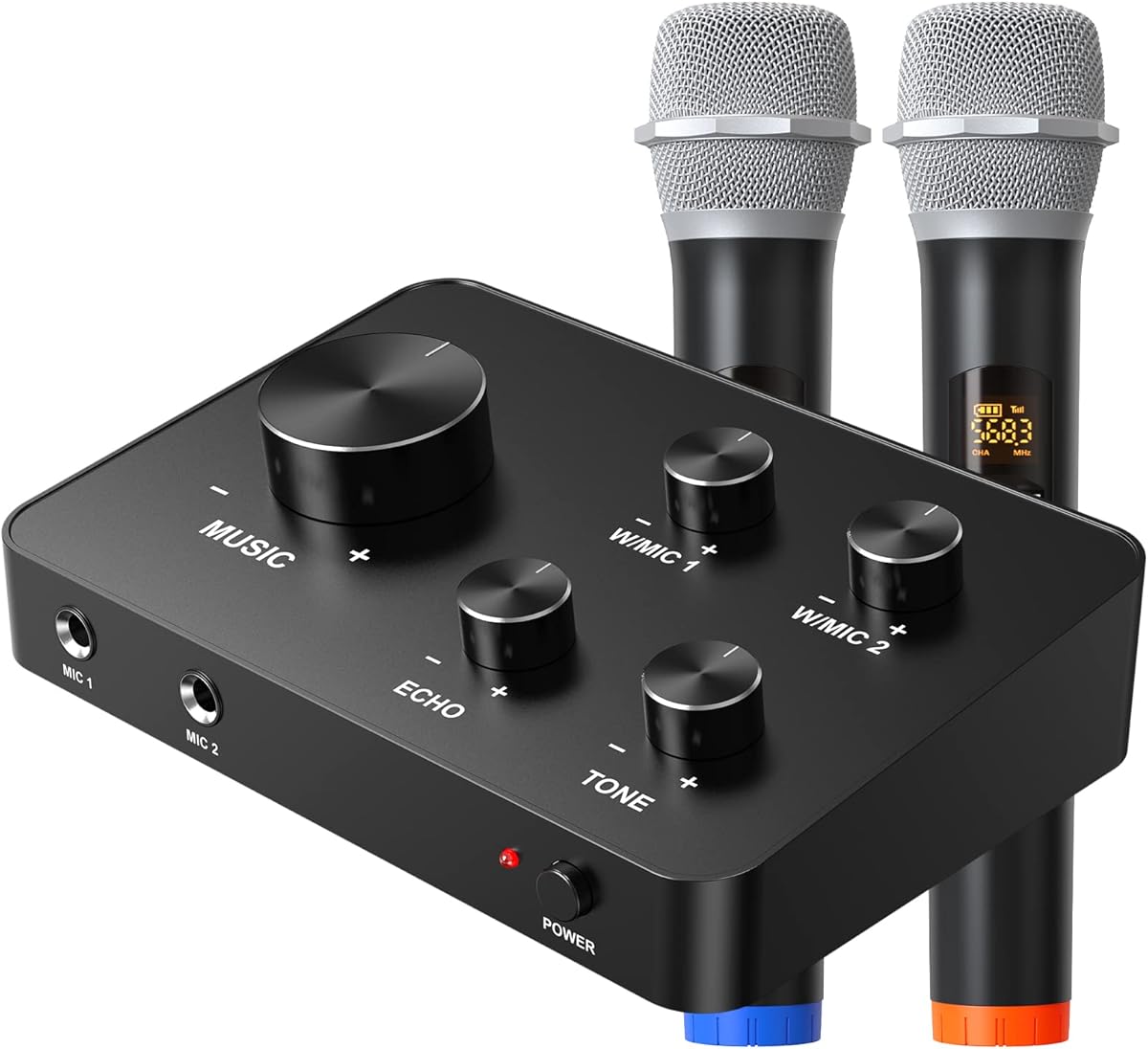
The Rybozen Wireless Microphone System brings true wireless freedom to your karaoke nights. It includes two handheld microphones that operate on UHF frequencies to minimize interference. The 100 foot range allows singers to move around the room without losing connection.
We may earn a commission when you buy through this link, at no additional cost to you.
The mixer unit has separate volume controls for each mic and music output. This allows for precise adjustments during performances to ensure vocals cut through the track. The adjustable frequencies let you pick a channel that is free from static or other signals.
Connectivity options include HDMI and AUX which make it compatible with many home theater systems. The setup is designed to be plug-and-play for quick integration. You can easily switch between mics or add wired ones if needed for a larger group.
This system is ideal for homes or small venues that need reliable wireless audio. The ability to control volumes independently is a significant advantage over standard setups. It turns any TV into a full karaoke station with minimal technical knowledge.
Operates up to 100 feet allowing freedom of movement during performances.
Separate dials for mic and music volume ensure perfect sound balance.
We may earn a commission when you buy through this link, at no additional cost to you.
The Sound Town 16 Channels Mixer is designed to integrate seamlessly with modern soundbars. The HD ARC feature extracts audio from your smart TV so you can control sound from a single unit. This simplifies the setup process significantly for home users.
We may earn a commission when you buy through this link, at no additional cost to you.
The mixer supports both wireless and wired microphones giving you flexibility for larger events. There are 16 frequency selections to avoid interference. The vocal cut mode allows you to remove original vocals from tracks for instant karaoke versions.
Bluetooth connectivity means you can stream music from your phone directly to the mixer. The optical input provides high-quality digital audio for compatible devices. Instrument inputs allow you to plug in guitars or keyboards for a full band experience.
This mixer is best for users who already own a soundbar or receiver and want to add karaoke. It bridges the gap between consumer audio gear and professional mixing needs. With careful tuning it delivers professional results for family gatherings and events.
HD ARC allows you to extract audio from your smart TV easily.
Bluetooth support lets you stream music directly from your phone.
We may earn a commission when you buy through this link, at no additional cost to you.
This Wireless Bluetooth Karaoke Microphone is an all-in-one solution for simple fun. It includes a built-in speaker so you do not need external amplification for small gatherings. The dynamic lights add a visual element to your performance which is great for kids.
We may earn a commission when you buy through this link, at no additional cost to you.
The battery life lasts up to 10 hours so you can use it all day without charging. There are 6 sound effects like chipmunk or alien voices that make singing playful. The Bluetooth 5.3 sync allows you to pair two mics for duets instantly.
It works with all smartphones making it universal for different operating systems. The voice cancellation feature removes vocals from songs for practice sessions. Its compact size fits easily into bags for travel or outings.
This microphone is best for casual use where portability is key. It is a great gift for children or families who want instant fun. While it lacks the power of a full system it covers the basics of singing entertainment well.
Built-in speaker means no need for external speakers in small rooms.
Dynamic lights provide a visual show to enhance the singing experience.
We may earn a commission when you buy through this link, at no additional cost to you.
Selecting the right equipment involves balancing performance with usability to ensure a seamless karaoke experience.
For karaoke purposes the size and clarity of the display are critical. A larger screen allows multiple guests to read lyrics comfortably. Look for Full HD resolution to ensure text remains sharp and readable from a distance.
Prioritize models with anti-glare coatings if you plan to use the device in bright rooms or outdoors.
The ability to connect to external speakers is paramount for a good karaoke setup. Ensure the laptop has a dedicated audio jack or supports Bluetooth 5.0 or higher for high-quality wireless audio.
Check for HDMI ports as they can transmit both video and audio to a TV or sound system simultaneously.
Streaming music and running video apps requires a capable processor to prevent freezing. A mid-range CPU like an Intel Core i5 or AMD Ryzen 5 provides a good balance of power and efficiency.
Avoid older or low-end processors that might struggle to handle multiple media streams at once.
A good selection of ports simplifies connecting microphones or mixing equipment. USB ports are necessary for wireless dongles while HDMI allows direct connection to displays.
Models with versatile I/O suites reduce the need to carry extra adapters during transport.
Long battery life ensures your music does not cut out during an event. Look for laptops offering at least 8 to 10 hours of usage on a single charge.
Fast charging technology is a valuable bonus for quick top-ups between sessions.
Windows 11 or 10 offers wide compatibility with music software and streaming services. Features like built-in noise reduction can help improve audio clarity during calls or practice.
Security features are also important to protect your personal data and files.
Connect your audio interface or wireless mic receiver to the laptop's USB or audio ports before starting. Ensure that the system volume is set to a level that prevents distortion before you begin singing.
Close unnecessary background applications to free up memory for your music player. This helps prevent lag when switching between tracks or adjusting visual effects during a performance.
Keep your device away from direct heat sources and liquids to maintain its longevity. Regularly update your drivers and software to ensure smooth compatibility with new audio applications.
For simple karaoke involving music streaming and lyrics you do not need a high-end machine. A standard laptop with 8GB RAM and a modern processor is sufficient for basic setups. However if you plan on running video editing or live streaming tools you will need more power.
Yes most mixers can connect to a laptop via USB audio interfaces. This allows the laptop to control levels or record performances digitally. Ensure your laptop has the necessary ports or an adapter for the mixer connection.
A 15-inch screen is a good minimum for reading lyrics comfortably. For larger groups a 17-inch screen or an external monitor is better to ensure everyone can see the words. Avoid small screens if you plan to host parties.
Bluetooth 5.0 and higher offers decent latency for casual singing but wired connections are safer for precise timing. If you need zero delay consider using an audio cable. Bluetooth is fine for general entertainment.
You can find karaoke tracks on streaming platforms or specialized apps. Some laptops come with bundled software that simplifies this process. Ensure you download files in formats supported by your media player like MP3 or MP4.
If your laptop lacks a physical audio jack you can use a USB-C to 3.5mm adapter. Many modern ultrabooks require these adapters to connect traditional headphones or speakers. Alternatively you can use Bluetooth speakers directly.
The HP 17 inch Business Laptop leads our list with its large display and reliable performance. For those on a budget the NIMO 15.6 AI Ready Laptop offers great value. The HP OmniBook 3 16 inch is a premium choice for those needing a touchscreen.
Prioritize audio connectivity and battery life when making your decision. These factors directly impact how smooth your sessions will be. A powerful processor ensures your music keeps playing without interruption.
Prices change regularly so verify the current listings before purchasing. Check for seasonal sales that might lower the cost of these devices. Choose the option that fits your specific hosting needs best.