
Yilador Webcam Cover 3 Pack
4.3Editor score
Ultra-thin 0.03 inch design
Compatible with most devices
Strong adhesive for long-term use
This comprehensive guide compares the top laptop camera covers for privacy and security, evaluating design, compatibility, and ease of use to help you choose
In an era where digital privacy is paramount, protecting your webcam from unauthorized access is essential. Laptop camera covers offer a simple yet effective physical barrier that ensures your lens remains secure when not in use. These devices are designed to slide smoothly and fit seamlessly on various gadgets without interfering with daily tasks.
We evaluated ten top-rated camera covers based on thickness, adhesive quality, and design versatility. Our comparison focuses on products that provide reliable protection while maintaining the aesthetic appeal of your laptop or tablet. Each entry in this list has been selected for its ability to deliver peace of mind to users.
Every product pick highlights specific strengths such as ultra-thin profiles, easy installation, or unique features like no-residue removal. We analyzed user feedback and technical specifications to ensure accuracy. Please note that availability and pricing may vary over time, so check current details before making a final decision.
4.3Editor score

4.5Editor score

3.6Editor score
The following table provides a side-by-side comparison of all ten products selected for their effectiveness and user satisfaction. It highlights key specifications such as thickness, material type, and compatibility to help you quickly identify the best fit for your needs.




The CloudValley Laptop Camera Cover Slide stands out as a top choice for privacy-conscious users. With a rating of 4.5 stars, it combines a sleek metal design with an ultra-thin profile that ensures your laptop closes properly. This cover is built to be durable while maintaining a subtle look that complements modern devices.
We may earn a commission when you buy through this link, at no additional cost to you.
Its space aluminum alloy construction offers a premium feel that resists wear and tear. The ultra-thin design measures only 0.023 inches, ensuring it does not interfere with closing your laptop or device. This is crucial for those who travel frequently or use their devices in tight spaces where bulk is a concern.
Installation is straightforward, requiring you to align, attach, and press firmly for 15 seconds. While some might find the need for a firm press slightly inconvenient, it ensures a secure bond. The package includes two covers, making it easy to protect multiple devices like tablets and laptops simultaneously.
Ideal for individuals prioritizing privacy without sacrificing style, this cover is a solid investment. It works flawlessly with most laptops and leading tablets. If you value a balance of durability, design, and function, this product offers the peace of mind you seek against unauthorized access.
The space aluminum alloy design provides a sophisticated look that enhances the appearance of your device rather than detracting from it.
A simple press for 15 seconds creates a strong adhesive bond that keeps the cover in place during daily use.
We may earn a commission when you buy through this link, at no additional cost to you.
The Yilador Webcam Cover 3 Pack offers exceptional value for those seeking reliable privacy protection on a budget. Rated at 4.3 stars, these covers are designed to be thin and stylish while providing a secure fit. The upgraded adhesive ensures they stay in place without damaging your equipment.
We may earn a commission when you buy through this link, at no additional cost to you.
Its ultra-thin 0.027 inch profile enhances your laptop's functionality and aesthetics. You can seamlessly close your laptop while adding a touch of sophistication. The adhesive is strong enough for long-term use, ensuring reliable protection day in and day out without leaving residue upon removal.
Installation is simplified into four easy steps: clean, apply adhesive, align, and press for 10 seconds. Note that these are not suitable for MacBooks released after 2023 or devices with protruding front cameras. However, for most other laptops and tablets, they offer a seamless integration.
If you need multiple covers for your family or office setup, this 3-pack is ideal. It allows you to safeguard privacy across various devices without spending a fortune. The balance of cost, performance, and ease of use makes it a top recommendation for budget shoppers.
Getting three covers in a single pack allows you to protect multiple devices at home or share with colleagues effortlessly.
The upgraded 3.0 adhesive provides a reliable hold that resists peeling even with frequent opening and closing.
We may earn a commission when you buy through this link, at no additional cost to you.
This large-size webcam cover offers a unique design with an extra large opening to prevent blocking camera shooting. With a 4.4-star rating, it addresses customer feedback about aperture size, making it almost compatible with all types of cameras. The cute patterns add a fun element to your privacy protection.
We may earn a commission when you buy through this link, at no additional cost to you.
Its 360-degree rotation capability allows you to switch views freely, breaking the limits of normal webcams. This flexibility is great for creative setups or presentations. The ultrathin design ensures it does not hinder your laptop's closure, maintaining a sleek profile.
Installation involves cleaning the surface and pressing for 30 seconds. However, be aware that on some MacBook Pro models, there may be a tiny gap when closed. Despite this, the robust protection it offers against hackers makes it a worthy consideration for those wanting extra security.
If you prefer a bit of personality in your accessories, these patterned covers are a great choice. They provide necessary security while adding flair. For users who need a reliable barrier that fits a variety of lenses, this product delivers on its promise.
The upgraded hole size ensures the camera lens is not blocked, maintaining functionality when the cover is open.
Print patterns add a touch of fun to your device, making privacy tools look less utilitarian.
We may earn a commission when you buy through this link, at no additional cost to you.
The MESMOS Laptop Camera Cover Slide brings a touch of whimsy to privacy protection with adorable plant designs. Rated at 4.4 stars, these covers are thin enough to close your laptops snugly. They are perfect for plant lovers who want to protect their privacy without compromising on style.
We may earn a commission when you buy through this link, at no additional cost to you.
The slim webcam cover sliders ensure a snug fit, making them ideal for MacBook Pro and Air users. They enhance your laptop's webcam protection while adding a fun accessory. The adhesive is strong enough for daily use but easy to remove without leaving sticky residue behind.
Installation is simple: clean the surface and apply the cover. You can easily remove them if you decide to change your setup. This flexibility is appreciated by users who like to switch accessories or move covers between devices as needed.
For gift-giving or personal use, these covers are a delightful choice. They serve as a great addition to your MacBook accessories. If you value aesthetics alongside security, this product combines both in a practical package.
These plant-themed covers make a perfect gift for friends who enjoy nature or unique laptop accessories.
You can remove the covers without worrying about sticky marks on your device surface.
We may earn a commission when you buy through this link, at no additional cost to you.
This product addresses a common pain point by eliminating sticky residue. Rated at 3.6 stars, it offers a clip-on solution that avoids the hassle of adhesives. Made in the USA, it focuses on quality and flexibility, making it a premium choice for those sensitive to adhesive damage.
We may earn a commission when you buy through this link, at no additional cost to you.
The cover clips over your laptop bezel with zero adhesive, ensuring a clean screen. It slides open and closed smoothly, providing privacy when needed. The material is durable enough for repeated use, allowing you to reuse it across different devices or time.
While it is designed for standard bezels, it works best on slim devices without heavy cases. It is not meant for phones but excels on laptops and tablets. If you prioritize cleanliness and reusability, this product stands out from traditional adhesive options.
For users who want a clean and reusable solution, this is a strong contender. It eliminates the risk of residue while maintaining security. The 4-pack allows you to share protection with family or colleagues, making it a practical choice for offices.
Manufactured domestically with durable materials, ensuring higher quality standards than mass-produced imports.
Avoid the mess of sticky residue that can damage screens or leave unsightly marks over time.
We may earn a commission when you buy through this link, at no additional cost to you.
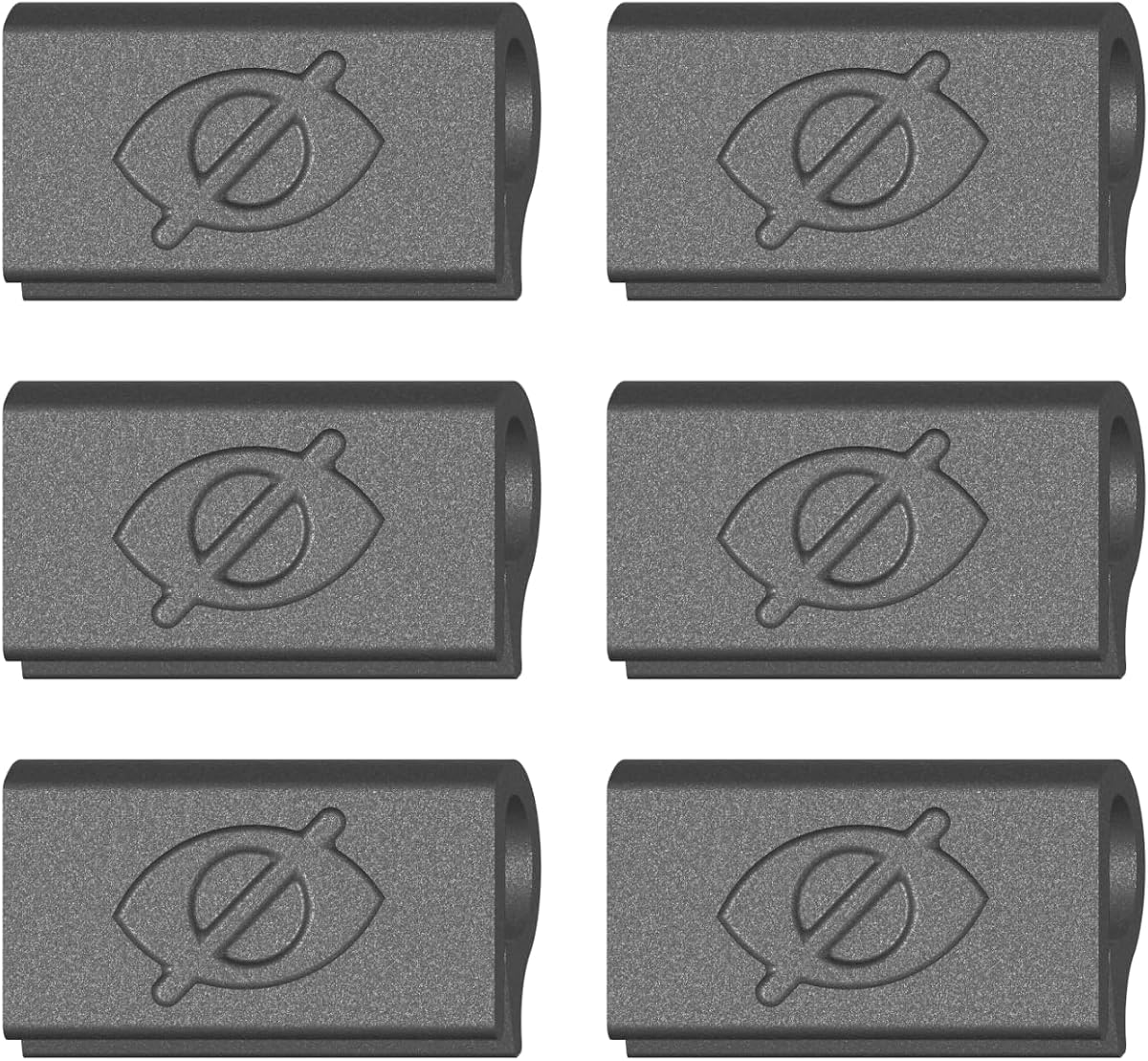
With a 4.2-star rating, this 6-pack offers excellent value for those needing multiple covers. The ultra-thin design of 0.022 inches ensures your laptop closes properly. It is made of flexible ABS material, which is not fragile and resists scratches on your laptop.
We may earn a commission when you buy through this link, at no additional cost to you.
The adhesive is strong enough to keep the cover from falling off. You simply tear off the tape, align it, and press hard for 10 seconds. This ensures a clean screen and a secure fit. It works well with various devices including Apple and Windows laptops.
This product is ideal for families or small offices where you need covers for several machines. The bulk pack ensures you are prepared for any situation. While the design is simple, it focuses on functionality and protection.
If you prioritize quantity and affordability without compromising on quality, this is a great pick. The thin profile ensures usability, and the flexible material adds durability. It provides reliable protection against hackers with a straightforward design.
The ABS material is strong yet flexible, preventing breakage during daily use and installation.
With six covers, you can easily outfit multiple devices in your home or office.
We may earn a commission when you buy through this link, at no additional cost to you.
This 9-pack offers a versatile solution with three sizes: large, medium, and small. Rated at 4.1 stars, it is perfect for devices ranging from laptops to phones. The ultra-thin design ensures it does not interfere with closing your laptop, maintaining a sleek profile.
We may earn a commission when you buy through this link, at no additional cost to you.
Installation is easy: clean the surface, remove the adhesive, and press for 15 seconds. The adhesive is designed to be easily applied and removed without traces. This makes it convenient to switch covers or remove them if needed. The package includes a mix to meet all camera needs.
The product is QC and packed in the USA, ensuring quality control. Customer service is available 24/7, which adds peace of mind. This makes it a reliable choice for those who want variety and support in a single purchase.
If you need to protect multiple devices with different camera sizes, this variety pack is ideal. It provides a practical solution for privacy on all fronts. The mix of sizes ensures you always have the right fit for your device.
With large, medium, and small options, you can find the perfect fit for any device.
Quality control and packing in the USA ensures higher standards for the product.
We may earn a commission when you buy through this link, at no additional cost to you.
This clip-on cover eliminates the need for adhesive, offering a clean and simple installation. Rated at 4.3 stars, it uses a flexible TPU clip to hold in place. It is made in the USA and designed specifically for laptops, ensuring a secure fit without residue.
We may earn a commission when you buy through this link, at no additional cost to you.
The installation is as simple as pressing it onto your bezel with one finger. No flexing or prying is required. The thin profile allows your laptop to close fully, entering sleep mode without removing the cover. This is a significant convenience for daily users.
While it is designed for laptops, it is not meant for tablets or phones. It focuses on MacBook and PC laptops. The flexible material grips the bezel without scratching, ensuring longevity. The 6-pack provides ample covers for shared use.
If you want a clean solution without adhesive, this product delivers. It is easy to use and remove, making it versatile for changing devices. The focus on laptops ensures it meets the needs of computer users.
The simple push-on mechanism means no tools or sticky adhesives are needed for setup.
Designed to close with the lid, ensuring your laptop can enter sleep mode easily.
We may earn a commission when you buy through this link, at no additional cost to you.
This pack offers two dimensions to suit different needs, ensuring compatibility with many devices. Rated at 4.0 stars, it is made of high-strength ABS plastic for reliable protection. The covers are easy to use, sliding open and closed with a simple finger movement.
We may earn a commission when you buy through this link, at no additional cost to you.
Installation involves removing the back sticker and pressing firmly for 15 seconds. You can easily remove the cover without sticky traces. The 6-pack provides enough covers for laptops, tablets, and smartphones. This makes it a practical choice for families.
The product is designed to be removable and reinstallable. If the slider separates during installation, it is designed to snap back into place. This flexibility ensures longevity and ease of use. Customer support is available within 24 hours.
If you want a versatile cover that fits multiple devices, this is a strong option. The simple design ensures it does not interfere with device use. It offers a balance of protection and practicality.
Includes two different dimensions to ensure you have the right fit for various device cameras.
The design ensures easy removal without leaving sticky residue on your device.
We may earn a commission when you buy through this link, at no additional cost to you.
Designed specifically for Logitech webcams, this cover offers a tailored fit that standard covers may not. Rated at 4.6 stars, it features an easy flip mechanism allowing 180-degree rotation. This ensures privacy and lens care without compromising functionality.
We may earn a commission when you buy through this link, at no additional cost to you.
The artful design makes it stylish, while the secure attachment prevents dust and scratching. Installation is simple, attaching securely without leaving residue. This makes it a hassle-free setup for users who rely on external webcams for work or streaming.
It is compatible with C920x, C920, and other Pro Stream models. If you use a Logitech camera, this is a dedicated solution. The package includes a direction booklet and 18-months after-sales support, ensuring peace of mind.
If you own a Logitech webcam, this cover is the best choice for privacy. It combines style with practicality, offering protection against hackers. The support package adds value to the purchase.
Specifically designed for Logitech webcams, ensuring a perfect fit without gaps.
The 180-degree flip allows for quick access and easy removal when needed.
We may earn a commission when you buy through this link, at no additional cost to you.
Choosing the right camera cover involves considering several factors to ensure it meets your privacy and aesthetic needs. This guide breaks down the key aspects to help you make an informed decision.
Thickness determines how easily your laptop closes with the cover attached. Most modern covers are around 0.02 inches to 0.03 inches thick to avoid interference. Thicker covers may cause the laptop lid to stay slightly open, leading to dust accumulation or battery drain.
Look for ultra-thin options to ensure seamless integration with your device.
The adhesive used can affect both security and device safety. Some covers use strong glue that may leave residue upon removal, while others use reusable clips. If you value a clean screen, opt for non-adhesive options or those with high-quality removable adhesives.
A strong adhesive prevents the cover from falling off during daily use.
Materials like aluminum alloy or plastic influence durability and appearance. Metal covers offer a premium look and long-lasting protection. Plastic covers are lighter and more flexible but may feel less premium.
Choose materials that match your device's aesthetic and durability needs.
Ensure the cover fits your specific device type. Some covers are designed for laptops, while others work for phones or webcams. Check dimensions and device compatibility lists to avoid fit issues.
Verify compatibility with your exact laptop model before purchasing.
The cover should slide smoothly to open and close the lens. A smooth mechanism ensures privacy without friction. Complex slides may wear out quickly or become difficult to operate over time.
Prioritize models with smooth sliding mechanisms for daily convenience.
Design can be functional or decorative. Some covers feature cute patterns or colors to match your style. Simple black covers blend in. Choose based on your preference for visibility or discretion.
Select a design that complements your personal or work environment.
Packs often include multiple covers for different devices. Buying in bulk can be more cost-effective. Consider how many devices you need to protect to choose the right pack size.
Opt for multi-packs if you need protection for multiple devices.
Products made in the USA often have higher quality control standards. This can translate to better adhesive and material quality. Check the origin to ensure you are buying a quality product.
Consider US-made products for potentially higher durability and safety.
To install, clean the surface around your webcam with alcohol wipes. Ensure the area is dry and free of dust. Align the cover with your camera lens and press firmly for the recommended time to secure the adhesive.
Use the slide mechanism to cover the lens when not in use. Slide it open when you need your camera. This simple action protects your privacy and prevents unauthorized access.
If you need to remove the cover, peel it off gently. Avoid using excessive force to prevent scratches. If adhesive residue remains, use a mild cleaning solution to wipe it away.
Most ultra-thin camera covers are designed not to interfere with closing the lid. However, you should check the specific thickness and fit. Some thick covers may cause a small gap, so opt for thin models to avoid this.
Most are safe if you choose high-quality ones. However, strong adhesives may leave residue. Non-adhesive options are available if you want to avoid sticky marks on your device.
Many covers fit phones, but verify dimensions. Some are specifically designed for phones or laptops. Ensure the size matches your device before purchasing.
Yes, they only block the camera lens and do not affect microphones. They allow audio recording while protecting your visual privacy.
Use a soft cloth to wipe the cover gently. Avoid abrasive cleaners that could scratch the surface. Regular cleaning keeps it in good condition.
Most covers do not block indicator lights since they sit in front of the lens. The light usually sits separately. However, check your device's layout to be sure.
Choosing the right camera cover is crucial for digital privacy and security. The products listed provide reliable protection while considering design and compatibility. Our top picks balance value, ease of use, and quality to help you find the perfect match.
When selecting a cover, prioritize thickness and material to ensure a seamless fit. A slim cover prevents interference with device closure, while quality materials ensure longevity. Consider how you plan to use it to choose the best option for your lifestyle.
Always check the current prices and availability before purchasing. While we provide accurate data, prices may fluctuate. Ensure you are buying a product that meets your needs and budget.