
HDMI KVM Switch 3 Monitors 2 Computers 4K@60Hz KVM Switches with 4 USB 3.0 Ports
4.2Editor score
Affordable entry-level pricing
4 USB 3.0 ports included
Supports 4K@60Hz output
This guide compares the top ten KVM switch for triple monitors to help you choose the right device for seamless multi-computer display and peripheral sharing.
Finding a reliable KVM switch for triple monitors can transform your workflow by allowing seamless switching between multiple computers without cluttering your desk with cables. This guide explores ten top-rated models designed to support three displays efficiently.
We evaluated each product based on resolution support, USB connectivity, switching methods, and overall build quality. Our goal is to provide a clear comparison that highlights the strengths and limitations of every option available in the current market.
Each pick includes detailed specifications, pros, cons, and real-world usage insights to help you make an informed decision. Please note that prices and availability may change over time so check current listings before purchasing.
4.2Editor score

4.9Editor score

3.9Editor score
The following comparison table provides a side-by-side overview of all ten products evaluated in this guide. Use it to quickly identify key differences in resolution, ports, and connectivity options.




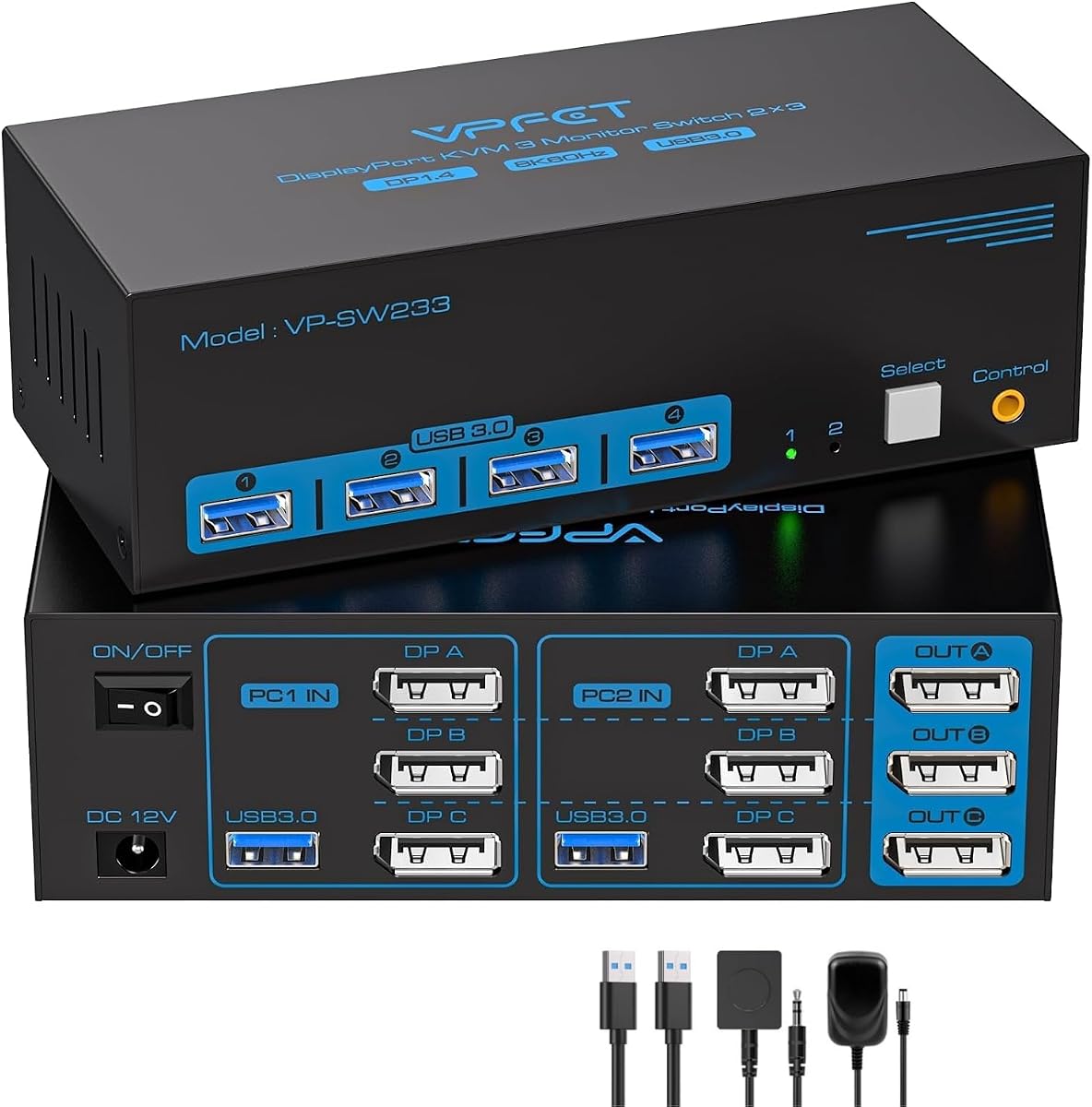

The AV Access KVM Switch 3 Monitors 2 Computers KVM Docking 8K@60Hz stands out as the top choice for professionals seeking maximum functionality. It combines high-resolution video support with extensive docking capabilities making it ideal for modern workstations.
We may earn a commission when you buy through this link, at no additional cost to you.
This device supports up to 8K@60Hz resolution on the desktop side and offers USB-C docking with 100W Power Delivery for laptops. It also features shared Ethernet ensuring continuous network connectivity even when switching between systems.
While it offers exceptional performance the higher cost may not be justified for casual users. Additionally MacBook users should note that only mirrored displays are supported through the USB-C connection limiting extended mode options.
This KVM switch is best suited for power users who need reliable multi-monitor setups with minimal cable clutter. Its robust feature set justifies the investment for those requiring seamless transitions between powerful computing environments.
Connect your USB-C laptop with a single cable for video data and charging simultaneously keeping your desk tidy and organized.
The shared 1Gb Ethernet port ensures both computers stay online during switching allowing uninterrupted downloads and background syncs.
We may earn a commission when you buy through this link, at no additional cost to you.
The HDMI KVM Switch 3 Monitors 2 Computers 4K@60Hz KVM Switches with 4 USB 3.0 Ports offers an accessible entry point into multi-monitor KVM functionality. It balances cost and features well for budget-conscious buyers needing reliable performance.
We may earn a commission when you buy through this link, at no additional cost to you.
This model supports resolutions up to 4K@60Hz and includes 4 USB 3.0 ports for sharing keyboards and mice. It offers dual switching methods via panel buttons or an external wired controller for flexible workspace setups.
Potential users should note that hotkey shortcuts are not supported which may slow down switching for some workflows. Additionally each computer must connect three HDMI cables to ensure stable triple-monitor output.
This option is perfect for home offices or budget gaming setups where cost efficiency is paramount. It delivers solid performance without breaking the bank making it a strong contender for entry-level triple-monitor configurations.
Choose between pressing the panel button or using the external wired controller to switch computers based on your desk layout.
Enjoy transfer rates up to 5Gbps with USB 3.0 ports ensuring fast file access and reliable peripheral performance.
We may earn a commission when you buy through this link, at no additional cost to you.
The UGREEN 8K@60Hz HDMI Displayport KVM Switch 3 Monitors 2 Computers represents a premium option for enthusiasts who demand top-tier video performance. Its aluminum construction and extensive cable support set a high standard for build quality.
We may earn a commission when you buy through this link, at no additional cost to you.
This model supports resolutions up to 8K@60Hz and refresh rates up to 240Hz with advanced features like VRR and G-Sync to prevent tearing. It includes a full set of cables allowing immediate setup without additional purchases.
Users must ensure their computers support triple-monitor output since the device does not support EDID emulation. This limitation means compatibility verification is critical before purchase to avoid potential display issues.
Ideal for professional creators and gamers this KVM switch delivers exceptional visual fidelity and responsiveness. Its robust feature set justifies the higher price for those who prioritize performance and build quality above all else.
With VRR and G-Sync support this switch minimizes screen tearing and stuttering for smoother high frame rate gaming.
The package includes 4 DP and 2 HDMI cables reducing the need to buy separate video cables for setup.
We may earn a commission when you buy through this link, at no additional cost to you.
The HDMI Displayport KVM Switch 3 Monitor 4 Computer stands out by allowing four computers to share a single triple-monitor setup. This capability is rare and valuable for environments requiring frequent transitions between multiple systems.
We may earn a commission when you buy through this link, at no additional cost to you.
It supports resolutions up to 8K@60Hz and includes 4 USB 3.0 ports plus cables for all connections. The device uses a combination of HDMI 2.1 and DP 1.4 ports to ensure high-bandwidth video delivery.
Setup requires that computers support 3 displays or multi-display mode which can limit compatibility with some configurations. Additionally ensuring all ports are discrete graphics outputs may be necessary for extended displays.
This KVM switch is ideal for IT professionals or power users managing multiple workstations. Its unique 4 PC support offers versatility that standard 2 PC switches cannot match making it a standout in its category.
Seamlessly switch between four desktops using one set of monitors and peripherals ideal for testing and IT environments.
Includes 4 USB 3.0 cables to ensure all computers can connect peripherals without additional purchases.
We may earn a commission when you buy through this link, at no additional cost to you.
The 8K KVM Switch 3 Monitors 2 Computers provides a balanced blend of high resolution and standard features. It aims to deliver professional-grade visual quality while maintaining ease of use for everyday computing tasks.
We may earn a commission when you buy through this link, at no additional cost to you.
This device supports 8K@60Hz with HDMI 2.1 and DP 1.4 ports ensuring crisp visuals. It also includes an external power switch allowing users to restart the KVM without unplugging cables if needed.
Users should be aware that passive adapters are not recommended for video conversion which may limit flexibility for some setups. Cable length must also be kept under 1.5 meters for maximum resolution support.
This KVM switch is well-suited for home offices and multimedia classrooms needing reliable high-resolution output. Its balance of price and performance makes it a solid choice for those requiring advanced display capabilities.
The external power switch allows for quick restarts of the KVM to resolve signal recognition issues easily.
USB 3.0 ports deliver up to 5Gbps speeds for efficient file sharing between connected computers.
We may earn a commission when you buy through this link, at no additional cost to you.
The AV Access 8K KVM Switch 3 Monitors 2 Computers offers a robust docking station solution that eliminates the need for separate hubs. It simplifies desk setups by integrating video audio and data connections seamlessly.
We may earn a commission when you buy through this link, at no additional cost to you.
This model supports resolutions up to 8K@60Hz and provides 100W Power Delivery for connected laptops. It also includes a shared 1Gb Ethernet port ensuring both computers remain online during switching.
The cost may be higher than standard switches but the added docking features provide significant value for users needing a complete workspace solution. MacBook users should confirm mirrored display compatibility before purchase.
This device is ideal for professionals seeking a clutter-free dual-computer desk setup. Its comprehensive feature set streamlines workflow by reducing the number of adapters and hubs required.
Eliminates the need for separate USB hubs and card readers by combining all functions into one docking unit.
Shared Ethernet ensures downloads and cloud sync continue on the inactive computer during switching.
We may earn a commission when you buy through this link, at no additional cost to you.
The 8K@60Hz HDMI KVM Switch 3 Monitors 2 Computers provides a straightforward solution for high-resolution video switching. It focuses on HDMI compatibility making it a strong choice for systems relying heavily on HDMI connections.
We may earn a commission when you buy through this link, at no additional cost to you.
This KVM switch supports 8K@60Hz resolution with HDMI 2.1 and includes 4 USB 3.0 ports for peripheral sharing. The wired controller allows flexible placement to keep desktops clutter-free.
While it offers great video performance it lacks advanced docking features like Ethernet sharing which might be needed for some workflows. Users should ensure HDMI 2.1 cables are used to achieve max resolution.
This model is best for users prioritizing high-resolution display quality without needing extensive docking functions. Its plug-and-play design makes it accessible for those who want immediate setup with minimal effort.
HDMI 2.1 support ensures crisp detailed visuals even at 8K resolution for professional multimedia tasks.
4 USB 3.0 ports allow easy sharing of keyboard mice and storage drives between computers.
We may earn a commission when you buy through this link, at no additional cost to you.
The 8K@60Hz HDMI Displayport KVM Switch 3 Monitors 3 Computers offers unique flexibility by allowing three computers to share one set of monitors. This configuration is valuable for environments with multiple workstations.
We may earn a commission when you buy through this link, at no additional cost to you.
It supports resolutions up to 8K@60Hz and includes 4 USB 3.0 ports for sharing peripherals. The wired remote controller provides convenient access to switching without reaching for the main unit.
Users must ensure each computer supports multi-monitor output and has the required ports. Cabling can be more complex with three inputs requiring careful planning to avoid clutter.
Ideal for home offices with shared resources or small business setups this switch delivers robust performance. Its ability to handle three inputs distinguishes it from standard two-computer models.
Supports switching between three computers which is useful for collaborative environments and shared workspaces.
4 USB 3.0 ports ensure seamless sharing of keyboards mice and storage across three systems.
We may earn a commission when you buy through this link, at no additional cost to you.
The 4K@144Hz DisplayPort KVM Switch 2 Computers 3 Monitors caters to users seeking high refresh rates and smooth visuals. It uses DisplayPort exclusively to ensure optimal bandwidth for demanding displays.
We may earn a commission when you buy through this link, at no additional cost to you.
This KVM switch supports 4K@144Hz with USB 3.0 ports for peripheral sharing. The wired controller makes switching easy while keeping the main unit hidden for a clean desk.
Setup requires each computer to have three DisplayPort outputs which may not be common on all systems. Users should verify their GPU ports before purchasing to ensure compatibility.
This model is ideal for gamers or graphic designers needing fluid motion and high detail. Its focus on DisplayPort performance ensures reliable and stable high-resolution output.
Supporting up to 144Hz ensures fluid motion for video editing gaming and fast-paced tasks.
DisplayPort connections provide reliable signal transmission for professional desktop environments.
We may earn a commission when you buy through this link, at no additional cost to you.
The KVM Switch 3 Monitors 2 Computers HDMI DisplayPort provides versatile connectivity with both HDMI 2.1 and DP 1.4 ports. This hybrid design accommodates a wide range of monitor and computer configurations.
We may earn a commission when you buy through this link, at no additional cost to you.
It supports up to 8K@60Hz resolution and includes 4 USB 3.0 ports plus a wired controller. The package includes necessary cables and offers a 1-year warranty service for peace of mind.
Users must ensure HDMI 2.1 and DP 1.4 cables are used to achieve maximum resolution. EDID emulation is not supported so checking computer compatibility is essential before purchase.
This KVM switch is suitable for mixed environments with varying display types. Its comprehensive package and warranty make it a reliable choice for those needing flexible connectivity options.
Hybrid HDMI and DP inputs allow integration with diverse monitors without needing adapters.
Includes HDMI and DP cables plus a wired remote so you can start using immediately.
We may earn a commission when you buy through this link, at no additional cost to you.
Selecting the right KVM switch involves considering several technical factors to ensure compatibility and performance.
Check the supported resolution and refresh rate such as 4K@60Hz or 8K@60Hz to match your monitors. Higher refresh rates like 144Hz are essential for smooth motion in design or gaming workflows.
Ensure the KVM switch supports the maximum specs of your displays to avoid bottlenecks.
Verify that your computers have the required video outputs whether HDMI DisplayPort or USB-C. Some models support only one type while others offer hybrid connectivity.
Matching your ports to the KVM switch is critical to avoid using passive adapters which may reduce performance.
Look for USB 3.0 ports to enable fast data transfer for peripherals like mice keyboards and storage drives. The number of ports should match the number of devices you plan to share.
USB 3.0 provides better performance than 2.0 and ensures smoother operation with multiple peripherals.
Evaluate the switching options available whether panel buttons or wired remote controllers. Some models include extra features like hotkeys or software controls for faster transitions.
Choose a switching method that fits your desk layout and workflow needs for efficiency.
Most KVM switches require an external power adapter to ensure stable performance especially with high-resolution displays. Check if the power adapter is included in the package.
Proper power supply avoids signal drops and ensures all USB devices function correctly.
Consider the materials such as aluminum housing for durability and heat dissipation. A sturdy build ensures the device lasts longer under continuous use.
Good build quality often correlates with better signal integrity and fewer connection issues.
Confirm support for extended display modes which allow different content on each monitor. Some KVM switches only support duplicate or mirror modes which limits productivity.
Extended mode is essential for multitasking across multiple screens effectively.
Some advanced models include shared Ethernet ports or USB-C Power Delivery for laptop charging. These features simplify desk setups by consolidating connections.
Look for docking capabilities if you need to connect laptops and desktops seamlessly.
Begin by connecting all video cables from your computers to the KVM switch matching HDMI and DisplayPort ports correctly. Ensure each computer has the required number of video outputs for triple-monitor setups.
Plug in your USB peripherals like keyboards and mice to the KVM switch ports rather than directly to the computers. Connect the power adapter and turn on the KVM before turning on the computers.
Use the panel button or wired controller to switch between computers and check that the active device indicator light reflects your selection. If switching issues arise check cable connections and power supply first.
Yes if the KVM switch supports the video ports of your monitors such as HDMI or DisplayPort. Hybrid models allow connecting both HDMI and DP monitors simultaneously but check compatibility before purchase.
Most modern KVM switches support extended desktop mode but verify this before buying. Some entry-level models may only support duplicate mode which limits multi-monitor productivity.
You typically need HDMI or DisplayPort cables for video and USB cables for peripherals. Many KVM packages include these cables but verify what is included to avoid extra costs.
Only KVM docking switches with Ethernet ports allow sharing network connections between computers. Standard switches usually require separate network connections for each computer.
Yes USB peripherals connected to the KVM switch will transfer with the active computer when switched. Ensure USB 3.0 ports are used for optimal performance and compatibility.
Most triple-monitor KVM switches require an external power adapter to ensure stable signal and USB device operation. Check the product details to confirm power requirements and if the adapter is included.
This guide has reviewed ten top KVM switches for triple monitors each offering unique strengths for different needs. Whether you prioritize budget affordability or premium docking features there is a suitable option for every user.
When making your final decision prioritize resolution support port compatibility and switching convenience to match your workspace. Understanding your specific requirements will help you select the most effective device.
Remember that prices and availability can change over time so check current listings before purchasing. A well-chosen KVM switch will significantly streamline your multi-computer workflow and desk organization.