
Logitech K120 Full Size Wired Keyboard USB Plug-and-Play Windows
4.6Editor score
Durable spill-resistant design
Comfortable deep-profile keys
Easy plug-and-play setup
Discover the top keyboards with built-in USB ports for enhanced connectivity and efficiency. We compare ten models to find the best options for your setup.
Finding a keyboard with a built-in USB port can streamline your workspace by reducing cable clutter. These devices allow you to connect peripherals like mice or flash drives directly through the keyboard.
We evaluated ten top-rated models based on build quality, port availability, compatibility, and overall typing experience. Our analysis covers everything from budget-friendly options to premium mechanical keyboards.
Each pick highlights key features, pros, and cons to help you decide quickly. Keep in mind that prices and availability may change over time, so verify details before purchasing.
4.6Editor score
4.4Editor score
4.3Editor score
This table provides a side-by-side look at the top ten keyboards with USB hubs. Review the key specifications to identify which model fits your workflow and budget best.






The Adesso AKB-132HB is a reliable keyboard designed for users who need quick access to connected peripherals. With a rating of 4.2 stars, it stands out for its built-in USB hub functionality.
We may earn a commission when you buy through this link, at no additional cost to you.
It features three built-in USB ports that allow you to plug in flash drives or mice without reaching behind your computer. The multimedia hotkeys let you control your music and video players instantly.
While the membrane switches offer a quieter typing experience, they lack the tactile feedback of mechanical keyboards. The Windows one-touch controls are convenient but may not suit Mac users.
This keyboard is ideal for office workers or students who need extra USB connectivity on a budget. It balances functionality and cost effectively for daily computing tasks.
The three USB ports eliminate the need for separate hubs and reduce cable clutter on your desk.
Built-in hotkeys allow for instant access to media players and essential Windows applications.
We may earn a commission when you buy through this link, at no additional cost to you.
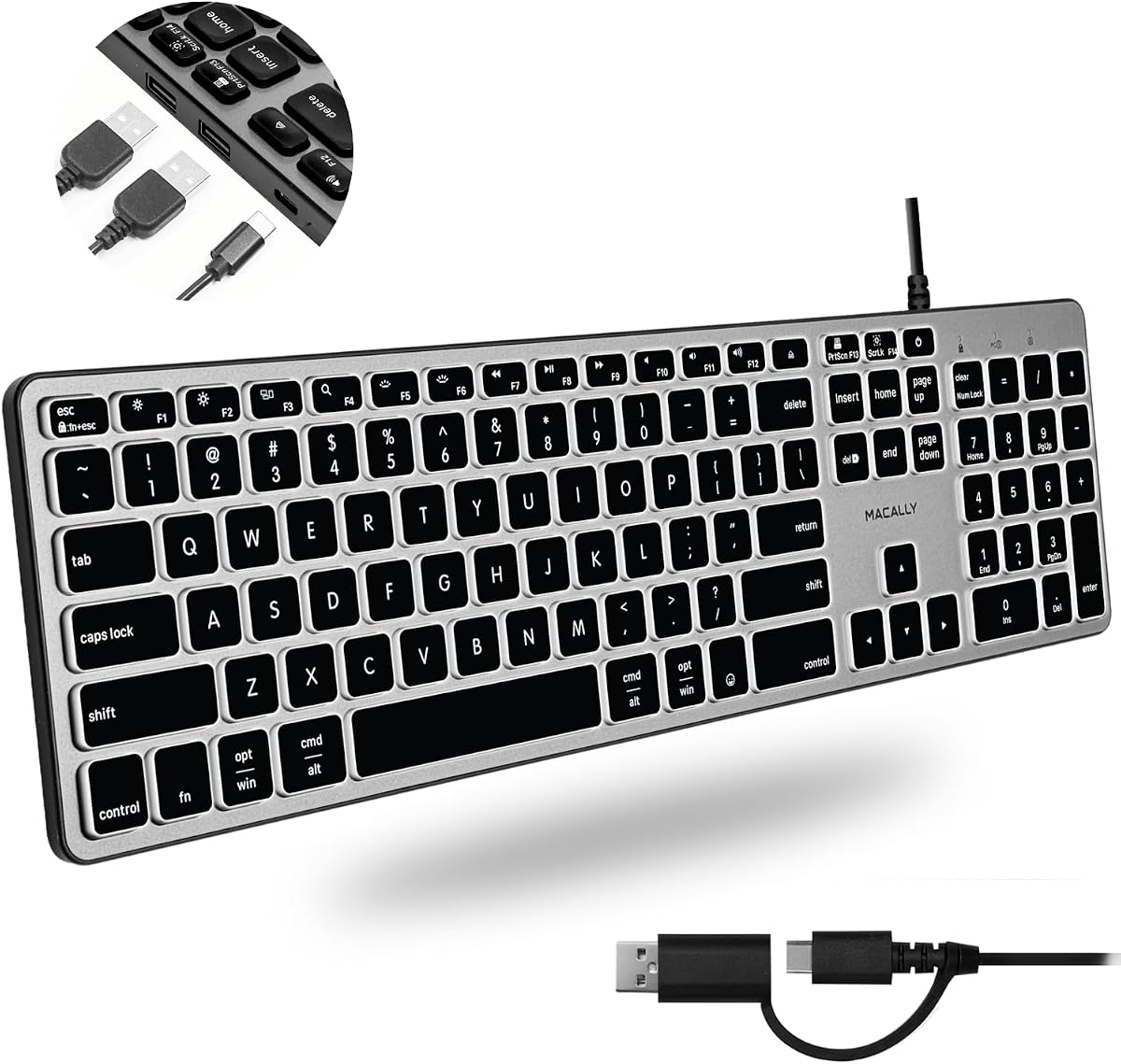
The Macally Wired Keyboard offers exceptional versatility with both USB-A and USB-C ports built into the unit. Its 4.4 rating reflects strong performance across various operating systems.
We may earn a commission when you buy through this link, at no additional cost to you.
It features auto OS detection that instantly adapts key layouts for Mac, Windows, Android, and iPad. The illuminated keys with adjustable brightness make typing in low light environments comfortable.
The dual interface plug ensures compatibility with a wide range of devices without needing adapters. However, the wired design limits placement options compared to wireless alternatives.
This keyboard is perfect for professionals working with mixed ecosystems who need reliable connectivity. The included warranty and support add peace of mind to your purchase.
Auto OS detection adapts shortcuts and layouts instantly for any device you connect.
White LED backlit keys with three brightness levels ensure visibility in any room.
We may earn a commission when you buy through this link, at no additional cost to you.
The Macally Premium Wired USB C Keyboard is designed for users with newer devices that rely on USB-C connections. Its 4.2 rating highlights its solid build and practical port options.
We may earn a commission when you buy through this link, at no additional cost to you.
It connects to your system via a reliable USB-C cable while offering two USB-A ports and one USB-C port for peripherals. The space gray finish and low profile design add elegance to any desk.
The quiet scissor switches provide a comfortable typing experience suitable for office environments. While it lacks backlighting, the functional layout ensures all keys work seamlessly on any OS.
This keyboard is ideal for MacBook Pro or Air users who need extra ports without dongles. The lifetime support and warranty ensure long-term satisfaction with your investment.
Simple USB-C wired connection ensures compatibility with the latest generation devices.
Space gray finish and integrated typing angle offer both elegance and practicality.
We may earn a commission when you buy through this link, at no additional cost to you.
The Logitech K120 is a classic choice for users seeking a durable and straightforward keyboard experience. With a high rating of 4.6 stars, it is known for its reliability and comfort.
We may earn a commission when you buy through this link, at no additional cost to you.
Its design features deep-profile keys that reduce finger fatigue during long typing sessions. The spill-proof construction adds a layer of protection against accidental liquid spills.
Although it lacks USB hubs, its plug-and-play simplicity makes it easy to set up on any Windows desktop or laptop. The recycled plastic construction also aligns with eco-friendly values.
This keyboard is best for users who prioritize longevity and simplicity over extra features. It serves as a dependable everyday tool for home or office work.
Spill-resistant design and anti-fade keys ensure the keyboard lasts for years.
Deep-profile keys and full-size layout create a comfortable typing experience.
We may earn a commission when you buy through this link, at no additional cost to you.
The Perixx PERIBOARD-409H is a mini keyboard designed to save space while maintaining essential connectivity features. Its 4.4 rating points to its solid construction and functional layout.
We may earn a commission when you buy through this link, at no additional cost to you.
It features two built-in USB ports on the side, allowing easy access for mice or flash drives. The compact design removes the number pad to free up desk space.
The responsive membrane keys offer a long life cycle and comfortable typing feel. The long cable ensures flexibility in connecting the keyboard to your computer regardless of location.
This keyboard suits users with smaller desks who still need peripheral connectivity. It balances space efficiency with practical features effectively for daily use.
Compact design without a number pad saves valuable desk real estate.
Built-in USB hubs let you connect extra devices easily on the side.
We may earn a commission when you buy through this link, at no additional cost to you.
The KOPJIPPOM Large Print Backlit Keyboard is designed for users who need enhanced visibility while typing. With a 4.5 rating, it offers clear fonts and helpful backlighting for low-light environments.
We may earn a commission when you buy through this link, at no additional cost to you.
Its keys are four times larger than standard fonts, making them easy to find and read. The white LED backlighting can be adjusted or turned off based on your preference.
The full-size layout includes a numeric keypad and ergonomic tilting feet to reduce hand fatigue. While it works with Mac, multimedia keys may not be fully functional on macOS.
This keyboard is ideal for the visually impaired, elderly users, or anyone working in dim lighting. The spill-proof design adds durability to support long-term use.
Large print keys and adjustable white LED backlight improve visibility significantly.
Unfoldable feet and full-size layout reduce fatigue during long typing sessions.
We may earn a commission when you buy through this link, at no additional cost to you.
The Dell Wired Keyboard KB216 provides a convenient and reliable solution for everyday computing needs. Its 4.6 rating reflects its durability and consistent performance in office environments.
We may earn a commission when you buy through this link, at no additional cost to you.
It features chiclet-style keys that offer a clean and modern look. The keyboard is designed to work seamlessly with a wide range of Dell systems and other standard PC setups.
The spill-resistant design ensures longevity even in busy workspaces. While it lacks USB hubs, its simplicity makes it a strong choice for users who do not need extra ports.
This keyboard is best for office environments where reliability and cost-effectiveness are key. It delivers essential functionality without unnecessary complexity.
Spill-resistant construction ensures the keyboard lasts longer in busy environments.
Simple plug-and-play setup gets you typing immediately without software installation.
We may earn a commission when you buy through this link, at no additional cost to you.
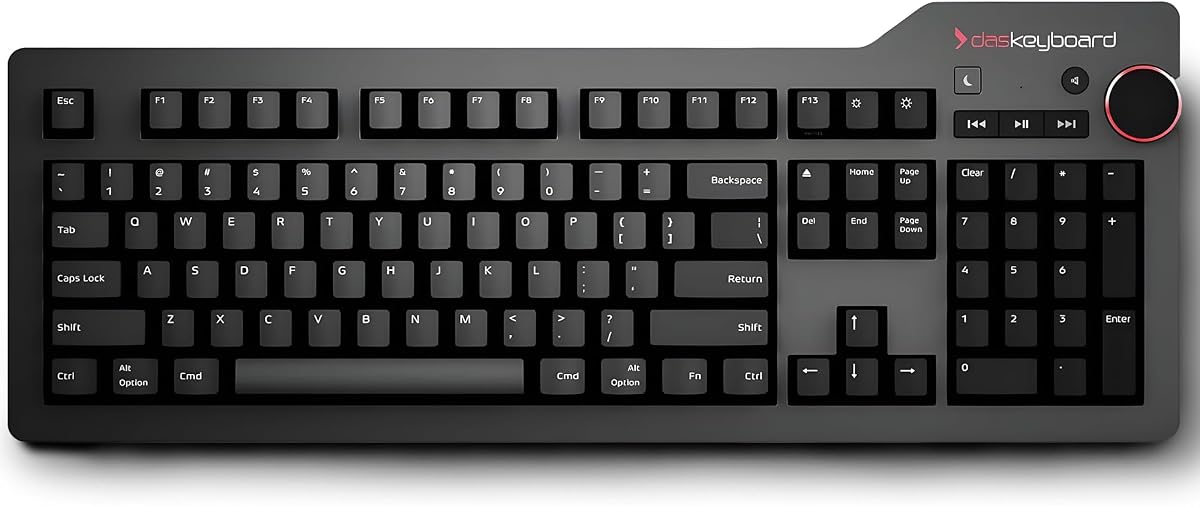
The Das Keyboard 4 Professional for Mac delivers a high-end mechanical typing experience with added convenience features. A 4.3 rating indicates strong performance for power users who prioritize build quality.
We may earn a commission when you buy through this link, at no additional cost to you.
Cherry MX Blue switches provide tactile feedback that enhances typing speed and precision. The USB 3.0 hub allows for fast data transfer and convenient device charging right at the keyboard.
An aluminum top and dedicated media controls, including a large volume knob, add a professional touch. However, the clicky sound might not be suitable for shared or quiet workspaces.
This keyboard is ideal for developers or professionals who spend hours typing daily. The combination of mechanical quality and USB convenience makes it a premium investment.
Cherry MX Blue switches offer precise feedback for faster and more accurate typing.
USB 3.0 hub transfers data ten times faster than USB 2.0 alternatives.
We may earn a commission when you buy through this link, at no additional cost to you.
The Das Keyboard 4 Professional offers a premium mechanical typing experience suitable for both Windows and Linux users. With a 4.3 rating, it provides robust build quality and performance.
We may earn a commission when you buy through this link, at no additional cost to you.
It supports full N-Key Rollover, ensuring every keystroke registers accurately even during fast typing. The USB 3.0 hub and media controls enhance productivity and multimedia management.
Laser-etched keycaps and high-performance gold-plated switches ensure long-term durability. While the price is higher, the reliability and tactile feedback justify the cost for serious typists.
This keyboard suits professionals and gamers who need reliability and mechanical precision. Its design balances functionality with a professional aesthetic effectively.
Full NKRO ensures every keypress is registered accurately for fast typists.
Laser-etched caps and aluminum top provide durability and elegant design.
We may earn a commission when you buy through this link, at no additional cost to you.
The Genuine Dell Business Multimedia Keyboard is an official replacement designed for specific Dell desktop models. Its 4.6 rating highlights its reliability and consistent OEM quality.
We may earn a commission when you buy through this link, at no additional cost to you.
It includes 14 hotkeys for quick access to common tasks and features a built-in 2-port USB hub. The spill-resistant design ensures durability in everyday office environments.
The removable palm rest adds comfort during extended typing sessions. However, it is primarily compatible with Dell business models, limiting its general use.
This keyboard is best for Dell users needing a direct replacement or extra functionality. It offers OEM reliability and convenient features at a reasonable price point.
Genuine Dell part ensures perfect compatibility with supported business desktops.
14 hotkeys and USB hubs simplify daily workflow and reduce desk clutter.
We may earn a commission when you buy through this link, at no additional cost to you.
Selecting the right keyboard with a USB port requires considering your workflow, budget, and device ecosystem. This guide outlines the critical factors to help you make an informed decision.
The number and type of USB ports vary significantly between models. Some keyboards offer two ports while others provide three. Modern designs may include USB-C alongside traditional USB-A options.
Check if the ports support data transfer and charging. Ensure the configuration matches your peripheral needs to avoid buying a model with insufficient connectivity.
Full-size keyboards include a numeric keypad which is useful for data entry tasks. Compact or tenkeyless models save desk space but lack the number pad.
Decide based on your desk space and typing habits. Smaller desks benefit from compact designs while data-heavy workflows need full-size layouts.
Membrane switches offer a quieter and softer typing experience suitable for shared offices. Mechanical switches provide tactile feedback and durability for heavy users.
Consider noise levels and feedback preferences. Mechanical switches last longer but may be louder than membrane alternatives.
Ensure the keyboard supports your OS with correct key mappings and shortcuts. Some models auto-detect OS while others are Windows-specific.
Mac users should look for dedicated Mac compatibility to ensure all function keys work correctly.
Spill-resistant and durable materials extend the keyboard lifespan in work environments. Aluminum tops and high-quality plastics resist wear better.
Check for warranties and support options to protect your investment against manufacturing defects.
Backlit keys improve visibility in low-light environments. Adjustable brightness levels offer flexibility for different lighting conditions.
Determine if you need lighting based on your typical workspace environment.
Ergonomic designs reduce hand strain during long typing sessions. Features like tilting feet and wrist rests help maintain a natural hand position.
Prioritize ergonomic features if you type for extended periods to prevent fatigue and discomfort.
Prices vary widely based on features and build quality. Budget models may lack USB ports while premium options include advanced connectivity and materials.
Balance your needs against the price to find the best value for your specific usage requirements.
Connect your keyboard to an available USB port on your computer and plug your peripheral into the keyboard's port to reduce cable clutter and improve access.
Clean your keyboard regularly using compressed air and a soft cloth to maintain responsiveness and prevent debris buildup between keys.
Avoid spilling liquids on the keyboard and check manufacturer guidelines for cleaning instructions to ensure longevity and safety.
The main advantage is increased connectivity without needing separate hubs. These keyboards allow you to plug in mice or flash drives directly for easier access and reduced desk clutter.
Many modern models support Mac with auto-detection features, but verify compatibility before buying. Some Windows-only models may not map correctly to macOS shortcuts.
Most USB ports provide enough power for low-energy devices like mice or keyboards, but charging smartphones may depend on the port type. USB 3.0 ports usually supply more power than 2.0 ports.
Yes, connecting one keyboard with built-in USB ports is an efficient way to expand your available connections when your computer is out of ports.
Cable lengths vary by model but often range from five to seven feet. Check the product specifications to ensure the length fits your desk depth comfortably.
Unplug the keyboard and flip it upside down to drain liquid. Use compressed air to dry internal components and allow it to air dry completely before reconnecting.
If you value typing feedback and durability, mechanical keyboards offer a better experience. However, if you just need ports and typing, membrane models are often more cost-effective.
Most are plug-and-play and work without installing drivers. However, some advanced multimedia features may benefit from optional software installation for full functionality.
Our top picks highlight diverse options from the versatile Macally Wired Keyboard to the affordable Logitech K120. Each model balances connectivity, build quality, and typing comfort differently.
When choosing, prioritize the number of USB ports and the switch type that suits your typing style. Consider your operating system needs to ensure seamless functionality.
Verify current prices and availability before purchasing since market values can change quickly. Investing in the right keyboard with USB ports can significantly improve your daily workflow efficiency.