
ATTACK SHARK X68 HE
4.6Editor score
0.01mm RT accuracy
Web driver support
Top mount structure
This guide compares the top 10 best keyboard for Valorant options featuring magnetic switches, rapid trigger, and low latency to help you dominate competitive
Choosing the right input device is critical for tactical shooters where split-second reactions determine victory. A dedicated keyboard for Valorant offers precision actuation and rapid trigger capabilities essential for counter-strafing and peeking mechanics.
We evaluated ten leading models based on polling rates, switch technology, and layout efficiency. Our analysis prioritizes keyboards that minimize input lag and maximize control consistency across intense ranked matches and team fights.
Each selection below highlights specific strengths tailored to competitive playstyles and budget constraints. Please note that product availability and pricing fluctuate regularly so verify current details before making your final purchasing decision.
4.6Editor score

4.1Editor score

4.4Editor score
The following table provides a side-by-side comparison of all ten featured keyboards allowing you to quickly evaluate key specifications like polling rates, switch types, and layout percentages.

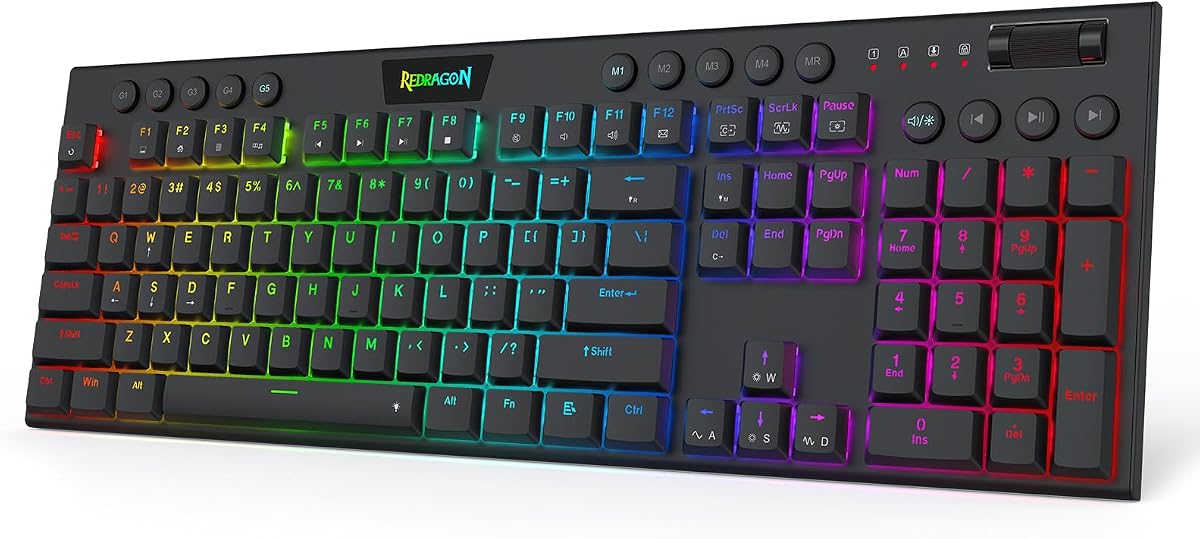





The Redragon K673 HE stands out as a premier keyboard for Valorant due to its next-gen UltraMag magnetic switches. With a rating of 4.1 stars it delivers instant 0.1mm resets for rapid tapping and faster reactions during critical rounds.
We may earn a commission when you buy through this link, at no additional cost to you.
Its 8000Hz hyper-polling ensures every input registers nearly instantly while rapid trigger cuts redundant keystrokes during quick direction changes. This setup maintains consistent actuation profiles between 0.1mm and 3.4mm for tailored precision.
While the software offers deep calibration the initial setup requires some familiarization. The wired connection limits flexibility but guarantees maximum stability without interference during peak tournament play or ranked matches.
Competitive players seeking affordable magnetic tech should prioritize this model. It balances performance and price exceptionally well making it an ideal upgrade for anyone serious about mastering counter-strafing mechanics in tactical shooters.
Magnetic switches detect keypresses without physical contact ensuring smoother and faster transitions between movement and firing actions.
Users can save multiple profiles via desktop driver allowing different games to utilize specific trigger points for optimal performance.
We may earn a commission when you buy through this link, at no additional cost to you.
This TKL variant offers the same magnetic benefits as its full-size counterpart but with a compact footprint. The 4.4 star rating reflects user satisfaction with its soft silky bounce that avoids harsh rigid clacks common in standard boards.
We may earn a commission when you buy through this link, at no additional cost to you.
The dual-module floating structure pairs with noise dampening layers to reduce distractions during intense gameplay. You can manage lighting and volume with a single knob without needing extra key combos or complex shortcuts.
Input transmission is up to eight times faster than standard boards thanks to hyper-polling. Dynamic key activation cuts redundancy effectively allowing for smoother strafing and movement execution within tight game maps.
Ideal for those wanting a smaller desk footprint without sacrificing speed. The TKL layout frees up mouse space for low sensitivity aiming which is crucial for precise crosshair placement in first-person tactical shooters.
The single control knob simplifies volume and media playback adjustments directly on the keyboard avoiding disruption to gaming focus.
Rapid trigger logic ensures keys reset instantly allowing for immediate directional changes that are essential for movement techniques.
We may earn a commission when you buy through this link, at no additional cost to you.
With a perfect 5.0 rating this low-profile model excels at counter-strafing thanks to its shortened travel distance. It registers keystrokes quicker and feels lighter on your wrists during long practice sessions or competitive matches.
We may earn a commission when you buy through this link, at no additional cost to you.
The low-profile design throughout the switches and keycaps ensures faster actuation than standard boards. You also get 20 on-the-fly macro keys that let you record combos or adjust volume without installing extra software.
Actuation profiles range from 0.1mm to 2.8mm allowing you to fine-tune sensitivity via the web-based driver. This keeps your setup consistent across different games and ensures you always land peek-and-fire timing correctly.
Perfect for gamers preferring a sleeker aesthetic or those with limited desk space. The compact 60% layout is ideal for high-sensitivity setups where mouse room is critical for aiming precision and movement fluidity.
Dedicated macro zones allow instant recording of combos saving you from digging through complex driver menus during gameplay.
The lower profile reduces finger travel distance lowering strain during extended gaming sessions and promoting better typing ergonomics.
We may earn a commission when you buy through this link, at no additional cost to you.
This white compact board offers advanced Hall Effect control designed specifically for competitive FPS scenarios. It features MGX Hyperdrive core switches with zero drift and 100M keystroke durability ensuring consistent performance under pressure.
We may earn a commission when you buy through this link, at no additional cost to you.
Multi-Action Smart Tap and Tap Lock give you streamlined play and reduced finger fatigue. The 8000Hz polling ensures near-instant input registration making every movement and shot land exactly when you need it in ranked matches.
IP57-rated durability handles intense gameplay with resistance against water and dust while PBT double-shot keycaps resist wear. Dual-layer sound dampening keeps keystrokes quieter to maintain focus during critical rounds without distractions.
Recommended for gamers willing to invest in high-end hardware for longevity and precision. Its compact 60% layout maximizes mouse space which is vital for players who rely on low-sensitivity aiming mechanics.
PBT keycaps and IP57 resistance mean the keyboard withstands heavy use and accidental spills over long periods of play.
Smart Tap and Tap Lock help execute complex combos with less physical effort reducing strain during extended competitive sessions.
We may earn a commission when you buy through this link, at no additional cost to you.
Optical switch technology registers key presses at the speed of light with significantly shorter actuation distances than other linear switches. Its 4.6 star rating highlights strong performance in speed and immersive personalization features.
We may earn a commission when you buy through this link, at no additional cost to you.
Snap Tap prioritizes the latest input between assigned keys for truly responsive in-game movement. You can remap any key or combination to execute complex commands using Razer Hypershift enhancing your macro setup capabilities.
The matte aluminum top frame increases structural integrity while oil-resistant double-shot PBT keycaps prevent grime buildup. This ensures a clean tactile surface that remains consistent even after years of intense daily gaming sessions.
A top choice for users invested in the Razer ecosystem looking for speed and style. The optical switches provide a distinct advantage in fast-paced shooters where milliseconds matter for reaction timing and movement efficiency.
Optical beams eliminate mechanical bounce making keypresses faster and cleaner than traditional mechanical switch designs.
Full sync with Razer Chroma and other hardware allows for seamless lighting effects that match your entire gaming setup.
We may earn a commission when you buy through this link, at no additional cost to you.
The Aula WIN60 HE features self-developed magnetic switches delivering up to 8000Hz polling for ultra-fast response times. Its 4.5 star rating confirms strong reliability and precision for FPS titles like Valorant and CS2.
We may earn a commission when you buy through this link, at no additional cost to you.
Rapid trigger mode ensures lightning-fast response times with a tiny 0.02mm RT step distance. This allows you to stay ahead in intense matches with unmatched speed and precision during rapid shooting and complex combos.
Customization happens via a web-based driver accessible from any device without bulky software downloads. You can remap keys and adjust RGB lighting quickly ensuring a seamless hassle-free customization experience for any user.
Ideal for players who want high-performance features without installing heavy software on their PCs. The compact 60% design saves desk space without sacrificing functionality making it perfect for gamers with smaller setups.
Access all settings directly from a browser window which eliminates installation steps and compatibility issues on different machines.
Swap out magnetic switches without soldering allowing you to experiment with different feels while keeping the high polling rate.
We may earn a commission when you buy through this link, at no additional cost to you.
This magnetic keyboard offers an industry-leading 8000Hz polling rate and ultra-low 0.3ms latency ensuring your commands take effect instantly. The 4.5 star rating reflects its ability to enhance both gaming efficiency and work productivity significantly.
We may earn a commission when you buy through this link, at no additional cost to you.
Each key can be personalized to the smallest unit of 0.1mm providing an ultra-precise keying experience. Web driver access lets you customize RT SOCD and DKS functions without downloading additional software on your system.
South-facing LEDs illuminate PBT keycaps for a better visual experience without interfering with aftermarket keycap compatibility. The 60% layout saves up to 40% of desktop space while retaining arrow keys and basic function keys.
Recommended for gamers seeking high-end specs on a budget without compromising on core speed features. The compact design also makes it easier to carry for LAN parties or travel to gaming events locally.
Adjust individual keys down to 0.1mm granularity allowing for highly tailored setups that match your exact playstyle needs.
South-facing LEDs allow RGB light to shine brightly through keycaps enhancing the setup aesthetic during dim gaming sessions.
We may earn a commission when you buy through this link, at no additional cost to you.
The F75 Pro works with Bluetooth 5.0 2.4GHz wireless and USB wired connections to suit diverse setups. Its 4.6 star rating highlights satisfaction with its smooth typing feel and premium structural build quality.
We may earn a commission when you buy through this link, at no additional cost to you.
Equipped with pre-lubricated stabilizers and LEOBOG reaper switches this keyboard offers fast response for exciting games. Hot swap support means beginners can easily DIY their own boards without soldering issues or special tools required.
Advanced structure with extended integrated silicone pads optimizes resilience and stability for a thocky sound. Five layers of filling silencer counteract cavity noise effectively ensuring a solid feel during intense gaming action.
Best for users needing a wireless option for both gaming and work environments seamlessly. The multi-function knob allows intuitive media and lighting adjustments making it a powerful tool for streamers and office users alike.
Connect up to five devices simultaneously and switch between them easily with shortcut keys or a side button control.
Deep internal damping ensures a satisfying sound profile that is pleasant to type on during long creative or gaming sessions.
We may earn a commission when you buy through this link, at no additional cost to you.
This magnetic keyboard offers adjustable hall effect switches with true 8000Hz polling rates reducing latency to an impressive 0.125ms theoretical value. With a 4.6 rating it effectively ensures flexibility and ultra-response for Valorant and rhythm games.
We may earn a commission when you buy through this link, at no additional cost to you.
The web driver link allows you to remap key functions and adjust lighting modes without installation. You can bind four functions to one key based on four different pressing degrees giving you revolutionary control over actuation points.
Top mount construction with double layer PORON enhances stability while fine-tuned stabilizers reduce wobbliness on big keys. South-facing LEDs ensure superior shine-through capabilities for an immersive visual experience during late night matches.
An exceptional choice for gamers seeking pro-level features on a tight budget. Its scientific structure and detachable USB cable provide a stable connection that remains consistent even during intense frantic gameplay moments.
Theoretical 0.125ms latency ensures near zero delay between physical press and digital signal recognition for maximum speed.
A curved wrist rest and scientific structure reduce strain during extended sessions keeping your hands fresh for long ranked games.
We may earn a commission when you buy through this link, at no additional cost to you.
This wireless keyboard provides a compact space-saving design retaining keys and number pad in a slim profile. It features pre-programmed hotkeys and a multi-function wheel for intuitive media adjustments without interrupting your flow.
We may earn a commission when you buy through this link, at no additional cost to you.
Tri-mode connectivity supports Bluetooth for up to three devices or low-latency 2.4GHz wireless with ROG SpeedNova technology. Hot swappable ROG NX Snow switches allow customization for smooth thocky keystrokes or crisp tactile clicky options.
Enhanced acoustics with integrated sound-dampening foam absorb pinging noises resulting in improved keystroke quality. A detachable wrist rest and adjustable tilt positions ensure ergonomic comfort during long hours of work or gaming.
Best suited for power users who need full functionality without the bulk of a traditional tenkeyless board. Its wireless capability offers flexibility for dual setups making it ideal for users who switch between gaming and office work.
Retains numpad and function keys in a slim footprint saving desk space while keeping essential workflow tools accessible.
Hot swapping allows you to change switch feel quickly letting you test different tactile experiences without buying new gear.
We may earn a commission when you buy through this link, at no additional cost to you.
Selecting the right keyboard involves balancing switch type polling rate and layout to fit your specific playstyle and desk space constraints.
For Valorant you want magnetic or optical switches that offer rapid trigger features. These allow keys to reset instantly when lifted enabling faster counter-strafing than traditional mechanical switches.
Prioritize keyboards with adjustable actuation points so you can fine-tune sensitivity to your fingers.
Look for keyboards with 8000Hz polling rates to ensure input is sent to your PC up to eight times faster than standard 1000Hz boards.
Higher polling rates reduce latency and make movement feel smoother which is critical in tactical shooters.
Choose between 60% TKL or full-size layouts based on how much desk space you have and mouse movement preferences.
A smaller layout gives you more room for low-sensitivity aiming which is a common pro setup choice.
Theoretical latency under 0.2ms is ideal for competitive play to ensure every keystroke registers exactly when intended.
Wired connections generally offer lower latency than wireless but modern 2.4GHz wireless is now viable for gaming.
Drivers that allow per-key RGB macro programming and rapid trigger settings add significant value to your setup.
Web-based drivers are convenient as they require no installation and work on any PC with a browser.
PBT keycaps resist wear and shine better than plastic alternatives ensuring your keyboard looks good for years.
Look for solid aluminum frames and sound dampening features to reduce noise during intense gaming sessions.
Wired keyboards guarantee stable performance while wireless options offer convenience for multi-device setups.
Ensure your choice supports the connections you need such as USB-C or Bluetooth if you use multiple devices.
You can find excellent magnetic keyboards under $60 that perform as well as expensive models so price isn't always the deciding factor.
Focus on core features like rapid trigger and polling rate rather than branding or aesthetic extras to maximize value.
To maximize performance enable rapid trigger mode in your keyboard software immediately after setup. This setting ensures keys reset the moment you lift your finger allowing for quick directional changes.
Clean your keyboard regularly with a soft brush or compressed air to remove dust buildup between the switches. Avoid using liquids directly on the board to prevent short circuits.
If using a wireless model charge it fully before playing to avoid unexpected disconnects during ranked matches. Always test your connection in custom games before going live.
Yes rapid trigger allows keys to reset instantly without waiting for the full physical travel distance. This significantly improves counter-strafing and movement accuracy in tactical shooters like Valorant.
Modern 2.4GHz wireless keyboards with high polling rates are sufficiently fast for competitive play. However wired options still offer the absolute lowest latency possible for tournament use.
Yes Hall Effect switches need software to manage actuation points and rapid trigger features. Many brands now offer web-based drivers that are easy to install on any PC.
An 8000Hz polling rate is the current standard for competitive keyboards ensuring inputs are registered with minimal delay. This is especially useful for quick directional changes.
A 60% or TKL layout is ideal because it frees up desk space for large mouse movements. This allows players to use lower DPI settings with greater control.
Most gaming keyboards support both Windows and Mac but check specific driver compatibility. Web-based drivers often support both platforms more easily than traditional installers.
You should clean the switches every few months or whenever they start feeling sticky. Using compressed air helps remove dust that can interfere with magnetic sensors.
They offer noticeable improvements in latency reduction which can be the difference between winning or losing a close round. If you play frequently it is a worthy investment.
We reviewed ten exceptional keyboards ranging from budget magnetic options to premium wireless models. The Redragon K673 HE stands out as the top overall pick due to its balance of speed and affordability.
Prioritize rapid trigger technology and 8000Hz polling when shopping for the competitive edge you need. Your specific needs for wireless or compact layouts should guide your final choice within the list.
Remember that prices and availability can change quickly so check current listings before purchasing. We hope this guide helps you find the perfect keyboard to master your movement and aim.