
Weilisi 10.2 Desk Ring Light
4.5Editor score
360 degree rotation
Flexible height design
Space saving clamp
Discover the 10 best Key Light for Streaming options for 2026. We compare top models for brightness, color accuracy, and ease of use.
Finding the right lighting can transform your online presence. A good Key Light for Streaming ensures your face is well lit and professional. It helps eliminate harsh shadows and provides consistent color tones for viewers.
We evaluated ten top rated models based on brightness, color temperature range, and build quality. Our comparison includes options for every budget and setup size. Each product offers unique features to enhance your video quality.
Every pick highlights key strengths and potential trade offs for real world use. Prices may vary over time due to sales or availability. Check current listings before deciding to ensure you get the best deal today.
4.5Editor score

4.5Editor score

4.4Editor score
This side by side comparison highlights the core specifications and unique features of each model. We focus on brightness, color range, and control methods to help you decide.



The Elgato Key Light stands out as a top choice for streamers seeking professional results. With a rating of 4.5 stars, it delivers consistent performance for video calls and broadcasts. Its high brightness and color accuracy make it a reliable staple.
We may earn a commission when you buy through this link, at no additional cost to you.
It features 2800 Lumens to illuminate your workspace effectively. The Wi-Fi enabled control allows you to adjust settings via desktop app without interrupting your stream. The opal glass face ensures even diffusion without glare.
While it costs more than basic lights, the heat output is impressively low compared to soft boxes. The color temperature range from 2900K to 7000K offers flexibility. Some users note Wi-Fi setup can be tricky initially.
This light is ideal for serious creators who value quality and control. It balances power with ease of use effectively. If you want a studio grade key light for streaming, this is a strong recommendation.
The 2800 Lumens output ensures your face remains well lit even in larger rooms.
Wi-Fi enabled control lets you fine-tune settings directly from your computer or phone.
We may earn a commission when you buy through this link, at no additional cost to you.
Logitech Litra Glow is perfect for streamers who want a simple setup. It earns a 4.5 rating for its natural skin tones and radiant look. TrueSoft technology delivers balanced full spectrum light for video conferencing.
We may earn a commission when you buy through this link, at no additional cost to you.
Its frameless diffuser radiates wide soft light that flatters the subject. The adjustable brightness and color temperature help you achieve your desired look quickly. You can use the G HUB app for more control.
Since it is USB powered, it is portable and lightweight. However, it may not be bright enough for large dark rooms. The fixed mount design might limit flexibility for some desktop layouts.
This light works well for webcam setups and casual streaming. It is safe for all-day streaming and clears strict testing guidelines. For a plug and play solution, it is a solid choice.
TrueSoft technology ensures your skin looks natural on camera without harsh filters.
G HUB app lets you save presets for quick access during your sessions.
We may earn a commission when you buy through this link, at no additional cost to you.
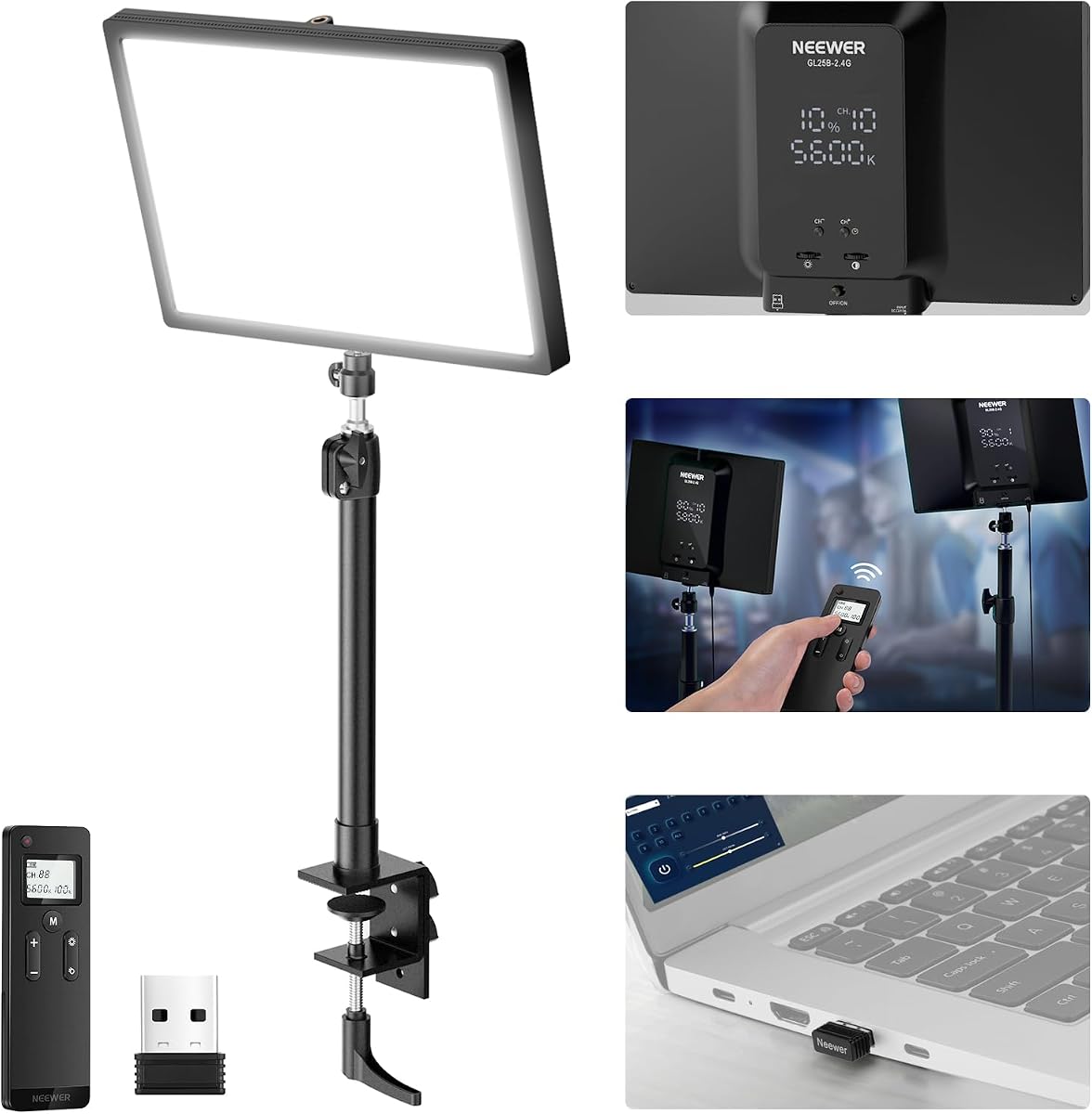
The NEEWER GL25B offers a quiet operation that streamers appreciate. With a 4.7 rating, it is highly regarded for its silent fanless cooling system. It delivers 2300lux output with a high CRI of 98.
We may earn a commission when you buy through this link, at no additional cost to you.
You can control the light directly on the panel or via the 2.4G remote. PC Mac control allows management of multiple lights through the app. The edge emitting soft glow ensures no harsh shadows.
The fanless design keeps noise down but can limit heat management in high intensity use. The remote allows for convenient adjustments without touching the panel. Setup includes an extendable stand and ball head.
This is a great choice for podcasters and gamers who need quiet lighting. It offers professional grade circuit and stable lighting. If you value silence and quality light, this fits well.
The fanless design ensures zero noise performance during immersive live streaming.
Use the included remote or PC/Mac control for flexible lighting management.
We may earn a commission when you buy through this link, at no additional cost to you.
The Elgato Key Light Air MK.2 is a slim 15 inch panel designed for modern setups. It has a 3.8 rating and offers up to 2100 lumens. It is 50 brighter than the original Air model.
We may earn a commission when you buy through this link, at no additional cost to you.
It supports USB-C power from laptop or adapter for flexible operation. You can control brightness and color temperature directly on the light or via app. Stream Deck support adds automation to your workflow.
While it is compact and convenient, some users find it dimmer than expected for dark rooms. The battery power option adds mobility but requires charging. It is good for tight spaces but less powerful.
This light is ideal for travelers or those with limited desk space. It offers full spectrum color from 2900K to 7000K. If you value automation and size, consider this option.
Stream Deck support allows you to automate lighting with a single keypress.
The slim design fits easily into small setups without sacrificing too much light.
We may earn a commission when you buy through this link, at no additional cost to you.
The Weilisi 10.2 is a great budget option for streaming. It has a 4.5 rating and provides soft uniform desk light. It restores natural light and ensures no shadow to enhance your subject.
We may earn a commission when you buy through this link, at no additional cost to you.
It features a 360 rotation and 180 adjustable head for flexible angles. The large metal C-clamp saves space and keeps your desk tidy. You get 10 brightness levels and 3 color temperatures.
The telescoping stand allows for flexible height adjustment to optimize coverage. While it is smaller than full panels, it works well for webcam use. Some users wish for more robust controls.
This is perfect for beginners or home office users. It is easy to install and provides consistent light for video calls. If you need a cheap but effective light, this is a winner.
Rotate 360 and adjust the head to get the perfect angle for any setup.
The C-clamp design saves valuable desk space while remaining stable.
We may earn a commission when you buy through this link, at no additional cost to you.
NiceVeedi offers a 2-pack kit ideal for creating a complete lighting setup. With a 4.4 rating, it provides stable ample output of 15W per light. It has a high CRI of 97 for precise color rendering.
We may earn a commission when you buy through this link, at no additional cost to you.
Each light comes with a durable tripod stand and phone holder. The 10 inch panels are compact and easy to carry. You can adjust height flexibly and rotate the panel 180 degrees.
While the power is lower than studio units, it is sufficient for home use. The thickened light shell works as diffusion. However, you cannot control it via app or internet.
This kit is great for multi-angle shots or small studios. It offers extra lighting for your works at an affordable rate. If you need multiple lights quickly, this pack is helpful.
Get two lights and stands to cover more area without buying separately.
Folded size and light weight make this kit easy to transport.
We may earn a commission when you buy through this link, at no additional cost to you.
This kit features gooseneck tubes for unique flexibility. It has a high 4.8 rating. The LCD display shows brightness color temperature clearly. It uses 118 LED beads for soft flicker-free light.
We may earn a commission when you buy through this link, at no additional cost to you.
The metal C-clamp stand fits desktops from 0.3 to 3.3 thick. Height adjusts between 12.2 and 21.3 inches. You can rotate tubes to multiple positions to achieve optimal lighting effects.
While flexible, the gooseneck can sometimes bend too much under weight. The built-in memory function saves your last settings. It offers 16W power and 1080Lux at 0.5m.
This is suitable for podcasting and gaming setups needing adjustable angles. It keeps the desktop clean and saves space. If you need precise positioning, the tubes provide that advantage.
The gooseneck tubes rotate to multiple positions for precise light placement.
The high definition LCD screen helps you check settings accurately.
We may earn a commission when you buy through this link, at no additional cost to you.
The Godox ES45 uses a soft diffused panel for glowing skin. It has a 4.4 rating. Designed for long sessions, it reduces eye fatigue with even diffused illumination. The magnetic remote is a standout feature.
We may earn a commission when you buy through this link, at no additional cost to you.
You can control brightness and color temperature in real-time with the remote. It snaps magnetically to the back and recharges automatically. The Godox Light App lets you control multiple lights simultaneously.
The 0-100 dimming and 2800K to 6500K range adapts to any environment. The clamp stand attaches to desks up to 2 inches thick. Some users report remote range limitations in large rooms.
This is ideal for streamers who want premium features. It minimizes harsh shadows and keeps your workspace tidy. If you value seamless control and quality, this is a top choice.
The magnetic remote attaches to the back and recharges automatically.
Gentle soft light designed for long sessions reduces eye strain.
We may earn a commission when you buy through this link, at no additional cost to you.
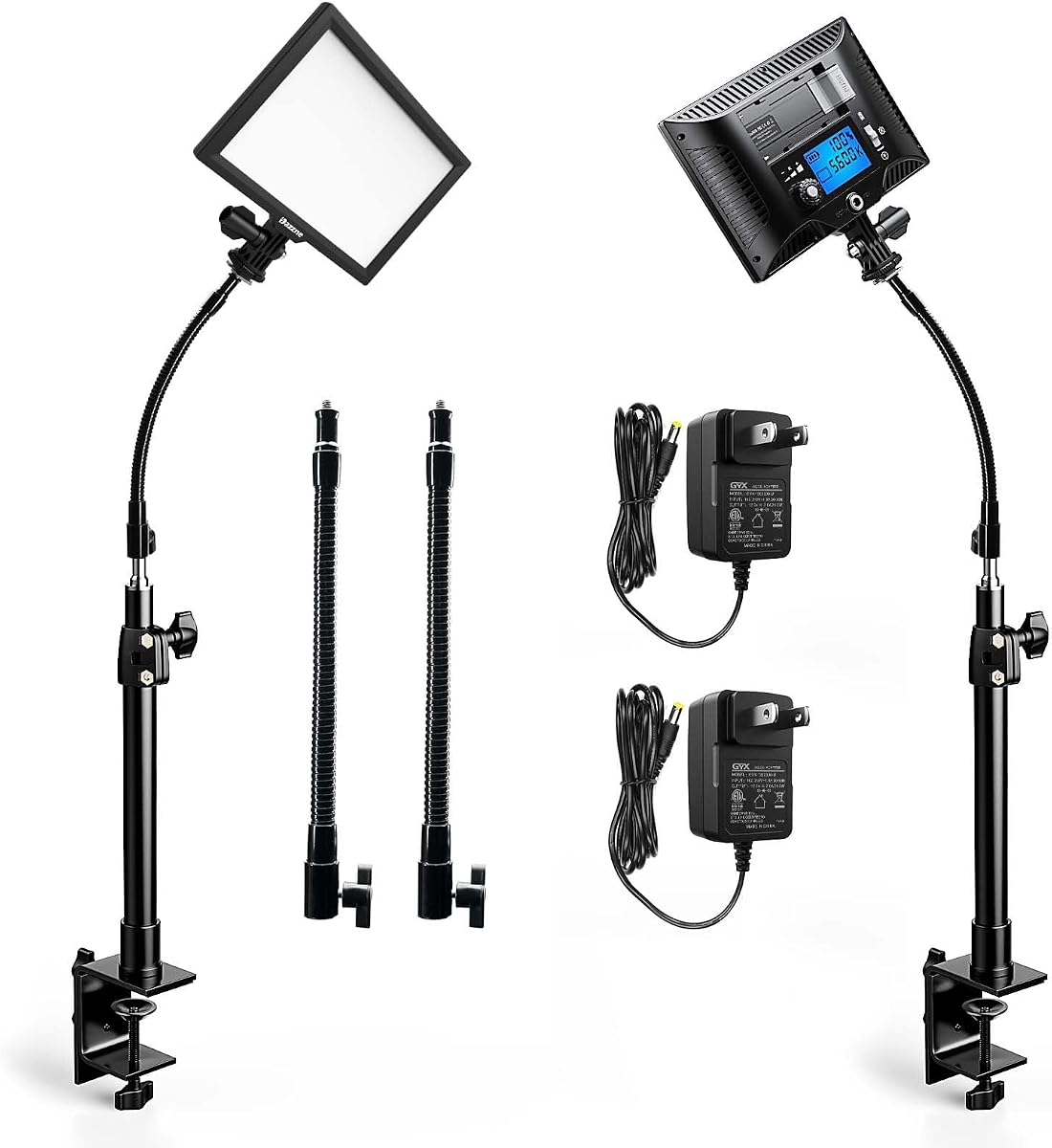
Dazzne provides a 2-pack with gooseneck tubes for versatile setups. It has a 4.4 rating. The LCD screen allows reliable checking of brightness and power. It uses 118 high-quality LED beads.
We may earn a commission when you buy through this link, at no additional cost to you.
The built-in memory function records your last settings. Each unit comes with a metal desktop bracket and gooseneck tube. You get consistent 16W power and CRI of 95 for accurate color.
It is suitable for continuous illumination during podcasts or Zoom meetings. The structure saves space compared to softbox setups. Note that batteries are not included for mobile use.
This kit works well for creators needing multiple lights easily. It offers adjustable stands and flexible angles. If you want a full kit with flexibility, this is a good option.
Gooseneck tubes provide more lighting angle options for your needs.
Built-in memory function makes operation easier and work efficient.
We may earn a commission when you buy through this link, at no additional cost to you.
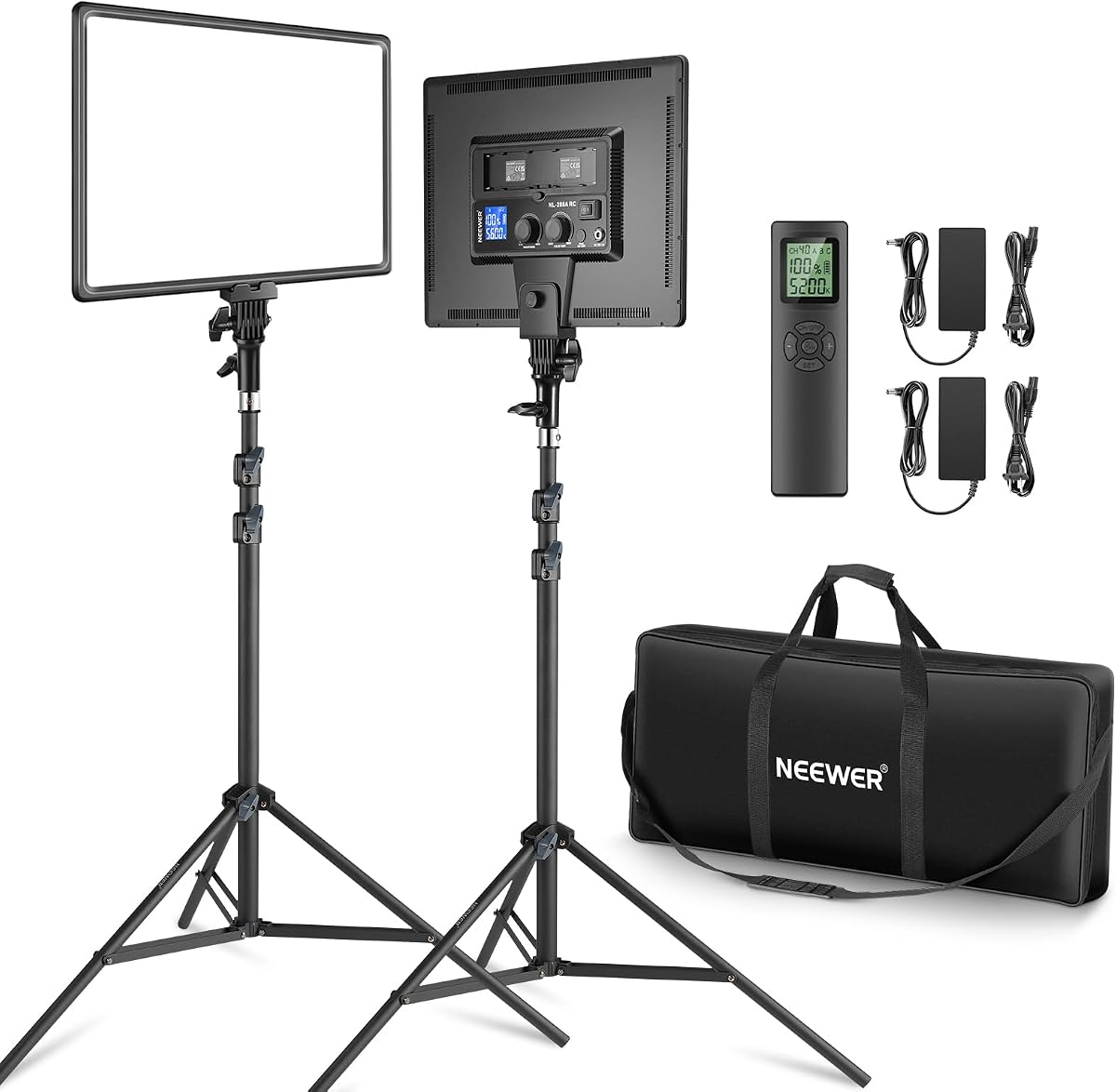
Neewer offers a robust 2-pack with high 45W output. It has a 4.6 rating. Each panel has 288 LEDs for soft continuous lighting. You get two tripod stands for flexible placement.
We may earn a commission when you buy through this link, at no additional cost to you.
The remote control lets you switch between 40 channels and 4 groups. Dual power options include AC adapter or Sony NP-F batteries for mobility. It offers 3200K to 5600K range.
While it delivers 4800Lux, batteries are not included. The carrying bag helps with transport. It is ideal for studio photoshoots and social media content creation.
This kit is for users needing high brightness and control. It allows full control over lighting for photography and videography. If you need serious power, this fits the bill.
45W output and 4800Lux provide strong illumination for any space.
Use AC adapter or batteries to keep shooting without interruption.
We may earn a commission when you buy through this link, at no additional cost to you.
Choosing the right Key Light for Streaming requires understanding several technical aspects and your specific needs.
Brightness is critical for ensuring your face is clearly visible on camera. Look for lights that offer at least 1000 Lumens for home setups. Higher brightness helps overcome shadows and maintains image quality in various environments.
Higher lumens mean better visibility but may generate more heat.
A wide color temperature range allows you to match your room or create a specific mood. Models offering 2900K to 7000K give you flexibility from warm to cool tones. This helps in keeping skin tones natural.
Adjustable temperature ensures you can adapt to any setting easily.
Color Rendering Index (CRI) measures how accurately colors appear on camera. A CRI of 90 or higher is recommended for professional results. Higher CRI ensures your skin and background look true to life.
High CRI makes a difference in video quality perception.
Some lights offer app control or Wi-Fi while others use remotes or physical knobs. Decide if you need remote adjustment during a stream. App control adds convenience but may require setup time.
Choose controls that fit your workflow and ease of use.
Mounting options vary from desk clamps to tripods. Consider where you will place the light and if you need to move it. Portable models are useful for creators who stream from different locations.
Stable mounting prevents flicker or movement during use.
Power can come from USB, AC, or batteries. USB is convenient for laptop setups but may limit power. AC ensures consistent output while batteries offer mobility. Evaluate your power availability.
Consistent power prevents interruptions during critical moments.
Fans can create noise that gets picked up by microphones. Fanless models are quieter but may run hotter. Consider how sensitive your audio is and if you need silent operation.
Quiet operation is key for high quality streaming.
Durability affects long term value. Look for sturdy materials and reliable warranties. Cheaper plastic parts might break easily. Invest in a solid unit to avoid frequent replacements.
Better build means fewer issues over time.
Start by setting up your light at eye level or slightly above. Position it at a 45 degree angle to reduce shadows on your face. Ensure the light is stable so it does not move during recording.
Adjust the color temperature to match your background or room. Use lower temperatures for a cozy look and higher for a crisp professional look. Test the brightness to avoid washing out your skin.
Keep the light panel clean by gently wiping it with a soft cloth. Avoid spraying liquids directly on the device. Store lights in a safe place when not in use to prevent damage.
The best angle is usually slightly above eye level pointing down at 45 degrees. This reduces shadows under eyes and chin. Adjust to find your most flattering position.
A window provides natural light but can change color or intensity. A Key Light ensures consistency and fills shadows. It helps maintain quality regardless of outside conditions.
Most lights range from 10W to 50W. Lower power lights are fine for small spaces. Higher power units offer brighter light for larger rooms.
Yes, many of these lights work great for Zoom or Teams. They improve image quality by reducing shadows. This helps you look more professional on calls.
5600K is often close to daylight and looks natural. But 3200K to 5600K allows flexibility. Choose based on your preference and background lighting.
Yes, most streaming lights use safe LED technology. They are designed to reduce eye strain. Keep them at a reasonable distance for comfort.
We highlighted top options ranging from budget to premium. The Elgato Key Light leads in performance while Weilisi offers great value. Each choice meets different needs for streamers.
Prioritize brightness and control methods that fit your space. A light that is too dim may not help. Ensure the setup matches your content goals.
Prices change frequently so check current listings before buying. Investing in a good light improves your quality significantly. Choose one that fits your budget and needs today.