
ASRock Intel Arc B570 Challenger 10GB OC
4.7Editor score
10GB GDDR6 Memory
Xe2-HPG Architecture
Dual Fan Cooling
This guide compares the best Intel Arc GPU options for gaming and AI workloads in 2026, highlighting performance, memory, and value across ten models.
Choosing the right graphics card can transform your computing experience significantly. Intel Arc GPUs offer compelling performance for gaming and content creation tasks alike.
We evaluated ten distinct models based on architecture, memory capacity, cooling efficiency, and real-world compatibility. Our analysis focuses on value and reliability for diverse user needs.
Each selection below highlights key strengths and potential limitations to help you decide. Note that availability and pricing fluctuate frequently across retailers.
4.7Editor score

3.9Editor score

The following table provides a side-by-side comparison of key specifications across all ten selected models to facilitate quick decision-making.



The ASRock Intel Arc Pro B60 Creator stands out as a powerhouse for professionals needing serious memory capacity. It features a massive 24GB of GDDR6 memory which is essential for large language models and high-resolution rendering tasks. The card uses Intel's next-gen Xe2-HPG architecture to deliver robust compute performance while maintaining compatibility with modern workstation platforms through PCIe 5.0 support.
We may earn a commission when you buy through this link, at no additional cost to you.
This GPU is specifically designed for AI inference and generative design workflows. Its 192-bit bus delivers 456 GB/s bandwidth ensuring data moves efficiently between memory and compute cores. The twin media transcoders allow for rapid export of videos in high-resolution formats using AV1 encoding. This makes it an excellent choice for content creators who require speed alongside raw capacity.
While the blower-style cooling ensures it fits easily into tight chassis spaces it can be noisy under full load. The single 8-pin power connector limits some potential thermal headroom compared to multi-connector designs. However for users prioritizing memory capacity and ISV certification these trade-offs are often acceptable given the card specific professional use case.
This card is ideal for engineers and designers running complex simulations or 3D renders locally. If you need to run large AI models without cloud dependency this GPU provides the necessary infrastructure on a single card. It remains a strong option for workstations needing to scale performance across multiple Linux-based systems effectively.
With 24GB of VRAM you can load large quantized models directly without needing expensive server infrastructure or external cloud compute.
Four DisplayPort 2.1 outputs allow you to connect up to four 8K displays simultaneously for expansive multi-monitor workflows.
We may earn a commission when you buy through this link, at no additional cost to you.
The ASRock Intel Arc B570 Challenger offers exceptional value for gamers seeking smooth performance at 1440p resolution. It features a modern Intel Xe2-HPG architecture designed to handle demanding titles efficiently. With 10GB of GDDR6 memory on a 160-bit bus this card provides ample buffer for high-resolution textures and complex scenes in current games.
We may earn a commission when you buy through this link, at no additional cost to you.
A standout feature is the support for Intel XeSS 2 technology which uses AI to upscale images for better performance and quality. The GPU clock speed of 2600 MHz ensures responsive gaming experiences even in CPU-bound scenarios. Efficient dual fan cooling with 0dB technology means the fans stop completely during light loads keeping your system silent when browsing or watching videos.
While ray tracing capabilities have improved on newer Intel chips they still lag behind competitors in the highest settings. The single 8-pin power connector might limit sustained clock speeds during very long intensive sessions compared to higher wattage cards. Nevertheless the overall balance of features and performance makes this a highly competitive option in its price range.
This graphics card is perfect for budget-conscious gamers who prioritize frame rates over maximum fidelity. It also supports modern display technologies like HDMI 2.1a and DisplayPort 2.1 ensuring compatibility with latest TVs and monitors. If you want a reliable card for content creation and gaming without overspending this is a smart choice.
Intel XeSS 2 uses machine learning to boost frame rates while maintaining sharp image quality in supported titles.
A stylish metal backplate provides structural rigidity to prevent GPU sag and enhances the card overall durability.
We may earn a commission when you buy through this link, at no additional cost to you.
The WEELIAO MAXSUN Intel Arc Pro B60 48G Turbo is a specialized workstation card built for heavy AI workloads. It combines two Arc Pro B60 GPUs into a single package offering a total of 48GB of GDDR6 memory. This massive capacity allows users to run large language models like DeepSeek-R1:70B or QwQ-32B entirely on a single card without cloud dependency.
We may earn a commission when you buy through this link, at no additional cost to you.
Each GPU operates at 2400 MHz delivering a combined total of 394 TOPS of INT8 compute power. This architecture is purpose-built for high-concurrency inference and multi-turn dialogues. The system recognizes each chip separately for flexible task assignment which is crucial for complex workflows. It uses a PCIe 5.0 x8 + x8 interface that achieves full bandwidth when paired with a motherboard supporting lane bifurcation.
The Turbo Edition features a triple-thermal design with a blower fan and large vapor chamber to maintain stable temperatures during sustained inference tasks. However the requirement for PCIe lane bifurcation adds complexity to system building as not all consumer boards support this feature. The price point is also high making it a niche product for serious AI researchers or developers.
This card is ideal for teams needing local LLM deployment without the cost of enterprise cloud solutions. It supports native PyTorch and vLLM making it compatible with standard open-source models and frameworks. If you need to run large AI models locally this product provides a powerful cost-effective solution compared to traditional server hardware.
Run large quantized models entirely locally eliminating the need for multi-card setups or expensive cloud services.
The card supports SR-IOV virtualization for flexible resource allocation across tasks or users on the same machine.
We may earn a commission when you buy through this link, at no additional cost to you.
The ASRock Intel Arc A580 Challenger is a solid option for gamers looking for reliable performance at 1440p resolution. It is powered by the Intel Arc A580 GPU with Intel Xe HPG microarchitecture featuring 384 XMX engines for enhanced AI acceleration. The card comes factory overclocked to 2000 MHz out of the box providing optimized performance for smooth gameplay immediately.
We may earn a commission when you buy through this link, at no additional cost to you.
With 8GB of GDDR6 memory on a 256-bit interface running at 16 Gbps this card delivers excellent bandwidth for demanding creative workloads. The advanced dual-fan cooling features striped axial fans and an ultra-fit heatpipe for efficient thermal management. 0dB Silent Cooling technology stops fans completely at low temperatures ensuring silent operation when you are not gaming.
One consideration is that it requires two 8-pin PCIe power connectors and a recommended 650W power supply which adds to system cost. The connectivity includes three DisplayPort 2.0 and one HDMI 2.0b which supports up to 4 displays simultaneously. While it lacks the latest DisplayPort 2.1 it still handles high resolutions well for most modern monitors.
This card is a great choice for budget builders who still want strong performance in modern titles. It includes a stylish metal backplate for enhanced PCB rigidity and durability. If you need a reliable GPU for general gaming and media consumption without breaking the bank this model offers a compelling package.
The dual-fan design with 0dB technology ensures the system stays cool during games but silent during idle tasks.
Supports up to four displays simultaneously with resolutions up to 7680×4320 for multi-monitor productivity.
We may earn a commission when you buy through this link, at no additional cost to you.
The Sparkle Intel Arc B580 Titan OC brings a unique aesthetic to the Intel Arc lineup with its blue breathing light feature. It features an OC Edition boost clock of 2760MHz which ensures high performance in gaming scenarios. The 12GB of GDDR6 memory provides ample headroom for modern games and creative applications alike.
We may earn a commission when you buy through this link, at no additional cost to you.
Cooling is handled by TORN Cooling 2.0 which uses axial fans to manage thermal output effectively. The metal backplate not only improves the card look but also provides structural rigidity. A graphic card sag bracket is included to help prevent physical damage due to the weight of the card in vertical slots.
The breathing light can be a nice touch for builds with RGB themes but might be distracting in a professional office environment. Support and driver availability may be slightly more limited compared to major brands like ASRock or Gigabyte. However for users who appreciate distinct styling and solid raw performance this card delivers on its promises.
This graphics card is suitable for gamers who want a bit of flair alongside their high performance. It is designed to handle demanding workloads with stability through its efficient cooling architecture. If you value a distinct look and reliable speed this model offers a compelling alternative in the mid-range market.
The blue breathing light adds a subtle touch of personality to your system without being overly flashy.
Included sag bracket ensures the card stays level and protected even during transport or long-term use.
We may earn a commission when you buy through this link, at no additional cost to you.
The MAXSUN Intel Arc Pro B60 Dual 48G utilizes a dual-GPU design to deliver exceptional parallel processing power. It features two Arc Pro B60 GPUs working in tandem to provide a total of 48GB of dedicated graphics memory. This massive amount of memory is ideal for large-scale rendering AI inference and complex visual computing tasks.
We may earn a commission when you buy through this link, at no additional cost to you.
Despite its high performance the card maintains a compact dual-slot form factor. This design allows it to fit neatly into standard PCIe slots without monopolizing your entire motherboard expansion space. A single large-diameter turbo fan efficiently exhausts heat out of the chassis keeping thermals in check during sustained heavy workloads.
Users should be aware that the single turbo fan may be louder than dual-fan consumer cards under full load. The dual-GPU nature also requires proper driver support to ensure both units are recognized by the system correctly. This makes it a specialized tool for professional workloads rather than a casual gaming solution.
This card is engineered to accelerate AI machine learning and professional creative applications. It is a strong choice for users needing significant memory capacity in a smaller physical footprint. If you require high-performance compute power for rendering or AI this dual-GPU approach offers a unique solution.
The dual-slot design allows for easier installation in workstations that have limited PCIe slot availability.
The turbo fan ensures efficient heat dissipation during long render times or AI inference tasks.
We may earn a commission when you buy through this link, at no additional cost to you.
This bundle includes the ASRock Intel Arc B570 Challenger paired with a reliable 650W 80 PLUS Gold PSU. It is designed to offer a modern value solution for builders starting fresh or upgrading a system. The GPU features the efficient Intel Xe2-HPG architecture built to deliver smooth 1440p gaming performance with minimal effort.
We may earn a commission when you buy through this link, at no additional cost to you.
The PRO-650G PSU is ATX3.1 ready and delivers stable clean power to maximize system performance. This pairing ensures you have enough wattage to run the GPU efficiently without worrying about power supply bottlenecks. The GPU also includes effective dual striped axial fans with 0dB silent cooling for effective heat dissipation.
Having a PSU included in the bundle saves time and often money compared to buying components separately. However the wattage and specific cable layout of the PSU might not suit every custom build case or future upgrade path. It is a convenience-focused choice that works well for standard mid-tower builds.
This bundle is ideal for first-time builders or those upgrading an older system to a modern gaming rig. It simplifies the purchasing process by ensuring compatibility between key components. If you want a complete start-to-finish solution for a 1440p gaming PC this bundle provides a solid foundation.
The 80 PLUS Gold certification ensures the power supply operates efficiently reducing electricity costs and heat.
Getting both GPU and PSU in one box simplifies the installation process for new PC builders.
We may earn a commission when you buy through this link, at no additional cost to you.
The GUNNIR Arc Pro B50 LP is designed for small form factor systems that still need professional power. It features a slim 167x69x18.4mm single-slot low-profile design with a robust metal shroud and turbo fan. Its 70W power draw requires no external PCIe power connector making it the perfect upgrade for small form factor workstations.
We may earn a commission when you buy through this link, at no additional cost to you.
Despite its small size it is equipped with 16GB of high-speed GDDR6 memory on a 128-bit bus. This substantial memory capacity enables you to load larger AI models and render complex 3D scenes smoothly. The card delivers up to 170 TOPS of INT8 compute power efficiently accelerating AI inference and deep learning tasks.
The trade-off for this compact size is that it generates more heat per unit of area than larger cards. The turbo fan must run faster to keep temperatures in check which may be audible in quiet office environments. However for users with strict physical constraints this is often an acceptable compromise.
This card is perfect for mini-tower and edge workstations where space is at a premium. It supports a wide range of open-source models and offers native support for standard ISV applications. If you need a professional GPU that fits in a tiny chassis this is a highly capable option.
Designed to fit into tiny cases that standard full-height cards simply cannot accommodate.
The 170 TOPS of compute power allows for serious AI acceleration in a compact package.
We may earn a commission when you buy through this link, at no additional cost to you.
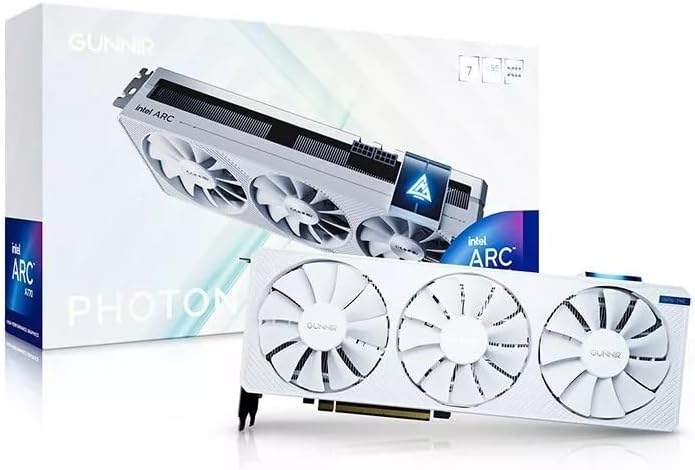
The GUNNIR Intel Arc A770 Photon offers a stylish white finish for builds needing specific aesthetics. It packs 8GB of GDDR6 VRAM running at 2400MHz delivering exceptional performance for gaming and content creation. The triple fan design ensures efficient cooling to maintain stable temperatures during intense workloads or long render times.
We may earn a commission when you buy through this link, at no additional cost to you.
Future-proof connectivity is a highlight here with support for PCIe and HDMI to connect to latest displays including 4K monitors. This GPU is designed to handle demanding graphics workloads with ease providing immersive visuals and seamless gameplay. The 256-bit interface ensures ample bandwidth for high-resolution textures and complex scenes.
The white finish is durable and consistent which is important for premium builds. However sourcing specific color variants can sometimes be more difficult than standard black models. Performance is on par with other Arc A770 models making it a reliable choice for general use cases.
This card is suitable for users who prioritize build aesthetics alongside solid performance. It handles 4K monitoring well and provides the necessary power for creative tasks. If you want a white GPU that delivers reliable power without compromising on quality this model is an excellent match.
The triple fan design provides ample airflow to keep the GPU cool even under sustained loads.
The white finish offers a clean look for builders with a white or light-themed PC case.
We may earn a commission when you buy through this link, at no additional cost to you.
The Sparkle Intel Arc A310 Omni View is designed specifically for office environments needing multiple monitors. It features 4x HDMI display outputs allowing you to connect multiple displays directly without extra adapters. With a 50W TBP and single fan design it is energy efficient and runs cool in office workstations.
We may earn a commission when you buy through this link, at no additional cost to you.
This card is a single slot configuration which saves space in crowded computer cases or thin client towers. It runs on Intel ARC A310 architecture providing reliable output for productivity tasks and digital signage. The low power draw reduces overall system electricity consumption and heat output significantly.
While it is not intended for gaming or heavy 3D rendering it excels in multi-monitor setups. The HDMI outputs simplify cabling for users who rely on standard displays rather than DisplayPort. For administrative tasks or trading setups this card provides the necessary connectivity without overhead.
This graphics card is ideal for office workstations or kiosks requiring stable video output across several screens. Its compact design ensures it fits into almost any PC chassis. If you need a reliable low-cost solution for multi-monitor productivity this model is a practical choice.
Four HDMI ports allow you to connect four screens easily without needing extra docks or splitters.
At only 50W TBP this card consumes very little power making it great for all-day office use.
We may earn a commission when you buy through this link, at no additional cost to you.
Selecting the right GPU depends on matching your specific workload to memory capacity and interface speed.
VRAM capacity is critical for gaming and AI workloads as it stores textures and model data. For general gaming 10GB is a solid baseline but AI inference often requires 24GB or more to run large language models locally without cloud dependency. Always check your typical software requirements to ensure you have enough headroom for future updates or larger datasets.
The memory bus width and speed determine how fast data moves between the GPU and memory. A wider bus like 256-bit offers higher bandwidth which is vital for high-resolution gaming and rendering tasks. However even with a narrower bus like 192-bit if the clock speed is high enough you can still achieve good performance for many applications.
Newer architectures like Xe2-HPG offer better efficiency and AI features compared to older Xe HPG models. Look for specific mentions of features like XeSS 2 or XMX engines if you need advanced upscaling or machine learning acceleration. Choosing the latest generation ensures you get better driver support and performance improvements over time.
Check the power connector requirements to ensure your power supply can support the card. Cards with a single 8-pin connector are easier to install and cheaper on power but may not sustain peak boost clocks. Higher performance cards often require multiple connectors so verify your PSU wattage before purchasing.
Ensure the card has the right ports for your monitors such as HDMI 2.1a or DisplayPort 2.1. If you need to connect multiple screens check the total number of outputs and their types. Some workstation cards offer four ports while gaming cards might offer three or four depending on the model.
Cooling types vary from dual fans to blowers or turbo fans each with different trade-offs. Dual fans offer better cooling and silence but take more space while blowers fit tight cases but can be loud. Consider your case size and noise tolerance when selecting a cooling solution for your build.
Look for features like metal backplates which add structural rigidity and prevent the card from sagging. High-quality components ensure longevity and stability under load. A well-built card will also handle better during transport or accidental bumps protecting your investment.
Check your motherboard for PCIe 4.0 or PCIe 5.0 support and slot availability before buying. Some dual-GPU cards require bifurcation which not all consumer motherboards support. Verify that your system BIOS and OS are ready to handle the specific card architecture and drivers.
Install the card firmly into the PCIe slot ensuring it clicks securely before powering on the system. Connect all required power cables from the PSU to the card to prevent power instability issues.
Intel Arc GPUs are increasingly viable for AI workloads due to dedicated XMX engines and large VRAM options. The Pro B60 models specifically support running large language models locally. Support for PyTorch and vLLM makes them suitable for developers needing local compute.
Yes many Intel Arc GPUs work well with Linux especially for workstation and multi-GPU setups. Open-source drivers are available and the hardware supports standard AI tools on Linux distributions.
No PCIe bifurcation is primarily required for the dual-GPU Pro B60 cards to get full bandwidth. Single GPU cards work on any standard motherboard without needing this specific BIOS feature.
You can monitor temperatures using tools like HWInfo or GPU-Z to track thermal performance. Intel also provides its own utility for detailed GPU information and control.
Yes Intel Arc GPUs feature media engines that support AV1 encoding and decoding for efficient video editing. They are capable of handling 4K workflows and multi-layer timelines effectively.
Xe2-HPG is the newer generation architecture offering improved efficiency and better AI acceleration features. It supports newer technologies like XeSS 2 and delivers higher performance per watt.
Choosing the right Intel Arc GPU depends heavily on whether you need raw gaming power or large memory for AI. For budget gamers the B570 offers excellent value while professionals benefit from the massive 48GB options for local LLMs.