
HDMI Extender Over Single Cat5e/6/7 Ethernet
4.9Editor score
Supports 1080p at 60Hz
Power over Cable technology included
Smart EDID copy for compatibility
This guide compares the top 10 HDMI Extender Cat 5 6 7 Ethernet models for video quality, range, and features to help you choose the right setup.
Finding the right HDMI extender can transform your home theater or office setup by allowing flexible device placement. These devices use Ethernet cables to transmit high-quality video and audio signals over long distances without losing clarity or performance.
We evaluated ten leading HDMI extenders based on their range, resolution support, and ease of installation. Our comparison focuses on real-world performance, compatibility with modern devices, and the reliability of the connection across various cable types.
Each pick highlights specific strengths like 4K support, Power over Cable technology, and IR pass-through capabilities. Please note that product availability and pricing may change frequently, so check current listings before making a final purchase decision.
4.9Editor score

4.6Editor score
4.2Editor score
The following table provides a side-by-side comparison of all ten products reviewed in this guide. It highlights key specifications such as maximum range, supported resolutions, and special features like Power over Cable or IR pass-through to help you quickly identify the best fit for your needs.




The OREI HDMI Over Ethernet Extender via CAT6 4K stands out as a top choice for users needing high-resolution video over distance. With a rating of 4.6 stars, it delivers crisp visuals up to 230 feet using a single Cat6 or Cat7 cable.
We may earn a commission when you buy through this link, at no additional cost to you.
This extender supports HDMI 2.0a and HDCP 2.2, ensuring compatibility with modern content sources like Blu-ray players and game consoles. The included Power over Cable feature simplifies installation by requiring power only at the transmitter end.
While the one-way IR pass-through is functional for most setups, some users may prefer bidirectional control for more complex configurations. The compact metal housing provides durability but may require careful placement in tight spaces.
If you need reliable 4K streaming without signal degradation, this model offers the best balance of performance and ease of use. It is ideal for home theaters or office presentations where visual quality is paramount.
The device supports HDR10 and Dolby Digital, ensuring vibrant colors and immersive sound for a complete entertainment experience.
Power over Cable technology means you only need to plug in one adapter, reducing cable clutter and making setup easier.
We may earn a commission when you buy through this link, at no additional cost to you.
The OREI 4K@60Hz HDMI Over Cat6 Balun is a robust option for setups where the display is closer to the source. It maintains high-quality video transmission up to 165 feet with support for 18 Gbps bandwidth.
We may earn a commission when you buy through this link, at no additional cost to you.
Key features include HDMI loop-out which allows you to view the content locally while sending it to a remote screen. This is particularly useful in conference rooms or retail displays where local monitoring is necessary.
The need for two separate power adapters is a minor inconvenience compared to PoC models. Additionally, the shorter maximum range limits its use in larger spaces like auditoriums or wide open offices.
This model is recommended for users who prioritize local monitoring capabilities and need reliable 4K performance over moderate distances. It serves well in home office or small commercial environments.
Built-in EDID management ensures the source device recognizes the display capabilities, preventing handshake issues.
Support for LPCM and Dolby TrueHD makes it suitable for high-fidelity audio setups in home theaters.
We may earn a commission when you buy through this link, at no additional cost to you.
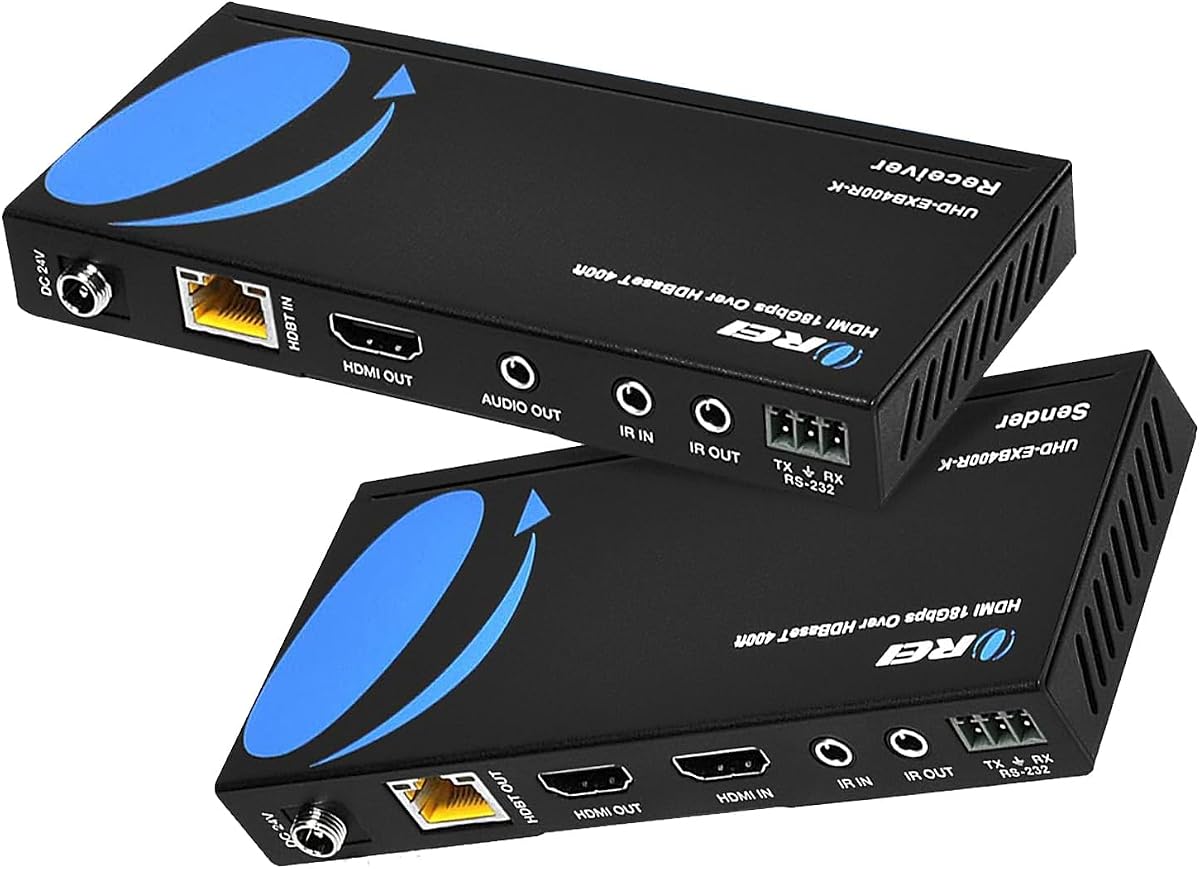
The OREI HDMI Extender HDBaseT 400ft is designed for professional environments requiring long-distance signal transmission. It delivers zero-latency performance up to 400 feet using standard Cat5e or Cat6 cables.
We may earn a commission when you buy through this link, at no additional cost to you.
Advanced features include RS-232 command control and two-way IR pass-through, which are essential for AV integration in large venues or boardrooms. Power over Cable ensures a clean setup without extra outlets.
Users should note that this model is not compatible with other brands or even other OREI HDBaseT models due to chip differences. This restricts flexibility but guarantees optimal performance within its ecosystem.
For large-scale installations where reliability and control are critical, this is a top-tier investment. It is best suited for integrators and businesses needing maximum range and advanced control options.
RS-232 command control allows for integration with professional automation systems for centralized management.
Achieving 400 feet of range without signal loss makes it ideal for auditoriums or large conference spaces.
We may earn a commission when you buy through this link, at no additional cost to you.
The OREI HDMI Extender Over Cat5 165ft offers a cost-effective solution for extending 4K signals at 30Hz. It is particularly useful for static content displays where high refresh rates are not necessary.
We may earn a commission when you buy through this link, at no additional cost to you.
Despite the lower refresh rate, it still delivers crisp visuals over distances up to 165 feet. The included Power over Cable feature simplifies power management significantly for remote displays.
Users looking for gaming or high-motion video applications might find the 30Hz limit restrictive. However, for signage or presentations, this performance is entirely adequate and reliable.
This unit is best for users on a budget who need 4K extension without investing in high-end equipment. It provides a good balance of features for basic professional or home use.
At a lower price point, it offers essential features like PoC and loop-out that are often missing in cheaper options.
It works well with existing Cat6 infrastructure, making it easy to upgrade without replacing current wiring.
We may earn a commission when you buy through this link, at no additional cost to you.
The HDMI Extender Over Single Cat5e/6/7 Ethernet is an excellent choice for budget-conscious buyers needing Full HD extension. It achieves a high 4.9 star rating due to its reliability and ease of use.
We may earn a commission when you buy through this link, at no additional cost to you.
It supports uncompressed 1080p at 60Hz, which is sufficient for most standard content consumption. The Smart EDID copy function ensures your devices handshake correctly, eliminating common 'no signal' errors.
The main limitation is that it does not support 4K resolution, which may be a dealbreaker for newer 4K TVs. Additionally, you need to provide your own USB power source as it is not in the box.
If you need a simple and cheap solution for extending 1080p signals in a home or classroom, this is the best choice. It provides professional-grade stability at an accessible price point.
The EDID copy feature automatically reads display parameters to prevent connection issues automatically.
The small form factor allows it to blend in behind TVs or monitors without adding bulk to your setup.
We may earn a commission when you buy through this link, at no additional cost to you.
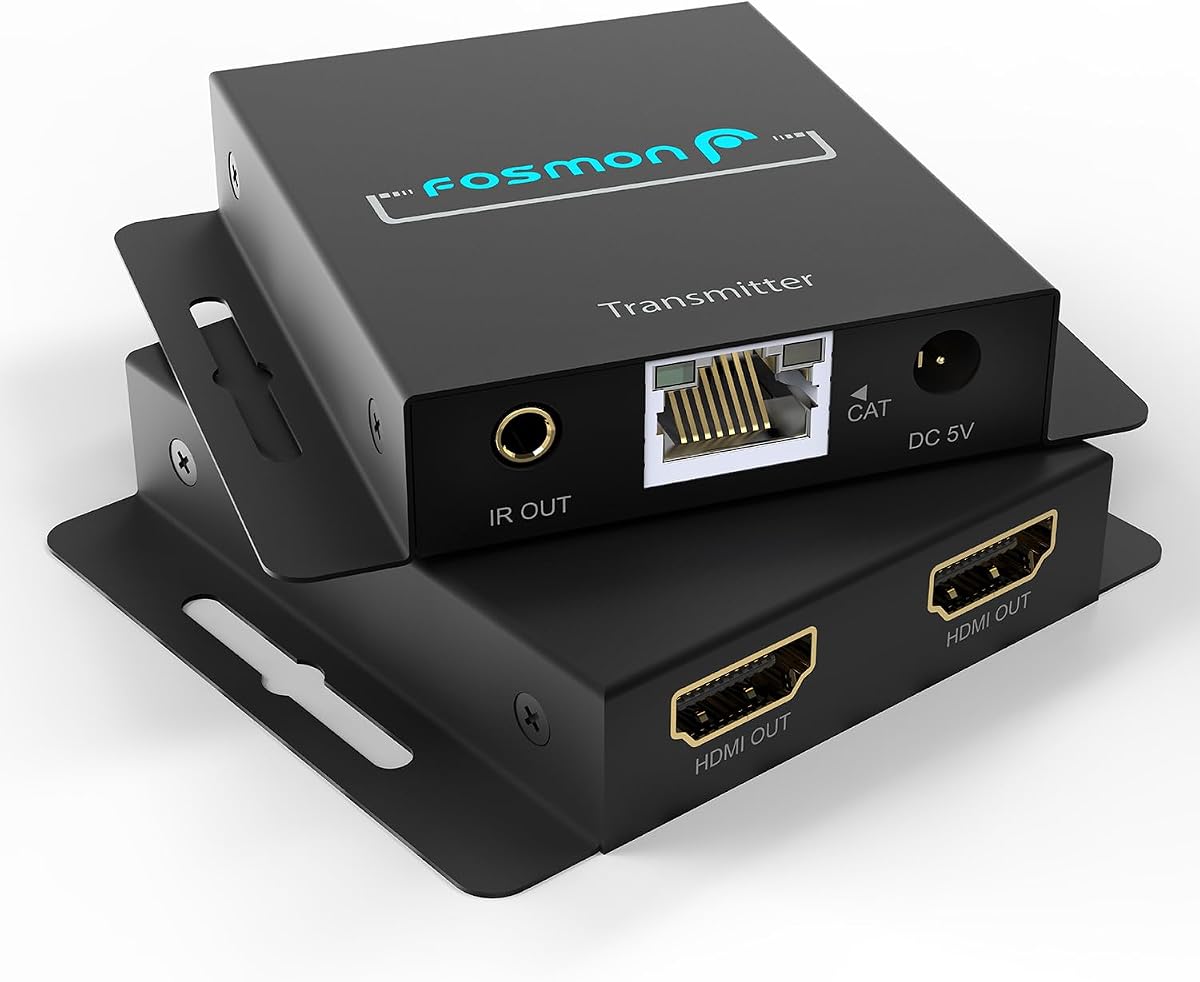
The Fosmon HDMI Extender provides reliable 1080p performance over distances up to 230 feet using Cat6 or Cat7 cables. It is designed to maintain perfect audio-video sync which is vital for professional or educational uses.
We may earn a commission when you buy through this link, at no additional cost to you.
One unique feature is the local loop-out on the receiver, allowing you to create complex display setups like 1-in-2-out configurations. This flexibility makes it highly versatile for classrooms or meeting rooms.
The EQ button allows you to adjust for cable length settings if you experience signal loss. While this ensures performance, it adds a small step to the setup process compared to auto-tuning models.
This model is recommended for users who need long-range Full HD extension with some flexibility in how signals are distributed. It is a solid middle-ground option between budget and premium tiers.
Loop-out options allow you to split signals effectively without needing a separate HDMI splitter.
IR pass-through means you can control your source device from the remote location easily.
We may earn a commission when you buy through this link, at no additional cost to you.
The avedio links HDMI Extender focuses on color depth and stability for high-quality Full HD output. It supports Deep Color up to 36 bits which ensures rich and vibrant image reproduction for various media.
We may earn a commission when you buy through this link, at no additional cost to you.
With a range of 196 feet, it is suitable for most home and office environments. The Power over Cable feature is handled with a single adapter, simplifying installation for users.
Performance depends heavily on using high-quality cables as noted by the manufacturer. It also lacks 4K support, which might limit future-proofing for new hardware purchases.
This unit is best for users who want accurate color reproduction and reliable 1080p transmission without extra complexity. It works well for educational or casual entertainment setups.
Supporting 36-bit color depth improves image realism and smoothness on compatible displays.
Only one power adapter is needed for the whole system which reduces cable clutter significantly.
We may earn a commission when you buy through this link, at no additional cost to you.
The Monoprice 4K HDMI Extender stands out with a perfect 5.0 rating for its consistent performance and reliability. It supports 4K resolution at 30Hz which is suitable for most standard video content and presentations.
We may earn a commission when you buy through this link, at no additional cost to you.
A key benefit is the bidirectional IR passthrough allowing control from either the transmitter or receiver end. This flexibility is rare at this price point and adds significant convenience for remote setups.
The Smart EDID feature ensures that the display and source device communicate effectively to avoid compatibility issues. However, the refresh rate limitation means it is not ideal for fast-paced gaming.
If you need a reliable 4K extender with robust IR support, this model is an excellent choice. It is particularly good for boardrooms or home theaters where you need to control devices remotely.
Control your device from the source or the display location with flexible IR pass-through capabilities.
A perfect user rating indicates high satisfaction and consistent performance across many different use cases.
We may earn a commission when you buy through this link, at no additional cost to you.
The PWAY 4K @60Hz HDMI Over Ethernet Extender delivers high-performance video for gaming and streaming setups. It supports 4K resolution at 60Hz over distances up to 200 feet which is impressive for this class.
We may earn a commission when you buy through this link, at no additional cost to you.
It includes a loop-out port for local monitoring, allowing technicians or users to check the source signal before transmission. This is helpful for troubleshooting and multi-display configurations.
Power over Cable is implemented efficiently, reducing the need for extra outlets at the display end. However, the maximum range may be slightly shorter than competitors for some very large installations.
For users wanting smooth 4K gaming or motion video without spending on premium models, this is a strong contender. It offers high performance at a competitive price point.
Supporting 60Hz at 4K ensures smooth motion for sports and gaming on compatible TVs.
The loop-out port allows you to check the source feed locally for easy setup and testing.
We may earn a commission when you buy through this link, at no additional cost to you.
The J-Tech Digital HDMI Extender offers an impressive range of up to 400 feet using standard Cat5e or Cat6 cabling. It uses a TCP/IP based approach which can offer better compatibility in networked environments.
We may earn a commission when you buy through this link, at no additional cost to you.
Its long-range capability makes it suitable for very large spaces like auditoriums or warehouses where other extenders fail. It also includes IR extension functionality for remote control of the source device.
However, some users report a more complex setup process compared to plug-and-play options. The resolution is limited to 1080p which may be insufficient for high-definition needs.
This model is best for specialized installations requiring maximum distance and network integration. It is less suited for simple home setups where ease of use is the priority.
Using TCP/IP allows for better integration in environments with existing network infrastructure and management.
Reaching up to 400 feet ensures coverage for almost any physical space without signal loss.
We may earn a commission when you buy through this link, at no additional cost to you.
Choosing the right HDMI extender requires understanding your specific range, resolution, and budget needs. This guide outlines the key factors to consider before making a purchase.
The most critical factor is how far you need to send the signal. Most extenders work well up to 165 feet with Cat6 but may drop to 1080p at longer distances. For 4K signals, staying within 100 feet is often safer unless you have Cat6a or Cat7 cables.
Always match the cable type to the device specifications to ensure optimal performance.
If you are using a modern 4K TV or gaming console, look for an extender that explicitly supports 4K at 60Hz. Many budget models only support 30Hz or 1080p which can limit your viewing experience.
Check the product specs for specific HDMI versions like 2.0 or 2.1 to ensure compatibility with your devices.
Power over Cable (PoC) technology simplifies installation by powering the receiver from the transmitter side. This eliminates the need for an outlet near your TV which is often difficult to access.
Prioritize PoC models if you want a cleaner setup with less visible cabling.
Infrared (IR) pass-through allows you to control your source device from behind a cabinet or wall. Bidirectional control is useful if you need to send commands back to the source as well.
Ensure the model supports the specific IR needs of your remote controls and devices.
Loop-out ports allow you to connect a local display at the source end while also extending the signal. This is helpful for monitoring the source feed without unplugging the transmitter.
Look for loop-out on both transmitter and receiver if you need complex display configurations.
Metal housing provides better heat dissipation and protection against physical damage. This is important for commercial environments or places with high traffic.
Plastic housings are common in budget models but may feel less sturdy over time.
Reliable brands often offer better technical support and longer warranties. This can save you time if you encounter setup issues or hardware failures.
Check for at least a 1-year warranty and accessible customer support options before buying.
Prices vary significantly based on features and range. Budget models often compromise on 4K support or PoC features.
Determine your must-have features to find the best balance between cost and functionality for your setup.
To set up your HDMI extender, connect the source device to the transmitter and the display to the receiver using HDMI cables. Then run your Ethernet cable between the transmitter and receiver ensuring it is fully seated in the ports.
Power the system by plugging the adapter into the transmitter if using PoC or both units if required. Wait for the indicator lights to stabilize which shows the signal is properly handshake and transmitting.
For long-term care keep the cables away from sharp edges and heavy furniture that might crush the internal wires. Dust the units occasionally with a soft cloth to prevent overheating and ensure stable performance.
While some extenders may work with Cat5 cables they generally have much shorter range and lower resolution support. For 4K signals it is highly recommended to use at least Cat6 cables to ensure stable performance without signal loss.
No, Power over Cable is a specific feature found in select models. It requires both the transmitter and receiver to be designed for this technology. Always check the product description before purchasing to confirm if PoC is included.
Standard IR pass-through only allows signals to go from the remote to the transmitter. Bidirectional IR allows signals to travel both ways which is useful if you need to control the display from the source location as well.
This often happens due to cable handshake issues. Ensure all cables are connected securely and try unplugging and replugging the HDMI and Ethernet connections. Using an EDID copy function can also resolve compatibility problems.
Yes, most HDMI extenders work well with HDMI switches. However you should place the switch before the transmitter to ensure it manages the signal correctly. Avoid using network switches as they are not compatible with direct HDMI signals.
Quality HDMI extenders have zero or negligible latency. You generally will not notice any delay during standard video playback but gaming might show a slight delay depending on the processing technology used.
We have reviewed the top 10 HDMI extenders ranging from budget-friendly 1080p options to professional 4K HDBaseT solutions. Each model offers unique strengths whether it is the OREI 4K performance or the value of the HDMI Extender Over Single Cat5e.
When choosing a model prioritize your specific needs such as maximum range and resolution support. Investing in the right cable type is just as important as the extender itself to ensure long-term reliability.
Always verify the current pricing and availability before purchasing since deals change frequently. We hope this guide helps you find the perfect solution to extend your video signals with ease.