
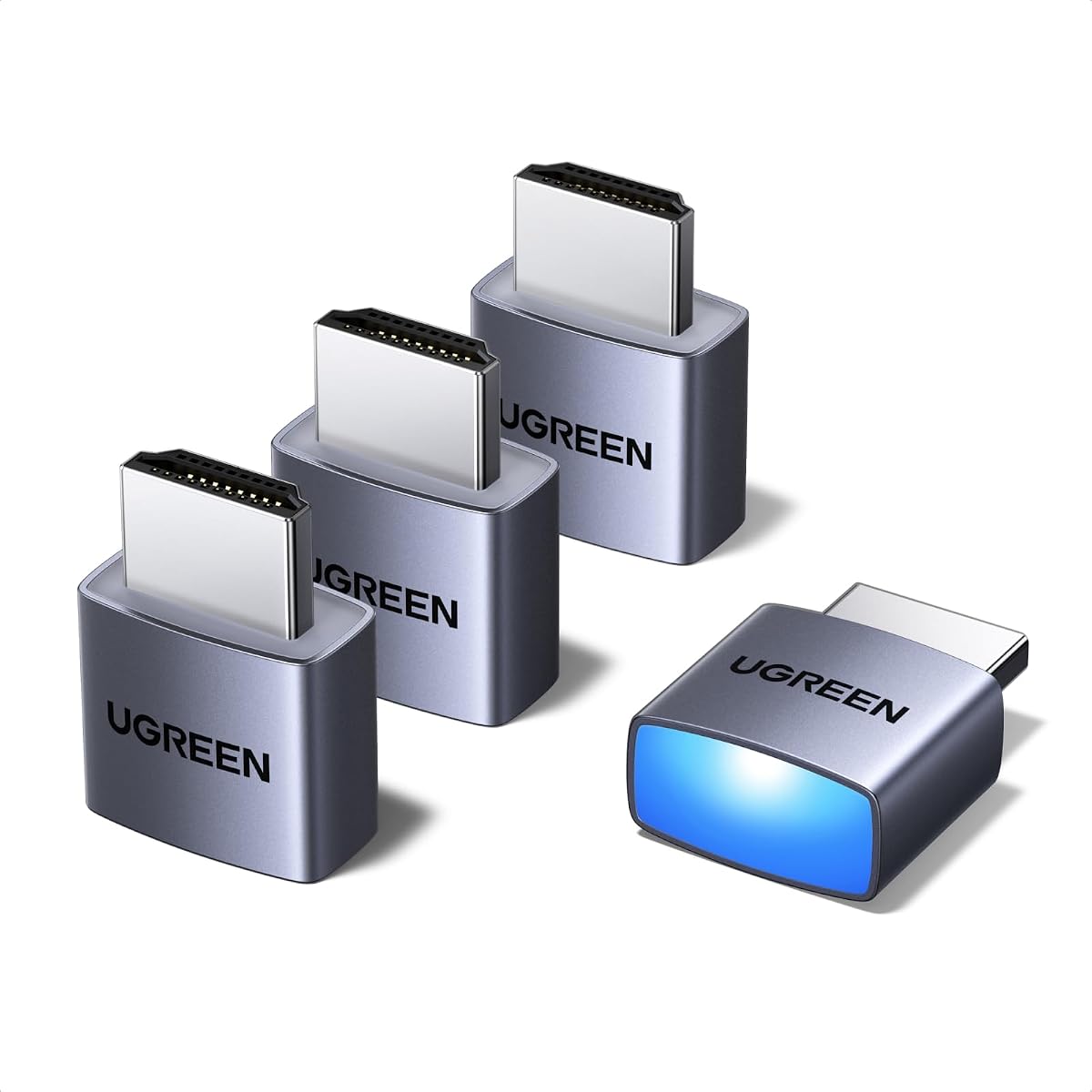
4 Pack HDMI Dummy Plug 4K HDR
4.8Editor score
Cost effective multi pack option
1080P@120Hz support
Plug and play setup
Discover the top HDMI dummy plugs for headless setups. This guide compares ten models for remote desktop, mining, and gaming performance.
An HDMI dummy plug is a small device that tricks your computer into thinking a monitor is connected. This enables remote desktop access and GPU acceleration without needing a physical screen.
We compared ten popular models based on resolution support, build quality, and compatibility across Windows, Mac, and Linux systems. Our analysis focuses on reliability for 24/7 operations.
Each pick highlights specific strengths for different use cases like mining or gaming. Please note that product availability and pricing may change frequently on retailer platforms.
4.8Editor score
4.6Editor score

This table provides a quick side-by-side look at the key specifications for each model we reviewed. Use it to find the right fit for your specific system requirements.


The UGREEN HDMI dummy plug stands out for its robust aluminum construction and reliable 4K performance. It scores a strong rating due to its ability to maintain system stability during intensive tasks like mining or rendering.
We may earn a commission when you buy through this link, at no additional cost to you.
Its standout quality is the heat dissipation design which prevents overheating even when running 24/7. The status LED provides immediate visual feedback on connection health which is crucial for remote monitoring.
The only trade-off is the cost compared to generic options but the durability justifies the expense. It requires no drivers and works seamlessly across Windows Mac and Linux systems.
This is the best choice for professionals who need reliability over multiple headless PCs. We recommend it for server farms or critical workstations where downtime is not an option.
Supports true 4K at 60Hz ensuring your GPU runs at full capacity without throttling due to lack of display.
The aluminum shell actively dissipates heat allowing continuous operation without risking hardware damage from overheating.
We may earn a commission when you buy through this link, at no additional cost to you.
This 4 pack offers one of the best price-to-performance ratios available in the market today. It holds an impressive rating for its ability to unlock GPU potential without breaking the bank.
We may earn a commission when you buy through this link, at no additional cost to you.
It mimics a high resolution monitor effectively allowing you to run headless servers or mining rigs efficiently. The build quality exceeds expectations for this price point with protective aluminum casing.
While it lacks some of the refined details of premium brands it performs equally well for standard tasks. The lack of driver requirements makes it accessible for non technical users.
We recommend this for hobbyists or small businesses needing multiple units. It provides everything you need to manage remote PCs without additional complexity.
Buying in bulk reduces the cost per device significantly making it ideal for scaling up multiple headless machines.
Designed to resist signal interference ensuring your remote connection stays stable during long periods of inactivity.
We may earn a commission when you buy through this link, at no additional cost to you.
The DTech model is a solid performer particularly for users with mixed operating systems including macOS. It earns good marks for solving the headless display issue without requiring software tweaks.
We may earn a commission when you buy through this link, at no additional cost to you.
Its gold plated connector ensures long term conductivity resistance which is vital for devices left plugged in for years. The compact design fits easily into tight spaces behind servers or laptops.
It does not have a status light which can make verifying connections slightly harder than with LED models. However it remains a dependable solution for standard remote access tasks.
Choose this if you prioritize compactness and macOS support over premium aesthetics. It works well for home labs or portable office setups.
Specifically addresses the common issue of Mac systems dropping resolution when no display is detected.
The tiny profile ensures it does not protrude awkwardly from your device allowing for neat cable management.
We may earn a commission when you buy through this link, at no additional cost to you.
This basic model focuses on simplicity and reliability for standard 1080p needs. It is an ideal choice for users who do not need 4K resolution but want a stable virtual display.
We may earn a commission when you buy through this link, at no additional cost to you.
It is designed to work with virtually any graphics card that has an HDMI port making it versatile across older and newer hardware. The lack of external power requirements keeps the setup clean.
The trade-off is the resolution limit which might not suit modern high performance rendering tasks. It functions strictly as a display emulator without extra utility features.
This is a good pick for budget conscious buyers or legacy systems. It gets the job done for basic remote access without unnecessary complexity.
Operates without external power sources reducing cable clutter and power draw on your host machine.
Compatible with almost any discrete GPU ensuring you can enable acceleration on diverse systems easily.
We may earn a commission when you buy through this link, at no additional cost to you.
This model balances price and performance well with a helpful two year warranty offering peace of mind. It achieves a stable rating for consistent performance across various remote desktop applications.
We may earn a commission when you buy through this link, at no additional cost to you.
The ability to support hot swapping allows you to connect and disconnect without restarting your system which adds flexibility for testing. The gold plated interface ensures clean signal transmission over time.
It performs well but does not offer unique features that set it apart from competitors. The warranty is a strong point but the design is fairly standard.
Select this if you want a balanced option with warranty coverage. It is suitable for general office use or light gaming setups.
Provides a two year guarantee that covers defects giving you confidence in the product longevity.
Allows you to change connections on the fly without needing to reboot your computer for detection.
We may earn a commission when you buy through this link, at no additional cost to you.
This pack emphasizes signal integrity with features like full board copper pouring and enhanced shielding. It is designed to handle high refresh rates which is beneficial for gaming servers.
We may earn a commission when you buy through this link, at no additional cost to you.
It supports a variety of resolutions including 1440p and 1080p at high refresh rates allowing for flexible configuration. The construction aims to prevent common failures like solder joint issues over time.
Lacking user feedback due to its new release means its long term reliability is yet fully proven. It is a strong candidate for technical users who value internal build specs.
Recommended for enthusiasts building complex home labs with high performance needs. It offers a good balance of features for the price.
Uses advanced internal construction to reduce interference ensuring a clean video signal to your GPU.
Supports up to 240Hz on 1080p making it suitable for motion sensitive applications like VR streaming.
We may earn a commission when you buy through this link, at no additional cost to you.
This adapter brings next generation HDMI 2.1 support to headless setups allowing for higher bandwidth applications. It scores well for enabling features like 120Hz streaming which older adapters cannot handle.
We may earn a commission when you buy through this link, at no additional cost to you.
It is specifically noted for compatibility with streaming tools like Moonlight and Steam Link making it perfect for gaming without a monitor. The heat emission is minimal which helps maintain server rack temperatures.
The main constraint is the need for an HDMI 2.1 port on your GPU so compatibility checks are necessary. It is a specialized tool rather than a general purpose dummy plug.
Choose this if you have a modern GPU and need high refresh rates for streaming. It unlocks capabilities that standard dummy plugs do not offer.
Utilizes HDMI 2.1 to support higher resolutions and refresh rates than previous standards allow.
Perfectly tuned for cloud gaming clients ensuring smooth high frame rate feeds to remote devices.
We may earn a commission when you buy through this link, at no additional cost to you.
This 8 pack is one of the largest options available making it ideal for large scale deployments. It focuses on signal stability with features designed to prevent electromagnetic interference.
We may earn a commission when you buy through this link, at no additional cost to you.
It supports 4K default but allows for flexibility with other resolutions. The construction includes thick aluminum shells which help with durability and heat management across multiple units.
While bulk buying is efficient for organizations it may be too much for casual home users. The lack of documentation is standard but users should be familiar with basic hardware setup.
Best suited for data centers or farms with many systems. It provides the most devices per dollar for large infrastructure projects.
Offers the largest quantity available for buyers needing to outfit many rooms with headless systems.
Built with shielding to resist noise which is crucial in environments with heavy electrical equipment nearby.
We may earn a commission when you buy through this link, at no additional cost to you.
This model defaults to 4K resolution making it ready for high fidelity tasks out of the box. It is part of a newer series that emphasizes low power consumption for energy saving.
We may earn a commission when you buy through this link, at no additional cost to you.
It is designed to run 24/7 tasks without drawing significant power which helps keep operating costs low. The build includes new solder and materials to ensure longevity over time.
As a newer product it lacks the long term track record of established brands. It performs well on paper and offers a good feature set for the price.
Select this for green focused projects or new builds. It offers modern features in a standard package.
Designed to consume minimal power helping reduce electricity usage in always on environments.
Uses fresh materials like solder to improve joint reliability and reduce failure rates.
We may earn a commission when you buy through this link, at no additional cost to you.
This is the most capable dummy plug on our list supporting 8K resolution at 30Hz alongside 4K at 120Hz. It is designed for enthusiasts who want maximum performance regardless of cost.
We may earn a commission when you buy through this link, at no additional cost to you.
It features a gold plated interface and HDMI 2.1 connectivity ensuring it can handle high bandwidth signals without bottlenecks. The packaging is premium and it feels like a professional tool.
The cost is high and it might be overkill for simple remote desktop tasks. However for specialized workflows like 3D rendering or professional color grading it offers necessary headroom.
Buy this if you need top tier specs and do not want to upgrade soon. It is an investment in future readiness for your setup.
Supports 8K output which ensures your virtual display remains relevant as hardware capabilities increase.
Uses premium materials like gold plating to ensure signal integrity and corrosion resistance over years.
We may earn a commission when you buy through this link, at no additional cost to you.
Selecting the right dummy plug involves considering resolution needs build quality and compatibility. Here are the key factors to evaluate.
Ensure the adapter supports the resolution and refresh rate your tasks require. For gaming or high fidelity rendering you may need 4K at 120Hz or higher.
Look for models explicitly stating support for your target resolution to avoid performance bottlenecks.
Since these devices run continuously quality matters for longevity. Aluminum shells and proper ventilation prevent overheating during long operations.
Avoid cheap plastic units if you plan to use them in enclosed spaces or for mining.
Most dummy plugs work with Windows but Mac users should verify macOS support. Some models specifically address macOS headless issues.
Check reviews for Linux compatibility if you run open source servers.
Confirm your GPU has an HDMI output and matches the version required. HDMI 2.1 is needed for 4K at 120Hz or 8K modes.
Older GPUs may work but will be limited to lower resolutions.
A good dummy plug should work without installing drivers. This ensures ease of use across different machines.
Verify that the product explicitly states no drivers are required.
Check if the manufacturer offers a warranty for protection against defects. A two year warranty is a good benchmark for quality.
Gold plated connectors are preferred for long term reliability.
Some models include a status LED to confirm connection without remote access. This is helpful for physical checks.
It is a minor feature but useful for initial setup and troubleshooting.
Consider if you need multiple units and buying in bulk is cheaper. Ensure the total cost fits your budget.
Compare the price per unit when evaluating multi packs.
Simply plug the dummy adapter into an available HDMI port on your computer. Ensure your system recognizes the display in settings.
You may need to adjust resolution settings manually to match the emulated display if it does not default correctly.
Keep the device clean and avoid blocking ventilation slots to prevent overheating during long use.
Most modern dummy plugs are plug and play and require no driver installation. They emulate a standard display that your operating system detects automatically.
It depends on the GPU. Some integrated GPUs require a display to output video while others do not. Check your specific model support.
Yes it keeps the GPU active allowing mining software to run without a physical monitor. This is essential for headless mining setups.
Yes many dummy plugs support macOS but ensure you select one that addresses headless issues for Mac systems specifically.
It prevents performance loss by keeping the GPU from shutting down. It does not degrade performance and enables full acceleration.
Not for all 4K. Standard HDMI 2.0 supports 4K at 60Hz. HDMI 2.1 is only needed for higher refresh rates like 120Hz.
We found the UGREEN 4 Pack and generic 4 Pack options to be top picks for reliability and value. They cover most needs effectively without complexity.
Prioritize build quality and resolution support based on your specific workload. For high performance tasks look for HDMI 2.1 capable models.
Remember to check current pricing and availability on Amazon before making your final decision.