
Acer Nitro V Gaming Laptop
4.6Editor score
RTX 4050 Graphics
165Hz FHD Display
Affordable Performance
Finding the right gaming laptop for Diablo 4 requires balancing power, portability, and display quality. You need a machine that handles ray tracing and AI upscaling while keeping frame rates high during intense dungeon crawls and boss fights.
We evaluated ten top models based on GPU performance, CPU speed, screen refresh rates, and cooling efficiency. Each pick offers distinct advantages for Diablo 4 players, from budget-friendly options to premium workstations capable of ultra settings at high resolutions.
This guide details the strengths and weaknesses of each laptop to help you choose wisely. Keep in mind that product availability and pricing can shift quickly, so check current listings before making your final purchase decision for the best deal.
4.6Editor score

4.4Editor score

4.3Editor score
As an Amazon Associate we earn from qualifying purchases.
This side-by-side comparison highlights the key specifications of all ten selected laptops to help you quickly identify the model that best fits your Diablo 4 gaming needs and budget constraints.




This laptop stands out as the premier choice for Diablo 4 due to its balanced performance and display. It combines the powerful RTX 5060 with a fast refresh rate screen, ensuring smooth visuals during combat.
We may earn a commission when you buy through this link, at no additional cost to you.
The NVIDIA Blackwell architecture enables DLSS 4 which significantly boosts frame rates without sacrificing image quality. The cooling system with vapor chamber technology keeps performance steady even during long raid sessions.
While the chassis is on the heavier side, the trade-off is worth it for the sustained performance levels. You will not experience throttling which is crucial for maintaining consistency in high demand scenarios.
Buy this if you want a reliable machine that excels at modern gaming titles. It offers the best overall experience for Diablo 4 players seeking quality without breaking the premium budget tier.
DLSS 4 utilizes AI to generate frames and enhance resolution dynamically. This means you can play on higher settings while maintaining fluid motion which is vital for action heavy games like Diablo 4.
The ROG Intelligent Cooling system uses liquid metal and a tri-fan design. This ensures the CPU and GPU stay cool under load preventing thermal throttling during extended gameplay sessions.
We may earn a commission when you buy through this link, at no additional cost to you.
This model brings impressive specs to the mid-range market including 32GB of RAM and a fast display. It handles multitasking and heavy gaming workloads with ease making it a strong contender for Diablo 4.
We may earn a commission when you buy through this link, at no additional cost to you.
The RTX 5060 paired with the Ryzen 7 260 delivers consistent frame rates. The 180Hz refresh rate ensures that movement looks fluid and responsive which helps in competitive play and dodging attacks.
However the build quality feels a bit more plastic compared to premium rivals. Also battery life is not a strong suit so you should plan to keep the charger nearby for extended use.
It is a great pick if you prioritize raw power over portability. The large amount of RAM is excellent for streaming or running background apps while you play Diablo 4 without slowdowns.
With 32GB of DDR5 memory you can run multiple applications alongside Diablo 4. This is ideal for streamers or those who keep Discord and browsers open while gaming.
The Ryzen 7 260 includes AI acceleration features that optimize performance. This helps in managing system resources more efficiently during demanding gaming sessions.
We may earn a commission when you buy through this link, at no additional cost to you.
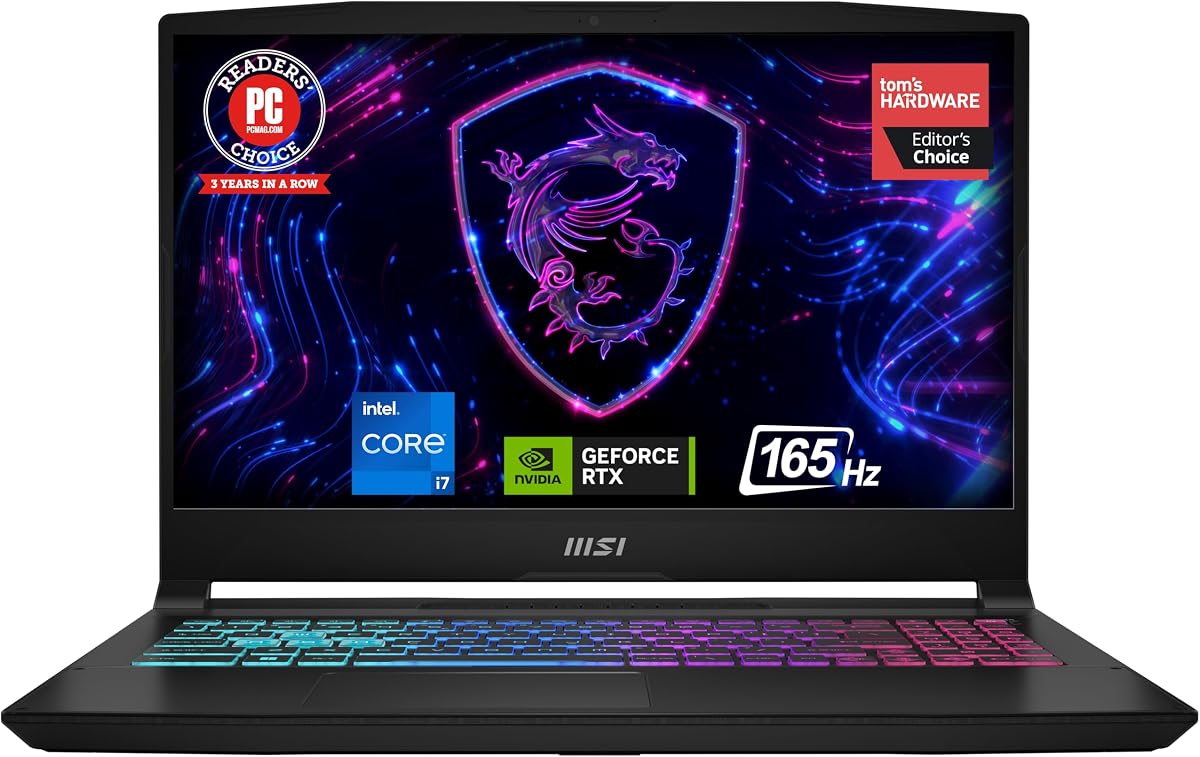
For gamers on a tight budget this laptop offers excellent value without compromising on core performance. The RTX 4050 is capable of running Diablo 4 smoothly at medium to high settings.
We may earn a commission when you buy through this link, at no additional cost to you.
The 165Hz display ensures that motion is smooth even if the resolution is standard FHD. You will still enjoy responsive gameplay which is essential for dodging projectiles and landing skill shots effectively.
While the build is not premium it is durable enough for daily use. The inclusion of Thunderbolt 4 is a nice bonus for connectivity allowing fast data transfers and external display support.
This is the ideal choice if you want to spend less while still getting a viable gaming experience. It balances cost and performance well for casual and entry level Diablo 4 players.
This model proves you do not need to spend a fortune to play modern titles. The RTX 4050 handles DirectX 12 titles well ensuring a good experience at a lower cost.
Thunderbolt 4 support means you can connect to docks or external drives easily. This makes it versatile for both gaming and productivity tasks at home or work.
We may earn a commission when you buy through this link, at no additional cost to you.
This is the powerhouse you want if you demand the best visual fidelity and speed. The RTX 5070 Ti allows for ultra settings and ray tracing in Diablo 4 without compromising frame rates.
We may earn a commission when you buy through this link, at no additional cost to you.
The 2.5K resolution combined with 240Hz refresh rate provides an incredibly sharp and fluid experience. Colors are vibrant and details are crisp making the game worlds look even more immersive.
The cost is high but you are getting a machine that will remain relevant for years. The cooling system ensures that the system runs quietly even when pushing the hardware to its limits.
Buy this if budget is not a concern and you want peak performance. It delivers a premium gaming experience that few other laptops can match today.
With the RTX 5070 Ti you can enable full ray tracing features. This adds realistic lighting and shadows that bring the dark fantasy world of Diablo 4 to life.
The Nebula display offers high brightness and accurate colors. You will see every detail in the environments and character designs clearly even in dark dungeons.
We may earn a commission when you buy through this link, at no additional cost to you.
The large 17.3 inch screen makes this a great desktop replacement for immersive gaming. You get more room to see UI elements and distant enemies in Diablo 4 which helps with awareness.
We may earn a commission when you buy through this link, at no additional cost to you.
The translucent design gives it a unique look that stands out from standard black laptops. Performance is strong thanks to the RTX 5060 which handles modern titles with ease.
Portability is a compromise here as the larger size makes it heavier. If you plan to move it often you might find it cumbersome compared to smaller alternatives in the list.
This is a good choice if you prefer bigger visuals over portability. The screen size enhances the experience significantly for those who game mostly at a desk.
The 17.3 inch display offers more viewing area for multitasking. This is useful if you like to have maps or guides open next to the game window.
The translucent chassis reveals internal components for a unique style. It adds a touch of personality to your gaming setup.
We may earn a commission when you buy through this link, at no additional cost to you.
This model offers a clean design that fits well in both gaming and professional settings. The 32GB RAM ensures you have enough headroom for multitasking and heavy applications.
We may earn a commission when you buy through this link, at no additional cost to you.
The RTX 4050 is sufficient for 1080p gaming and Diablo 4 runs well at these settings. The 144Hz refresh rate is decent though not as high as some competitors in this list.
Cooling is adequate but can get a bit loud under heavy load. However the build quality is solid and the keyboard is comfortable for long typing or gaming sessions.
Choose this if you want a laptop that looks good everywhere. It is a reliable option for students or professionals who game after work without needing top tier specs.
The Mica Silver finish and discreet design make it less like a traditional gaming laptop. This helps when using it in public spaces or meetings.
With 32GB of RAM you can run heavy applications without slowdown. This is great for creators who also enjoy gaming on the same device.
We may earn a commission when you buy through this link, at no additional cost to you.
This is the most affordable option available and is suitable for entry level gaming. The RTX 4050 allows you to play Diablo 4 but you may need to adjust settings for optimal performance.
We may earn a commission when you buy through this link, at no additional cost to you.
The 165Hz display is a nice feature at this price point ensuring smooth visuals. However the 8GB RAM and 512GB storage will likely require upgrades to meet modern gaming standards comfortably.
Upgrading is straightforward which adds value to this budget unit. If you are comfortable adding more memory and storage this becomes a very capable machine for the cost.
Buy this if you want to start gaming without a large investment. It is a perfect base for customizing to suit your specific needs over time.
The design allows for easy access to RAM and storage slots. You can increase capacity as your needs grow without buying a new machine.
At this price it is hard to beat for basic gaming needs. It provides a functional experience for budget conscious gamers looking for value.
We may earn a commission when you buy through this link, at no additional cost to you.
This model offers a good balance of screen size and performance features. The 180Hz refresh rate ensures smooth motion which is beneficial for fast paced games like Diablo 4.
We may earn a commission when you buy through this link, at no additional cost to you.
The RTX 5050 is capable of decent performance at 1080p though you might need to tweak settings for heavier scenes. The display quality is good with accurate colors for media and games.
Cooling is functional but not the best under continuous heavy load. It will handle casual sessions well but extended high performance use might warm up the chassis.
It is a solid mid-range option for those wanting a 16 inch screen. The combination of RAM and storage makes it ready for gaming right out of the box.
The 180Hz rate is higher than standard gaming laptops. This makes animations look smoother and reduces motion blur during fast movement.
Intel Core 7 240H provides efficient power usage and performance. It helps in balancing battery life with gaming capability.
We may earn a commission when you buy through this link, at no additional cost to you.
This laptop stands out for its QHD display which offers higher detail than standard FHD. The RTX 4070 is needed to drive this resolution effectively in demanding games.
We may earn a commission when you buy through this link, at no additional cost to you.
The cooling system helps maintain performance during intense gaming sessions. You get a sharper image which enhances the visual experience of Diablo 4 significantly.
However the build quality is not as robust as premium rivals. The screen brightness is also average which might be a drawback if you game in bright rooms.
It is a good value if you want high resolution without spending premium prices. Aim for gamers who want sharper visuals and decent frame rates.
The QHD resolution makes textures and UI elements look sharper. This adds to the immersion by reducing pixelation in the game world.
MSI’s cooling tech keeps components safe from overheating. This ensures stability even during long periods of gameplay.
We may earn a commission when you buy through this link, at no additional cost to you.
This model brings unique AI capabilities that optimize system performance dynamically. The Ryzen 7 260 pairs well with the RTX 5060 for consistent gaming performance.
We may earn a commission when you buy through this link, at no additional cost to you.
The slim chassis design is impressive for the power it houses. It makes the laptop easier to carry than many other gaming models in this class.
The hinge allows you to lay it flat which is convenient for sharing content. However support and driver availability can be less robust compared to major brands.
Choose this if you value design and AI optimization. It is a capable machine that offers a fresh approach to gaming laptop features.
The GiMATE system helps manage resources intelligently. This allows for smoother multitasking and gaming without manual tweaking.
The thin profile makes it easier to transport. It is one of the slimmest options available for a 16 inch gaming laptop.
We may earn a commission when you buy through this link, at no additional cost to you.
Selecting the right laptop requires understanding key components that impact gameplay. Here are the main factors to consider before buying.
The GPU is the most critical component for gaming. Look for RTX 50 series or RTX 40 series cards to handle ray tracing and high settings effectively.
A stronger GPU ensures better frame rates and visual fidelity during intense combat scenes.
A fast CPU helps with physics calculations and loading times. Modern i7 or Ryzen 7 processors are recommended for smooth multitasking.
Ensure the processor supports the latest instruction sets for optimized game performance.
RAM determines how many apps you can run simultaneously. Aim for at least 16GB to avoid bottlenecks while gaming and browsing.
Higher capacity like 32GB offers future proofing for demanding updates and multitasking.
A high refresh rate screen makes movement look smoother. Look for 144Hz or higher to reduce motion blur during fast action.
This is essential for reactive gameplay where timing is critical.
Solid State Drives load games much faster than traditional hard drives. Ensure you have at least 512GB of NVMe SSD space.
Large games need room so consider models with 1TB or expandable storage options.
Effective cooling prevents performance throttling during long sessions. Look for laptops with multiple fans and vapor chamber technology.
Good thermal design keeps the system quiet and maintains consistent speeds.
Gaming laptops often have shorter battery life due to high power draw. Expect 4 to 6 hours of non gaming use.
Keep the charger handy for unplanned gaming sessions away from a power source.
Consider the weight and size if you travel often. Smaller screens and lighter chassis improve portability.
Balance the need for screen real estate with how often you will carry the device.
Always keep your laptop on a hard flat surface to ensure proper airflow and cooling. Avoid using it on soft surfaces like beds or couches where vents can get blocked and cause overheating.
Use cooling pads if you plan to game for extended periods. External fans can help maintain lower temperatures and extend the lifespan of internal components.
Regularly update drivers and firmware for optimal performance and security. Manufacturers often release patches that fix bugs and improve game compatibility.
An NVIDIA RTX 4060 or higher is recommended for smooth performance at high settings. The RTX 50 series in newer laptops provides even better AI upscaling capabilities.
Sixteen GB is the standard minimum for modern gaming. Thirty-two GB allows for smoother multitasking if you run other applications alongside the game.
Most gaming laptops allow you to upgrade RAM and storage. However the CPU and GPU are usually soldered and cannot be changed after purchase.
While not strictly necessary it greatly improves visual fluidity. It helps reduce motion blur which makes tracking fast moving enemies easier.
Ray tracing enhances lighting but requires powerful hardware. Most GPUs in this list support it but you may need to lower settings to maintain high FPS.
Larger screens offer better immersion but are less portable. Fifteen to sixteen inch models are a good balance for home and travel use.
Sustained temperatures above 90°C can throttle performance. Good cooling systems should keep CPU and GPU under this limit during gaming.
Yes many gaming laptops have professional features and strong CPUs. Look for models with good keyboards and decent battery life for office tasks.
We have reviewed ten excellent options ranging from budget friendly to premium powerhouses. The ASUS ROG Strix G16 stands out as the top choice for its balance of performance and display quality.
Prioritize GPU and refresh rate if you want the smoothest experience. For those on a budget the Acer Nitro V models offer solid performance without breaking the bank.
Remember to check current prices and availability before purchasing. Technology markets shift quickly and deals may change as new models arrive.