
ASUS TUF Gaming GeForce RTX 5090
4.4Editor score
32GB GDDR7 Memory
Blackwell Architecture Support
SFF Ready Design
Discover the top 10 flagship graphics cards for gaming and creative work in October 2026 with detailed comparisons of performance, cooling, and value.
Flagship graphics cards define the cutting edge of visual computing performance. They deliver unmatched frame rates, ray tracing capabilities, and AI acceleration for demanding workflows. Choosing the right model ensures your system can handle future titles and creative applications without bottlenecks.
We evaluated ten leading models based on architecture, memory speed, cooling efficiency, and real-world performance metrics. Our analysis includes detailed specifications, user ratings, and expert insights to help you navigate the current market landscape effectively and confidently.
Each pick highlights specific strengths like ultra-wide support, VR readiness, or energy efficiency. Prices and availability fluctuate frequently so always verify current listings before purchasing to ensure you get the best deal available for your specific build requirements.
4.4Editor score

4.8Editor score

4.7Editor score
This table provides a side by side overview of key specifications and ratings for all ten top ranked models to help you compare performance and features at a glance.





This model delivers exceptional performance for high resolution gaming and creative work. It holds a solid 4.6 rating from users who appreciate its balance of power and efficiency. The Blackwell architecture ensures next gen features are fully supported.
We may earn a commission when you buy through this link, at no additional cost to you.
The integrated 16GB GDDR7 memory provides ample bandwidth for texture heavy titles and 3D rendering tasks. WINDFORCE cooling keeps thermals in check even during extended gaming sessions or video encoding workloads.
While the power requirements are higher than midrange options the performance gains justify the investment for enthusiasts. The PCIe 5.0 interface future proofs your build for upcoming motherboards and storage solutions.
Buyers seeking flagship performance without stepping to top tier pricing should consider this card. It offers a sweet spot of raw power and modern features for serious gamers and creators.
Blackwell architecture brings improved ray tracing and AI upscaling capabilities compared to previous generations.
The WINDFORCE system uses multiple fans to maintain low noise levels while dissipating heat efficiently.
We may earn a commission when you buy through this link, at no additional cost to you.
This card stands out for its rugged construction and high reliability standards. With a 4.8 rating it reflects strong user satisfaction regarding durability and performance consistency. The military grade components ensure long term stability.
We may earn a commission when you buy through this link, at no additional cost to you.
The phase change GPU thermal pad offers superior heat transfer compared to traditional paste. This design choice helps maintain optimal clock speeds under heavy loads without thermal throttling issues.
Prospective buyers should verify their power supply meets the 850W requirement before purchase. The large 3.125 slot design also requires sufficient case clearance for proper airflow and installation.
Users prioritizing build quality and longevity will find this model an excellent choice. It combines top tier cooling with durable materials for a high end experience.
Protective PCB coating guards against moisture and debris for improved reliability in varying environments.
GPU Tweak III software allows real time system monitoring and advanced thermal controls for optimization.
We may earn a commission when you buy through this link, at no additional cost to you.
This model represents the pinnacle of the previous generation architecture with massive compute power. It holds a 4.6 rating due to its unmatched raw performance in 4K and 8K scenarios. New Flow Multiprocessors double efficiency.
We may earn a commission when you buy through this link, at no additional cost to you.
The 24GB VRAM capacity ensures future proofing for high resolution textures and complex 3D scenes. Fourth generation Tensor Cores accelerate AI tasks significantly for rendering and content creation workflows.
While newer Blackwell cards are available this model still leads in pure rasterization power. Buyers seeking proven performance and high VRAM for professional work will appreciate its capabilities.
Consider this if you need maximum VRAM and ray tracing performance without waiting for the latest release. It remains a top choice for 8K gaming and professional visualization.
Supports 4K 120Hz and 8K 60Hz HDR with Variable Refresh Rate for smooth high refresh gaming.
Dedicated NVIDIA Encoder and Reflex low latency platform enhance livestreaming quality and responsiveness.
We may earn a commission when you buy through this link, at no additional cost to you.
This variant offers the same core power as other 5080 models with enhanced durability features. The 4.6 rating reflects consistent performance and strong build quality. Military grade components ensure longevity under stress.
We may earn a commission when you buy through this link, at no additional cost to you.
The 3.6 slot design optimizes airflow with a massive fin array. Phase change thermal pads maintain low temperatures during long sessions. Boost clock reaches 2730 MHz for peak performance.
Buyers should confirm case clearance and PSU compatibility before purchase. The GPU bracket included helps reduce sag and stress on the motherboard slot during transport or use.
Ideal for users who want top tier performance with rugged construction. This card balances raw power with reliability for demanding gaming and workloads.
Phase change pads ensure optimal heat transfer for longer performance under heavy loads than paste.
GPU Tweak III provides intuitive controls for performance tweaking and advanced thermal monitoring.
We may earn a commission when you buy through this link, at no additional cost to you.
This AMD card delivers excellent performance for the price with strong user feedback. It holds a 4.7 rating for its balance of specs and affordability. The 16GB GDDR6 memory is sufficient for high resolution gaming.
We may earn a commission when you buy through this link, at no additional cost to you.
Server grade thermal conductive gel improves heat transfer efficiency and noise levels. WINDFORCE cooling maintains stable clocks during extended sessions. RGB lighting allows custom aesthetic integration with your system.
While it may lag behind NVIDIA in ray tracing or DLSS features it excels in rasterization and raw frame rates. Users with AMD CPUs may see additional synergy with certain features.
Buyers on a budget seeking flagship resolution capabilities should consider this model. It offers strong value and future proofing with PCIe 5.0 support.
Hawk Fans and server grade gel combine for effective heat dissipation and lower noise.
PCIe 5.0 support ensures compatibility with next generation motherboards and storage speeds.
We may earn a commission when you buy through this link, at no additional cost to you.
This card excels in small chassis builds due to its compact 2.5 slot design. It holds a 4.7 rating for its balance of size and performance. AI performance reaches 767 TOPS for modern tasks.
We may earn a commission when you buy through this link, at no additional cost to you.
Axial tech fans use a smaller hub for longer blades and increased air pressure. 0dB technology allows silent operation during light gaming or browsing. Dual BIOS lets you toggle between Quiet and Performance profiles.
While not as powerful as higher tier models it is perfect for mid range builds needing VRAM. Dual ball bearings extend lifespan and reliability compared to sleeve bearing designs.
Small form factor builders needing modern architecture and high VRAM will find this ideal. It offers efficient cooling and flexibility for compact gaming systems.
0dB technology ensures fans stop under light loads for quiet browsing and office work.
Dual ball fan bearings last twice as long as standard sleeve bearing designs for durability.
We may earn a commission when you buy through this link, at no additional cost to you.
This card offers massive VRAM capacity for extreme workloads and future gaming titles. It holds a 4.4 rating for its high end features and build quality. AI performance reaches 772 TOPS for accelerated rendering.
We may earn a commission when you buy through this link, at no additional cost to you.
The 32GB GDDR7 memory ensures seamless handling of large datasets and high resolution textures. SFF Ready design allows installation in smaller cases without sacrificing cooling efficiency. 2.5 slot design maintains compatibility.
While power requirements are high the performance justifies it for professionals and enthusiasts. Dual ball bearings extend lifespan under heavy use. Dual BIOS provides flexibility for quiet operation when needed.
Users needing maximum VRAM and modern AI features should consider this model. It brings workstation capabilities to a gaming card with compact form factor options.
32GB of memory handles 8K textures and complex 3D scenes without bottlenecks.
SFF Ready design enables high performance in smaller cases with better build flexibility.
We may earn a commission when you buy through this link, at no additional cost to you.
This model combines reliable cooling with strong aesthetic appeal for custom builds. It holds a 4.6 rating for consistent performance and thermal efficiency. Axial tech fans feature a smaller hub for increased air pressure.
We may earn a commission when you buy through this link, at no additional cost to you.
Phase change GPU thermal pads help ensure optimal heat transfer and lower temperatures. Dual BIOS allows toggling between Quiet and Performance profiles. Auto Extreme process ensures precision and reliability.
GPU Tweak III software provides intuitive performance tweaking and monitoring. 0dB technology supports silent operation. Dual ball bearings last twice as long as standard sleeve bearings for longevity.
Builders prioritizing cooling and aesthetics for mid range builds should consider this card. It offers strong thermal performance and flexibility for varied usage scenarios.
Phase change pads and Axial tech fans lower GPU temperatures for enhanced performance.
GPU Tweak III offers intuitive controls for performance tweaking and system monitoring.
We may earn a commission when you buy through this link, at no additional cost to you.
This card offers a balanced mix of modern architecture and durability. It holds a 4.7 rating for consistent performance and user feedback. Military grade components deliver rock solid power and longer lifespan.
We may earn a commission when you buy through this link, at no additional cost to you.
Blackwell architecture ensures DLSS 4 support and improved efficiency. Phase change thermal pads outlast traditional paste for longevity. GPU Guard reduces risk of cracks and ensures stable mounting.
Protective PCB coating guards against short circuits from moisture or dust. Auto Extreme precision manufacturing ensures reliability. GPU Tweak III provides intuitive system monitoring and thermal controls.
Buyers seeking reliable performance and durability in a mid tier model should consider this. It offers modern features with strong build quality for long term use.
GPU Guard and PCB coating protect against physical and environmental damage.
Blackwell architecture and phase change pads ensure optimal thermal performance and efficiency.
We may earn a commission when you buy through this link, at no additional cost to you.
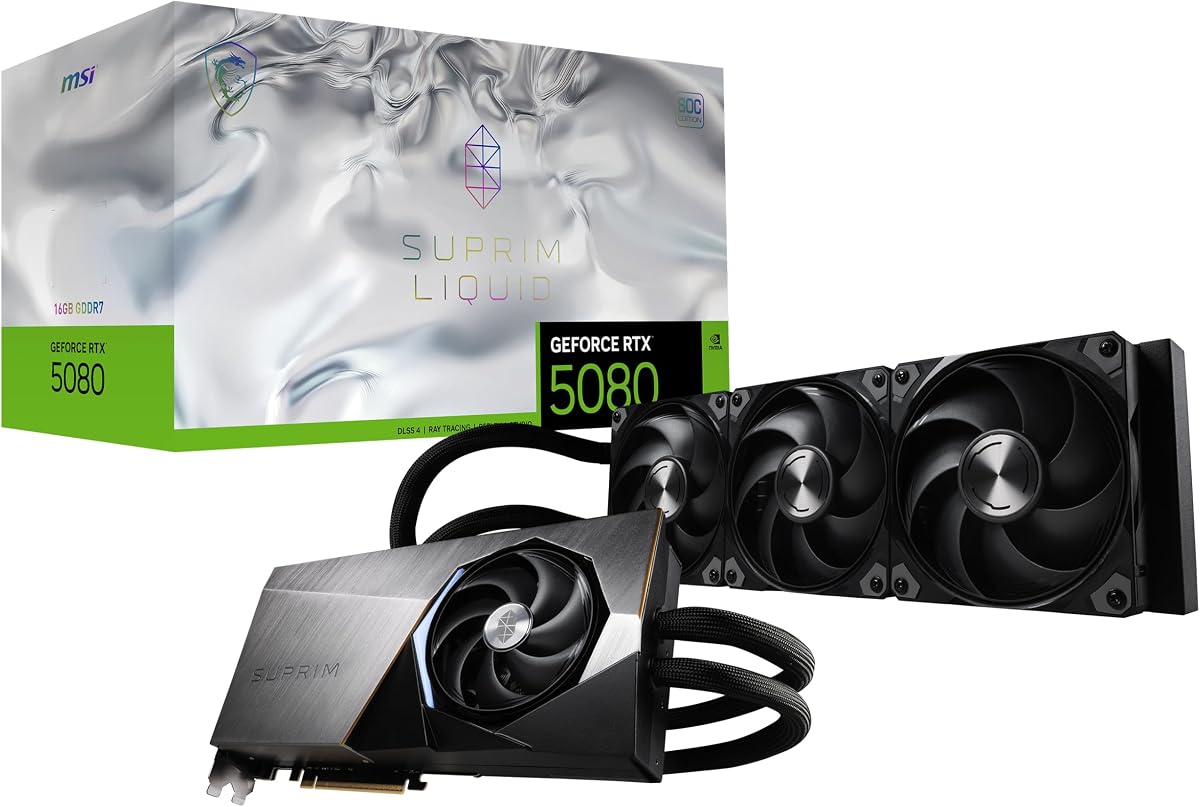
This model pushes performance boundaries with extreme overclocking and liquid cooling. It holds a 4.7 rating for its raw power and output options. Boost clock reaches 2760 MHz for maximum frame rates.
We may earn a commission when you buy through this link, at no additional cost to you.
16GB GDDR7 memory ensures fast data transfer. DisplayPort 2.1a and HDMI 2.1b support high resolution refresh rates. Extreme Performance chipsets enable stable operation under load.
Installation requires compatible liquid cooling infrastructure. This makes it ideal for enthusiasts building custom loops for top tier gaming rigs or workstations.
Buyers seeking maximum clock speeds and output versatility will find this card appealing. It delivers extreme performance for those willing to invest in specialized cooling.
DisplayPort 2.1a and HDMI 2.1b support high refresh rates and resolutions.
Extreme Performance chipsets and liquid cooling enable stable 2760 MHz boost clocks.
We may earn a commission when you buy through this link, at no additional cost to you.
Selecting the right flagship card requires balancing performance needs with budget and system constraints.
Flagship cards often offer 16GB to 32GB of VRAM to handle high resolution textures and large datasets. Choose more VRAM for 4K gaming or professional creative workloads.
Aim for at least 16GB for future proofing against increasingly demanding game assets.
Newer architectures like Blackwell bring improved ray tracing and AI upscaling technologies. These features impact frame rates and visual fidelity significantly.
Prioritize the latest generation for better efficiency and feature support over several years.
Effective cooling ensures sustained boost clocks without thermal throttling during long sessions. Look for multiple fans and quality thermal interface materials.
Robust cooling reduces noise and extends the lifespan of the graphics processing unit.
High end cards demand powerful PSUs often 850W or more. Verify your power supply supports the required connectors and wattage.
Upgrading your PSU may be necessary to avoid instability or system crashes.
Some flagship models occupy up to 4 slots and exceed 300mm in length. Ensure your case has sufficient clearance for proper installation.
Measure your case interior before buying to avoid fit issues or airflow blockage.
Check for DisplayPort and HDMI versions supporting your monitor refresh rates and resolutions. Newer ports like 2.1a and 2.1b enable higher bandwidth.
Match port versions to your display capabilities to avoid bottlenecks in performance.
GPU software suites provide monitoring and tweaking tools for performance optimization. Features like Dual BIOS allow switching between quiet and performance profiles.
Evaluate vendor software support for stability and customization options after purchase.
Durable components like phase change pads and ball bearings extend the life of the card. These reduce maintenance and ensure consistent performance over time.
Prioritize cards with proven build quality to maximize value and reliability.
Install the card carefully using a firm but gentle push to ensure full slot contact. Secure it with screws to prevent sagging during transport or use. Use the correct power connectors from your power supply.
Update graphics drivers regularly to benefit from new optimizations and bug fixes. Use software suites to monitor temperatures and fan speeds for early detection of issues.
Keep the interior of your PC clean from dust to maintain airflow. Avoid overclocking beyond recommended levels to prevent heat damage or instability over time.
Yes most flagship models offer multiple DisplayPort and HDMI outputs. Check specific port versions to ensure they match your monitor resolutions and refresh rates.
Most modern flagship cards require at least 850W power supplies. Some extreme models may recommend 1000W or more depending on your CPU and storage configuration.
Air cooling is sufficient for most flagship models. Liquid cooling is only needed for extreme overclocking or silent builds where noise reduction is critical.
While basic functionality works without updates you miss out on performance optimizations. Always install the latest drivers for best compatibility and frame rates.
Measure your case interior length and compare it to card dimensions on product pages. Account for additional clearance for airflow and cable routing.
Newer generations often bring better efficiency and features like advanced upscaling. The value depends on your specific use case and current performance needs.
The top picks cover a range of needs from budget friendly 16GB models to extreme 32GB workstation power. Each card balances modern features with robust build quality for reliability.
Prioritize memory capacity and cooling for long term satisfaction. Verify power supply compatibility before purchasing to avoid installation issues.
Prices and availability change quickly so check current listings before buying. Ensure your choice matches your system and performance goals for best results.