
10Gtek 10Gb PCI-E NIC
4.4Editor score
Intel 82599EN Controller
Single SFP Plus Port
Windows Linux VMware Support
This guide compares the top ten fiber optic network interface cards for 2026, evaluating performance, compatibility, and features to help you choose the right
Modern data centers and home labs require robust networking solutions to handle increasing bandwidth demands. A fiber optic network interface card provides the high-speed connectivity needed for seamless data transfer and reduced latency across your infrastructure.
We evaluated ten leading models based on chipset performance, port configuration, and system compatibility. Our analysis covers everything from budget-friendly single-port adapters to enterprise-grade dual-port cards designed for virtualization and storage workloads.
Each pick highlights key specifications and real-world usage scenarios to guide your decision. Remember that pricing fluctuates frequently, so check current listings before purchasing to ensure you get the best value for your specific networking needs.
4.4Editor score

5.0Editor score

4.9Editor score
The following table provides a side-by-side comparison of all ten fiber optic network interface cards evaluated in this guide to help you quickly identify the model that fits your hardware and performance requirements.


The StarTech 2-Port GbE SFP Network Card stands out as the top choice for users needing reliable gigabit fiber connectivity. With a perfect five-star rating, this card delivers consistent performance for desktops and servers alike.
We may earn a commission when you buy through this link, at no additional cost to you.
Powered by the Intel I350-AM2 chipset, it supports advanced features like IPv4/IPv6 offloading and link aggregation. The dual unlocked SFP slots allow you to mix copper and fiber connections based on your specific network topology needs.
While it only supports gigabit speeds which may seem limiting compared to ten-gigabit options, its stability and compatibility make it ideal for environments where reliability is paramount. The included low-profile bracket ensures it fits in smaller cases easily.
We recommend this card for IT professionals managing servers that require stable connections without the complexity of higher-speed protocols. Its thoughtful design with LED indicators simplifies troubleshooting significantly during daily operations.
The unlocked SFP slots work with any MSA-compliant module, giving you flexibility to choose between singlemode or multimode optics without vendor lock-in restrictions.
A built-in heatsink keeps the controller chip at optimal temperatures ensuring sustained performance even during long periods of high network traffic load.
We may earn a commission when you buy through this link, at no additional cost to you.
The 10Gtek 10Gb PCI-E NIC offers exceptional value for those seeking ten-gigabit performance without breaking the bank. Its original Intel 82599EN controller ensures stable operation across various server environments and virtualization platforms.
We may earn a commission when you buy through this link, at no additional cost to you.
This single-port card supports iSCSI and FCoE storage protocols making it suitable for network attached storage setups. The inclusion of both full-height and low-profile brackets means it can be installed in almost any standard computer case or rack server.
Users should note that Windows 11 requires specific driver configuration to function correctly which might add a small step to the installation process. However the reliability of the hardware makes this trade-off acceptable for most buyers.
We suggest this card for hobbyists and small businesses looking to upgrade their network backbone economically. The three-year warranty and lifetime technology support provide peace of mind for long-term usage scenarios.
Built-in support for iSCSI and FCoE allows you to utilize existing network infrastructure for high-speed storage access without needing dedicated hardware.
From Windows Server to Linux ESX and VMware this card offers wide compatibility ensuring it fits into diverse operating system environments seamlessly.
We may earn a commission when you buy through this link, at no additional cost to you.
The LinksTek X520-DA1 delivers unified ten-gigabit connectivity ideal for data centers and home labs. It leverages the popular Intel 82599ES controller to provide stable LAN and SAN connectivity for servers and PCs.
We may earn a commission when you buy through this link, at no additional cost to you.
This adapter supports advanced virtualization technologies including SR-IOV and VMDq which helps improve performance in virtual machine environments. The PCIe 2.0 x4 interface provides sufficient bandwidth for full ten-gigabit throughput in most scenarios.
Users should ensure they purchase compatible SFP plus transceivers as the card does not come with optics included. This separation allows you to choose modules that match your specific cabling needs but adds to the initial cost.
We recommend this card for users upgrading to a ten-gigabit network infrastructure. Its strong driver support across Linux distributions and Windows Servers makes it a versatile choice for mixed operating system environments.
Features like Flexible Port Partitioning and traffic management ensure virtual machines get consistent bandwidth for better overall system performance.
The high throughput supports demanding applications like four K video streaming and competitive gaming with minimal latency or packet loss.
We may earn a commission when you buy through this link, at no additional cost to you.
The Asus XG-C100F offers blazing fast ten-gigabit speeds for users needing to upgrade from standard gigabit connections. Its aluminum heatsink not only keeps the card cool but adds a stylish element to your internal hardware.
We may earn a commission when you buy through this link, at no additional cost to you.
Built-in QoS technology automatically boosts bandwidth to important streams ensuring critical tasks like video conferencing or gaming get priority over background downloads. This prioritization helps maintain smooth performance during peak network usage times.
The card supports both fiber optic and direct-attach copper connections giving you flexibility in how you cable your network. It is designed to operate within a wide temperature range making it suitable for various environmental conditions.
We recommend this card for users who value brand reliability and thermal performance. While it is slightly more expensive than generic options the quality of construction and feature set justify the investment for serious networking applications.
The sophisticated aluminum heatsink dissipates heat effectively ensuring the card remains cool during sustained high performance data transfer tasks.
Automatic QoS boosts bandwidth for priority tasks automatically preventing network congestion from impacting your most critical applications.
We may earn a commission when you buy through this link, at no additional cost to you.
This Realtek-based card features the latest PCIe Gen4 x1 interface providing forward compatibility with modern motherboards. It includes exclusive RealWoW technology that enhances wake-up and diagnostics functions for improved transmission stability.
We may earn a commission when you buy through this link, at no additional cost to you.
The card supports up to six-point-ten Linux kernels ensuring compatibility with most current Linux distributions. It also offers comprehensive protocol support including IEEE eight-zero-two-dot-one Q VLAN tagging for efficient network management.
Users should note that this card does not support FreeBSD or ESXi systems which may limit its use in specific virtualization environments. However for standard Windows and Linux setups it offers excellent performance and reliability.
We recommend this card for users building modern systems with PCIe Gen4 slots. The ability to scan a QR code for quick driver downloads simplifies the setup process significantly for non-technical users.
PCIe Gen4 x1 support ensures the card can leverage higher bandwidth potential available on newer motherboards for future-proof performance.
RealWoW technology optimizes data transmission stability ensuring consistent performance during critical network operations and wake tasks.
We may earn a commission when you buy through this link, at no additional cost to you.
This card uses genuine Intel 82599EN silicon ensuring sustained ten-gigabit throughput for demanding tasks like NAS transfers and VM migration. It is designed without vendor lock-in allowing third-party DAC and optical modules to work reliably.
We may earn a commission when you buy through this link, at no additional cost to you.
It is detected by Proxmox Truenas and Unraid without requiring driver steps which makes it ideal for home lab enthusiasts running open-source virtualization platforms. The passive heatsink design is quiet but requires adequate case airflow.
Jumbo frames up to nine KB and checksum offload run in hardware improving throughput efficiency. However users in silent builds may need to clip a small fan to the heatsink to prevent thermal throttling during heavy loads.
We recommend this card for homelabbers looking for reliable ten-gigabit performance without proprietary restrictions. Its compatibility with popular open-source systems makes it a favorite for DIY storage and virtualization projects.
No driver installation needed on Proxmox Truenas and Unraid makes setup instant for users of these popular open-source platforms.
Passive cooling design is silent but requires proper airflow to maintain optimal temperatures during sustained high network traffic usage.
We may earn a commission when you buy through this link, at no additional cost to you.
The CX4121A is a dual twenty-five-gigabit Ethernet adapter designed for high-performance virtualization and storage servers. It uses the Mellanox ConnectX-4 Lx controller to deliver cost-effective solutions for cloud and data analytics workloads.
We may earn a commission when you buy through this link, at no additional cost to you.
RDMA over RoCE support enables low-latency data transfers essential for database and storage platforms. The card also supports overlay networks via NVGRE VXLAN and GENEVE making it versatile for modern data center architectures.
While it requires compatible twenty-five-gigabit switches and transceivers the performance gains are significant for users scaling their infrastructure. It supports open fabrics enterprise distribution ensuring wide compatibility across Linux and Windows systems.
We recommend this card for enterprise environments needing high bandwidth and low latency. Its support for twenty-five-gigabit speeds ensures your network remains viable as data demands continue to grow over the next few years.
Support for RDMA over RoCE allows direct memory access between computers reducing latency for high-performance computing tasks.
Advanced features like NVGRE and VXLAN enable flexible network virtualization crucial for cloud and scalable data center environments.
We may earn a commission when you buy through this link, at no additional cost to you.
This card uses the reliable Intel 82599EN chip to provide stable ten-gigabit performance. The gold-plated fingers ensure reliable contact reducing hardware faults and extending the service life of the adapter in demanding environments.
We may earn a commission when you buy through this link, at no additional cost to you.
It includes a multimode optical module out of the box which simplifies the initial setup process significantly. The single SFP plus port supports various cables including DAC and AOC for flexible connectivity options.
Users should be aware that the PCIe X1 interface limits maximum bandwidth potential compared to x4 or x8 variants. However for most standard ten-gigabit connections this limitation is rarely noticeable in real-world usage.
We recommend this card for users wanting a ready-to-use solution with included optics. The combination of stable performance and essential features makes it a solid choice for general-purpose network upgrades.
Gold-plated fingers prevent oxidation and ensure consistent electrical contact reducing the risk of sudden disconnection issues.
Includes a multimode optical module so you can start connecting your fiber network immediately after installation.
We may earn a commission when you buy through this link, at no additional cost to you.
Although not a fiber optic card the TP-Link TX401 is a strong contender for users needing ten-gigabit speeds without changing cabling infrastructure. It uses 10GBase-T technology to deliver ten-gigabit performance over standard copper cables.
We may earn a commission when you buy through this link, at no additional cost to you.
The card is backwards compatible with lower speeds like 2.5 and 5 gigabits allowing it to negotiate best performance with older switches. A free CAT6A cable is included to ensure you get maximum speeds right out of the box.
It includes QoS technology to prioritize network traffic which is useful for gaming and streaming environments. The low-profile bracket ensures it fits in small form factor cases making it versatile for various desktop builds.
We recommend this card for users with existing copper cabling who want to upgrade speeds easily. The ease of use and included cable make it a convenient choice for home and small office upgrades.
10GBase-T technology allows you to use existing Cat6A or Cat7 copper cables for ten-gigabit speeds without new fiber cabling.
A rated CAT6A cable is included in the box ensuring you have the correct hardware to achieve full ten-gigabit performance immediately.
We may earn a commission when you buy through this link, at no additional cost to you.
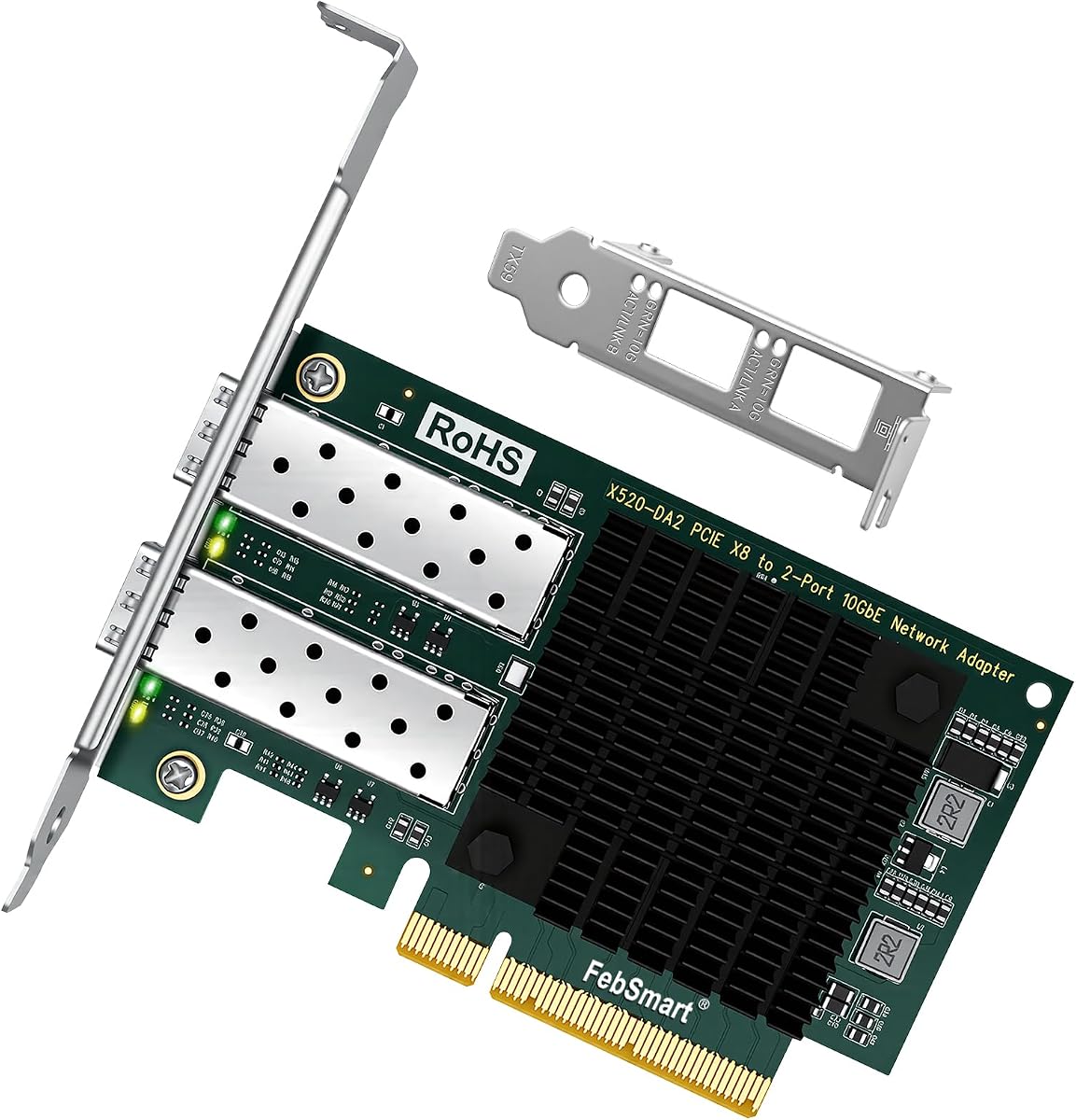
The FebSmart X520-DA2 offers dual ten-gigabit ports powered by a dual-channel Intel controller for stable LAN and SAN connectivity. It is ideal for virtualization and storage-intensive environments needing multiple high-speed links.
We may earn a commission when you buy through this link, at no additional cost to you.
Features like Intel Virtualization Technology and SR-IOV help maintain performance in virtualized setups. The card supports storage over Ethernet protocols making it useful for NAS builds and servers requiring direct storage access.
Driver installation is free on most Windows Server versions simplifying enterprise deployment. However Linux users will need to install the IXGBE driver manually which may require technical knowledge to configure correctly.
We recommend this card for users needing redundancy or increased aggregate bandwidth. Its dual port configuration allows for link aggregation or separate uplinks for different network segments providing flexibility for advanced users.
Support for VMDq and SR-IOV ensures virtual machines get optimized network performance for better server efficiency.
Two ten-gigabit ports allow for link aggregation or redundant connections ensuring high availability and increased throughput.
We may earn a commission when you buy through this link, at no additional cost to you.
Selecting the right fiber optic network interface card requires understanding your current hardware and future networking needs. This guide breaks down the key factors to consider before making a purchase.
Determine whether you need one, ten, or twenty-five gigabit speeds based on your switch and internet connection. Ten-gigabit cards are standard for home labs while twenty-five-gigabit cards serve enterprise needs.
Ensure your motherboard slot can support the bandwidth. PCIe x4 lanes are sufficient for ten gigabits while twenty-five gigabits usually require eight lanes.
Fiber cards use SFP or SFP plus cages which accept transceivers or direct attach cables. Verify that the module type matches your existing cabling infrastructure like multimode or singlemode fiber.
Check if the card is vendor locked as some branded cards reject third-party optics. Unlocked cards give you more flexibility in choosing cost-effective modules.
Confirm that drivers exist for your specific operating system version. Linux support varies by kernel version and some cards require manual driver installation on Windows.
Virtualization platforms like ESXi and Proxmox often require specific chipsets to ensure the hardware is recognized without complex configuration.
Newer PCIe versions like Gen4 offer higher throughput per lane than Gen2 or Gen3. Ensure your slot version matches the card requirements to avoid bottlenecks.
A Gen4 x1 card can often fit in a x4 or x16 slot but check if the bandwidth is sufficient for your intended speed.
For virtual environments look for cards supporting SR-IOV and VMDq. These technologies allow direct access to hardware resources reducing overhead and improving VM performance.
Storage over Ethernet protocols like iSCSI and FCoE should also be supported if you plan to use your network for storage traffic.
Check if the card comes with a low-profile bracket. This is essential for small form factor cases or rack-mounted servers where space is limited.
Standard full-height brackets are easier to secure in towers but may not fit smaller chassis without modification.
Ten-gigabit cards generate significant heat and often require passive heatsinks. Ensure your case has adequate airflow to cool the card effectively.
If you run the card in a silent build consider adding a small fan clip to prevent thermal throttling during heavy usage.
Reliable brands offer warranties ranging from three years to lifetime. This protection is valuable for hardware that undergoes frequent upgrades or heavy use.
Check community forums or vendor support pages to see how active they are in providing driver updates and troubleshooting assistance.
Install the card into a compatible PCIe slot ensuring it clicks securely into place. Attach the appropriate bracket and connect the fiber optic cable to the SFP cage using the correct transceiver module.
Install the necessary drivers for your operating system from the vendor website or use built-in OS drivers. Once installed configure IP settings and verify link status using LED indicators on the card.
Monitor temperatures regularly during heavy transfers and ensure airflow is not obstructed. Clean dust from heatsinks periodically to prevent overheating and maintain long-term reliability.
Yes, fiber cards require optical fiber cables or direct attach copper cables with compatible transceivers. Standard copper Ethernet cables cannot be plugged directly into SFP ports. You must select the correct module type like SFP or SFP plus that matches your switch and distance needs.
Not directly. You need a copper SFP module that converts the signal to Ethernet. However, many ten-gigabit cards support copper SFP plus modules allowing you to use standard Cat6A cables without changing the card itself.
Manufacturers program their cards to only recognize branded transceivers. This ensures compatibility but limits your choice of modules. Look for unlocked cards if you want to save money with third-party optics.
SFP supports up to one gigabit while SFP plus supports ten gigabits. SFP plus is backwards compatible with SFP so you can use slower modules in a faster slot but the speed will be limited to one gigabit.
You typically need a PCIe x4 slot or larger for ten gigabit performance. Most modern motherboards have at least one x4 or x16 slot. Always check your motherboard manual to ensure bandwidth availability.
Fiber offers better distance and immunity to interference making it great for longer runs. Copper is cheaper and easier to manage for short distances. Choose fiber if you need to bridge rooms without signal loss.
We reviewed ten top fiber optic network interface cards ranging from budget-friendly gigabit options to high-end twenty-five-gigabit enterprise adapters. Each model offers unique strengths depending on your specific performance and budget requirements.
Prioritize compatibility with your existing switch and operating system to ensure smooth integration. Consider future needs like virtualization support and bandwidth requirements to avoid upgrading too soon.
Prices for networking hardware fluctuate frequently so check current listings before finalizing your purchase. Always compare total costs including transceivers and cables to get the most accurate budget estimate.