
EPOMAKER Ajazz AK820 Pro Wireless Mechanical Keyboard with TFT Display&Knob
4.7Editor score
Compact 75% layout
TFT screen display
Affordable price point
This guide compares the top Epomaker keyboards for gaming and work, analyzing features like wireless connectivity, screen displays, and switch types.
Finding the right mechanical keyboard can transform your daily workflow and gaming experience. Epomaker offers a wide range of options tailored to different needs, from compact layouts to full-size boards with premium features.
We have carefully evaluated each model based on build quality, wireless performance, customization options, and user feedback. Our goal is to help you find the perfect match for your specific setup and preferences without the guesswork.
Each pick highlights key strengths and potential trade-offs to ensure you make an informed decision. Please note that prices and availability may change over time, so verify details before purchasing.
4.7Editor score
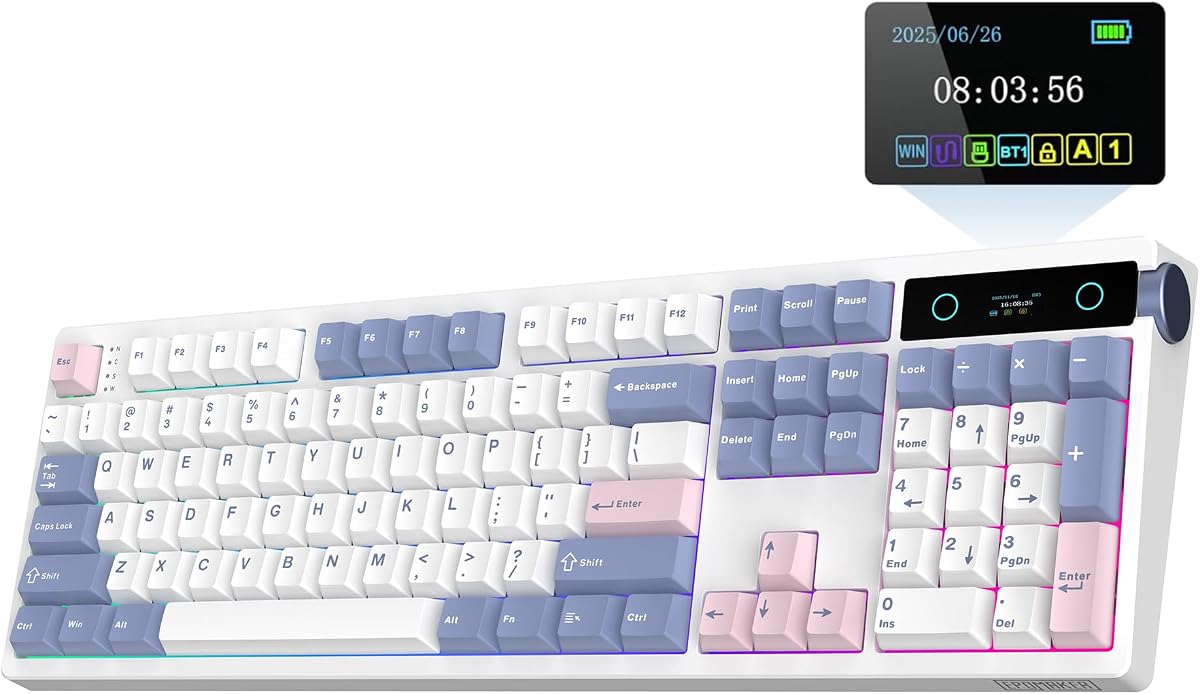
4.7Editor score
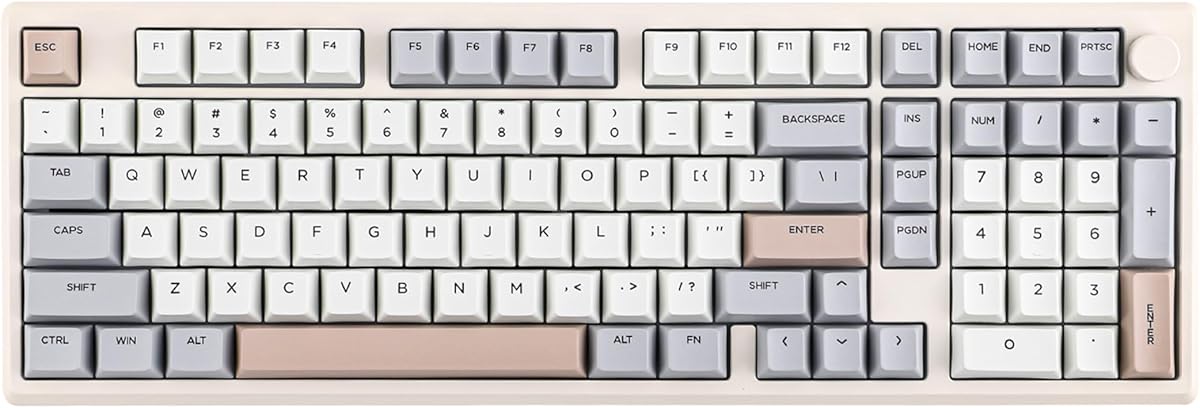
4.5Editor score
The following table provides a side-by-side comparison of all ten models to help you quickly identify key differences in layout, battery, and special features.


The EPOMAKER TH108 PRO stands out as a top contender in the mechanical keyboard market, earning a strong 4.7 rating from users who appreciate its blend of functionality and style. This full-size keyboard integrates a smart screen and rotary knob that adds a layer of customization rarely seen at this price point. Whether you are gaming or working, the ability to monitor battery life and toggle settings without software makes it highly practical.
We may earn a commission when you buy through this link, at no additional cost to you.
Performance is where this keyboard truly shines. With a massive 10000mAh battery, it offers up to 200 hours of use on a single charge, eliminating the need for frequent recharging. The tri-mode connectivity allows seamless switching between up to five devices via cable, 2.4GHz, or Bluetooth. The gasket mount design ensures a soft, flexible typing feel that reduces fatigue during long sessions, while the hot-swappable PCB lets you experiment with different switches easily.
While the TH108 PRO is excellent, it does have some trade-offs. Its full-size layout and weight of over 1.1kg mean it takes up significant desk space and is not ideal for on-the-go use. However, for a stationary desktop setup, this stability is often a benefit rather than a drawback. The screen software requires a Chrome-based browser which is convenient but limits native app integration for some users.
If you are looking for a versatile keyboard that balances gaming performance with office productivity, the TH108 PRO is an outstanding choice. It is particularly suited for users who want a high-tech aesthetic with practical features like battery monitoring and customizable visuals. For those who prefer a standard layout without sacrificing modern features, this model delivers exceptional value and reliability.
The smart screen allows you to display custom GIFs or monitor system stats, while the rotary knob provides quick access to volume and screen controls without interrupting your workflow.
With a 10000mAh battery and tri-mode wireless support, you can enjoy uninterrupted sessions across multiple devices, making it perfect for hybrid work and gaming setups.
We may earn a commission when you buy through this link, at no additional cost to you.
The EPOMAKER X Aula F75 MAX brings the popular TFT screen feature to a more compact form factor, appealing to users who want modern tech without the bulk of a full-size board. With a 4.6 rating, it is praised for its ergonomic design and satisfying acoustic profile. The 75% layout retains arrow keys and function layers while freeing up valuable desk space for mouse movement.
We may earn a commission when you buy through this link, at no additional cost to you.
This keyboard excels in build quality and typing feel. The gasket mount structure isolates the PCB from the case, reducing harsh vibrations and providing a softer typing experience. The factory-lubed switches deliver a creamy sound that enthusiasts love. Connectivity is robust with support for Bluetooth, 2.4GHz, and wired modes, ensuring stable performance across PC, Mac, and Linux systems.
One consideration is the lack of a dedicated function row, which might slow down users who rely heavily on media keys without layer switching. Additionally, the compact size means fewer dedicated keys for macros or numpad entry. However, for most general users and gamers, these compromises are minor compared to the benefits of portability and desk space efficiency.
The F75 MAX is ideal for gamers and professionals who value a streamlined desk setup without sacrificing premium features like a customizable screen and hot-swap capability. It is a great middle-ground option for those transitioning from a standard 104-key board to something smaller but still feature-rich.
Designed with a low front height and adjustable kickstands, the F75 MAX reduces wrist strain and provides a comfortable typing angle for extended sessions.
The TFT screen allows you to show off animations or monitor battery status, adding a personalized touch that enhances both functionality and visual appeal.
We may earn a commission when you buy through this link, at no additional cost to you.
The EPOMAKER Galaxy100 is a standout for users seeking a premium feel with deep customization options. Boasting an aluminum shell and a 4.5 rating, this keyboard offers a weighty, durable construction that feels high-end. The inclusion of QMK/VIA support opens up limitless possibilities for key remapping and macro creation, appealing to power users and enthusiasts.
We may earn a commission when you buy through this link, at no additional cost to you.
Typing performance is exceptional thanks to the gasket mount design and five layers of sound-dampening materials. The pre-lubed linear switches provide a smooth, consistent keystroke that minimizes friction and noise. With a 8000mAh battery and tri-mode connectivity, it ensures reliable wireless performance for both gaming and productivity tasks without frequent charging.
The aluminum construction adds significant weight, which enhances stability but makes the keyboard less portable. Additionally, the price point is higher than plastic alternatives, which might be a factor for budget-conscious buyers. However, the longevity and tactile quality often justify the investment for those who prioritize a premium typing experience.
If you want a keyboard that looks and feels professional while offering advanced customization, the Galaxy100 is a top-tier choice. It is particularly well-suited for office environments where a sleek aesthetic and quiet operation are valued alongside high performance.
QMK and VIA compatibility allow for granular control over key functions and layers, enabling complex macros and custom layouts without needing to compile code.
Multiple layers of foam and silicone cushion the keystrokes, creating a mellow, thocky sound that reduces noise pollution in shared workspaces.
We may earn a commission when you buy through this link, at no additional cost to you.
The EPOMAKER TH108 V2 PRO is an evolution of the original TH108, designed with hybrid users in mind. With a strong 4.7 rating, it combines a full-size layout with dedicated Mac modifier keys, making it a versatile tool for those who switch between Windows and Mac environments. The screen and knob remain key features for quick adjustments without software intervention.
We may earn a commission when you buy through this link, at no additional cost to you.
This model delivers on performance with a 10000mAh battery and tri-mode connectivity, ensuring seamless switching between devices. The gasket mount provides a soft, pillowy typing feel that is gentle on fingers during long coding or writing sessions. Low latency and high polling rates make it equally capable for competitive gaming scenarios.
The large footprint is expected for a full-size keyboard but might be an issue for smaller desks. Some users might find the screen distracting if they prefer a minimalist look, though it can be turned off. The build quality is robust, weighing over 1kg, which ensures it stays put during intense use.
The V2 PRO is ideal for professionals and gamers who need a reliable, feature-rich keyboard that adapts to multiple operating systems. Its focus on productivity with Mac support and customizable display makes it a powerful ally for complex workflows.
Dedicated Mac modifier keys allow for smooth transitions between operating systems, reducing the need to relearn keyboard shortcuts or layout changes.
The screen acts as a digital command center, displaying battery status and time while enabling quick access to settings through the rotary knob.
We may earn a commission when you buy through this link, at no additional cost to you.
The EPOMAKER TH99 PRO offers a unique 96% layout that saves space while keeping a full numpad, making it perfect for data entry and finance work. With a 4.6 rating, users appreciate the balance of compactness and utility. The inclusion of a screen and knob adds a modern touch to this productivity-focused design.
We may earn a commission when you buy through this link, at no additional cost to you.
Battery life is impressive at 10000mAh, supporting long sessions without interruption. The gasket mount design ensures a soft, cushioned typing feel that reduces fatigue. The hot-swappable PCB allows for switch customization, meaning you can tailor the sound and feel to your preference without soldering.
The closely spaced keys can lead to accidental presses for users not accustomed to compact layouts. Also, the lack of a distinct function row might require layer switching for media controls. However, these are standard trade-offs for the space-saving benefits of a 96% design.
If you need a keyboard that fits smaller desks but still requires a numpad, the TH99 PRO is an excellent solution. It is particularly suitable for accountants, data analysts, or anyone who values efficiency without sacrificing desk real estate.
The 96% layout keeps arrow keys and numpad close to the main typing area, reducing hand movement and increasing typing speed for data-heavy tasks.
Multiple layers of sound-dampening material ensure a quiet typing experience, making it ideal for shared office environments or late-night work sessions.
We may earn a commission when you buy through this link, at no additional cost to you.
The EPOMAKER TH108 provides a no-frills yet high-quality full-size experience. With a 4.5 rating, it is a solid choice for those who want the reliability of a full-size layout with modern wireless features. The 10000mAh battery ensures long usage between charges, making it practical for daily use.
We may earn a commission when you buy through this link, at no additional cost to you.
Build quality is robust with a thick body that weighs over 1.2kg for stability during intense gaming or typing. The gasket mount design delivers a comfortable, bouncy feel that minimizes shock. PBT keycaps resist wear and shine, maintaining a fresh look over time. Hot-swappable sockets allow for easy switch customization.
The absence of a screen or knob means you miss out on some customization features found in the PRO versions. However, this keeps the price lower and the design simpler. The RGB backlighting is customizable, adding visual flair without needing extra hardware.
For users seeking a reliable, affordable full-size keyboard without extra bells and whistles, the TH108 is a great pick. It balances cost and performance effectively, making it a strong contender for general gaming and office use.
Double-shot PBT keycaps ensure legends remain vivid and the surface resists shine, providing a long-lasting aesthetic that withstands heavy daily use.
Tri-mode connectivity options provide flexibility, allowing you to switch between wired and wireless modes depending on your immediate needs and location.
We may earn a commission when you buy through this link, at no additional cost to you.
The EPOMAKER G84 HE is designed for serious gamers who demand precision. With a 4.7 rating, it stands out for its Hall Effect switches that offer adjustable actuation and zero dead zones. The 8K polling rate ensures that every input is registered instantly, giving a competitive edge in fast-paced games.
We may earn a commission when you buy through this link, at no additional cost to you.
The magnetic switches allow you to customize actuation and release points, enabling techniques like rapid triggering and key rollover. The software supports advanced functions like SOCD logic, which prioritizes the last input for smoother movement. Despite being wireless, the latency is incredibly low, matching wired performance.
New users might find the software settings complex to configure initially. Without a screen, you must rely on the software to adjust settings. However, the performance benefits outweigh these learning curves for dedicated gamers who need the best hardware possible.
If you are into competitive FPS or rhythm games, the G84 HE is unmatched in this lineup. It offers features typically found in high-end esports keyboards, making it a powerful tool for those who prioritize speed and accuracy.
DKS technology allows a single keypress to execute multiple commands based on how far you press, adding a layer of control not possible with mechanical switches.
Adjustable actuation from 0.1 to 3.3mm lets you tailor the sensitivity to your preference, reducing finger fatigue and improving reaction times.
We may earn a commission when you buy through this link, at no additional cost to you.
The EPOMAKER TH99 is a budget-friendly option that does not skimp on essential features. With a 4.6 rating, it offers a 96% layout that includes a numpad, making it functional for office work while saving space. The 8000mAh battery ensures decent endurance for daily use.
We may earn a commission when you buy through this link, at no additional cost to you.
The gasket mount provides a surprisingly comfortable typing experience for this price range. Soft materials dampen the sound and add a tactile bounce that is pleasant to the touch. Connectivity is versatile with tri-mode support, allowing you to pair with multiple devices easily.
The RGB lighting is less vibrant compared to premium models, and the shell is standard plastic. However, for the price, these are minor compromises. The keyboard delivers reliable performance and essential features that most users need without breaking the bank.
For students or home users looking for a compact, functional keyboard at a great value, the TH99 is a smart choice. It bridges the gap between affordability and performance effectively.
Cherry profile keycaps and adjustable kickstands make typing comfortable over long periods, reducing strain and improving overall usability.
The battery lasts up to 800 hours with backlight off, ensuring you rarely need to plug in during regular workdays.
We may earn a commission when you buy through this link, at no additional cost to you.
The EPOMAKER Ajazz AK820 Pro delivers premium features at an entry-level price point. With a 4.7 rating, it is a favorite for users who want a screen and gasket mount without spending too much. The 75% layout is compact yet functional, fitting most desks comfortably.
We may earn a commission when you buy through this link, at no additional cost to you.
Despite the lower price, the build quality is solid. The gasket mount and flex-cut plate ensure a satisfying typing feel. The TFT screen allows for custom visuals, adding a tech-forward look to your setup. South-facing LEDs provide bright, clear RGB lighting without washout.
The battery capacity is smaller compared to other models, offering about 4000mAh. This means more frequent charging if you use the screen often. However, for many users, the balance of features and cost makes this a compelling option for first-time mechanical keyboard buyers.
If you want to experience a modern mechanical keyboard with all the bells and whistles on a budget, the AK820 Pro is the best value. It is perfect for casual users and enthusiasts looking to upgrade without a heavy investment.
The TFT screen and RGB lighting create a visually striking aesthetic that enhances your desk setup and adds personalization options.
Gasket mounting isolates the plate from the case, providing a soft and consistent typing experience that is rare at this price range.
We may earn a commission when you buy through this link, at no additional cost to you.
The EPOMAKER x Aula F99 offers a balanced mid-range experience. With a 4.5 rating, it is a reliable workhorse for those who prefer a compact 96% layout with a numpad. The 8000mAh battery provides excellent endurance, ensuring you can work or game without interruption.
We may earn a commission when you buy through this link, at no additional cost to you.
Sound quality is a strong point, with five layers of sound-shock absorption dampening the noise for a quiet, thocky profile. The hot-swappable PCB allows for easy customization, letting you swap switches to match your style. PBT keycaps add durability and texture to the typing experience.
Without a screen or knob, it lacks some of the flashy features of other models. However, this keeps the design clean and focused on core functionality. The build quality is sturdy, and the connectivity is reliable for most daily tasks.
For users seeking a solid, no-fuss keyboard that performs well across office and gaming scenarios, the F99 is a dependable choice. It offers a strong balance of features and value for the average user.
Multiple internal layers of padding absorb sound and shock, making the keyboard quiet and pleasant for use in shared or quiet environments.
High-quality materials and a well-finished chassis ensure the keyboard lasts through years of daily use, maintaining its look and feel.
We may earn a commission when you buy through this link, at no additional cost to you.
Choosing the right Epomaker keyboard depends on your specific needs, from layout preferences to connectivity options and build materials.
Epomaker offers keyboards in various layouts such as full-size, 96%, 75%, and 80%. Full-size keyboards include a numpad and function row, ideal for data entry. Compact layouts like 75% or 96% save desk space while keeping essential keys. Choose based on your desk size and whether you need a number pad.
Consider your workspace and typing habits when selecting a layout to ensure it fits your desk and workflow.
Most models support tri-mode connectivity: wired USB-C, 2.4GHz wireless, and Bluetooth. This allows you to switch between devices like a PC, Mac, and tablet seamlessly. Ensure the keyboard you choose supports the devices you plan to use.
Look for tri-mode support to maximize flexibility and reduce cable clutter in your setup.
Battery capacity varies significantly, from 4000mAh to 10000mAh. Larger batteries can last up to 200 hours, which is crucial for wireless users. If you plan to use RGB lighting and a screen, expect shorter battery life. Always check the estimated usage time under your typical conditions.
Prioritize a higher mAh battery if you need all-day wireless usage without frequent recharging.
Epomaker keyboards often feature hot-swappable sockets, allowing you to change switches without soldering. Pre-lubed switches provide a smooth feel out of the box. Decide if you prefer linear, tactile, or clicky switches based on your typing style and noise tolerance.
Choose a hot-swappable model to easily experiment with different switches and sounds later.
Build materials range from ABS plastic to aluminum alloy. Aluminum shells offer durability and a premium feel but add weight. Gasket mounting is common in these keyboards, providing a softer, more cushioned typing experience. PBT keycaps are standard for durability and texture.
Select materials that match your preference for weight, portability, and aesthetic feel.
Some models include screens, rotary knobs, and QMK/VIA support. These features allow for deep customization and real-time info display. Screens can show battery status or custom images. Knobs adjust volume quickly. Decide if these features align with your workflow needs.
Opt for specialized features like screens if you want extra customization and quick access controls.
Gaming keyboards often emphasize low latency and high polling rates, while office keyboards focus on ergonomics and noise reduction. Models with Hall Effect switches are great for competitive gaming. Gasket mounts are excellent for long typing sessions at work.
Match the keyboard's primary strengths to your main use case, whether gaming or productivity.
Prices vary based on features like screens and materials. Entry-level models are affordable but may lack premium features. Mid-range to high-end options offer aluminum builds and advanced software. Determine your budget before shopping to narrow down the best options for you.
Set a budget range to find a keyboard that offers the best value for your specific needs.
Connect your keyboard via USB-C, 2.4GHz receiver, or Bluetooth. Download the official driver from the Epomaker website to remap keys, adjust RGB, and set macros. Ensure you match the keyboard's mode to your operating system using the provided shortcut keys.
To maintain the keyboard, gently clean the keycaps with a soft cloth and mild soap. Avoid using excessive water or harsh chemicals. Periodically remove keycaps to clean under them and ensure smooth operation. Check that the battery is charged to keep wireless features functional.
Store the keyboard in a cool, dry place to prevent damage to internal components. If you plan to store it for a long time, fully charge the battery first to prevent it from draining completely. Adjust the tilt to a comfortable position to reduce wrist strain during use.
Yes, many Epomaker models are excellent for gaming due to low latency and high polling rates. Models like the G84 HE offer Hall Effect switches for ultra-precise control. The tri-mode connectivity ensures stable wireless performance for gaming sessions without cables.
Most Epomaker keyboards are compatible with Mac, Windows, and Linux. Some models include dedicated Mac modifier keys for easier switching. Ensure you check the specific model's compatibility details to confirm OS support.
To change switches, simply use a switch puller to remove the old ones and push in the new ones. No soldering is required. Ensure the new switches match the PCB socket size, typically 3-pin or 5-pin, for proper installation.
Battery life varies by model and usage. Larger batteries like 10000mAh can last up to 200 hours with RGB off. With RGB and screens active, expect shorter durations ranging from 40 to 80 hours depending on settings.
Some models like the TH108 PRO and F75 MAX include a rotary knob for quick volume adjustment. Others require using key combinations to adjust volume via software. Check the product details for physical volume control options.
Most models feature PBT keycaps which are highly durable and resistant to shine. Double-shot legends ensure text remains clear even after prolonged use. This makes them more durable than standard ABS keycaps found on cheaper boards.
Yes, you can customize RGB lighting using the provided driver software. You can change colors, brightness, and effects. Some models even allow per-key customization to match your preferences and style.
Most keyboards in this list are wireless with Bluetooth and 2.4GHz support. This provides flexibility and reduces desk clutter. Wired USB-C options are also available for stable connections when needed.
Our top picks highlight the versatility and value that Epomaker brings to the market. Whether you need the compact efficiency of the F75 MAX, the full-size power of the TH108 PRO, or the budget-friendly features of the AK820 Pro, there is a model for every need.
When choosing, prioritize your specific requirements such as layout size, battery needs, and desired features like screens or specialized switches. Consider your primary use case and how the keyboard fits into your existing setup to ensure maximum satisfaction.
Remember that prices and availability may fluctuate, so always verify the latest details before purchasing. Investing in a quality keyboard can enhance your daily productivity and enjoyment, making it a worthwhile addition to your desk.