
ATSC Digital Converter Box with TV Tuner
3.8Editor score
Affordable recording solution
Supports external USB storage
Clear QAM function included
Discover the top DVR recorders for TV in our expert guide comparing features, tuners, and recording capabilities to help you choose the right device for your
Finding the right DVR recorder for TV can transform how you watch and manage your favorite shows. Modern devices offer everything from simple recording capabilities to advanced streaming integration and cloud storage options for your convenience.
We compared ten leading models based on tuner counts, recording formats, compatibility with existing hardware, and ease of setup. Our analysis focuses on real-world performance and user feedback to ensure you get reliable technology for your viewing needs.
Each pick highlights key strengths and potential limitations so you can make an informed decision quickly. Please note that product availability and specifications may vary over time, so always check the latest details before purchasing your new device.
3.8Editor score

3.2Editor score

4.1Editor score
This side-by-side comparison outlines the core specifications of each model to help you identify the best fit for your specific recording and streaming requirements across different setups.
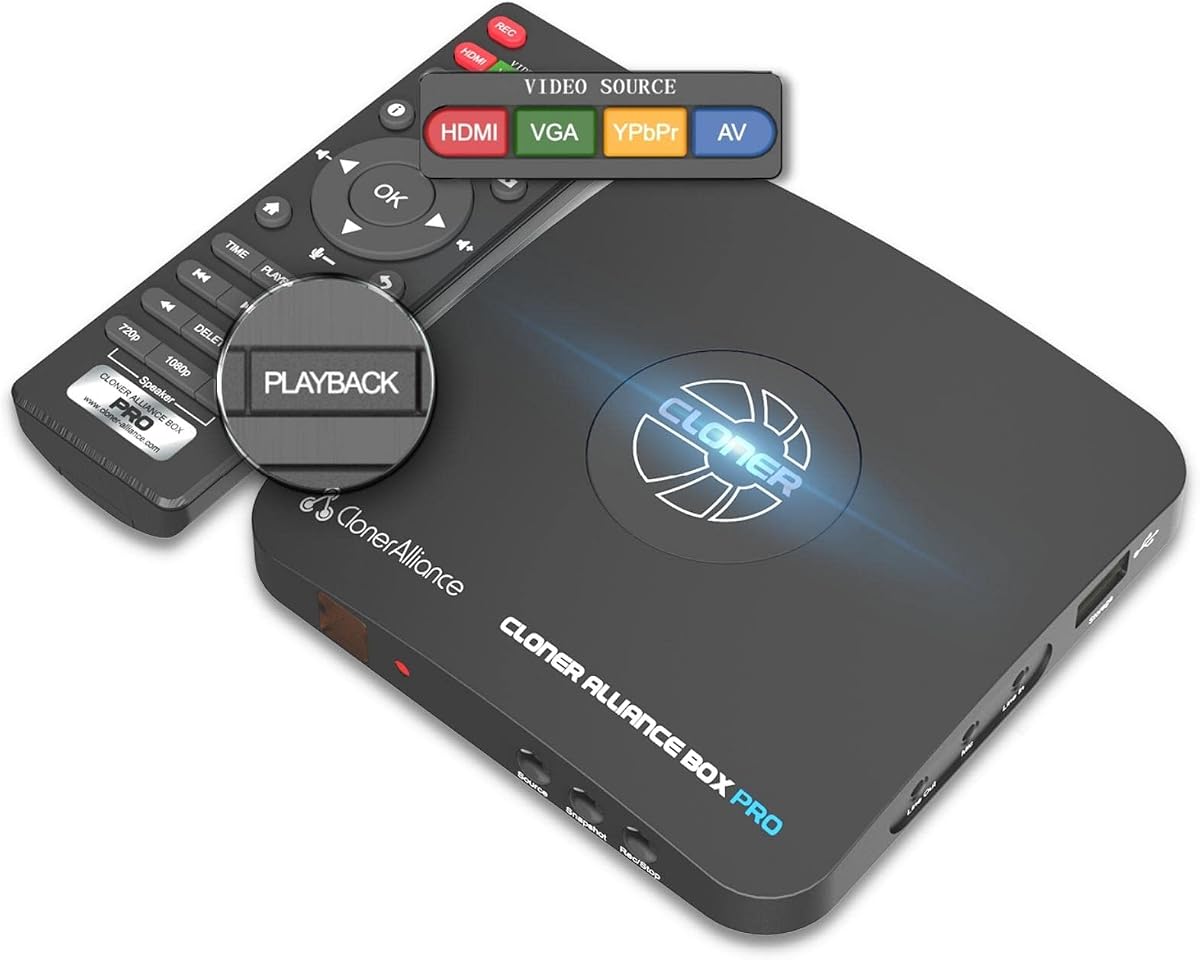


The ClonerAlliance Box Pro stands out as a robust standalone video recorder that requires no computer connection for basic operation. It receives a strong rating from users who appreciate its ability to digitize analog tapes or record gaming sessions directly to a USB drive.
We may earn a commission when you buy through this link, at no additional cost to you.
Its key strength lies in the wide range of input options including HDMI RCA component and VGA making it versatile for connecting various legacy devices like VCRs game consoles or set-top boxes. The ultra low latency ensures smooth playback on your TV with minimal delay between input and output.
However users should be aware that it does not support content protected by HDCP which limits its use with certain modern cable boxes or streaming devices. Also the included editing software only works on Windows systems so Mac users may need third party tools for file management.
This device is ideal for anyone looking to archive old home videos or capture console gameplay without investing in a full PC setup. Its straightforward interface and schedule recording tasks make it a practical choice for older adults or tech beginners.
Convert your VHS tapes and analog game recordings into modern MP4 files easily without needing a computer to process the stream.
Set up automatic recording sessions to capture your favorite shows or events while the device operates independently in the background.
We may earn a commission when you buy through this link, at no additional cost to you.
The Tablo TV 4th Gen offers a comprehensive solution for cord cutters who want to keep over-the-air TV without monthly subscription costs. It allows you to record and watch live local channels from major networks on your entire family's devices simultaneously.
We may earn a commission when you buy through this link, at no additional cost to you.
Its main advantage is the whole home access feature which streams live and recorded content over your Wi-Fi network to compatible smart TVs phones tablets and streaming players. The four tuners ensure you can record up to four shows at once while still watching another channel on a different screen.
Despite these strengths the reliance on a consistent high-speed internet connection means that slower networks may experience buffering during playback. Also it only works with OTA signals so cable subscribers would need to check if their provider offers unencrypted feeds to use this device effectively.
This system is perfect for households with multiple viewers who want to watch different shows at the same time without paying extra fees. The one-time payment model eliminates recurring costs making it an economical long-term option for local TV recording.
Record four different programs simultaneously while watching a fifth one on another device thanks to the dedicated tuner hardware.
Enjoy free access to local channels and streaming content without any monthly bills or hidden fees after your initial purchase.
We may earn a commission when you buy through this link, at no additional cost to you.
For those seeking a more affordable entry into DVR recording the Tablo TV 4th Gen 2-Tuner provides essential features without the higher cost of the four tuner model. It shares the same no subscription model and whole-home streaming capabilities as its larger sibling.
We may earn a commission when you buy through this link, at no additional cost to you.
The dual tuners allow you to record one show while watching another which is sufficient for most single household setups. You can connect your TV antenna and stream recorded content to smartphones tablets and smart TVs throughout your home for flexible viewing.
However the reduced number of tuners means you cannot record four shows at once which might be limiting for large families with overlapping schedules. Also external storage expansion options are more limited compared to other modern networked recorders.
This unit is a smart choice for smaller households or casual viewers who prioritize cost savings and simplicity over maximum recording capacity. It delivers reliable local TV access and streaming features at a price point that is hard to beat in the market.
Save money on hardware while still getting reliable whole home streaming and no subscription fees for your local channel needs.
Simultaneously record and view two channels which covers the needs of most couples or small families effectively.
We may earn a commission when you buy through this link, at no additional cost to you.
This bundle offers a complete start-to-finish solution for capturing local broadcasts by including both the 2-tuner DVR and a compatible indoor antenna. It removes the guesswork of finding a separate antenna and simplifies the initial installation process for new users.
We may earn a commission when you buy through this link, at no additional cost to you.
The 35-mile range antenna helps ensure you get a stable signal even if you live slightly outside the core urban area. Combined with the two tuners you can record a show while watching another on your smart TV or stream to mobile devices.
Keep in mind that antenna performance depends on your location and surrounding obstructions so the 35-mile claim is an estimate. Also like other Tablo models it does not work with non-smart TVs so you need a compatible streaming player or app.
It is an excellent value for anyone wanting a ready-to-use DVR system that supports flexible viewing throughout the home. You get everything needed to start recording local TV immediately without extra purchases or complex setup steps.
Get both the recorder and the antenna in one package to save time and effort on hardware selection.
Watch your recorded shows on any compatible device in the house thanks to the networked streaming features.
We may earn a commission when you buy through this link, at no additional cost to you.
The Mediasonic HomeWorx converter box is a budget-friendly way to record over-the-air TV or unencrypted cable signals onto a USB hard drive. It supports recording to up to 2TB of external storage and offers basic multimedia playback for photos and videos.
We may earn a commission when you buy through this link, at no additional cost to you.
Its Clear QAM feature allows it to work with some cable providers without a set-top box which is rare for devices in this price range. The front display shows channel numbers and time even when in standby mode adding a bit of usability.
Users must provide their own USB hard drive and the device does not support ATSC 3.0 signals which are becoming more common for high definition broadcasts. Also USB flash drives are not recommended for reliable recording performance.
This box is ideal for users who need a simple recording solution and already have an external hard drive available. It keeps costs low while providing essential features for recording and playback without complex setup or hidden fees.
Watch unscrambled cable channels directly without a monthly subscription by using the Clear QAM capability.
See channel numbers and time clearly on the front panel even when the device is in standby mode.
We may earn a commission when you buy through this link, at no additional cost to you.
This vintage unit combines DVD and VHS recording into one device which is unique in a market dominated by digital solutions. It includes a built-in ATSC tuner so you can record digital broadcasts to tape or disc and play back your favorite media.
We may earn a commission when you buy through this link, at no additional cost to you.
The one-touch recording makes capturing shows simple and the ability to dub between formats lets you preserve old VHS tapes onto more durable DVDs. Video upconversion to 1080p ensures your recordings look sharp on modern high definition displays.
However this model is older and may lack the latest connectivity options or firmware updates available on newer devices. Support and replacement parts are harder to find now which can be a risk for long-term ownership.
It suits collectors or users who still rely on VHS tapes and want a dedicated machine for dubbing or recording without computer intervention. Its hybrid approach fills a specific niche that modern all-digital recorders cannot match.
Record to both DVD and VHS tapes using a single unit for maximum compatibility with your existing library.
Convert old tapes to DVDs easily to preserve your content in a more durable and modern format.
We may earn a commission when you buy through this link, at no additional cost to you.
This package delivers the full Tablo experience with four tuners and a compatible indoor antenna bundled together for convenience. It allows households to record multiple shows while streaming live TV to any device on the network without extra fees.
We may earn a commission when you buy through this link, at no additional cost to you.
The 35-mile antenna helps secure a strong signal for recording local networks and the four tuners mean you can capture all your favorite programs simultaneously. Whole-home access lets everyone in the house watch what they want independently.
The higher cost compared to standalone units may deter some buyers but you save on separate antenna costs. Also you still need a reliable internet connection for streaming features to work smoothly across your network.
It is the best fit for larger families who need maximum recording capacity and want a ready-to-go solution. The included antenna removes one variable from setup so you can start recording local TV right away.
Receive everything needed to record four channels and stream to multiple devices in one purchase.
Record four shows at once while watching a different one on your smart TV for ultimate flexibility.
We may earn a commission when you buy through this link, at no additional cost to you.
The ClonerAlliance UHD Pro brings ultra-high definition capture to standalone recorders allowing you to record 4K content directly to USB storage or SD cards. It is praised for its ultra-low latency and support for both H.264 and H.265 codecs.
We may earn a commission when you buy through this link, at no additional cost to you.
Its ability to pause and resume recording in a single file makes it perfect for capturing long events like sports games without worrying about file limits. The passthrough feature ensures your TV output remains clear while recording on the fly.
One limitation is that it does not support HDCP protected content so it cannot record from streaming services or most cable boxes. Also the higher price point may not be necessary if you only need standard 1080p recording.
This device is ideal for professionals or enthusiasts who need to capture 4K footage from consoles or cameras without editing on a PC. It provides a robust and simple way to archive high quality video with cinematic frame rate options.
Capture your favorite high-definition content in 4K resolution directly onto a USB storage device.
Pause and resume your recording without creating separate files so your footage stays seamless and easy to manage.
We may earn a commission when you buy through this link, at no additional cost to you.
This renewed model offers the same capabilities as the brand new Tablo 2-tuner DVR but at a reduced price for budget-conscious shoppers. It still provides two tuners for recording and whole-home streaming without any ongoing subscription fees.
We may earn a commission when you buy through this link, at no additional cost to you.
You can connect external USB storage to expand your recording capacity beyond the built-in limits which is useful for archiving many shows. The network setup process remains simple and allows you to watch recorded TV on tablets and smartphones.
Keep in mind that renewed items come with limited warranties and you may not have access to the exact original accessories. Performance should be reliable but there is always a small risk of hardware wear compared to a brand new unit.
It is a smart buy for those who want the full Tablo experience but are okay with refurbished quality. You get the benefits of OTA recording and streaming without the full retail cost of the new hardware.
Get the same recording and streaming features for less money with a refurbished unit.
Add extra storage capacity by connecting an external USB drive to save more shows.
We may earn a commission when you buy through this link, at no additional cost to you.
For users needing high capacity recording on a budget this renewed four tuner DVR provides the same power as the new version for less. It allows you to record four shows at once and stream to multiple devices throughout your home.
We may earn a commission when you buy through this link, at no additional cost to you.
The onboard storage handles around 50 hours of content and you can expand it further with external USB drives to keep even more shows. It supports free streaming channels in addition to local broadcasts for a wide range of content.
The trade-off is that as a renewed item it may show signs of wear and comes with a shorter warranty. However the core functionality remains the same which makes it a reliable choice if the price difference is significant.
This model suits heavy DVR users who want maximum recording capacity and whole-home streaming without paying full retail. It is a practical solution for families who record many shows daily and need flexible viewing options.
Record four shows at once with the power of four tuners in a budget-friendly renewed package.
Add external USB storage to keep hundreds of hours of your favorite local and free content.
We may earn a commission when you buy through this link, at no additional cost to you.
Selecting the right DVR involves understanding your storage needs, tuner count, and connectivity options. This guide breaks down the key factors to help you find a reliable device for your setup.
The number of tuners determines how many shows you can record at the same time. If you have a family with overlapping schedules, look for devices with multiple tuners so you do not miss your favorite programs.
For most households, two to four tuners provide enough flexibility to handle typical viewing habits without complexity.
Recording space is critical for keeping your shows available to watch later. Check if the device supports external hard drives or has built-in storage that meets your needs for long-term archiving.
Devices that allow USB expansion let you add extra space as your library grows without replacing the entire unit.
Determine whether you need an Over-The-Air (OTA) tuner or if you want to record from cable inputs. Some models only work with OTA signals while others accept various video inputs for analog sources.
If you rely on cable or satellite, ensure the device supports those connections or plan to use a converter box for compatibility.
Network connectivity allows you to stream recorded content to other devices like phones and tablets. Wi-Fi support offers placement flexibility while Ethernet provides a more stable connection for reliable playback.
Check if the device supports your existing home network standards to avoid connectivity issues during setup.
Modern recorders often support 1080p or even 4K recording depending on the input source. Higher resolutions ensure your saved content looks sharp on today's high-definition televisions.
Confirm that the device handles the resolution of your source signal to avoid downscaling or poor image quality.
User interface and remote control design matter for daily interaction. Look for models with intuitive menus and scheduling options that make recording simple for all ages.
A straightforward setup process saves time and reduces frustration during initial installation and regular use.
Some recorders require monthly fees to access features while others are fully functional with a one-time payment. Consider your budget and how often you use the recording features before committing.
Devices without subscription fees offer better long-term value and more predictable ownership costs.
Reliable customer service and warranty terms provide peace of mind in case of hardware issues. Extended warranties can be valuable for expensive models or those used frequently.
Review the warranty details before purchase to ensure you are covered for parts and labor if needed.
Connect your DVR recorder to your TV antenna or cable box using the appropriate cables to ensure a stable signal. Follow the on-screen setup instructions to scan for channels and configure your recording preferences.
Regularly clean the device vents and check cable connections to maintain good airflow and prevent overheating. Keep the firmware updated by following the manufacturer's guidelines to benefit from performance improvements.
Organize your recorded content using the built-in playlist or folder features to find shows easily. Schedule recordings during low traffic times if possible to ensure smooth operation without network interruptions.
Yes, many modern DVR recorders support Over-The-Air (OTA) signals directly from a TV antenna. You simply connect the coaxial cable from your antenna to the DVR and configure it to scan for local channels.
It depends on how many shows you record and the video quality. A standard 500GB drive can store hundreds of hours of content, but high-definition recordings take more space.
Some models support Clear QAM which works with unencrypted cable signals. Others may require a converter box to capture cable content if they are designed only for OTA use.
Many networked DVR recorders allow you to stream recorded content to mobile devices via their apps. Ensure your device supports streaming and your internet connection is stable.
No, most standalone DVR recorders operate independently without a PC. However some models offer additional editing features that may require computer software.
Recordings are stored on your device until you delete them manually or the storage is full. Some units may overwrite old content automatically depending on the settings you choose.
We highlighted the top models including the ClonerAlliance Box Pro for standalone capture and the Tablo series for whole-home streaming. Each offers unique strengths depending on whether you need analog conversion or networked recording.
Focus on what matters most to your household whether it is tuner count storage capacity or subscription fees. Choosing the right balance ensures you get value without unnecessary complexity or ongoing costs.
Always verify current availability and specifications before making a final decision as technology and offers change. Check the latest details from the provider to ensure the device meets your needs today.