
Dell Pro Laptop Docking Station WD25
4.5Editor score
100W Power Delivery
Up to 4 Displays
Sustainable Recycled Design
Compare the top 10 docking stations for Dell Pro 14 Plus laptops. We review power, connectivity, and design to help you choose the right hub today.
Finding the right docking station for your Dell Pro 14 Plus is essential for maximizing productivity and workspace efficiency. A quality hub connects multiple displays, peripherals, and networks through a single cable, reducing clutter and streamlining your daily workflow effectively.
We compared ten leading models based on power delivery, port selection, video support, and build quality. Our analysis focuses on compatibility with Dell Pro systems while ensuring reliable performance for mixed environments where versatility and stability matter most for professionals.
Each pick highlights unique strengths like Thunderbolt speed, sustainable design, or bundle value. Prices and availability change frequently, so verify current details before purchasing to ensure you get the best fit for your specific technical requirements and budget needs.
4.5Editor score
4.2Editor score
5.0Editor score
This side-by-side comparison highlights key specifications across all ten reviewed docking stations to help you quickly identify which model offers the power delivery, port selection, and display support you need for your Dell Pro 14 Plus.




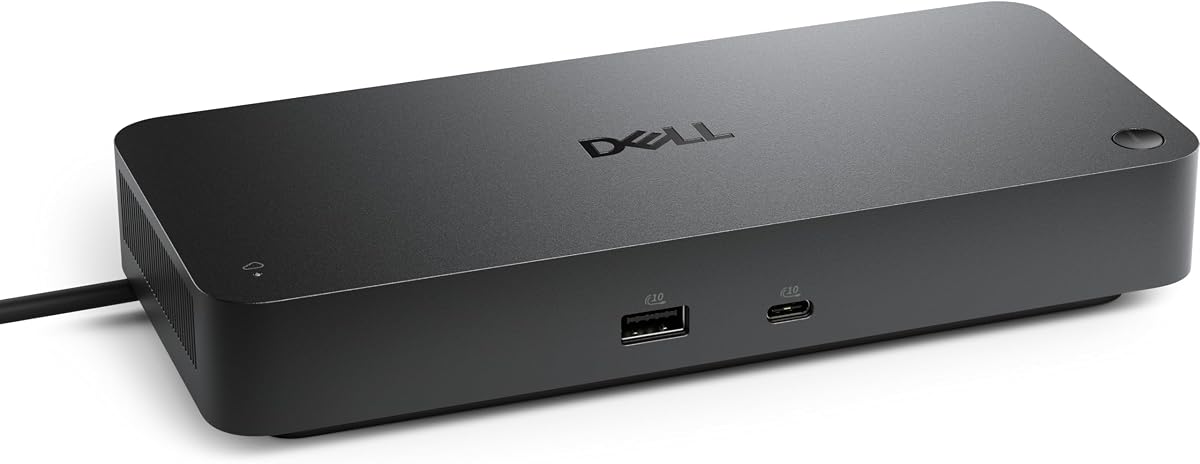
The Dell Pro Laptop Docking Station WD25 offers excellent compatibility and power for Dell AI PCs and other systems. With a 4.5 rating, it delivers 100W charging and supports up to four high-resolution displays through modern ports.
We may earn a commission when you buy through this link, at no additional cost to you.
Its ambidextrous USB-C cable allows left or right routing for a cleaner desk. The durable connector ensures long-term reliability while maintaining enterprise-grade manageability for IT teams across distributed workforces.
While the price is premium compared to generic hubs, the build quality and sustainability features justify the cost. Standby power consumption is reduced by 72 percent, making it efficient for continuous office use.
This dock is ideal for professionals needing reliable multi-monitor setups and fast data transfer. It balances performance, durability, and eco-conscious design better than most alternatives in this category.
The WD25 delivers 100W to keep your Dell Pro 14 Plus fully charged while driving multiple peripherals simultaneously without performance loss.
Built with 65 percent post-consumer recycled materials, this dock reflects Dell's commitment to reducing environmental impact without sacrificing functionality or durability.
We may earn a commission when you buy through this link, at no additional cost to you.
The Dell Pro Smart Dock SD25 brings enterprise management features to individual users at a competitive price. It earns a 4.5 rating for its ability to be managed remotely without end-user presence, saving IT resources.
We may earn a commission when you buy through this link, at no additional cost to you.
Security is a strong point with WPA3 encryption and tamper-resistant hardware encryption protecting sensitive data. Firmware updates can be scheduled off-hours, minimizing disruptions to daily workflows and maintaining compliance.
The ambidextrous USB-C cable enhances flexibility for left or right-handed setups. However, it offers less raw power than Thunderbolt docks, which may affect users needing maximum performance for heavy tasks.
This dock suits office environments prioritizing manageability and security over extreme power. It provides essential connectivity with peace of mind regarding data protection and system maintenance costs.
The Dell Device Management Console lets you configure and update docks remotely via Wi-Fi, reducing the need for physical access.
WPA3 encryption ensures secure Wi-Fi communication, protecting your sensitive corporate data from potential threats during network transmission.
We may earn a commission when you buy through this link, at no additional cost to you.
The Dell Pro Thunderbolt 4 Smart Dock SD25TB4 delivers top-tier connectivity with 130W power and dual Thunderbolt 4 ports. With a 4.2 rating, it supports four 4K displays, making it perfect for creative and data-intensive workflows.
We may earn a commission when you buy through this link, at no additional cost to you.
Thunderbolt 4 allows high-speed data transfer and daisy-chaining up to six devices without signal loss. The inclusion of 2.5GbE Ethernet ensures stable, fast networking for large file transfers and cloud syncs.
Security features include DMA protection and secure enclosure, catering to enterprise needs. While the price is higher, the combination of power and video support justifies the cost for power users.
This dock is best for professionals needing maximum bandwidth and display real estate. It future-proofs your workspace against evolving tech standards while providing robust performance.
Supporting four 4K monitors via HDMI 2.1 and DP 1.4 lets you multitask across extensive visual information effortlessly.
Thunderbolt 4 ensures your dock remains compatible with upcoming devices, offering 40Gbps speeds for fast data and video transmission.
We may earn a commission when you buy through this link, at no additional cost to you.
The Anker Prime Docking Station stands out with its massive 14-in-1 connectivity options. Rated 4.3, it offers 160W total output for charging multiple devices simultaneously, ideal for diverse setups.
We may earn a commission when you buy through this link, at no additional cost to you.
It features dual HDMI ports supporting 2K@60Hz, perfect for streaming or productivity across screens. The 10Gbps data speeds ensure quick file transfers, while three USB-C ports support up to 100W each.
However, Linux users should avoid this model due to incompatibility issues. macOS users will only get identical displays on external monitors, limiting multi-screen utility for Apple ecosystems.
Despite these OS limitations, its sheer port count and power make it versatile for Windows professionals. It simplifies cable management by consolidating almost every peripheral into one hub.
With 11 ports and dual displays, this dock handles cameras, drives, and monitors all through a single upstream USB-C connection.
The 160W total output allows simultaneous charging of your laptop and accessories without sacrificing performance or stability.
We may earn a commission when you buy through this link, at no additional cost to you.
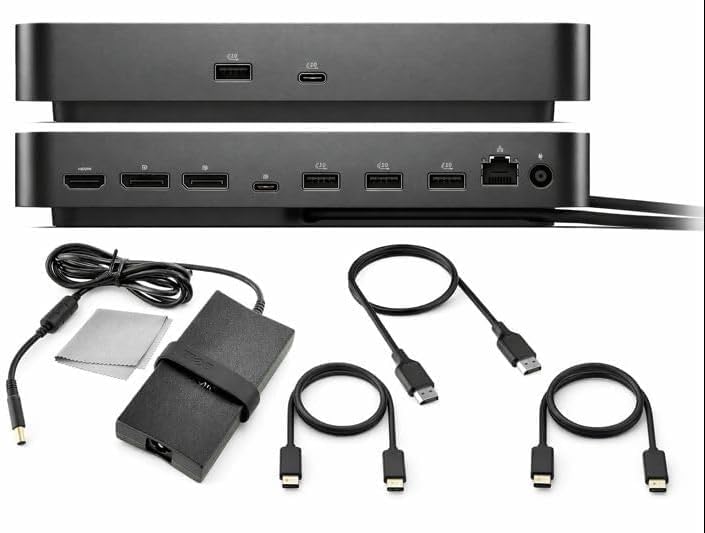
The Dell Pro Dock WD25 Universal Bundle provides a complete setup out of the box. With a 3.9 rating, it includes the dock, 100W adapter, and necessary HDMI, USB-C, and DisplayPort cables for immediate use.
We may earn a commission when you buy through this link, at no additional cost to you.
The inclusion of a premium microfiber cleaning cloth adds value for maintaining screen clarity. This bundle eliminates the need to purchase separate cables, saving time and reducing compatibility confusion for new users.
The 30-day return guarantee ensures satisfaction if the performance does not match expectations. However, the higher price point compared to standalone dock options may deter budget-conscious buyers seeking flexibility.
This bundle is best for users who want everything they need in one purchase. It simplifies the onboarding process for new workstations requiring quick and reliable connectivity.
The bundle includes all critical cables and accessories, so you can start docking your devices without additional shopping or configuration delays.
Enjoy a 30-day return guarantee, providing peace of mind that your investment is protected against any performance issues or compatibility concerns.
We may earn a commission when you buy through this link, at no additional cost to you.
The Dell Pro Dock WD25Z stands out with its impressive 180W power delivery capacity. With a 4.9 rating, it is one of the highest-rated models, offering robust energy for demanding high-end laptops and workloads.
We may earn a commission when you buy through this link, at no additional cost to you.
While detailed specs are less available, the high wattage suggests it supports power-intensive peripherals and charging needs simultaneously. This makes it ideal for professionals who cannot compromise on power stability.
Users praise its reliability and compatibility with professional setups. However, the premium price reflects its specialized function, which may not suit those with lower power requirements or budget constraints.
Choose this dock if your workflow demands maximum power throughput. It ensures your Dell Pro 14 Plus and connected devices run without interruption during heavy computational tasks.
The 180W capacity ensures even power-hungry mobile workstations stay fully charged while driving multiple demanding external peripherals.
With a 4.9 user rating, this dock consistently delivers performance and durability that meet the expectations of professional users.
We may earn a commission when you buy through this link, at no additional cost to you.
The Dell Pro Dock WD25 USB-C offers strong connectivity with dual 4K support and a 3-year warranty. With a 4.5 rating, it provides reliable power and Ethernet speeds suitable for professional office environments and remote work.
We may earn a commission when you buy through this link, at no additional cost to you.
Its 2.5GbE Ethernet port ensures fast and stable network connections. The included cables mean you can plug everything in immediately, saving time and money compared to buying accessories separately.
While the price is higher than basic hubs, the warranty adds long-term value. It protects your investment against defects, ensuring continued reliability for daily business operations and critical tasks.
This dock is best for businesses prioritizing long-term support and stability. It delivers solid performance with the security of an extended warranty for peace of mind.
The 3-year warranty provides extensive coverage, ensuring that your dock remains functional and supported throughout its lifecycle.
With 2.5GbE Ethernet, you get faster internet speeds than standard Gigabit ports, improving overall workflow efficiency.
We may earn a commission when you buy through this link, at no additional cost to you.
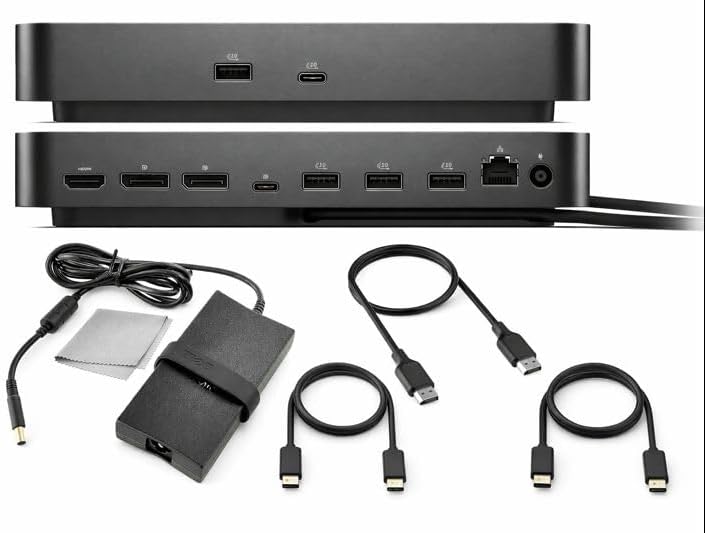
The Dell Pro Smart Dock SD25 Bundle earns a perfect 5.0 rating for its comprehensive feature set. It includes a 130W charging station, HDMI, USB-C, and DisplayPort cables, plus a cleaning cloth for complete setup readiness.
We may earn a commission when you buy through this link, at no additional cost to you.
Supporting up to four displays allows for extensive multitasking and visual work. The 2.5GbE Ethernet ensures robust network performance, making this bundle ideal for demanding professional and creative workflows.
While the bundle costs more than standalone units, the included accessories save time and ensure compatibility. The cleaning cloth is a nice touch for maintaining your workspace and devices professionally.
This bundle is perfect for users who want zero hassle and maximum value. It delivers top-tier performance with all accessories included, simplifying the purchasing and setup process.
With a perfect 5.0 rating, this bundle consistently meets user expectations for power, connectivity, and bundle value.
The bundle includes HDMI, USB-C, and DisplayPort cables, so you do not need to purchase extra adapters to get started.
We may earn a commission when you buy through this link, at no additional cost to you.
The WD25 Dell Pro Dock USB-C is a standard yet highly rated option with a 4.8 score. It provides 100W power delivery, fast Ethernet networking, and a multi-port USB hub for diverse peripheral needs and reliable daily use.
We may earn a commission when you buy through this link, at no additional cost to you.
It includes 4 USB-A 3.2 Gen 2 ports alongside a USB-C 3.2 Gen 2 port for fast data transfer. This mix allows compatibility with legacy and modern devices alike without needing additional adapters.
The 3-year warranty offers strong protection for your investment. However, the price is higher than basic generic hubs, reflecting the professional build quality and support Dell customers expect.
This dock is best for reliable daily productivity. It offers solid specs and warranty coverage for those prioritizing dependability over flashy features or extreme power.
With a 4.8 rating, this dock consistently delivers stable connectivity and power for everyday office tasks without interruption.
The mix of USB-A and USB-C ports ensures compatibility with a wide range of peripherals, from mice to external drives.
We may earn a commission when you buy through this link, at no additional cost to you.
The Dell Pro Dock WD25 Docking Station combines compact design with robust performance. With a 4.4 rating, it supports up to four WQHD displays and offers 100W power for efficient charging of your Dell Pro laptop.
We may earn a commission when you buy through this link, at no additional cost to you.
Its 6 USB ports provide ample connectivity for various peripherals. The ambidextrous cable allows flexible routing left or right, optimizing desk space for a cleaner and more organized workspace setup.
Sustainability features like recycled materials reduce environmental impact. While the cable length is fixed, the durable construction ensures it withstands daily use without performance degradation over time.
This dock is ideal for users seeking balance in performance and space. It delivers professional features in a compact package that fits well in modern office environments.
The compact footprint and ambidextrous cable routing let you arrange your workspace for maximum efficiency without clutter.
Supporting up to four WQHD displays allows extensive multitasking, improving workflow efficiency for data-heavy tasks.
We may earn a commission when you buy through this link, at no additional cost to you.
Choosing the right docking station depends on your power needs, display requirements, and connectivity preferences.
Ensure the dock supports at least 100W power delivery to fully charge your Dell Pro 14 Plus while connected. Higher wattage options like 130W or 180W provide headroom for power-intensive peripherals and ensure stable charging under load.
Always check the dock's wattage rating to match your laptop's power adapter for reliable performance.
Determine how many external monitors you need and their resolution. Most models support up to four displays, but verify HDMI and DisplayPort versions to ensure 4K or WQHD compatibility.
Matching your monitor specs with the dock's video ports ensures optimal clarity and refresh rates without bandwidth issues.
Count the number of USB-A and USB-C ports required for your peripherals. Models with USB 3.2 Gen 2 provide faster data transfer speeds essential for external drives and high-bandwidth devices.
More ports reduce the need for additional hubs, keeping your setup simpler and more efficient.
Look for 2.5GbE Ethernet for faster and more stable internet compared to standard Gigabit ports. This is crucial for professionals handling large data transfers or needing low-latency connections.
Ethernet ensures reliable networking that Wi-Fi cannot match for critical business applications.
Select docks with durable materials and compact designs to fit your workspace comfortably. Features like ambidextrous cables allow flexible cable routing for left or right-handed setups.
A robust build ensures longevity and consistent performance in daily office environments.
Many modern docks use recycled materials and offer reduced standby power consumption. Sustainable designs help minimize environmental impact while maintaining performance standards.
Choosing eco-friendly options supports green initiatives without compromising functionality or build quality.
Look for models with at least a 3-year warranty to protect your investment. Reliable support ensures quick resolution of any technical issues that may arise during usage.
A strong warranty reflects the manufacturer's confidence in product durability and reliability.
Consider bundles that include HDMI, DisplayPort, and USB-C cables to save time and ensure compatibility. These packages simplify setup and avoid missing essential accessories upon unboxing.
Bundles often provide better overall value compared to buying components separately.
Connect the docking station to your Dell Pro 14 Plus using the included USB-C cable for optimal power and data transfer. Ensure the cable is firmly seated to avoid intermittent connection issues.
Plug your monitors, peripherals, and Ethernet cable into the appropriate ports on the dock. Verify that each device is recognized by your operating system before starting your work.
Clean the dock and cables regularly with a microfiber cloth to remove dust. Avoid using harsh chemicals or excessive force to prevent wear on connectors over time.
Yes, most docks in this list support Dell Pro 14 Plus models. Check that your laptop has a compatible USB-C Thunderbolt or DisplayPort Alt Mode connection for full functionality.
Most docks include a power adapter capable of charging your laptop. Verify wattage ratings to ensure it meets your laptop's charging requirements without needing a separate charger.
Many models support up to four displays. Check each dock's specs for HDMI and DisplayPort versions to ensure your desired resolution and refresh rate are supported correctly.
Some docks offer partial macOS support but may limit display functionality. Check compatibility notes carefully before purchasing if you primarily use an Apple ecosystem.
Yes, most docks are plug-and-play. However, installing Dell Display Manager or drivers can enhance peripheral functionality and display management for best results.
Use a soft microfiber cloth to wipe dust from the ports and body. Avoid liquids and excessive force to protect sensitive connectors and plastic components.
We reviewed ten top docking stations ranging from premium Thunderbolt models to versatile bundles. Each option offers distinct advantages for power, display support, and manageability to fit various needs.
Prioritize power delivery and port selection based on your daily workflow. A dock that supports multiple displays and fast Ethernet ensures smooth multitasking and efficient connectivity.
Prices and availability fluctuate frequently, so check current listings before purchasing. Verify the latest details to ensure you get the best value for your professional setup.