
NICE-POWER DC Power Supply Variable
4.5Editor score
Compact lightweight design
Encoder button precise adjustment
Wide input voltage range
This guide compares the top DC power supply for laptop repairing options based on voltage range, protection features, and build quality for reliable repairs.
Finding the right DC power supply for laptop repairing is crucial for technicians who need stable and adjustable power sources. A good unit offers precise voltage control and safety features to prevent damage to sensitive components during diagnosis and repair.
We evaluated ten top-rated bench power supplies focusing on their adjustment mechanisms, protection circuits, and suitability for electronic repair tasks. Each product was selected based on user feedback and technical specifications relevant to laptop servicing and hobbyist projects.
Each pick highlights key capabilities and ideal use cases to help you choose the best tool for your workspace. Please note that prices and availability change frequently, so verify current details before making your final purchasing decision.
4.5Editor score

4.6Editor score

4.2Editor score
The following table provides a side-by-side comparison of the top ten DC power supplies suitable for laptop repairing and general electronics work. Review the specifications to find the model that best fits your technical requirements and budget constraints.



This upgraded DC power supply integrates advanced features ideal for laptop repairing tasks. It holds a strong rating of 4.6 stars from users who appreciate its precise control and safety mechanisms for electronic work.
We may earn a commission when you buy through this link, at no additional cost to you.
The coarse and fine coding knobs allow you to set voltage values with high accuracy before and after the decimal point. This dual-knob system significantly improves efficiency when you need to dial in specific voltages for different laptop boards.
While it offers excellent performance, users should note that the cooling fan can be audible under load. Additionally, extended use at maximum output may cause the unit to heat up, so adequate ventilation is recommended.
This unit is highly recommended for technicians who need a reliable bench supply with modern charging options. Its combination of precision, safety, and utility makes it a top choice for any repair workspace.
The combination of coarse and fine knobs allows for highly accurate setting of voltage and current values without the frustration of traditional potentiometers.
A dedicated Type-C charging port lets you power or charge mobile devices directly from the supply, adding convenience to your repair workflow.
We may earn a commission when you buy through this link, at no additional cost to you.
The YIHUA 305D-IV is a reliable switch-mode power supply designed for precision electronic projects. It features a clean design and accurate readings that are essential for diagnosing laptop power issues.
We may earn a commission when you buy through this link, at no additional cost to you.
Its LED screen displays voltage, current, and power parameters with high resolution. You can see current values down to every milliamp and voltage down to every 10 millivolts, providing the clarity needed for delicate repairs.
The unit is notably lighter than conventional linear supplies due to its efficient regulator design. However, it only supports up to 5 amps which may limit testing for high-power systems or multiple devices.
This model is an excellent choice for users who prioritize low noise and portability. It balances professional features with a compact footprint, making it suitable for both labs and home workbenches.
The screen shows detailed readouts allowing you to monitor exact power delivery without needing additional measurement tools.
Thanks to an improved regulator design, the unit uses a heat sink without a bulky fan, reducing noise during operation.
We may earn a commission when you buy through this link, at no additional cost to you.
The X-Tronic PX-70 is engineered for advanced users and experts who demand reliability and advanced features. It offers a linear design known for stability and comes with memory recall capabilities that streamline repetitive repair tasks.
We may earn a commission when you buy through this link, at no additional cost to you.
You can save up to three voltage and current presets for quick access. The lock function prevents accidental changes during long tests. These features make it particularly useful for production lines or professional service centers.
While it provides superior build quality and support, it is heavier than switch-mode units and costs more. This trade-off ensures low noise and robust protection which are often preferred in critical diagnostic applications.
This supply is ideal for professionals who need a durable tool with extensive protection and memory features. Its comprehensive accessory kit and lifetime support add significant value for serious technicians.
Save up to three different voltage and current settings to quickly switch between common repair profiles without manual re-entry.
Multiple protection modes including overcurrent and overvoltage ensure your connected laptop components remain safe during testing.
We may earn a commission when you buy through this link, at no additional cost to you.
This power supply is built with modern connectivity in mind, featuring USB-C PC control for automated testing sequences. It provides a dual display showing set value and real output side by side for complete transparency.
We may earn a commission when you buy through this link, at no additional cost to you.
You can adjust voltage and current directly from your laptop. This is excellent for logging real-time parameters during stress tests on laptop power systems without needing manual intervention at the bench.
The unit includes an 18W Type-C fast charge port to power your devices. While efficient, users should ensure they install the necessary drivers and software to unlock the full PC control capabilities.
It is a strong choice for tech-savvy repairers who want automated workflows. The combination of precise encoder controls and modern interfaces makes it versatile for R&D and repair testing.
Built-in USB-C allows direct connection to your PC for programming output values without needing obsolete adapters or cables.
Dual displays show both the set value and real output simultaneously so you can see exactly what your circuit is getting.
We may earn a commission when you buy through this link, at no additional cost to you.
NICE-POWER offers a newly upgraded 150W power supply that balances cost and functionality. It is designed to be ultra small and portable, making it a top budget choice for hobbyists and mobile repair work.
We may earn a commission when you buy through this link, at no additional cost to you.
The encoder buttons allow you to set exact values without turning a knob continuously. This digit-based selection ensures that you can quickly adjust voltage and current to the desired level.
It accepts a wide range of AC input voltages globally which is convenient for travel. However, the lightweight build may feel less robust compared to premium models, so handle with care.
This unit is perfect for those entering the repair field or needing a secondary portable supply. Its cost-effective design includes essential safety features without a high price tag.
Weighing less than 1KG and with small dimensions it fits easily into tight workspaces or travel bags for on-site repairs.
Encoder switches replaced potentiometers so you can press to select a digit and rotate to set it accurately and efficiently.
We may earn a commission when you buy through this link, at no additional cost to you.
This unit stands out for its practical Output Enable/Disable button which helps prevent accidental power delivery during adjustments. It offers a bright 4-digit display that is easy to read in various lighting conditions.
We may earn a commission when you buy through this link, at no additional cost to you.
The encoder knob allows for precise setting of voltage and current values. You can press to switch digits and turn to adjust. This method is faster than traditional continuous turn knobs.
A short circuit alarm provides immediate feedback if a fault is detected. While the build quality is average for this price point, the functionality meets the needs of standard laptop testing procedures.
It is a solid choice for those who value operational safety features. The output button ensures that you maintain control over when power is actually sent to your device.
The dedicated output button allows you to make adjustments safely before engaging the power to your test circuit.
A short circuit alarm and OCP protection stop output automatically to prevent damage to connected electronics during faults.
We may earn a commission when you buy through this link, at no additional cost to you.
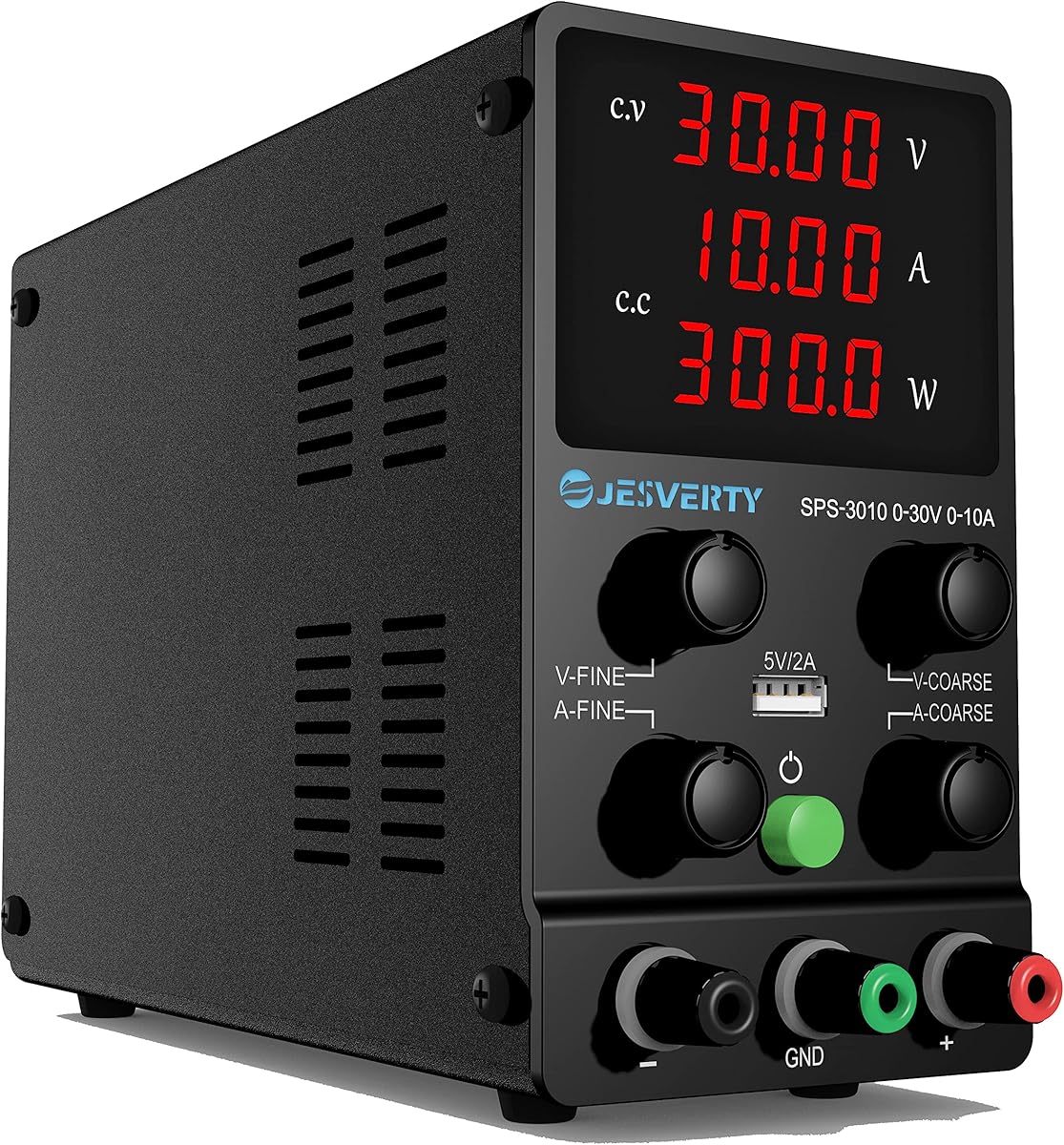
The Jesverty SPS-3010 is designed to save space on your workbench with its compact body. It weighs only about 2.5lbs which makes it easy to move around or transport for mobile repairs.
We may earn a commission when you buy through this link, at no additional cost to you.
Its display shows measured values of voltage current and power in real-time. The high-precision LED readout helps you monitor the power delivery accurately during diagnostic procedures on laptops.
Note that the test leads included are basic, so you may need to upgrade them for high current testing. Also, the power cord type might vary depending on where the unit was shipped from.
Despite minor trade-offs, this unit offers reliability and safety at a great size. It is an excellent option for those with limited desk space or who need a portable power solution.
With a footprint of roughly 7.1 inches by 3.35 inches it saves valuable bench space while delivering powerful 10A output.
The unit switches automatically between constant voltage and constant current modes based on load changes to protect connected devices.
We may earn a commission when you buy through this link, at no additional cost to you.
FNIRSI introduces a unique IPS color screen that can be flipped 90 degrees for better viewing angles. This makes it easy to observe the power status from any position on your workbench.
We may earn a commission when you buy through this link, at no additional cost to you.
The screen supports both numerical and curve display modes to visually represent power status over time. This visual feedback is helpful for spotting transient issues or stability trends during tests.
It offers low power ripple to protect precision electronic equipment from voltage fluctuations. However, it is limited to 5A so it is best for standard laptop boards rather than high-power systems.
This unit is ideal for visual-focused repair workflows. Its high-quality display and stable output make it a premium choice for diagnostics and detailed monitoring tasks.
The 2.8-inch IPS screen supports 90 degree flip so you can adjust the angle for comfortable viewing during long sessions.
Beyond numbers the screen shows power curves to help visualize stability and detect fluctuations during component testing.
We may earn a commission when you buy through this link, at no additional cost to you.
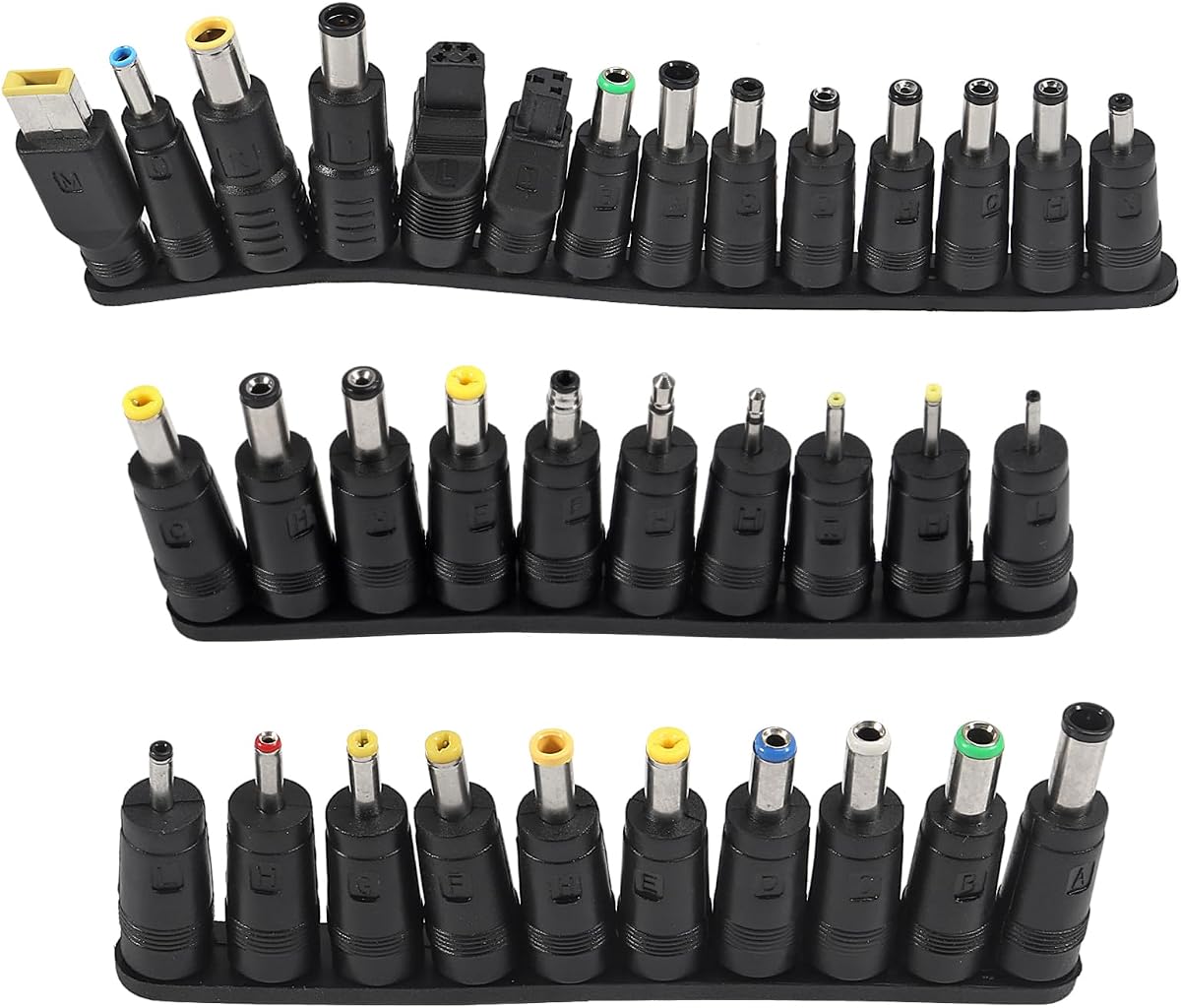
This is a comprehensive accessory kit rather than a standalone power supply. It contains 34 pieces of connector tips that are compatible with many laptops including Thinkpad and other brands.
We may earn a commission when you buy through this link, at no additional cost to you.
The kit includes specific tips like Lenovo square tips and various diameters such as 5.5mm x 2.1mm. This variety ensures you can connect most laptop power jacks to your bench power supply.
It is designed to be portable and compact so you can carry it in your toolkit. However, it does not provide power on its own and must be used with an existing DC power source.
This kit is essential for any repairer dealing with diverse laptop models. It saves time and effort by offering ready-made connectors for the most common laptop power ports.
Includes specific connectors for Lenovo Thinkpad and other common laptop models to ensure a secure connection for testing.
The set contains multiple sizes including tuning forks and core pins to cover a broad range of electronic devices and adapters.
We may earn a commission when you buy through this link, at no additional cost to you.
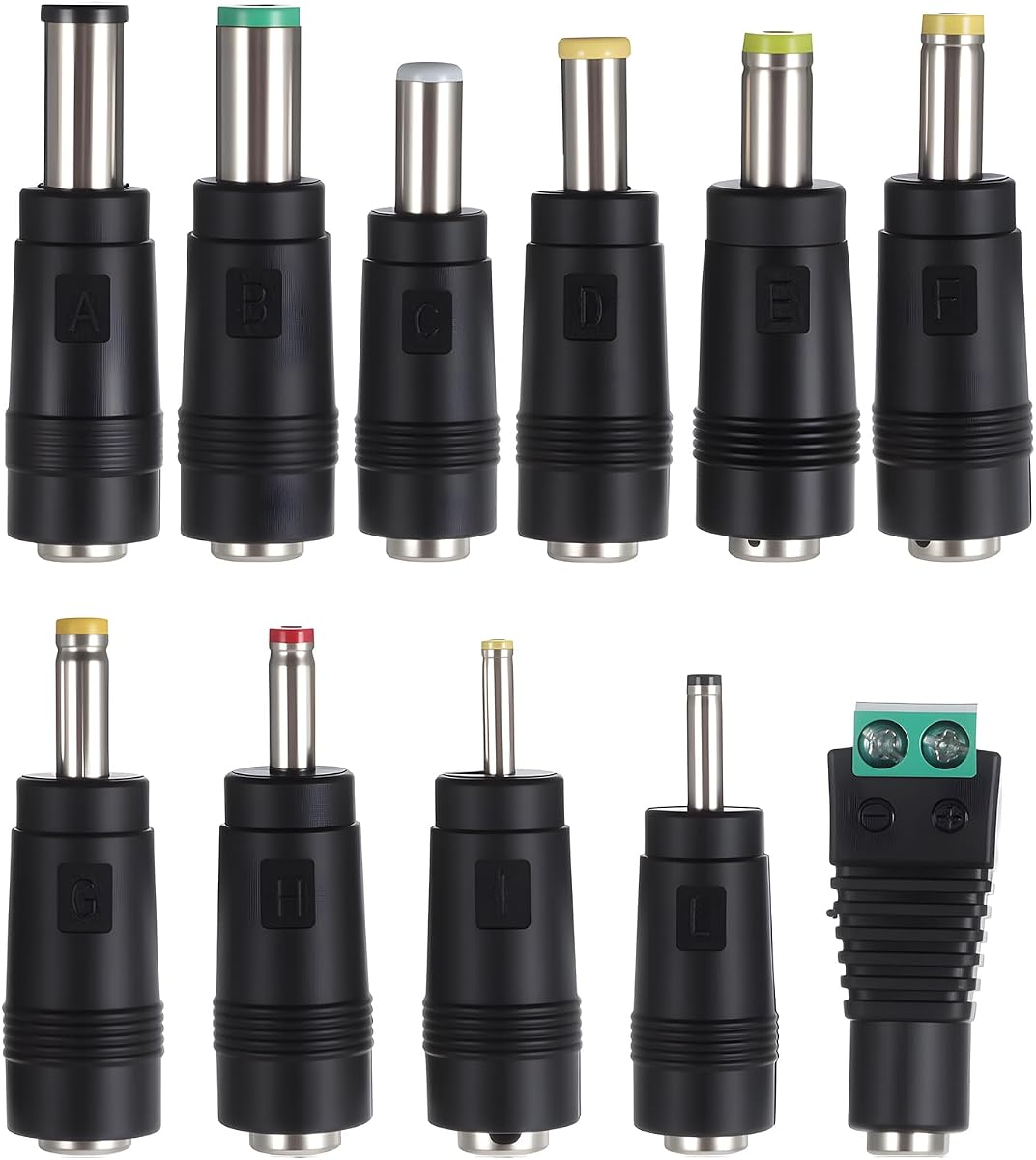
This kit provides 11 pieces of power converters designed for portable repairs or maintenance. It includes common models like 5.5 x 2.5 mm and 6.3 x 3.0 mm to cover many laptop requirements.
We may earn a commission when you buy through this link, at no additional cost to you.
Each header connector can be inserted into a standard 5.5 x 2.1 mm male connector. This allows for quick conversion to match the specific adapter requirements of different devices.
It is an affordable accessory that complements a bench power supply well. However, always confirm the device interface type carefully to ensure compatibility before purchasing and using the adapter.
This kit is ideal for on-the-go repairs where carrying a full supply is not possible. It ensures you have the right tips to connect to a device even when using temporary power sources.
The portable design makes these connectors ideal for field repairs where you need to adapt to various laptop charging ports quickly.
Convert standard outputs to specific tips easily to match chargers power banks or AC adapters for your specific test setup.
We may earn a commission when you buy through this link, at no additional cost to you.
Selecting the right DC power supply for laptop repairing requires careful attention to technical specifications and safety features. Below are the key factors to consider before making your purchase.
Ensure the power supply covers the typical voltage and current requirements of the laptops you service. Most laptops operate within 12V to 20V, so a 0-30V range is standard and sufficient. Check that the current output meets your needs such as 5A or 10A depending on whether you test single boards or multiple devices.
Always choose a unit with a range that exceeds your typical needs to allow headroom for testing.
Look for units with precise adjustment mechanisms like encoder knobs or digital inputs. These allow you to set voltage and current values accurately without the guesswork of traditional potentiometers. Digital displays that show exact values help ensure you deliver the correct power to sensitive laptop circuits.
High precision controls prevent damage caused by overvoltage or excessive current during repairs.
Safety is paramount when working with electronics. Choose a power supply that includes overcurrent protection OCP overvoltage protection OVP and short circuit protection. These features will shut down the output if a fault is detected protecting both the device and the power supply from damage.
Prioritize models with comprehensive protection circuits to avoid costly mistakes during repairs.
A clear display is essential for monitoring output status. Look for 3-digit or 4-digit LED displays that show voltage current and power values. Some units offer IPS color screens that can be adjusted for better visibility in different lighting conditions which is helpful in workshop environments.
Ensure the screen provides clear and accurate readouts for real-time monitoring.
Consider how you plan to use the supply. If you need to move it frequently, choose a lightweight and compact model. Some advanced units offer USB or USB-C control allowing you to program settings from a computer which can automate testing processes for efficiency.
Select a size and connectivity style that matches your workspace and workflow needs.
Extra features like USB or Type-C charging ports can be very useful for charging mobile devices while you work. Some units include adjustable USB outputs allowing you to customize voltage for specific gadgets. These extras add value and convenience to your repair station.
Additional ports save space and provide more utility from a single power source.
Repair work can be demanding on equipment so look for units with robust construction and reliable heat dissipation systems. Metal cases and effective cooling fans ensure the unit lasts longer under heavy load. Check reviews for feedback on long-term reliability and build quality.
Invest in a durable model that can withstand daily use in a repair environment.
Verify that the manufacturer offers good customer support and a reasonable warranty. Technical support is crucial if you encounter issues with setup or operation. Some brands provide lifetime support or detailed manuals that help you get the most out of the product.
Good support ensures you can resolve issues quickly and keep working without delays.
Always set your voltage and current limits before connecting the laptop board to avoid accidental power surges. Connect the leads securely to the appropriate test points on the device and turn on the output only after verifying settings.
Monitor the device during testing and watch for any signs of overheating or short circuits. If the power supply triggers an alarm or shuts down, disconnect the load immediately and troubleshoot the issue before continuing.
Keep the power supply in a well-ventilated area to ensure proper cooling and prevent thermal stress. Regularly clean dust from the vents and check the connections for wear to maintain safe and reliable operation over time.
A range of 0 to 30 volts is ideal for most laptop repair work. This covers common laptop voltages from 12V to 20V and provides flexibility for testing different devices safely.
Switching power supplies are generally lighter and more cost-effective for most repair tasks. Linear supplies offer lower noise and better stability but are heavier and more expensive.
Overcurrent protection is critical to prevent damage to both the laptop board and the power supply. It automatically limits or cuts off current if a fault is detected during testing.
Yes, but you must ensure the voltage and current settings are safe for phone components. Use a unit with precise control to avoid applying too much power to sensitive phone circuits.
You should have quality test leads and adapters like universal connector kits. These help connect the power supply to various laptop charging ports securely for accurate testing.
Use an output enable button if available and double-check connections before turning on the supply. Keep the work area clean and organize your tools to prevent conductive debris from causing shorts.
We have reviewed the top 10 DC power supplies for laptop repairing ranging from budget-friendly to premium models. The top picks offer precision control safety features and modern connectivity to suit various repair needs.
When choosing your supply prioritize voltage range, current capacity, and safety protections. Consider how you will use it whether for mobile repairs or fixed bench work to find the best fit.
Remember to check current pricing and availability as they can change frequently. With the right power supply you can improve the accuracy and safety of your laptop repair services.