
HP Chromebook 14
4.4Editor score
Intel Quad-Core Processor
14 Inch HD Display
14 Hours Battery Life
Finding a reliable laptop on a budget can be challenging. Cheap Chromebooks offer an excellent balance of affordability and functionality for everyday tasks like browsing and streaming. They are lightweight, secure, and boot up quickly for immediate productivity without breaking the bank.
We analyzed ten top-rated models to determine which ones deliver the best value. Our comparison focuses on processor speed, screen quality, battery life, and build durability. Each product was selected based on user feedback and technical specifications to ensure a fair assessment.
Every pick in this list highlights specific strengths and potential trade-offs. Whether you need a device for school, work, or entertainment, there is a suitable option here. Please note that prices fluctuate frequently so check current listings before making your final purchase decision.
4.4Editor score

4.3Editor score
4.4Editor score
As an Amazon Associate we earn from qualifying purchases.
This side-by-side comparison summarizes the key specifications of each selected model. Use this table to quickly identify which device meets your specific performance and portability needs.



The HP 14 Chromebook stands out as a highly affordable option for students and home users. With a rating of 4.4 stars it has proven reliable for everyday tasks like web browsing and document editing. Its quad-core processor ensures smooth multitasking without lag during typical usage sessions.
We may earn a commission when you buy through this link, at no additional cost to you.
Key strengths include its impressive battery life which can last up to 14 hours on a single charge. This makes it ideal for long school days or travel without needing a power outlet. The display offers decent visibility with anti-glare properties that reduce eye strain in bright environments.
Trade-offs involve the limited 64GB storage which may require cloud reliance for larger files. Additionally the HD resolution is functional but lacks the sharpness of higher-end screens. However for the price these compromises are acceptable for basic computing needs.
Anyone seeking a budget-friendly laptop for education or light entertainment should consider this model. It delivers essential Chrome OS features with robust hardware support for the cost. We recommend it as a top choice for those prioritizing value and portability.
The extended battery life ensures you stay productive throughout the day without interruption.
Multiple ports including USB-A and USB-C allow for versatile peripheral connections.
We may earn a commission when you buy through this link, at no additional cost to you.
This HP model offers a refined look with its ash gray finish and thin profile. It maintains solid performance with the N4120 processor which handles daily tasks efficiently. Users appreciate the custom-tuned speakers that provide clear audio for media consumption.
We may earn a commission when you buy through this link, at no additional cost to you.
Its ability to stream 4K content smoothly is a notable advantage over many competitors. The fast charging feature allows you to get significant battery time in just minutes. This convenience is perfect for users who are often on the move.
While the price is slightly higher than the base model it justifies the added features. The main downside remains the storage capacity which is typical for this class. Still the enhanced viewing experience makes it a strong contender.
Ideal for media consumers who want a reliable device without spending much. It balances performance with a premium feel in a budget category. We suggest this for those who value design and screen versatility.
Support for 4K content ensures high-quality video playback without stuttering.
Fast charge capability reduces downtime significantly for busy users.
We may earn a commission when you buy through this link, at no additional cost to you.
The Dell Chromebook 11 brings versatility to a compact size with its touch capabilities. It is designed for flexibility allowing you to use it as a tablet or laptop. This dual nature makes it great for interactive learning or casual browsing.
We may earn a commission when you buy through this link, at no additional cost to you.
Being a renewed unit offers significant savings without sacrificing core performance. The Intel N4020 handles basic operations well and the touchscreen adds a layer of convenience. It fits easily into backpacks for students or travelers needing mobility.
The smaller screen might be a downside for productivity tasks requiring space. Storage is also limited at 32GB requiring reliance on cloud services. Yet the price point makes these trade-offs reasonable for specific use cases.
Buyers looking for a portable and interactive device will find this appealing. It serves well in educational settings where touch input is beneficial. We recommend it for those needing a versatile backup or primary small laptop.
The 2-in-1 design allows for easy switching between typing and touch modes.
Its small size ensures it fits in any bag for on-the-go use.
We may earn a commission when you buy through this link, at no additional cost to you.
This Lenovo model impresses with a crisp Full HD touchscreen for clearer visuals. The 8-core processor provides a noticeable speed boost for multitasking tasks. Its slim profile makes it easy to carry while maintaining durability.
We may earn a commission when you buy through this link, at no additional cost to you.
WiFi 6 connectivity ensures faster internet speeds which is crucial for streaming or video calls. The MediaTek processor is efficient and keeps battery life strong during normal use. It offers a modern interface with natural touch navigation features.
Some users may find app compatibility slightly less than Intel counterparts. The design is functional but not groundbreaking compared to other brands. Despite this the performance and screen quality remain compelling advantages.
For users wanting high resolution and fast connectivity this is a great pick. It suits professionals needing a sharp screen for detailed work or browsing. We suggest it for those who value screen clarity and speed.
The Full HD resolution offers sharp text and vibrant colors for viewing.
WiFi 6 ensures low latency and fast downloads for modern needs.
We may earn a commission when you buy through this link, at no additional cost to you.
The Acer Chromebook 15 offers a generous 15.6-inch screen that expands your workspace. It is ideal for those who need more room to view multiple windows or spreadsheets. The inclusion of accessories adds immediate value upon unboxing.
We may earn a commission when you buy through this link, at no additional cost to you.
Battery life is solid allowing for hours of usage without charging. The anti-glare coating helps maintain visibility in various lighting conditions. It serves as a stable platform for education and office work alike.
However the larger size makes it less portable than smaller alternatives. The resolution remains standard HD which might lack detail compared to FHD options. Yet for desk use the trade-off is negligible.
Ideal for users who prioritize screen real estate over extreme portability. It fits well in home offices or study desks where size is less critical. We recommend it for productivity tasks requiring more visual space.
The 15.6-inch screen provides ample room for open tabs and windows.
Additional accessories like a mouse enhance immediate usability out of the box.
We may earn a commission when you buy through this link, at no additional cost to you.
This ASUS model stands out with its Full HD IPS display for better color accuracy. It offers double the storage space of many competitors at 128GB for more local files. The renewed status helps keep the price competitive while maintaining quality.
We may earn a commission when you buy through this link, at no additional cost to you.
The processor delivers consistent speeds up to 2.80GHz for responsive performance. The IPS technology ensures wide viewing angles which is great for collaborative work. Its pastel blue design gives it a unique look among standard gray laptops.
Buying renewed comes with minor risks compared to brand new units. The weight might be a factor for those carrying it daily. However the storage and screen benefits outweigh these concerns for many users.
For those needing extra storage without paying a premium price this is a strong choice. It is well-suited for media consumption and general productivity. We suggest it for anyone wanting a high-res screen on a budget.
128GB of space allows for more offline files and media downloads.
IPS technology provides consistent colors and brightness from any angle.
We may earn a commission when you buy through this link, at no additional cost to you.
This HP model is celebrated for its reliability and high user satisfaction ratings. The ceramic white finish gives it a clean and professional appearance. It supports fast charging so you can quickly top up the battery during short breaks.
We may earn a commission when you buy through this link, at no additional cost to you.
While the processor is older it remains efficient for basic daily tasks. The build quality is sturdy and the keyboard feels responsive for typing. It is a safe choice for those needing a dependable workhorse.
The limited storage is a constraint that requires cloud planning. Performance might lag slightly under heavy multitasking compared to newer chips. However for simple use cases it performs admirably without issues.
Ideal for users seeking a trusted brand with minimal complications. It suits students or home users with straightforward computing needs. We recommend it for those prioritizing reliability and brand trust.
Quick recharge capabilities minimize downtime when you are away from outlets.
The ceramic white finish adds a touch of elegance to daily use.
We may earn a commission when you buy through this link, at no additional cost to you.
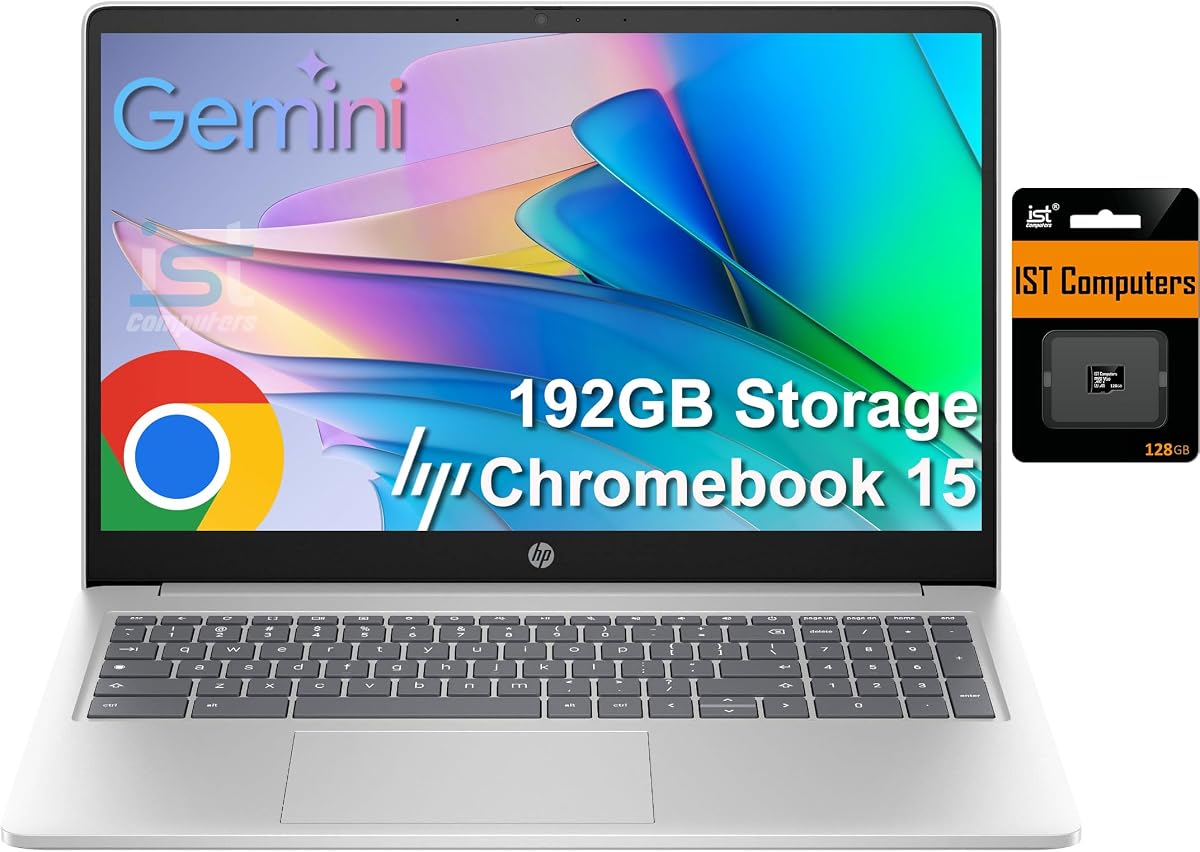
This model represents the high end of the budget spectrum with superior hardware. The 8GB DDR5 RAM ensures smooth multitasking even with many tabs open. Storage is abundant at 192GB allowing for extensive local file management.
We may earn a commission when you buy through this link, at no additional cost to you.
It supports 4K external displays which is rare in this category. This makes it useful for creative tasks or detailed presentations. The N200 processor offers efficient performance for demanding workloads.
The price is higher than other options but justifies the specs. Its size might not fit smaller bags or limited desk space. Still the performance gap between this and others is significant.
Buyers needing power for more than just browsing will find this valuable. It bridges the gap between cheap laptops and premium machines. We recommend it for advanced users requiring memory and storage.
DDR5 RAM provides faster data access for smoother multitasking experiences.
4K external monitor support enhances productivity with dual screen setups.
We may earn a commission when you buy through this link, at no additional cost to you.
Acer offers this model with a distinct Dale Purple finish that stands out visually. It features DDR5 memory which is a forward-thinking spec for budget devices. The screen provides good clarity with its FHD IPS panel.
We may earn a commission when you buy through this link, at no additional cost to you.
WiFi 6 ensures fast connections for modern internet demands. Being renewed it offers excellent value for those wanting newer tech without the cost. It balances style and performance well in a 15-inch form factor.
Color availability might be limited depending on market trends. The processor speed is adequate but not the fastest on the list. However for most users the difference is negligible in daily tasks.
Ideal for buyers who want something different in design. It suits students or professionals wanting a splash of color. We recommend it for those prioritizing aesthetics alongside technical features.
DDR5 RAM brings improved bandwidth and efficiency to daily tasks.
The Dale Purple finish offers a unique look compared to standard laptops.
We may earn a commission when you buy through this link, at no additional cost to you.
This is the most affordable option on the list making it accessible for everyone. It serves well for basic web browsing and simple tasks without needing power. The compact size makes it easy to slip into any bag.
We may earn a commission when you buy through this link, at no additional cost to you.
The MediaTek processor handles basic operations efficiently for its class. Renewed condition keeps the cost minimal while maintaining functionality. It is perfect for children or secondary device needs.
Storage is the main limitation at 16GB requiring heavy reliance on cloud. Performance will not support heavy multitasking or modern apps. Yet for the price it is a practical utility tool.
Buyers needing a cheap primary or backup device will appreciate this. It offers essential Chrome OS features without financial strain. We recommend it for those with strict budget constraints.
The low cost makes it accessible for almost any household budget.
Its small form factor ensures it can be carried anywhere easily.
We may earn a commission when you buy through this link, at no additional cost to you.
Selecting the right Chromebook involves balancing performance with price and specific needs.
The processor determines how fast the device runs tasks. For basic browsing and typing an Intel Celeron or MediaTek chip is sufficient. Look for quad-core options if you plan to multitask frequently.
Prioritize newer models with higher boost clocks for better responsiveness.
Most budget Chromebooks come with 4GB of RAM which handles multiple tabs well. Storage is often limited to 32GB or 64GB so rely on cloud drives for files. If you need more local space look for models offering 128GB.
Ensure the RAM is enough for your typical number of open apps.
A Full HD screen offers sharper text and images compared to standard HD. IPS panels provide better viewing angles which is great for sharing screens. Consider touchscreen options if you prefer direct interaction.
Choose a larger screen for productivity if portability is not your main concern.
Long battery life is essential for students and travelers. Aim for models promising at least 10 to 14 hours of usage. Check reviews to confirm real-world performance matches claims.
Fast charging features can save you time when you need quick power.
USB-C and USB-A ports allow for various peripheral connections. Ensure the model supports the latest WiFi standards like WiFi 6 for speed. HDMI ports are useful for connecting to external monitors.
Check for Bluetooth support to pair mice and keyboards wirelessly.
Durability matters if you carry the laptop daily. Look for ENERGY STAR certified devices that often meet rigorous standards. A slim design is nice but ensure it feels sturdy enough for travel.
Plastic builds can be durable if reinforced correctly by the manufacturer.
Chrome OS is secure and updates automatically to keep you safe. Ensure the device has a long Auto Update Expiration date for longevity. Android app support expands your software options significantly.
Verify the device supports Google Play Store for broader app access.
Determine your maximum spend before browsing options to stay focused. Renewed units can offer better value than new budget models. Do not compromise on essential specs just to save a few dollars.
A slightly higher price often leads to better longevity and satisfaction.
Always close unused browser tabs to maintain speed and battery life. Use cloud storage services like Google Drive to keep files safe and accessible from anywhere.
Keep the device clean by wiping the screen and keyboard with a microfiber cloth. Avoid spills and dust accumulation to prevent hardware damage over time.
Update your Chromebook regularly through settings to get the latest security patches. Restart the device occasionally to clear cache and improve performance.
While not designed for heavy gaming many cheap Chromebooks can run casual web games and Android titles. For better performance look for models with higher RAM and storage. Most support basic streaming services for entertainment.
No Chromebooks use Google Docs and Sheets instead of Microsoft Office. You can access Office online via a browser though. Some users prefer Google apps for their free and cloud-integrated nature.
Most budget Chromebooks do not allow internal storage upgrades. However they usually have a microSD slot to add extra space. You can also rely on cloud storage to manage files efficiently.
Yes renewed models often come with warranties and save money. They are tested to ensure functionality before sale. It is a smart way to get higher specs for less cost.
Yes all Chromebooks support USB and Bluetooth mice easily. This helps if you prefer mouse navigation over the touchpad. It is convenient for precise tasks like spreadsheet work.
Typically they last between 10 to 14 hours on a full charge. Actual usage depends on screen brightness and active apps. Some models offer fast charging to top up quickly.
We have explored ten excellent models ranging from basic budget picks to more advanced premium options. Each device offers distinct strengths suitable for different user needs and preferences.
Prioritize the factors that matter most to you such as screen size or battery life. A slightly higher investment might pay off in longevity and daily satisfaction.
Remember that prices change frequently so check current listings before purchasing. Use this guide to find a reliable laptop that fits your budget.