
Alex Tech 10ft – 1/2 inch Cord Protector Wire Loom Tubing Cable Sleeve Split Sleeving For USB Cable Power Cord Audio Video Cable – Protect Cat From Chewing – Black
4.7Editor score
Split sleeve design
Ten feet long length
Insulated for safety
A clean gaming setup starts with organized wires. Proper cable management for gaming PC setups hides clutter, improves airflow, and protects your gear from damage or accidental unplugging.
We evaluated ten top-rated solutions including trays, sleeves, clips, and ties. Each was scored on capacity, durability, ease of installation, and how well it fits standard gaming desks and rigs.
Each pick shows real specs and user feedback to help you choose. Prices and availability change often so check current links before buying to ensure you get the right fit for your station.
4.7Editor score
4.6Editor score
4.6Editor score
As an Amazon Associate we earn from qualifying purchases.
This side-by-side comparison reviews ten top cable management solutions for gaming PCs. We compare capacity, installation style, and durability to help you find the right organizer for your desk setup.




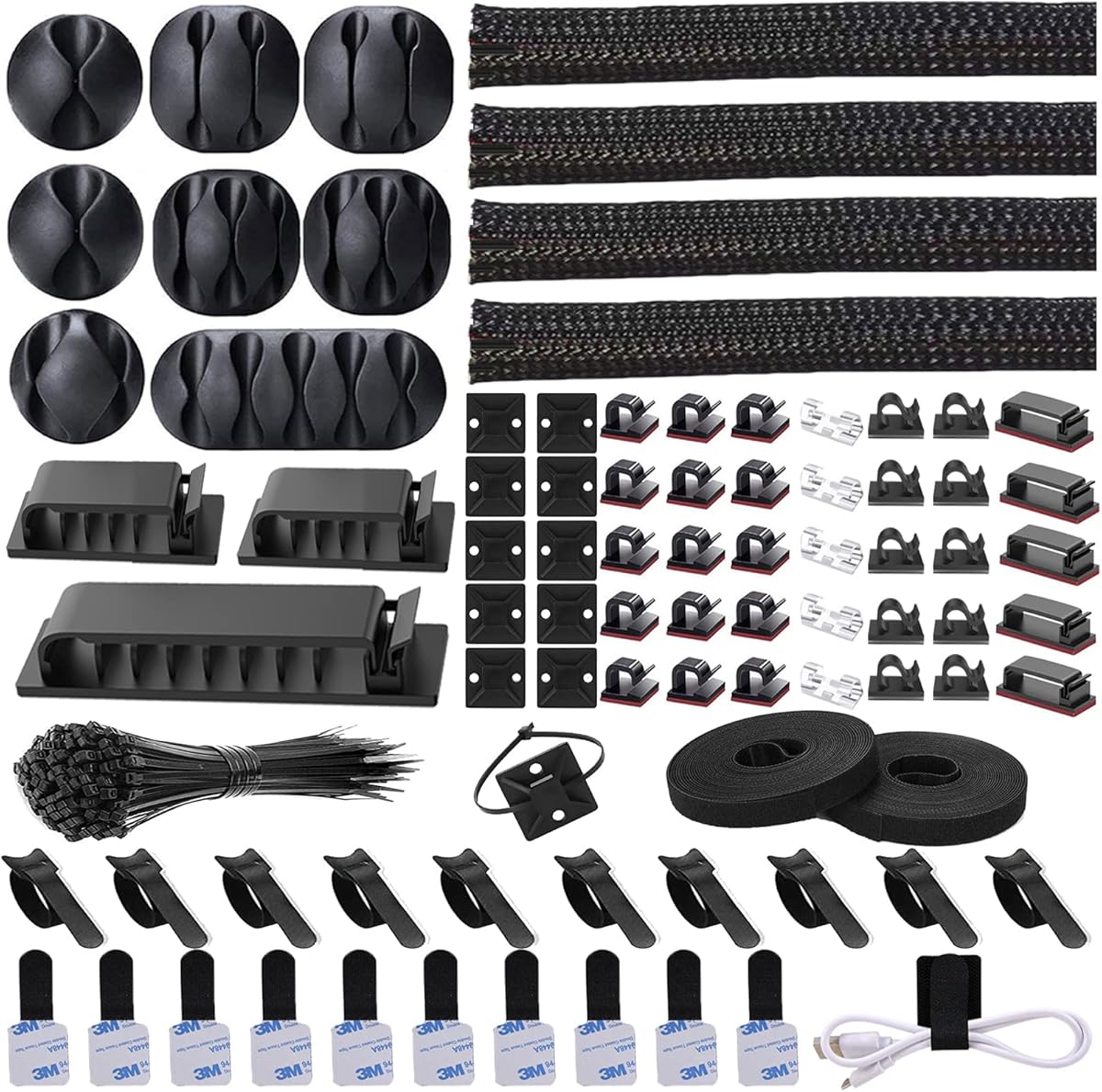
This N NOROCME kit stands out as the most complete solution for cable management for gaming PC setups. It includes 192 pieces covering sleeves, ties, clips, and adhesive rolls to tackle any messy station.
We may earn a commission when you buy through this link, at no additional cost to you.
The 4 wire organizer sleeves are split for easy loading without unplug. The included clips are made from eco friendly Polyamide66 and hold tight on clean surfaces. You get 20 reusable ties and 2 rolls of adhesive ties for flexible routing.
The sheer volume of parts means you spend time sorting before starting. Some adhesive holders might leave residue if removed without heat. These trade offs are acceptable given the comprehensive coverage it offers for large gaming rigs.
Buy this if you want one box to solve all your cable clutter. It fits most standard setups and keeps wires organized for years to come.
With 192 pieces including sleeves and ties this kit handles every cable type and length need in a gaming station.
The split wire loom design lets you load cables without unplugging existing gear for a hassle free setup experience.
We may earn a commission when you buy through this link, at no additional cost to you.
The Cord Management Organizer Kit offers a strong alternative to other kits with 192 pieces. It focuses on core needs with four cord protector sleeves and multiple adhesive holders for clean cable management for gaming PC.
We may earn a commission when you buy through this link, at no additional cost to you.
Each sleeve is split for easy wire loading and closes securely. The 36 black adhesive cord holders work on desks and walls. You also get 10 reusable wire ties and 2 rolls of self adhesive ties.
There are fewer reusable ties compared to other kits. Adhesive pads are strong but can leave residue. These small drawbacks are outweighed by the comprehensive kit and ease of use.
Choose this if you want a full set without extra parts. It keeps cords organized and protects against chewing pets.
Split sleeves let you load wires easily without unplugging existing cables making installation simple.
Made from sturdy quality materials these components ensure clutter free organization for years to come.
We may earn a commission when you buy through this link, at no additional cost to you.
The Alex Tech Cord Protector is a budget friendly choice for focused cable management for gaming PC needs. It offers 10 feet of split sleeve to bundle long runs of power and signal cables.
We may earn a commission when you buy through this link, at no additional cost to you.
The split loom makes it easy to load wires without unplugging. It is insulated and UL recognized for safety. The sleeve keeps cat from chewing cables and maintains a tidy look under desks.
It does not include adhesive clips or ties so you may need extras. The black color is standard but not customizable. These limits are acceptable for its low price and reliable protection.
Buy this if you need long cable protection without spending much. It works well for Hifi speaker and automotive wires.
The split loom design allows easy loading of wires without disconnecting existing equipment.
The sleeve acts as a barrier to keep cats from chewing cables and causing damage.
We may earn a commission when you buy through this link, at no additional cost to you.
The YECAYE Cable Management set includes 6 J channels for structured cable management for gaming PC. These raceways offer a spacious and practical way to organize cords under desks or along walls.
We may earn a commission when you buy through this link, at no additional cost to you.
Each J channel features an outward facing opening for effortless cable placement. The PVC material is flame retardant for safety. Pre applied adhesive tape ensures a robust installation without tools.
Adhesive removal requires heat to avoid residue. Powder coated walls may hinder tape adhesion. These issues are manageable with proper prep and heat gun use.
Choose this for a tidy, professional workspace. It suits homes and offices needing reliable cord organization.
The unique outward opening design makes placing or removing cables effortless for user comfort.
Made from premium PVC these raceways provide fire resistance for added safety.
We may earn a commission when you buy through this link, at no additional cost to you.
Nettbe reusable cable ties provide flexible cable management for gaming PC setups needing quick adjustments. This pack includes 60 pieces of hook loop straps to bundle and organize loose cords.
We may earn a commission when you buy through this link, at no additional cost to you.
The ties are made from premium nylon adhesive materials for multiple uses. They are easy to use and remove when you need to change your setup. Many can be used in home, office, or garage.
It lacks sleeves or clips so it does not bundle large groups. Not ideal for long cable runs without other tools. These limits are acceptable for a versatile binding tool.
Buy this to add flexibility to your setup. It works well for bundling and quick adjustments.
The hook loop design allows you to easily remove and adjust the cable ties when needed.
Suitable for many uses in home office garage and outdoor setups for versatile organization.
We may earn a commission when you buy through this link, at no additional cost to you.
The Scanfield Under Desk Tray offers a clean solution for cable management for gaming PC setups. This 2 pack includes two 17 inch trays with no screw installation via strong adhesive backing.
We may earn a commission when you buy through this link, at no additional cost to you.
Users reported improved desk aesthetics and reduced visible cable clutter. The trays are spacious enough to accommodate multiple cables and power strips. They are robust and solid for secure holding.
Adhesive strength may fail on textured surfaces without heat. The 17 inch size may be small for large desks. These drawbacks are manageable for a simple no tool install.
Choose this for quick under desk upgrades. It keeps cables tidy and improves desk appearance.
Strong adhesive backing allows easy installation without drilling or additional tools.
Trays are spacious enough to accommodate multiple cables and power strips efficiently.
We may earn a commission when you buy through this link, at no additional cost to you.
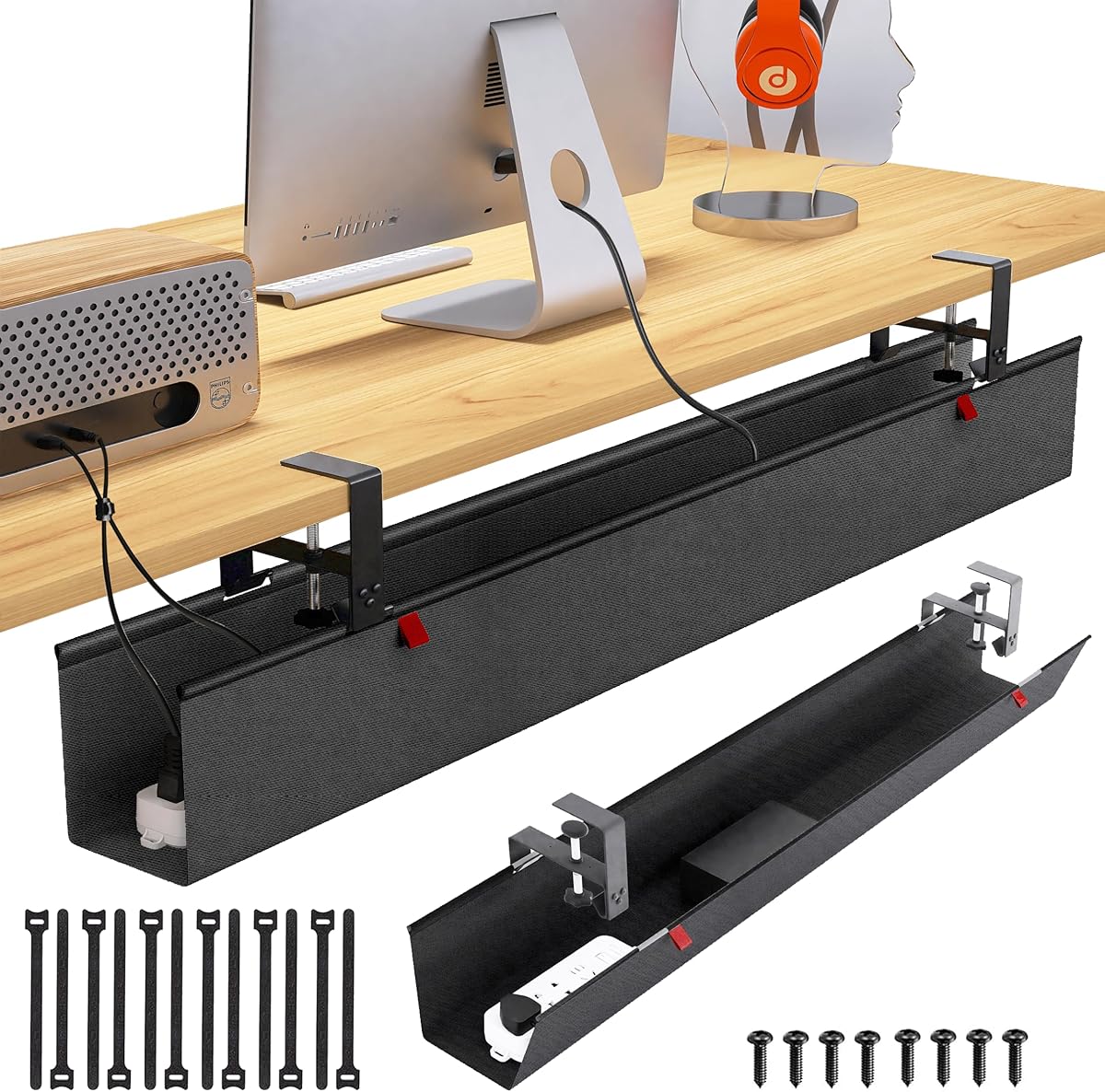
The Univivi No Drill Under Desk Cable Management Tray offers large capacity cable management for gaming PC setups. It measures 36 inches long to fit all size adapters and sockets under your table.
We may earn a commission when you buy through this link, at no additional cost to you.
It supports both clamp on and screw fixing installation for versatile setup. The thick 600D oxford fabric is flame retardant. Every item can be fixed in the tray by using the built-in ties.
It needs 5.3 inches of edge space for clips. It is impossible to make it completely invisible. These constraints are minor given the large capacity and durable build.
Buy this for wide desks needing hidden storage. It keeps everything under your table organized and accessible.
This under desk organizer supports both no drill clamp on and screw fixing installation.
The large tray size fits all size adapters and sockets holding and hiding everything under your table.
We may earn a commission when you buy through this link, at no additional cost to you.
The 25 Inch Cable Management Under Desk Tray provides sturdy cable management for gaming PC setups. It offers enough space for all cables with a metal mesh structure that allows airflow.
We may earn a commission when you buy through this link, at no additional cost to you.
The clamp has non-slip rubber pads to protect the desk surface. It supports both inward and outward installation. The mesh reduces dust accumulation and prevents power supply overheating.
Assembly takes a few minutes using screws. It fits desks from 0.4 to 2 inches thick. These limits are minor given the strong metal build.
Choose this for a ventilated under desk storage. It keeps cables tidily stored away from kids.
The mesh structure maintains good ventilation to prevent power supply overheating and reduce dust.
Cable tray under desk are easy to install with adjustable desk clamp.
We may earn a commission when you buy through this link, at no additional cost to you.
The 10-Pack Adjustable Elastic Adhesive Cable Clips offer versatile cable management for gaming PC setups. These clips hold anything from single chargers to big bunches of cords up to 1 inch diameter.
We may earn a commission when you buy through this link, at no additional cost to you.
The impact-resistant ABS plastic hook design allows one-handed operation. The elastic loop allows you to swap cables without waste. It includes 12 adhesive pads screws and zip ties.
Heavy cables may need screws for ultimate strength. The 1 inch diameter limit may not fit very thick bundles. These limits are acceptable for its flexible and reusable design.
Buy this for adjustable clip management anywhere. It works for desks walls floors and furniture legs.
The elastic loop allows you to swap and change your cables as much as you want without waste.
Use adhesive pads screws or zip ties to attach the clip to anything.
We may earn a commission when you buy through this link, at no additional cost to you.
The 48 Gaming Under Desk Cable Management Tray delivers premium cable management for gaming PC setups. This 47.8 inch tray features a high-density black Oxford fabric that blocks the view of wires.
We may earn a commission when you buy through this link, at no additional cost to you.
Built to handle heavy power bricks it has a reinforced anti-sag base. The intelligent side-opening design allows easy routing of thick HDMI and DisplayPort cables. It keeps your under-desk area clean and dark.
It requires assembly taking only a few minutes. The higher price reflects its heavy-duty build and concealment. These trade-offs are worth it for a professional battlestation look.
Buy this for a complete and professional upgrade. It lets your RGB lights pop instead of cable spaghetti.
Unlike mesh nets this high-density black Oxford fabric completely blocks the view of wires.
The reinforced base supports heavy gaming power bricks and surge protectors without bowing.
We may earn a commission when you buy through this link, at no additional cost to you.
Choosing the right cable management for gaming PC requires understanding your desk size, cable count, and installation preferences. This guide breaks down key factors to simplify your decision.
Measure your desk width and thickness to match tray or clamp dimensions. Larger desks may need 36 inch or longer trays to hide all cables effectively.
Match tray length to your desk width and choose clamp options that fit your desk thickness range.
Estimate how many cables you need to manage. Large setups with multiple monitors and peripherals benefit from trays with high capacity and built-in ties.
Choose trays or kits that can hold your expected cable count without bulging.
Decide between adhesive, clamp, or screw installation. Clamps are removable and safer for desks. Adhesive is permanent but requires smooth surfaces.
Pick installation methods that match your desk material and permanence needs.
Look for durable materials like PVC, metal, or thick Oxford fabric. Flame-retardant and heat-dissipating designs help keep your gear safe from electrical issues.
Choose materials that balance strength, ventilation, and safety for your setup.
Reusable ties and split sleeves allow you to adjust cables without tools. This flexibility is useful for gamers who change gear often.
Prioritize reusable components if you plan to modify your setup frequently.
Black trays and sleeves blend into most gaming setups. Some options offer RGB-compatible designs or stealth fabrics for a cleaner look.
Select colors and finishes that match your desk and gear for a cohesive style.
Check weight limits and anti-sag features. Heavy power bricks and converters require trays with strong bases or support bars.
Ensure your chosen tray can handle the weight of your power and adapters without bending.
Side openings or J-channels make adding cables easy. Open designs allow you to route thick HDMI or DisplayPort cables without disassembly.
Choose designs with easy access points to simplify cable routing.
Start by planning your cable routes before installing trays or clips. Group cables by device and secure them with ties before routing to the tray.
Use adhesive with heat for stronger hold. For clamps, tighten gently to avoid damaging the desk surface. Test the clamp stability before loading cables.
Clean trays regularly to remove dust. Check adhesive pads periodically and replace if they show signs of wear or residue.
The best solution depends on your desk and cables. Trays with high capacity work well for large rigs, while sleeves and ties suit simpler setups. Choose based on installation preference and cable volume.
Use adhesive-backed trays or clamps that grip the desk edge. Split sleeves can be secured with adhesive hooks. These methods provide strong hold without damaging your furniture.
Yes, most use non-damaging adhesive designed for smooth surfaces. To avoid residue, use heat to remove them. Always clean the area before applying adhesive for better hold.
Trays hide cables from pets and children, reducing tripping and chewing hazards. Some feature flame-retardant materials and ventilation to protect power supplies from overheating.
High-quality sleeves made from durable PVC or braided materials can last several years. Regular inspection and gentle handling extend their lifespan and performance.
Clips offer flexibility for routing, while trays provide storage and concealment. Use trays for bulk storage and clips to secure individual cables to desk edges.
Measure the width under your desk and check the desk thickness. Ensure the tray length fits the width and clamp size matches the thickness for a secure fit.
Most kits include sleeves, ties, clips, and adhesive holders. Review the contents to confirm you have enough pieces for your cable count and routing needs.
The N NOROCME 192 PCS Kit, Alex Tech Cord Protector, and 48 Gaming Under Desk Tray offer strong options for different needs. Each provides reliable organization for gaming PCs.
Prioritize capacity, installation type, and durability when selecting. Consider how often you change gear to choose reusable vs. permanent solutions.
Check current availability and specs before buying. These picks cover most setups and help keep your gaming station clean and safe.