
N80 Bluetooth Thermal Printer
4.1Editor score
Inkless thermal technology
Lightweight design
Bluetooth and USB support
Portable printers with built-in batteries have revolutionized how professionals and travelers handle documents on the go. These devices eliminate the need for constant power outlets or cumbersome cables, ensuring you can print contracts, photos, or receipts anywhere. Whether you are a truck driver, a mobile notary, or a student, having reliable mobile printing capability is essential for modern productivity and convenience.
We evaluated ten leading models based on battery life, print quality, connectivity options, and overall portability. Our analysis covers traditional inkjet printers that offer color capabilities alongside innovative thermal printers that require no ink at all. Each product was scrutinized for its ease of use, software compatibility, and durability in real-world travel scenarios to help you make an informed decision.
This guide provides detailed insights into each printer's strengths, weaknesses, and ideal use cases. You will find comprehensive reviews, feature comparisons, and practical advice on choosing the right device for your specific needs. Please note that prices and availability can change frequently, so always check the current listings before making a purchase to ensure you get the best value.
4.1Editor score

4.4Editor score
4.5Editor score
As an Amazon Associate we earn from qualifying purchases.
The following table provides a side-by-side comparison of all ten printers reviewed in this guide. It highlights key specifications such as connectivity methods, paper sizes supported, and unique features to help you quickly identify which model aligns with your specific printing requirements and budget constraints.



The Canon PIXMA TR160 stands out as a versatile option for users needing color printing on the move. With a rating of 4.2 stars, it offers a balance of portability and print quality that appeals to both professionals and casual users. Its lightweight design ensures it fits easily into bags without adding significant bulk.
We may earn a commission when you buy through this link, at no additional cost to you.
This printer supports standard letter size printing and uses a 5-Color Hybrid Ink System to produce sharp text and vibrant photos. The inclusion of an OLED display makes it easy to monitor ink levels and printer status directly on the device. Connectivity options include the Canon PRINT app, AirPrint, and Wireless Direct Mode, allowing flexible connections without a router.
While the device excels in print quality and ease of use, it does not explicitly highlight a built-in battery in the main product description, which might be a consideration for users needing independence from outlets. Additionally, it requires standard paper rather than thermal media, which affects ongoing supply costs. These trade-offs are acceptable given the high-quality output and robust feature set.
Anyone needing a portable color printer for occasional use at home or while traveling should consider this model. It is particularly well-suited for small offices or students who need reliable document and photo printing capabilities. The Canon PIXMA TR160 delivers a premium experience that justifies its position as a top choice in the portable category.
The 5-Color Hybrid Ink System ensures that photos and documents look professional with rich colors and sharp text.
Wireless Direct Mode allows you to connect devices directly to the printer even when no Wi-Fi router is available.
We may earn a commission when you buy through this link, at no additional cost to you.
The HP OfficeJet 250 is a robust all-in-one device designed for professionals who need scanning and copying capabilities alongside printing. With a 4.3-star rating, it delivers reliable performance in various environments. The inclusion of a battery ensures you can work without finding an outlet, making it ideal for field work or remote locations.
We may earn a commission when you buy through this link, at no additional cost to you.
This printer supports a wide range of paper sizes including legal and executive formats, which is rare for portable models. The HP Fast Charge feature allows the battery to charge quickly while the printer is turned off, maximizing uptime. Setup is simplified through HP Auto Wireless Connect, enabling easy connection from mobile devices or laptops without a router.
The main drawbacks include a higher price point compared to inkless thermal printers and a weight that may be significant for daily commuting. However, for business users requiring document management tools on the go, these factors are secondary to functionality. The ability to handle legal documents makes it a unique asset for contractors and consultants.
Buyers needing a complete mobile office solution should prioritize this model. It is perfect for mobile notaries or sales representatives who need to scan contracts and print receipts instantly. The HP OfficeJet 250 provides comprehensive functionality that supports complex workflows away from the main office.
With print scan and copy functions this device replaces the need for multiple bulky office equipment in your bag.
Unlike most portable printers this model handles legal size paper ensuring compliance with standard business document requirements.
We may earn a commission when you buy through this link, at no additional cost to you.
The HP OfficeJet 200 is a highly rated choice for those seeking reliable mobile printing with strong battery performance. Its 4.4-star rating reflects user satisfaction with its ability to print documents anywhere without tethering to power. The included battery is designed to provide sufficient runtime for a full day of typical mobile printing tasks.
We may earn a commission when you buy through this link, at no additional cost to you.
This model focuses purely on printing efficiency, offering support for letter legal and photo paper sizes. The HP app facilitates seamless printing from smartphones while HP Auto Wireless Connect simplifies the initial setup process. The Fast Charge capability ensures that the battery is ready for use quickly whenever you have access to an AC source.
While it lacks scanning features found in the 250 model, the reduced complexity often leads to better portability and lower operational costs. Users should budget for ink cartridge replacements as with all inkjet printers but the high page yields help extend this period. These considerations are minor given the overall convenience and quality provided.
Travelers and remote workers who prioritize speed and reliability will find this printer ideal. It serves well for small businesses or students who need to print assignments or invoices on demand. The HP OfficeJet 200 balances performance and portability better than most competitors in its class.
Original HP 62 series cartridges deliver long-lasting performance reducing the frequency of supply replacements during travel.
Charge the battery in just 90 minutes while the unit is off to maximize availability during busy workdays.
We may earn a commission when you buy through this link, at no additional cost to you.
The Epson Workforce WF-110 offers a compact solution for users who need color printing capabilities on the road. With a 4.1-star rating, it appeals to graphic designers and marketers who need vibrant outputs from their devices. The built-in rechargeable lithium-ion battery ensures you can work independently of power sources for extended periods.
We may earn a commission when you buy through this link, at no additional cost to you.
One of its standout features is the flexibility in charging options allowing you to charge via USB or AC adapter. This versatility is crucial for travelers who may have limited access to wall outlets. Wi-Fi Direct functionality also enables easy connection to various devices including iPads and laptops without a network setup.
Potential buyers should note that as an inkjet printer it requires regular maintenance to prevent clogging which might be challenging in dusty environments. The paper width is limited to standard sizes which may not suit large format needs. However for most general business applications these limitations are rarely encountered in daily use.
Professionals requiring color prints in the field should consider this printer for its balance of size and performance. It is particularly useful for real estate agents or event planners needing on-site marketing materials. The Epson Workforce WF-110 delivers reliable color output in a truly portable package.
Charge through USB or AC adapter to keep the printer running even when you only have access to laptop power.
Connect directly from your device without needing a router simplifying the printing process in remote locations.
We may earn a commission when you buy through this link, at no additional cost to you.
The Gloryang Inkless Portable Printer is an excellent choice for budget-conscious travelers needing basic document printing. With a 4.2-star rating, it offers reliable performance without the mess of ink or toner. The device uses thermal technology which means it requires no consumables other than special thermal paper making it very cost-effective.
We may earn a commission when you buy through this link, at no additional cost to you.
This model supports standard 8.5 by 11 inch paper allowing for full document pages rather than just small receipts. The included carry case ensures the printer stays protected during transit while three rolls of paper provide immediate utility. Connectivity is managed through Bluetooth via the Jadens Printer app ensuring smooth operation from mobile devices.
Users should be aware that it only prints in black and white and requires specific thermal paper which may not be available everywhere. Additionally the quality may not match high-end laser printers for text-heavy documents. However for quick contracts or travel itineraries these limitations are acceptable given the convenience and low cost.
Students and travelers looking for a simple way to print on demand will appreciate this device. It is ideal for printing emergency documents or personal notes while on vacation. The Gloryang Inkless Portable Printer provides a practical solution for basic printing needs without the hassle of traditional ink systems.
Eliminate the need for cartridges and toners by using thermal technology that is both clean and economical to maintain.
Package includes multiple rolls of paper and a case so you can start printing immediately upon arrival at your destination.
We may earn a commission when you buy through this link, at no additional cost to you.
The A285M Small Thermal Printer is designed for versatility in paper sizes making it unique among portable thermal models. With a 4.0-star rating, it supports everything from 2-inch labels up to full 8.5 by 11-inch sheets. This flexibility makes it suitable for users who need to print various formats like receipts and full documents from a single device.
We may earn a commission when you buy through this link, at no additional cost to you.
It connects via Bluetooth to smartphones or via USB-C to laptops providing multiple ways to integrate with different devices. The printer uses advanced thermal technology which prevents clogging issues common in inkjet printers. It is also extremely lightweight at just 1.5 pounds ensuring it does not burden your backpack during travel.
The primary limitation is the reliance on thermal paper which may fade over time and is strictly black and white. Users must also download specific drivers for laptop connectivity which adds a step to setup. Despite this the ability to handle multiple paper widths offers significant utility for diverse use cases like shipping labels or full forms.
Small business owners or delivery drivers needing varied print outputs will find this model beneficial. It serves well for printing both invoices and labels without changing devices. The A285M Small Thermal Printer provides a practical multi-purpose tool for mobile professionals with mixed document requirements.
Print anything from small labels to full letter size documents with five supported thermal paper widths for any task.
Use USB-C for laptop or Bluetooth for phones to ensure you can print from any device in your office kit.
We may earn a commission when you buy through this link, at no additional cost to you.
The D90E Inkless Portable Thermal Printer is a reliable companion for users needing quick document access. With a 4.3-star rating, it is praised for its ease of use and protective travel case. The printer uses thermal technology to print standard 8.5 by 11-inch pages without the need for ink cartridges or ribbons.
We may earn a commission when you buy through this link, at no additional cost to you.
One standout feature is the automatic paper eject mechanism which simplifies clearing jams by pressing the power button. This design choice minimizes user effort and reduces the risk of damage to the device. It connects to mobile devices via Bluetooth and to PCs via USB providing broad compatibility across platforms and operating systems.
It is important to note that it is not compatible with Chromebooks and requires flat thermal paper to prevent curling issues. Users must also install drivers for PC use which may take a few minutes to set up. However for most users these minor constraints do not significantly impact the overall utility and portability of the device.
Freelancers and travelers needing to print contracts on demand will appreciate this model. It is ideal for printing agreements or itineraries while away from home or office. The D90E Inkless Thermal Printer offers a straightforward solution for mobile document handling with thoughtful design features.
Clear paper jams easily by simply pressing the power button which automatically ejects the paper without forceful opening.
Included travel case protects the printer during transit ensuring it remains in good condition for multiple trips.
We may earn a commission when you buy through this link, at no additional cost to you.
The JADENS Portable US Letter Thermal Printer stands out for its innovative app features and high battery capacity. With a 4.6-star rating it is highly favored by users who value software integration. The device allows printing directly from a connected device without uploading to the cloud ensuring privacy for sensitive documents.
We may earn a commission when you buy through this link, at no additional cost to you.
Its proprietary app includes AI tools for image generation and editing allowing users to create custom designs directly on the phone. The built-in 1800mAh battery supports up to 360 sheets per charge reducing downtime during busy workdays. It also features a 203 DPI resolution for clear and easy-to-read text and graphics.
The printer requires specific US Letter thermal paper which must be sourced from the manufacturer to ensure quality. It also does not support color printing which may limit creative applications. However for standard business and educational needs these trade-offs are acceptable given the robust feature set and high reliability.
Students and professionals looking for a smart printing solution should consider this model. It is well-suited for creating custom study materials or business documents securely. The JADENS Portable Thermal Printer offers a blend of hardware and software features that enhance productivity significantly.
Generate and edit images with AI directly in the app before printing for unique and personalized outputs.
Print directly from your device without cloud uploads to keep personal and business documents completely private.
We may earn a commission when you buy through this link, at no additional cost to you.
The N80 Bluetooth Thermal Printer is an ideal entry-level choice for users on a tight budget. With a 4.1-star rating it offers essential features without unnecessary complexity. The printer uses high-definition thermal technology to deliver clear prints of documents photos and web pages anywhere you need them.
We may earn a commission when you buy through this link, at no additional cost to you.
It comes with a 1500mAh battery that supports around 160 sheets per charge making it suitable for occasional travel use. The device supports multiple paper types including roll and tattoo transfer paper expanding its utility beyond standard documents. A USB-C cable is included allowing for wired connections to laptops when needed.
Users must remember to switch the paper size switch on the app to ensure correct alignment and quality. While it is lightweight and portable the build quality is basic compared to premium models. Despite this the low cost and reliable performance make it a fantastic option for students or travelers needing basic printing.
Anyone needing an affordable and simple printer for on-the-go needs should pick this model. It is perfect for printing boarding passes or temporary documents while traveling. The N80 Bluetooth Thermal Printer offers excellent value for those who want to avoid expensive ink systems without paying a premium.
Compatible with tattoo transfer paper making it a unique option for artists needing temporary tattoo prints.
High-definition printing technology ensures text and images remain sharp and easy to read on every sheet.
We may earn a commission when you buy through this link, at no additional cost to you.
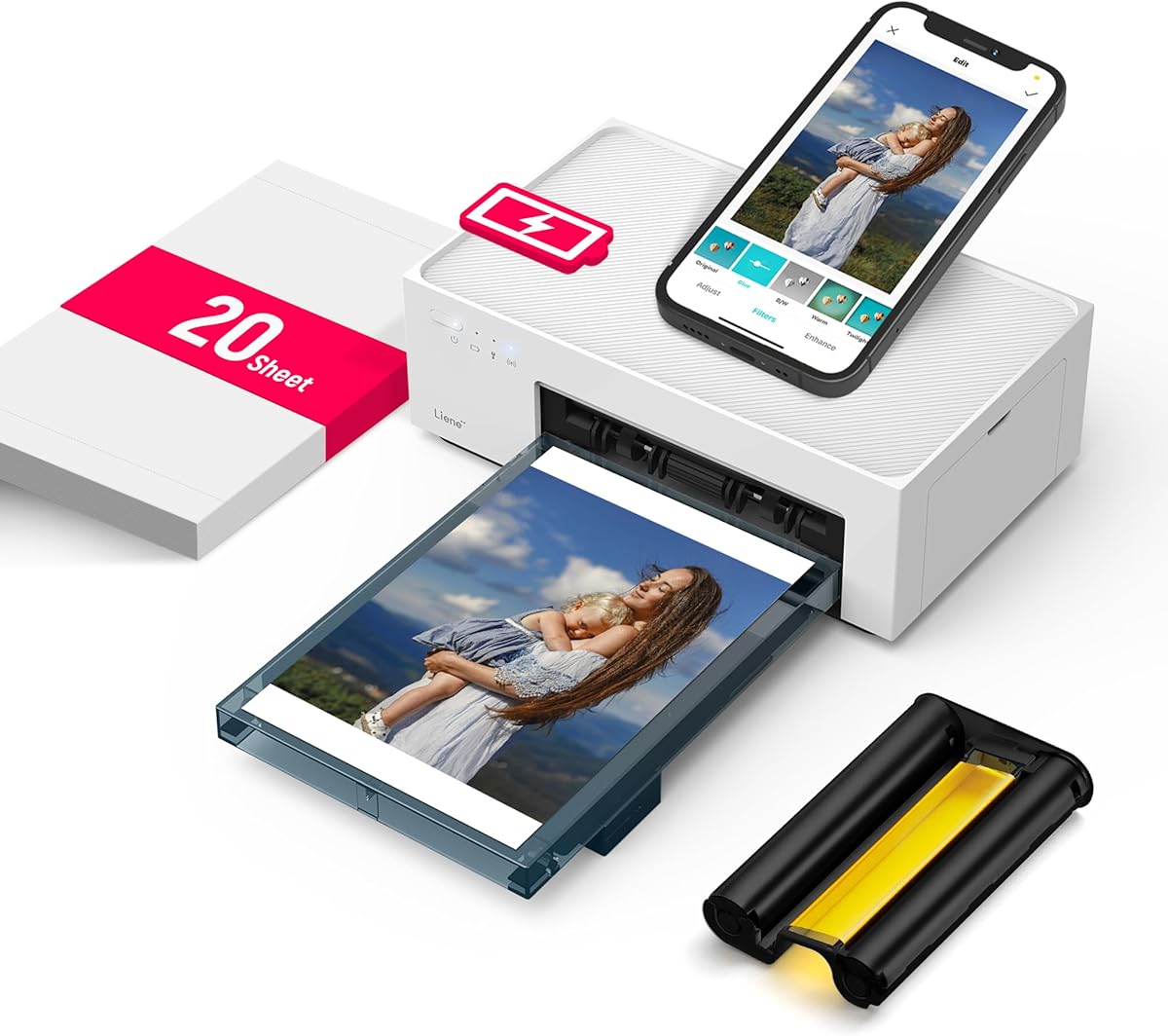
The Liene White M200 is a premium photo printer designed for capturing memories on the go. With a 4.5-star rating it excels in producing high-quality vibrant images that rival professional labs. The dye sublimation technology ensures colors penetrate the paper layer by layer creating professional-looking results.
We may earn a commission when you buy through this link, at no additional cost to you.
It features a rechargeable built-in battery allowing you to print up to 40 prints per charge without an outlet. The printer also includes a built-in WiFi hotspot for stable connections without relying on home networks. Its unique magnetic design allows the photo cassette to be stored securely after use keeping the device compact.
Users are limited to 4×6 inch photos which may not suit larger document printing needs. The special photo paper and ink cartridges can be more expensive than standard paper options. However for families and photographers wanting instant physical copies of digital memories these constraints are a minor trade-off for quality.
Families and travelers wanting to preserve memories physically should invest in this model. It is perfect for events and trips where you want instant prints without a computer. The Liene White M200 delivers professional-quality photo printing in a convenient portable package.
The sublimation process makes printed photos waterproof scratch-resistant and fade-resistant for long-lasting memory preservation.
Up to five users can connect simultaneously via the hotspot enabling seamless photo printing at group events.
We may earn a commission when you buy through this link, at no additional cost to you.
Selecting the right battery powered portable printer requires understanding your specific needs regarding print quality and paper size and connectivity. This section breaks down the essential factors to consider before purchasing a device to ensure it fits your workflow.
Battery life is a critical factor for portable printers. Look for devices with rechargeable batteries that offer sufficient runtime for your typical usage. Some models come with the battery included while others may require you to purchase it separately. Also consider charging times and options such as USB charging which adds convenience when traveling.
Always check the estimated print count per charge to ensure it meets your daily needs without interruption.
Thermal printers do not use ink making them cleaner and cheaper to operate but they print only in black and white on special paper. Inkjet printers offer color quality and standard paper support but require cartridges and can be messier. Choose based on whether color quality or operational simplicity is your priority.
If you need color documents for business, inkjet is necessary. If you just need quick black text, thermal is more efficient.
Ensure the printer supports the paper size you need. Most portable units support up to 8.5 by 11 inches but some are limited to receipts or photos. Thermal printers require specific media that can be expensive or hard to find depending on location. Inkjets use standard paper which is widely available.
Verify if the printer accepts standard office paper or if it relies solely on proprietary thermal rolls.
Connectivity options such as Bluetooth and Wi-Fi Direct allow you to print from mobile devices without a router. Some models also include USB ports for direct connection to laptops. This flexibility is key for travel where internet access might be unreliable. Check if the device supports AirPrint or Android printing standards.
Wireless features should be tested to ensure they work with your existing smartphone or tablet ecosystem.
Weight and dimensions determine how easy the printer is to carry. Look for lightweight designs that fit into a backpack or briefcase. Durability is also important if you plan to use the device in rugged environments. Some models come with protective cases which add value for travel.
A slim profile is essential if you intend to carry the printer daily along with other gear.
Consider the long-term cost of supplies. Thermal printers often save money on ink but may have higher paper costs. Inkjet cartridges can be expensive to replace especially if you print frequently. Check if refillable options exist or if the brand offers cost-effective ink solutions to reduce overhead.
Calculate the cost per page based on the recommended supplies to understand the true operational expense.
Modern printers come with companion apps that allow editing layout adjustment and direct printing from files. Good apps support PDF Word and image files efficiently. Some even include tools like AI editing which adds value beyond just printing. Ensure the app is compatible with your operating system.
Read user reviews regarding app stability and ease of use to avoid frustration during critical tasks.
Travel gear often faces wear and tear so a reliable warranty is valuable. Check if the manufacturer offers support in regions where you travel. Some brands provide limited hardware warranties while others include accidental damage protection. Having a support channel ensures quick resolution if issues arise.
Look for brands with a reputation for responsive customer service to minimize downtime.
To get started with your portable printer charge the battery fully before first use. For Bluetooth models connect the app on your phone and pair the device via settings. For USB connections install the drivers on your computer to ensure communication. Follow the specific paper loading instructions to avoid jams.
Maintain the printer by keeping it clean from dust and debris especially if used in outdoor settings. Avoid exposing the printer to extreme temperatures as this can damage the battery and internal components. Store the device in a dry cool place when not in use to preserve its longevity and performance.
Regularly update the printer firmware and app to ensure compatibility with new devices and security fixes. If you notice fading prints check the battery level or the condition of the ink/thermal head. Cleaning the print head with recommended tools can improve quality significantly over time.
No, thermal printers require specific thermal paper that reacts to heat. Regular copy paper will not print on these devices. Using the wrong paper can damage the print head and result in blank outputs.
Battery life varies by model but generally ranges from 100 to 400 pages per charge. Some models include a battery while others require you to purchase it separately. Always check the specific runtime before buying.
Many models support laptop printing via USB-C or Wi-Fi, but you may need to install specific drivers. Bluetooth is primarily for mobile devices. Always verify laptop compatibility on the product page before purchasing.
Thermal portable printers usually print in black and white only. Inkjet portable models can print in color but are more expensive and require cartridges. Choose the technology that fits your color needs.
Replacement paper is often available from the manufacturer or online retailers like Amazon. Ensure you buy the correct width and type specified in the user manual to maintain quality.
No, many portable printers work without Wi-Fi using Bluetooth or direct USB connections. Wi-Fi Direct allows printing without a router. This is ideal for travel where internet access is limited or unavailable.
Choosing a battery powered portable printer depends on your specific needs for color, size, and portability. The HP OfficeJet 200 and Canon PIXMA TR160 are excellent for traditional document printing. For quick inkless options, the N80 and Gloryang models offer great value.
Prioritize battery life and paper compatibility to avoid issues during travel. If you need color, stick with inkjet models. If you need quick text, thermal options are cleaner. Always consider the long-term cost of consumables before making a final decision.
Remember that prices change frequently so verify current listings before purchasing. Check reviews for recent user experiences to ensure the device meets your expectations. We hope this guide helps you find the perfect portable printer for your lifestyle.