
NetumScan USB 1D Scanner
4.4Editor score
Plug and play USB connection
Durable anti-shock design
Fast 1D code reading
Discover the top barcode scanners for library use. This guide compares wireless, wired, and portable models to help you choose the right device for inventory
Libraries rely on efficient systems to manage vast collections of books and media. A reliable barcode scanner is essential for quick check-ins, check-outs, and inventory tracking to keep operations running smoothly.
We evaluated ten top-rated scanners based on connectivity, durability, battery life, and barcode recognition capabilities. Our comparison focuses on devices that perform well in quiet library environments and handle common ISBN formats.
Each pick highlights key strengths and limitations to help you match a device to your specific workflow. Keep in mind that prices and availability can change frequently on retailer websites.
4.4Editor score

4.4Editor score

4.3Editor score
The following table compares the core specifications of all ten scanners to help you find the best fit for your library needs.




The NETUM Bluetooth Barcode Scanner stands out as a top choice for library staff needing reliable performance. With a 4.4 star rating, it offers a blend of wireless freedom and wired stability that fits many library workflows.
We may earn a commission when you buy through this link, at no additional cost to you.
Its high resolution CCD sensor quickly reads ISBN barcodes even if they are worn or damaged. The battery lasts for up to 200000 scans on a single charge, making it ideal for long inventory days without interruptions.
While it requires scanning a setting barcode to configure modes, the process is straightforward. Users can disable the buzzer for quiet scanning in reading areas, which is a thoughtful feature for libraries.
Librarians who need a versatile device for both desktop and mobile work will appreciate this model. It handles common library codes well and provides the flexibility to switch between connection types easily.
The 2600mAh battery ensures the scanner lasts through busy periods, reducing downtime for charging during peak hours.
Adjustable sound settings allow staff to scan silently, maintaining a peaceful environment for patrons studying nearby.
We may earn a commission when you buy through this link, at no additional cost to you.
The NetumScan USB 1D Barcode Scanner is an excellent budget option for smaller libraries or checkout desks. Its solid 4.4 star rating reflects its reliability in handling standard library tasks without breaking the bank.
We may earn a commission when you buy through this link, at no additional cost to you.
Equipped with advanced CCD sensor technology, it captures 1D codes from paper and screens quickly. The sturdy design can withstand drops from up to two meters, ensuring it survives daily wear and tear.
Setup is incredibly simple since it uses a direct USB connection without needing drivers. While the cable limits movement, it ensures a stable connection that never runs out of battery charge.
Libraries on a tight budget will find this scanner a practical choice for high volume scanning tasks. It is robust and efficient enough to handle the daily flow of book checkouts and returns.
The anti-shock design guarantees a long service life, making it a smart investment for high traffic library counters.
Staff can scan barcodes directly from computer monitors, streamlining digital inventory updates without printing labels.
We may earn a commission when you buy through this link, at no additional cost to you.
The Eyoyo Mini 1D Bluetooth Scanner is designed for portability, making it perfect for floor checks or moving collections. With a tiny 35g weight, it is easy to carry around the library without fatigue.
We may earn a commission when you buy through this link, at no additional cost to you.
It offers three connection ways including Bluetooth which provides a range of up to 50 meters. The auto-off feature helps save power, extending the usage to up to ten days on a single charge.
While it does not support QR codes, it handles all common 1D library codes including ISBN. The vibration mode is a great addition for libraries where noise must be kept to an absolute minimum.
Staff members who need to scan books on shelves far from the desk will love this compact device. It is reliable and light enough to be used for quick audits during daily routines.
Switching to vibration mode ensures staff know a scan was successful without disturbing quiet study zones.
The storage mode allows users to scan in low signal areas and sync data once back within wireless range.
We may earn a commission when you buy through this link, at no additional cost to you.
The Tera Barcode Scanner 5100 Purple is a robust wireless option that keeps staff informed with a battery indicator light. Its high 4.5 star rating suggests it is a reliable tool for consistent daily use in libraries.
We may earn a commission when you buy through this link, at no additional cost to you.
The curved handle and widened grip make it comfortable to hold for extended periods. The IP54 technology protects the device from dust which can be a factor in older library buildings with many books.
Wireless transmission reaches up to 328 feet in open spaces allowing great flexibility for inventory tasks. However, it is limited to 1D codes so it will not read QR codes found on some modern library items.
Libraries needing a sturdy device that won't die unexpectedly due to low battery will find this model helpful. The visual indicator removes the guesswork of knowing when to charge the scanner during a shift.
The IP54 rating ensures the internal components stay clean and functional even in dusty book storage areas.
Staff can walk far from the desk without losing connection making it easier to scan items on high shelves.
We may earn a commission when you buy through this link, at no additional cost to you.
The Tera Barcode Scanner with Screen offers advanced features like an LCD display for settings and data view. With a 4.3 star rating, it is a premium choice for libraries that need to read more complex barcode formats.
We may earn a commission when you buy through this link, at no additional cost to you.
It supports both 1D and 2D QR codes including PDF417 which appears on driver licenses and other IDs. The included charging cradle keeps the device powered and organized when not in use on the desk.
While it is more expensive than basic models, the ability to read multiple barcode types adds significant value. The built-in receiver means no extra dongles are needed keeping your workspace cleaner and simpler.
Libraries processing various document types or requiring detailed scan logs will benefit from this versatile scanner. The screen allows staff to verify data quickly without needing to check a computer screen.
The ability to read 2D codes expands the scanner utility beyond standard book barcodes to other library documents.
The cradle acts as a USB receiver and charger ensuring the device is always ready for work at a glance.
We may earn a commission when you buy through this link, at no additional cost to you.
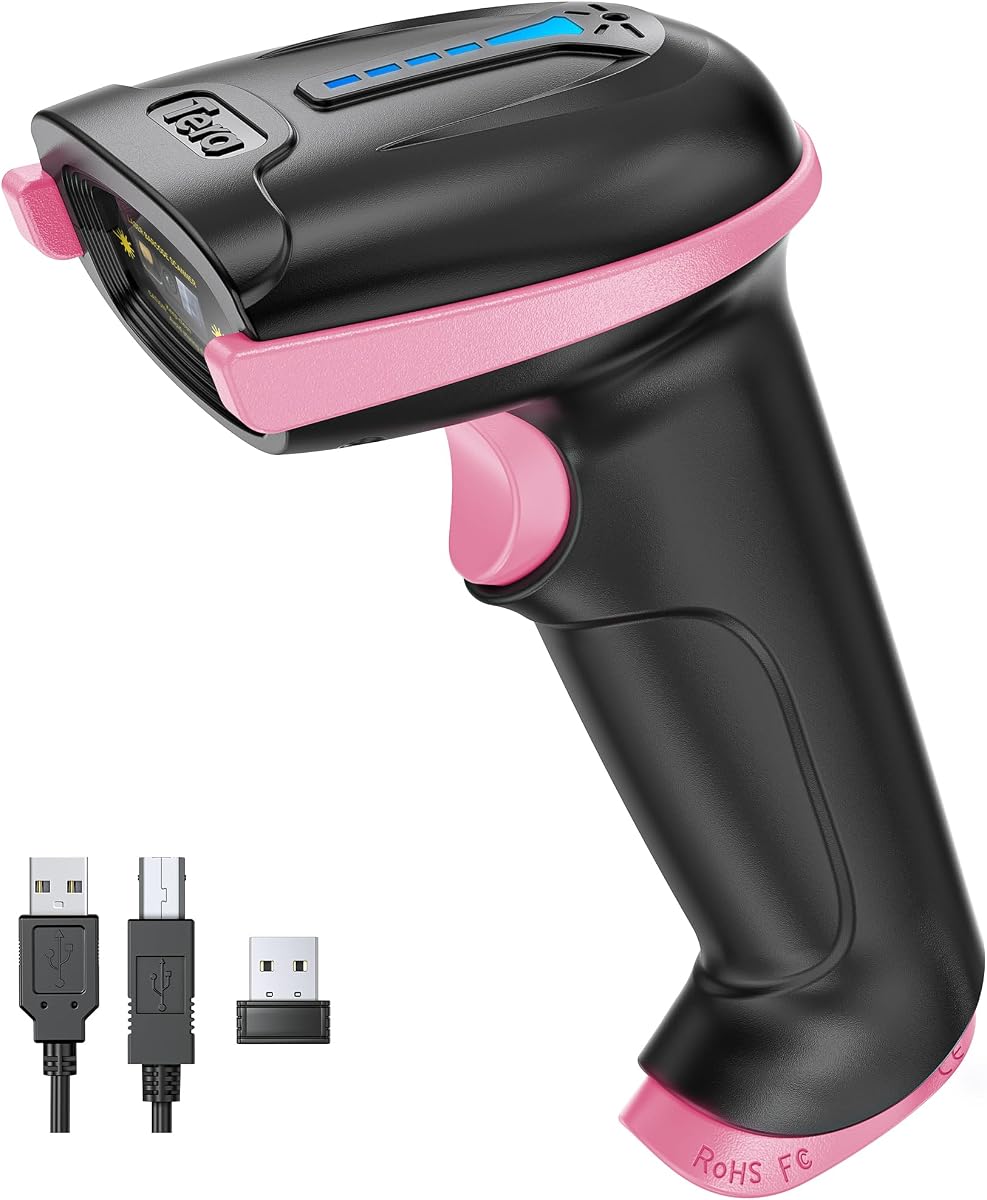
The Tera Barcode Scanner 5100 Pink shares all the core features of the purple version but offers a unique look. It also holds a 4.5 star rating for its dependability and long battery life suitable for library environments.
We may earn a commission when you buy through this link, at no additional cost to you.
The ergonomic design with a wide curved handle ensures comfort during long scanning sessions. The battery indicator light provides clear visual cues so you never run out of power unexpectedly during an inventory count.
Its wireless range extends up to 328 feet allowing staff to move freely around the library building. The durable construction protects it from dust and minor drops making it suitable for daily circulation work.
Libraries wanting a scanner that combines function with a bit of style will appreciate this pink variant. It performs just as well as other models with the same robust protection and reliable wireless connection.
The pink design makes the device easy to spot among other library equipment reducing the risk of misplacement.
The smooth flat trigger and extended handle reduce strain on the hand during repeated scanning actions.
We may earn a commission when you buy through this link, at no additional cost to you.
The WoneNice USB Laser Barcode Scanner is a classic tool known for speed and reliability. With a 4.5 star rating, it is an excellent choice for checkout counters where high speed processing is needed every day.
We may earn a commission when you buy through this link, at no additional cost to you.
It scans up to 200 codes per second making it one of the fastest options in this list. The laser technology works best on printed barcodes though it might struggle with some screen displays compared to CCD sensors.
The device is fully compatible with Windows Mac and Linux systems without requiring extra software. You can configure many settings like adding prefixes or turning off the beep to fit your library protocols exactly.
Libraries focused on efficiency at the front desk will find this scanner a great match. It is tough enough to handle drops and simple enough to set up quickly for new staff members.
The rapid scan rate helps reduce wait times for patrons checking out multiple books during busy hours.
Compatible with a wide range of operating systems so it fits easily into existing library computer setups.
We may earn a commission when you buy through this link, at no additional cost to you.
The Symcode Wireless Barcode Scanner offers impressive range up to 400 meters in open air. With a 4.4 star rating it is a strong contender for large libraries where staff need to move far from the main computer.
We may earn a commission when you buy through this link, at no additional cost to you.
It supports offline storage of up to 100000 barcodes allowing you to scan items in low signal areas. You can upload the data later when you return to the range ensuring no data is ever lost.
Multiple scanners can connect to one receiver which is useful if you have teams checking inventory simultaneously. The built-in rechargeable battery provides more than a week of continuous scanning on a single charge.
Large facilities or multi-building libraries will appreciate the extended reach of this device. It keeps workflow smooth even when scanning items in remote corners of the building without cable constraints.
The long transmission distance allows staff to roam freely without worrying about connection drops in large spaces.
Scan and store barcodes in any location then sync them once you are back in range to preserve all records.
We may earn a commission when you buy through this link, at no additional cost to you.
The Eyoyo Portable Mini Pink adds a stylish touch to library work with its compact design. It holds a 4.3 star rating and is built for those who value portability and a bit of color in their daily tools.
We may earn a commission when you buy through this link, at no additional cost to you.
Switching between Bluetooth wireless and wired modes is simple making it adaptable to different situations. The 650mAh battery gives about five hours of continuous work which suits shifts without long breaks.
It reads all common 1D library codes and allows you to disable sound for quiet zones. The vibration mode ensures you get feedback without noise which is essential for maintaining a calm library atmosphere.
Libraries looking for a secondary scanner for quick tasks will find this unit practical and fun. It is light enough to carry on a belt and capable of handling standard circulation duties effectively.
The small form factor makes it easy to store in a pocket or bag for quick access anywhere in the library.
Vibration alerts confirm scans without creating noise so readers can study without distractions nearby.
We may earn a commission when you buy through this link, at no additional cost to you.
The Anyeast Barcode Scanner with Stand offers a hands-free option that keeps your desk organized. With a 4.0 star rating it is a functional choice for libraries that need to scan high volumes of items quickly.
We may earn a commission when you buy through this link, at no additional cost to you.
The auto-sensing feature allows you to scan by waving a book over the sensor without holding a trigger. The included adjustable stand lets you set the best angle for scanning which helps reduce physical strain.
It supports both 1D and 2D QR codes making it versatile for various inventory types. The USB connection ensures a stable link to your computer without the need for extra batteries or receivers.
Libraries needing a dedicated counter scanner for rapid checkout will find this model helpful. The stand feature adds convenience by letting you keep both hands free to handle books while scanning.
Wave the book over the sensor to scan freeing your hands to organize items or assist patrons at once.
The stand adjusts to your height ensuring comfortable scanning angles for different staff members.
We may earn a commission when you buy through this link, at no additional cost to you.
Choosing the right barcode scanner involves balancing connectivity, durability, and specific library workflow needs.
Libraries often need either wireless freedom or stable wired connections. Bluetooth offers flexibility for floor checks while USB ensures reliability at checkout desks without battery concerns.
Decide if you need mobility or a fixed setup to narrow your options effectively.
Most library books use 1D ISBN codes but some modern items may have QR codes. Ensure the scanner supports 2D codes if you plan to scan digital content or IDs.
Standard 1D models are usually sufficient for basic book collections.
For wireless devices battery life determines how often you need to recharge. Look for scanners with long capacity or storage modes to last through full shifts.
A battery that lasts several hours or days reduces interruptions during busy periods.
Libraries can be busy environments where scanners might drop or get dusty. Check for drop resistance and dust protection ratings to ensure longevity.
Sturdy devices save money on replacements over time.
Quiet scanning modes are crucial in libraries to maintain a peaceful environment. Look for options that allow disabling beeps or using vibration feedback.
Silent operation keeps patrons comfortable while they study nearby.
Staff should be able to set up and use the scanner easily without complex software. Plug and play devices or those with intuitive settings menus are preferable.
Simple operation reduces training time for new library employees.
Prices range from basic wired models to feature rich wireless scanners. Determine how much you can spend while meeting the essential requirements for your team.
Balancing cost and features ensures you get the best value for your library.
Connect your scanner to the computer or pair it via Bluetooth by following the manual instructions. Most models require scanning a specific setting code to activate the right mode.
Hold the scanner close to the barcode and press the trigger or wave it over the sensor. Listen for the beep or feel for vibration to confirm a successful scan.
Clean the lens regularly with a soft cloth to maintain reading accuracy. Store wireless scanners in their charging cradle when not in use to preserve battery health.
Yes, most CCD and laser scanners can read damaged or smudged barcodes better than human eyes. They use advanced sensors to interpret imperfect prints on book spines.
No, these scanners function as keyboard wedge devices requiring no extra software. They send data directly to your computer like typing from a keyboard.
Wireless scanners provide the freedom to move around shelves without a cable. They are ideal for inventory audits where you need to walk far from the desk.
Many models support Bluetooth connection to tablets and smartphones. Check the specific compatibility list to ensure it works with your device OS.
Most scanners have a manual barcode in the instruction guide that toggles the beep on or off. Scan that barcode to disable the sound for quiet zones.
1D scanners read linear codes like ISBNs while 2D scanners can read square QR codes and matrix codes. Choose based on the types of labels you need to scan.
Battery life varies but many models last several hours to days on a single charge. Look for mAh ratings to compare capacity across different devices.
Most scanners work with any system accepting text input. Ensure your LMS supports standard barcode input formats for smooth integration.
We reviewed ten top scanners suitable for libraries ranging from budget wired models to premium wireless options. The NETUM Bluetooth Scanner stands out for its long battery life and reliable connectivity.
When choosing prioritize features like silent operation and durability to ensure the device fits your library environment. Consider whether you need 2D code support for modern inventory tracking.
Keep in mind that product prices and availability can change so check the current details before purchasing. Selecting the right scanner will streamline your workflows and help manage your collection efficiently.