
ASUS Z170 PRO Gaming
4.1Editor score
LGA1151 Socket Support
SupremeFX Flawless Audio
Gamer's Guardian Durability
Discover the top 1151 Z170 Skylake gaming motherboards for 2026. This guide compares features, performance, and value to help you choose the right board.
Finding the right motherboard for your build is crucial for performance and stability. The Z170 chipset remains a popular choice for gamers seeking reliable support for Skylake processors.
We evaluated ten top models based on connectivity, VRM quality, audio, and expansion options. Our analysis focuses on real-world gaming performance and long-term durability.
Each pick highlights specific strengths like USB speed or overclocking potential. Prices fluctuate often, so verify current listings before finalizing your purchase decision.
4.1Editor score

4.2Editor score

4.2Editor score
This side-by-side comparison highlights key specifications across all ten models. Check the table to quickly identify which board fits your specific hardware needs.


The Asus ROG Maximus VIII Hero stands out as a top choice for enthusiasts building around the Z170 chipset. Its rating of 4.2 reflects consistent performance and reliability in real-world gaming scenarios.
We may earn a commission when you buy through this link, at no additional cost to you.
Key strengths include the Extreme Engine DIGI+ system which ensures stable power under load. The SupremeFX 2015 audio delivers immersive soundscapes that enhance competitive gaming experiences significantly.
Trade-offs involve the premium price tag compared to entry-level boards. However, the enhanced durability and feature set justify the cost for serious gamers seeking long-term value.
Buyers prioritizing audio fidelity and stable VRM performance should choose this model. It remains a solid recommendation for those investing in high-end Skylake builds.
The Extreme Engine DIGI+ technology provides precise voltage regulation essential for sustained overclocking performance during long sessions.
SupremeFX 2015 combined with Sonic Sense Amp offers clear directional audio critical for spotting enemies in tactical shooters.
We may earn a commission when you buy through this link, at no additional cost to you.
This Gigabyte model offers exceptional value with a perfect 5.0 rating from verified users. It supports both 6th and 7th Gen Intel processors providing flexibility for upgrades.
We may earn a commission when you buy through this link, at no additional cost to you.
Strengths include support for up to 64GB of DDR4 memory and dual M.2 sockets for fast storage. The industrial packaging does not affect functionality but may look less premium.
Potential buyers must note the requirement for a BIOS update to support 7th Gen CPUs. This minor hurdle is outweighed by the robust feature set at this price point.
Ideal for budget-conscious builders who need future-proofing. The dual M.2 support ensures storage performance remains competitive even as NVMe drives become standard.
With multiple PCIe and USB options this board accommodates diverse storage and expansion needs without compromising performance.
Support for high-speed DDR4 modules allows users to push system performance beyond stock specifications effectively.
We may earn a commission when you buy through this link, at no additional cost to you.
The ASUS Z170 PRO Gaming delivers solid performance for entry-level enthusiasts. Its 4.1 rating indicates reliable operation for standard gaming tasks without breaking the bank.
We may earn a commission when you buy through this link, at no additional cost to you.
Key strengths are its Gamer's Guardian durable components and Intel Gigabit Ethernet with LANGuard for stable network connections. These features ensure longevity and consistency during online play.
Compared to premium models audio quality is functional but not audiophile grade. For most gamers the network reliability and storage speed are far more impactful priorities.
Choose this board if you need a dependable foundation for a mid-range build. It offers excellent bang for buck with essential modern connectivity included.
LANGuard technology protects against power surges ensuring uninterrupted gaming sessions even during electrical fluctuations.
USB 3.1 support combined with M.2 slots speeds up file transfers and loading times significantly.
We may earn a commission when you buy through this link, at no additional cost to you.
This listing highlights a motherboard designed for serious gamers needing enhanced power delivery. It emphasizes durability and seamless connectivity for long sessions without instability issues.
We may earn a commission when you buy through this link, at no additional cost to you.
Strengths include an advanced cooling system that keeps temperatures low under load. The upgraded power design maximizes potential of high-end processors effectively.
Trade-offs involve the lack of verified user ratings on this specific listing. Buyers should check seller reputation and compatibility before purchasing this variant.
Recommended for users prioritizing thermal management and voltage stability. The rugged design supports demanding workloads effectively over time.
Advanced cooling features prevent thermal throttling maintaining peak clock speeds during extended gaming marathons.
Seamless connectivity ensures peripherals and storage devices function without latency or interference issues.
We may earn a commission when you buy through this link, at no additional cost to you.
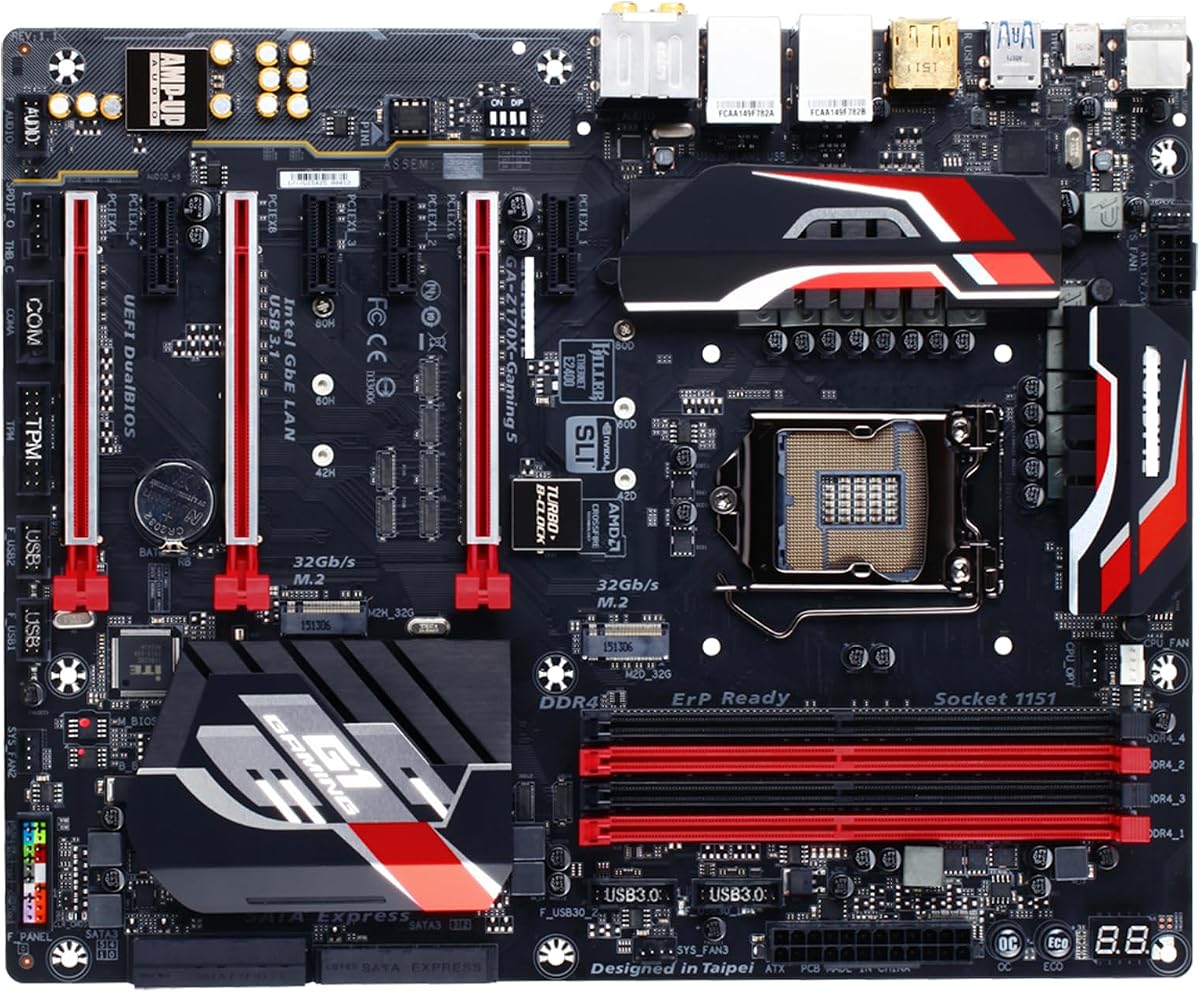
The Gigabyte GA-Z170X-Gaming 7 targets enthusiasts needing multi-GPU capabilities. Its 4.2 rating confirms consistent performance in demanding gaming environments.
We may earn a commission when you buy through this link, at no additional cost to you.
Key strengths are 2-Way NVIDIA SLI and 3-Way AMD Crossfire support. Plus seven USB 3.0 ports provide ample connection options for peripherals and storage devices.
Compared to smaller boards the ATX form factor means case compatibility is crucial. The high price point limits appeal to those needing specific multi-GPU features.
Ideal for users building high-end rigs with multiple graphics cards. It delivers robust expansion capabilities that remain relevant for legacy support scenarios.
Support for SLI and Crossfire allows users to maximize graphics throughput for ultra-high resolution gaming.
Seven USB 3.0 ports eliminate the need for hubs ensuring all devices connect with high speed.
We may earn a commission when you buy through this link, at no additional cost to you.
This model offers a balanced feature set for general gaming needs. Its 3.7 rating reflects mixed user feedback but remains viable for standard builds.
We may earn a commission when you buy through this link, at no additional cost to you.
Strengths include support for 2-Way SLI and 3-Way AMD Crossfire. The 6 SATA 6Gb/s connectors ensure plenty of storage options for multiple drives.
Trade-offs involve fewer USB ports compared to higher-end variants. Users requiring extensive peripheral connectivity may need to look elsewhere.
Choose this if you need basic SLI support without premium features. It serves as a reliable platform for mid-range processor and GPU pairings.
Multiple PCIe slots allow for additional capture cards or Wi-Fi adapters without sacrificing bandwidth.
Abundant SATA ports facilitate easy installation of multiple hard drives or SSDs for bulk storage.
We may earn a commission when you buy through this link, at no additional cost to you.
The ASRock Z170 EXTREME4 provides enthusiast features at a budget price. Its 4.2 rating indicates strong performance relative to its cost point.
We may earn a commission when you buy through this link, at no additional cost to you.
Key strengths include Realtek ALC1150 audio and flexible PCIe slots for various configurations. The board supports up to 64GB memory capacity effectively.
Trade-offs involve a simpler aesthetic compared to RGB-heavy boards. For functional builds performance outweighs visual flair in most scenarios.
Ideal for users seeking maximum features without the premium price tag. It remains a top choice for practical overclocking setups.
The ALC1150 codec delivers high-definition sound suitable for gaming and media consumption alike.
Support for 64GB allows heavy multitasking and future-proofing for resource-intensive applications.
We may earn a commission when you buy through this link, at no additional cost to you.
The msi Z170 Krait Gaming focuses on audio and physical durability. Its 3.9 rating suggests decent performance with some room for improvement in specific areas.
We may earn a commission when you buy through this link, at no additional cost to you.
Key strengths include Audio Boost 3 and MSI Steel Armor on PCIe slots. These features enhance sound clarity and physical slot protection effectively.
Trade-offs involve fewer aesthetic customization options compared to competitors. Users prioritizing internal specs over RGB will appreciate this balance.
Choose this if audio quality and slot durability are high priorities. It offers solid support for multi-GPU setups and standard gaming needs.
Audio Boost 3 technology reduces noise and improves signal quality for a more immersive listening experience.
Steel Armor slots reinforce the PCIe connectors preventing damage from heavy graphics cards over time.
We may earn a commission when you buy through this link, at no additional cost to you.
The Asus Z170-A strikes a balance between features and user friendliness. Its 4.3 rating highlights high satisfaction among users valuing simplicity.
We may earn a commission when you buy through this link, at no additional cost to you.
Key strengths include Dual Intelligent Processors 5 and 5-Way Optimization. These tools automate system tuning making performance tweaks accessible to non-experts.
Trade-offs involve less advanced features compared to higher-tier ROG models. For most users the automated setup outweighs manual control needs.
Ideal for builders who want a reliable system without complex configuration. It delivers consistent performance with minimal setup effort.
5-Way Optimization automatically adjusts CPU and cooling settings ensuring stable performance without manual intervention.
5X Protection II safeguards the motherboard against hardware threats ensuring long-term reliability.
We may earn a commission when you buy through this link, at no additional cost to you.
The Asus ROG MAXIMUS VIII GENE offers premium features in a compact mATX layout. Its 4.0 rating reflects solid quality even in refurbished condition.
We may earn a commission when you buy through this link, at no additional cost to you.
Key strengths include Extreme Engine DIGI+ and SupremeFX 2015 audio. The mATX form factor fits smaller cases without sacrificing core performance.
Trade-offs involve limited expansion slots due to smaller size. Users needing multiple peripherals may find this restrictive compared to full ATX models.
Choose this for high-performance small form factor builds. It delivers flagship features in a compact package suitable for space-constrained setups.
Despite smaller dimensions this board maintains robust power delivery for high-end CPU overclocking scenarios.
Certified refurbishment offers significant savings while ensuring full functionality and warranty protection for buyers.
We may earn a commission when you buy through this link, at no additional cost to you.
Selecting the right Z170 motherboard involves understanding socket compatibility, VRM quality, and expansion needs. Consider these factors before finalizing your purchase.
Ensure the board supports your specific Intel generation. The Z170 chipset works with 6th and 7th Gen CPUs but may need a BIOS update for 7th Gen models.
Always check the manufacturer's CPU support list before buying to avoid compatibility issues during installation.
Voltage Regulator Module quality determines how stable your CPU runs under load. Boards with Extreme Engine DIGI+ or similar designs offer better overclocking stability.
Prioritize VRM design if you plan to push your CPU beyond stock speeds.
All Z170 boards support DDR4 but speed limits vary. Most support 2400MHz standard with higher speeds via overclocking.
Choose boards supporting higher frequencies if you need maximum system bandwidth for gaming.
Modern builds require fast storage. Look for M.2 slots that support NVMe drives for significantly reduced load times.
Ensure there are enough SATA ports for your total drive requirements including backups.
Online gaming demands stable low-latency connections. Ethernet ports with LANGuard or similar protections reduce packet loss.
Consider Wi-Fi compatibility if you cannot run a cable directly to the PC.
Audio codecs like SupremeFX or ALC1150 provide cleaner sound. High-end boards often include shielding to reduce electrical interference.
Use quality headphones for the best gaming experience regardless of onboard audio quality.
ATX boards offer more expansion slots while mATX saves space. Ensure your case supports the chosen board size.
Check clearance for GPU sizes before finalizing your layout to avoid fit issues.
Refurbished items come with limited warranties compared to new units. Check seller policies carefully when buying used boards.
Always keep your purchase receipts to ensure warranty claims can be processed smoothly.
Install components carefully to avoid bent pins. Align the CPU notch correctly before applying pressure during mounting.
Regularly update your BIOS to ensure stability with newer CPUs. Use a reliable power supply to protect against surges.
Keep your case clean from dust to maintain thermal performance. Monitor temperatures regularly using system utilities.
Yes but you must update the BIOS to the latest version first. Most Z170 boards support 7th Gen after the update though check compatibility lists.
Most Z170 boards include M.2 slots that support NVMe drives. Check the manual for speed limits since some run at PCIe 2.0 speeds.
SLI is for NVIDIA GPUs while Crossfire is for AMD. Your board must specifically support the type of multi-GPU setup you plan to use.
If you plan to overclock or need multiple expansion cards it is worth it. For stock builds mid-range options are sufficient and save money.
Visit the manufacturer's website and check the support page for your specific board model. The CPU support list is usually updated regularly.
If you choose an mATX model like the GENE it will fit smaller cases. Full ATX boards require standard mid-tower or larger enclosures.
Our top pick remains the Asus ROG Maximus VIII Hero for its balanced premium features. The Gigabyte models offer excellent value for specific storage needs.
Prioritize VRM quality and connectivity options that match your build plans. A reliable motherboard ensures stability for years of gaming.
Prices change frequently so always check current listings before buying. Verify seller reputation and warranty terms to protect your investment.