
Computer Fan Stand 120mm 140mm
4.4Editor score
Fits 120mm and 140mm fans
Heavy duty metal construction
Tool free thumb screw installation
Finding the right computer fan stand can transform your workspace efficiency and device longevity. Whether you manage a gaming rig or a laptop setup, proper airflow is essential to prevent overheating during intense sessions.
We analyzed ten top-rated cooling solutions based on build quality, fan performance, and ergonomic design. Our comparison highlights versatile mounts for PC fans and integrated stands for laptops to suit every technical need.
Each selection below showcases unique strengths from budget-friendly options to premium aluminum constructs. Prices fluctuate frequently so check current listings before purchasing to ensure you get the best value available today.
4.4Editor score
4.6Editor score

4.0Editor score
As an Amazon Associate we earn from qualifying purchases.
This side-by-side comparison evaluates ten distinct cooling solutions ranging from laptop risers to standalone PC fan mounts. We examine compatibility, material durability, and adjustability to help you identify the ideal match for your specific hardware requirements.


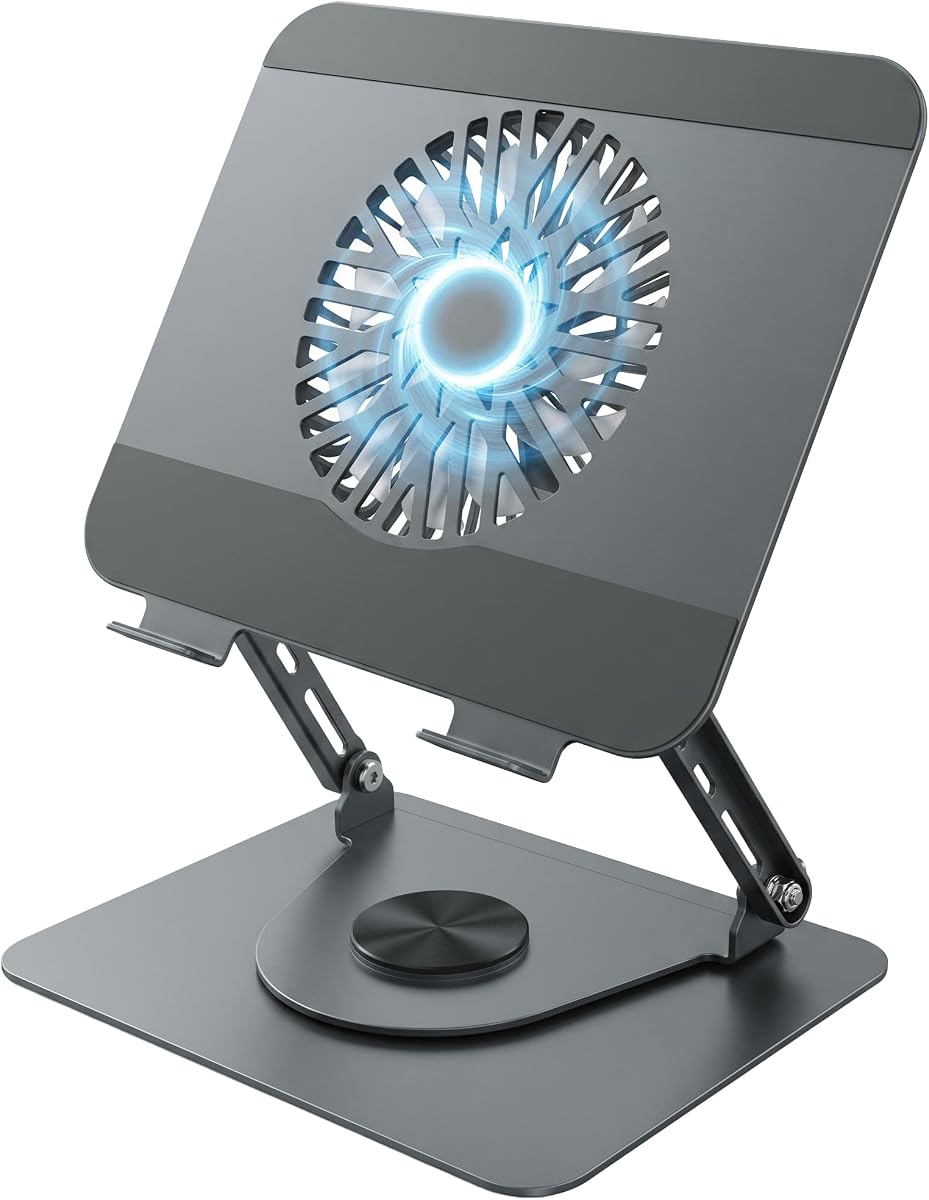
This laptop stand delivers an all-in-one cooling solution with a built-in fan designed to keep your device running cool during demanding tasks. It holds a strong 4.6 rating from users who appreciate the smooth rotation and ergonomic adjustability.
We may earn a commission when you buy through this link, at no additional cost to you.
The central fan actively moves air beneath the laptop preventing heat buildup that can throttle performance. Its 360-degree rotating base allows effortless screen sharing without moving the entire stand, making it ideal for collaborative work or client meetings.
While the fan is integrated and not removable for custom setups the convenience of an active cooling system outweighs this limitation for most users. The non-slip silicone pads ensure your laptop stays secure even when typing vigorously on the elevated surface.
Anyone seeking a professional workspace upgrade should consider this riser for its blend of cooling and ergonomic benefits. It transforms any standard desk into an efficient station while protecting your laptop from overheating during long sessions.
The integrated fan targets heat accumulation under the laptop ensuring sustained performance during gaming or video rendering tasks without thermal throttling.
The 360-degree swivel base lets you turn the screen toward colleagues instantly which enhances presentation flow and teamwork efficiency.
We may earn a commission when you buy through this link, at no additional cost to you.
This heavy-duty mount provides an economical way to position standard PC fans for desktop cooling without requiring case modifications. It achieves a 4.4 rating thanks to its sturdy build and straightforward installation process using thumbscrews.
We may earn a commission when you buy through this link, at no additional cost to you.
The stand supports both 120mm and 140mm square-frame fans allowing flexibility for different cooling needs. Its weighted base and metal construction ensure stability even when running high-speed fans that might otherwise wobble on cheaper plastic stands.
Users note that while the fan is not included the precision-cut metal edges require careful handling during installation. This minor safety consideration is offset by the tool-free assembly that lets you set up your cooling zone quickly.
DIY enthusiasts and budget-conscious users will find this mount ideal for directing airflow to routers 3D printers or specific PC components. It offers reliable performance at a low cost making it a practical choice for targeted cooling projects.
Designed to fit most square-frame PC fans this stand allows you to use existing cooling hardware without needing new proprietary parts.
The adjustable pivot lets you direct air exactly where needed such as toward a hot GPU or router modem for optimal heat dissipation.
We may earn a commission when you buy through this link, at no additional cost to you.
Crafted with precision CNC machining this mount offers a premium aesthetic and robust performance for larger cooling fans. It holds a 4.0 rating from users who value its durable aluminum alloy construction and refined finish.
We may earn a commission when you buy through this link, at no additional cost to you.
The stand accommodates 120mm 140mm and even 180mm fans providing exceptional versatility for custom builds or industrial setups. Its three precision damped pivot hinges allow secure positioning at any angle ensuring the fan stays exactly where you set it.
While the price is higher than basic steel mounts the corrosion-resistant anodized finish ensures longevity in various environments. Users should note the included thumbscrews allow tool-free adjustment though tightening six points may take a few minutes initially.
Professional PC builders and enthusiasts seeking a high-end look will appreciate the elegant design and stability. It delivers both form and function making it a top choice for those who demand quality in their cooling infrastructure.
The sandblasted and anodized aluminum provides a smooth texture that resists rust and scratches while maintaining a sophisticated appearance on any desk.
Unlike many mounts this stand handles large 180mm fans giving you extra airflow capacity for demanding cooling requirements without stability issues.
We may earn a commission when you buy through this link, at no additional cost to you.
The Kootek pad features five fans including one large central unit to deliver powerful cooling for laptops ranging from 12 to 17 inches. Its 4.4 rating reflects satisfaction with its quiet operation and practical USB hub integration.
We may earn a commission when you buy through this link, at no additional cost to you.
Users can control fans via two switches allowing them to run one four or all five fans depending on heat needs. The built-in dual USB hub adds valuable connectivity for peripherals like mice or drives without using laptop ports.
The six ergonomic height settings help improve posture during long work sessions while front stoppers keep devices secure. However the rigid design means it is less portable than foldable alternatives and the USB cable requires nearby power.
Ideal for desk setups where maximum cooling is needed this pad excels in stationary environments. It balances performance with utility offering a reliable solution for gamers and professionals who use larger laptops regularly.
Independent switches let you choose fan configurations to balance cooling power and noise levels according to your current activity and environment.
The USB hub allows seamless connection of external devices keeping your workspace organized and reducing the need for additional docking stations.
We may earn a commission when you buy through this link, at no additional cost to you.
This aluminum stand combines portability with cooling through two quiet fans and customizable RGB lighting. It holds a 4.4 rating for its stylish design and ease of use in home or mobile settings.
We may earn a commission when you buy through this link, at no additional cost to you.
The stand is foldable and lightweight making it easy to pack for travel or store when not in use. Three adjustable fan speeds provide flexibility to match cooling needs from light office tasks to intense gaming sessions.
While the aluminum construction is durable its lighter weight means it may shift slightly if bumped. Users should be careful when adjusting the angle to avoid tilting the laptop especially given the portable design.
Perfect for users who value aesthetics and mobility this stand suits DJs and travelers who need reliable cooling on the go. The RGB lighting adds a personalized touch that enhances any workspace vibe.
The foldable structure collapses into a slim profile that fits easily in bags ensuring your laptop stays cool whether at home or on the move.
RGB lighting options let you match the stand to your setup style adding a modern flair that complements gaming or creative environments.
We may earn a commission when you buy through this link, at no additional cost to you.
This versatile stand features an active cooling fan and open frame design to prevent overheating during extended sessions. It earns a 4.5 rating for its portability and adaptable load capacity up to five kilograms.
We may earn a commission when you buy through this link, at no additional cost to you.
The stand includes a phone mount and multiple USB ports which adds utility for users managing multiple devices. Its folded thickness of just 1.3 inches makes it incredibly compact for easy storage or transport.
Adjusting the load capacity requires using a screw tool which may be slightly inconvenient but ensures security for heavier laptops. The USB-powered fan works well but relies on an available port for continuous operation.
Ideal for students and professionals on the move this stand provides essential cooling with extra organization features. It balances function and portability making it a smart choice for hybrid work environments.
When folded the stand becomes nearly flat allowing you to slip it into a laptop sleeve or drawer without occupying much space.
Built-in phone mounts and USB ports let you keep your phone and peripherals organized while using your laptop efficiently.
We may earn a commission when you buy through this link, at no additional cost to you.
This cooling pad is designed with family use in mind offering three silent fans and a simple wheel switch for speed control. It holds a 4.3 rating for its quiet operation and ergonomic height adjustments suitable for various users.
We may earn a commission when you buy through this link, at no additional cost to you.
The phone holder allows you to prop up devices for video calls or entertainment while using the laptop. Its five-level height adjustment ensures comfortable viewing angles whether working at a desk or gaming on a couch.
Users appreciate the durable ABS and stainless steel mesh construction that resists wear over time. The max noise level of 40dB ensures it does not disrupt focus or relaxation during daily activities.
A practical choice for households this pad supports multiple devices and needs effectively. It combines cooling with convenience making it an excellent gift for students or parents managing multiple tech tasks.
The simple wheel switch eliminates complicated buttons allowing anyone to adjust fan speeds instantly without technical knowledge.
With USB ports and a phone holder it serves as a multi-functional hub that reduces clutter and keeps essentials within reach.
We may earn a commission when you buy through this link, at no additional cost to you.
This upgraded aluminum mount focuses on durability with a rust-proof construction designed to last in varied conditions. It holds a 4.3 rating for its stability and flexibility in directing airflow for 120mm fans.
We may earn a commission when you buy through this link, at no additional cost to you.
The 360-degree vertical rotation allows you to channel air up down or sideways to target specific cooling zones. Tool-free thumb screws make setup quick and adjustments easy without needing extra hardware.
While limited to 120mm fans its heavy-duty build ensures it handles high-speed operations without shaking or wobbling. Users seeking a dedicated stand for this size will find it reliable and sturdy.
Ideal for desktops needing targeted cooling this mount offers a professional solution for managing heat. Its simplicity and robust construction make it a dependable choice for long-term use.
Full aluminum construction ensures the stand resists corrosion maintaining its appearance and function even in humid environments.
Vertical rotation flexibility lets you aim air exactly where needed such as toward a router or modem for efficient cooling.
We may earn a commission when you buy through this link, at no additional cost to you.
This metal mount supports both 120mm and 140mm fans providing flexibility for different cooling setups. It holds a 4.3 rating for its sturdy construction and straightforward installation process.
We may earn a commission when you buy through this link, at no additional cost to you.
The stand offers 360-degree vertical rotation allowing you to direct airflow in any direction needed for effective cooling. Heavy-duty metal ensures stability even when running high-speed fans that generate vibration.
Tool-free installation with thumb screws means you can set it up quickly without additional hardware. Users should note that fans are not included so you will need to source them separately.
A practical option for DIY cooling needs this stand delivers reliable performance at a reasonable cost. It suits users who need versatile mounting for multiple fan sizes without complex modifications.
Support for both 120mm and 140mm sizes offers flexibility to use different fans depending on your specific cooling requirements.
Heavy-duty metal construction prevents wobbling during operation ensuring the fan remains steady and effective over long periods.
We may earn a commission when you buy through this link, at no additional cost to you.
This mount achieves a perfect 5.0 rating for its robust design and ability to eliminate vibration during fan operation. It supports both 120mm and 140mm fans with a solid metal bracket ensuring stability.
We may earn a commission when you buy through this link, at no additional cost to you.
The 360-degree vertical rotation provides unlimited airflow direction for various devices like laptops routers or modems. Textured thumb knobs allow quick assembly and repositioning without tools making setup hassle-free.
Users appreciate the multi-scene versatility which makes it suitable for gaming or work environments alike. Precision pre-drilled holes ensure a tight fit for mainstream fans reducing the risk of loosening over time.
Highly recommended for users seeking a reliable cooling solution this stand delivers on its promise of stability and flexibility. It is an excellent addition for anyone looking to optimize airflow without complex setups.
Thick solid metal construction absorbs vibration from high-RPM fans ensuring a quiet and stable experience even during intense cooling.
Works well with laptops routers and electronics making it a versatile solution for cooling multiple types of devices effectively.
We may earn a commission when you buy through this link, at no additional cost to you.
Selecting the right computer fan stand depends on your specific hardware and cooling needs. This guide outlines key factors to consider to ensure you choose a solution that enhances performance and durability.
Ensure the stand supports your fan size whether 120mm 140mm or larger models. Universal mounts offer flexibility if you plan to upgrade your cooling components later.
Check for adjustable mounting points to secure different fan sizes firmly without wobbling.
Metal stands provide superior stability and heat dissipation compared to plastic. Look for aluminum or steel materials for long-term durability.
A solid base prevents tipping when fans spin at high speeds ensuring safety and consistency.
Rotation and tilt capabilities allow you to direct airflow exactly where it is needed for optimal cooling efficiency.
Height adjustment is crucial for laptop stands to achieve an ergonomic viewing angle and better posture.
Foldable or lightweight designs are ideal if you move your workstation frequently. Consider travel needs when choosing between portable and permanent options.
Compact sizes save desk space and make storage easier when not in active use.
Quiet fans are essential for work or study environments to avoid distractions during focused tasks.
Check decibel ratings or user feedback to ensure the stand operates silently under load.
Tool-free setups with thumbscrews simplify assembly and allow quick adjustments without extra hardware.
Clear instructions and pre-drilled holes reduce installation time and frustration during setup.
Built-in USB hubs or phone holders add convenience for managing devices without extra clutter on your desk.
RGB lighting may appeal to gamers but ensure it does not interfere with your focus or power usage.
Place the stand on a flat stable surface to prevent wobbling during operation. Ensure the fan has enough clearance to rotate freely without hitting nearby objects.
Connect the fan to a reliable power source and verify it runs smoothly before leaving it unattended. Regularly check cables for wear to maintain safe operation over time.
Clean dust from the fan blades and stand monthly to ensure optimal airflow. Use a soft brush or compressed air to avoid damaging delicate components.
Most stands support standard sizes ranging from 12 to 17 inches but you should verify the max weight and width limits. Some models like the Kootek pad fit larger laptops while others are limited to smaller devices. Always check the product specs before buying.
No most mounts are sold separately and require you to provide your own cooling fan. This allows you to choose a fan that matches your specific noise and performance needs. Always confirm what is included in the package.
Yes many stands with adjustable bars or flexible surfaces can support tablets securely. Ensure the device fits within the width limits and does not slide off during use. Non-slip pads help keep tablets stable.
Quality bearings and balanced fan blades reduce noise during operation. Stand materials like rubber or silicone can also dampen vibrations from the fan motor. Check decibel ratings for a precise measure of quietness.
Use compressed air to blow dust out of the fan blades and stand crevices. A soft brush can help remove stubborn debris without scratching the surface. Regular cleaning maintains airflow and prevents overheating.
Yes ergonomic laptop stands feature adjustable height and tilt settings to match your viewing preferences. Look for models with multiple locking positions to secure your device safely. Adjustable angles reduce neck strain significantly.
Our top picks include the Laptop Stand with Cooling Fan for overall performance and the Computer Fan Stand for budget-friendly PC cooling. Each option offers unique benefits depending on your hardware and workspace needs.
Prioritize build quality and adjustability to ensure long-term reliability and ergonomic comfort. A well-chosen stand protects your device from overheating and improves your daily workflow efficiency.
Prices and availability change frequently so verify current listings before purchasing. Always compare features against your specific requirements to make the best investment for your setup.