
VOYEE Switch Controllers
4.4Editor score
Programmable Buttons
RGB Lighting
Affordable Price
This expert guide compares the top gaming controller for Apple TV options to help you find the best wireless gamepad for iOS gaming and streaming.
Finding the right gaming controller for Apple TV can transform your living room into a powerful gaming console. Whether you play Apple Arcade titles or stream services, a quality gamepad ensures precise control and comfort during long sessions.
We evaluated ten top-rated controllers based on compatibility, battery life, build quality, and feature sets. Each product was analyzed for its ability to connect seamlessly with tvOS and deliver responsive input for various game genres and genres.
This list covers budget-friendly options alongside premium models designed for serious gamers. Each pick highlights key strengths and potential drawbacks. Please note that product availability and pricing may change, so verify details before purchasing your new gear.
4.4Editor score

4.7Editor score

4.0Editor score
Below is a detailed side-by-side comparison of all ten controllers. This table highlights key specifications and features to help you quickly identify which model fits your specific gaming needs and budget constraints.
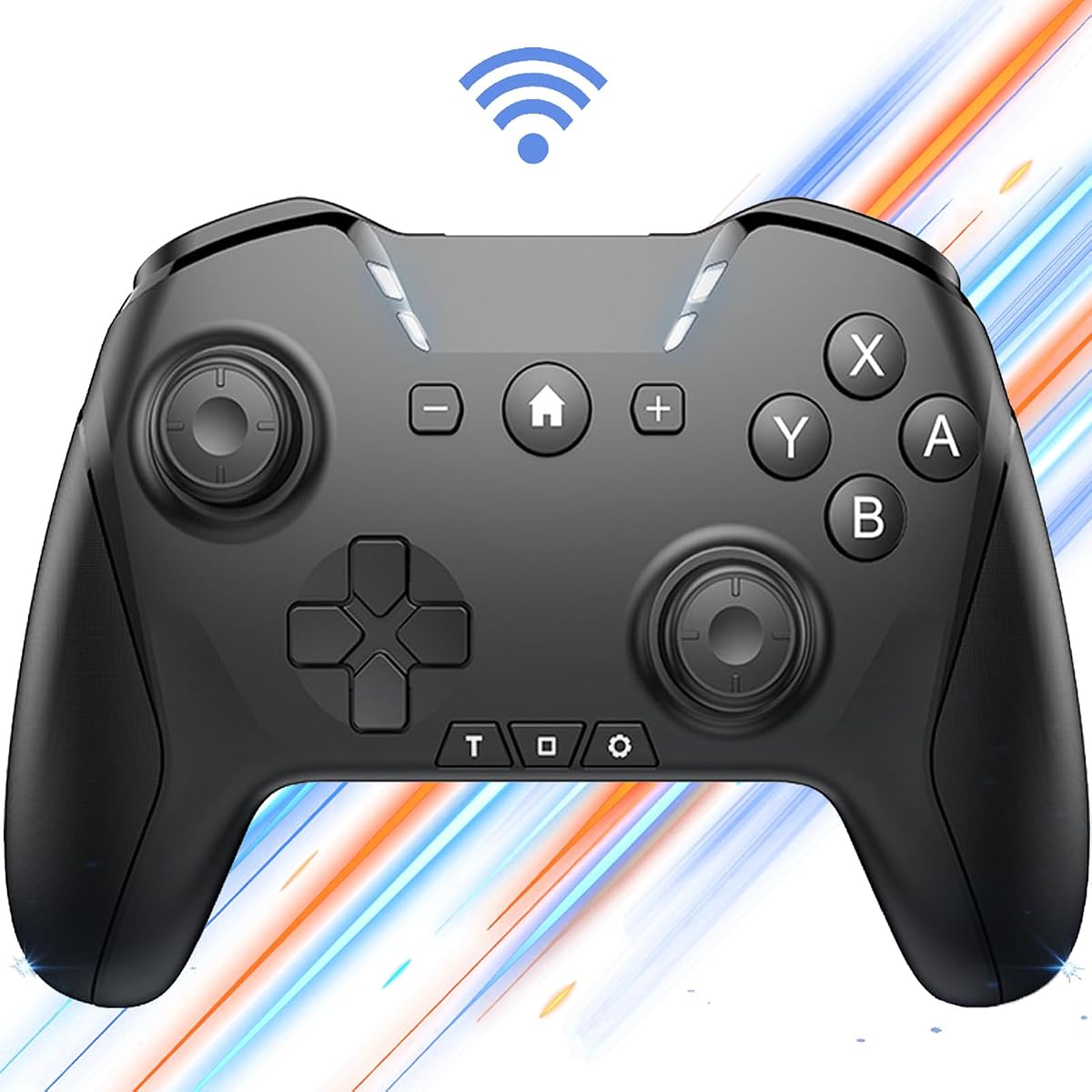



This Bluetooth controller stands out for its broad compatibility across multiple platforms including Apple TV, iOS, and Android. With a 4.0 rating, it offers a solid entry point for gamers seeking versatile connectivity without breaking the bank. Its standout qualities include programmable macros and a robust battery life.
We may earn a commission when you buy through this link, at no additional cost to you.
The controller features adjustable turbo and macros which allow users to customize button combinations up to 30 seconds. This is particularly useful for repetitive tasks in gaming. The 650mAh battery supports up to 15 hours of playtime ensuring you stay connected during marathon sessions. It also supports wake up functions for compatible consoles.
While the features are impressive the build quality feedback is mixed among users. Some report connectivity issues that require following the manual strictly. However for the price point these trade-offs are acceptable for casual gamers who prioritize function over premium aesthetics. The USB-C charging also adds convenience.
This controller is ideal for players who switch between PC, mobile, and Apple TV frequently. Its ability to handle different input schemes makes it a practical choice for multi-platform households. We recommend it for budget-conscious users who need flexibility and decent battery performance in their gaming setup.
Customize button combinations up to 30 seconds for advanced gameplay strategies.
Enjoy up to 15 hours of playtime on a single charge with the 650mAh battery.
We may earn a commission when you buy through this link, at no additional cost to you.
The SteelSeries Nimbus+ is an officially licensed controller for Apple devices including tvOS. With a 4.0 rating, it delivers reliable performance and a premium feel. Its standout qualities include a massive 50+ hour battery life and tactile feedback that enhances gaming precision.
We may earn a commission when you buy through this link, at no additional cost to you.
This controller features tactile D-Pad buttons for fast responsive feedback which is crucial for platformers and retro games. The clickable joysticks add extra input options allowing for more control during complex scenarios. Its battery life is a major highlight ensuring weeks of play on a single charge.
Despite its high-end features the controller sometimes requires a firmware update via SteelSeries Engine for optimal compatibility. This step adds a minor hurdle for new users. However the long-term stability and reliability make this a worthwhile investment for serious Apple ecosystem gamers.
We recommend this controller for users who prioritize official support and long battery life. It fits seamlessly into the Apple ecosystem offering a seamless connection and responsive gameplay. The tactile controls are perfect for competitive titles where every millisecond matters.
Guaranteed compatibility with all iOS, iPadOS, and tvOS devices out of the box.
Play for over 50 hours on a single charge reducing the need for frequent recharging.
We may earn a commission when you buy through this link, at no additional cost to you.
The VOYEE Switch Controller offers an affordable yet feature-rich option for gamers. With a high 4.4 rating, it balances cost and performance effectively. Its standout qualities include customizable RGB lighting and a responsive gyro sensor that enhances motion control accuracy.
We may earn a commission when you buy through this link, at no additional cost to you.
This controller supports one-key pairing and wake up features making it convenient for quick gaming sessions. The M1/M2 programmable buttons allow for complex skill operations to be simplified which is helpful in action games. The 3-speed turbo function adds versatility for different game genres.
While it performs well on Switch and iOS the PC compatibility is limited to wired connections. This might be a drawback for users who prefer wireless play on Windows. However for the price and battery life this is a minor compromise for most mobile and console players.
This controller is perfect for budget gamers who want premium features like RGB and programmable buttons. It makes a great gift for family and friends due to its cool design. We suggest it for those who prioritize value and visual appeal in their hardware.
Choose from 4 light modes including solid, breathing, strobe, and off for style.
Map M1/M2 keys to simplify complex moves and improve gameplay efficiency.
We may earn a commission when you buy through this link, at no additional cost to you.
The 8Bitdo SN30 Pro is a favorite for retro gaming enthusiasts and Apple TV users alike. With a top-tier 4.7 rating, it offers exceptional build quality and precision. Its standout qualities include Hall Effect joysticks that prevent drift and a compact retro design.
We may earn a commission when you buy through this link, at no additional cost to you.
This controller is officially supported on Apple TV ensuring seamless connectivity without extra dongles. The Hall Effect technology ensures your inputs remain accurate over time which is vital for precise aiming. It also features motion controls and vibration for a fully immersive experience.
While it excels in retro games the smaller form factor might not fit larger hands comfortably for long sessions. Additionally it lacks some modern features found in more expensive models. However for its target audience these trade-offs are acceptable given the price and performance.
We recommend this controller for those who value portability and classic aesthetics. It is ideal for streaming classic games on Apple TV or playing indie titles. The high reliability and ease of use make it a top choice for dedicated retro players.
Use magnetic sensors for long-lasting precision and zero drift over time.
A compact form factor fits easily in your pocket for gaming on the go.
We may earn a commission when you buy through this link, at no additional cost to you.
The renewed SteelSeries Nimbus+ offers a sustainable and cost-effective way to access premium gaming controls. With a 3.6 rating, it provides the core features of the original at a lower price. Its standout qualities include professional inspection and a stable wireless connection.
We may earn a commission when you buy through this link, at no additional cost to you.
This controller has been tested to meet Amazon Renewed quality standards ensuring it works like new. It maintains the same compatibility with iPhone, iPad, and Apple TV as the original version. The rechargeable battery supports extended sessions without the need for constant replacements.
However the rating suggests some users may experience minor issues compared to the new version. There might be visible signs of wear on the exterior although functionality remains intact. For budget shoppers willing to take a small risk this is a practical alternative.
We suggest this model for environmentally conscious buyers looking to save money. It is a great way to enter the Apple TV gaming ecosystem without the premium price tag. Always inspect the unit upon arrival to ensure it meets your expectations.
Professionally inspected and cleaned to meet Amazon Renewed quality standards.
Enjoy responsive gameplay without cables thanks to reliable wireless technology.
We may earn a commission when you buy through this link, at no additional cost to you.
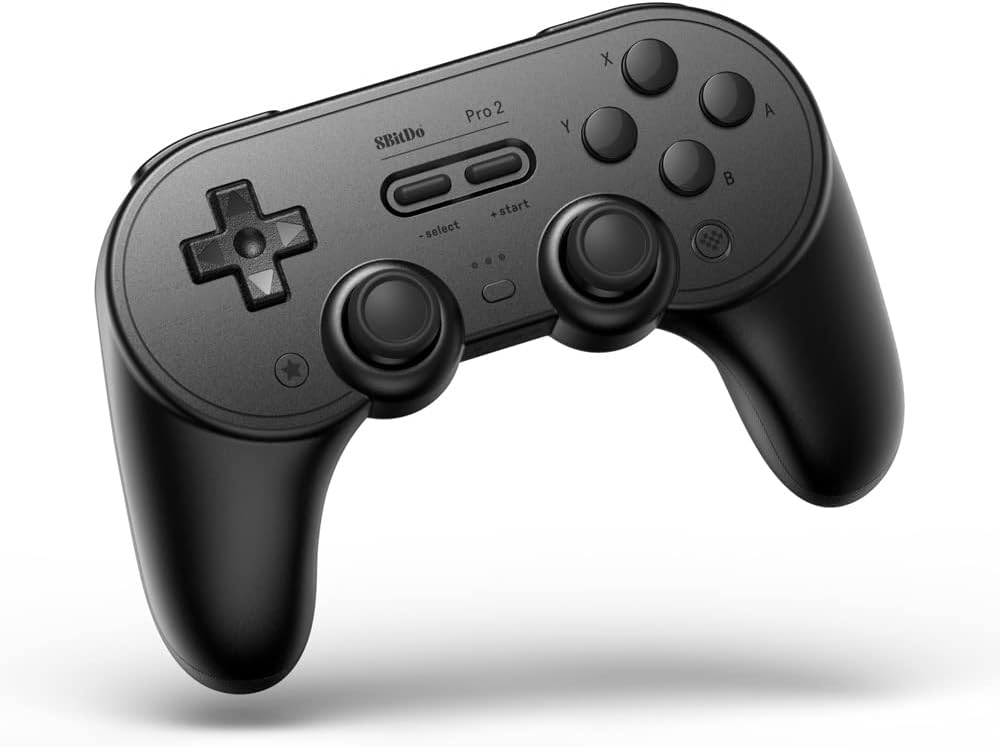
The 8BitDo Pro 2 brings advanced features to the Apple TV gaming experience with a 4.5 rating. It stands out with its back buttons and custom profile switching capabilities that cater to serious gamers. The enhanced grip and 20-hour battery make it comfortable for long play.
We may earn a commission when you buy through this link, at no additional cost to you.
This controller allows custom profile switching via Ultimate software on PC and iOS. This means you can save different settings for different games and switch between them easily. The 4-way mode switching button makes transitioning between platforms seamless and efficient for users.
While the features are robust the initial setup on PC might require some technical knowledge. Also the price is higher than basic models which might deter casual gamers. However the versatility and control depth make it worth the investment for enthusiasts.
We recommend this controller for users who need pro-level inputs and customization. It is perfect for competitive games where every button placement matters. The multi-platform support ensures you can use it across all your devices without buying multiple controllers.
Two pro-level back buttons provide extra inputs for complex gameplay scenarios.
Save and switch between custom profiles using the Ultimate software for flexibility.
We may earn a commission when you buy through this link, at no additional cost to you.
The standard SteelSeries Nimbus+ offers a reliable and straightforward gaming experience for Apple TV users. With a 4.1 rating, it delivers consistent performance without unnecessary bells and whistles. Its standout qualities include a trusted brand reputation and solid wireless connectivity.
We may earn a commission when you buy through this link, at no additional cost to you.
This controller is designed specifically for iOS and tvOS ensuring smooth operation out of the box. The rechargeable battery supports multiple sessions without frequent interruptions. The ergonomic shape fits comfortably in the hand allowing for extended play without fatigue.
While it does not have unique features like macros or RGB it excels in simplicity and reliability. For users who want a controller that just works without setup this is an ideal choice. The lack of complex settings makes it user-friendly for all ages.
We suggest this model for users who prefer a no-frills approach to gaming. It is excellent for families with children who need durable and simple controls. The brand quality ensures longevity and customer support when needed.
SteelSeries is known for high-quality gaming peripherals and reliable performance.
A comfortable design reduces hand strain during long gaming sessions.
We may earn a commission when you buy through this link, at no additional cost to you.
The AceGamer Aurora II offers a versatile gaming solution with both 2.4G and Bluetooth connectivity. With a 4.2 rating, it combines modern tech like Hall Effect joysticks with a massive 1000mAh battery. Its standout qualities include reduced drift and customizable back keys.
We may earn a commission when you buy through this link, at no additional cost to you.
This controller supports host SW 2 connection and offers stronger encryption for stable wireless play. The Hall Effect sensors ensure precision and longevity for the joysticks. Additionally the 1000mAh battery provides an extra-long playtime ideal for travel or marathon sessions.
While the 2.4G connection requires a receiver it offers better stability against interference compared to Bluetooth. The setup process is straightforward though it may require pressing specific button combinations. For multi-platform gamers this dual connectivity is a significant advantage.
We recommend this controller for those who value technical specs and battery life. It is great for PC and Switch users who also connect to Apple TV. The enhanced precision and customization options make it a strong contender in the mid-range market.
Hall Effect sensors provide precise input detection without drift over time.
1000mAh capacity ensures extended playtime without constant recharging needs.
We may earn a commission when you buy through this link, at no additional cost to you.
The Official Luna Wireless Controller is designed for seamless cloud gaming with a 4.4 rating. It stands out with its Cloud Direct technology that connects directly to game servers for low latency. Its standout qualities include screen switching and wide device support.
We may earn a commission when you buy through this link, at no additional cost to you.
When playing on Luna you can pause on one screen and pick up on another. This feature is unique and enhances the mobile gaming experience significantly. The offset thumbsticks and responsive triggers make it comfortable for varied game genres.
While it is optimized for Amazon Luna it works via Bluetooth on many other devices. However the experience may be most seamless within the Amazon ecosystem. For those who rely on cloud gaming this controller is a specialized tool that delivers well.
We recommend this controller for Luna subscribers looking to maximize their experience. It is also a solid general-purpose option for its Bluetooth capabilities. The specialized features make it a unique choice among standard controllers.
Connect directly to game servers for low-latency gameplay during streaming.
Pause and resume gaming seamlessly across different compatible screens.
We may earn a commission when you buy through this link, at no additional cost to you.
The GMBACK Wireless Switch 2 Pro controller offers specialized features like loop macros for a 4.1 rating. It stands out for its ability to automate repetitive tasks which saves time in grinding games. Its standout qualities include wake-up functionality and customizable turbo settings.
We may earn a commission when you buy through this link, at no additional cost to you.
This controller allows you to record custom button sequences and replay them automatically. This is ideal for tasks that require constant button presses such as farming in RPGs. The 800mAh battery supports 15-20 hours of gameplay making it reliable for daily use.
While macros are powerful they require a learning curve to set up correctly. Users must follow instructions to record and play back the sequences accurately. However once mastered this feature provides a significant edge in efficiency and automation.
We suggest this controller for gamers who value automation and efficiency. It is great for RPG players who need to grind resources. The wake-up feature adds convenience for quick access to your console without searching for a remote.
Record and replay button sequences to automate repetitive gaming tasks easily.
Wake up your console directly from the controller for faster access.
We may earn a commission when you buy through this link, at no additional cost to you.
Choosing the right controller involves considering compatibility, battery, build quality, and specific features. This guide outlines the key factors to help you make an informed decision for your gaming setup.
Ensure the controller explicitly supports Apple TV and tvOS. Some controllers are designed for Android or PC and may lack specific drivers for Apple devices. Look for MFi certification or official support listings to guarantee seamless pairing.
Check the product description for mentions of tvOS support to avoid connection issues.
Gaming sessions can last hours so a long-lasting battery is crucial. Aim for controllers offering at least 15 hours of playtime on a single charge. This reduces interruptions and ensures you are always ready to play.
Consider rechargeable models with USB-C for convenient and modern charging options.
The durability of the controller affects its longevity and comfort. Look for textured grips and robust buttons that can withstand frequent use. High-quality materials prevent wear and tear over time.
Review user feedback to confirm the build quality meets your expectations.
Advanced features like gyro motion, programmable buttons, and turbo settings enhance gameplay. These features allow for more control and customization tailored to your specific needs. Assess which features add value to your specific gaming style.
Prioritize features that directly improve your gaming experience rather than aesthetic additions.
Wireless connectivity via Bluetooth is standard for Apple TV controllers. Ensure the pairing process is straightforward and stable. A reliable connection prevents latency issues that can impact gameplay.
Verify that the controller supports the latest Bluetooth standards for best performance.
Comfort is key during extended play sessions. The controller should fit naturally in your hands without causing strain. Look for designs that distribute weight evenly and have comfortable triggers.
Consider the size of the controller if you have smaller hands.
While price is a factor balance it with the features offered. Budget controllers may lack durability while premium ones offer better build quality. Determine how much you are willing to spend based on your usage needs.
Look for sales or refurbished options to get better value for your money.
Some controllers require firmware updates or software apps for optimal performance. Check if the manufacturer provides easy-to-use tools for updates. This ensures your controller stays compatible with new device updates.
Verify the availability of support resources from the manufacturer.
To pair your controller, navigate to Settings on your Apple TV and select Controllers. Put the controller in pairing mode by holding the dedicated button. Select it from the list to complete the connection.
Keep the controller charged by plugging it into a USB port when not in use. Avoid exposing the device to extreme temperatures or moisture to maintain battery health.
Clean the controller periodically with a soft dry cloth to remove dust. Do not use water or chemical cleaners directly on the buttons or joysticks to prevent damage.
While many Bluetooth controllers work, those with MFi certification or explicit tvOS support are recommended. Generic controllers may have connectivity issues or lack specific features like gyro support. Always verify compatibility before purchasing to ensure a smooth experience.
Most controllers require a companion app on your smartphone to update firmware. Download the specific app recommended by the manufacturer and follow the instructions. Keeping firmware updated ensures compatibility with the latest Apple TV updates.
Battery life varies but a good standard is between 15 to 20 hours. Some premium models offer extended life up to 50 hours. Check the product specifications to ensure it meets your gaming duration needs.
Wired controllers offer zero latency but limit mobility. Wireless Bluetooth controllers are generally preferred for Apple TV to reduce cable clutter. Modern wireless tech provides sufficient performance for most games without lag.
Yes, most controllers with iOS support work seamlessly with Apple Arcade titles. Ensure the controller is paired with your Apple TV or iPhone before launching games. Compatible controllers enhance the experience of platformers and action games.
If connection issues arise, try forgetting the device in Bluetooth settings and re-pairing. Ensure the controller has enough battery. Restarting your Apple TV can also resolve temporary glitches.
Choosing the right gaming controller for Apple TV can elevate your home entertainment experience. Whether you opt for the reliable SteelSeries Nimbus+ or the versatile 8Bitdo SN30 Pro there is a model for every gamer. Each option offers unique strengths depending on your specific needs.
When making your decision prioritize compatibility and battery life to ensure a hassle-free experience. Consider the extra features like macros or RGB lighting if they align with your gaming habits. A well-chosen controller enhances every moment of play.
We hope this guide has helped you narrow down the best options available. Prices and stock change frequently so check the current listings before buying. Happy gaming and enjoy exploring the world of Apple TV with your new gear.