
Thibault Aluminum Laptop Stand
4.6Editor score
Sturdy aluminum alloy build
Ventilated design for airflow
Fits laptops up to 17 inches
Laptops are powerful tools that often struggle with heat buildup during heavy use. Effective cooling solutions prevent slowdowns and extend device lifespan significantly.
We evaluated ten highly rated cooling pads and stands based on airflow performance, ergonomic design, and user feedback. Each product offers unique benefits for different needs.
Every pick highlights key features, pros, and cons to help you decide quickly. Note that availability and terms may change, so always check current details before buying.
4.6Editor score
4.4Editor score

4.4Editor score
As an Amazon Associate we earn from qualifying purchases.
Here is a side-by-side look at all ten top solutions to help you compare features and find the best match for your setup.


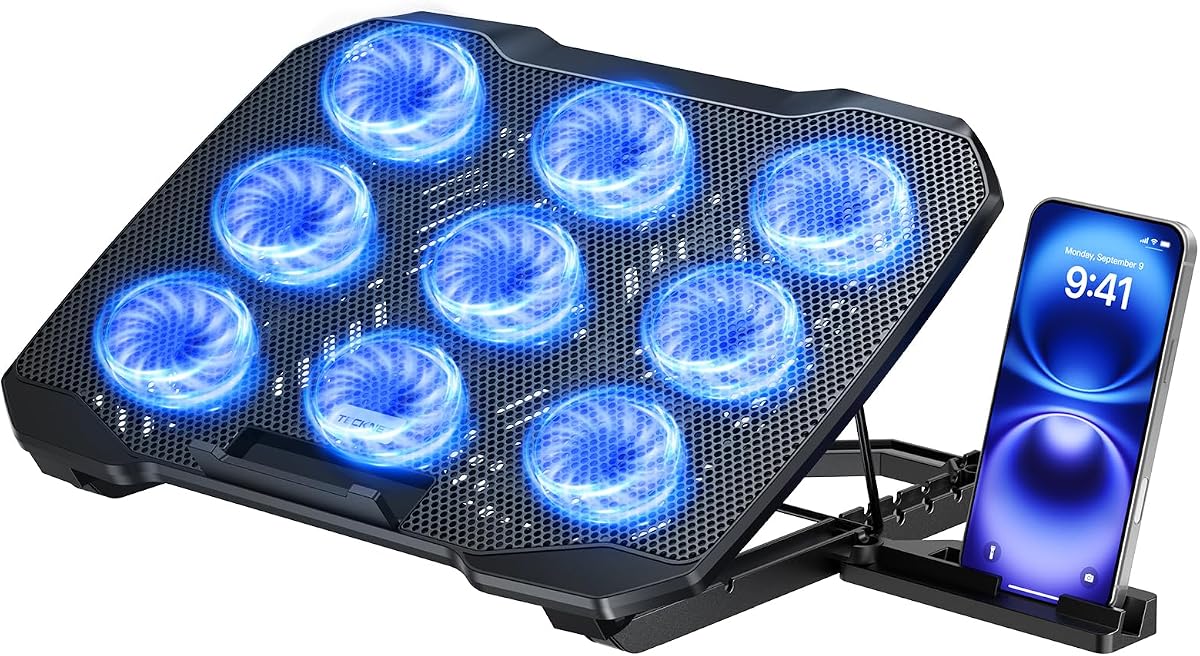
This TECKNET cooling pad earns top marks with a 4.4 rating for its exceptional airflow and ergonomic design. It is engineered to prevent overheating during intensive gaming or work sessions.
We may earn a commission when you buy through this link, at no additional cost to you.
Nine high-performance fans deliver 360-degree cooling at speeds up to 2600 RPM. The LED brightness syncs with fan speed, and five height settings let you tilt up to 34 degrees.
The built-in phone holder is convenient but limits side placement options. While robust, it is heavier than ultra-slim models, which could matter for travel.
Ideal for gamers and power users who need serious cooling and stability. Its combination of performance and ergonomics makes it a top recommendation for desktop setups.
Nine fans ensure rapid heat dissipation across the entire laptop base to prevent throttling during demanding tasks.
Five adjustable heights and a 34-degree tilt angle promote better posture and comfortable typing angles.
We may earn a commission when you buy through this link, at no additional cost to you.
The havit HV-F2056 is a slim and quiet cooling pad rated 4.4 stars. It is designed to protect laptops during travel while providing solid cooling at home.
We may earn a commission when you buy through this link, at no additional cost to you.
Three ultra-quiet fans create a noise-free environment. The metal mesh surface offers stability, and two height settings allow ergonomic positioning for better typing angles.
Lacks individual fan controls which may limit customization. Also, type-C devices need an adapter for the USB connection.
Perfect for travelers and students who value portability. It balances cooling power with a lightweight design ideal for mobile use.
Its light and slim build makes it easy to carry in any laptop bag for on-the-go cooling.
The extra USB port allows connecting additional devices without occupying your laptop's ports.
We may earn a commission when you buy through this link, at no additional cost to you.
This TECKNET cooling pad ranks 4.5 stars for reliable performance and broad laptop compatibility. It is a great value choice for everyday cooling needs.
We may earn a commission when you buy through this link, at no additional cost to you.
Three powerful fans run at 1200 RPM to pull cool air efficiently. The dual USB ports power the cooler and an external device simultaneously.
Lacks adjustable height which may affect ergonomics. Also, USB-C laptops require an adapter for connectivity.
Best for general users wanting efficient cooling without extra features. It works well with most 12 to 17-inch laptops.
1200 RPM fans provide strong airflow to prevent overheating during extended use.
Registration gives access to lifetime support ensuring long-term reliability and assistance.
We may earn a commission when you buy through this link, at no additional cost to you.
Kootek's cooling pad offers five quiet fans rated 4.4 stars. It balances powerful cooling with ergonomic flexibility for various laptop sizes.
We may earn a commission when you buy through this link, at no additional cost to you.
Five fans including big and small sizes deliver enhanced cooling. Two switches control fan and LED modes, and six height settings adjust the viewing angle.
More fans mean slightly more weight and potential cable management needs. Not ideal for minimalists preferring simpler designs.
Ideal for users wanting customizable airflow and height options. It suits extended work or gaming sessions with secure laptop placement.
Five fans provide broad coverage to dissipate heat efficiently across the laptop base.
Adjustable height settings support comfortable typing angles and reduce neck strain.
We may earn a commission when you buy through this link, at no additional cost to you.
KeiBn offers an affordable 4.4 rated cooling pad with two strong fans. It is a budget-friendly option for gamers and office workers needing quick heat dissipation.
We may earn a commission when you buy through this link, at no additional cost to you.
Five adjustable heights let you customize the setup. A hidden phone holder on the side releases your hands during calls or streaming.
Limited to two fans so may struggle with extreme heat loads. Phone holder access is not always convenient depending on orientation.
Best for budget-conscious users seeking basic cooling with added convenience. Works well with most laptops up to 15.6 inches.
Two strong fans and metal mesh keep laptops cool during extended use.
Side-mounted phone stand helps free your hands while using the laptop.
We may earn a commission when you buy through this link, at no additional cost to you.
The Thibault aluminum stand holds a 4.6 rating for durability and simplicity. It is a passive cooling option using ventilation and elevation to reduce heat.
We may earn a commission when you buy through this link, at no additional cost to you.
Robust aluminum ensures stability while the ventilated design allows air to circulate beneath your laptop. Soft rubber pads protect your desk and device from scratches.
Lacks active fans which may be insufficient for intense workloads. Not adjustable beyond assembly height.
Best for users who prefer fanless cooling and sturdy stands. Excellent for home offices where style and longevity matter.
Crafted from robust aluminum alloy for long-lasting performance and minimal wear.
Elevated design and openings enhance airflow to keep devices cool passively.
We may earn a commission when you buy through this link, at no additional cost to you.
Hagibis cooling stands are rated 4.6 stars for portability. These tiny magnetic feet elevate laptops to improve airflow without bulky hardware.
We may earn a commission when you buy through this link, at no additional cost to you.
Magnetic design makes attachment and removal easy. Silicone pads protect surfaces while the stands weigh only 1.76oz each.
Limited cooling power alone not ideal for heat-intensive tasks. Works best alongside other cooling measures.
Best for travelers needing lightweight cooling support. They subtly enhance airflow without adding bulk to your bag.
Strong Nd-Fe-B magnets allow quick and secure attachment to your laptop base.
Tiny size fits easily in pockets or bags for on-the-go cooling support.
We may earn a commission when you buy through this link, at no additional cost to you.
AIMIUZI's cooling pad is rated 4.4 stars for adjustable cooling. Five fans and multiple angles support both work and gaming comfortably.
We may earn a commission when you buy through this link, at no additional cost to you.
Honeycomb mesh improves airflow while the central small fan plus four big fans maximize coverage. Five adjustable heights ensure ergonomic comfort.
Lacks a phone holder which might be useful. Fan controls are basic without individual speed settings.
Ideal for users needing customizable airflow and height options. Fits most laptops between 12 and 15.6 inches well.
Combination of central and side fans provides broad low-noise cooling coverage.
Five height settings allow customization for comfortable viewing and typing.
We may earn a commission when you buy through this link, at no additional cost to you.
TECKNET cooling pad rated 4.3 stars features a smooth design suited for lap use. It channels air directly to the CPU for targeted cooling.
We may earn a commission when you buy through this link, at no additional cost to you.
Two large fans adjust speed between 0 and max. USB-C and A ports let you charge devices while cooling. Flat base isolates heat from legs.
Slightly lower rating reflects user preferences. Not the strongest performer for heavy gaming loads.
Best for casual users working on couches or beds. It combines portability with lap comfort and targeted airflow.
Internal channel directs cool air straight to the CPU area for efficient heat removal.
Dual ports allow charging devices while running the cooling pad.
We may earn a commission when you buy through this link, at no additional cost to you.
The Targus Lap Chill Mat offers a premium 4.4 rated experience with dual fans and soft materials. It is ideal for lap users prioritizing comfort and cooling.
We may earn a commission when you buy through this link, at no additional cost to you.
Soft neoprene bottom cushions your lap while dual fans disperse heat. Open mesh top promotes constant airflow during work.
Higher price may deter budget shoppers. Less portable than slim pads due to larger footprint.
Best for users who want comfort and powerful cooling on the go. Suits large laptops up to 17 inches perfectly.
Cushioned base provides superior comfort during lap use without overheating skin.
Two fans ensure consistent airflow across large laptop bases.
We may earn a commission when you buy through this link, at no additional cost to you.
Selecting the right solution involves balancing cooling power, portability, and comfort features.
Look for fans with high RPM and wide coverage to effectively dissipate heat during intensive tasks.
Prioritize models with multiple fans and open designs for best thermal management.
If you travel frequently, choose lightweight slim mats or stands that fit easily in bags.
Compact passive stands are ideal for minimal bulk but may lack active cooling power.
Adjustable height and tilt features reduce strain on your neck and wrists during long sessions.
Stands with rubber pads improve stability and prevent sliding on uneven surfaces.
Choose quiet fans under 40 dB for distraction-free environments such as offices or libraries.
Whisper-quiet technology ensures comfort without compromising airflow effectiveness.
Verify the product fits your laptop size, typically 12 to 17 inches or larger for some models.
Universal compatibility ensures secure fit across different brands and form factors.
USB-powered units avoid extra adapters while some may offer USB-C for modern devices.
Check cable types included to avoid needing extra adapters for your setup.
Durable materials like aluminum alloy or metal mesh ensure long-term use without wear.
Sturdy construction provides stability and protects your device from scratches or sliding.
Extra USB ports or phone holders add convenience for multitasking without extra cables.
LED indicators and speed controls help monitor and customize performance easily.
Place the cooling pad on a stable surface and ensure it connects securely to your laptop's USB port.
Adjust the height or tilt settings to suit your ergonomic preferences and improve airflow under the chassis.
Regularly clean fans and surfaces with a soft cloth or compressed air to maintain optimal performance over time.
Yes, cooling pads improve airflow under the laptop which reduces internal temperatures significantly. They are especially useful during gaming or heavy processing tasks.
Check the product specifications for compatible screen sizes. Most pads support 12 to 17 inches, but confirm exact fit before purchasing.
USB-powered units draw minimal power from your laptop or computer and are generally safe. Ensure your USB port provides sufficient power for the device.
Some pads have flat or neoprene bases suitable for lap use but ensure ventilation is not blocked to prevent heat buildup.
Clean every few weeks or whenever you notice reduced airflow. Use compressed air to remove dust from fan blades and vents.
Active coolers with fans provide stronger heat dissipation while passive stands offer silent cooling. Choose based on your performance needs and noise tolerance.
The TECKNET cooling pad leads with top cooling power, while the Thibault stand offers durable passive cooling, and the Targus mat excels at lap comfort.
Prioritize cooling performance if you game or work intensively, but choose lightweight portable options if you travel often.
Prices and availability can change, so always verify current details before making your purchase.