
SteelSeries Apex 3 Gaming Keyboard – Black
4.6Editor score
IP32 water resistant design
10-zone RGB illumination
Whisper quiet gaming switches
Discover the top Mac gaming keyboards ranked for performance and comfort. This guide compares ten excellent options tailored for macOS users seeking precision.
Choosing the right gaming keyboard for your Mac setup involves balancing compatibility, feel, and features. A good model ensures smooth input for games while supporting macOS shortcuts and layout needs seamlessly.
We evaluated ten top-rated options based on switch types, connectivity, build quality, and user feedback. Our list covers wireless and wired choices suitable for various gaming styles and desktop configurations.
Each pick highlights key strengths and potential trade-offs to help you decide. Prices and availability change frequently so verify the latest details on the product pages before finalizing your purchase today.
4.6Editor score
4.3Editor score

4.0Editor score
This table provides a quick side-by-side overview of all ten keyboards to help you compare key specifications at a glance before diving into detailed reviews.


The SteelSeries Apex 3 offers an affordable entry into gaming peripherals with solid build quality. Rated highly by users it features waterproofing and quiet operation suitable for various environments.
We may earn a commission when you buy through this link, at no additional cost to you.
Its whisper quiet switches ensure minimal noise during late night gaming while the 10-zone RGB lighting adds visual flair. The magnetic wrist rest provides extra comfort during extended sessions without straining your wrists.
Although it uses membrane switches instead of mechanical ones the tactile feedback remains responsive. Some Mac users may find the key mapping less intuitive than native options but the functionality is generally sufficient.
This keyboard is ideal for budget-conscious gamers who need reliability and comfort. It delivers consistent performance for casual gaming and daily tasks making it a smart choice for Mac setups on a budget.
The IP32 water resistant rating helps protect against accidental spills extending the lifespan of the device.
Dedicated multimedia controls allow you to adjust volume and settings quickly without leaving your game.
We may earn a commission when you buy through this link, at no additional cost to you.
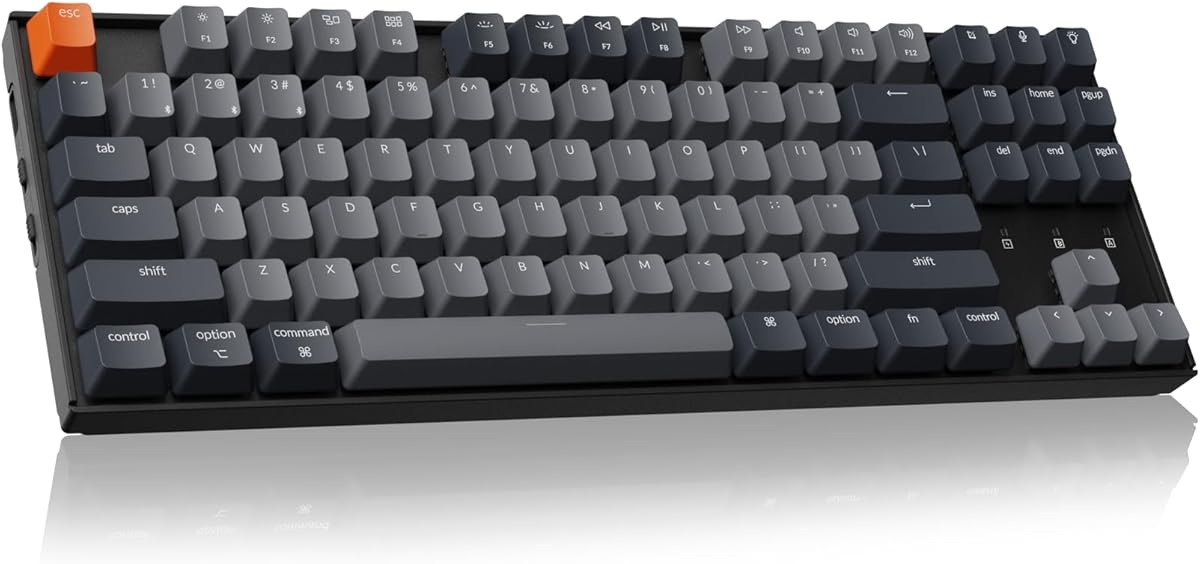
The Keychron K8 stands out as a top choice for Mac users seeking a mechanical experience. It includes specific keys for macOS ensuring seamless integration with your system without extra configuration effort.
We may earn a commission when you buy through this link, at no additional cost to you.
Its dual connectivity modes allow you to switch between wireless and wired connections effortlessly. The tactile brown switches provide a satisfying feel while the large battery ensures long usage times between charges.
While it lacks RGB lighting some may prefer the simplicity of the white backlight. The tenkeyless layout saves desk space making it perfect for setups where screen real estate matters most.
This keyboard is best for those prioritizing macOS compatibility and mechanical feel. It balances performance and ergonomics well making it a standout option for both gaming and productivity tasks on your Mac.
The included keycaps and default layout match macOS function keys for immediate usability.
Connect up to three devices via Bluetooth and switch between them with a simple key press.
We may earn a commission when you buy through this link, at no additional cost to you.
The Logitech G915 X delivers top-tier performance with its low-profile GL mechanical switches. Rated for speed and precision it allows rapid key presses essential for competitive gaming scenarios.
We may earn a commission when you buy through this link, at no additional cost to you.
Its aluminum top plate provides durability and a premium feel that matches high-end setups. The LIGHTSYNC RGB system offers extensive color options letting you customize the look to match your environment perfectly.
However the high cost may be prohibitive for some buyers and the wired design limits portability compared to wireless alternatives. Still the build quality and response times justify the investment for serious gamers.
This keyboard is perfect for users wanting the best in speed and aesthetics. It excels in fast-paced games where every millisecond counts making it a powerful tool for competitive Mac gamers.
Set up to fifteen functions per key using KEYCONTROL to create a personalized command center.
Double-shot PBT keycaps resist wear over time ensuring legends remain visible for years.
We may earn a commission when you buy through this link, at no additional cost to you.
The EPOMAKER X Aula F75 MAX introduces a unique TFT screen that adds a fun functional layer to your desk. This feature allows you to show animations or system stats making it a standout choice for enthusiasts.
We may earn a commission when you buy through this link, at no additional cost to you.
Its gasket mounting design provides a soft and consistent typing feel by isolating the PCB from the case. Combined with hot-swappable switches you can easily tweak the sound and feel without needing soldering skills.
While the software offers deep customization it may require time to learn for beginners. The compact layout means no numpad which might bother those used to full-size boards but it saves plenty of desk space.
This keyboard is ideal for those who enjoy tinkering and unique features. It brings a creative edge to gaming setups with its display and sound profile making it a memorable addition to any desk.
Foams and silicone layers dampen noise for a rich and pleasant acoustic experience.
Switch seamlessly between Android Windows Mac and Linux with broad OS compatibility.
We may earn a commission when you buy through this link, at no additional cost to you.
The Logitech G413 TKL SE focuses on reliability and durability for gaming. It uses PBT keycaps that resist wear and shine ensuring the keys look new for a long time of usage.
We may earn a commission when you buy through this link, at no additional cost to you.
Its brushed aluminum-magnesium top case provides a strong backbone that minimizes flex during intense typing or gaming sessions. The tactile switches offer clear feedback that helps with accuracy in fast-paced games.
Although it lacks deep software customization it does the basics well with media controls and lighting. The design is straightforward without unnecessary features making it easy to use right out of the box.
This keyboard suits users who want a solid mechanical experience without breaking the bank. It is a reliable workhorse for Mac setups requiring durability and consistent performance over long periods.
The minimal flex design ensures the keyboard stays stable during rapid key presses.
FN key media controls allow you to manage volume and playback directly from the keyboard.
We may earn a commission when you buy through this link, at no additional cost to you.
The Redragon K742 offers incredible value with features usually found on much more expensive boards. Its gasket structure and sound-absorbing paddings create a satisfying typing sound that appeals to enthusiasts.
We may earn a commission when you buy through this link, at no additional cost to you.
You can program it using QMK/VIA software giving you deep control over keys and macros. This level of customization is rare at this price point making it a favorite for those who love to tweak their setup.
The tri-mode connectivity ensures you can switch between devices easily which is great for hybrid work or multi-device gaming. The volume knob adds convenience for adjusting audio on the fly during sessions.
This keyboard is perfect for budget conscious tinkerers who want high-end features. It delivers versatility and customization that outperforms competitors in its price range making it a smart buy for Mac users.
Use VIA Software to remap keys and edit macros for maximum personalization.
Connect via Bluetooth 5.0 2.4GHz wireless or USB-C wired with simple switching.
We may earn a commission when you buy through this link, at no additional cost to you.
The Keychron K4 packs a number pad into a 96% layout saving space while retaining full functionality. This makes it ideal for spreadsheets or numeric input without sacrificing desk room for gaming.
We may earn a commission when you buy through this link, at no additional cost to you.
It supports both macOS and Windows layouts allowing you to switch between systems easily. The white backlight offers clear visibility in low light and the battery life supports weeks of use without recharging.
The dense layout may feel cramped for those used to larger gaps between keys but the convenience is worth it. Wireless performance remains stable so you can game without worrying about cable clutter on your desk.
This keyboard is a great fit for users needing a numpad on a Mac setup. It balances productivity features with gaming responsiveness making it a versatile choice for hybrid work and play environments.
Extra keycaps are included to ensure function keys match macOS expectations perfectly.
With a 4000 mAh battery you can enjoy up to 240 hours of use with backlight disabled.
We may earn a commission when you buy through this link, at no additional cost to you.
The Logitech MX Mechanical is designed for comfort and efficiency across multiple devices. Its tactile quiet switches provide feedback without disturbing others making it suitable for shared workspaces or quiet environments.
We may earn a commission when you buy through this link, at no additional cost to you.
Smart illumination lights up when your hands approach and adjusts to lighting conditions automatically. The Flow feature allows you to copy text between computers seamlessly enhancing productivity when switching between machines.
While it is a premium device it excels more in productivity than gaming specifically. The battery lasts up to ten months with backlight off ensuring minimal downtime even during heavy daily usage.
This keyboard suits professionals and gamers who need comfort and connectivity. It is a polished choice for Mac users who value ergonomics and multi-device capabilities over pure gaming performance.
Pair with up to three devices on any OS for seamless control switching.
Low-profile keys reduce hand strain during long typing or gaming sessions.
We may earn a commission when you buy through this link, at no additional cost to you.
The GravaStar Mercury K1 boasts a stunning aluminum alloy exoskeleton that looks futuristic and premium. Its gradient black finish and flowing curves make it a centerpiece of any modern gaming setup.
We may earn a commission when you buy through this link, at no additional cost to you.
Inside the keyboard features a gasket-mounted structure for soft and consistent keystrokes that reduce fatigue. The dual RGB lighting systems allow deep customization so you can match your room lighting or game themes.
While the design is striking it remains functional for both gaming and typing with reliable wireless connectivity. The linear switches are smooth ensuring fast responses in games without accidental key presses.
This keyboard is ideal for users who prioritize aesthetics without sacrificing performance. It brings a unique look to your desk making it a great choice for those wanting a stylish Mac gaming experience.
Five layers of foam reduce noise for a comfortable typing experience.
Switch between wired Bluetooth and wireless with easy compatibility across systems.
We may earn a commission when you buy through this link, at no additional cost to you.
The Logitech G213 Prodigy is a reliable full-sized keyboard designed for both gaming and productivity. It features spill resistant construction that repels liquids and dirt for easy cleanup and longevity.
We may earn a commission when you buy through this link, at no additional cost to you.
Its anti-ghosting gaming matrix ensures that multiple key presses are registered accurately which is vital for gaming. Dedicated media controls let you play pause or skip tracks instantly without leaving your game.
While it uses membrane switches it offers a balanced feel that many users find comfortable. The integrated palm rest adds support for long sessions making it easy to use throughout the day.
This keyboard is a great choice for casual gamers needing a budget-friendly solution. It provides essential features without complexity making it an excellent addition to Mac setups focused on value.
Use Logitech G HUB to personalize lighting zones and sync with other devices.
Durable construction repels dirt and liquids for easy maintenance.
We may earn a commission when you buy through this link, at no additional cost to you.
Selecting the ideal keyboard involves weighing several factors to match your workflow and gaming habits.
Mechanical switches offer tactile feedback and durability while membrane switches are quieter. For gaming tactile or linear switches provide speed and responsiveness suitable for fast-paced titles.
Prioritize switches that match your preference for noise and resistance to ensure comfortable use.
Wireless keyboards free up desk space but wired ones ensure zero latency. Many models offer dual modes allowing you to choose based on your needs at any time.
Choose connectivity that fits your setup stability requirements and desk organization goals.
Look for keyboards with macOS key layouts and function keys to avoid remapping issues. Some models include extra keycaps for seamless switching between Windows and Mac systems.
Ensure the keyboard supports Mac shortcuts to maintain productivity without extra configuration.
Aluminum or metal frames provide sturdiness while plastic cases may save cost. Check for features like water resistance and PBT keycaps to extend the device's life.
Invest in robust materials if you plan to use the keyboard for long periods daily.
A good keyboard includes a wrist rest or adjustable feet to prevent strain during use. Low-profile designs reduce hand movement while standard profiles offer a more traditional typing feel.
Select a form factor that supports your posture and reduces fatigue over time.
Software support allows key remapping macro recording and RGB customization. Look for open standards like QMK or VIA if you want deep control over your layout.
Assess whether you need advanced features or prefer a plug-and-play experience.
Prices range from affordable membrane boards to premium mechanical options. Determine which features matter most to you to find the best value within your spending limit.
Focus on essential performance traits rather than extra bells and whistles to save money.
Full-size keyboards include a numpad while tenkeyless or 60% models save desk space. Consider how much room you have and whether you need numeric input for work or gaming.
Choose a layout that balances functionality with available desk real estate.
Connect your keyboard via Bluetooth or USB-C ensuring your Mac recognizes it in System Settings. If using Windows mode toggle the switch or install provided drivers for full compatibility.
Regularly clean the keys with compressed air to remove dust and debris that may affect performance. Wipe the surface with a damp cloth avoiding liquids entering the internal components.
Update firmware periodically to fix bugs and improve connectivity. Store the keyboard in a dry place to prevent moisture damage and extend its lifespan significantly.
Mechanical keyboards offer faster response times and durability compared to membrane models. They provide tactile feedback that can improve accuracy during gaming. However some Mac users prefer quieter membrane switches to avoid disturbing others.
Most modern keyboards work plug-and-play but some require software for advanced features like RGB or macros. Check product details for macOS support to ensure full functionality without issues.
Yes but you may need to remap keys for Command and Option to match macOS shortcuts. Many keyboards include keycaps or switches to accommodate this difference easily.
Wired keyboards provide zero latency which is ideal for competitive gaming. Modern wireless options have improved significantly with low latency and reliable connections suitable for most users.
Use compressed air to blow out dust from between switches. Wipe keycaps with a slightly damp cloth and avoid harsh chemicals that could damage the plastic.
A tenkeyless or 96% layout saves desk space while keeping essential keys. Full-size layouts are useful if you need a numpad for data entry alongside gaming.
Our top picks include the Keychron K8 for Mac compatibility and the SteelSeries Apex 3 for budget value. The Logitech G915 X leads in premium performance for those seeking speed.
Prioritize switch feel and layout to match your specific gaming and work needs. A comfortable keyboard ensures better focus and performance over long sessions.
Verify current pricing and availability before purchasing as details may change over time. Check user reviews and warranty options for added confidence in your final choice.