
Thrustmaster T-Flight Hotas X
4.4Editor score
Detachable throttle design
Adjustable resistance dial
Plug and play ready
This guide compares the top 10 airplane controllers for PC to help you choose the best flight stick, yoke, or HOTAS setup for realistic simulation gaming.
Flight simulation enthusiasts seek authentic control experiences to bring virtual cockpits to life. Choosing the right airplane controllers for PC ensures precise input and immersive gameplay across various titles.
We evaluated ten leading models based on build quality, button layout, software support, and realism. Our analysis covers everything from budget-friendly sticks to professional-grade yoke systems for serious aviators.
Each pick highlights specific strengths and ideal use cases for different simulator types. Please note that availability and pricing may vary over time so check current listings before purchasing.
4.4Editor score

4.0Editor score
4.6Editor score
The following table provides a side by side overview of key specifications for all ten reviewed controllers to help you compare features at a glance.





The Logitech G X56 offers an impressive array of programmable controls ideal for complex flight simulations. With a rating reflecting strong user satisfaction, it stands out for its precision and versatility.
We may earn a commission when you buy through this link, at no additional cost to you.
Its magnetic non-contact sensors provide enhanced longevity and pinpoint accuracy during intense maneuvers. The twin throttles feature friction adjusters for fine-tuned control that mimics real aircraft systems.
While the price is a consideration, the level of customization justifies the investment for serious simmers. Some users find the initial software configuration time-consuming but rewarding.
This controller is best suited for enthusiasts who demand high fidelity and extensive button mapping for modern flight sim titles.
Hall-effect sensors ensure consistent input without wear over time.
Software allows deep mapping of nearly every button and axis.
We may earn a commission when you buy through this link, at no additional cost to you.
This system delivers a realistic yoke experience perfect for commercial flight simulation. Users praise its sturdy build and smooth operation across various axes.
We may earn a commission when you buy through this link, at no additional cost to you.
The stainless steel shaft ensures robust control while the throttle quadrant adds necessary complexity for airliner profiles. Clamps provide secure mounting on most desks.
It is not designed for military aviation due to the yoke form factor. Space requirements can be significant compared to single stick options.
Ideal for pilots focusing on civil aviation routes who value authenticity in their control setup.
Stainless components ensure durability during long simulation sessions.
Clamps allow quick installation without permanent desk modifications.
We may earn a commission when you buy through this link, at no additional cost to you.
The T-Flight Hotas X balances cost and performance effectively for new simmers. Its ergonomic design reduces fatigue during extended flights while maintaining solid controls.
We may earn a commission when you buy through this link, at no additional cost to you.
Detachable throttle allows flexible cockpit setups and adjustable resistance offers customization for pitch and roll inputs. Plug and play setup simplifies immediate use.
It lacks the extensive button count of premium models but covers essential functions well. Beginners find it intuitive while veterans may want more programmable options.
This model is an excellent starting point for those entering flight simulation without breaking the bank.
Throttle detachment allows for compact or expanded desk layouts.
Performance exceeds price expectations for most casual users.
We may earn a commission when you buy through this link, at no additional cost to you.
This control system combines a joystick and throttle with a useful LCD display for command feedback. It remains a popular choice for those seeking reliable input.
We may earn a commission when you buy through this link, at no additional cost to you.
Progressive throttle allows for nuanced control over thrust and afterburner settings. The 5 position handle system accommodates different hand sizes comfortably.
Some users report software compatibility issues with newer OS versions requiring updates. The design is established but may feel dated compared to newer models.
Recommended for existing users or those finding it at a discount who prefer tactile feedback.
LCD screen displays active commands without needing game overlays.
Adjustable handle positions reduce strain during long sessions.
We may earn a commission when you buy through this link, at no additional cost to you.
The PXN 2113PRO provides an entry point for casual flight gaming without significant investment. Vibration feedback adds immersion to standard joystick inputs.
We may earn a commission when you buy through this link, at no additional cost to you.
Eight-way hat switch and 12 programmable buttons cover many common flight actions. The compact design saves desk space for those with limited room.
Precision is lower than dedicated flight sticks which may frustrate hardcore simmers. Driver support is basic but functional for supported titles.
Best for players experimenting with flight sims who need a functional and inexpensive controller.
Vibration cues enhance the feeling of turbulence or engine power.
Small footprint fits easily on crowded workspaces.
We may earn a commission when you buy through this link, at no additional cost to you.
X52 system offers magnetic sensors for longevity and an LCD for status monitoring. It is known for its robust feel and precise axis control.
We may earn a commission when you buy through this link, at no additional cost to you.
3D twist with rudder lock ensures accurate yaw control without accidental activation. The 5 position grip maintains comfort across different hand sizes.
Users appreciate the large number of programmable commands reducing keyboard reliance. Some prefer the Pro version for specific features depending on preference.
A strong option for simmers seeking reliability and high input counts.
Magnetic sensors prevent wear from physical contact.
Rudder lock prevents accidental input during complex maneuvers.
We may earn a commission when you buy through this link, at no additional cost to you.
This Boeing edition yoke brings realistic airliner control to home setups with licensed design. The pendular mechanism replicates real aircraft movement for enhanced immersion.
We may earn a commission when you buy through this link, at no additional cost to you.
Metal internal structure ensures stability while the quadrant offers extensive autopilot controls. Magnetic technology enhances axis precision for takeoffs and landings.
The price is significant and requires substantial desk space for full installation. Enthusiasts willing to invest will appreciate the premium build and realism.
Ideal for serious flight sim pilots focused on commercial aviation authenticity.
1:1 scale replica captures official Boeing control details accurately.
Pendulum suspension mimics the natural movement of a large airliner.
We may earn a commission when you buy through this link, at no additional cost to you.
Sidestick offers an authentic Airbus experience with contactless magnetic sensors for accuracy. The integrated throttle saves space compared to separate units.
We may earn a commission when you buy through this link, at no additional cost to you.
17 action buttons with braille style identification allow quick command access. Swappable joystick heads enable customization for different flight profiles.
It is optimized for Airbus systems so may feel less natural for Boeing or military sims. Setup is straightforward and works with minimal configuration.
Recommended for pilots focusing on Airbus aircraft or those preferring side stick controls.
Magnetic technology eliminates potentiometer wear for long life.
Single unit design reduces clutter on smaller desks.
We may earn a commission when you buy through this link, at no additional cost to you.
This universal controller bridges gaming and simulation with high precision axes and OLED display. It supports both Xbox and PC platforms seamlessly.
We may earn a commission when you buy through this link, at no additional cost to you.
Touchpad allows cursor control without a mouse while RGB lighting adds visual flair. 27 programmable buttons cover a wide range of flight functions.
As a newer product long term reliability data is limited compared to established brands. Users appreciate the innovation and modern feature set.
A compelling choice for gamers seeking a versatile controller that supports both flight and other titles.
OLED screen provides clear flight status information during tasks.
Touchpad enables easy menu navigation without switching devices.
We may earn a commission when you buy through this link, at no additional cost to you.
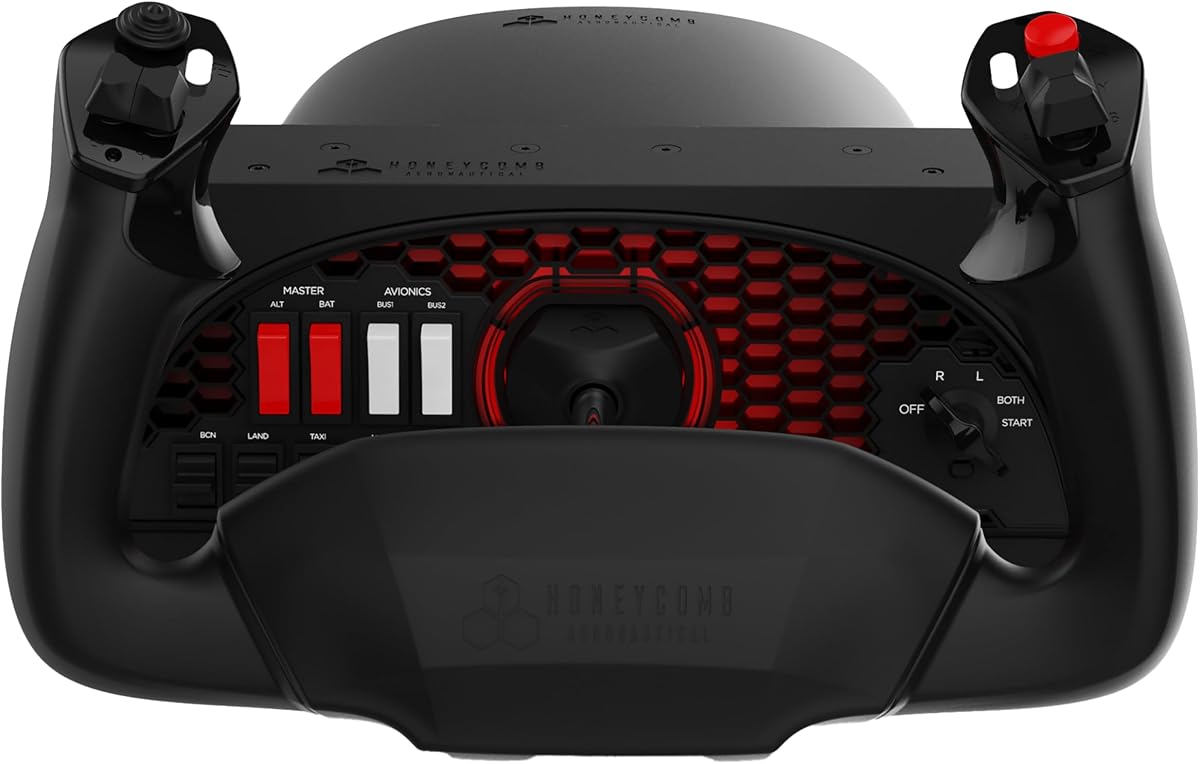
Alpha Flight Controls features a steel shaft and integrated switch panel for immersive flight simulation. Users appreciate the high quality build and realistic operation.
We may earn a commission when you buy through this link, at no additional cost to you.
Self-centering mechanism with minimal deadzone ensures accurate maneuvers. Red LED backlighting aids visibility during night flights in software.
The switch panel adds complexity and realism but adds to overall cost. Assembly is required but straightforward for most users.
Highly recommended for simmers prioritizing realism and build quality in their cockpit setup.
Solid steel shaft mimics the feel of real aircraft yokes.
Integrated panel removes need for separate switches on desk.
We may earn a commission when you buy through this link, at no additional cost to you.
Selecting the right controller depends on your preferred flight style and available desk space.
Choose between joysticks, yokes, or sidesticks based on aircraft preferences. Yokes suit airliners while sticks favor fighters.
Match the controller type to your most played simulator genre.
Look for metal shafts and durable materials to ensure longevity. High quality construction reduces friction over time.
Invest in robust materials if you simulate long hours regularly.
Count programmable buttons to ensure coverage for essential aircraft functions. More buttons reduce reliance on keyboard shortcuts.
Prioritize models with high button counts for complex simulations.
Check if software supports your operating system and flight sim titles. Compatibility ensures all features work as intended.
Verify software updates before committing to a new model.
Comfort is key for long sessions so check grip shape and weight. Adjustable resistance helps tailor force to your strength.
Test grip feel if possible or read user comfort reviews.
Measure your desk to ensure the controller fits without overcrowding. Yokes need more space than compact sticks.
Consider clamp types to ensure stability on your specific desk.
Set a realistic budget that balances cost with required features. Higher price often brings better materials and more inputs.
Look for sales on previous gen models for value.
Ensure the controller connects via USB and supports your OS version. Some models require specific drivers or optional downloads.
Check system requirements before finalizing your purchase decision.
Connect the controller to a USB port and install drivers if needed. Test inputs in the software calibration tool to ensure accuracy.
Regularly clean surfaces with a dry cloth to prevent dust buildup. Check cables for wear and store securely when not in use.
Update firmware and software periodically to maintain compatibility with new titles. Adjust axis curves in settings for smoother flight dynamics.
Yokes are better for airliners while joysticks suit military fighters. Choose based on your preferred aircraft type for realistic control.
Most models are designed for Windows but some may work with Mac via adapters. Check specific system requirements before purchasing for Mac use.
Use the manufacturer software to calibrate axes and buttons. Ensure the stick centers correctly and all inputs register without drift.
Yokes require significant space so measure carefully before buying. Some models have smaller footprints but still need room for full range.
Hall-effect sensors measure position using magnetic fields without physical contact. This reduces wear and improves longevity compared to potentiometers.
Many controllers support VR titles like MSFS 2020 or 2024. Check specific VR compatibility before relying on them for immersive setups.
We covered ten top controllers ranging from budget picks to premium systems. Each offers unique strengths depending on your simulation preferences.
Prioritize build quality and software support to ensure long term satisfaction. Match the controller type to your favorite aircraft for best results.
Remember to check current listings for availability and compatibility before purchasing. Your investment will enhance the realism and enjoyment of every flight.