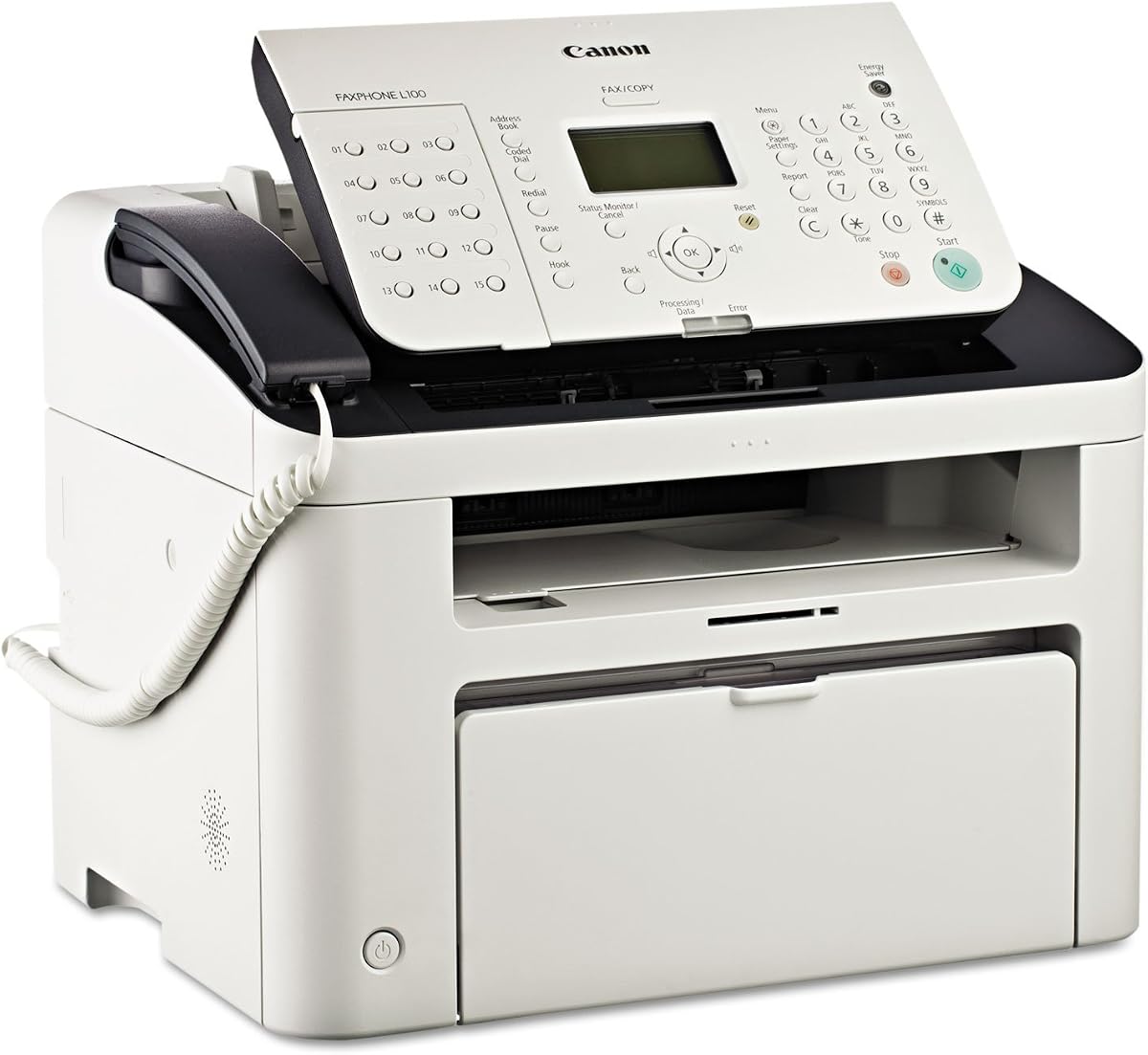
Canon FAXPHONE L100
4.1Editor score
19 pages per minute speed
512 sheets memory capacity
30-sheet auto feeder
Finding a reliable fax machine with phone capabilities remains essential for many businesses and home offices today. These devices streamline communication by combining printing, scanning, and telephony into one robust unit that handles daily document needs efficiently and effectively.
We evaluated ten top-rated models based on transmission speed, memory capacity, paper handling, and ease of use. Each product was assessed for its ability to integrate seamlessly with existing phone lines while delivering clear, professional-quality faxes every single time.
Each pick below highlights key features, pros, and cons to help you choose the right fit. Please note that product availability and pricing may change frequently, so verify current details before making your final purchase decision online or in store.
4.1Editor score
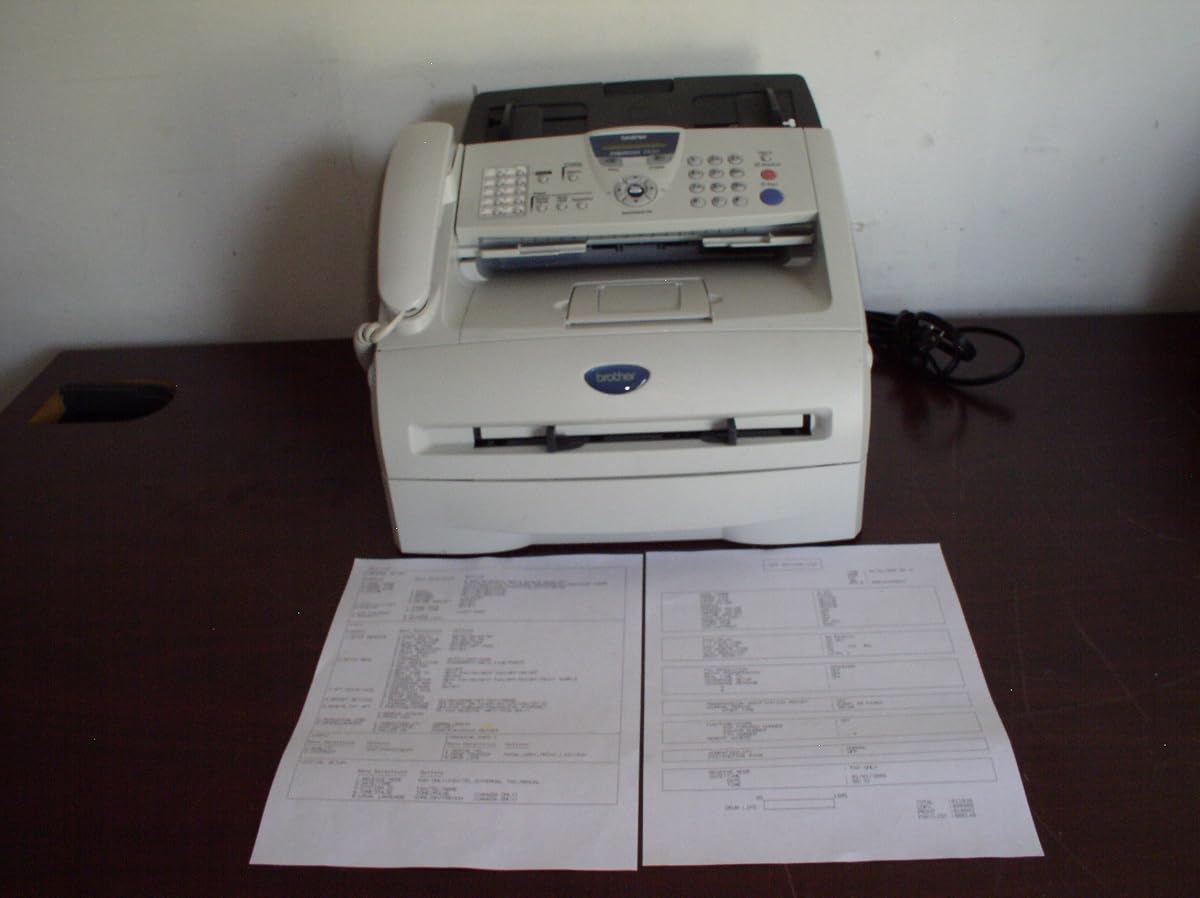
4.2Editor score

4.4Editor score
As an Amazon Associate we earn from qualifying purchases.
The following comparison table provides a side-by-side overview of all ten featured fax machines with phone capabilities. Use this quick reference to compare key specifications like memory, speed, and paper capacity before diving into detailed reviews below.


The Brother IntelliFax 2820 stands out as a highly reliable fax machine with phone capabilities for small businesses. With a 4.2 star rating, users appreciate its laser print quality and robust memory features that reduce paper waste significantly.
We may earn a commission when you buy through this link, at no additional cost to you.
Its 8 MB memory stores up to 500 pages, ensuring no faxes are lost during power outages. The 20-page auto document feeder and 250-sheet input capacity handle high-volume workloads effortlessly while maintaining sharp text and image clarity.
While it lacks a color display or advanced touchscreen, these trade-offs keep the interface simple and durable. Users find the 220-station auto dialing convenient for broadcasting documents to multiple recipients without manual dialing each time.
This model is ideal for offices needing consistent fax and copy performance without unnecessary bells and whistles. If you prioritize reliability and memory capacity, the IntelliFax 2820 delivers excellent value for professional communication needs.
The 8 MB memory allows storing hundreds of pages, preventing data loss during power failures and ensuring secure document transmission.
With a 20-page auto feeder and large paper tray, users can process multiple documents quickly without constant reloading interruptions.
We may earn a commission when you buy through this link, at no additional cost to you.
The Brother PPF4750E is a high-performance laser fax machine designed for demanding business environments. With a 4.4 rating, it combines Super G3 fax technology with monochrome laser printing for crisp, professional document transmission every time.
We may earn a commission when you buy through this link, at no additional cost to you.
Its ability to copy up to 15 pages per minute ensures quick turnaround for internal documents. The plain paper fax feature eliminates the need for special thermal rolls, reducing ongoing costs and improving archival quality of stored files.
Although it carries a higher price point, the durability and output quality justify the investment for frequent users. It lacks modern connectivity like Wi-Fi but excels in core fax and copy functions without software compatibility issues.
Businesses seeking a dedicated fax solution with minimal maintenance will find this model ideal. Prioritize this unit if print quality and speed are your top concerns over smart connectivity options in 2026.
Super G3 ensures faster transmission times and better image quality compared to older G3 standards, improving overall fax efficiency.
Using standard plain paper instead of thermal rolls reduces recurring costs and allows documents to be stored or copied easily later.
We may earn a commission when you buy through this link, at no additional cost to you.
The Canon FAXPHONE L100 offers impressive performance for a budget-friendly fax machine with phone capabilities. Rated at 4.1 stars, it delivers 19 pages per minute printing speed and substantial memory to handle daily office tasks without slowing down.
We may earn a commission when you buy through this link, at no additional cost to you.
With up to 512 sheets of memory capacity, users can store multiple faxes securely. The 30-sheet simplex automatic document feeder and 150-sheet paper capacity mean less frequent reloading, saving time during busy periods in small offices.
Trade-offs include a simpler build and lack of wireless connectivity, but wired functionality remains stable. The included telephone handset ensures direct communication without needing separate equipment, making it a complete solution for home workspaces.
This model suits users needing speed and memory without a high price tag. If you want reliable laser faxing and copying under strict budget constraints, the L100 provides excellent value and functionality for most basic needs.
Printing up to 19 pages per minute ensures quick turnaround for documents, reducing wait times during peak office hours significantly.
Large memory capacity allows safe storage of incoming and outgoing faxes, preventing loss during power interruptions or busy times.
We may earn a commission when you buy through this link, at no additional cost to you.
The Brother PPF-2800 is a straightforward plain paper fax machine that combines essential fax and phone features efficiently. With a 3.6 rating, users appreciate its simplicity and ability to print using standard paper, reducing specialized consumable costs over time.
We may earn a commission when you buy through this link, at no additional cost to you.
Its 108-station auto dialing memory and broadcast features make it easier to send documents to frequent contacts. The machine stores up to 90 pages in memory, which is adequate for moderate usage in home or small office environments daily.
Slower print speed and limited memory compared to newer models may be drawbacks for high-volume users. However, for basic faxing needs, the reliable performance and easy operation make it a practical choice without unnecessary complexity.
This unit is best for users prioritizing simplicity and paper type flexibility. If you do not need advanced connectivity or high speed, the PPF-2800 delivers consistent fax and copy results at an accessible price point.
Store up to 108 stations for quick dialing, reducing manual effort when sending faxes to frequent business contacts regularly.
Using standard plain paper eliminates thermal roll dependency, making documents easier to store or reproduce without special supplies.
We may earn a commission when you buy through this link, at no additional cost to you.
The Brother MFC7240 combines printing, scanning, copying, and faxing into one compact monochrome unit with phone support. Rated 4.2 stars, it offers 21 pages per minute copy speed and a high 2400 dpi resolution for sharp text and professional fax documents.
We may earn a commission when you buy through this link, at no additional cost to you.
Its 250-sheet capacity paper tray and 20-page auto document feeder support efficient document handling. Users benefit from multiple connectivity options via USB, ensuring compatibility with various systems without requiring additional network hardware setup.
Limited to wired USB connections may restrict flexibility for wireless workflows. However, the machine's speed and document handling capabilities make it an excellent choice for small offices prioritizing productivity and cost-effective monochrome output daily.
Choose this if you want an all-in-one device with fast copy speed. It balances performance and footprint well, making it suitable for workspaces where space is limited but functionality remains critical for daily operations.
Printing and copying at 21 ppm keeps workflows moving quickly, reducing idle time during document-intensive periods in the office.
A 250-sheet tray minimizes frequent refills, allowing users to focus on tasks rather than constantly managing paper supplies.
We may earn a commission when you buy through this link, at no additional cost to you.
The CimFAX A5 offers a modern paperless approach to faxing, sending and receiving via PC or mobile phone around the clock. With a 4.0 rating, it appeals to users seeking to eliminate physical hardware while maintaining traditional fax line connectivity for reliable transmission.
We may earn a commission when you buy through this link, at no additional cost to you.
Its ability to auto-save faxes as PDFs to a local folder or forward them via email streamlines digital workflows. This paperless design reduces paper waste and simplifies document management for remote workers or tech-savvy businesses prioritizing digital archiving.
While it removes hardware maintenance, reliance on internet connectivity and potential subscription models may concern some users. However, the convenience of managing faxes digitally without dedicated machines provides significant operational savings over time.
This option is ideal for those transitioning away from traditional fax hardware. If you prefer digital document handling and mobile access over physical faxes, the CimFAX A5 delivers secure and flexible fax communication effectively.
Eliminate physical machines and paper waste by managing faxes digitally through mobile apps and computer interfaces seamlessly.
Incoming faxes are automatically converted to PDF and sent to your email, ensuring quick access to documents anywhere.
We may earn a commission when you buy through this link, at no additional cost to you.
The Brother FAX-575 is a personal fax machine combining essential phone, fax, and copy functions in a user-friendly design. Rated 4.1 stars, it is known for convenient operation and straightforward controls that simplify daily document tasks for home users.
We may earn a commission when you buy through this link, at no additional cost to you.
Its 512 KB memory stores up to 25 pages, which works well for light fax usage. The 9,600 BPS fax modem transmits at about 15 seconds per page, ensuring timely delivery for standard documents without significant delays.
Paper capacity is limited to 50 sheets, requiring frequent refills during heavy usage. Older technology means less connectivity options, but for basic fax needs, this machine remains dependable and simple to maintain without technical expertise.
This unit suits users needing basic fax and phone functions. If you require a hassle-free device for occasional use without advanced features, the FAX-575 offers consistent performance and ease of use at home.
Intuitive controls and easy-to-use design make it accessible for non-technical users managing daily personal fax and copy tasks.
The fax modem ensures reliable transmission speeds, maintaining document integrity during sending and receiving over standard phone lines.
We may earn a commission when you buy through this link, at no additional cost to you.
The Brother FAX-575 Renewed provides the same reliable fax and phone features as the new model at a lower price point. Rated 3.8 stars, it appeals to budget-conscious users who want proven functionality without paying premium prices for brand-new hardware.
We may earn a commission when you buy through this link, at no additional cost to you.
It maintains the same 512 KB memory and 15 seconds per page transmission speed, ensuring consistent performance. Renewed units undergo testing to verify functionality, making them a practical choice for occasional fax needs without compromising core capabilities.
Users should note that physical condition may vary and warranties might be shorter. For those prioritizing cost savings over cosmetic perfection, this option delivers dependable faxing and copying without requiring extra investment in newer technology.
Choose this for affordable faxing solutions that still perform well. If you want proven reliability and basic functionality at a reduced cost, the Renewed version is a smart economical choice for home or small office use.
Renewed models offer significant price reductions while maintaining original performance features, making faxing affordable for tight budgets.
Units are tested to ensure core fax and phone features work correctly before being sold, providing confidence in their reliability.
We may earn a commission when you buy through this link, at no additional cost to you.
The Panasonic KX-FHD331 is a plain paper fax machine featuring caller ID compatibility and answering machine interface for integrated communication. With a 2.8 rating, users note basic reliability but may find it lacks advanced features compared to newer models currently available in the market.
We may earn a commission when you buy through this link, at no additional cost to you.
It operates at 9.6 Kbps modem speed, suitable for standard fax transmissions. The ability to use plain paper simplifies document storage and reduces costs over time, making it a practical choice for users prioritizing simple faxing needs daily.
Lower ratings suggest possible durability issues or outdated interfaces compared to competitors. However, for those needing a dedicated fax with telephone features without smart connectivity, this unit remains an accessible entry-level solution.
This model suits basic faxing requirements with caller ID awareness. If you value straightforward operation and plain paper convenience over modern tech, it provides functional support for traditional fax and phone workflows.
Caller ID compatibility helps you identify senders before receiving faxes, improving security and document management accuracy.
Seamless integration with answering machines allows unified communication management for voice and fax on the same line.
We may earn a commission when you buy through this link, at no additional cost to you.
The Canon FAXPHONE L80 combines laser fax and printing capabilities with a included telephone handset for complete communication. With a 3.6 rating, it delivers quality laser output and a 33.6 Kbps modem speed ensuring rapid transmission of professional documents over phone lines reliably.
We may earn a commission when you buy through this link, at no additional cost to you.
Printing at 6 pages per minute is slower than multi-function competitors but adequate for basic tasks. The USB interface provides reliable connectivity, and the 1-year warranty offers peace of mind against potential hardware issues during standard use periods.
Limited feature set and slower print speed may deter power users seeking high-volume capabilities. However, for essential faxing needs with quality output, it provides a balanced option with dependable performance and straightforward operation for everyday tasks.
Choose this for reliable laser faxing with phone support. If you prioritize output quality and basic functionality over advanced connectivity or high speed, it remains a solid tool for managing documents and calls efficiently.
33.6 Kbps modem ensures faster fax transmission times, reducing wait periods and improving workflow efficiency during busy hours.
Having a built-in telephone handset allows direct voice calls without needing extra equipment, simplifying communication management.
We may earn a commission when you buy through this link, at no additional cost to you.
Selecting the right fax machine with phone requires considering transmission speed, memory, connectivity, and paper handling. This guide explains critical factors to help you match a device to your specific business or home office needs.
Transmission speed determines how quickly documents are sent and received. Look for machines with at least 9,600 BPS modem speed to ensure reasonable turnaround times. Faster modems like 33.6 Kbps reduce wait periods during high-volume usage.
Prioritize higher speeds for busy offices to minimize downtime and improve overall communication efficiency.
Memory allows storing faxes during power outages or busy periods. Units with 8 MB or more can store hundreds of pages, ensuring no data loss. Consider your typical fax volume when selecting storage size.
Opt for larger memory to prevent lost documents during unexpected power failures or network interruptions.
Paper capacity and feeder size impact workflow efficiency. Machines with 200+ sheet trays reduce refills. Auto document feeders allow multi-page scanning without manual feeding. Plain paper usage is standard and cost-effective.
Choose larger trays and auto feeders to minimize interruptions and support high-volume document processing.
Connectivity varies from USB to network or wireless support. Wired USB ensures stable connections, while network options allow shared access. Evaluate your setup for compatible ports and required software drivers.
Select connectivity that matches your current infrastructure for seamless integration with existing computers and networks.
Print resolution affects document clarity. Laser machines typically offer sharper text than inkjet models. Look for at least 400 dpi for clear faxes. Laser output ensures documents remain readable over time.
Prioritize laser technology and higher dpi for professional-quality faxes that maintain clarity in archival storage.
Interfaces range from simple button panels to touchscreens. Straightforward menus reduce learning curves. Auto-dialing features and broadcasting options simplify sending to multiple recipients. User-friendly designs reduce setup time.
Choose intuitive interfaces and auto-dial functions to streamline sending processes and reduce operator errors.
Built quality affects lifespan and maintenance costs. Reputable brands often provide reliable components. A 1-year or longer warranty protects against defects. Consider service availability in your region.
Prioritize models with strong warranties and solid build quality to ensure longevity and reduce repair expenses.
Initial price and ongoing supply costs vary. Laser toners last longer than ink. Plain paper machines avoid thermal roll expenses. Factor in total cost of ownership when comparing options.
Evaluate toner life and paper types to minimize recurring expenses over the device's lifecycle.
To begin, connect the fax machine to a dedicated phone line using the provided telephone cord. Plug it into a grounded electrical outlet and install any necessary drivers if connecting to a computer via USB. Allow a few minutes for initialization.
Load plain paper into the input tray, ensuring it is aligned properly. Adjust guides to match paper size. For faxes, place documents face down on the glass or feed through the auto document feeder. Dial the recipient number manually or select from memory.
Regular maintenance includes cleaning the glass surface with a soft cloth to prevent smudges. Replace toner cartridges when print quality declines. Periodically update firmware if networked. Check telephone line quality if issues arise during transmission.
Yes, most traditional fax machines with phone require a dedicated analog phone line to function correctly. Sharing a line with voice calls can cause transmission errors. Some newer models support VoIP adapters, but compatibility should be verified.
Stored faxes in memory appear when the machine is ready. Use the menu buttons to browse stored jobs. Print or delete files as needed. If memory fills up, print stored faxes before new ones arrive to avoid overwriting.
Yes, using paperless services or software-based faxing allows sending from computers via the internet. These methods eliminate hardware but may require subscriptions. Physical fax machines with phone remain standard for businesses requiring direct phone line faxing.
Laser fax machines use toner and plain paper, offering better quality and longevity. Thermal fax machines use special rolls that fade over time. Laser models are preferred for professional document storage and cost efficiency over the long term.
Choose a model with sufficient internal memory to store incoming faxes during power loss. Some units have battery backups. Always print stored faxes immediately after power returns to ensure documents are archived on paper or digital formats.
Many fax machines support broadcast features, allowing a single document to be sent to multiple numbers. Setup varies by model. Use the auto-dial list to store recipient numbers for efficient distribution without repeated manual dialing.
We have reviewed ten top-rated fax machines with phone capabilities for 2026, ranging from basic personal units to high-performance business models. The Brother IntelliFax 2820 and Canon L100 stand out for memory and speed, while paperless options offer modern alternatives.
Prioritize transmission speed, memory capacity, and paper handling based on your volume. Laser technology provides better output quality and longevity. Consider connectivity options and ease of use for daily workflow integration and long-term satisfaction.
Prices and availability change frequently, so verify current details before purchasing. Choose a model that balances features with cost for your specific needs. These devices remain essential for reliable communication in 2026 office environments.