
Ducky OK-M
4.4Editor score
Gasket-Mount Design
Hot-Swappable Switches
Three Mode Connectivity
This guide compares the top Ducky Keyboard models for gamers and professionals evaluating features like wireless connectivity hot swap switches and acoustic
Finding the right mechanical keyboard can transform your daily computing experience. Ducky has built a reputation for quality construction premium materials and innovative design across their diverse lineup of mechanical input devices.
We have analyzed ten distinct models from the brand to help you find the perfect match for your needs. This list covers everything from compact wireless options to full sized layouts with various switch types.
Each pick highlights key specifications strengths and ideal use cases to simplify your decision process. Please note that product availability and pricing may change over time so always verify details before purchasing.
4.4Editor score

4.7Editor score

3.8Editor score
The following table provides a side-by-side comparison of all ten models to help you quickly identify the right fit for your setup based on key specifications and features.


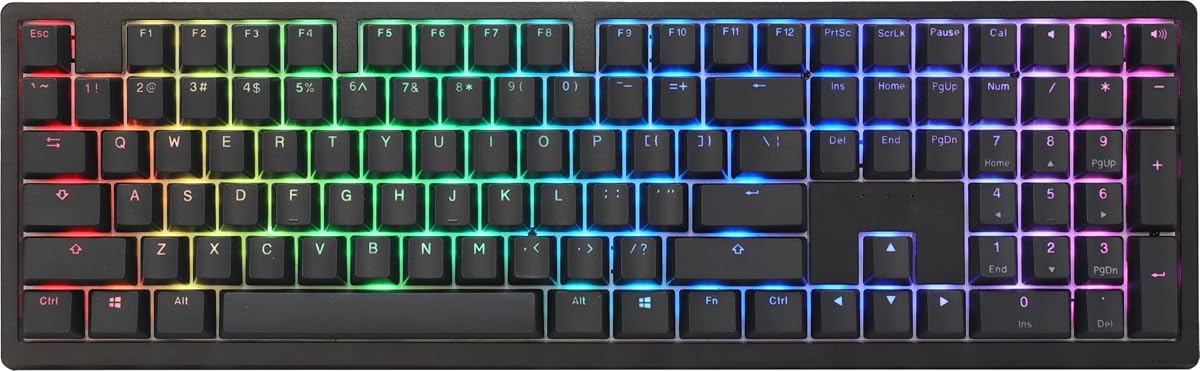


The Ducky OK-M offers a premium mechanical typing experience at a budget-friendly price point. With a 4.4 rating it stands out for its gasket-mount design and five-layer acoustic dampening that reduce pinging and echoes.
We may earn a commission when you buy through this link, at no additional cost to you.
Its versatile connectivity supports USB-C, Bluetooth, and 2.4GHz wireless for flexible multi-device use. VIA support unlocks full key and macro customization through web-based software enhancing user control.
While the Baby switch may not suit everyone, the overall typing feel is comfortable and refined. The side RGB adds a touch of flair without overwhelming the desk setup.
This model is ideal for users seeking high-quality construction without breaking the bank. It is a strong recommendation for those needing wireless flexibility and acoustic comfort.
Five-layer acoustic dampening creates a quieter and more comfortable typing environment suitable for shared spaces.
Tri-mode connectivity allows seamless switching between devices for efficient workflow management across platforms.
We may earn a commission when you buy through this link, at no additional cost to you.
The Ducky Origin Mechanical Gaming Keyboard in Vintage with Cherry MX Brown switches delivers a classic tactile experience. With a 4.6 rating it is praised for its durable PBT keycaps and slim design.
We may earn a commission when you buy through this link, at no additional cost to you.
Key features include Kailh yellow hotswap sockets on stabilizer keys and a detachable braided USB-C cable. An enter key in a random color adds a unique touch to the layout.
The south-facing switches and exceptionally slim bezel design contribute to a refined look. However the wired connection may limit flexibility for some users.
This keyboard is perfect for enthusiasts who value build quality and tactile feedback. It is recommended for desktop setups where a wired connection is acceptable.
Hotswap sockets on stabilizer keys allow easy maintenance and customization without soldering.
OEM profile Double Shot PBT keycaps ensure long-lasting legends and resistance to wear.
We may earn a commission when you buy through this link, at no additional cost to you.
This Ducky Origin variant features Cherry MX Blue switches for a distinct clicky tactile experience. Rated 4.5 it offers the same premium build quality and slim design as the Brown version.
We may earn a commission when you buy through this link, at no additional cost to you.
It includes Kailh yellow hotswap sockets on stabilizer keys and a detachable braided USB-C cable. The bonus enter key in a random color provides unique personalization.
The south-facing switches and slim bezel design enhance the aesthetic appeal. However the loud clicky sound may not be suitable for quiet environments.
Ideal for users who enjoy audible feedback and tactile precision. It is a strong choice for dedicated gaming or typing setups.
Cherry MX Blue switches provide a satisfying click that enhances typing satisfaction for enthusiasts.
Double Shot PBT keycaps ensure durability and vibrant legends that resist fading over time.
We may earn a commission when you buy through this link, at no additional cost to you.
The Ducky Zero 6108 is a compact wireless option designed for gamers and professionals needing portability. With a 4.1 rating it features smooth linear Cherry MX2A Red switches and tri-mode connectivity.
We may earn a commission when you buy through this link, at no additional cost to you.
It supports seamless switching between USB-C 2.4GHz wireless and Bluetooth for versatile usage. The RGB LED backlighting allows customization to match your style and setup.
Premium PBT keycaps ensure durability and superior typing feel for intense sessions. Full N-Key Rollover ensures every keypress is registered accurately.
This keyboard is great for users seeking a balance of size and functionality. It is recommended for those needing wireless flexibility in a compact form.
The 6108 layout saves desk space while retaining essential keys for efficient typing.
Full N-Key Rollover ensures accurate registration during complex and rapid key presses.
We may earn a commission when you buy through this link, at no additional cost to you.
This Ducky Origin Vintage model features Cherry MX Blue switches for a tactile clicky experience. Rated 4.5 it combines a unique vintage look with reliable performance and premium materials.
We may earn a commission when you buy through this link, at no additional cost to you.
Key features include Kailh yellow hotswap sockets on stabilizer keys and a detachable braided USB-C cable. The bonus enter key in a random color adds a personal touch.
The slim bezel design and PBT keycaps ensure a refined look and durability. However the loud sound may not suit quiet workspaces.
Ideal for users who prioritize aesthetics and tactile feedback. It is a strong choice for desktop setups where style matters.
The vintage design offers a nostalgic appeal that stands out in modern setups.
High-quality materials ensure the keyboard withstands daily use without compromising style.
We may earn a commission when you buy through this link, at no additional cost to you.
The Ducky One 2 Pro Mini White Edition offers a compact layout with Cherry Brown switches. With a 4.6 rating it is praised for its true PBT keycaps and refined build quality.
We may earn a commission when you buy through this link, at no additional cost to you.
This model features RGB LED backlighting for customization and a minimalist aesthetic. The compact design saves desk space while maintaining essential functionality.
While the mini layout requires adjustment for some users the quality remains high. The tactile switches provide a satisfying typing experience for daily tasks.
Ideal for users seeking a compact portable keyboard with premium materials. It is recommended for those who prefer tactile feedback in a small form.
The mini layout maximizes desk space while retaining essential keys for productivity.
True PBT keycaps ensure durability and a premium feel that resists wear.
We may earn a commission when you buy through this link, at no additional cost to you.
The Ducky One X Wireless Inductive Keyboard introduces next-gen analog switches for greater accuracy and power efficiency. Rated 3.8 it features a seven-layer dampening design and gasket-mount for a sublime typing experience.
We may earn a commission when you buy through this link, at no additional cost to you.
Versatile tri-mode connectivity allows USB wired 2.4 GHz RF wireless and BT connection. Intuitive web-based software ensures easy setting adjustments without resource consumption.
High-Density PBT Doubleshot Keycaps offer unrivalled resistance to shine ensuring longevity. The rapid trigger feature enhances performance for competitive gaming.
Ideal for users seeking cutting-edge technology and premium build. It is recommended for those willing to invest in advanced features.
Inductive switches offer greater accuracy and consistency over traditional analog switch.
Seven-layer dampening and gasket-mount design provide unprecedented typing feel and acoustics.
We may earn a commission when you buy through this link, at no additional cost to you.
The Ducky One 3 Matcha features QUACK Mechanics design philosophy and Cherry MX Blue switches. With a 4.7 rating it is the best overall pick for performance and build quality.
We may earn a commission when you buy through this link, at no additional cost to you.
It includes a dual layer hotswap PCB with exclusive Kailh yellow sockets and high-grade silicone dampeners. The low profile case design comes in exclusive color options like Matcha.
Thick PBT Double-shot seamless keycaps and improved V2 stabilizers ensure a refined feel. N-key rollover guarantees accurate registration for fast typing and gaming.
Ideal for enthusiasts seeking top-tier typing experience and aesthetics. It is a strong recommendation for those valuing premium materials.
Dual-layer high-grade silicone and EVA foam ensure a quieter and more refined sound.
Exclusive Kailh yellow hotswap sockets allow easy switch replacement without soldering.
We may earn a commission when you buy through this link, at no additional cost to you.
The Ducky One 3 TKL Matcha combines QUACK Mechanics with Cherry MX Brown switches. With a 4.3 rating it offers a TKL layout that balances size and functionality.
We may earn a commission when you buy through this link, at no additional cost to you.
It features a dual layer PCB with exclusive Kailh yellow hotswap sockets and high-grade silicone dampeners. The improved PCB design and V2 stabilizers enhance typing stability.
Thick PBT Double Shot seamless keycaps and remapped macro layout provide a premium feel. 3-level adjustable feet allow for comfortable typing angles.
Ideal for users needing a compact keyboard without losing essential keys. It is recommended for those seeking a refined typing experience.
The tenkeyless layout provides a balance of size and full keyboard functionality.
Improved PCB design and V2 stabilizers ensure a solid and wobble-free typing feel.
We may earn a commission when you buy through this link, at no additional cost to you.
The Ducky One 2 features Cherry MX Red switches and RGB backlighting for reliable performance. With a 4.3 rating it offers a solid 80% layout for gaming and typing.
We may earn a commission when you buy through this link, at no additional cost to you.
It supports Ducky's newest RGB software and includes 10 additional PBT Double Shot colorful keycaps. The detachable 1.5 meter USB-C cable adds convenience and portability.
Dual layer PCB ensures durability and stability during intense sessions. Adjustable feet allow for comfortable typing angles.
Ideal for users seeking a proven reliable keyboard with customizable RGB. It is recommended for those valuing consistency and build quality.
Newest RGB software allows extensive customization for visual flair and functionality.
Dual layer PCB and PBT keycaps ensure the keyboard withstands heavy daily usage.
We may earn a commission when you buy through this link, at no additional cost to you.
Selecting the right Ducky Keyboard involves evaluating several key factors that match your typing style setup requirements and budget.
Switches define the tactile and audible feedback of the keyboard. Linear switches like Cherry MX Red are smooth and quiet for gaming. Tactile switches like Cherry MX Brown offer a bump without loud clicks. Clicky switches like Cherry MX Blue provide distinct feedback but are louder for shared spaces.
Choose the switch type based on your sensitivity to noise and preference for tactile feedback.
Layout determines the number of keys and overall footprint. Full-size keyboards include numpads for data entry. TKL and 80% layouts save space while keeping essential keys. Compact layouts like 60% are ideal for portability and gaming desk setups.
Select a layout that balances desk space availability with functional key requirements.
Connectivity impacts flexibility and cable management. Wired USB-C ensures zero latency and reliable connection. Wireless options including Bluetooth and 2.4GHz allow for flexible multi-device use. Tri-mode models offer the best of both worlds for diverse setups.
Prioritize wireless models if you need to switch between devices frequently.
Build quality affects durability and typing feel. Gasket mounts reduce vibrations for softer sound. PBT keycaps resist shine and wear better than ABS. Sound dampeners like silicone or foam reduce pinging and hollow noises during use.
Invest in models with robust materials for long-lasting performance and comfort.
Customization allows personalization to your workflow. Hotswap sockets enable easy switch replacement without soldering. VIA software provides advanced macro and key remapping options. RGB lighting adds visual flair and can signal different modes.
Look for hotswap and software support if you enjoy tinkering with your setup.
Budget influences feature availability and build quality. Entry-level models offer core mechanical typing with fewer bells and whistles. Premium models include advanced features like inductive switches and gasket mounts. Determine your ceiling before comparing specs.
Set a clear budget to narrow down options without overspending.
Design impacts the visual appeal of your setup. Colorways like Matcha or Vintage offer unique looks. Slim bezels and profile designs contribute to a modern look. Consider RGB effects or minimalism based on personal taste.
Choose a design that complements your desk environment and style preferences.
Compatibility ensures smooth integration with your systems. Support for Windows and macOS expands utility. Web-based software simplifies updates and configuration. Ensure the layout matches your region like US or UK for physical comfort.
Verify software support and OS compatibility before purchasing for seamless integration.
To use your keyboard effectively connect it via USB-C or pair via Bluetooth or 2.4GHz receiver. Configure your preferred switch layout and macros using the provided software tools.
Maintain the device by regularly cleaning keycaps and surface with a soft brush and compressed air. Avoid liquid spills and store in a dry environment to prevent internal damage.
For wireless models keep firmware updated via software to ensure optimal performance and battery efficiency. Replace batteries or charge periodically for consistent connectivity during use.
Yes Ducky Keyboards are well-suited for gaming due to N-key rollover and fast response times. Models with linear switches like Cherry MX Red offer smooth rapid actuation ideal for competitive play. High-quality build materials ensure durability under intense usage.
Many modern Ducky Keyboards support hot-swap switches via Kailh yellow sockets on PCBs. This feature allows users to replace switches without soldering for easy customization. Check specific model details to confirm hotswap availability before purchasing.
PBT keycaps are made from polybutylene terephthalate offering better resistance to shine and wear. ABS keycaps are softer and more prone to glossing over time. Ducky uses PBT keycaps in most models to ensure longevity and a premium feel.
Gasket mount design suspends the PCB on gaskets reducing vibrations and providing a softer typing feel. This helps to minimize pinging sounds and hollow echoes typical of rigid boards. It enhances overall comfort for extended typing sessions.
Yes most Ducky Keyboards work with Mac computers via standard USB or Bluetooth connections. While some software features are Windows focused key remapping is often possible via web-based tools. Ensure the physical layout matches your region preferences.
Battery life on wireless Ducky Keyboards varies by usage and brightness settings typically lasting several weeks on a single charge. Models with efficient Bluetooth or 2.4GHz connections conserve power during inactivity. Check specific specifications for average estimates.
Factory lubrication varies by model and switch type but many Ducky Keyboards ship with pre-lubed switches for smooth feel. Users can also re-lube switches manually for further refinement. Always refer to product details for factory lubrication specifics.
Ducky often utilizes web-based software like VIA for advanced key mapping and macro customization. This approach ensures compatibility across operating systems without requiring heavy downloads. Check individual product descriptions for supported software tools.
The Ducky OK-M and Ducky One 3 Matcha stand out as top picks for budget and overall performance respectively. Their robust build quality and feature sets cater to diverse user needs effectively.
Prioritize connectivity and switch type based on your specific usage patterns to maximize satisfaction. Investing in the right model ensures long-term comfort and productivity for your setup.
Always check current availability and pricing before purchasing to secure the best deal. With these options you are well-equipped to make an informed decision today.