
Power Strips with Surge Protection
4.8Editor score
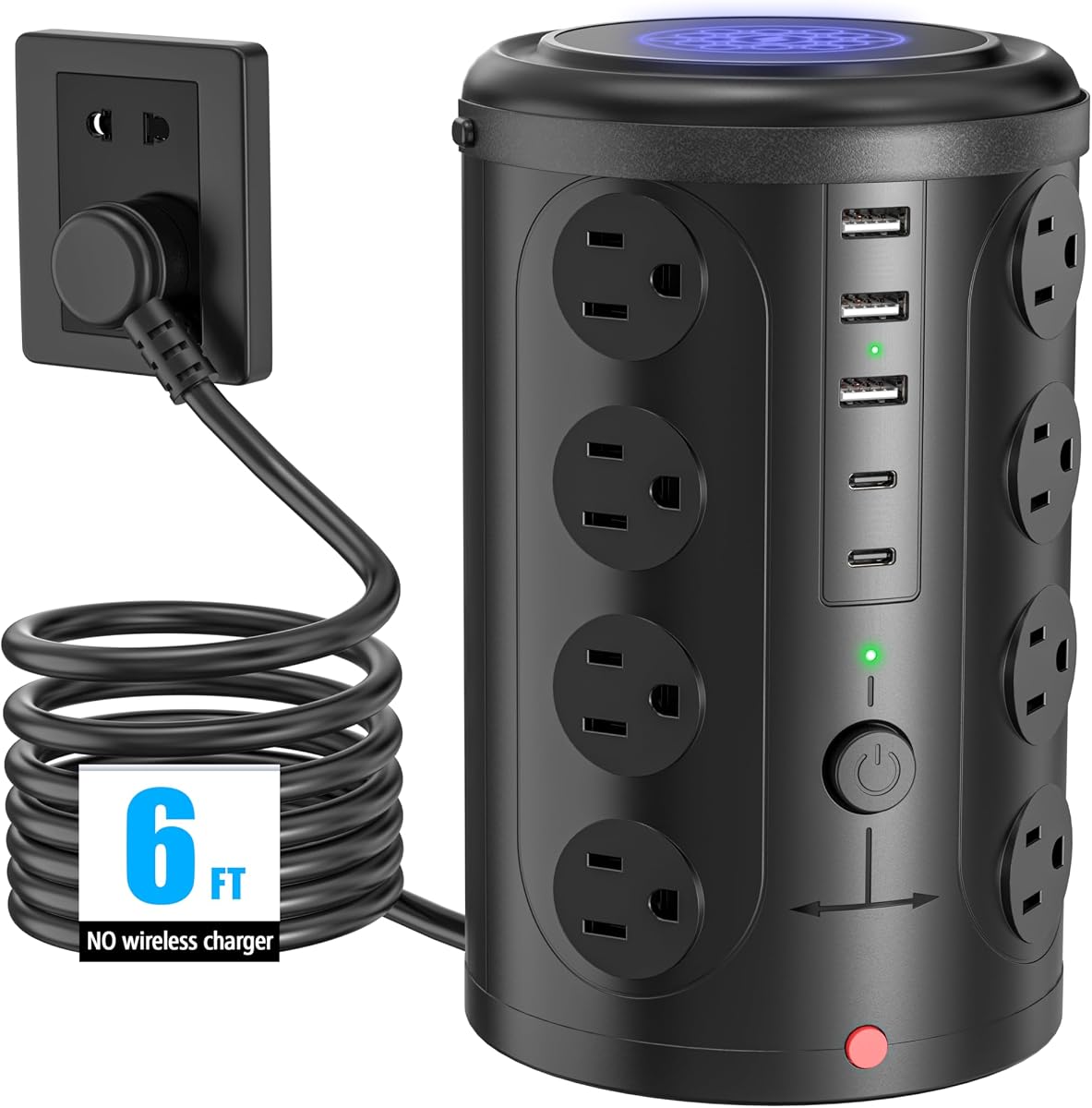
16 IN 1 Charging Station
1080 Joules Protection
Flat Extension Cord
This guide compares the best desk mounted outlet towers for 2026 featuring surge protection USB charging ports and compact designs for home offices and dorms.
Desk mounted outlet towers provide a smart solution for organizing power needs in tight workspaces. They combine multiple AC outlets and USB ports into a single vertical unit that saves valuable desk real estate.
We evaluated ten top models based on outlet count, charging speed, safety features, and build quality. Each product was assessed for its ability to handle modern device loads without compromising stability or safety.
Each pick highlights unique strengths for different user scenarios from budget setups to premium workstations. Please note that pricing and availability may fluctuate over time so check current listings before purchasing.
4.8Editor score

4.8Editor score

5.0Editor score
The following table offers a side-by-side comparison of all ten models evaluated in this guide. Review outlet counts, USB capabilities, and protection ratings to find the right fit for your setup.




The Anker Nano Power Strip stands out as the top pick for its innovative clamp design and robust charging capabilities. With a 4.8 rating it reflects high user satisfaction regarding its utility and build quality.
We may earn a commission when you buy through this link, at no additional cost to you.
Its dual-zone 10-port layout allows for organized cable management. The 70W USB-C port enables fast charging for laptops reducing the need for separate power bricks in your workspace.
While the clamp is secure it is not compatible with curved or sloped desk edges. This limitation means some users may need to verify their desk thickness and edge type before purchase.
Ideal for professionals seeking a tidy workstation this power strip combines safety and convenience effectively. Its premium features justify the cost for those prioritizing desk organization and high-speed charging.
The clamp mechanism frees up valuable surface area by attaching directly to the desk edge rather than sitting on top of it.
GaN technology in the USB-C port delivers sufficient power to charge most modern laptops quickly without overheating.
We may earn a commission when you buy through this link, at no additional cost to you.
This model offers exceptional value for users needing high outlet counts without breaking the bank. Its 4.8 rating indicates strong performance relative to its low price tag.
We may earn a commission when you buy through this link, at no additional cost to you.
With 12 AC outlets and wide spacing it accommodates large power adapters efficiently. The smart USB ports provide reliable charging speeds for phones and tablets simultaneously.
The slim plug design fits easily into tight wall spaces. However the cord length might be restrictive for some desktop setups requiring extended reach from the wall.
For budget-conscious buyers or dorm students this tower is a practical solution. It delivers essential safety features and ample connectivity for everyday devices at a fraction of premium costs.
Despite the low cost it maintains high safety standards and supports up to 16 devices simultaneously.
The USB ports detect connected devices to deliver optimal charging speed automatically without user intervention.
We may earn a commission when you buy through this link, at no additional cost to you.
The Uncaged Ergonomics tower distinguishes itself with a unique retractable cord system that minimizes cable clutter. A perfect 5.0 rating underscores its exceptional user satisfaction and reliability.
We may earn a commission when you buy through this link, at no additional cost to you.
Pulling the cord out as needed and having it auto-rewind keeps the workspace tidy. This feature is particularly useful for environments where power sources are far from the desk.
It has fewer AC outlets than some competitors which might be limiting for setups with many high-power devices. The cord mechanism also requires gentle handling to ensure longevity.
Ideal for offices prioritizing aesthetics and flexibility this model blends form and function. The mountable feet allow for versatile placement options whether on a floor or mounted wall.
The built-in retraction system ensures cords never coil or trip anyone over when not in use.
Mountable feet enable users to secure the tower to workbenches or under-desk surfaces for maximum space efficiency.
We may earn a commission when you buy through this link, at no additional cost to you.
TenTrend offers a balanced mix of AC and USB ports with a focus on fast charging capabilities. Its 4.5 rating reflects solid performance for daily use in home offices.
We may earn a commission when you buy through this link, at no additional cost to you.
The two orange 65W USB-C ports are capable of charging laptops efficiently. Alongside the AC outlets this tower handles a wide range of device power requirements in one unit.
The compact size saves desk space but might feel dense with multiple heavy plugs inserted. Ensure the cord length meets your specific distance needs as it is standard 5 feet.
This model is recommended for users needing versatile charging options in a small form factor. It balances cost and functionality well for general office or bedroom environments.
The high-wattage USB-C ports reduce cable clutter by eliminating the need for separate laptop power adapters.
Built-in overcurrent and overheat protection ensure your devices remain safe during extended charging sessions.
We may earn a commission when you buy through this link, at no additional cost to you.
The SMALLRT model provides a generous 6.5-foot extension cord suitable for distant outlets. With a 4.7 rating users appreciate its stability and versatile switch controls.
We may earn a commission when you buy through this link, at no additional cost to you.
Four separated switches allow independent control of different outlet sections which helps manage power consumption. This feature is useful for turning off specific peripherals without unplugging them.
The tower is robust and well-constructed but heavier than smaller models. Ensure you have a stable surface for it as it might tip if not placed on a flat surface.
Recommended for setups requiring extra reach between the desk and the wall socket. It is a reliable choice for dorm rooms where outlets are often located under the bed or far away.
Separate switches let users turn off specific device groups saving energy without unplugging cords.
Heavy-duty materials and overload protection ensure long-term safety for expensive electronics.
We may earn a commission when you buy through this link, at no additional cost to you.
This version of the SMALLRT tower emphasizes durability with pure copper wiring and fire-resistant materials. Its 4.8 rating highlights confidence in its safety and longevity.
We may earn a commission when you buy through this link, at no additional cost to you.
The focus on pure copper ensures efficient current flow and reduced heat generation. This makes it a safer option for continuous use with high-power devices.
The flame retardant shell adds an extra layer of safety in case of electrical faults. While the USB ports are standard they still provide reliable charging for most mobile devices.
Ideal for users prioritizing safety and build quality in their power solutions. It is a robust choice for home offices where equipment runs for long hours each day.
Pure copper conductors reduce resistance and heat buildup compared to aluminum alternatives.
The shell meets high flame retardant standards providing extra protection for your home environment.
We may earn a commission when you buy through this link, at no additional cost to you.
This tower offers 16 AC outlets which is among the highest in its class. The wide spacing ensures that large plugs do not block adjacent sockets effectively.
We may earn a commission when you buy through this link, at no additional cost to you.
Users report good satisfaction with the layout. The vertical design keeps cables organized and accessible without taking up much horizontal desk real estate.
Its height may require careful placement under shelves or cabinets. The standard cord length might need extension for very large desks but the outlet density compensates for this.
Best suited for high-density setups like studio desks or multi-device workstations. It maximizes power access in limited space and provides essential lightning protection.
Wide spacing ensures bulky power bricks fit easily without blocking neighboring outlets.
Built-in protection guards sensitive electronics from voltage spikes caused by storms.
We may earn a commission when you buy through this link, at no additional cost to you.
TESSAN is known for its slim flat plug that sits flush against the wall. This design allows for tight placement in corners or behind furniture where bulky plugs fail.
We may earn a commission when you buy through this link, at no additional cost to you.
The 45-degree right angle prevents blocking adjacent outlets on the wall. Combined with 1050J protection it offers a safe and space-efficient charging solution.
The USB count is lower than some competitors which might not suit users needing many simultaneous USB charges. However the AC outlets cover most standard needs effectively.
Ideal for home setups where wall space is limited or aesthetics are a priority. It keeps cords hidden and safe while delivering reliable power for multiple devices.
The flat plug allows the tower to stand close to the wall minimizing visible cord loops.
Rubber feet prevent slipping on smooth surfaces ensuring the tower stays upright.
We may earn a commission when you buy through this link, at no additional cost to you.
The VILONG model offers a dual-layer design that can be mounted under a desk surface. This frees up the top space entirely for work surfaces reducing clutter significantly.
We may earn a commission when you buy through this link, at no additional cost to you.
Its clamp mechanism is secure on flat edges making it stable for daily use. The 700J surge protection provides basic safety against common electrical fluctuations.
The clamp has limits on desk thickness which requires checking before purchase. It is less effective for users who prefer traditional tower styles on top of their desks.
Best for minimalist setups needing to hide the power strip completely. It is a solid choice for standing desks or shared workspaces where surface space is premium.
Clamping under the desk keeps the tower out of sight and out of the way.
No drilling is required for installation making setup quick and damage-free.
We may earn a commission when you buy through this link, at no additional cost to you.
This tower is notable for its narrow width which fits easily into tight corners. The 1800J surge protection is robust for its size ensuring safe charging.
We may earn a commission when you buy through this link, at no additional cost to you.
Users value the compact footprint that saves horizontal space on desks. The wide spacing between outlets remains functional even with the slim design.
It lacks unique features like clamps or retractable cords which makes it a standard tower option. This simplicity means it is easy to use and understand for all users.
Recommended for those needing a reliable compact power solution. It provides essential features and safety without unnecessary complexity or bulk.
The slim width allows placement in narrow corners where traditional strips would be too wide.
1800J rating offers significant protection for computers and sensitive electronics.
We may earn a commission when you buy through this link, at no additional cost to you.
Selecting the right power tower involves considering several factors to ensure compatibility and safety for your devices.
Check the total wattage rating to ensure it can handle all your devices simultaneously. Higher capacity ensures safe operation when multiple high-power devices are plugged in.
Always match the total power load of your devices to the tower's rated capacity to prevent overloading.
Determine how many USB ports you need and their power output. Look for USB-C ports that support fast charging for laptops or tablets.
Prioritize towers with high-wattage USB-C ports to reduce the need for extra wall adapters.
Look for a high joule rating which indicates better protection against electrical spikes. Higher ratings provide more safety for expensive electronics.
Choose models with at least 1000J protection for reliable safety in typical home or office environments.
Decide whether you want a desktop tower or a clamp model. Clamps save space but require specific desk edge types.
Ensure the mounting style fits your desk thickness and shape before purchasing to avoid installation issues.
Evaluate the extension cord length to ensure it reaches your power source comfortably. Flat plugs save space on walls and floors.
Select a length that matches your room layout and look for flat plugs for a neater appearance.
Wide spacing between outlets allows large plugs to fit without blocking others. Check dimensions to ensure your power bricks will fit.
Measure your largest adapter to confirm it will fit comfortably between the outlets on the tower.
Look for overload protection and short-circuit safeguards that shut off power automatically. Fire-resistant materials add an extra layer of safety.
Verify that the tower has independent switches or automatic shut-off features for better control.
Consider the physical footprint to ensure it fits your workspace. Compact designs help maintain a clean and organized desk.
Choose a shape and color that blends well with your existing office or home decor.
Place the tower on a flat stable surface or clamp it securely to a desk edge. Ensure it is not blocked by paper or curtains to avoid overheating.
Plug only devices within the total power rating to prevent overloading. Avoid connecting high-power heaters or cooling devices to these towers.
Inspect cords and plugs regularly for damage and replace them if frayed. Keep the outlets free of dust to maintain good electrical contact.
Yes, they often include advanced surge and overload protection. The vertical design also reduces the risk of tipping over or catching on objects compared to flat strips.
Many models offer USB-C ports with 60W or higher output sufficient for most laptops. Always check the wattage rating against your laptop's power requirements.
Most are designed for 125V standard in North America. Always check the voltage rating on the product label to ensure compatibility with your region.
USB ports are durable but can wear if used excessively. Most towers are rated for thousands of insertions so daily use should not affect longevity significantly.
Some models come with mounting feet or options to secure them to walls. Check the product description for specific wall mount capabilities before purchasing.
At least 20W is needed for phones and tablets. For laptops look for 60W or higher on the USB-C port to ensure efficient charging speeds.
The Anker Nano and Uncaged Ergonomics models lead the pack with innovative designs and high performance. For budget needs the Power Strips with Surge Protection offers excellent value.
Prioritize safety features like surge protection and overload cutoffs to protect your investment. Match the tower's power capacity to your device count to ensure reliable operation.
Remember to check current availability and specifications as product details may vary. Choose the model that best fits your desk style and power requirements.