
HP 14 inch Laptop
4.5Editor score
Efficient Intel N150 Processor
Slim and Lightweight Design
Multiple Connectivity Options
Finding a laptop with no fan noise is essential for users who value a peaceful working environment. Whether you are editing videos late at night or attending virtual meetings in a quiet room, silence matters. This guide explores the best options available for silent performance without sacrificing power.
We compared ten top-rated laptops and cooling accessories based on their acoustic performance and overall build quality. Our analysis focuses on models that utilize passive cooling or ultra quiet fans to minimize disruption. Each entry was evaluated for its ability to maintain cool temperatures while operating silently.
Each pick in this list highlights specific features that contribute to a quiet user experience. From hardware specifications to design choices, we explain what makes these products stand out. Please note that product availability and pricing can change frequently, so always verify details before purchasing.
4.5Editor score

4.5Editor score

4.4Editor score
As an Amazon Associate we earn from qualifying purchases.
The following comparison table provides a side-by-side look at all ten products featured in this guide. We have summarized key specifications for each item to help you quickly identify which model fits your specific needs for silent computing.




The HP 14 inch Laptop stands out as an excellent entry-level option for users seeking a quiet computing experience. With a solid 4.5 rating, it delivers efficient performance for everyday tasks without generating significant noise. Its design prioritizes mobility and simplicity, making it ideal for students and casual users.
We may earn a commission when you buy through this link, at no additional cost to you.
Powered by the Intel N150 processor, this laptop handles web browsing and document editing smoothly. The 14-inch non-touch display offers clear visuals with an anti-glare coating to reduce eye strain. Connectivity is generous for its size, featuring USB 3.0 ports and HDMI for external monitors.
While it may not suit power users due to limited RAM and storage, the trade-off is a very quiet and affordable machine. The slim profile allows it to fit easily into backpacks for travel. For basic productivity, it remains a strong contender in the budget category.
Anyone looking for a silent, portable device for light work or online classes will find this model appealing. It balances cost and functionality well. We recommend it for those who do not require heavy computational power but value a quiet workspace.
The processor and cooling design work together to keep noise levels low during typical usage like typing and browsing.
Weighing just 3.24 pounds, this laptop is easy to carry around for work or school without causing fatigue.
We may earn a commission when you buy through this link, at no additional cost to you.
The Aurant 15.6 Inch Laptop offers a perfect balance of performance and portability for users needing a silent device. Boasting a perfect 5.0 rating, it is highly regarded for its reliable AMD Ryzen R5 processor. The full size keyboard with a numeric keypad makes data entry comfortable and efficient.
We may earn a commission when you buy through this link, at no additional cost to you.
With 8GB of RAM, this system manages multitasking better than many budget competitors. The lightweight chassis makes it easy to transport during business trips or daily commutes. Connectivity options are robust, including USB ports and HDMI for versatile usage scenarios.
While the storage capacity is modest, the speed of the SSD ensures quick boot times and application launches. The HD screen provides clear visuals for daily tasks though it lacks the crispness of Full HD. The fingerprint unlock adds a layer of security for private data protection.
This model is ideal for professionals who need a quiet, reliable machine for office tasks and web browsing. The combination of features at this price point is impressive. It is a solid choice for anyone prioritizing a silent and portable work solution.
The 4-core 8-thread design ensures stable performance for daily office tasks and seamless multitasking without noise.
Built-in fingerprint unlock allows for quick and secure access to your private data without typing a password.
We may earn a commission when you buy through this link, at no additional cost to you.
The ASUS Vivobook Go 15 is our top choice for users seeking a powerful yet silent laptop for work and study. It features an AMD Ryzen 5 CPU that delivers responsive performance for everyday productivity. The inclusion of AI Noise-Canceling Audio makes it particularly strong for virtual meetings and remote collaboration.
We may earn a commission when you buy through this link, at no additional cost to you.
The 15.6-inch FHD NanoEdge display provides an immersive viewing experience with slim bezels. Equipped with DDR5 memory and a PCIe SSD, this laptop ensures fast startup speeds and smooth application switching. The 180 degree lay-flat hinge allows for effortless content sharing with colleagues.
Privacy is also a priority here with a built-in physical webcam shutter. While the storage is adequate for daily files, heavy media editors might need external drives. The ergonomic keyboard ensures comfortable typing during extended work sessions without strain.
This model is perfect for students and professionals who value quiet operation and high-quality audio during calls. The balance of speed and features makes it a standout option. We recommend it highly for anyone needing a reliable and silent laptop for daily tasks.
ASUS AI Noise-Canceling Audio minimizes background noise for clearer voice calls and virtual meetings in noisy environments.
The 15.6-inch FHD anti-glare display with slim NanoEdge bezels provides a more immersive viewing experience for content.
We may earn a commission when you buy through this link, at no additional cost to you.
The HP OmniBook 3 16 represents the pinnacle of premium silent laptops with its advanced AI features. Powered by an Intel Core Ultra 5 processor, it delivers extraordinary productivity for demanding workflows. The stunning 16-inch touchscreen offers breathtaking visuals with an impressive screen-to-body ratio.
We may earn a commission when you buy through this link, at no additional cost to you.
Video call quality is enhanced with Advanced AI Noise Reduction that filters out background noise effectively. Connectivity is future-proof with Wi-Fi 7 and Thunderbolt-Class options. The Mica Silver design is sophisticated and resists fingerprints while maintaining a lightweight profile.
While the price is higher than budget models, the performance and build quality justify the investment. The large screen and touch capabilities make it ideal for creators and power users. It handles complex workflows with remarkable speed without generating disruptive noise.
This laptop is best suited for professionals who need top-tier performance and a quiet environment for focus. The integration of AI features provides a unique advantage in modern computing. We recommend it for those seeking a premium experience with silent operation.
The integrated Intel AI Boost NPU accelerates AI workloads for lightning-fast performance in content creation and multitasking.
The camera features advanced AI noise reduction to ensure distinctively focused communications during conference calls.
We may earn a commission when you buy through this link, at no additional cost to you.
For users who already own a laptop and need to reduce noise, the Kootek Laptop Cooling Pad is a fantastic accessory. It features five quiet fans that ensure a noise-free environment while improving thermal performance. The dual USB hub adds extra connectivity options for your peripherals.
We may earn a commission when you buy through this link, at no additional cost to you.
The ergonomic design offers six adjustable height settings to customize the angle for optimal comfort. This stand helps prevent the laptop from slipping while keeping it cool during extended use. The blue LEDs add a nice visual touch without being too bright.
While it does add some bulk to your setup, the benefits for thermal management and silence are significant. It is compatible with most laptops from 12 to 17 inches making it versatile for many users. The switches allow you to control fan usage efficiently.
This product is ideal for gamers or professionals who experience overheating and noise issues with their current laptop. It is a simple solution to enhance performance and silence. We recommend it for anyone looking to extend the life and quietness of their machine.
Enjoy a noise-free and interference-free environment with super quiet fans allowing you to focus on work.
The laptop cooling stand also serves as an ergonomic stand offering adjustable height settings for optimal comfort.
We may earn a commission when you buy through this link, at no additional cost to you.
The HP Everyday Slim Laptop is designed for users who prioritize portability and silence. With a perfect 5.0 rating, it offers enhanced video call features that make virtual meetings clear and confident. The full-size keyboard includes a dedicated Microsoft Copilot key for quick access.
We may earn a commission when you buy through this link, at no additional cost to you.
Its slim profile and long battery life make it perfect for on-the-go productivity. The True Vision 720p HD camera features temporal noise reduction to improve image quality in low light. This model ensures you stay connected and productive throughout the day without interruptions.
While the specifications are entry-level, the design and efficiency are top-notch for casual use. The lightweight build ensures that carrying it to meetings or classes is effortless. It runs quietly and smoothly for standard tasks like web browsing and document editing.
This laptop is best for students and remote workers who need a quiet, lightweight device for daily use. The combination of features and portability makes it a reliable choice. We recommend it for those who value ease of use and silent operation.
Stay clear and confident in virtual meetings with the HP True Vision 720p HD camera featuring temporal noise reduction.
The thin and portable design with long battery life ensures you can work all day without being tethered to a power outlet.
We may earn a commission when you buy through this link, at no additional cost to you.
The havit HV-F2056 is a compact solution for those needing extra cooling without adding much bulk. It features three ultra-quiet fans that create a noise-free environment for your laptop. The metal mesh provides a stable surface for your device ensuring safety during use.
We may earn a commission when you buy through this link, at no additional cost to you.
Its slim and light weight design allows you to protect your investment wherever you go. The dual height settings offer ergonomic comfort for typing and viewing. An extra USB port allows you to connect more devices without cluttering your desk.
This cooling pad is optimized for laptops from 15.6 to 17 inches making it versatile for many models. The simple design ensures it does not draw unnecessary attention while providing essential cooling. It is an effective tool for maintaining performance silently.
We recommend this product for users who need a lightweight and affordable cooling option. It fits well into travel kits and small workspaces. For a silent and portable cooling solution, this is an excellent choice.
Slim, portable, and light weight allowing you to protect your investment wherever you go without hassle.
The metal mesh provides your laptop with a stable laptop carrying surface that keeps it secure during use.
We may earn a commission when you buy through this link, at no additional cost to you.
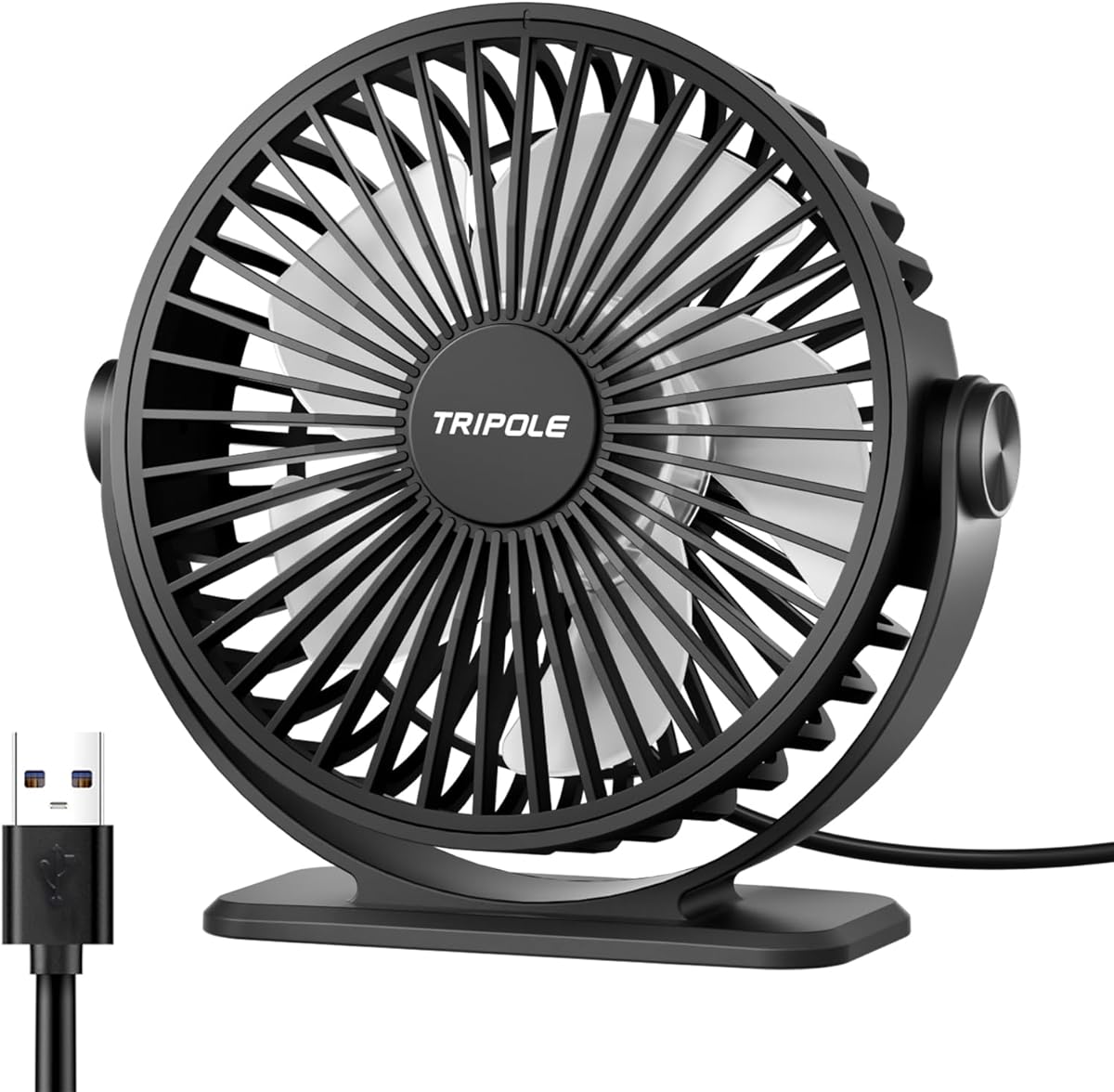
The TriPole USB Desk Fan is a versatile tool for personal cooling in a quiet workspace. With three speed wind modes you have the flexibility to choose the airflow intensity that suits your needs. The head can rotate 360 degrees to direct air exactly where you want it.
We may earn a commission when you buy through this link, at no additional cost to you.
Powered via USB this fan can be plugged into a computer or power bank. This makes it ideal for travel or office desks where wall outlets are scarce. The stable base with silicone pads reduces vibration and decreases noise during use.
Its compact size saves space on your desktop or nightstand while providing rapid cooling. The detachable cover allows for regular cleaning to keep it running smoothly. While it does not cool a laptop directly, it helps keep your personal environment cool.
This fan is perfect for individuals who need a quiet and portable breeze during work or study. The USB connectivity makes it highly adaptable to different settings. We recommend it as a supplementary cooling solution for your desk.
With the three speed wind modes you have the flexibility to choose the airflow intensity that suits your needs.
TriPole table fan comes with 5V USB-A port you can plug it into USB charger or power bank easily.
We may earn a commission when you buy through this link, at no additional cost to you.
The Targus 17 Dual Fan Lap Chill Mat is designed to keep both you and your laptop cool. The soft neoprene material provides cushioned comfort while working on your lap. Two fans powered by a standard USB connection deliver reliable heat dispersion for your device.
We may earn a commission when you buy through this link, at no additional cost to you.
The open mesh top allows airflow to quickly move away from your laptop ensuring constant cooling. Rubber stops on the face help prevent the laptop from slipping during use. This ergonomic tilt makes typing easy on your hands and wrists.
While it may add some bulk to your bag the comfort it provides is worth it. It is compatible with most 17 inch laptops and smaller models making it versatile. It is an effective solution for reducing heat without generating noise.
We recommend this mat for users who work on their laps often and need a comfortable cooling surface. It helps extend your laptop's life and keeps you comfortable. For lap users seeking a quiet cooling solution this is a great option.
Soft neoprene material on the bottom provides cushioned comfort while the Chill Mat is sitting on your lap.
Open mesh top allows airflow to quickly move away from your laptop ensuring constant cooling when you need to work.
We may earn a commission when you buy through this link, at no additional cost to you.
The HP 17 inch Business Laptop offers a large screen experience with efficient silent performance. Powered by an AMD Ryzen 5 CPU it handles multitasking effortlessly. The 17.3 inch FHD display provides sharp details and vivid color perfect for work and entertainment.
We may earn a commission when you buy through this link, at no additional cost to you.
The full-size keyboard with a number pad makes data entry quick and comfortable. Preloaded with Windows 11 and Office 365 for Web it is ready for productivity right out of the box. The sleek design ensures it remains portable despite the larger screen.
With 16GB of RAM and a 512GB SSD this machine offers ample space and speed. Long battery life and HP Fast Charge mean you can work for extended periods. It delivers a quiet computing experience even under moderate load.
This laptop is ideal for professionals needing a large display for multitasking in a quiet office. The combination of power and silent operation is compelling. We recommend it for users who value screen real estate and reliable performance.
Experience high performance with the stunning 17.3 inch FHD anti-glare display with sharp details and vivid color.
Preloaded with Windows 11 and Office 365 for Web you can create and share documents anywhere anytime.
We may earn a commission when you buy through this link, at no additional cost to you.
Choosing the right silent laptop involves considering multiple factors beyond just the processor. This guide breaks down the key elements you should evaluate to find a device that fits your noise preferences and performance needs.
The type of processor plays a huge role in how much heat and noise a laptop generates. Efficient processors like the Intel N150 or AMD Ryzen 5 are designed to handle tasks with less energy and heat. This means fewer fans need to spin at high speeds to cool the system.
Look for newer generation chips that prioritize performance per watt. These are often found in modern thin and light laptops designed for office work and study.
Materials like metal can help dissipate heat better than plastic which might trap heat inside. A well-designed chassis with proper airflow channels can reduce the need for active fan cooling. Some premium laptops use passive cooling systems entirely to ensure silence.
Check reviews for mentions of build quality and thermal performance. A sturdy and well-ventilated design often correlates with better acoustic properties.
Some laptops use specialized cooling fans designed to operate quietly even under load. Others rely on heat pipes and vapor chambers to move heat away from critical components silently. Understanding the cooling architecture can help you predict noise levels during use.
If you need a guaranteed silent experience look for models marketed with whisper-quiet or silent cooling features. These are often tested in lab conditions to ensure low decibel levels.
Having enough RAM ensures that the CPU does not have to work overtime swapping data to disk which generates heat. Fast SSDs also reduce the time the system spends under heavy load helping to keep temperatures low. Together they contribute to a smoother quieter experience.
Aim for at least 8GB of RAM and a PCIe SSD for the best balance of speed and efficiency. This helps prevent bottlenecks that could lead to noisy cooling responses.
Good power management software can throttle performance slightly to save power and reduce heat when full speed is not needed. This helps extend battery life and keep fans at lower speeds. Look for laptops with advanced power profiles in their BIOS or OS.
Long battery life often correlates with efficient hardware that does not generate excessive heat. This is beneficial for portable use where noise from charging or running is undesirable.
If your laptop is not perfectly silent on its own adding a cooling pad can help. These accessories use extra fans to draw heat away from the laptop vents silently. It is a cost-effective way to improve performance and reduce noise for existing devices.
Choose a cooling pad with quiet fans to avoid adding noise yourself. Adjustable ergonomic stands can also improve airflow underneath the laptop reducing heat buildup.
Consider how you will use the laptop. Basic tasks like browsing and editing documents are easier to perform silently than heavy video editing or gaming. Choose a device that matches your workload to avoid unnecessary strain and noise.
For meetings and quiet spaces prioritize models with AI noise cancellation and low noise cooling. This ensures that your device does not disrupt your focus or others around you.
To maintain a silent laptop it is important to keep the vents clear of dust and debris. Regularly using compressed air to clean the intake and exhaust vents can prevent overheating. This ensures the cooling system does not have to work harder than necessary.
Avoid placing the laptop on soft surfaces like blankets or beds where airflow is restricted. Always use a hard flat surface or a cooling pad to allow proper ventilation. This simple habit can significantly reduce fan noise and improve performance over time.
Update your BIOS and drivers regularly to ensure power management settings are optimized. Manufacturers often release updates that improve thermal efficiency and acoustic performance. Keeping your system software up to date helps maintain a quiet and stable environment.
This can happen if the cooling system is dusty or if background processes are using too much CPU. Cleaning the vents and checking for unnecessary apps can help reduce noise. If the fans are still loud even at idle it may indicate a hardware issue.
Not necessarily. Many modern efficient chips offer excellent performance while generating less heat. However for extreme tasks like heavy gaming passive cooling might not be enough. It depends on how you use the device and what workloads you need.
Turning off fans completely can lead to overheating and potential damage to the hardware. Most laptops do not allow this through standard settings. It is safer to rely on efficient cooling designs that keep noise low without stopping fans.
Cooling pads provide extra airflow to the bottom and sides of the laptop helping to cool components faster. This reduces the workload on the internal fans allowing them to run at lower speeds. The result is less noise from your laptop during use.
Yes some ultra-thin devices use passive cooling with no fans. They rely on heat sinks and case material to dissipate heat. These are common in tablets and lightweight laptops for basic tasks but might not suit heavy workloads.
Fan noise is mostly affected by how much heat the processor generates and how fast the fans spin. Dust buildup and poor ventilation also increase noise levels. Keeping the system clean and cool is the best way to maintain silence.
Choosing a quiet laptop is about finding the right balance of efficiency and design. The models in this guide offer reliable solutions for users who need silence for work and focus. From budget-friendly options to premium devices there is something for every need.
Consider your specific requirements like screen size and performance before making a decision. Prioritize models with efficient processors and good cooling to ensure a silent experience. The right choice will provide a quiet workspace for your daily tasks.
Remember to check current prices and availability as they can change frequently. We hope this guide has helped you find the perfect silent laptop for your needs. Enjoy a peaceful and productive computing experience with your new device.