
VEIKK VK1200 V2
4.3Editor score
Full laminated screen technology
Six customizable shortcut keys
Includes two battery-free pens
Finding an affordable pen display can be challenging for beginners and hobbyists looking to start digital art without breaking the bank. These devices offer a direct drawing experience on screen which is essential for precision and creativity in modern illustration workflows.
We have carefully selected ten models that balance cost with performance ensuring you get reliable hardware for sketching or animation. Each option was chosen based on display quality, pen technology, and compatibility with popular creative software used by professionals worldwide.
Every pick in this list highlights specific strengths and trade-offs helping you decide which device fits your workspace needs. Please note that availability and pricing can change frequently so always verify current details before making your final purchase decision today.
4.3Editor score

4.4Editor score

4.5Editor score
As an Amazon Associate we earn from qualifying purchases.
The following table provides a side-by-side overview of all ten selected models highlighting their core specifications and key differentiators for easy comparison.




The XP-PEN Artist12 stands out as a top contender in the affordable pen display market offering a balanced package for new digital artists. With a solid rating and widespread praise this model delivers vivid visuals and responsive drawing capabilities that rival more expensive units.
We may earn a commission when you buy through this link, at no additional cost to you.
Its 11.6 inch HD IPS display covers 72 percent NTSC which ensures your colors look true and vibrant during creative sessions. The battery-free P06 stylus feels natural in hand and includes a digital eraser plus eight replacement nibs for long term use.
While it lacks tilt recognition the eight thousand levels of pressure sensitivity allow for expressive strokes and fine control over line weight. The pre-installed anti-reflective protector reduces glare effectively making it comfortable to work under various lighting conditions.
This tablet is ideal for students or hobbyists who need a reliable tool for sketching and design without overspending. Its robust driver support and compatibility with major apps make it a versatile choice for growing creative portfolios.
The display presents vivid images and extreme detail allowing your artwork to look professional even on a budget.
Customizable shortcut keys and a programmable touch bar let you zoom scroll and switch tools quickly while drawing.
We may earn a commission when you buy through this link, at no additional cost to you.
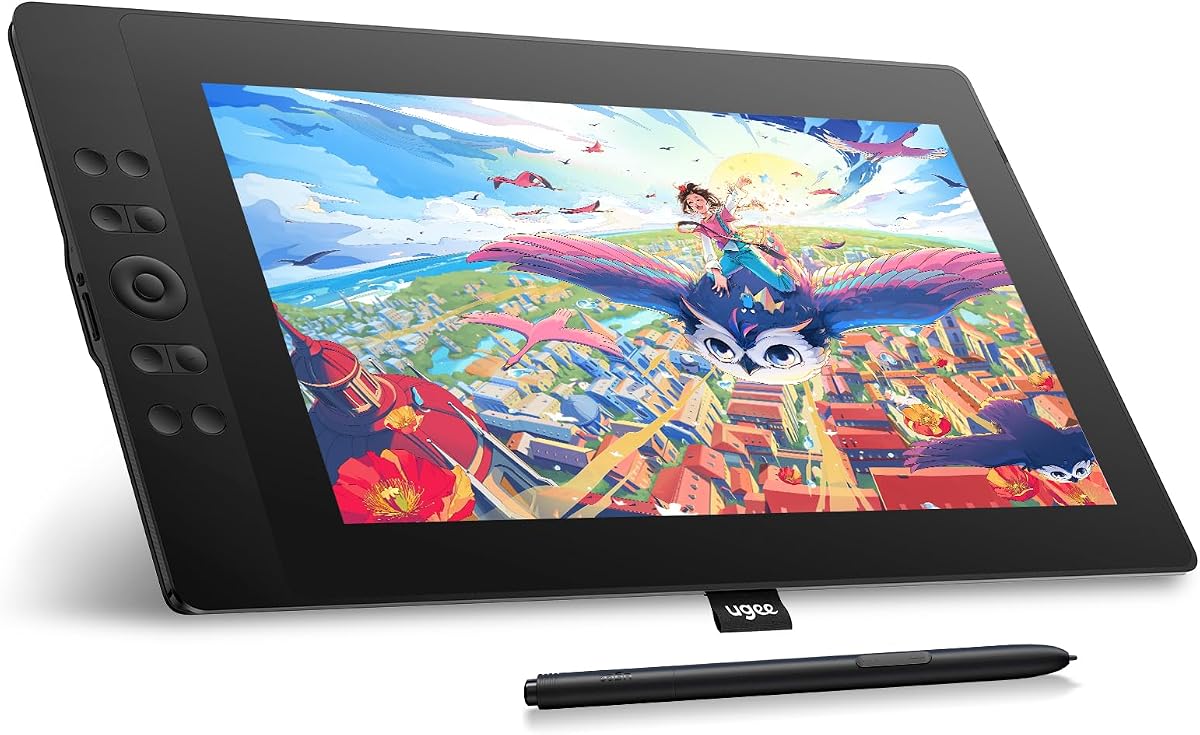
The VEIKK VK1200 V2 offers an impressive array of features for its price point making it a standout budget option. It combines modern full-laminated technology with a paper-like drawing experience that enhances accuracy and comfort for daily use.
We may earn a commission when you buy through this link, at no additional cost to you.
Full-lamination minimizes the gap between glass and screen so your cursor aligns perfectly with the pen tip. This model also supports tilt recognition and includes two battery-free pens along with twenty-eight replacement nibs for extended creative sessions.
Setup is straightforward with a single USB-C cable that handles data power and video signals simultaneously. The six programmable shortcut keys improve efficiency by letting you map frequent actions like undo or zoom directly to the device.
Artists seeking a compact and stylish solution will appreciate the all-metal body and anti-slip back design. Its combination of portability and performance makes it a strong recommendation for those starting their digital art journey.
Seamlessly integrated glass and screen ensure cursor accuracy and a natural drawing feel without parallax errors.
The frameless all-screen infinity display and metal body provide a stable and stylish workspace for creating.
We may earn a commission when you buy through this link, at no additional cost to you.
The HUION Kamvas 13 Gen 3 delivers high-end features that justify its position as a premium choice in this roundup. With factory color calibration and advanced pen technology it offers precision and reliability for serious illustrators and designers.
We may earn a commission when you buy through this link, at no additional cost to you.
Canvas Glass 2.0 provides a matte surface that reduces glare and improves accuracy mimicking traditional paper. The pen supports sixteen thousand pressure levels and tilt detection ensuring fluid natural strokes without lag during complex artwork creation.
Color accuracy is exceptional with 99 percent sRGB coverage and Rec.709 standards guaranteeing consistent output across different media. Dual dial buttons and programmable shortcut keys streamline your process allowing quick adjustments to brush size or zoom.
While it sits at a higher price point the build quality and performance make it a worthwhile investment. Its compatibility with Android devices adds versatility making it suitable for portable workflows alongside desktop setups.
Factory calibration and wide color gamuts ensure your visuals are stunning and consistent for professional work.
Dual dials and shortcut keys give you tactile control to streamline common tasks without interrupting your flow.
We may earn a commission when you buy through this link, at no additional cost to you.
The GAOMON PD1161 provides a robust feature set for those who prioritize workflow efficiency and customization. Its eight press keys on the side allow extensive mapping of shortcuts to speed up your creative process significantly.
We may earn a commission when you buy through this link, at no additional cost to you.
The display features a pre-installed matte film that creates a paper-like feel while reducing uncomfortable glare. With 72 percent NTSC color gamut it presents lifelike colors and smooth gradations suitable for various artistic styles.
Battery-free stylus pen avoids the hassle of charging and supports tilt for dynamic brush strokes. While it lacks full lamination the active area remains spacious and comfortable for detailed illustration and sketching tasks.
This model is well-suited for artists on a budget who need reliable performance and extensive control options. Its compatibility with popular software ensures you can integrate it seamlessly into your existing digital environment.
Eight customizable press keys and two pen buttons let you create a highly ergonomic and convenient work platform.
The matte film and pressure sensitivity combine to give a familiar feel of standard pencil sketching.
We may earn a commission when you buy through this link, at no additional cost to you.
The Artisul D16 offers a larger workspace compared to typical entry-level displays making it ideal for detailed illustration. Its refurbished status allows users to access a premium size at a significantly lower cost than standard new models.
We may earn a commission when you buy through this link, at no additional cost to you.
Full-laminated technology ensures cursor positioning accuracy which is critical when working on intricate designs or animations. The P58B stylus provides 8192 levels of pressure sensitivity for fine control over brush strokes and texture.
A quick dial on the side lets you adjust brush size effortlessly speeding up your editing workflow. The adjustable stand supports multiple angles allowing both left-handed and right-handed users to find a comfortable posture.
This option is perfect for users who need more screen real estate without investing in high-end equipment. Its compatibility with major creative apps ensures it integrates smoothly into professional workflows.
A 15.6 inch active area provides a larger space to create without feeling cramped during complex projects.
Full-laminated screen makes cursor positioning accurate for a natural drawing experience free from parallax.
We may earn a commission when you buy through this link, at no additional cost to you.
The UGEE UE16 excels in color reproduction offering an ultra-high 143 percent sRGB gamut that showcases exceptional accuracy. This makes it a compelling choice for designers who rely on precise color matching for their projects.
We may earn a commission when you buy through this link, at no additional cost to you.
Its full-laminated screen reduces parallax ensuring your pen tip aligns directly with the cursor. The 16K pressure sensitivity allows for rich vibrant strokes that translate effortlessly onto the screen without delay.
Four color space modes including sRGB Adobe RGB and DCI-P3 let you transition between visual experiences seamlessly. The eight physical shortcut keys plus a digital wheel provide tactile feedback that enhances your drawing experience.
This tablet supports multiple operating systems including Android for versatile connectivity. Its combination of color precision and ergonomic features makes it a strong contender for professional digital artists.
The 143 percent sRGB gamut ensures accurate and vivid portrayal of sixteen point seven million colors.
Support for Windows Mac and Android allows you to use the device across different operating systems.
We may earn a commission when you buy through this link, at no additional cost to you.
The VEIKK VK1200 is an excellent entry point for beginners needing a reliable drawing display without extra complexity. It offers essential features like tilt and eight thousand pressure levels which are sufficient for most learning needs.
We may earn a commission when you buy through this link, at no additional cost to you.
Two battery-free pens and twenty-eight replacement nibs come in the box providing ample resources to start creating immediately. The artist glove helps keep hands clean and free from smudges during long drawing sessions.
Six shortcut keys allow access to essential functions like undo zoom and brush selection. The LED screen offers decent resolution and color performance suitable for sketching and basic digital art tasks.
This model is best suited for students or hobbyists starting their digital journey. Its straightforward design and included accessories make it a convenient and welcoming option for new artists.
Includes two pens and numerous nibs to keep you drawing without needing immediate extra purchases.
Shortcut keys for undo redo and zoom help you focus on art rather than software menus.
We may earn a commission when you buy through this link, at no additional cost to you.
The RubensTab T11 Pro stands out as a standalone device that does not require a computer connection for use. This makes it uniquely portable allowing you to create anywhere with just the device and a power source.
We may earn a commission when you buy through this link, at no additional cost to you.
It features a 10.1 inch Full HD IPS screen with vibrant colors and sharp details for an immersive experience. The built-in battery supports up to five hours of continuous use which is ideal for short creative sessions on the go.
Multi-touch functionality enables intuitive zooming and panning improving the natural feel of navigation. Pre-installed apps provide a ready-to-use environment for beginners to explore digital art without downloading extra software.
This tablet is perfect for travelers or those who need a secondary device for sketches. Its independence from desktops offers a freedom that screen-based tablets cannot match in this category.
Completely independent design allows you to create and sketch anywhere anytime without external hardware.
Pre-installed professional-grade apps let you dive right into drawing without needing setup.
We may earn a commission when you buy through this link, at no additional cost to you.
The VEIKK VK1200V2 brings upgraded pressure technology to an affordable price point making it a strong contender. The sixteen thousand levels of sensitivity allow for delicate lines and natural brush dynamics.
We may earn a commission when you buy through this link, at no additional cost to you.
Its full-laminated design reduces parallax ensuring precise cursor positioning for comfortable creation. The display covers 120 percent sRGB which presents vivid visuals and rich lifelike colors for detailed work.
Two P05 passive styluses ensure you always have a backup ready for use. The 290 PPS reading rate ensures ultra-smooth tracking without lag during fast strokes.
This model is well-suited for artists seeking high pen performance without a high price. Its lightweight and highly portable design make it perfect for daily use in various environments.
Upgraded 16384 pressure levels offer twice the sensitivity of standard models for delicate line work.
120 percent sRGB color gamut delivers vivid visuals and rich lifelike colors for your art.
We may earn a commission when you buy through this link, at no additional cost to you.
The XPPen Artist 12 Pro Lite offers a unique red dial for customizable control adding convenience to your workflow. It combines full-lamination with tilt support for a natural drawing feel.
We may earn a commission when you buy through this link, at no additional cost to you.
The display eliminates parallax effectively offering a distraction-free working environment. With 8192 pressure levels it provides increased accuracy for fine sketches and detailed work.
Eight shortcut keys give you plenty of customization options at your fingertips for different apps. The 3-in-1 cable design means no adapter is needed to connect to your computer.
This model is ideal for users who value quick control access and clean cable management. Its compatibility with popular digital art software ensures it fits well into diverse creative needs.
The programmable Red Dial is comfortable in the hand and convenient to control brush sizes.
Natural tilt support lets you adjust shading easily without frequent software adjustments.
We may earn a commission when you buy through this link, at no additional cost to you.
Selecting the right pen display requires considering several key factors to ensure it meets your specific creative needs and budget constraints.
Screen size determines how much space you have to work on and affects portability. Common sizes range from 11.6 inches to 15.6 inches with 1920×1080 resolution being standard for clarity.
Look for an active area that matches your hand movement comfort and your workspace setup.
Color gamut like sRGB or NTSC indicates how many colors the screen can display. Higher percentages mean better fidelity for professional design work.
Aim for at least 72 percent NTSC or 100 percent sRGB for reliable color reproduction.
Pressure sensitivity levels such as 8192 or 16384 determine how nuanced your strokes can be. Battery-free pens reduce maintenance and ensure uninterrupted drawing.
Tilt support adds another dimension for shading and brush control if needed for your style.
Full-laminated screens eliminate the air gap between glass and panel reducing parallax for accurate cursor placement. This feature significantly improves the natural feel of drawing.
Non-laminated screens may feel disconnected but are often found on cheaper models.
Ensure the device works with your operating system and software. Most support Windows and Mac but Android connectivity is increasingly valuable for mobile workflows.
Check required ports like HDMI USB or USB-C to avoid needing extra adapters.
Programmable keys and dials improve efficiency by letting you map common commands to physical buttons. This reduces mouse dependency during art creation.
Consider how many keys you need based on your typical software usage patterns.
Single cable solutions like USB-C simplify setup and reduce clutter on your desk. Some models require multiple cables for power and data which can be cumbersome.
Verify your computer has the necessary ports before purchasing to ensure smooth operation.
Sturdy construction ensures durability especially if you move the device often. Included accessories like gloves pens and nibs add value to the purchase.
Check warranty terms and technical support options for peace of mind.
Set up the tablet by connecting it to your computer via the included cables and installing the latest drivers for optimal performance. Ensure your device is properly powered and recognized by your operating system.
Calibrate the pen settings in the driver software to match your drawing style and pressure preferences. Adjusting tilt and sensitivity can significantly improve the accuracy and comfort of your work.
Keep the screen clean with a soft cloth and avoid applying excessive pressure during use. Store the device in a cool dry place and use a protective cover when transporting it to prevent scratches.
Most pen displays in this list require a connection to a PC or Mac to function as secondary monitors. However some standalone models like the RubensTab T11 Pro work independently without a computer.
They are compatible with popular creative apps such as Adobe Photoshop Illustrator and Clip Studio. Many also support open-source tools like Krita GIMP and Blender for diverse workflows.
Yes devices with high pressure sensitivity and good resolution support 3D sculpting and modeling software like ZBrush and Maya effectively.
Some models support Android via USB-C DP1.2 if your phone or tablet has the right ports. Always check the specifications for confirmed Android compatibility.
It depends on your computer ports. If your laptop lacks HDMI or USB-A you may need a USB-C to HDMI adapter for connection.
Update your drivers and ensure your computer meets minimum system requirements. Adjusting the pen speed in driver settings can also improve smoothness.
Most brands provide a one-year hardware warranty with lifetime technical support. Always register your device with the manufacturer to claim benefits.
This guide has highlighted ten reliable options ranging from budget-friendly displays to high-performance premium models. Each offers unique features to suit different needs and skill levels.
Prioritize screen quality and pen sensitivity if you plan to work professionally. For casual use consider portability and ease of setup.
Always check current availability and pricing before buying to ensure you get the best deal available in the market today.