
Motherboard USB 2.0 to Type C Front Panel Cable
4.8Editor score
Works with 9pin USB 2.0 headers
Simple plug and play installation
Compact 6.6 inch cable length
Modern desktop computers often lack convenient front panel USB C ports despite supporting high speed data transfer internally. Adding these ports improves accessibility for phones, drives, and peripherals without opening the case every time.
We compared ten leading adapter cables and hubs based on data speed support, motherboard header compatibility, build materials, and installation ease. Each product was evaluated for real world utility across common PC scenarios and use cases.
Every pick shows specific strengths like speed ratings or connector types. Prices and availability change frequently, so verify current details before purchasing to ensure compatibility with your specific motherboard and case configuration.
4.8Editor score

4.6Editor score

4.6Editor score
As an Amazon Associate we earn from qualifying purchases.
This side-by-side comparison highlights key specifications for all ten products, helping you quickly identify which header or hub matches your motherboard's available ports and your required data transfer speeds.


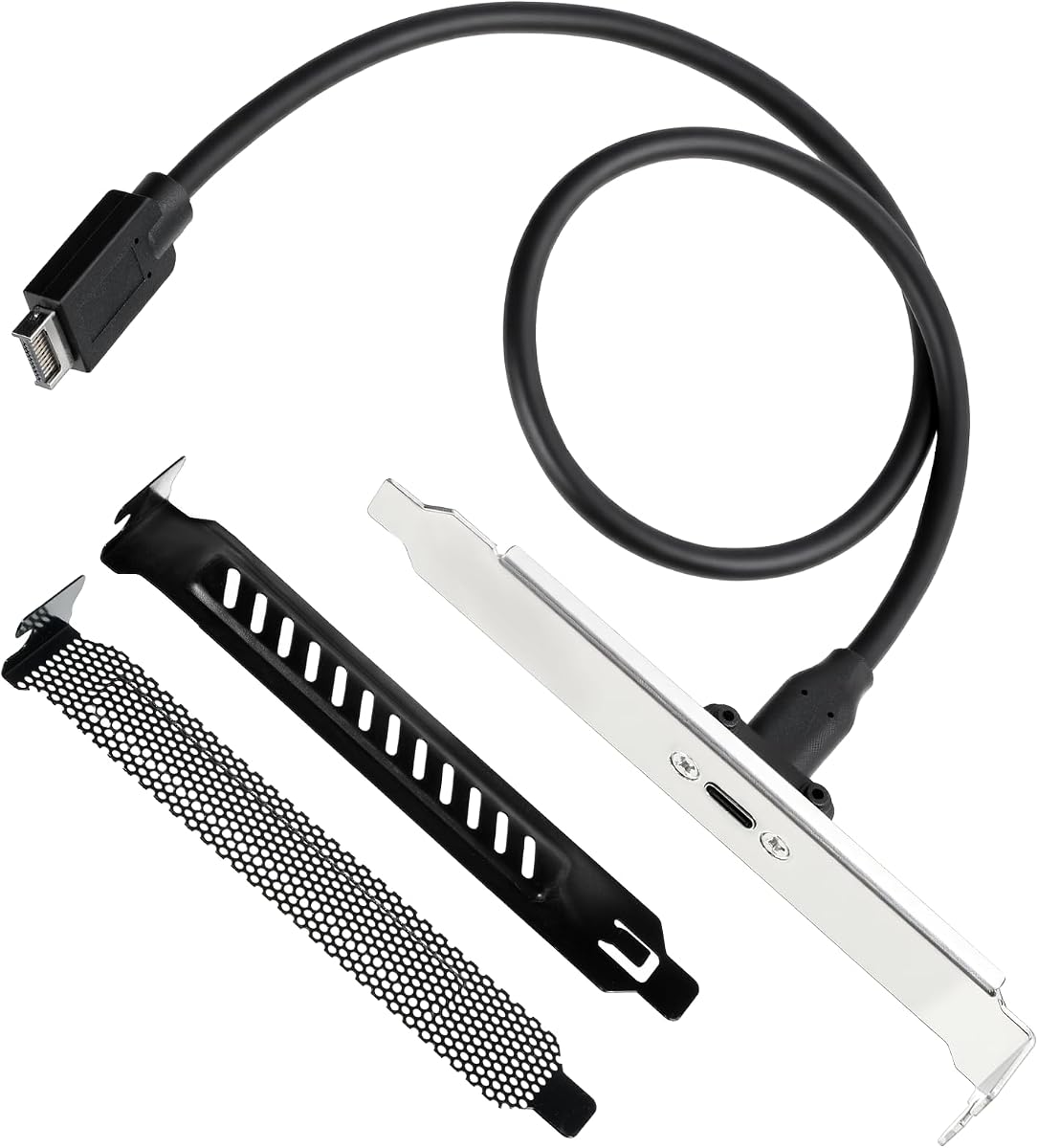


This GRAUGEAR extension cable stands out as the top pick for users needing the fastest possible front panel USB C access. With support for USB 3.2 Gen 2×2 speeds up to 20Gbps, it handles large file transfers effortlessly. The rating reflects consistent performance and robust construction.
We may earn a commission when you buy through this link, at no additional cost to you.
The double shielded EMI/EFI wires ensure stable data transmission by reducing noise interference. This is crucial for maintaining high speed integrity over the 23.6 inch cable length. The sturdy metal PCI bracket secures the port firmly on the back panel, offering durability and a professional look.
While it requires a specific 20-pin USB 3.2 Key-A Type-E header, this limitation is common for high speed solutions. The backward compatibility with older USB standards ensures it works with a wide range of peripherals even if the full 20Gbps is not utilized.
Ideal for power users and professionals who prioritize speed and reliability, this cable delivers premium performance. It is the best choice for modern builds equipped with compatible headers. Verify your motherboard specifications before purchase to ensure a perfect fit.
Supports USB 3.2 Gen 2×2 for up to 20Gbps data transfer, ideal for large files.
Double shielded wires prevent EMI and EFI interference for stable high speed connections.
We may earn a commission when you buy through this link, at no additional cost to you.
This adapter provides a direct route to high speed USB C connectivity from the rear panel. It supports USB 3.2 Gen 2×2 speeds, matching the top tier performance seen in modern motherboards. The build quality ensures reliable data transmission over time.
We may earn a commission when you buy through this link, at no additional cost to you.
The panel mounted USB C female connector allows easy connection of phones, tablets, and drives. Sturdy metal construction on the bracket adds durability. Double shielded wires protect against internal and external noise interference, maintaining signal integrity.
Installation is straightforward with a plug and play design that needs no drivers. However, it requires a specific 20-pin Type-E header which older boards may lack. Compatibility check before buying is essential for functionality.
This cable is perfect for users wanting premium speed without internal hubs. It fits well in cases needing back panel access. Verify your motherboard supports Type-E headers to maximize performance benefits.
Panel mounted USB C connector supports phones, tablets, drives, and all USB-C peripherals.
Sturdy metal bracket ensures long service life and secure mounting on the chassis.
We may earn a commission when you buy through this link, at no additional cost to you.
This adapter expands connectivity by offering both USB C and traditional USB A ports on the front panel. It supports USB 3.2 Gen 2×2 speeds for the C port and USB 3.0 for the A port. The versatility makes it suitable for mixed device environments.
We may earn a commission when you buy through this link, at no additional cost to you.
The cable connects to both Type-E and USB3.0 headers on the motherboard. Sturdy metal construction ensures durability. Double shielded wires reduce interference, ensuring stable high speed data transmission even with multiple devices connected.
While highly versatile, installation requires your motherboard to have both specific headers. Older boards might need adapters. The plug and play design simplifies software setup but hardware compatibility is key for full functionality.
Ideal for users needing both port types without extra hubs. It maximizes motherboard resources efficiently. Check header availability on your board before purchase to avoid compatibility issues.
Combines USB-C and USB-A ports for connecting a wider range of legacy and modern devices.
Delivers up to 20Gbps on USB-C while maintaining backward compatibility with older standards.
We may earn a commission when you buy through this link, at no additional cost to you.
This hub transforms a floppy drive bay into four high speed ports. It offers two USB-C and two USB 3.2 Gen 2 ports, providing excellent flexibility. The metal build ensures stability and heat dissipation for heavy usage.
We may earn a commission when you buy through this link, at no additional cost to you.
Each port supports up to 10Gbps data transfer, allowing fast file sharing. Multiple safety protections like over-current and short circuit protection add reliability. The hub includes screws for secure mounting and stability within the case.
Installation requires both a Type-E header and a SATA power connector. This power requirement ensures consistent performance under load. Users must verify both connections are available before purchase to avoid installation issues.
Perfect for workstations needing multiple high speed connections in one spot. It expands desktop scalability significantly. Ensure power and header availability to unlock its full potential.
Converts 3.5 inch space into four ports, meeting diverse needs for multiple external devices.
Includes over-current and voltage protection to safeguard devices from power surges.
We may earn a commission when you buy through this link, at no additional cost to you.
This expansion card offers a flexible solution for systems lacking internal headers. It adds front USB and USB C ports via a PCIe x1 slot. The 5Gbps speed supports modern devices well for everyday tasks.
We may earn a commission when you buy through this link, at no additional cost to you.
Built with explosion-proof capacitors for temperature control and stable power. It requires no external power adapter, drawing energy directly from the PCIe slot. Windows 10 and above do not need drivers, simplifying setup.
The card installs into any empty PCIe slot, making it versatile. However, older systems might require driver installation. Ensure your system has an available PCIe slot and compatible OS for best results.
Great for older PCs needing a USB C upgrade without motherboard changes. It provides a cost effective way to modernize connectivity. Check PCIe slot availability before purchase.
Uses empty PCIe x1 slot to add front panel ports without internal header dependencies.
Uses polymer dielectric capacitors for stable power and temperature control during operation.
We may earn a commission when you buy through this link, at no additional cost to you.
This hub combines a fast USB-C port with standard USB 3.0 options. It supports 20Gbps speeds on the C port for rapid file transfers. The design converts a floppy bay into versatile connectivity options.
We may earn a commission when you buy through this link, at no additional cost to you.
Two USB 3.0 ports add capacity for older devices. Safety protections ensure device safety against power issues. Sturdy construction includes screws for stability during operation in desktop cases.
It requires both 19-pin USB 3.0 and 20-pin Type-E headers. This limits use to newer motherboards with both slots. Verify header availability to ensure proper function before purchase.
Ideal for mixed environments needing both speed and compatibility. It maximizes drive bay utility effectively. Check motherboard specs to confirm header presence.
Offers both 20Gbps USB-C and 5Gbps USB 3.0 ports for diverse device needs.
Includes over-current and voltage protection to prevent damage during power fluctuations.
We may earn a commission when you buy through this link, at no additional cost to you.
This cable provides an affordable way to add USB C to older motherboards. It connects to standard 9pin USB 2.0 headers. While speed is limited to 480Mbps, it is sufficient for phones and basic peripherals.
We may earn a commission when you buy through this link, at no additional cost to you.
The design is compact at 17cm, fitting easily in smaller cases. It requires no drivers, ensuring instant setup. The low cost makes it accessible for budget builds or simple upgrades.
It does not support video or audio output or USB 3.0 speeds. This limitation is acceptable for charging and data transfer only. Verify header type before purchase to avoid mismatch.
Best for users prioritizing cost over speed on older systems. It enables modern connectivity affordably. Check compatibility with 9pin headers for success.
Offers USB C connectivity for older 9pin headers at a very low price point.
Plug and play design with no driver installation needed for immediate use.
We may earn a commission when you buy through this link, at no additional cost to you.
This adapter delivers 20Gbps speeds for high bandwidth tasks. It is constructed with metal and PVC for durability and flexibility. The included PCI bracket and slot covers ensure a clean professional installation.
We may earn a commission when you buy through this link, at no additional cost to you.
The 50cm cable offers slack for easy routing in large cases. Clear labeling helps avoid connector orientation errors. However, it relies on a dedicated 20-pin Type-E header for full functionality.
Some users report mixed experiences, reflected in the rating. Proper motherboard compatibility is crucial for performance. Ensure your board supports Gen 2×2 standards before purchase.
Best for builds needing clean rear panel USB C access. It provides high speed and aesthetic integration. Verify header compatibility for reliable use.
Includes metal PCI bracket and slot covers for secure mounting and clean appearance.
Supports up to 20Gbps for handling large files and bandwidth applications efficiently.
We may earn a commission when you buy through this link, at no additional cost to you.
This extension cable features an ultra-thin flat TPE design that resists bending damage. It supports 10Gbps speeds and up to 100W power delivery for charging needs. The double shielding layer ensures stable signal transmission.
We may earn a commission when you buy through this link, at no additional cost to you.
The cable is designed for easy bending without damage. It includes a panel mount screw for secure front installation. Silver plated materials reduce impedance for faster speeds.
It requires a USB 3.1 Type-E port on the motherboard. Users should check header compatibility before buying. The 30cm length fits standard cases comfortably.
Ideal for users wanting high flexibility and decent speed. The flat cable simplifies cable management. Verify motherboard header presence for compatibility.
Ultra-thin flat cable material allows bending and folding without damage thousands of times.
Double shielding reduces impedance and ensures stable high speed signal transmission.
We may earn a commission when you buy through this link, at no additional cost to you.
This adapter combines a high speed USB C port with USB 3.0 options. It delivers up to 20Gbps on the C port for fast data. The design offers backward compatibility with USB 2.0 devices for broad support.
We may earn a commission when you buy through this link, at no additional cost to you.
Sturdy metal construction and double shielded wires ensure reliability and interference protection. The included PCI bracket secures the ports on the panel. Users report high satisfaction with its performance.
It requires both Type-E and USB 3.0 headers on the motherboard. Older boards might need conversion adapters for full use. Verify header presence to avoid compatibility issues.
Great for users needing versatile front connectivity with high speed. It is reliable and well built. Check motherboard compatibility before purchasing.
Achieves a perfect customer rating due to reliable performance and robust construction.
Combines 20Gbps USB C and USB 3.0 for connecting a wide range of devices.
We may earn a commission when you buy through this link, at no additional cost to you.
Selecting the right front panel USB C header requires understanding your motherboard's capabilities and your usage needs. This guide covers essential factors to help you make an informed decision.
The most critical factor is ensuring your motherboard has the required headers. High speed options often need a 20-pin Type-E header. Older boards might only support 19-pin or 9-pin headers. Check your motherboard manual or specs for exact port types before purchasing any adapter.
Always verify your motherboard has the matching header to ensure the adapter will work correctly.
Speeds vary significantly from 480Mbps up to 20Gbps depending on the USB standard supported. If you frequently transfer large files, opt for USB 3.2 Gen 2×2 options. For simple charging or mouse connections, lower speeds suffice. Matching speed to your usage saves costs.
Choose a speed rating that meets your data transfer requirements without overpaying.
Cable length affects routing flexibility inside your case. Longer cables allow better positioning but may tangle. Look for double shielded wires to reduce noise interference which maintains signal integrity at high speeds. Quality materials like TPE resist bending damage over time.
Select a cable length and shielding level that fits your case and ensures stable connections.
Sturdy metal brackets protect the port from physical damage and secure it firmly to the chassis. Plastic brackets may feel less durable. Consider builds that include screws for additional stability especially if the front panel sees frequent use or movement.
Prioritize metal brackets and secure mounting options for long-term durability.
Some hubs require SATA power connectors to provide sufficient power for high draw devices. Simple extension cables draw power directly from the header. If you plan to charge laptops or drive external storage, ensure the solution supports the necessary power output.
Check if your adapter needs extra power connections for high-demand devices.
Decide between direct header extensions or PCIe expansion cards based on slot availability. Extensions are simpler if headers are present. Cards are versatile for older boards but require an open PCIe slot. Both methods offer different trade-offs for compatibility.
Pick an expansion method that aligns with your available case and motherboard resources.
Some adapters offer both USB-C and USB-A ports for versatility. This reduces the need for dongles when connecting older devices. Single port adapters are cheaper and simpler. Consider your specific device mix to determine if dual ports are worth the extra cost.
Choose between single or dual ports based on your current device connectivity needs.
Most modern adapters work without drivers on Windows 10 and above. Older systems like XP or Vista may require specific driver installations. Linux support varies by chipset. Confirm OS compatibility to avoid unexpected setup hurdles after purchase.
Ensure the adapter supports your operating system version for seamless plug and play use.
Begin by powering down your computer and unplugging it from the power source to avoid electrical hazards. Remove the side panel of your case to access the internal components. Locate the appropriate motherboard header matching your adapter specifications.
Align the connector pins carefully with the header on the motherboard ensuring no pins are bent. Push the connector down gently until it clicks into place. Secure the mounting bracket to the case back panel using the provided screws for stability.
After reassembling the case, power on the system and insert a USB-C device to test the port. If the device does not appear, recheck the connection alignment. Keep dust away from the ports to maintain signal quality and longevity.
Yes, high speed headers often require a specific Type-E connector. Older boards may have 19-pin or 9-pin headers. Check your motherboard manual to see which headers are available. Some adapters include conversion cables for compatibility with older ports.
Most front panel USB-C headers do not support video output. They are designed for data and power transfer only. If you need video output, look for adapters specifically claiming DisplayPort or Alt Mode support on your motherboard.
Slow charging may occur if the motherboard header limits power output. Some headers provide less than 100W. Ensure your adapter supports the necessary power delivery. Using a high-power external charger may be needed for laptops.
Most modern adapters are plug and play on Windows 10 and above. Older systems like Windows XP may require specific drivers. Linux and Mac OS support depends on the chipset. Check the product page for OS requirements.
Yes, reputable adapters include safety measures like over-voltage and short circuit protection. They are tested to prevent damage to your devices. Ensure you buy from trusted brands to avoid electrical risks during usage.
These adapters are designed for desktop motherboards and cases. Laptops do not have the necessary internal headers or power supply. Desktop users looking for front panel USB C are the primary target for these solutions.
The top picks offer a range of solutions from budget-friendly extensions to premium hubs. For speed, the GRAUGEAR 20Gbps cables lead. For versatility, hubs with mixed ports work well. Select based on your specific motherboard headers and power needs.
Prioritize compatibility over features to avoid installation issues. If your board lacks specific headers, consider expansion cards or adapters. Building a reliable upgrade path ensures you get the performance you expect without hardware conflicts.
Always check current prices and availability before purchasing. Product specifications and stock levels change over time. Ensuring your setup is verified guarantees a smooth upgrade for your desktop system.