
Behringer X AIR XR18
4.6Editor score
Tablet remote control
16 MIDAS preamps
Integrated Wi-Fi router
Discover the top digital mixing consoles for live sound and studio recording. Our guide compares features, specs, and performance to help you choose the right
Digital mixing consoles have revolutionized how audio professionals manage sound in live and studio environments. These powerful tools offer precision control, extensive routing options, and built-in processing to streamline workflows effectively.
We evaluated ten leading models based on channel count, preamp quality, connectivity, and user interface. Our analysis focuses on real-world performance, reliability, and value to ensure you find the perfect match for your needs.
Each pick highlights unique strengths and ideal use cases for different budgets and applications. Please note that prices fluctuate regularly, so verify current listings before making your final purchasing decision today.
4.6Editor score

4.7Editor score

4.2Editor score
This side-by-side comparison highlights the core specifications and capabilities of each model to help you quickly identify which console fits your specific audio production requirements.




The Behringer X32 stands out as a powerhouse for professional audio mixing. With a 4.7 rating, it delivers audiophile-quality sound through its 32 MIDAS-designed mic preamps. Its 40-input capability ensures ample room for complex live or studio setups.
We may earn a commission when you buy through this link, at no additional cost to you.
Its 25 fully automated motorized faders provide instant overview and powerful scene management. The unit supports DAW control, making it ideal for recording engineers. LCD Scribble Strips on all channels enhance intuitive workflow navigation during critical sessions.
While the unit is large, its versatility justifies the space in most studios. The extensive I/O including XLR outputs and talkback sections adds significant value. These trade-offs are acceptable given the professional-grade performance it consistently provides.
This console is perfect for sound engineers needing reliability and depth. Whether managing live tours or studio recordings, the X32 delivers. Its industry-standard features make it a top recommendation for serious professionals.
The MIDAS-designed preamps ensure low noise and high fidelity across all input channels.
25 buses and multiple output options allow complex signal paths for any production scenario.
We may earn a commission when you buy through this link, at no additional cost to you.
The Yamaha DM3 Standard offers renowned sound quality in an ultracompact form. Its 4.4 rating reflects strong performance for smaller venues. The 96kHz sample rate ensures high-fidelity capture for critical recording applications.
We may earn a commission when you buy through this link, at no additional cost to you.
Its 9 inch best-in-class touchscreen simplifies navigation significantly. The 22-channel configuration balances power with portability effectively. Built-in USB audio interfaces allow direct playback and recording without extra hardware.
Channel limitations may frustrate large-scale productions. However, for mobile rigs or smaller venues, it excels. The compact size and reliable Yamaha engineering make it a practical choice for many.
This unit suits engineers needing quality without bulk. Its user-friendly interface reduces setup time. Consider this if portability is a priority for your mobile audio needs.
96kHz sample rate and professional Yamaha preamps deliver crystal-clear sound reproduction.
Large touchscreen streamlines complex mixing tasks for faster, more accurate control.
We may earn a commission when you buy through this link, at no additional cost to you.
The Behringer WING represents the pinnacle of digital mixing power. With a 4.2 rating, it delivers immense flexibility for large productions. Its 48-channel capacity handles complex touring or broadcast setups with ease.
We may earn a commission when you buy through this link, at no additional cost to you.
The inclusion of 8 MIDAS PRO mic preamps and outputs ensures top-tier sound. 24 motorized faders across three sections offer unparalleled scene management. AES50 ports with SuperMAC tech ensure ultra-low jitter and latency.
The high cost and space requirements are significant barriers. However, for demanding environments, the performance justifies the investment. Its robust connectivity supports extensive remote I/O options for scaling systems.
This console is ideal for major live sound teams. Its detailed editing and flexible routing suit complex needs. If budget allows, the WING offers unmatched professional capability.
MIDAS PRO preamps provide the dynamic range required for critical professional recordings.
AES50 ports support vast remote I/O setups without compromising audio quality or latency.
We may earn a commission when you buy through this link, at no additional cost to you.
The Yamaha MGX12 boasts an impressive 5.0 rating for exceptional value. It offers 18 channels with versatile inputs and MGX preamps. The inclusion of a robust software bundle enhances its appeal for content creators.
We may earn a commission when you buy through this link, at no additional cost to you.
Its tactile faders and 4.3 touchscreen provide quick access to controls. Built-in DSP ensures professional sound quality with latency-free monitoring. The USB-HDMI interface supports 4K video capture pass-through for streaming.
Channel limits restrict large-scale mixing. The small touchscreen may limit detailed editing. However, for podcasting or small events, it excels. The included software adds significant value beyond hardware specs.
Ideal for creators seeking affordability with quality. Its user-friendly layout reduces setup time. Consider this for entry-to-mid level productions needing reliable performance.
USB-HDMI interface and Bluetooth inputs simplify live streaming and content creation workflows.
Included DAW and FX software provide immediate production value out of the box.
We may earn a commission when you buy through this link, at no additional cost to you.
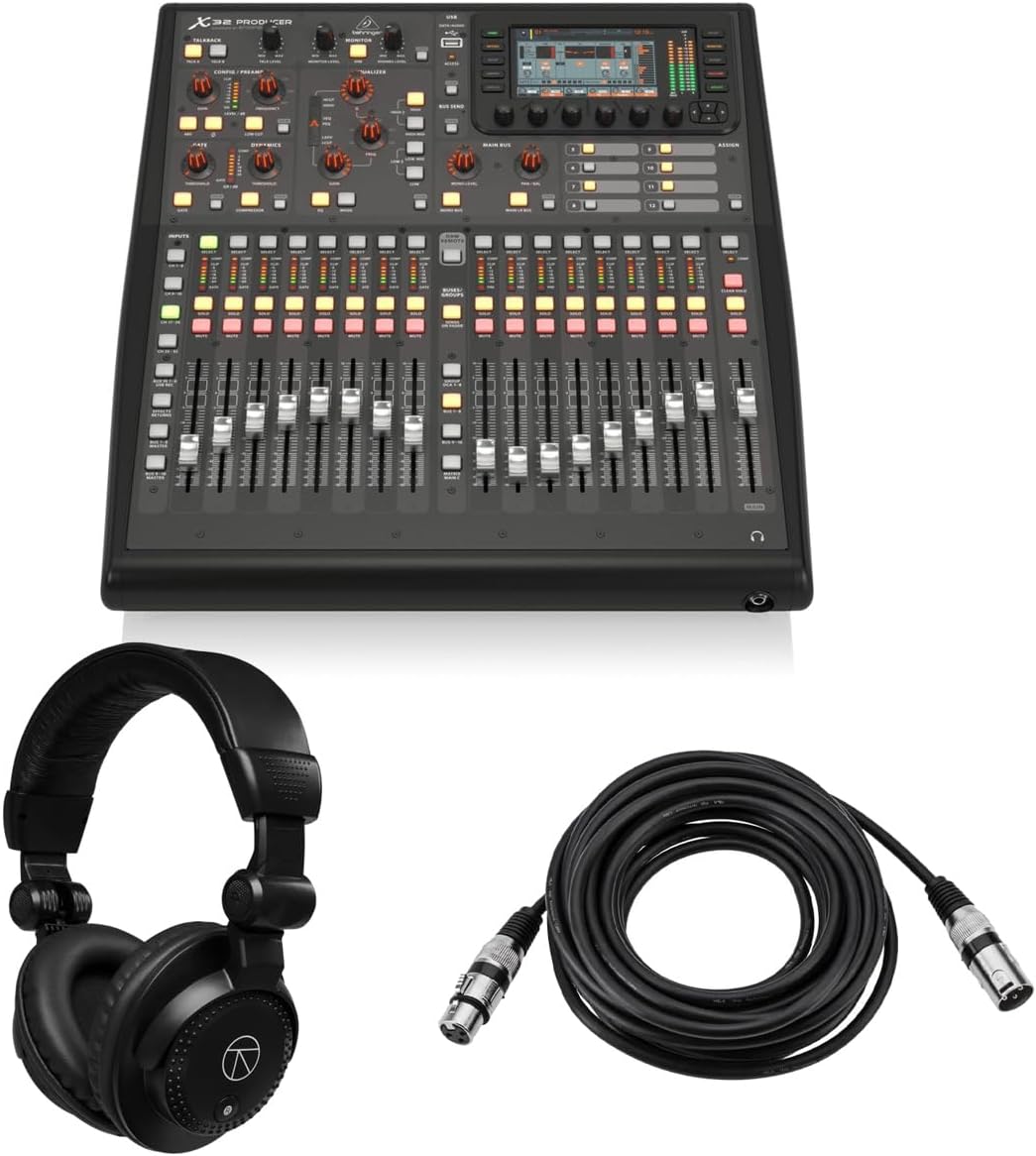
The Behringer X32 Producer earns a perfect 5.0 rating for reliability. It offers the powerful X32 engine in a rack-mountable form. The included bundle with headphones and cables provides immediate value for buyers.
We may earn a commission when you buy through this link, at no additional cost to you.
Its 16 MIDAS preamps ensure pristine audio quality. 40 input channels manage complex setups effortlessly. Virtual FX engines like Lexicon simulations offer extensive creative control over sound processing.
The compact form limits tactile controls compared to full units. Rack space requirements may be a constraint. However, the robust build and consistent performance are ideal for demanding live or studio use.
This unit is perfect for permanent installations. Its reliable components ensure long-term use. Consider this if you need X32 power in a space-saving format.
Rack-mountable chassis fits standard racks while delivering flagship X32 mixing power.
Included professional headphones and cables save time and money on essential accessories.
We may earn a commission when you buy through this link, at no additional cost to you.
The Behringer X32 Compact delivers flagship features in a smaller package. With a 4.7 rating, it retains the X32 engine. Its 17 motorized faders and 40 inputs ensure robust control for various applications.
We may earn a commission when you buy through this link, at no additional cost to you.
MIDAS-designed preamps provide audiophile sound quality. LCD Scribble Strips make channel assignment intuitive and easy. The talkback section and multiple phone connectors support professional communication needs.
Fewer faders than the full X32 limit simultaneous control. Still, its compact design fits tighter stages well. For mid-sized productions, it balances performance and space effectively.
Ideal for engineers needing X32 power without the bulk. Its durable build withstands tour environments. Consider this for venues requiring flexibility and quality.
17 motorized faders allow efficient management of complex mixes in limited space.
MIDAS preamps guarantee consistent, low-noise audio performance across all inputs.
We may earn a commission when you buy through this link, at no additional cost to you.
The PreSonus StudioLive excels in studio environments. With a 3.9 rating, it offers classic functionality. Its Fat Channel signal processing provides EQ, compression, and limiting on all channels.
We may earn a commission when you buy through this link, at no additional cost to you.
The 18-in/16-out USB interface records every channel. Integrated Studio One Artist DAW adds immediate value. Scene recall ensures quick setup for repeated studio sessions.
Lower ratings suggest limitations in newer markets. Older design lacks modern touchscreens. However, its straightforward workflow suits engineers preferring physical controls over screens.
Best for studios focusing on recording and mixing. Its software integration simplifies workflows. Consider this for reliable, traditional digital mixing needs.
Seamless USB audio interface and DAW bundle support efficient multi-track recording.
Fat Channel processing on every channel ensures consistent sound across the mix.
We may earn a commission when you buy through this link, at no additional cost to you.
The Behringer X AIR XR18 delivers value with a 4.6 rating. It offers 18 channels with MIDAS preamps at a fraction of traditional cost. Its integrated Wi-Fi eliminates external routers for direct control.
We may earn a commission when you buy through this link, at no additional cost to you.
Tablet apps enable flexible remote operation. 18×18 USB interface supports direct recording on iPad. The compact footprint makes it easy to transport anywhere.
Lack of physical knobs limits tactile access. Tablet dependency might frustrate some. But for cost-conscious users, its remote flexibility offers a strong entry into digital mixing.
Perfect for DJs and small mobile events. Its Wi-Fi control simplifies setup. Consider this if you already own a tablet and need budget-friendly mixing.
Integrated Wi-Fi allows full control from mobile devices without extra hardware.
MIDAS preamps and robust features at a price point accessible to newcomers.
We may earn a commission when you buy through this link, at no additional cost to you.
The Allen & Heath Qu-5 provides exceptional audio quality via 96kHz FPGA processing. Its 38 inputs and 24 outputs ensure professional flexibility. Motorized faders and a touchscreen streamline complex workflows.
We may earn a commission when you buy through this link, at no additional cost to you.
Extensive connectivity includes SLink expansion and USB multitrack. The recording features support SD card capture. Remote control apps enhance versatility for live production.
Current ratings lack verification. The complex interface demands training. However, its FPGA processing ensures ultra-low latency for critical live sound.
Ideal for demanding production environments. Its customization suits advanced users. Consider this for setups requiring maximum audio fidelity and routing.
FPGA processing guarantees immediate audio response for live monitoring.
SLink ports allow seamless scaling of inputs and outputs as needs grow.
We may earn a commission when you buy through this link, at no additional cost to you.
The QSC TouchMix-16 offers 20 full function inputs in a compact package. With a 4.4 rating, it supports professional audio needs. Each channel features a gate and compressor for consistent sound control.
We may earn a commission when you buy through this link, at no additional cost to you.
TRS aux outs directly drive in-ear monitors. Parametric EQ allows precise tone shaping. The included bag enhances portability for mobile applications.
Fewer buses limit complex routing scenarios. Software integration lacks depth. But its straightforward workflow makes it accessible for users needing quick setup.
Perfect for small venues and mobile DJs. Its IEM capabilities are a highlight. Consider this for simplified, reliable mixing without complex menus.
Direct TRS aux outs simplify in-ear monitor setups without extra hardware.
Built-in gates and compressors ensure clean, consistent audio on every channel.
We may earn a commission when you buy through this link, at no additional cost to you.
Choosing the right console requires balancing channel needs, processing power, and connectivity. This guide breaks down the critical factors to consider before buying.
The number of inputs determines how many microphones or instruments you can connect simultaneously. Ensure the console supports your maximum input requirements plus some headroom. Inputs should include combo jacks for flexibility.
Always choose a console with enough inputs for your largest expected setup. Underestimating channel needs forces expensive upgrades later.
Mic preamps define the clarity and noise floor of your audio. Look for branded preamps like MIDAS or XMAX for professional results. High-quality preamps reduce the need for external gear.
Prioritize consoles with known high-quality preamps. Poor preamps cannot be fixed with software.
Buses allow you to route signals to subgroups, monitors, and recording. Ensure the console offers enough buses for your mixing strategy. Flexible routing simplifies complex live setups.
Check bus counts match your monitoring and recording needs. Limited routing restricts your control.
Physical I/O includes XLR, USB, and digital options. Ensure it supports your external gear and recording interface. Modern connectivity like AES50 offers low latency expansion.
Verify all necessary ports are present before purchasing. Missing connections may require costly adapters.
Motorized faders and touchscreens speed up mixing. Physical knobs and buttons remain important for rapid adjustments. A good interface reduces setup time and mistakes.
Select a console that matches your tactile preferences. Interfaces are personal and impact daily use.
Built-in effects and processors reduce external gear. Look for parametric EQs and dynamics on every channel. This consolidates signal chains and lowers costs.
Ensure internal processing is powerful enough for your production. Weak effects limit mixing quality.
Size and weight matter for mobile work. Rack-mountable options save space in fixed installations. Consider travel cases or rugged build quality.
Choose a form factor that fits your venue. Overlooking portability can hinder mobility.
Digital mixers should support future growth. Digital expansion ports or remote I/O add capacity later. Firmware updates should maintain performance over time.
Invest in a system that can grow with your needs. Expandability protects your investment.
Start by configuring your scene and input gain properly before live sound. Proper gain staging prevents digital clipping and ensures clean signal flow.
Regularly update firmware to access bug fixes and new features. Use the manufacturer's software to manage backups and scene recall safely.
Store the console in a controlled environment to prevent dust and moisture damage. Transport it in a padded case to protect sensitive faders and knobs during travel.
Digital consoles use software and digital processing to manage audio, allowing for precise recall of settings and built-in effects. Analog consoles rely on physical circuits, offering a more tactile feel but lacking scene storage. Digital units generally offer more flexibility for modern setups.
Most modern digital mixers operate standalone without a computer. However, external computers can be used for recording, remote control via apps, or managing complex routing. Some entry-level models rely heavily on tablets for full functionality.
Motorized faders automate level adjustments, allowing you to store and recall scenes instantly. They provide visual feedback on channel assignments, making troubleshooting easier. This feature is essential for fast-paced live sound environments.
Yes, many digital mixers feature USB interfaces for direct multitrack recording. They offer superior processing and routing compared to basic interfaces. Ensure the channel count matches your recording needs before purchasing.
Preamp quality is critical for capturing clean audio with minimal noise. High-quality preamps ensure your signal remains clear before processing. This impacts the overall fidelity of your final mix significantly.
Yes, compact digital mixers are ideal for small venues due to their efficiency and built-in effects. They reduce the need for outboard gear and simplify setup. Smaller models balance power and portability effectively.
With proper care, digital consoles often last a decade or more. Firmware updates keep software relevant. Mechanical wear on faders is usually the primary failure point.
Count all microphones and instruments in your largest setup. Add extra channels for future expansion. Always match your input count to the console's capacity.
We reviewed ten top consoles ranging from compact entry-level to professional flagship models. Each offers unique strengths for specific audio environments.
Prioritize channel count and preamp quality to ensure your investment meets your needs. Portability and connectivity should match your specific application.
Prices change regularly, so verify current listings before purchasing. Investing in the right digital console improves your production quality and workflow efficiency.