
MSTJRY Charging Station
4.3Editor score
Five USB-A ports
Seven cables included
Removable dividers
This guide compares the top 10 charging station for multiple devices solutions available in October 2026 to help you choose the right organizer for your needs.
Finding a reliable charging station for multiple devices is essential for modern homes and offices. Cluttered cables and missing adapters can slow down productivity and create safety hazards. A good unit consolidates power sources and keeps everything organized efficiently.
We evaluated ten top models based on port count, charging speed, build quality, and safety features. Our analysis focuses on how well each station handles diverse devices like laptops, phones, and tablets simultaneously without overheating or slowing down.
Each pick below highlights specific strengths and ideal use cases for different setups. Keep in mind that availability and stock levels may change over time. Always verify current details before making your final purchase decision today.
4.3Editor score

4.6Editor score

4.6Editor score
The following table provides a side-by-side comparison of all ten models to help you quickly identify the best fit for your specific power and organization requirements.




The Zobirez 420W station stands out as a powerful solution for households with many electronic gadgets. It offers a high total output capable of charging ten devices at once without significant speed loss.
We may earn a commission when you buy through this link, at no additional cost to you.
Its design includes five USB-C ports that support fast charging for laptops and phones. The sturdy one-piece slots ensure devices stay secure and organized on your desk or nightstand.
While it is larger than some compact alternatives, the build quality justifies the space it takes. Safety features like overheat protection give users peace of mind during extended charging sessions.
This model is ideal for families or small offices needing reliable power for multiple users. It balances performance and organization effectively for daily use cases.
The 420W total output ensures even demanding devices like laptops charge quickly alongside phones and accessories simultaneously.
Included mixed cables help reduce clutter right from the start, making setup easy for various device types.
We may earn a commission when you buy through this link, at no additional cost to you.
The Zobirez 750W model represents the top tier of power available in this category today. It delivers enough energy to handle high-demand laptops and smartphones simultaneously without throttling.
We may earn a commission when you buy through this link, at no additional cost to you.
All five USB-C ports support up to 120W each, making it suitable for professional workstations. The durable one-piece slots keep devices safe and organized even when cases are attached.
The investment is higher than average, but the performance justifies the cost for power users. Safety protections are robust, ensuring long-term reliability for your expensive electronics.
Choose this if you need to charge professional equipment alongside personal devices regularly. It is built for heavy usage and consistent performance over time.
With 120W per USB-C port, this station can handle high-end laptops and tablets with ease during peak usage.
The one-piece slot design prevents wobbling and ensures your devices remain upright and secure while charging.
We may earn a commission when you buy through this link, at no additional cost to you.
Anker Prime Charging Station is a favorite among users who value brand reputation and efficiency. It uses GaN technology to provide high power in a smaller form factor than traditional chargers.
We may earn a commission when you buy through this link, at no additional cost to you.
Each USB-C port supports up to 100W, allowing two laptops to charge simultaneously at high speeds. The compact footprint saves space on crowded desks or nightstands.
While it offers fewer ports than some competitors, the quality of power delivery is superior. Anker's safety system monitors temperature continuously to protect your devices from damage.
This unit is perfect for tech enthusiasts who prioritize charging speed and build quality. It is a reliable choice for daily use in modern home offices.
Gallium Nitride technology allows for higher efficiency and less heat generation during heavy charging loads.
Charging two 14-inch MacBook Pros to 50 percent in roughly 28 minutes shows its high power capability clearly.
We may earn a commission when you buy through this link, at no additional cost to you.
This charging station prioritizes size and portability over raw power output. It is designed for users who need to charge phones and small accessories while traveling or working from a limited space.
We may earn a commission when you buy through this link, at no additional cost to you.
The unit measures just a few inches on each side, making it easy to pack. Despite its small size, it supports fast charging for mobile devices and earbuds effectively.
It is not intended for powering high-demand laptops which require more wattage. However, for general mobile device charging it performs well and keeps your bag organized.
Ideal for travelers or those with minimal desktop space who still need multiple charging points. Its lightweight design makes it easy to move around as needed.
Weighing little and measuring small, this charger fits easily into bags or pockets without adding bulk.
The included five-foot extension cord adds flexibility to reach outlets that are far behind desks or nightstands.
We may earn a commission when you buy through this link, at no additional cost to you.
The Anker MagGo station is specifically designed for users deeply integrated into the Apple ecosystem. It supports wireless charging for phones and watches with certified fast speeds.
We may earn a commission when you buy through this link, at no additional cost to you.
The compact 3-in-1 design keeps your nightstand free from cable clutter. You can adjust the viewing angle for StandBy mode which adds extra utility to your bedside setup.
While it lacks wired USB ports for Android or other devices, it excels at its specific purpose. The official certification ensures safe and efficient charging for Apple Watch Series 10.
This dock is perfect for iPhone owners who want a clean look and wireless convenience. It simplifies your nightly charging routine significantly.
Harnessing full 15W charging power means your phone charges quickly without plugging in cables every time.
The ability to adjust the phone angle vertically helps you find the perfect viewing position for media or notifications.
We may earn a commission when you buy through this link, at no additional cost to you.
This desktop charger combines USB ports with AC outlets for a versatile power solution. It handles six USB connections alongside three standard wall outlets for larger plugs.
We may earn a commission when you buy through this link, at no additional cost to you.
The surge protection rating is excellent for protecting sensitive electronics from power spikes. The sturdy build feels premium and remains stable even when fully loaded with devices.
Weighing over a pound, it is not meant for travel but works well on fixed desks. It simplifies power access by eliminating the need for separate extension cords.
Ideal for permanent workstation setups where both plugs and USB devices are common. The safety features provide added confidence for long-term use.
Combining AC plugs with USB ports means you can power anything from a desktop lamp to a phone.
The eight-point safety system guards against overvoltage and short circuits to protect your valuable gear.
We may earn a commission when you buy through this link, at no additional cost to you.
The MSTJRY station is a cost-effective solution for basic charging needs. It offers five USB-A ports and includes seven short cables so you can start using it immediately.
We may earn a commission when you buy through this link, at no additional cost to you.
Removable dividers allow you to adjust the slots for larger tablets or phones with cases. The power switch gives a quick visual indication that the unit is active.
While it lacks modern USB-C speeds it handles standard phones and accessories well. The low price makes it accessible for families on a budget who still want organization.
Best for secondary rooms or guest areas where advanced speed is not a priority. It solves the clutter problem without breaking the bank.
This model offers a complete charging solution at a fraction of the cost of high-end multi-port stations.
Including seven cables means you do not need to buy extras to charge multiple devices right away.
We may earn a commission when you buy through this link, at no additional cost to you.
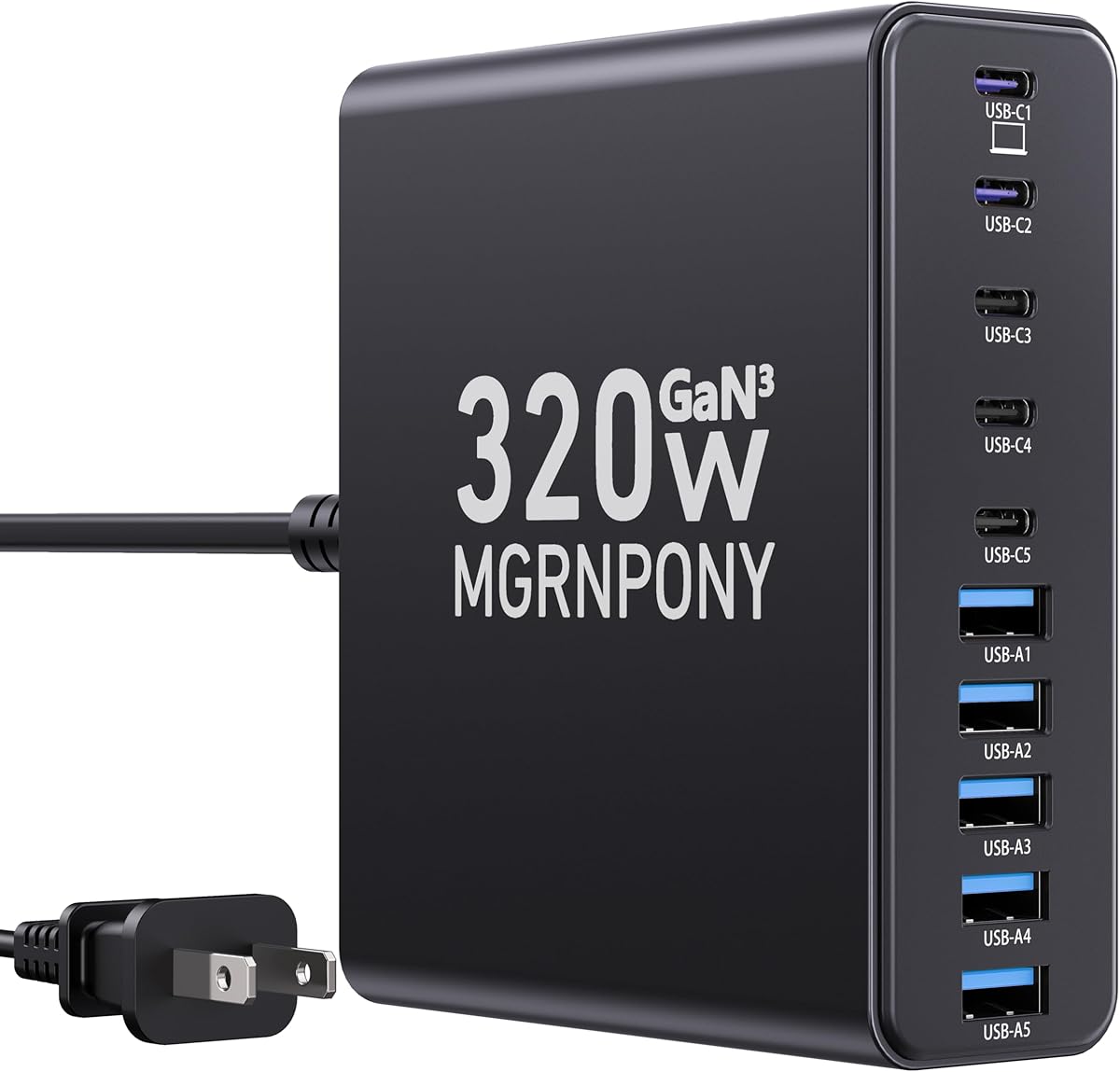
The MGRNPONY 320W station provides a strong balance of power and size. It features IceShield 3.0 technology that monitors temperature continuously to prevent overheating issues.
We may earn a commission when you buy through this link, at no additional cost to you.
With ten ports split between USB-C and USB-A it can handle a variety of devices. The design is compact enough to fit on most desks without taking up too much room.
It charges laptops and phones simultaneously though not as fast as the highest-end premium models. The safety protections add value for daily use in busy households.
A practical choice for those who want modern USB-C support at a reasonable price. It fits well in most home office environments.
Continuous temperature checks ensure the charger stays safe and cool even when all ports are in use.
Gallium Nitride technology improves efficiency so less energy is wasted as heat during charging cycles.
We may earn a commission when you buy through this link, at no additional cost to you.
This charging station stands out for its retractable cable design that minimizes tangles. It allows you to pull out just the length of cable you need and store it neatly when done.
We may earn a commission when you buy through this link, at no additional cost to you.
Supporting up to eight devices simultaneously it covers most household needs. The 105W output ensures decent speeds for most phones and small tablets on the go.
While retractable cables are convenient they can be prone to wear over very long periods. Still the clean look makes it a top choice for tidy spaces.
Perfect for nightstands where you want a sleek look without visible wires. The GaN tech ensures efficient performance in a compact unit.
The eight-inch retractable cables pull out smoothly and retract automatically to keep your surface clear.
With support for eight devices at once you can keep family gadgets charged without fighting for outlets.
We may earn a commission when you buy through this link, at no additional cost to you.
Lcssio offers a reliable 300W charging station suitable for family environments. It includes dual 65W ports that can handle laptops alongside smaller devices like phones and headphones.
We may earn a commission when you buy through this link, at no additional cost to you.
The anti-slip rubber pads protect your desk surface and keep the unit stable during use. The solid construction avoids flimsy removable dividers ensuring durability over time.
It balances power and stability well for general use. The included mixed cables cover most common device types without requiring immediate extra purchases.
Ideal for family rooms where multiple people need to charge devices regularly. It provides a practical and organized solution for daily power needs.
Rubber pads prevent the station from sliding around and protect your furniture from scratches during use.
Dual 65W ports allow for efficient charging of many popular laptop models alongside your mobile devices.
We may earn a commission when you buy through this link, at no additional cost to you.
Selecting the right charging station involves evaluating several technical and practical factors to ensure it meets your specific needs.
Total wattage determines how many devices you can charge simultaneously without slowing down. High wattage is essential if you plan to charge laptops alongside phones and tablets at the same time.
Look for stations that offer enough power to support your most demanding devices like high-performance laptops.
Modern stations should include a mix of USB-C and USB-A ports to accommodate both new and older devices. USB-C ports usually support faster charging and higher power delivery for laptops.
Ensure the mix of ports matches the types of devices you currently own to avoid needing extra adapters.
Safety is critical when dealing with high-power electrical devices. Look for certifications and features like overheat protection overvoltage protection and short circuit protection.
Robust safety systems protect your expensive electronics from damage caused by power surges or overheating.
Build quality affects how long the station will last and how well it keeps your devices secure. Look for sturdy materials and non-slip bases to prevent sliding.
Avoid models with cheap removable dividers that may break or wobble easily during daily use.
Good cable management keeps your desk tidy and prevents tangling. Some models come with built-in cables or retractable options to reduce clutter.
Consider if you prefer included cables or if you are comfortable providing your own for better customization.
The physical size of the station matters depending on your available space. Compact units are better for nightstands while larger ones fit better on spacious desks.
Measure your available area to ensure the station fits comfortably without blocking other items.
Established brands often provide better reliability and customer support. Look for companies with a history of producing safe and durable electronics.
Reading verified reviews can give you insight into real-world performance and longevity.
Some stations offer extra conveniences like AC outlets or wireless charging. These can be useful if you have mixed power needs beyond just USB devices.
Decide which extra features are worth the extra cost for your specific usage scenario.
Place the charging station on a flat stable surface away from direct sunlight or heat sources. Ensure that the ventilation slots are not blocked so the unit can stay cool during operation.
Plug the power cord securely into a wall outlet and the station unit. Connect your devices using the included or compatible cables ensuring they are fully seated for optimal power delivery.
Regularly inspect the cables and ports for dust or debris and clean them gently with a dry cloth. Avoid overloading the unit with devices that require more power than its total output allows.
Yes you can charge most modern laptops via USB-C if the station provides enough wattage. Look for ports that support at least 60W or higher for reliable laptop charging speeds.
Most modern charging stations include safety features like overheat and overcharge protection that make them safe for overnight use. Always check the manufacturer safety specifications before leaving devices plugged in overnight.
Many models come with a set of short cables to get you started. However you may need to buy longer cables if your power outlets are far from where you want to place the station.
Yes most multi-device stations allow simultaneous charging of laptops and phones. Just ensure the total wattage output is high enough to support the combined power needs of all connected devices.
USB-C ports generally support faster charging speeds and higher power delivery compared to USB-A ports. USB-C is the standard for modern devices including most new laptops and smartphones.
Quality charging stations include battery management features that prevent overcharging which helps maintain battery health. Avoid cheap uncertified units that lack proper safety protocols.
Use a dry soft brush or compressed air to gently remove dust from the ports. Avoid using liquids or metal objects that could damage the internal contacts or cause short circuits.
The top picks like the Anker Prime and Zobirez 750W offer exceptional performance for those needing high power and reliability. They stand out for their speed build quality and safety features.
When choosing prioritize total wattage and port mix to match your specific devices. A station that can handle your most demanding gear ensures you never face power bottlenecks.
Remember to check current stock levels and verify safety certifications before buying. Investing in a quality unit now will save you time and hassle in the long run.