
2×2 4k Video Wall Controller
4.6Editor score
HDMI and DVI input support
Eleven splicing modes included
Built-in memory function
Affordable pricing for basic setups
This guide compares the top HDMI Video Wall Controller options for 2026, analyzing features like 4K support, display modes, and audio extraction to help you
Video wall controllers transform multiple screens into a unified display, ideal for businesses and home theaters. A good controller ensures seamless integration, supports high resolutions, and offers flexible layout options to maximize visual impact across your display array.
We evaluated ten leading HDMI Video Wall Controller models based on performance, compatibility, and ease of use. Our analysis covers resolution support, input types, control methods, and audio handling to help you find the best fit for your specific multi-screen project.
Each pick highlights unique strengths, from budget-friendly splitters to advanced matrix systems. Note that prices and availability fluctuate regularly, so verify current details before purchasing. This guide serves as a comprehensive resource for planning your video wall installation effectively.
4.6Editor score

4.8Editor score

4.2Editor score
The following table provides a side-by-side comparison of the ten selected HDMI Video Wall Controller models. It highlights key specifications such as resolution limits, input types, and unique features to assist in quick decision-making for your project.



The J-Tech Digital HDMI Video Wall Controller stands out as a top choice for users seeking reliability and performance. With a high 4.8 rating, it delivers consistent results for creating seamless video walls from four HDMI displays.
We may earn a commission when you buy through this link, at no additional cost to you.
This processor supports 4K at 30Hz input and offers eight distinct display modes, including 2×2 and 1×4 configurations. The ability to rotate images by 180 degrees helps align screens properly, while edge masking fine-tunes the visual output by adjusting pixels to eliminate distortion.
While it does not support HDR10, the device handles standard content effectively. The audio extraction feature routes sound via SPDIF optical and 3.5mm ports, providing flexibility for external speakers. These trade-offs are acceptable for most professional and home installations.
This unit is ideal for businesses or home theaters needing a robust, easy-to-use controller. With free lifetime technical support and a one-year warranty, it offers peace of mind for long-term usage and troubleshooting needs.
Supports multiple modes like 2×2, 1×3, and 1×4 to adapt to various room layouts and screen arrangements effectively.
Image rotation and edge masking tools allow precise adjustments to minimize bezel gaps and ensure a uniform appearance across all screens.
We may earn a commission when you buy through this link, at no additional cost to you.
This budget-friendly controller offers excellent value for users needing a simple way to combine four screens. It supports HDMI and DVI inputs, allowing flexibility for older devices while maintaining 4K capability on HDMI ports.
We may earn a commission when you buy through this link, at no additional cost to you.
Eleven splicing modes provide diverse layout options, and the device remembers settings for quick startup. Control is available via IR remote, RS232, or button press, ensuring adaptability for different installation environments without extra costs.
The lack of 4K support on DVI is a limitation, but HDMI handles it well. The memory function prevents the need to reset configurations after power cycles, which is a significant convenience for daily operational use in various settings.
Ideal for small businesses or hobbyists, this controller balances cost and functionality. Its smart chip design ensures stability, making it a reliable choice for those who want a straightforward solution without advanced features.
Priced affordably, it delivers core video wall functionality without unnecessary complexity, making it accessible for tight budgets and smaller projects.
Supports both HDMI and DVI, allowing connection of a wider range of source devices including legacy computers and older media players easily.
We may earn a commission when you buy through this link, at no additional cost to you.
This premium controller caters to professionals requiring high-resolution input and remote management. It supports 4K at 60Hz input, ensuring smooth motion for dynamic content while allowing flexible scaling to different output resolutions.
We may earn a commission when you buy through this link, at no additional cost to you.
With LAN web control, users can manage the device remotely, which is ideal for distributed systems. The multiviewer presets let you view multiple sources on one screen, adding versatility beyond standard video wall splitting functions.
While the price is higher, the advanced features justify the cost for enterprise needs. The ability to upscale or downscale outputs ensures compatibility with various display types, reducing the need for additional hardware converters.
Recommended for high-end installations, this matrix offers powerful tools for content management. The seamless switching ensures no picture loss, making it a robust choice for environments where reliability and image quality are paramount.
LAN web control allows remote management, simplifying administration for large setups and enabling easier updates without physical access to the unit.
Supports 4K at 60Hz input, delivering crisp motion and detailed visuals essential for demanding professional or entertainment applications effectively.
We may earn a commission when you buy through this link, at no additional cost to you.
The OREI controller stands out with its USB-C and HDMI inputs, offering broad compatibility for modern sources like laptops. It supports 4K at 60Hz input, ensuring high-quality signal processing for video walls across four displays.
We may earn a commission when you buy through this link, at no additional cost to you.
This device includes RS-232 control and multiple display modes such as 2×2 and 1×4, providing flexibility for diverse layout needs. The dual voltage power supply with an international adapter makes it suitable for global use without needing extra converters.
However, it does not support HDR10 or Dolby Vision, which may limit use for high-end media consumption. Audio extraction is available but limited to specific formats, requiring users to verify compatibility with their audio systems carefully.
This unit is well-suited for businesses needing versatile input options and reliable performance. With comprehensive audio extraction and control features, it serves as a solid choice for standard professional video wall setups.
Supports both USB-C and HDMI inputs, allowing seamless integration of modern devices like laptops without requiring additional adapters or converters.
Includes dual voltage power supply and international adapters, ensuring reliable operation across different regions and electrical standards without issues.
We may earn a commission when you buy through this link, at no additional cost to you.
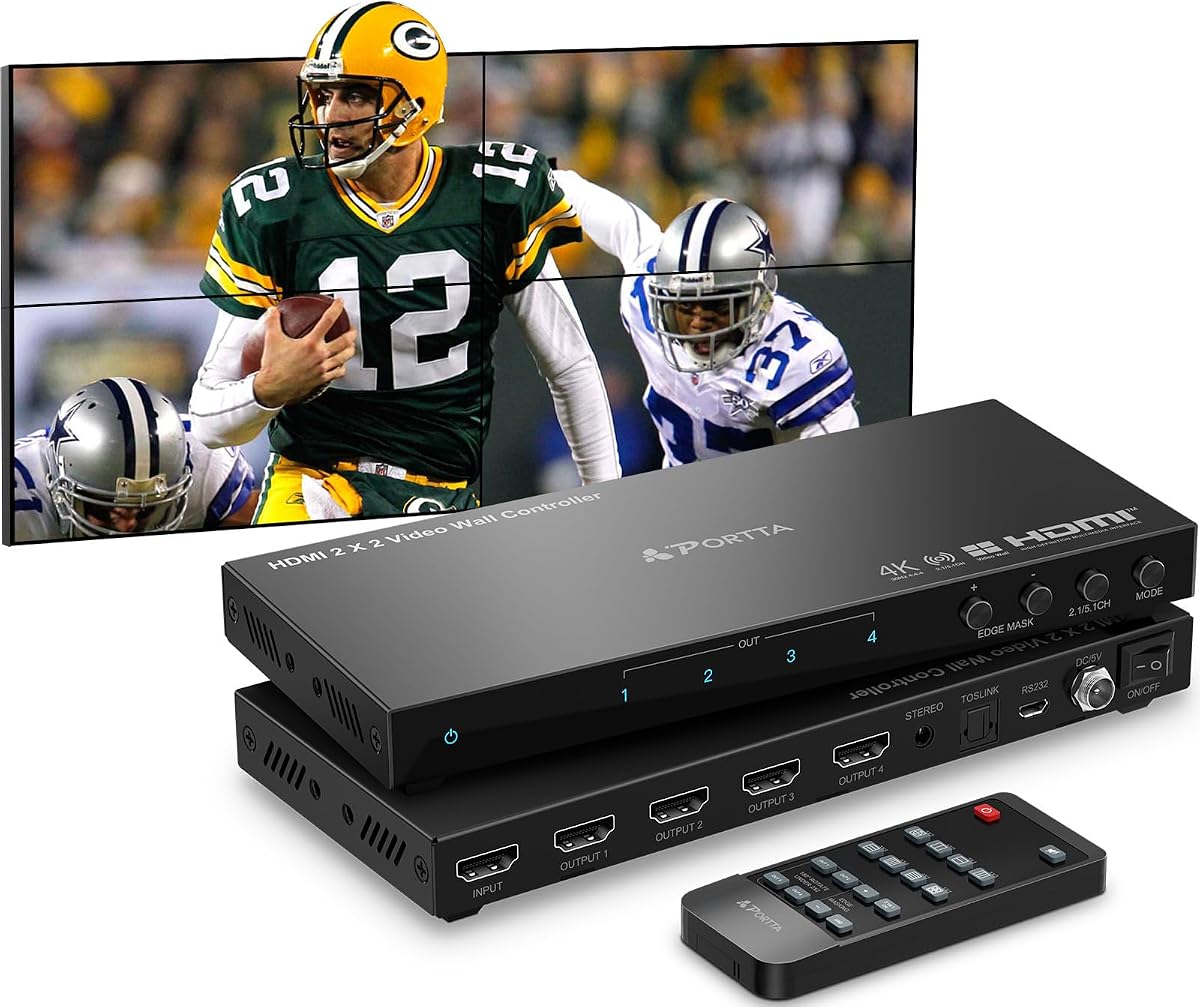
This PORTTA controller offers extensive layout options with eleven splicing modes, ideal for complex display arrangements. It supports 4K input at 30Hz, delivering clear visuals while maintaining stable performance across four HDMI outputs.
We may earn a commission when you buy through this link, at no additional cost to you.
The edge masking feature prevents image distortion by adjusting pixels, ensuring a seamless look. Users can rotate images 180 degrees for orientation flexibility. It includes a two-year warranty and lifetime technical support, adding long-term value for any installation.
While outputs are fixed at 1080p, input support is robust. The inclusion of both IR and RS232 control methods ensures accessibility for various operational environments. This trade-off is manageable for many applications needing cost-effective solutions.
Best for users needing varied layouts without high output resolution, this controller balances functionality and price. Its comprehensive support and masking features make it a reliable option for standard video wall installations.
Provides eleven splicing modes including vertical and horizontal options to accommodate diverse screen arrangements and content presentation needs effectively.
Backed by a two-year warranty and lifetime technical support, ensuring help is available for troubleshooting and setup issues whenever needed.
We may earn a commission when you buy through this link, at no additional cost to you.
This OREI model offers broad compatibility with both HDMI and USB-C inputs, accommodating modern laptops easily. It supports 4K at 60Hz input, ensuring smooth video processing for multi-screen setups across various applications and environments.
We may earn a commission when you buy through this link, at no additional cost to you.
EDID management helps optimize display setups by handling resolution negotiation. The device supports multiple modes like 2×2 and 1×4, while optical audio output allows for separate sound handling. This flexibility supports various professional scenarios and content types.
While output resolution details are not fully specified, input performance is strong. The dual voltage supply adds international utility. Users should verify specific output settings to ensure they match their monitor requirements for best results.
Ideal for setups needing USB-C integration and reliable control, this controller is a solid choice. Its wide compatibility and optical audio features make it versatile for both commercial and home multimedia environments effectively.
Supports USB-C input, allowing modern laptops and media players to connect directly without extra adapters, streamlining setup and cable management.
Includes EDID management to ensure screens automatically configure correctly, preventing resolution conflicts and ensuring stable video output.
We may earn a commission when you buy through this link, at no additional cost to you.
This matrix allows switching four sources to four displays simultaneously, adding flexibility beyond simple splitting. It supports up to 4K at 60Hz, ensuring high-quality signal routing and video wall configurations across four screens effectively.
We may earn a commission when you buy through this link, at no additional cost to you.
Web control enables remote management, ideal for distributed installations. Advanced EDID management ensures optimal signal handling. The device supports multiple audio formats including TrueHD and DTS-HD, accommodating high-fidelity audio systems for professional environments.
The price is higher due to expanded matrix capabilities. It is more complex to configure than basic controllers, but offers superior control over inputs and outputs. This is best for users needing source switching, not just display splitting.
Best for large commercial setups needing flexible signal routing, this matrix provides comprehensive control. With web management and high-resolution support, it serves as a robust backbone for multi-room video systems effectively.
The 4×4 matrix allows switching multiple sources to any display, offering unparalleled flexibility for complex multi-source video wall installations and presentations.
Built-in web control allows for remote configuration and monitoring, simplifying administration for installations that are physically difficult to access directly.
We may earn a commission when you buy through this link, at no additional cost to you.
This ISEEVY controller supports 4K 60Hz both on input and output, ensuring full UHD resolution across all screens. It provides multiple splice modes like 2×2 and 1×4 for flexible video wall configurations and various room layouts.
We may earn a commission when you buy through this link, at no additional cost to you.
The unit is designed for easy plug and play with remote control or button press switching. USB-C input offers modern connectivity. Its professional design supports stable 24×7 work, making it suitable for always-on digital signage or display systems.
However, advanced control options like RS232 are not highlighted. The simplicity ensures ease of use but may limit complex automation setups. Users prioritizing resolution stability and plug-and-play functionality will find this model highly effective for general use.
Ideal for setups needing true 4K output without complex setup, this controller delivers solid performance. Its stable design and multiple modes make it a reliable choice for digital signage or home video wall environments effectively.
Supports 4K 60Hz on all outputs, ensuring maximum visual fidelity and smooth motion for all connected displays in a video wall array.
Designed for stable 24×7 operation, making it suitable for continuous digital signage or public display installations requiring constant uptime and consistency.
We may earn a commission when you buy through this link, at no additional cost to you.
This controller supports 4K 60Hz input and provides USB playback for various video and image formats. It offers extensive modes like 1×4 and 2×2, ensuring adaptability for different video wall needs and diverse presentation scenarios easily.
We may earn a commission when you buy through this link, at no additional cost to you.
Audio extraction is available via 3.5mm and SPDIF optical outputs for separate sound handling. Users can adjust brightness, sharpness, and contrast, providing visual customization. This makes it versatile for varied lighting conditions and content types.
Lack of RS232 network features may limit automation setups. However, the strong image adjustment tools support flexible use. The USB playback feature adds functionality for standalone presentations without a connected computer.
Ideal for users needing USB media playback and visual customization, this controller delivers robust performance. Its adjustment features and audio outputs support dynamic content presentation effectively for both retail and home settings.
Built-in USB playback support for video and image files, allowing standalone presentations without the need for external computers or media sources.
Includes controls for brightness, sharpness, and contrast, enabling precise visual tuning to match specific room lighting or display preferences effectively.
We may earn a commission when you buy through this link, at no additional cost to you.
This ISEEVY model supports up to six TVs with 6 HDMI outputs and 4K 60Hz resolution. It allows layouts like 2×3 and 3×2 for larger arrays. The unit ensures full UHD capability across all connected displays effectively.
We may earn a commission when you buy through this link, at no additional cost to you.
USB-C input provides modern connectivity, while plug and play design simplifies setup. It supports various splice modes for flexible configurations. This makes it suitable for larger installations needing more screens than standard four-display units typically offer.
The added complexity and output count may increase setup time. However, it remains user-friendly. Users needing more than four screens will appreciate its expandability without requiring multiple controller units or additional hardware components.
Best for large-scale setups needing six displays, this controller offers robust resolution and flexibility. Its modern input options and easy setup make it a reliable choice for expanding video wall projects effectively.
Supports up to six HDMI outputs for larger wall arrays, allowing users to scale up their video installations without complex extra hardware configurations.
Includes USB-C input alongside HDMI, ensuring compatibility with latest devices and enabling versatile source connections for dynamic content presentations.
We may earn a commission when you buy through this link, at no additional cost to you.
Selecting the right controller requires evaluating resolution, inputs, and control features to match your display goals and budget constraints.
Check if the unit supports your source content's maximum resolution and refresh rate. While some models accept 4K inputs at 30Hz, others offer 60Hz for smoother motion.
Prioritize units with input support matching your content needs to avoid quality loss or frame rate issues during playback.
Ensure the controller supports HDMI and USB-C if needed for modern devices. Some units also include DVI or Ethernet ports for expanded connectivity.
Verify the number of HDMI outputs matches your display count to avoid needing extra splitters or hardware upgrades later.
Different applications require different arrangements. Look for controllers offering modes like 2×2, 1×4, and portrait options if you plan to rotate screens.
More flexible modes allow better use of screen real estate for signage or content that benefits from vertical layouts.
Consider how you will manage settings. Basic remotes are simple, but RS232 or LAN web control supports automation and remote administration.
Choose units with control options that fit your environment, especially if the unit is mounted out of reach for manual access.
Many controllers allow you to route audio separately from video signals. Look for SPDIF optical or analog outputs if you plan to use an external sound system.
Ensure supported audio formats match your system requirements to avoid compatibility issues with your speakers or amplifiers.
Bezels can distract from a seamless look. Units with edge masking or rotation functions help align images and reduce visible gaps.
Advanced models allow pixel adjustment to correct distortion. Select units that offer visual fine-tuning if your setup demands a uniform appearance.
Professional setups need reliable support. Check if the brand offers warranties and accessible technical help for installation or troubleshooting issues.
Lifetime or extended support provides peace of mind and ensures long-term reliability for critical business or entertainment installations.
Verify power requirements. Some units include universal power supplies for global use. Ensure the device is easy to mount and has proper ventilation for 24×7 operation.
Check for mounting options like ears or rack compatibility. Adequate cooling ensures the device remains stable during long-term continuous operation.
Connect your source device to the controller input using a high-quality HDMI cable. Ensure all display screens connect to the controller outputs securely. Plug the controller into power and allow it to initialize before turning on your screens.
Access the menu via remote or button to set your desired display mode. Match input source resolution to output configuration for stable performance. Enable any image adjustment features like rotation or masking to perfect bezel alignment across screens.
To maintain performance, keep the unit in a cool, ventilated area. Avoid blocking ventilation slots during operation. Clean dust from ports occasionally to ensure connections stay secure and prevent signal issues over time.
An HDMI Video Wall Controller is a device that splits or merges video signals to create a multi-screen display. It accepts one source input and distributes it across multiple outputs, allowing seamless video wall creation.
Not all models support 4K inputs or outputs. Many budget units handle 1080p outputs, while others support 4K at 30Hz or 60Hz. Check specs to confirm compatibility with your display resolution.
Audio extraction routes sound from HDMI to optical or analog ports. This allows external speakers to receive audio without relying on HDMI output audio. Ensure the controller supports your desired audio format.
Common modes include 2×2, 1×4, and 4×1. Some units offer vertical options like 1×3 or 1×4. Mode availability depends on your unit and whether it supports splitting or full-screen mirroring.
Yes, many controllers support 180-degree rotation to match TV orientation. This helps align edges and fix orientation issues for vertically mounted displays within a video wall array.
Higher-end models include RS232 or LAN for remote administration. Basic units rely on IR remotes. Choose based on your need for automation or remote system management capabilities.
This guide highlighted ten top-rated HDMI Video Wall Controllers, covering options from budget-friendly splitters to advanced matrix systems. Each model offers unique strengths for different needs.
Prioritize features like resolution support, control options, and audio extraction when selecting. Consider your setup size, display count, and whether remote management is required for your environment.
Prices change frequently, so verify current offers before purchasing. With the right controller, you can build a reliable and flexible multi-screen setup that meets your visual goals effectively.