
Replacement TV Remote for Fire Stick
4.3Editor score
Wide device compatibility
Voice control support
Affordable price point
Discover the top Fire Stick Replacement Remote options for 2026. We compare features, compatibility, and performance to help you choose the right voice remote
Finding a reliable Fire Stick Replacement Remote can restore full control to your streaming setup. Whether your original remote lost buttons or battery issues persist, a quality replacement offers voice control and quick app access without breaking the bank.
We evaluated ten top-rated remotes based on compatibility, voice functionality, and build quality. Our selection includes official Amazon models and third-party alternatives that support various Fire TV generations and smart TV brands for seamless integration.
Each pick highlights key strengths like backlighting or shortcut buttons. Note that availability and specific model support may vary. Always verify your device generation before purchasing to ensure a perfect fit for your entertainment system.
4.3Editor score
4.5Editor score

4.5Editor score
This side-by-side comparison highlights key specs for all ten selected remotes. Review compatibility ranges, voice features, and unique selling points to find the model that best matches your specific Fire TV device and viewing habits.
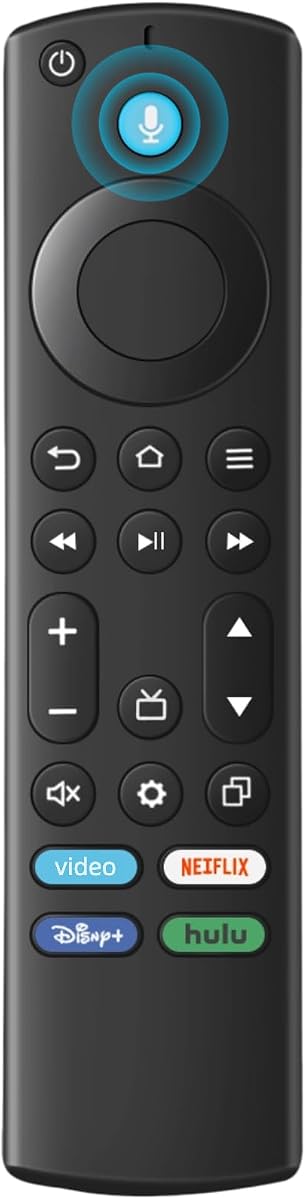


This replacement remote offers solid voice control for Fire Stick 3rd Gen and newer models. With a 4.2 rating, it balances affordability and functionality for users needing a basic yet effective remote.
We may earn a commission when you buy through this link, at no additional cost to you.
Its voice function helps find content quickly without typing. The remote supports various Smart TV brands like Toshiba and Insignia. Setup involves standard pairing steps found in the manual.
While it lacks premium features like backlighting, it handles daily navigation well. The build feels sturdy enough for regular use. Users appreciate the clear instructions for activation.
Ideal for budget-conscious viewers needing a voice-capable remote. It restores full control to your Fire TV setup without high costs. Just remember to buy batteries separately.
Voice commands allow hands-free searching and app launching for a smoother experience.
Works with multiple Fire TV generations and specific smart TV models for flexibility.
We may earn a commission when you buy through this link, at no additional cost to you.
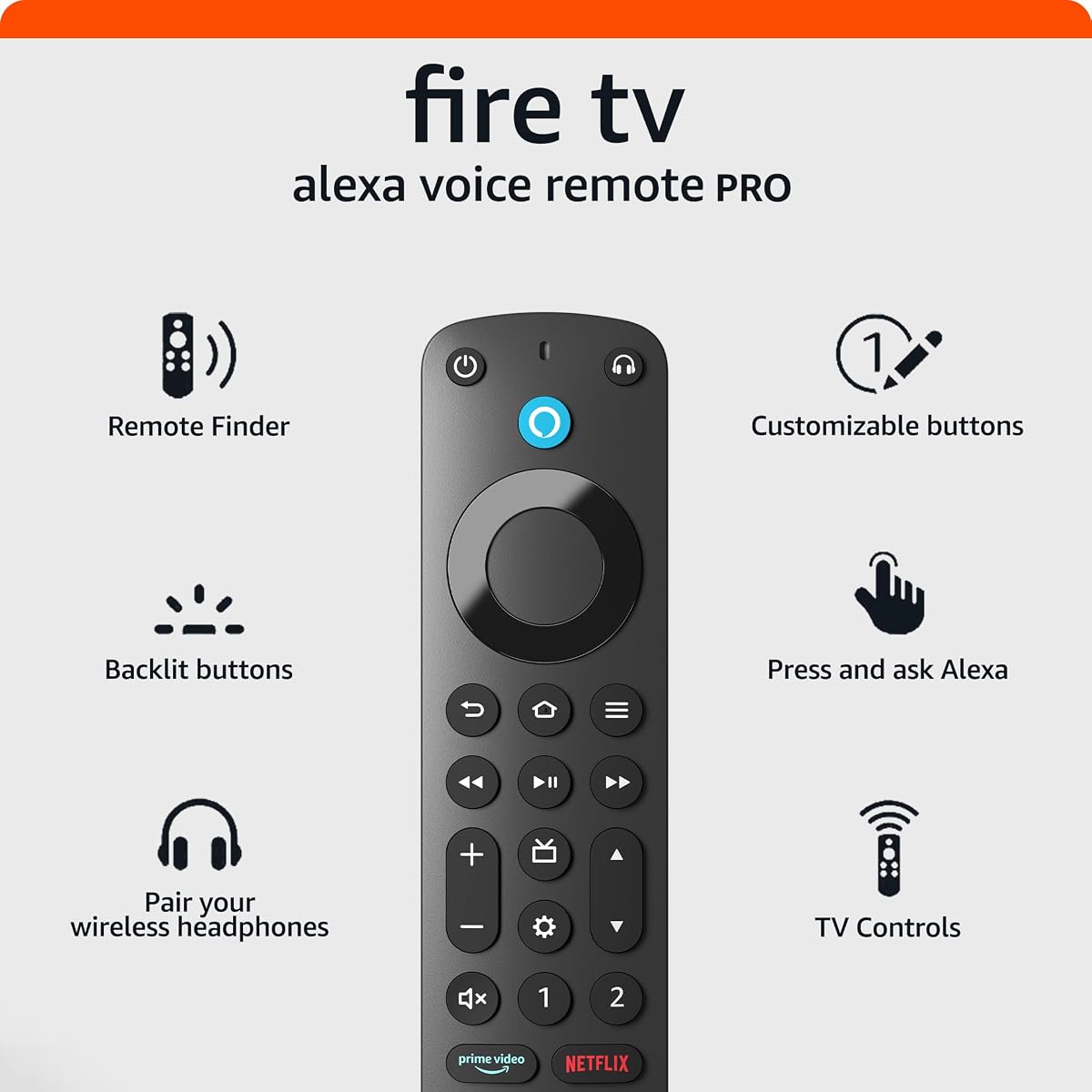
The Fire TV Alexa Voice Remote Pro is the premium choice for enhanced control. With features like remote finder and backlighting, it addresses common pain points of losing remotes in dim rooms.
We may earn a commission when you buy through this link, at no additional cost to you.
The backlight activates automatically when you pick it up. Customizable buttons let you launch apps instantly. The headphone button pairs wireless headsets quickly without navigating menus.
While costlier, the added convenience justifies the price for heavy users. It feels more durable than third-party options. The remote finder rings via Alexa or the app.
Best for users who value convenience and premium features. If you often lose your remote or watch in dark rooms, this model offers significant quality of life improvements.
Locate misplaced remotes easily using Alexa commands or the Fire TV app.
Motion-activated backlight ensures visibility in low-light viewing conditions.
We may earn a commission when you buy through this link, at no additional cost to you.
This remote stands out for its impressive compatibility list at a budget-friendly price. Users rate it highly for covering both Fire Stick and specific Insignia smart TV models effectively.
We may earn a commission when you buy through this link, at no additional cost to you.
It includes two customizable buttons for quick app access. The voice function works after pairing, allowing hands-free control. It fits Fire TV Stick 4K Max and Cube models.
The lack of backlighting might be a downside for some. However, the build quality exceeds expectations for the price. The manual provides clear instructions for activation.
Great for households needing multiple remotes without overspending. It delivers core features like voice search and shortcuts reliably. Ensure your device matches the listed models.
Customizable buttons let you pin favorite apps for instant access from the home screen.
Supports a wide range of Fire TV sticks and smart TV series for versatility.
We may earn a commission when you buy through this link, at no additional cost to you.
This remote supports Fire Stick models from 2020 to 2026. It offers a strong 12-meter range for room flexibility. The voice control works after following simple setup steps.
We may earn a commission when you buy through this link, at no additional cost to you.
Four shortcut buttons allow quick navigation to favorite apps. The design mimics the original closely. It also supports Fire TV Cube models effectively for full control.
The 60-day guarantee adds confidence for buyers. Some users note pairing requires precise timing. The buttons feel responsive for daily use.
A reliable choice for those needing a standard replacement with extra range. Ensure you power cycle your device during pairing for the best results.
Control your device from up to 12 meters away for better comfort.
Direct buttons to streaming apps reduce time spent navigating menus.
We may earn a commission when you buy through this link, at no additional cost to you.
This model focuses on ease of use with auto-sync capabilities. It works seamlessly with Fire Stick models released after 2018. The voice function helps launch apps without typing.
We may earn a commission when you buy through this link, at no additional cost to you.
Four pre-programmed buttons offer instant access to popular services. The remote connects automatically when power is restored. It supports smart TVs like Insignia and Toshiba well.
Users appreciate the straightforward setup process. The design is ergonomic for comfortable holding. While basic, it covers all essential functions needed for streaming.
Perfect for users who hate complicated pairing steps. It delivers a hassle-free experience right out of the box. Verify device compatibility before purchase.
Connects automatically to your device when power is reconnected for quick setup.
Pre-programmed buttons allow one-tap access to favorite streaming services.
We may earn a commission when you buy through this link, at no additional cost to you.
This remote covers a broad spectrum of Fire devices including Cube and Lite models. Voice functionality allows control of content and smart home devices easily. The LED indicator aids pairing.
We may earn a commission when you buy through this link, at no additional cost to you.
It features standard playback controls for media management. Users note that pairing is simple if the old remote is removed. It supports Fire TV 3rd Gen TVs effectively.
The build feels light but durable enough for daily use. It is a solid alternative if official remotes are out of stock. The price point is very competitive.
Best for those seeking a generic replacement with broad compatibility. It handles voice search well and supports basic TV control functions effectively.
Voice commands control playback and smart home devices hands-free for convenience.
Standard navigation buttons ensure you can browse menus and content easily.
We may earn a commission when you buy through this link, at no additional cost to you.
This official Amazon remote comes with batteries included for immediate use. It features dedicated power and volume buttons for TV control. The guide button lists live TV apps.
We may earn a commission when you buy through this link, at no additional cost to you.
Voice control helps find content instantly. It works with newer Fire Stick and Cube generations. The build quality matches the original device design.
While it lacks backlighting, the standard features are reliable. Users appreciate the extra convenience of included batteries. It is a safe choice for new setups.
Ideal for those who want an official replacement without extra cost. It delivers a seamless experience integrated with the Fire TV ecosystem.
Comes with two AAA batteries so you can start using it immediately.
Dedicated power and volume buttons control your TV directly from the remote.
We may earn a commission when you buy through this link, at no additional cost to you.
This remote is designed for Fire Cube and Smart TV 3rd Gen. It features voice control for quick searches and playback. The LED light confirms pairing status clearly.
We may earn a commission when you buy through this link, at no additional cost to you.
Users report it feels like the original remote. It works well with Fire Stick Lite and 4K models. The instructions help activate voice functions properly.
Some note that pairing requires precise timing with the Home button. The build is sturdy for daily use. It is a cost-effective replacement option.
Recommended for Fire Cube owners needing a reliable remote. Ensure your device model matches the compatibility list before ordering.
Say commands like volume up or channel switch for hands-free control.
Indicator light shows pairing status for easy setup confirmation.
We may earn a commission when you buy through this link, at no additional cost to you.
This remote is compatible with Hisense and Pioneer smart TVs alongside Fire Stick. It includes voice search and four app shortcuts for convenience. The LED flashes during pairing.
We may earn a commission when you buy through this link, at no additional cost to you.
Users find it easy to sync with Fire Cube. It supports 4K Max and Lite models. The design allows simple navigation through menus.
The support team offers help if pairing fails. It is a solid replacement for those with smart TV combos. The price is reasonable for the features.
Best for users with Hisense or Pioneer TVs needing Fire remote control. Check your device model to ensure compatibility before buying.
Four app buttons provide quick access to favorite content.
Works with major smart TV brands like Hisense and Pioneer.
We may earn a commission when you buy through this link, at no additional cost to you.
This remote supports Fire Series smart TVs like Omni and QLED. It offers voice search and shortcut buttons for apps. Pairing involves holding the Home button briefly.
We may earn a commission when you buy through this link, at no additional cost to you.
Users appreciate the quick app launch capabilities. It works with Fire Stick HD and 4K models. The support team is responsive to pairing issues.
The remote feels lightweight and easy to handle. It lacks premium features but covers basic needs well. The price is competitive.
Ideal for Omni TV owners needing Fire control. Ensure your setup matches the Fire Series criteria for proper function.
Compatible with Fire Series TVs like Omni for unified control.
Use voice to search content hands-free without typing.
We may earn a commission when you buy through this link, at no additional cost to you.
Choosing the right remote depends on your device generation and desired features. This guide explains what to consider before buying a Fire Stick Replacement Remote.
Ensure the remote supports your specific Fire Stick or Fire TV generation. Most new remotes work with 2nd and 3rd Gen models, but older 1st Gen devices may require different pairing. Check the product description for list of supported models like Cube or Stick 4K Max.
Always verify your device model before purchasing to avoid return hassle.
Voice control allows hands-free searching and playback commands. All models listed include microphone support for Alexa integration. Some require manual activation steps during setup to enable this feature.
Look for remotes that offer clear voice recognition for better experience.
Standard remotes include volume and power buttons for TV control. Look for customizable shortcut buttons to launch apps like Netflix instantly. This reduces navigation time significantly for daily users.
Prioritize models with shortcuts for apps you use most often.
Remotes vary in durability and button responsiveness. Official Amazon models often feel more premium than third-party ones. Check user feedback on button longevity before making a final choice.
Select a build quality that matches your usage frequency.
Most remotes use standard AAA batteries which are often sold separately. Some official models include batteries in the box to save time. Check if batteries are included to know total cost.
Confirm battery availability to ensure immediate usage upon arrival.
Most remotes use Bluetooth or IR for control. Bluetooth allows control even when the device is hidden behind a TV. Check range specs to ensure it works across your room.
Ensure the signal range meets your room setup requirements.
Third-party remotes are often cheaper than official replacements. Consider the features you need versus the cost. Sometimes paying slightly more for an official model guarantees better integration.
Balance cost against features to find the best value.
Check if the product comes with a warranty or support promise. Third-party brands often offer 60-day guarantees to resolve issues. Ensure support channels are available if setup fails.
Choose sellers offering support for a safer purchase experience.
To set up your new remote, remove batteries from any old device to prevent conflicts. Then insert AAA batteries into the new remote. Press the Home button for ten seconds until the LED light starts flashing rapidly on the remote.
Once the remote starts flashing, wait about thirty to sixty seconds for it to pair automatically. Do not move away from your TV or streaming device during this time. The LED will stop flashing when the connection is successful.
For maintenance, keep your remote away from moisture and heat sources. Clean the surface with a dry cloth to remove dust from buttons. If it becomes unresponsive, remove the batteries for a minute before reinserting them.
Yes, many third-party remotes work with Fire TV Stick models from 2nd and 3rd Gen. Check the product compatibility list to confirm it supports your specific device generation like 4K or HD.
Most modern replacement remotes include voice control via a built-in microphone. You must follow setup instructions to enable this feature. Once active, you can use Alexa to search content or control playback.
To pair, hold the Home button for ten seconds until the LED flashes. Wait thirty to sixty seconds while the remote connects to your device. Ensure no other remotes are nearby interfering with the signal.
Batteries are often sold separately with third-party remotes. Some official Amazon models include batteries in the box. Check the product details to confirm if batteries are included or needed.
Most replacement remotes include TV control buttons like power and volume. Ensure your TV supports IR commands for this feature to work. Some remotes allow you to program specific TV codes.
Try removing and reinserting the batteries to reset the device. Ensure your streaming device has power and is connected to WiFi. Check if your old remote is removed during pairing.
The Amazon Fire TV Alexa Voice Remote Pro leads our list for its premium features like backlighting and remote finder. Budget users might prefer third-party options that still offer solid voice control.
Prioritize compatibility with your specific Fire TV model before purchasing. Features like shortcut buttons and TV controls enhance daily use significantly for most viewers.
Always check current pricing and availability before buying. Prices can fluctuate on Amazon, so compare models to find the best deal for your needs today.