
Newmen GM326 Mechanical Keyboard
4.4Editor score
Hot swappable linear switches
Rainbow LED backlight modes
Multi-function volume knob
Compare the top 75 percent percent mechanical keyboard models for gaming and work, featuring wireless options, hot-swap switches, and premium gasket mounts.
Finding the right compact typing solution can transform your workspace efficiency. The 75 percent percent mechanical keyboard offers a perfect balance between size and functionality. It retains essential arrow keys while saving valuable desk space for movement.
We analyzed ten leading models based on build quality, connectivity options, and customization potential. Our review covers wired and wireless variants with hot-swap capabilities. Each entry brings unique features tailored to different user preferences and budgets.
Every pick highlights specific strengths like gasket mounting or RGB lighting effects. Please note that product availability and pricing fluctuate frequently. We recommend checking current listings before making your final purchase decision today.
4.4Editor score

4.6Editor score

4.7Editor score
This side-by-side comparison outlines key specifications across all ten featured models. We focus on connectivity types, switch compatibility, and unique design elements like knobs or displays to help you decide quickly.



The AULA F75 Pro stands out as a top contender in the compact mechanical keyboard market. With a rating of 4.6 stars, it offers a compelling mix of features for enthusiasts. Its tri-mode connectivity ensures you can connect multiple devices seamlessly.
We may earn a commission when you buy through this link, at no additional cost to you.
This model shines with its pre-lubed LEOBOG Reaper switches, delivering a smooth typing experience right out of the box. The five-layer filling system effectively dampens noise, creating a satisfying thocky sound. Additionally, the side-printed PBT keycaps add a unique visual flair not often found at this tier.
While the battery life is impressive at 4000mAh, heavy RGB usage may reduce longevity slightly. Some users might find the driver software less intuitive compared to established brands. However, these trade-offs are minor given the overall build quality and typing feel provided.
If you need a versatile keyboard for both work and gaming, this is an ideal choice. The ability to switch between Bluetooth, 2.4GHz, and wired modes makes it highly adaptable. We recommend it for users seeking a balance of premium features and practical functionality.
You can connect up to five devices simultaneously, making it easy to switch between your PC and mobile phone without interruption.
The five layers of silicone filling ensure that every keystroke sounds crisp and consistent without unwanted hollow noises.
We may earn a commission when you buy through this link, at no additional cost to you.
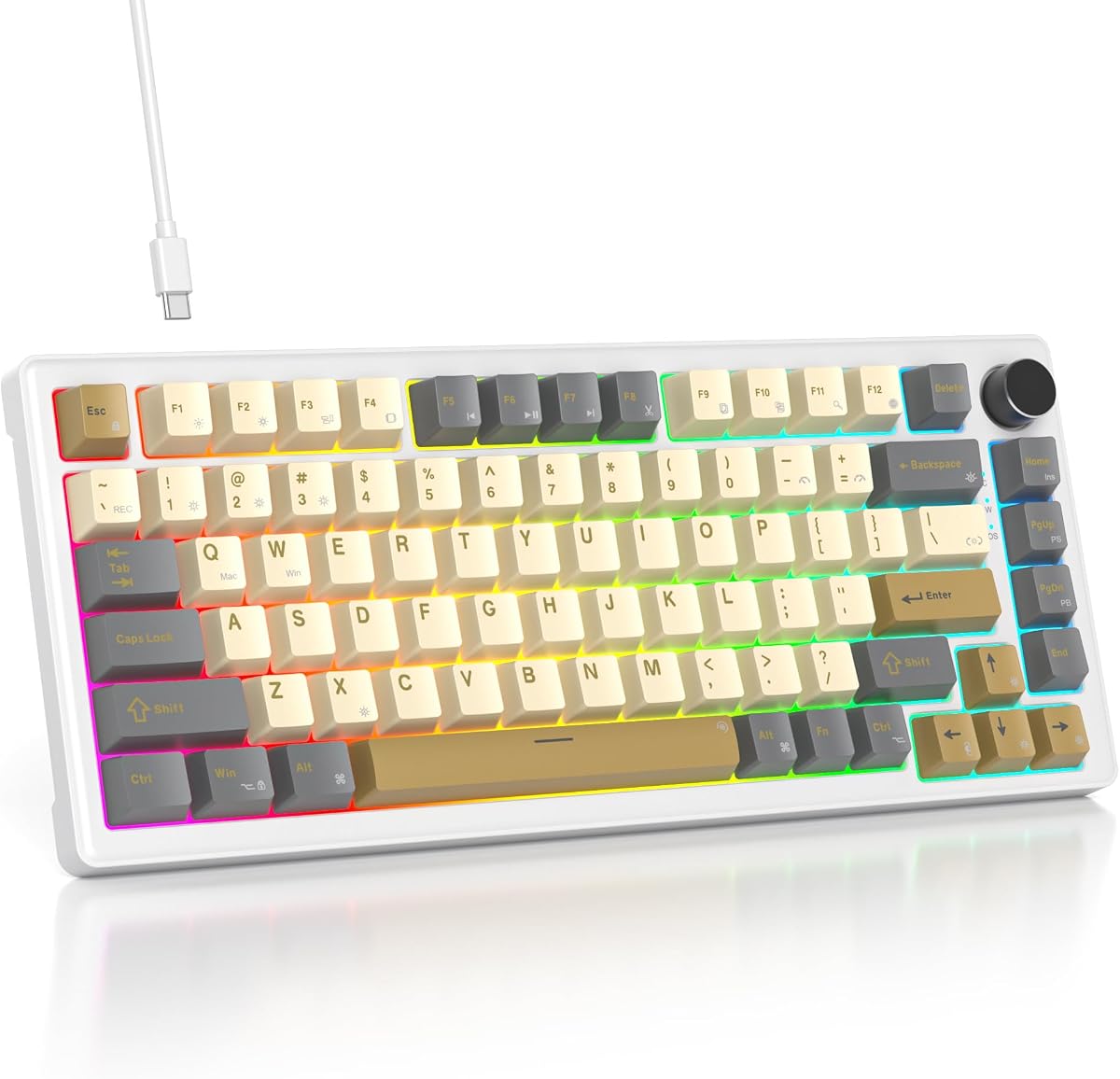
For those seeking an entry-level option, the Newmen GM326 delivers impressive value. Rated at 4.4 stars, it provides essential features without breaking the bank. The compact design saves desk space while keeping arrow keys fully functional.
We may earn a commission when you buy through this link, at no additional cost to you.
Its hot-swap PCB allows you to experiment with different switch types easily. The rainbow backlighting offers twenty modes to personalize your setup visually. The multi-function knob adds convenience for adjusting volume quickly during sessions.
Since it is wired only, portability is slightly limited compared to wireless models. The ABS keycaps might show shine over time with heavy use. Still, for the price, the feature set is hard to beat for casual users.
This keyboard is perfect for students or beginners entering the mechanical keyboard world. The ergonomic design ensures comfort during long typing sessions. We suggest it as a reliable starting point for anyone wanting customization without high costs.
The hot-swap function lets you change switches without soldering, letting you tweak the feel of your keyboard over time.
Two-stage adjustable tilt legs help maintain a natural hand position, reducing strain during extended periods of typing.
We may earn a commission when you buy through this link, at no additional cost to you.
The Womier SK80 introduces a distinct feature with its color multimedia display screen. With a 4.7 rating, it stands out for users wanting extra visual feedback. This display allows customization of GIFs and system status indicators.
We may earn a commission when you buy through this link, at no additional cost to you.
Its gasket mount design enhances the typing feel, reducing noise significantly. The south-facing switches ensure compatible with keycaps and better lighting visibility. The software suite enables deep customization including macro settings and lighting effects.
While the premium features come at a higher cost, the build quality justifies it. Some users may need time to learn the software interface fully. However, the unique screen adds a personal touch few other keyboards offer.
Ideal for streamers or enthusiasts who want a standout desk setup, this keyboard delivers. The connection options are flexible for various devices. We recommend it for those willing to invest in a unique high-end experience.
The multimedia screen shows custom images and system info, adding a unique layer of interaction to your desktop setup.
The gasket mount structure provides a softer impact and less noise than traditional hard-mounted boards.
We may earn a commission when you buy through this link, at no additional cost to you.
The RK ROYAL KLUDGE R75 offers robust wireless performance with its triple mode connection. Rated at 4.4 stars, it ensures you can switch between devices effortlessly. The gasket mount design provides a solid typing experience for daily tasks.
We may earn a commission when you buy through this link, at no additional cost to you.
Cream switches are pre-installed for a smooth and quiet keystroke. The PCB slotting ensures stability during intense gaming sessions. The CNC metal knob adds durability and precise control for volume adjustments.
While the weight is slightly higher due to the metal knob, it feels premium. Wireless connectivity is stable though may have minor latency compared to wired. These factors do not significantly impact overall performance for most users.
This model is excellent for users needing reliable wireless connectivity without sacrificing build quality. The PBT keycaps ensure long-lasting legends. We suggest it for professionals who prioritize typing comfort and device flexibility.
Connect via Bluetooth or 2.4GHz for a clutter-free desk, while keeping a wired option for charging when needed.
The CNC aluminum knob is built to withstand daily use, providing a premium tactile experience when adjusting settings.
We may earn a commission when you buy through this link, at no additional cost to you.
This wired variant focuses on tactile feedback with its pre-lubed Brown switches. With a 4.6 rating, it appeals to users who enjoy a bump response. The triple absorption layers help manage sound effectively during typing.
We may earn a commission when you buy through this link, at no additional cost to you.
The RGB lighting offers 18 modes to enhance your gaming atmosphere. Hot-swappable PCB allows for future customization of switch types. The scientific stair-up design minimizes hand fatigue over time.
While lacking wireless options ensures lower latency which is ideal for competitive gaming. Some users may find the tactile bump pronounced initially. This is acceptable given the clear feedback provided for precise inputs.
Best suited for gamers preferring tactile switches, this model delivers consistent performance. The detachable cable aids portability when needed. We recommend it for those who want a direct wired connection with high-quality feedback.
The tactile Brown switches provide a clear bump, helping you know exactly when a key actuates without pressing too hard.
Internal foam layers reduce hollow sounds, resulting in a cleaner and more satisfying audio profile.
We may earn a commission when you buy through this link, at no additional cost to you.
Collaboration between EPOMAKER and Aula results in exceptional sound tuning. Rated 4.6, this keyboard features five layers of padding for acoustic mastery. The 1.2mm PCB ensures precise key registration during fast inputs.
We may earn a commission when you buy through this link, at no additional cost to you.
Factory-lubricated switches offer a smooth actuation immediately. Cherry profile double-shot PBT keycaps resist wear and maintain texture. The battery supports long sessions without frequent recharges.
The added padding increases weight slightly but enhances stability. Some users may prefer more advanced software options for macros. However, the acoustic performance stands out as a key differentiator for quiet environments.
Ideal for office workers seeking a quiet typing experience, this model is strong. The wireless options add convenience for desk setups. We suggest it for those prioritizing sound quality and typing feel.
The internal design eliminates resonance, giving you a clean and quiet sound that suits professional environments.
PBT keycaps and a high-quality PCB ensure the board lasts longer and performs consistently over time.
We may earn a commission when you buy through this link, at no additional cost to you.
DIERYA offers a unique browser-based key control system for easy customization. Rated 4.5, this white model stands out visually on any desk. The gasket-mounted structure provides a cushioned and enjoyable typing experience.
We may earn a commission when you buy through this link, at no additional cost to you.
Pre-lubed switches rated for fifty million keystrokes ensure longevity. The 1000Hz polling rate delivers responsive input for gaming. You can adjust lighting and macros directly through a web browser.
The lack of wireless might limit mobility for some users. White keycaps require more maintenance to keep clean. However, the unique control method reduces software installation hassles significantly.
Best for users who dislike installing desktop software, this is a strong choice. The clean look complements minimal setups perfectly. We recommend it for those valuing convenience and aesthetics.
Remap keys and set macros directly in your browser, avoiding bulky desktop software installations.
The high polling rate ensures your commands register instantly, crucial for competitive gaming scenarios.
We may earn a commission when you buy through this link, at no additional cost to you.
A simple and effective option for beginners, the MageGee 75% offers plug and play convenience. Rated 4.1, it provides essential mechanical features without complexity. The compact layout saves space effectively for any desk.
We may earn a commission when you buy through this link, at no additional cost to you.
Linear red switches allow for rapid key presses. Blue backlighting creates an immersive atmosphere for games. The metal panel adds structural integrity to the build.
While lacking customization options, it works well for general use. The lighting is static compared to RGB models. This limitation is acceptable given the target price range for entry users.
Ideal for those on a strict budget or needing a simple tool, this fits. The ergonomic stands help maintain comfort. We suggest it as a no-fuss solution for basic mechanical typing needs.
No software installation required means you can plug it in and start using it immediately.
The metal panel provides stability during intense typing or gaming sessions.
We may earn a commission when you buy through this link, at no additional cost to you.
This model brings a unique retro aesthetic with modern functionality. Rated 4.6, it combines style with performance for daily use. The gasket mount ensures stability and quiet operation.
We may earn a commission when you buy through this link, at no additional cost to you.
Pre-lubed white jade switches deliver a creamy tactile experience. Full-key macro programmability enhances efficiency for complex workflows. The music rhythm lighting syncs with audio for a dynamic display.
Users should note it is wired only which limits flexibility. Color options might be limited compared to standard RGB boards. The design choice supports a unique look without functional compromise.
Great for creative users wanting a distinct style, this keyboard fits well. The silent switches suit shared spaces. We recommend it for those valuing looks and quiet operation.
The retro look sets it apart, offering a minimalist vibe that suits various desk themes.
Lighting effects can sync with your music, adding an immersive element to your entertainment setup.
We may earn a commission when you buy through this link, at no additional cost to you.
This keyboard focuses on durability with its PBT keycaps and sound dampening. Rated 4.6, it offers solid performance for general use. The compact layout retains essential keys without bulk.
We may earn a commission when you buy through this link, at no additional cost to you.
Hot-swap sockets allow for easy switch customization. Sound absorbing pads ensure quieter operation. RGB lighting adds style and can be customized via software.
It lacks wireless connectivity which might limit some users. Software is basic but functional for remapping. These constraints keep the price competitive and accessible for many.
Best for value seekers needing a sturdy keyboard, this is a great pick. The PBT caps ensure a long lifespan. We suggest it for daily typing needs without high cost.
PBT keycaps resist oil and wear better than standard ABS plastic, keeping the keyboard looking new longer.
Internal pads absorb unwanted noise, making it quieter for shared spaces or late-night work.
We may earn a commission when you buy through this link, at no additional cost to you.
Selecting the right keyboard involves evaluating several key factors that match your specific needs. Here are the primary aspects to consider before making your purchase.
Modern mechanical keyboards often offer wired, wireless, or tri-mode connectivity. Wired connections provide zero latency which is critical for competitive gaming. Wireless options like Bluetooth or 2.4GHz reduce cable clutter and improve desk aesthetics. Consider how many devices you need to connect and whether portability is a priority for your setup.
Choose wired for gaming performance and wireless for a clean workspace.
Mechanical switches determine the tactile and auditory experience. Linear switches are smooth and quiet ideal for gaming. Tactile switches offer a bump for typing accuracy. Clicky switches provide audible feedback which might disturb others. Some models come with pre-lubed switches for a smoother out-of-box experience.
Pick linear for speed and tactile for precision typing.
Hot-swap PCBs allow you to change switches without soldering. This is perfect for enthusiasts who want to experiment with different sounds and feels. It extends the lifespan of your keyboard by letting you replace worn switches easily. Ensure the board supports the pin type of your preferred switches.
Prioritize hot-swap for future-proofing and customization.
Keycaps come in ABS or PBT materials. PBT keycaps are more durable and resist shine and oil over time. They offer a textured feel that many users prefer. ABS keycaps are cheaper but may wear down faster. Side-printed or doubleshot legends ensure clarity and longevity.
Opt for PBT for better durability and texture.
Mounting styles affect typing comfort and sound. Gasket mounts use soft pads to isolate the PCB reducing noise and providing a softer feel. Plate mounts are stiffer and louder. Trays mounts are common in budget models. Gasket mounts are preferred for a premium typing experience.
Select gasket mount for comfort and reduced noise.
RGB lighting adds visual flair and can be customized to match your setup. Look for models with per-key RGB and diverse lighting effects. Software support allows macros and remapping for better productivity. Some models feature unique displays for added functionality.
Ensure software is user-friendly and supports your customization needs.
For wireless models battery capacity determines usage time between charges. Large batteries like 4000mAh support long sessions. Check if the device supports passthrough charging to stay plugged in while using it. Battery life varies based on RGB usage so dimming lights can help extend it.
Look for high capacity batteries if you use wireless mode frequently.
The 75 percent layout balances compact size with function keys. It keeps arrow keys essential for gaming and shortcuts. Adjustable tilt legs help maintain comfortable hand angles. Ensure the keyboard fits your desk space and offers the right height for typing.
Check adjustability and size to match your workspace requirements.
Start by connecting the keyboard via USB or pairing it via Bluetooth to your device. Install any necessary drivers for macro programming or lighting customization. Explore the different lighting modes to find your preferred setting.
Regularly clean the keycaps using a soft brush or compressed air to remove dust and debris. Avoid using harsh chemicals on the keycaps or switches. For deep cleaning you can remove keycaps with a puller and wash them carefully.
If you have a hot-swap keyboard experiment with different switches to find your ideal feel. Always turn off the device or disconnect it before swapping switches to avoid electrical issues. Update firmware periodically if your manufacturer releases new software.
Yes the 75 percent layout is excellent for gaming. It retains essential arrow keys and function keys while freeing up desk space for mouse movement. This compact design enhances ergonomics during long gaming sessions.
Most modern mechanical keyboards support both Windows and macOS. Check the product specifications for Mac compatibility. Some models include specific keys or settings to switch between operating systems easily.
Hot-swap means you can change mechanical switches without soldering. This allows customization of the typing feel and sound. It is a valuable feature for enthusiasts who want to tweak their setup.
Modern wireless keyboards using 2.4GHz technology offer low latency comparable to wired models. They are suitable for gaming provided you maintain a good battery charge. Bluetooth is better for general office use.
To reduce noise choose linear switches with pre-lubing. Look for keyboards with sound dampening materials like foam or gasket mounts. Adjusting your typing force also helps minimize noise during operation.
A volume knob is a convenient accessory for quick audio adjustments without reaching for software controls. It is especially useful during gaming or media consumption. It adds a layer of functionality to your setup.
PBT keycaps are generally considered best due to their durability and resistance to shine. They provide a textured surface that enhances grip. ABS is cheaper but may degrade faster over time.
Mechanical switches typically last for 50 million keystrokes or more. With regular maintenance and care they can serve you for years. Hot-swap boards allow you to replace switches easily if they wear out.
The 75 percent mechanical keyboard offers a versatile balance of compact size and full functionality. Our top picks like the AULA F75 Pro and Womier SK80 showcase the range of features available. From wireless convenience to premium gasket mounts there is a model for every user.
Prioritize what matters most to you whether it is sound quality battery life or customization options. A keyboard with hot-swap capabilities offers long-term flexibility. Ensure the layout fits your workspace and supports your workflow needs.
Prices and availability can change so always check current listings before buying. We hope this guide helps you find the perfect typing companion for your setup. Happy typing and gaming with your new gear.