
Razer DeathAdder Essential
4.5Editor score
6400 DPI optical sensor
Durable mechanical switches
5 programmable buttons
This guide compares the top gaming mice for Diablo 4, evaluating sensors, buttons, and ergonomics to help you find the perfect device for your gameplay style.
Finding the right gaming mouse for Diablo 4 can significantly enhance your gameplay experience. Whether you prefer fast-paced combat or detailed inventory management, the right device offers precision and comfort during long sessions.
We compared ten top-rated gaming mice based on sensor accuracy, button programmability, ergonomic design, and overall durability. This list includes options for various budgets and play styles to ensure you find the best fit.
Each pick highlights key features and potential trade-offs to help you make an informed decision. Please note that availability and pricing can change frequently, so check the latest details before purchasing your new gear.
4.5Editor score

4.6Editor score

4.2Editor score
The following table provides a side-by-side comparison of all ten gaming mice selected for this guide. Review the specifications and features to determine which model aligns best with your specific needs for Diablo 4.





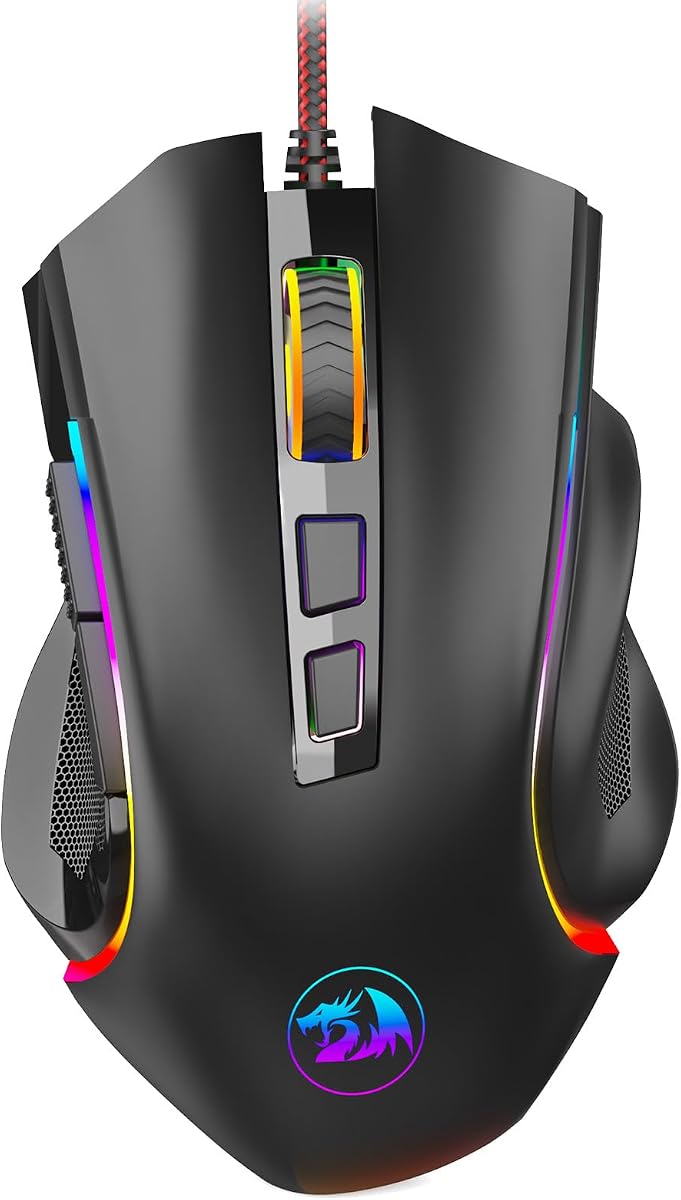
The Razer DeathAdder Essential is a solid entry-level option for Diablo 4 players on a budget. It offers a reliable 6400 DPI sensor and a comfortable ergonomic shape that supports long gaming sessions without fatigue.
We may earn a commission when you buy through this link, at no additional cost to you.
Its mechanical switches are rated for up to 10 million clicks, ensuring durability over time. The five programmable buttons allow you to map essential skills or macros to streamline your combat actions effectively.
While it lacks advanced features like RGB lighting or adjustable weights, it focuses on core functionality. This makes it an excellent choice for players who prefer simplicity and value over extra customization options.
We recommend this mouse for beginners or those looking to upgrade from a standard office mouse. It provides a significant performance boost for the price, making it a smart investment for new gamers.
This mouse delivers essential gaming features without the high price tag, making it accessible for budget-conscious players.
The right-handed ergonomic design fits naturally in your hand, reducing strain during extended gameplay sessions.
We may earn a commission when you buy through this link, at no additional cost to you.
The Corsair NIGHTSWORD RGB stands out with its unique tunable weight system. This allows you to fine-tune the balance and weight between 119g and 141g to match your personal grip preference perfectly.
We may earn a commission when you buy through this link, at no additional cost to you.
It features a custom Pixart PMW3391 sensor with 18000 DPI, providing ultra-accurate tracking for precise movements in Diablo 4. The ten fully programmable buttons enable complex macro setups for spells and inventory management.
The contoured shape and rubber grips ensure comfort during extended play, inspired by professional sports equipment. However, utilizing its full potential requires installing the CORSAIR software for weight calibration and button mapping.
This mouse is ideal for players who value customization and precision. If you want to adjust the feel of your mouse to match your exact playing style, this model offers a compelling solution.
The high DPI optical sensor ensures that every movement is tracked accurately, essential for aiming skills in fast-paced combat.
With multiple weight configurations available, you can customize the mouse to feel lighter or heavier based on your preference.
We may earn a commission when you buy through this link, at no additional cost to you.
The Logitech G502 Hero is widely regarded as one of the best all-around gaming mice available. Its HERO 25K sensor delivers precision tracking up to 25600 DPI with zero smoothing, ensuring pixel-perfect accuracy.
We may earn a commission when you buy through this link, at no additional cost to you.
With 11 programmable buttons and a dual-mode hyper-fast scroll wheel, it offers incredible versatility. You can assign macros for skills and use the scroll wheel for rapid inventory navigation or weapon cycling.
The adjustable weight system lets you arrange up to five weights to customize the balance. Mechanical button tensioning provides a crisp click feel, enhancing feedback during intense combat scenarios in Diablo 4.
We recommend this mouse for players seeking a balance of features and price. It is a reliable workhorse that performs exceptionally well for both casual and competitive gaming without breaking the bank.
The hyper-fast scroll wheel allows you to switch between ratcheted and free-spin modes for quick inventory browsing or precise item selection.
Adjustable weights let you tailor the mouse feel to your preference, improving control during rapid movements and precise aiming.
We may earn a commission when you buy through this link, at no additional cost to you.
The Razer Basilisk V3 combines ergonomic design with advanced features like the HyperScroll tilt wheel. This wheel supports free-spin mode for fast scrolling and tactile mode for precise control, ideal for navigating complex menus.
We may earn a commission when you buy through this link, at no additional cost to you.
It features an optical mouse switches Gen 2 system with 0.2ms actuation speed, providing crisp and responsive clicks. The Focus Plus 26K DPI optical sensor tracks movement flawlessly with zero smoothing for accurate gameplay.
With 11 programmable buttons, you can assign macros and secondary functions for push-to-talk or ping. The 11 Chroma RGB lighting zones react dynamically with over 150 integrated games for immersive visual effects.
This mouse is perfect for players who want modern features and customization. While it relies on wired connectivity, the performance and flexibility it offers make it a top contender for serious Diablo 4 enthusiasts.
The tilt wheel offers two modes, allowing you to scroll through inventory quickly or stop precisely on specific items when needed.
Optical switches eliminate debounce delay, ensuring your clicks register instantly for a responsive gaming experience.
We may earn a commission when you buy through this link, at no additional cost to you.
The Logitech G305 Lightspeed proves that wireless gaming can be accessible and effective. It utilizes LIGHTSPEED wireless technology with a 1ms report rate, delivering lag-free performance comparable to wired mice.
We may earn a commission when you buy through this link, at no additional cost to you.
Powered by a single AA battery, it offers up to 250 hours of continuous gameplay. You can switch to Endurance mode via software to extend this up to 9 months depending on usage patterns.
At only 3.4 oz, it is lightweight and portable, making it easy to use on different desks. The compact design includes built-in nano receiver storage for safekeeping when traveling with your gaming setup.
We recommend this for players who want wireless freedom without spending a fortune. Its simple button layout focuses on essentials, making it ideal for those who do not need a dozen side buttons.
LightSPEED technology ensures stable connectivity with minimal latency, allowing you to game without cable drag or interference.
The energy-efficient design means you can game for months on a single battery, reducing the need for frequent replacements.
We may earn a commission when you buy through this link, at no additional cost to you.
The Corsair Scimitar RGB Elite is designed specifically for MMO and MOBA players who require numerous inputs. It features 17 fully programmable buttons to handle complex macros and frequent actions in Diablo 4.
We may earn a commission when you buy through this link, at no additional cost to you.
The patented Key Slider Control System allows you to reposition the 12 side buttons to fit your grip. This customization ensures that all buttons are within easy reach of your thumb, reducing strain during long sessions.
Built with Omron switches rated for 50 million clicks, it is designed to withstand heavy use. The contoured shape with a finger rest offers additional support for stability during intense gameplay scenarios.
This mouse is a strong choice for hardcore MMO fans. While it is heavier and bulkier than standard mice, the sheer number of accessible buttons and adjustability make it a practical tool for complex gameplay.
You can slide the side button module forward or backward to find the optimal position for your thumb size and comfort.
With 17 buttons, you can map nearly all your skills and items to the mouse, streamlining your gameplay efficiency.
We may earn a commission when you buy through this link, at no additional cost to you.
The UtechSmart Venus Pro Wireless offers an extensive feature set at a competitive price point. With 16 customizable buttons, it provides ample room for complex macro coding and action mapping in Diablo 4.
We may earn a commission when you buy through this link, at no additional cost to you.
It features dual modes with 2.4 GHz wireless technology and a wired option for stable transmission. The PixArt PMW3335 optical sensor supports up to 16000 DPI, offering high precision for tracking movement accurately.
The large 1000mA battery capacity supports up to 70 hours of wireless gaming on a single charge. The auto-sleep mode helps extend battery life further, ensuring you can play for long durations without interruption.
This mouse is a solid option for players seeking wireless versatility without a high price. While software may not be as polished as major brands, the hardware offers strong performance and button customization.
You can choose between wireless freedom for gaming or a wired connection for stable data transmission when needed.
The 16000 DPI sensor allows you to adjust sensitivity to match your playstyle, from quick turns to precise aiming.
We may earn a commission when you buy through this link, at no additional cost to you.
The Redragon M901K offers an impressive 19 macro programmable buttons for detailed action mapping. This allows you to bind many spells and items to the mouse, reducing reliance on the keyboard during intense battles.
We may earn a commission when you buy through this link, at no additional cost to you.
It includes up to eight removable 2.4g weights inside the mouse for personalized balance tuning. You can arrange them to achieve the perfect weight and feel for every game scenario you encounter in Diablo 4.
The ergonomic design uses skin-friendly materials to prevent fatigue during long sessions. RGB lighting with 16.8 million color combinations adds visual flair, and you can switch lighting modes via software or button clicks.
This mouse is ideal for players who want high button counts and customization at a low cost. While it may lack premium polish, its feature set provides excellent value for MMO and MOBA fans.
With 19 buttons, you can map almost every action you need, keeping your hands on the mouse for maximum efficiency.
Removable weights allow you to adjust the balance of the mouse, ensuring it feels just right for your hand.
We may earn a commission when you buy through this link, at no additional cost to you.
The Redragon M602 is a reliable option with a classic ergonomic design that fits comfortably in the hand. With 9 programmable buttons, you can assign macros to streamline your gameplay actions efficiently.
We may earn a commission when you buy through this link, at no additional cost to you.
It offers an adjustable DPI up to 7200, ensuring responsive tracking for most gaming needs. The RGB backlighting provides visual customization, and you can switch modes easily via software or buttons on the device.
This model has been verified for quality over time, with a positive sharing rating indicating user satisfaction. Its durable construction ensures it can withstand regular use, making it a solid choice for daily gaming.
We recommend this mouse for casual gamers or those seeking a simple, effective upgrade. It balances affordability with functionality, making it a great starting point for anyone looking to enhance their gaming setup.
The shape is designed to support your hand naturally, reducing strain and improving comfort during extended play.
Built to last, this mouse offers a durable experience that stands up to regular gaming demands without breaking the bank.
We may earn a commission when you buy through this link, at no additional cost to you.
The Razer Naga V3 Pro stands out with three swappable magnetic side plates featuring 12, 6, or 2-button layouts. This adaptability lets you customize the mouse for MMO, MOBA, or FPS genres instantly.
We may earn a commission when you buy through this link, at no additional cost to you.
It features the Focus Pro 50K Optical Sensor with up to 50,000 DPI for accurate tracking. Razer Optical Mouse Switches Gen 4 provide crisp feedback and over 100 million click durability for long-term use.
HyperSpeed Wireless delivers low-latency gameplay, while Bluetooth extends battery life for up to 280 hours. You can also use USB-C wired mode for charging and connected play, offering versatility for different scenarios.
This is a premium choice for players who need top-tier performance and versatility. While expensive, the ability to change side plates and high precision make it a future-proof investment for dedicated gamers.
Changing side plates is easy and magnetic, allowing you to adapt the mouse layout based on the game genre you are playing.
The 50K DPI sensor ensures pixel-perfect tracking, giving you a competitive edge in any game mode you choose.
We may earn a commission when you buy through this link, at no additional cost to you.
Selecting the right gaming mouse involves evaluating several key factors to ensure it meets your specific gameplay needs. This guide outlines what to consider before making your purchase decision.
The sensor is the heart of your gaming mouse, determining how accurately it tracks your movements. Look for optical sensors with high DPI ranges, such as 12,000 or higher, to ensure smooth and precise cursor control during intense battles in Diablo 4. Higher DPI allows for faster movements without losing tracking accuracy, which is crucial for aiming skills and dodging attacks.
Prioritize mice with high-quality sensors that avoid smoothing or acceleration to maintain consistent performance.
Diablo 4 relies heavily on skill usage and inventory management, so having enough programmable buttons is vital. Mice with at least 6 to 10 buttons allow you to map spells, items, and shortcuts directly to the mouse. This reduces the time it takes to execute actions and can significantly improve your reaction time during combat or dungeon exploration.
Choose a mouse with enough buttons to map your essential skills comfortably without crowding your fingers.
Comfort is critical when playing for long sessions. Look for an ergonomic shape that fits your hand size and grip style to prevent fatigue and strain. A well-designed mouse should support your palm and thumb naturally, ensuring you can play for hours without discomfort. Different mice cater to different hand sizes, so consider your hand dimensions when choosing.
Ensure the mouse fits your hand well to avoid wrist pain during extended gaming sessions.
Modern wireless technology has largely closed the gap with wired mice in terms of latency. Wireless options offer freedom from cables, reducing drag and clutter on your desk. However, wired mice often provide consistent power and eliminate concerns about battery life. Consider your preference for mobility versus convenience when deciding between wired and wireless options.
Both wired and wireless options are viable, so choose based on your preference for convenience and setup.
If you choose a wireless mouse, battery life is a major factor to consider. Some models offer hundreds of hours of gameplay on a single charge or battery, while others require frequent recharging. Longer battery life ensures uninterrupted gaming sessions without worrying about the mouse dying mid-battle. Check the specifications for estimated battery usage before buying.
Select a wireless mouse with sufficient battery life to support your typical gaming duration without frequent recharging.
Gaming mice endure heavy use, so durability is essential. Look for mice with mechanical or optical switches rated for high click counts, such as 50 million or more. Robust construction ensures that your mouse remains responsive and reliable over time. Quality materials and build quality contribute to a longer lifespan and better user experience.
Opt for mice with high-rated switches and sturdy construction to ensure longevity and consistent performance.
The software provided with the mouse affects how easily you can customize buttons and settings. Intuitive software allows you to create complex macros and adjust DPI settings without technical hassle. Some brands offer more polished experiences with cloud syncing and profile management, while others are more basic. Evaluate the software quality before committing to a specific brand.
Check that the software supports the level of customization you need for efficient gameplay setup.
Gaming mice range widely in price from budget-friendly options to premium models. Determine your budget beforehand and look for the best features within that range. Often, mid-range mice offer the best balance of performance and cost. It is possible to find excellent gaming mice without overspending if you prioritize your essential needs.
Balance your budget with the features you need to find a mouse that offers value without unnecessary extras.
To get the most out of your gaming mouse, install the manufacturer's software and configure your button mappings. Assign skills and inventory actions to buttons that are easy to reach, ensuring you can execute commands quickly during gameplay.
Keep your mouse pad clean and free of debris to maintain optimal sensor performance. A smooth, consistent surface helps the sensor track movements accurately, preventing lag or missed inputs during critical moments in the game.
Periodically check and update your mouse firmware to ensure compatibility and bug fixes. Keeping your device up to date can improve performance and fix any connectivity issues that might arise over time.
While not strictly necessary, a gaming mouse offers significant advantages in precision and speed. The ability to map skills to buttons improves reaction time and overall gameplay efficiency compared to a standard mouse.
Modern wireless gaming mice use advanced technology like LIGHTSPEED or HyperSpeed to minimize latency. These mice perform as well as wired mice, making them suitable for competitive and casual play.
A DPI range between 400 and 1600 is often comfortable for most players. This allows precise aiming while avoiding overly sensitive movements that could lead to inaccurate targeting.
At least 6 to 10 programmable buttons are recommended for efficient gameplay. This number provides enough slots for active skills, potions, and inventory items without cluttering your hands.
Use a soft, slightly damp cloth to wipe the exterior and sensors. Avoid using harsh chemicals or excessive water to prevent damage to the internal components of the device.
RGB lights do not affect performance but add visual customization. They can help identify different profiles or modes but are optional based on personal preference and style.
Yes, gaming mice are versatile and can be used for everyday computing. The ergonomic designs and responsive sensors also benefit productivity and general PC use effectively.
High-quality gaming mice typically last several years with regular use. Durability depends on usage intensity and switch ratings, but many models exceed 50 million clicks.
Choosing the right gaming mouse for Diablo 4 involves balancing features like sensor accuracy, button layout, and ergonomics. Whether you select a budget option or a premium model, the goal is to find a device that enhances your control and comfort during gameplay.
Prioritize features that match your specific playstyle, such as high DPI for accuracy or more buttons for complex macro setups. A well-chosen mouse can significantly improve your ability to execute skills and manage inventory efficiently.
Remember to check the latest availability and specifications before purchasing, as models and features may update. With the right mouse, you can focus on mastering your gameplay and enjoying Diablo 4 to the fullest extent.