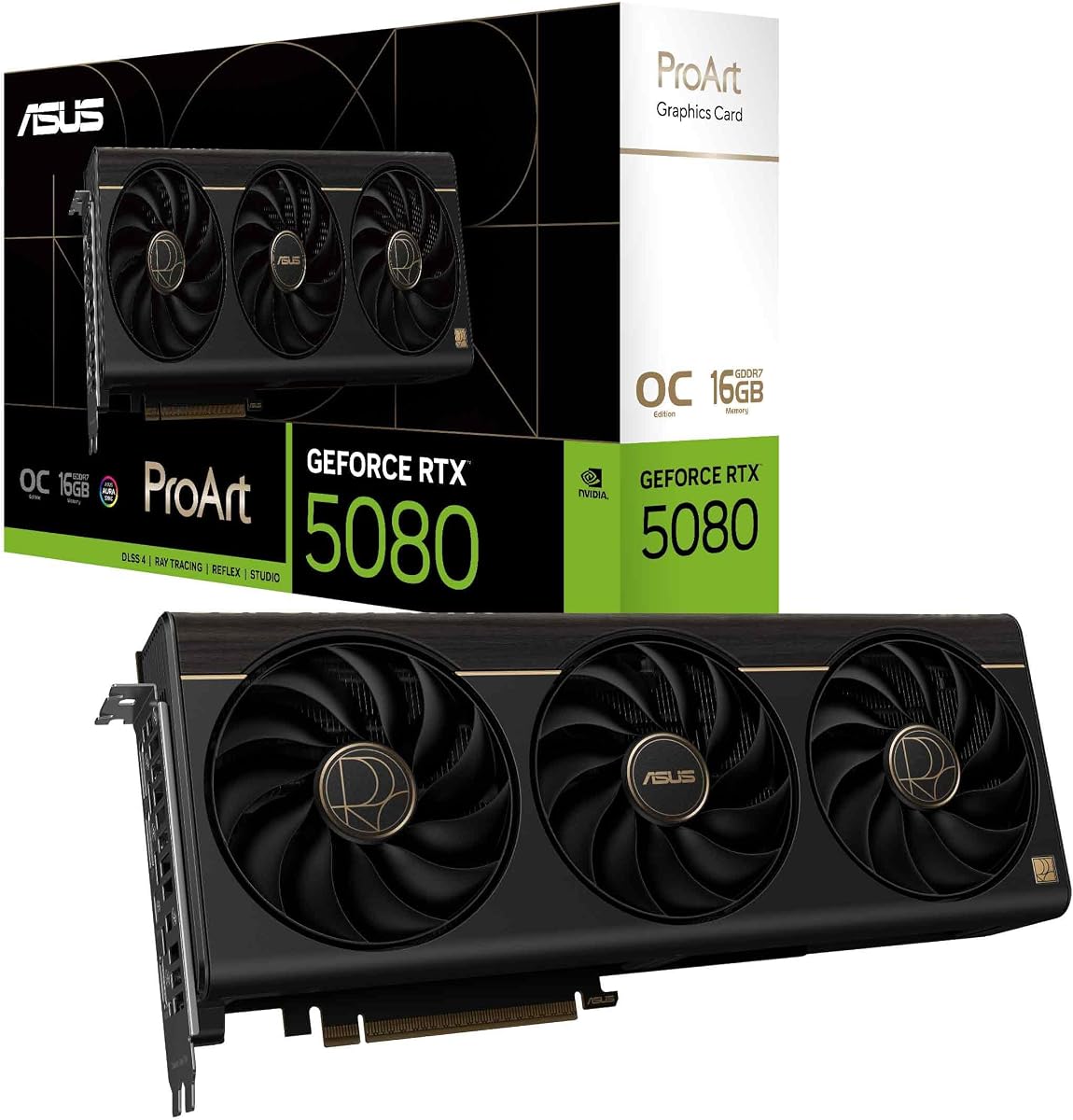
ASUS ProArt GeForce RTX 5080 16GB GDDR7 OC Edition
4.9Editor score
Blackwell architecture power
16GB GDDR7 memory
ProArt thermal design
Explore the top 10 GPUs for Davinci Resolve in October 2026. We compare performance, VRAM, and features to help you choose the right graphics card.
Selecting the right GPU for Davinci Resolve is critical for smooth editing and fast rendering. Professional workflows demand high VRAM and CUDA core counts to handle complex effects efficiently.
We evaluated ten top-rated graphics cards based on architecture, memory capacity, and real-world performance metrics. Our analysis focuses on models that excel in color grading and timeline playback.
Each pick highlights key strengths and trade-offs for different budgets and project scales. Note that prices fluctuate frequently, so verify current offers before making your final purchase decision today.
4.9Editor score

4.7Editor score

4.7Editor score
This side-by-side comparison highlights the core specifications of every featured graphics card. Use this table to quickly identify memory sizes, architectures, and cooling styles relevant to your workstation needs.




This card offers exceptional performance for its price point with robust memory handling. It holds a strong 4.7 rating for reliability and speed in creative applications.
We may earn a commission when you buy through this link, at no additional cost to you.
The WINDFORCE cooling system keeps temperatures low during long editing sessions. PCIe 5.0 support ensures future-proof bandwidth for high-resolution timeline playback.
While AMD drivers have improved, some users note occasional quirks compared to NVIDIA. The lack of DLSS means relying on native resolution scaling for effects.
Buyers seeking a budget-friendly high-memory option should consider this model. It balances cost and capability well for intermediate professional video workloads.
The 16GB GDDR6 memory allows handling larger projects without swapping textures frequently.
Server-grade thermal gel ensures consistent performance even under sustained 4K render loads.
We may earn a commission when you buy through this link, at no additional cost to you.
This model stands out with a near-perfect rating thanks to its advanced cooling and architecture. It is designed specifically for professional creators needing color accuracy.
We may earn a commission when you buy through this link, at no additional cost to you.
The Blackwell architecture delivers faster rendering times and better AI upscaling features. Vapor chamber cooling maintains low noise levels even during heavy GPU load.
Its premium price tag might be steep for hobbyists but justifies for pros. The USB-C port adds versatility for direct connection to high-end monitors.
Invest in this card if budget allows and you need top-tier reliability. It sets the standard for creative workstation graphics cards this year.
New architecture enables faster real-time rendering and improved neural network acceleration for effects.
The aesthetic and thermal design prioritize silent operation essential for broadcast and recording environments.
We may earn a commission when you buy through this link, at no additional cost to you.
This card provides a cost-effective entry into modern GPU features with ample memory. It is ideal for users who need VRAM over raw throughput speed.
We may earn a commission when you buy through this link, at no additional cost to you.
The 2.5 slot design fits easily into smaller cases without compromising cooling. Dual BIOS options let you toggle between quiet and performance modes easily.
While it lacks the raw power of higher-tier cards, it handles 1080p and 1440p well. The 16GB memory helps prevent bottlenecks in complex timelines.
Choose this if you prioritize value and compact size in your workstation build. It offers solid performance for entry-level professional editing tasks.
The 2.5 slot design maximizes compatibility and cooling efficiency for superior performance in small chassis.
0dB technology lets you enjoy light gaming in relative silence during low-load editing phases.
We may earn a commission when you buy through this link, at no additional cost to you.
This model delivers consistent high-end performance suitable for demanding video workloads. The WINDFORCE system ensures thermals stay within safe limits during peak usage.
We may earn a commission when you buy through this link, at no additional cost to you.
Its 16GB GDDR7 memory offers rapid data transfer speeds for complex color grading. PCIe 5.0 support ensures compatibility with next-gen motherboards and bandwidth needs.
The physical dimensions may not fit all mid-tower cases so check clearance first. Power requirements are higher than older cards so a strong PSU is mandatory.
Consider this for balanced performance if you have the case and power headroom. It offers excellent stability for daily professional editing workflows.
WINDFORCE cooling system maintains stable temperatures for sustained rendering without throttling.
16GB 256-bit GDDR7 interface provides rapid transfer speeds for complex color grading tasks.
We may earn a commission when you buy through this link, at no additional cost to you.
This card is built for longevity with military grade components ensuring long-term stability. It handles heavy workloads with reliable thermal performance over time.
We may earn a commission when you buy through this link, at no additional cost to you.
The Axial-tech fans maximize airflow while maintaining relatively low noise levels. Phase-change thermal pads ensure efficient heat transfer from the GPU die.
Its weight and length may require a sturdy case bracket to prevent bending. Users should verify power supply capacity before installation to avoid issues.
Pick this if you prioritize build quality and durability for a mixed-use rig. It works well for both editing and high-fidelity gaming.
Military-grade components deliver rock-solid power and longer lifespan for ultimate durability.
Phase-change GPU thermal pad helps ensure optimal thermal performance and longevity under heavy loads.
We may earn a commission when you buy through this link, at no additional cost to you.
With 32GB of memory this card supports massive projects and complex 3D scenes. It is optimized for professional content creation environments specifically.
We may earn a commission when you buy through this link, at no additional cost to you.
The blower style cooler allows dense multi-GPU configurations in tight server cases. Vapor chamber heatsink ensures reliable cooling under sustained professional loads.
Blower designs can be noisier than axial fans in open workspaces. Verify driver compatibility with your specific software before purchasing to avoid issues.
Choose this if you need maximum memory for heavy 3D rendering and simulation. It excels in environments where capacity matters most over noise.
32GB of GDDR6 memory provides ample bandwidth for large AI models and 8K video editing.
Professional blower cooling exhausts heat directly out of the chassis ideal for multi-GPU setups.
We may earn a commission when you buy through this link, at no additional cost to you.
This card introduces Intel's Xe architecture with strong memory for professional tasks. It supports multiple high resolution displays for expansive multi-monitor workflows.
We may earn a commission when you buy through this link, at no additional cost to you.
Twin Media Transcoders allow quick export in various high-res formats. The ISV certification validates it for design and engineering software environments.
Lower ratings suggest early driver maturity issues compared to established competitors. Ensure your software stack supports Intel drivers before deployment.
Consider this if you have a specific workflow needing Intel features. It offers a compelling alternative with strong multi-display support.
Twin Media Transcoders support AV1 and HEVC for exporting videos quickly in high-res formats.
4x DisplayPort 2.1 outputs connect up to four 8K displays simultaneously for workflows.
We may earn a commission when you buy through this link, at no additional cost to you.
This legendary card remains a solid choice for users requiring high core counts. Its Turing architecture still handles many professional tasks effectively.
We may earn a commission when you buy through this link, at no additional cost to you.
With 4609 CUDA cores it delivers substantial compute power for rendering and simulation. Windows and Linux certification ensures broad OS compatibility.
However newer cards offer better efficiency and features at similar or lower power. It may be harder to find in new condition with warranty.
Buy if you already own one or need a proven professional unit. It remains capable for tasks that rely on raw CUDA performance.
4609 NVIDIA CUDA cores running at 1770 MegaHertZ boost clock provide strong compute power.
577 Tensor Cores enable AI acceleration for modern machine learning workflows.
We may earn a commission when you buy through this link, at no additional cost to you.
This card brings professional stability to entry-level creative workflows. It delivers interactive performance suitable for light 3D work and modeling.
We may earn a commission when you buy through this link, at no additional cost to you.
RTX technology enables real-time rendering for professionals needing visual feedback. 36 RT cores accelerate photorealistic ray-traced rendering tasks effectively.
Memory capacity limits its use in larger high-resolution projects. It is best suited for entry-level or secondary workstation roles.
Pick this for budget-conscious professional setups needing certified drivers. It provides a stable foundation for moderate creative tasks.
RTX technology brings real-time rendering to professionals using immersive VR features.
Designed for fast interactive professional application performance with stable drivers.
We may earn a commission when you buy through this link, at no additional cost to you.
This card offers unmatched memory capacity for enterprise and research tasks. It is designed for heavy workloads requiring extreme precision and capacity.
We may earn a commission when you buy through this link, at no additional cost to you.
96GB of ECC memory ensures data integrity during long simulations and renders. MIG allows dividing the GPU into isolated instances for secure workloads.
The price is prohibitive for most individuals and comes in OEM packaging only. Ensure strict adherence to export regulations before ordering this unit.
Select this for enterprise-grade infrastructure needing maximum capacity and security. It is built for large-scale professional workflows exclusively.
96GB DDR7 ECC memory enables massive 3D and AI projects with local fine-tuning.
Universal MIG divides the GPU into multiple instances for secure isolation of applications.
We may earn a commission when you buy through this link, at no additional cost to you.
Choosing a GPU requires balancing memory capacity architecture support and budget. This guide outlines the most important factors for video editors.
VRAM is crucial for handling high resolution timelines and complex effects. Resolve benefits significantly from 16GB or more to avoid memory bottlenecks.
Prioritize cards with at least 16GB for professional workflows to ensure smooth playback.
Newer architectures offer better efficiency and support for modern codecs. Look for Blackwell or RDNA 4 features for best performance.
Always choose a card with current architecture to maximize software compatibility.
Resolve relies heavily on CUDA cores for many effects and rendering. NVIDIA cards typically have optimized driver support for the software.
If using Resolve NVIDIA CUDA cores should remain your top priority for reliability.
High-performance cards demand significant wattage. Ensure your PSU has enough headroom to handle peak loads safely.
Verify your power supply meets or exceeds the recommended wattage before installation.
Modern GPUs often require 3 to 4 slots of clearance. Measure your case carefully to ensure the card fits properly.
Check slot width and length specs to avoid fitting issues during assembly.
Efficient cooling prevents thermal throttling during long exports. Dual fan or blower designs vary based on your case airflow.
Select a cooling solution that matches your thermal needs and workspace noise limits.
Allocate a significant portion of your budget to the GPU for best results. Do not compromise on video memory to save costs.
Investing in a higher tier GPU now prevents future upgrade needs.
Professional drivers ensure stable performance over time. Check for Studio or Workstation certifications from the manufacturer.
Regular driver updates maintain stability and feature access for your software.
Install the latest drivers from the manufacturer before launching Davinci Resolve to ensure full compatibility with new architecture features.
Set your power management to performance mode in the control panel to prevent throttling during heavy render tasks.
Keep your workstation clean and dust-free to maintain optimal airflow and cooling efficiency for the graphics card.
Yes especially if you work with 4K timelines or use Fusion effects. Lower VRAM can cause dropped frames or crashes during heavy editing.
Resolve historically performs better with NVIDIA due to CUDA support. AMD has improved but may lack some optimized features.
It depends on the architecture and driver support. Newer versions require recent GPUs for advanced effects and rendering.
VRAM does not directly speed up render but prevents stuttering and allows complex timelines without crashing.
For stability and ISV certification yes. For raw speed gaming cards often offer better value for Resolve.
Most require 750W to 850W. Check the specific wattage requirement on the product data before buying.
Our top picks like the ASUS ProArt RTX 5080 and RX 9070 XT offer the best balance for performance.
Prioritize VRAM capacity and architecture support to future proof your workstation for high resolution workflows.
Remember to check current prices and availability as they change frequently in the GPU market today.