
ARCTIC Case Fan Hub
4.7Editor score
Ten fan ports total
SATA power input
Compact black design
Discover the best Fan Control Hub for PC options to manage airflow and lighting. We compare top hubs by port count, PWM support, and build quality for your
Managing airflow and lighting in a modern PC build requires reliable hardware to keep temperatures down and aesthetics sharp. A fan control hub simplifies wiring by connecting multiple fans to a single header while maintaining precise speed control and synchronization for your system performance.
We evaluated ten top-rated fan control hubs based on port capacity, power delivery stability, and ease of installation. Our comparison looks at PWM support, RGB connectivity, mounting options, and compatibility with various motherboard headers to help you choose the right solution for your specific setup needs.
Each pick below highlights key features and potential limitations so you can make an informed decision before purchasing. Please note that availability and pricing may change over time, so always check the latest details on the product page before finalizing your order for your computer build.
4.7Editor score
4.6Editor score

4.7Editor score
The following table provides a side-by-side comparison of all ten fan control hubs reviewed in this guide. Each entry includes key specifications like port count, power input method, and unique features to help you quickly identify the best fit for your PC build requirements.


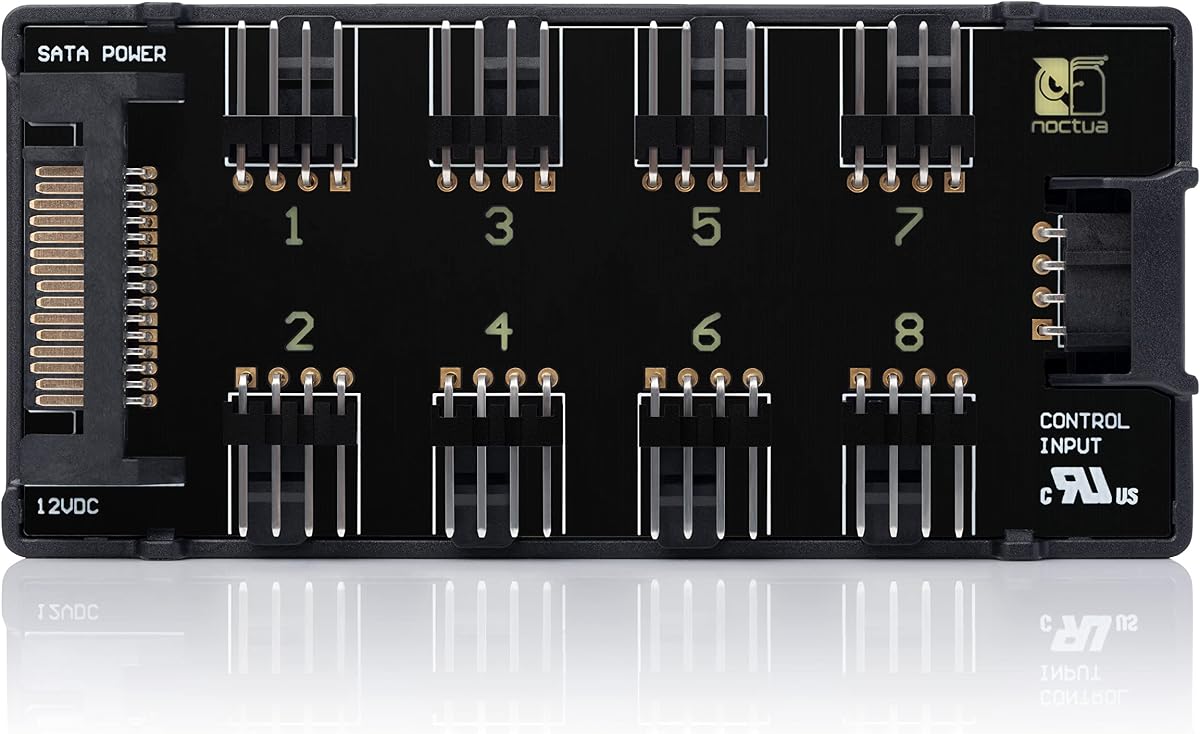
The Noctua NA-FH1 stands out as the Editor's Choice for its exceptional reliability and safety features. With a strong reputation for quality components, this hub delivers consistent performance for managing multiple fans without compromising system stability or airflow efficiency.
We may earn a commission when you buy through this link, at no additional cost to you.
Its eight ports allow you to connect up to eight fans while maintaining precise PWM control. The included magnetic mounting and robust safety fuses against overcurrent or short circuits make installation straightforward and secure for any chassis design.
Although it lacks RGB lighting support and carries a higher price than basic hubs, the durability and safety certifications justify the cost. Users valuing long-term reliability and clean builds will appreciate the focus on performance over extra features.
This hub is ideal for builders who prioritize fan control quality and need robust protection against electrical issues. It ensures your cooling system operates smoothly under load while keeping cable management simple and organized inside the case.
The hub transmits PWM signals synchronously to all connected fans ensuring consistent speed control. This helps maintain balanced cooling across your system without requiring multiple motherboard headers.
Safety fuses protect against overcurrent and short circuits which prevents potential damage to your fans or motherboard. This added layer of security is crucial for high-performance cooling setups.
We may earn a commission when you buy through this link, at no additional cost to you.
The ARCTIC Case Fan Hub offers excellent value as a budget option without sacrificing essential functionality. It supports ten PWM fans and uses SATA power to ensure stable voltage delivery to each connected unit for consistent performance.
We may earn a commission when you buy through this link, at no additional cost to you.
Its compact design and one-cable connection to the motherboard help reduce clutter inside your case. The hub reads RPM from the first fan slot so you can still monitor speeds through your BIOS or software tools.
While it does not support RGB lighting or advanced features, it delivers what most users need for effective cooling management. The build quality is solid for the price point and ensures reliable operation over time.
This hub is perfect for builders seeking an affordable solution to expand fan headers. It simplifies wiring and keeps airflow optimized without breaking the bank or adding unnecessary complexity to your PC build.
Powered directly by the PSU via SATA the hub avoids voltage loss that can occur with motherboard headers. This ensures fans run smoothly even at full speed under demanding conditions.
A single cable connects the hub to the motherboard header while all fan cables plug into the hub. This centralizes connections and keeps hidden wiring tidy inside the chassis.
We may earn a commission when you buy through this link, at no additional cost to you.
The ARCTIC Fan Controller earns a top pick for its advanced individual PWM control across all ten ports. This level of customization allows precise airflow tuning and noise management throughout your PC chassis for optimized cooling efficiency.
We may earn a commission when you buy through this link, at no additional cost to you.
Support for Windows and Linux ensures compatibility with a wide range of fan control software and monitoring tools. The high current capacity per port means you can power demanding fans without risking voltage drop or instability.
While it requires driver installation and is more complex than basic hubs, the flexibility it offers is unmatched. Magnetic or adhesive mounting provides options to secure the hub neatly inside your case for a clean installation.
This controller is ideal for enthusiasts who want granular control over their cooling setup. It delivers superior performance and compatibility for both casual users and power users needing advanced thermal management.
Each port operates independently allowing you to set different speeds for different fans based on specific zones. This helps balance cooling performance and acoustic noise within your system.
Native support for major operating systems means you can use existing monitoring tools without extra software. This simplifies the setup process and integrates smoothly with your current workflow.
We may earn a commission when you buy through this link, at no additional cost to you.
The Thermalright ARGB Fan HUB is designed to synchronize lighting across multiple fans while managing their power efficiently. It supports eight groups of fans and focuses on ARGB lighting coordination to enhance the visual appeal of your build.
We may earn a commission when you buy through this link, at no additional cost to you.
Its strong double-sided adhesive ensures the hub stays fixed inside your case while SATA power maintains stable output under load. The small body helps keep cable management neat and organized without taking up too much space.
Be aware that this hub only supports 5V 3Pin ARGB devices not 12V RGB ones to avoid damaging your components. Speed reading is limited to one port so you rely on motherboard headers for full monitoring.
This hub suits builders who want coordinated lighting and simplified wiring for ARGB fans. It offers a cost-effective solution to expand fan headers while maintaining aesthetic consistency across your cooling system.
Connect multiple ARGB fans or light bars to synchronize their colors and effects through a single interface. This creates a cohesive look throughout your chassis without needing extra headers.
Direct SATA power ensures fans receive consistent voltage without relying on limited motherboard outputs. This helps maintain smooth operation even when all ports are in use.
We may earn a commission when you buy through this link, at no additional cost to you.
This hub supports up to twelve groups of fans offering exceptional capacity for extensive cooling setups. It handles both ARGB lighting and PWM speed control making it versatile for complex builds needing multiple fan types and lighting elements.
We may earn a commission when you buy through this link, at no additional cost to you.
The white color option helps it blend into light themed cases while SATA power ensures stable performance. Its design keeps cables organized and reduces clutter so you can maintain a tidy interior in your PC.
Remember that 12V RGB devices are not supported and only one port reads fan speed for monitoring. These limitations are acceptable for most users seeking expansion without needing advanced monitoring features on every port.
Ideal for cases needing many fans and lighting zones this hub provides a reliable way to centralize connections. It balances cost and functionality well for builders who prioritize capacity and visual coherence.
With twelve fan groups this hub handles larger cases or specialized cooling configurations. It ensures every fan receives consistent power without straining your motherboard headers.
The hub manages both PWM and ARGB signals so you can control speed and lighting independently. This simplifies wiring for setups combining performance fans with aesthetic lighting needs.
We may earn a commission when you buy through this link, at no additional cost to you.
The upHere hub offers a unique remote control feature that lets you adjust lighting effects without reaching into your case. It supports up to nine ports and integrates both PWM fans and ARGB devices for a comprehensive cooling solution.
We may earn a commission when you buy through this link, at no additional cost to you.
Built-in magnets provide flexible mounting options so you can place the hub anywhere inside your chassis. The kit includes necessary cables and a sync cable which simplifies setup for custom RGB builds.
While the remote controls lighting it does not adjust fan speeds which still rely on motherboard headers. This design prioritizes convenience for lighting customization while maintaining stable power delivery through SATA input.
This hub suits users who want easy lighting control and a tidy build. It balances functionality with ease of use making it a great choice for those valuing aesthetic flexibility in their PC.
Use the included RF remote to switch colors and effects from outside the case. This adds convenience for changing moods without disrupting airflow or opening the chassis.
Strong magnets allow you to attach the hub to any metal surface inside your case. This flexibility helps you find the best spot for cable management and airflow.
We may earn a commission when you buy through this link, at no additional cost to you.
This hub focuses on simplicity with ten fan ports and a straightforward setup process. It uses SATA power directly to ensure stable output under load and keeps cable management tidy inside your case for better airflow.
We may earn a commission when you buy through this link, at no additional cost to you.
The strong double-sided adhesive secures the hub to any chassis surface while its small body fits into tight spaces. Only one port reads fan speed so you monitor performance through the motherboard or a separate tool.
It lacks RGB support but delivers essential PWM functionality reliably for cooling needs. This makes it ideal for builders prioritizing performance and organization over aesthetic lighting control in their PC.
For a no-fuss solution to expand fan headers this hub is a reliable choice. It balances ease of use with consistent performance and helps keep your system cool without extra complexity.
SATA direct input ensures fans receive consistent voltage without relying on limited motherboard headers. This maintains smooth operation even during high load conditions or peak cooling demands.
A single motherboard connection and SATA power keep cable runs minimal and organized. This simplifies routing and reduces clutter for a cleaner build appearance.
We may earn a commission when you buy through this link, at no additional cost to you.
The X8 hub supports eight ARGB and PWM fans to balance cooling performance with visual effects. It uses SATA power for stable operation and includes adhesive mounting to keep the hub secure and organized inside your case.
We may earn a commission when you buy through this link, at no additional cost to you.
Its compact size helps maintain cable neatness while connecting lighting and fan cables to the right ports. Only one port reads speed so you need motherboard headers for full performance monitoring.
This hub does not support 12V RGB devices which limits compatibility for some older lighting products. However it delivers reliable results for modern 5V ARGB fans and simplifies wiring efficiently.
For builders needing both speed and lighting control this hub provides a straightforward solution. It fits well into most builds and helps keep your cooling system organized and visually cohesive.
Connect both ARGB and PWM fans to manage cooling and lighting from one central point. This reduces the number of cables and simplifies your wiring layout significantly.
Direct SATA power ensures fans run smoothly without voltage drop issues. This supports consistent performance and helps avoid potential electrical failures during operation.
We may earn a commission when you buy through this link, at no additional cost to you.
This hub supports ten fan groups and offers multiple control options including RF remote and chassis key. It combines ARGB lighting and PWM speed management to help you organize a complex cooling system effectively.
We may earn a commission when you buy through this link, at no additional cost to you.
Magnetic mounting lets you place the hub securely anywhere inside the case while SATA power ensures stable output. The compact size helps keep cable runs short and organized for a cleaner internal layout.
Only one port reads fan speed so you rely on the motherboard for performance monitoring. It also does not support 12V RGB devices but works well with modern 5V ARGB equipment.
For users wanting flexible control and neat wiring this hub provides practical features. It suits builds needing both cooling and lighting coordination without requiring excessive motherboard headers.
Use an RF remote or chassis key to adjust lighting settings from inside or outside the case. This offers convenience for customizing your build aesthetics without extra tools.
Magnetic suction provides easy attachment to metal surfaces so you can place the hub anywhere. This flexibility helps you route cables efficiently and reduce clutter.
We may earn a commission when you buy through this link, at no additional cost to you.
The X8 variant supports eight groups of ARGB and PWM fans to simplify wiring in most cases. It uses SATA power for stable performance and includes adhesive mounting to secure the hub neatly inside your chassis.
We may earn a commission when you buy through this link, at no additional cost to you.
Port markings are clear to help connect lighting and speed cables correctly. Only one port reads fan speed so you rely on your motherboard headers for full monitoring and control.
It does not support 12V RGB devices which is a key limitation to consider before purchase. However for 5V ARGB fans it delivers consistent results and keeps cable management tidy.
For a straightforward hub that handles basic RGB and PWM needs this option works well. It balances simplicity and reliability and helps keep your build organized without extra complexity.
Clear port labels make connecting ARGB and PWM cables quick and error free. This simplifies setup and ensures each component gets the right signal.
SATA power direct input ensures fans run smoothly without relying on limited headers. This maintains stable performance during high load conditions for your system.
We may earn a commission when you buy through this link, at no additional cost to you.
Selecting the right fan control hub depends on several factors including port count, signal type, and mounting needs. This guide outlines key considerations to help you choose a hub that fits your cooling and aesthetic goals.
Determine how many fans you need to connect based on your case size and cooling requirements. Look for hubs that offer enough ports to handle all your fans without requiring additional splitters.
Check if your fans use PWM for speed control or ARGB for lighting. Some hubs support both while others focus on one type so match the hub to your fan specifications.
Most hubs use SATA power to ensure stable voltage across all ports. This prevents voltage loss that can occur with motherboard headers and keeps fans running smoothly.
Hubs come with adhesive stickers, magnets, or screws for installation. Choose a method that secures the hub firmly and fits the available space in your case.
Some hubs read fan speeds from only one port so you may need additional headers for full monitoring. Consider whether speed tracking is critical for your use case.
Ensure the hub supports your RGB voltage (5V or 12V) to avoid damaging components. Always check the manufacturer notes before connecting lighting devices.
Look for hubs with good build materials and safety features like fuses. A longer warranty can provide peace of mind against defects or early failures.
A good hub should reduce cable clutter by consolidating connections. Check the included cables and connector types to ensure they fit your routing needs.
First install the hub inside your case using the provided mounting method. Secure it firmly to prevent movement that could strain cables or affect airflow inside the chassis.
Next connect the SATA power cable to a power supply rail and route the PWM or ARGB cables to the motherboard header. Ensure connections are snug to avoid loose contacts during operation.
Regularly check that all fans spin freely and that no dust accumulates on the hub. Keep airflow paths clear and inspect wiring periodically for signs of wear or heat damage.
A fan control hub is a device that connects multiple fans to a single motherboard header. It manages power and signal distribution to simplify wiring and improve airflow management in your system.
You may need one if your motherboard lacks enough fan headers for all your fans. It helps centralize connections and ensures stable power delivery across multiple cooling units.
Some hubs support ARGB lighting control while others only handle fan speeds. Always check the product details to see if it matches your lighting voltage and signal type.
Secure the hub inside the case using adhesive or magnets then connect SATA power and the motherboard header. Route fan cables to the hub ports ensuring snug connections for reliable operation.
PWM controls fan speed while ARGB controls lighting colors. A hub may support one or both depending on its design and your component compatibility needs.
SATA power provides stable voltage and higher current needed for multiple fans. USB ports do not deliver enough power and could overload without proper electrical support.
Most hubs support 5V ARGB so verify compatibility before connecting. Using a 12V device with a 5V hub can cause electrical damage or component failure.
If the hub reads only one speed you may need to check BIOS or software. Some models report to the motherboard while others rely on a dedicated monitoring port.
The top picks in this guide offer a range of options from budget-friendly hubs to premium controllers. Each one helps simplify wiring while maintaining reliable fan performance and visual aesthetics for your build.
Prioritize features like port count, signal support, and mounting style based on your specific needs. Consider whether you need RGB lighting or just PWM speed control before making a final choice.
Always verify the latest product details and current pricing before purchasing. Availability and specifications can change over time so checking the official page ensures you get the right hub.